Upgrade & Secure Your Future with DevOps, SRE, DevSecOps, MLOps!
We spend hours scrolling social media and waste money on things we forget, but won’t spend 30 minutes a day earning certifications that can change our lives.
Master in DevOps, SRE, DevSecOps & MLOps by DevOps School!
Learn from Guru Rajesh Kumar and double your salary in just one year.
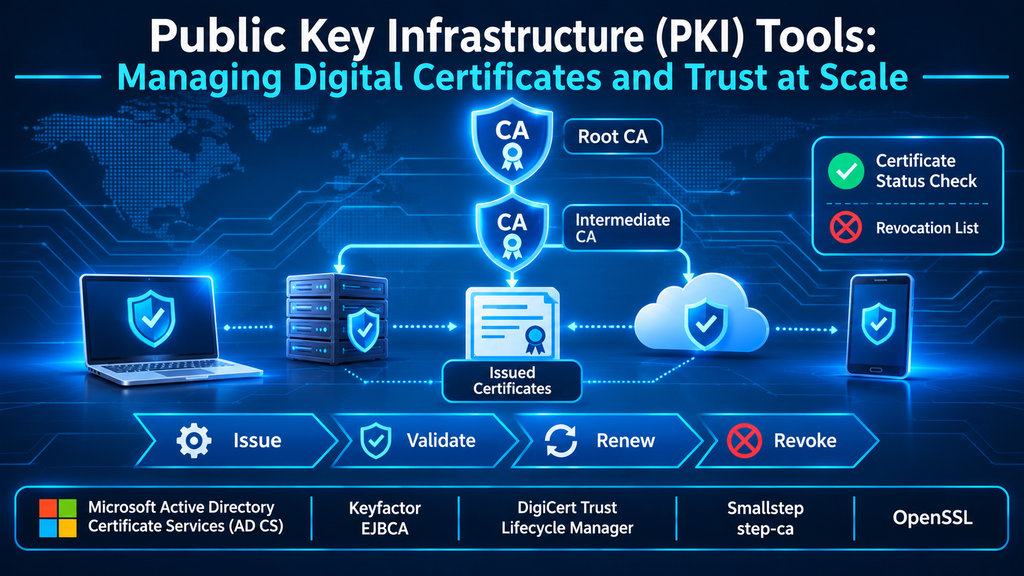
Public Key Infrastructure (PKI) Tools: Managing Digital Certificates and Trust at Scale
Public Key Infrastructure (PKI) is the framework organizations use to establish, distribute, verify, and manage digital trust. It connects cryptographic keys with verified identities through digital certificates, certificate authorities, policies, and validation mechanisms. PKI tools help build and operate this framework, from issuing certificates to renewing them, checking their status, and revoking credentials that should no longer be trusted.
PKI is central to secure web connections, device identity, enterprise Wi-Fi, VPN access, mutual TLS, code signing, email protection, and many other systems. As organizations deploy more workloads, devices, APIs, and machine identities, certificate management becomes an operational discipline—not simply a task for a certificate administrator.
What PKI actually does
At its core, PKI binds a public key to an identity through a digitally signed certificate. A certificate authority (CA) validates the relevant request and issues a certificate according to defined policies. Systems that trust the issuing CA can then validate the certificate chain and use the public key for supported security operations.
A typical PKI environment includes:
- Certificate Authority (CA): Issues and signs certificates. Root and intermediate CAs form a hierarchy of trust.
- Registration Authority (RA): Performs or coordinates identity checks and enrollment approval before certificates are issued.
- Public and private keys: A key pair supports cryptographic operations such as authentication, digital signatures, and key establishment. The private key must remain protected.
- Digital certificates: Bind a public key to an identity or system attributes, with validity periods and defined usage constraints.
- Trust stores: Hold trusted CA certificates used by operating systems, browsers, applications, and devices to validate certificate chains.
- Revocation and status services: Help relying parties determine whether a certificate remains valid before its expiry.
- Certificate policies and profiles: Define permitted identities, key types, algorithms, validity periods, and intended certificate uses.
PKI is not just a certificate issuing server. It is a trust architecture whose security depends on CA protection, identity verification, certificate policy, private-key custody, and reliable lifecycle operations.
PKI tools and platforms to evaluate
The products below address different parts of the PKI problem. Some provide certificate authority infrastructure, others focus on enterprise certificate lifecycle management, and some are cryptographic toolkits rather than full PKI management platforms.
| Tool or platform | Primary role | Best fit to investigate |
|---|---|---|
| Microsoft Active Directory Certificate Services (AD CS) | Windows Server certificate authority infrastructure | Windows-centric enterprise environments |
| Keyfactor EJBCA | Enterprise PKI and certificate authority platform | Complex, scalable public and private PKI deployments |
| DigiCert Trust Lifecycle Manager | Certificate lifecycle management and PKI services | Enterprise-wide discovery, governance, and automation |
| Smallstep step-ca | Certificate authority and automated PKI toolchain | Developer, workload, and device identity workflows |
| OpenSSL | Cryptographic toolkit for certificates, keys, and TLS | Technical operations, testing, and custom automation |
Microsoft Active Directory Certificate Services
Microsoft Active Directory Certificate Services (AD CS) is a Windows Server role that provides PKI capabilities, including certificate issuance and management. It can support enterprise certificate enrollment workflows and integrate with Active Directory environments through certificate templates and related services.
AD CS is often considered where Windows domain infrastructure, domain-joined devices, smart-card authentication, and internal certificate issuance are already established. Its flexibility also means architecture and administration matter: organizations must plan CA hierarchy, certificate templates, approval processes, private-key protection, revocation, and trust distribution.
Microsoft’s PKI design guidance emphasizes deciding the CA hierarchy and revocation approach before deployment. It also discusses using a hardware security module (HSM) to protect CA keys where required. These are foundational design decisions, not settings to postpone until after installation.
Official documentation: Active Directory Certificate Services and PKI design considerations.
Keyfactor EJBCA
EJBCA is an enterprise PKI and certificate authority platform available in community and enterprise editions. It is designed for issuing and managing certificates across varied environments and use cases. Keyfactor’s product documentation describes deployment options that include software, cloud, container, and appliance-based approaches.
EJBCA is worth evaluating when an organization needs more than a basic internal CA, especially where certificate issuance must scale across applications, devices, infrastructure, or specialized environments. Its suitability depends on the required certificate profiles, enrollment protocols, availability architecture, integrations, and operational expertise.
Keyfactor also offers related products that address different parts of the digital trust lifecycle. For example, Command focuses on certificate discovery and lifecycle automation, while SignServer supports server-side signing workflows. These should not be confused with the CA role of EJBCA itself.
Official resources: Keyfactor documentation and Keyfactor EJBCA resources.
DigiCert Trust Lifecycle Manager
DigiCert Trust Lifecycle Manager combines certificate lifecycle management with PKI services. Its documented capabilities include certificate discovery, inventory, policy, notifications, automation, integrations, and management of public and private certificate environments.
This is particularly relevant to enterprises that have certificates issued by multiple certificate authorities and need a unified view of their estate. A lifecycle management layer can help teams discover certificates they do not know about, identify ownership, monitor expiration, and automate supported enrollment and renewal workflows.
It is important to distinguish certificate lifecycle management from the underlying CA. Trust Lifecycle Manager can manage certificate workflows across supported sources; it does not mean every certificate authority or every certificate operation is supported identically. Buyers should validate connector coverage and the exact actions available for each CA and certificate type.
Official resources: Trust Lifecycle Manager documentation and DigiCert Trust Lifecycle Manager.
Smallstep step-ca
Smallstep step-ca is an online certificate authority designed for automated certificate issuance and PKI workflows. The broader Smallstep toolchain includes the step CLI, which supports certificate and cryptographic operations, and integrations for automated certificate enrollment.
Smallstep is relevant to teams issuing certificates for workloads, services, devices, and internal applications. Automated issuance can reduce manual certificate requests and make short-lived certificate strategies more practical. Its documentation describes integrations and workflows involving ACME, SCEP, and mutual TLS, with deployment options that depend on the selected Smallstep offering.
The open-source toolchain is useful for teams that want to operate their own CA and automate internal PKI. It should not be mistaken for a complete enterprise device identity or certificate lifecycle management platform in every deployment; additional capabilities and operational components may be needed depending on the use case.
Official resources: Smallstep documentation and step CLI reference.
OpenSSL
OpenSSL is a widely used open-source cryptographic toolkit. It provides command-line utilities and libraries for working with keys, certificates, certificate signing requests, certificate chains, and TLS-related operations.
Administrators and developers use OpenSSL to inspect certificates, generate key pairs, create certificate signing requests, test TLS configurations, and troubleshoot cryptographic issues. It is a valuable companion to a PKI platform because it helps engineers understand and validate certificate behavior directly.
However, OpenSSL is not a turnkey enterprise certificate lifecycle management system. It does not, by itself, provide the full organizational workflows expected from a managed CA platform, such as centralized enrollment approval, enterprise-wide certificate discovery, ownership tracking, and automated renewal governance. Those capabilities require additional systems, scripts, or services.
Official resource: OpenSSL documentation.
Understanding the certificate lifecycle
A certificate’s lifecycle begins before issuance and continues until it expires or is revoked. Weakness at any stage can undermine the trust PKI is intended to provide.
- Identity validation: The CA or RA verifies the identity and authorization of the certificate requester according to policy.
- Key generation: The requester or an approved system generates a key pair, ideally protecting the private key in an appropriate hardware or software boundary.
- Certificate request: A certificate signing request (CSR) provides the public key and requested identity information for CA processing.
- Issuance: The CA evaluates the request and signs a certificate that includes defined attributes, validity, and usage constraints.
- Deployment: The certificate and corresponding private key are installed or made available to the intended system, device, or application.
- Validation: Relying parties check the certificate chain, validity period, identity, usage, and applicable revocation status.
- Renewal or replacement: Certificates are renewed or replaced before expiration, compromise, or policy changes create an operational risk.
- Revocation and retirement: Certificates that are no longer trustworthy are revoked, and associated keys and records are handled according to retention and security policy.
Automation is valuable throughout this process, but it does not remove the need for identity assurance, secure key handling, and policy governance.
Certificate validation: chains, CRLs, and OCSP
A certificate is trusted only when the relying system can validate it under its trust rules. This normally includes building a chain from the presented certificate through intermediate CA certificates to a trusted root, checking signatures and validity periods, and confirming that the certificate is appropriate for the requested purpose.
Revocation checking adds another layer. A certificate may be revoked before its expiry—for example, because a private key is compromised, a device is retired, or the identity is no longer authorized.
Two widely used revocation mechanisms are:
- Certificate Revocation List (CRL): A signed list published by a CA that identifies revoked certificates. Relying parties retrieve and check the list according to their configuration and update behavior.
- Online Certificate Status Protocol (OCSP): Allows a relying party to query a responder for certificate status rather than relying solely on a downloaded list.
Neither mechanism should be treated as a universal guarantee of instantaneous revocation enforcement. Caching, network availability, client configuration, responder behavior, and application-specific validation policies can affect the result. Organizations should test how their actual clients behave when revocation endpoints are unavailable or report a certificate as revoked.
Why certificate lifecycle management is becoming critical
The number of certificates in an organization can grow rapidly as cloud services, containers, APIs, microservices, connected devices, and automated deployment pipelines expand. Certificates may be issued by public CAs, internal CAs, cloud services, vendors, or application-specific systems.
Without centralized inventory and ownership, teams can lose visibility into certificates that are close to expiry or no longer meet policy. An expired certificate can interrupt a service even when the underlying application and infrastructure are otherwise healthy.
Certificate lifecycle management (CLM) tools address this operational challenge through discovery, inventory, ownership assignment, policy enforcement, alerts, and automation. They complement PKI infrastructure rather than replacing the need for a correctly designed CA hierarchy.
How to choose the right PKI solution
Start by defining the identities and systems that need certificates. A Windows domain environment with internal user and machine certificates has different requirements from a cloud-native platform issuing short-lived workload identities or an industrial organization provisioning certificates to connected devices.
Consider these selection criteria:
- Deployment model: Determine whether the CA must run on-premises, in a private cloud, in a public cloud, in containers, or as a managed service.
- Certificate use cases: List requirements for TLS, mutual TLS, device identity, user authentication, email, code signing, smart cards, and other certificate types.
- Enrollment protocols: Verify support for the protocols and integrations actually used by your clients, such as ACME, SCEP, EST, or Microsoft enrollment workflows.
- CA hierarchy and key protection: Assess root and intermediate CA design, HSM integration, backup, recovery, and separation of administrative duties.
- Automation: Evaluate issuance, deployment, renewal, revocation, and integration with configuration management or CI/CD systems.
- Visibility: Determine whether the solution can discover certificates from multiple CAs and maintain a reliable inventory with owners and expiration status.
- Availability and scale: Test expected issuance volume, resilience, disaster recovery, and behavior during CA or network outages.
- Governance: Review approval workflows, role-based access, certificate policies, audit records, and reporting.
- Migration: Plan how existing certificates, CA keys, trust stores, applications, and enrollment processes will transition.
- Cost and operational effort: Include licensing, infrastructure, HSMs, integrations, support, maintenance, and the specialist skills required to operate the platform.
A proof of concept should cover real enrollment and renewal flows, not only a demonstration of certificate creation. Test revocation, client trust-chain validation, CA recovery, key protection, and the effect of expired or unavailable certificates on production-like applications.
Common PKI implementation mistakes
- Using a flat or poorly planned CA hierarchy: A rushed hierarchy can make root CA protection, delegated issuance, and future migration difficult.
- Leaving private keys exposed: A certificate may be public, but the corresponding private key must be protected and access restricted.
- Ignoring revocation: Issuing certificates without a tested revocation and status-checking strategy leaves important lifecycle gaps.
- Relying on manual renewal: Human-driven tracking becomes unreliable as certificate volume and deployment complexity grow.
- Overly broad certificate templates or profiles: Weak enrollment controls can allow certificates to be issued with inappropriate identities or privileges.
- Failing to inventory certificates: Unknown certificates may expire unexpectedly or remain active after their systems have been retired.
- Assuming all clients validate identically: Different operating systems, browsers, applications, and embedded devices may use different trust stores and revocation behaviors.
- Treating PKI as a one-time installation: CAs, algorithms, certificate profiles, trust stores, and enrollment systems require ongoing maintenance and review.
Final perspective: PKI is a trust system, not just a certificate tool
The right PKI platform depends on where identities live, how certificates are issued, and how much control an organization needs over trust and lifecycle operations. Microsoft AD CS is a natural candidate for many Windows-centered internal PKI deployments. EJBCA offers a flexible CA platform for broader enterprise and specialized requirements. DigiCert Trust Lifecycle Manager is relevant when certificate discovery, governance, and automation across multiple sources are priorities. Smallstep supports automated certificate authority workflows, while OpenSSL remains a useful technical toolkit for certificate and TLS operations.
No product removes the need for sound PKI architecture. Organizations still need to protect CA private keys, verify identities, define certificate policies, maintain trust stores, monitor certificate status, and test recovery procedures.
When these foundations are in place, PKI becomes a scalable way to establish trust among people, devices, applications, and services—without relying on passwords or manual certificate handling as the only means of authentication.
