Upgrade & Secure Your Future with DevOps, SRE, DevSecOps, MLOps!
We spend hours scrolling social media and waste money on things we forget, but won’t spend 30 minutes a day earning certifications that can change our lives.
Master in DevOps, SRE, DevSecOps & MLOps by DevOps School!
Learn from Guru Rajesh Kumar and double your salary in just one year.
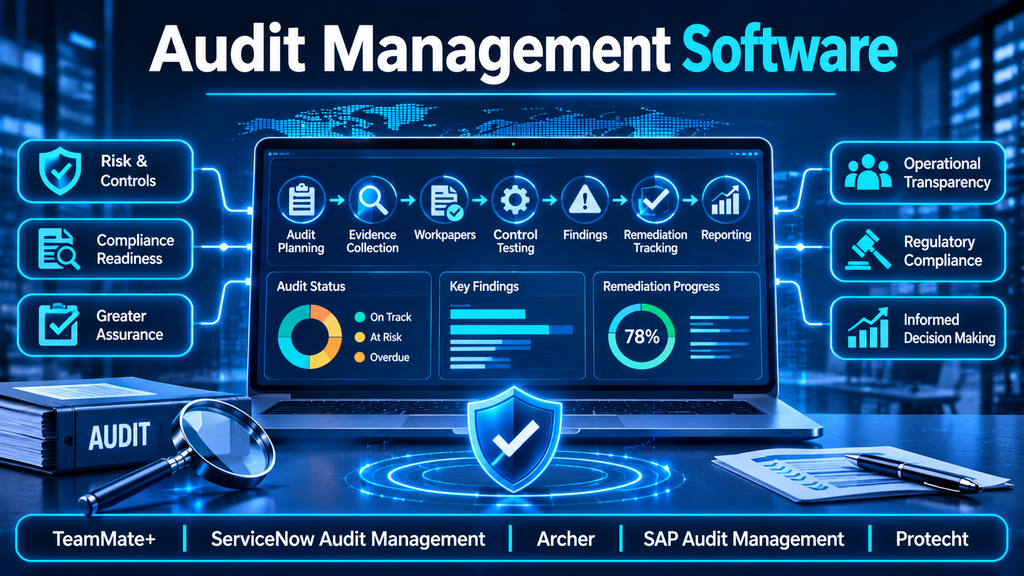
Audit Management Software: Streamlining Audit Planning, Evidence Collection, and Remediation
Introduction
Organizations conduct internal audits to evaluate whether processes, systems, controls, and business activities are operating as intended. However, managing an audit program across multiple departments can involve extensive coordination, documentation, evidence requests, testing procedures, reviews, and follow-up activities.
When these activities are managed through spreadsheets, email conversations, and disconnected document repositories, audit teams can struggle with inconsistent records, delayed responses, duplicated work, and limited visibility into unresolved findings.
Audit management software addresses these challenges by providing a structured environment for the complete audit lifecycle. It helps teams plan engagements, assign responsibilities, collect evidence, document testing, prepare reports, and monitor corrective actions.
The most effective platforms do more than digitize paperwork. They connect audit activities to organizational risks, controls, business processes, and management decisions.
What Is Audit Management Software?
Audit management software is a platform that helps organizations plan, execute, document, review, and monitor audits.
It can support internal audits, IT audits, operational audits, compliance audits, financial control assessments, supplier audits, and other assurance activities.
A typical platform includes:
- Audit planning: Creating audit schedules, defining objectives, assigning resources, and prioritizing engagements.
- Audit universe management: Maintaining a structured inventory of auditable departments, processes, systems, and business units.
- Risk assessment: Evaluating risk exposure to determine audit priorities and coverage.
- Evidence collection: Requesting, receiving, organizing, and reviewing supporting documentation.
- Working paper management: Recording procedures, observations, testing results, and audit conclusions.
- Findings management: Documenting control weaknesses, observations, and recommendations.
- Remediation tracking: Assigning corrective actions, monitoring deadlines, and validating closure.
- Reporting and analytics: Producing audit reports, dashboards, and management summaries.
A centralized system creates a consistent record of what was planned, what was tested, what evidence was reviewed, and what actions followed.
Why Organizations Need Audit Management Platforms
1. Manual audit processes consume valuable time
Auditors frequently spend substantial effort requesting documents, following up with stakeholders, organizing evidence, and maintaining spreadsheets.
Automated workflows can reduce repetitive coordination and give audit professionals more time for analysis and testing.
2. Evidence needs to be traceable
An audit conclusion should be supported by appropriate evidence and documented procedures.
A structured platform can associate evidence with specific audit objectives, control tests, findings, reviewers, and conclusions.
3. Audit priorities change as business risks evolve
Traditional annual audit plans may become outdated when organizations introduce new technology, enter new markets, acquire businesses, or experience significant incidents.
Risk-based planning helps audit leaders reassess priorities and direct resources toward areas with greater exposure.
4. Findings require consistent follow-up
An audit finding is not resolved simply because it appears in a report. Management must assign ownership, implement corrective measures, and provide evidence that the issue has been addressed.
Audit management software helps track actions and identify overdue remediation.
5. Leadership needs visibility into assurance activities
Audit committees and senior management need to understand audit coverage, significant findings, recurring control weaknesses, and unresolved issues.
Centralized reporting helps communicate this information without manually consolidating data from multiple teams.
Essential Features of Audit Management Software
Audit universe and risk-based planning
The audit universe is an inventory of areas that may be subject to audit. It can include departments, applications, business processes, locations, vendors, and technology environments.
A platform should help audit leaders evaluate these areas and develop a risk-based audit plan.
Important capabilities include:
- Auditable entity inventories.
- Risk assessments and scoring.
- Historical audit coverage.
- Audit frequency and scheduling.
- Resource and capacity planning.
- Engagement approvals.
- Annual and multi-year audit plans.
Risk-based planning should account for more than numerical scores. Changes in business operations, emerging threats, regulatory developments, and previous findings may also influence priorities.
Audit engagement management
Once an audit is approved, the platform should help teams manage the engagement from initiation through completion.
Useful capabilities include:
- Engagement objectives and scope.
- Audit programs and procedures.
- Assigned auditors and stakeholders.
- Milestones and deadlines.
- Review and approval workflows.
- Status tracking.
- Engagement documentation.
This creates a consistent process across different audit teams and business units.
Evidence collection and document management
Evidence collection can be one of the most time-consuming parts of an audit.
The platform should provide secure ways to request, upload, organize, review, and retain supporting documents.
Evaluation considerations include:
- Centralized evidence repositories.
- Access permissions and role-based controls.
- Document version history.
- Evidence request tracking.
- Review comments and approvals.
- Secure external stakeholder access.
- Retention and export capabilities.
Auditors should be able to identify which evidence supports each test and conclusion.
Working papers and audit documentation
Working papers record the procedures performed, evidence examined, testing results, and conclusions reached during an engagement.
A capable platform should support structured documentation, reviewer comments, sign-offs, and version history.
Working paper quality is especially important when an engagement may later be reviewed by another auditor, an external assurance provider, or a regulator.
Findings and issue management
Audit findings document weaknesses, control failures, process gaps, or other observations that require management attention.
A platform should support:
- Finding descriptions and classifications.
- Root cause analysis.
- Risk and impact assessments.
- Recommendations.
- Management responses.
- Assigned action owners.
- Target completion dates.
- Escalation workflows.
- Closure validation.
Connecting findings to underlying risks and controls helps organizations identify recurring weaknesses rather than treating every observation as an isolated event.
Audit reporting and dashboards
Reporting capabilities should provide visibility at both engagement and enterprise levels.
Examples include:
- Audit plan completion.
- Engagement status.
- Evidence request progress.
- Findings by severity or category.
- Overdue remediation actions.
- Repeat findings.
- Control testing results.
- Audit resource utilization.
Reports should allow stakeholders to understand the context behind the numbers and identify where management action is needed.
Integration with enterprise systems
Audit teams often need information from systems that already manage business operations.
Useful integrations may include:
- ERP and financial management systems.
- IT service management platforms.
- Identity and access management tools.
- Vulnerability management solutions.
- GRC platforms.
- Document management systems.
- Human resources and procurement applications.
- Data analytics and business intelligence tools.
Integration capabilities should be assessed carefully. Some products provide native connectors, while others rely on APIs, custom development, or third-party integration services.
Leading Audit Management Software
The following platforms illustrate different approaches to audit planning, execution, documentation, and remediation. Product capabilities can vary by edition, configuration, and deployment.
1. TeamMate+ Audit
<text weight=”medium”>Vendor:</text> <Entity value=”Wolters Kluwer” category=”company” disambig=”Professional information, software, and services provider”/>
TeamMate+ Audit is designed to support internal audit functions across planning, engagement management, documentation, and reporting.
It is relevant to teams seeking a dedicated audit management environment with structured workflows and support for audit execution.
Key evaluation areas:
- Risk-based audit planning.
- Engagement and workpaper management.
- Audit documentation and review.
- Findings and issue tracking.
- Reporting and analytics.
Potential fit: Internal audit departments seeking a dedicated platform for managing audit engagements and documentation.
Official product information: https://www.wolterskluwer.com/en/solutions/teammate
2. ServiceNow Audit Management
<text weight=”medium”>Vendor:</text> <Entity value=”ServiceNow” category=”company” disambig=”Enterprise workflow and IT service management software provider”/>
ServiceNow Audit Management supports audit planning, engagement workflows, evidence requests, testing, issue management, and remediation tracking.
Its integration with the wider ServiceNow environment can be valuable when audit activities need to connect with IT operations, risk management, and enterprise workflows.
Key evaluation areas:
- Risk-based audit planning.
- Evidence requests and collection.
- Test plans and working papers.
- Issue prioritization and remediation.
- Workflow configuration.
- Integration with other ServiceNow applications.
Potential fit: Organizations already using ServiceNow or seeking to connect audit activities with broader operational workflows.
Official product information: https://www.servicenow.com/products/audit-management.html
3. Archer Audit Management
<text weight=”medium”>Vendor:</text> <Entity value=”Archer” category=”company” disambig=”Enterprise governance, risk, and compliance software provider”/>
Archer provides audit-related capabilities within its broader integrated risk management environment.
Its audit engagement and workpaper functionality supports audit universe tracking, testing, documentation, review workflows, reporting, and remediation.
Key evaluation areas:
- Audit universe management.
- Audit engagement workflows.
- Workpaper documentation and approvals.
- Findings and remediation management.
- Integration with enterprise risk and control records.
Potential fit: Organizations seeking to connect internal audit with broader enterprise GRC processes.
Official product information: https://www.archerirm.com/
4. SAP Audit Management
<text weight=”medium”>Vendor:</text> <Entity value=”SAP” category=”company” disambig=”Enterprise application and business software provider”/>
SAP Audit Management supports audit planning, preparation, execution, documentation, reporting, and follow-up.
Its relationship with SAP enterprise applications may be relevant to organizations that want to connect audit activities with business and financial processes.
Key evaluation areas:
- Audit planning and scheduling.
- Audit work programs.
- Evidence and working paper management.
- Audit findings and action plans.
- Reporting and progress monitoring.
- Integration with SAP business systems.
Potential fit: Organizations with significant SAP investments and requirements for integrated audit workflows.
Official documentation: https://help.sap.com/docs/SAP_ASSURANCE_AND_COMPLIANCE_SOFTWARE_-_SAP_AUDIT_MANAGEMENT
5. Protecht Audit Management
<text weight=”medium”>Vendor:</text> <Entity value=”Protecht” category=”company” disambig=”Risk management and governance software provider”/>
Protecht provides audit management capabilities connected with enterprise risk and compliance processes.
Its platform supports audit planning, execution, workpapers, findings, corrective actions, and reporting. Connecting audits with risks and controls can help organizations maintain a broader view of assurance activities.
Key evaluation areas:
- Audit universe and risk-based planning.
- Audit scheduling and workflows.
- Evidence and workpaper management.
- Findings and corrective action tracking.
- Risk and control relationships.
- Audit reporting.
Potential fit: Organizations seeking to connect internal audit with enterprise risk management and operational controls.
Official product information: https://www.protechtgroup.com/solutions/audit-management
Audit Management Software Comparison
| Platform | Primary approach | Key areas to evaluate | Potential fit |
|---|---|---|---|
| TeamMate+ Audit | Dedicated audit management | Planning, workpapers, engagement management, reporting | Internal audit departments |
| ServiceNow Audit Management | Workflow-connected audit management | Evidence, remediation, integrations, issue management | ServiceNow-centric enterprises |
| Archer | Audit within integrated risk management | Audit universe, workpapers, risk and control relationships | Organizations with broader GRC requirements |
| SAP Audit Management | Enterprise audit workflows | Planning, documentation, reporting, SAP integration | SAP-oriented enterprises |
| Protecht | Audit connected to risk and controls | Risk-based planning, evidence, findings, remediation | Organizations seeking integrated assurance |
This is a general product-positioning comparison rather than an independent performance ranking. Buyers should verify module availability, licensing, integration requirements, and deployment options with each vendor.
How to Choose the Right Audit Management Platform
Define the audit function’s requirements
Identify which audit activities the organization needs to manage.
Consider whether the priority is internal audit, IT audit, financial controls, operational assurance, compliance testing, supplier audits, or a combination.
The required scope will determine which capabilities are essential.
Evaluate the audit lifecycle
A platform should support the processes the audit team actually performs.
Review how it handles:
- Audit universe management.
- Risk assessment and planning.
- Engagement initiation.
- Audit procedures and testing.
- Evidence collection.
- Working papers and review.
- Findings and recommendations.
- Reporting and remediation.
A product that manages only findings may be useful for issue tracking but may not replace a complete audit management system.
Review evidence and workpaper controls
Evidence handling is central to audit quality.
Check access permissions, document versioning, reviewer comments, retention policies, export options, and the ability to trace evidence to testing procedures and conclusions.
Assess workflow customization
Different audit teams may follow different methodologies.
Evaluate whether the software supports configurable audit programs, templates, approval stages, risk classifications, and reporting formats without requiring excessive custom development.
Examine integrations
Determine whether the platform can connect to the systems that contain the information auditors need.
Pay attention to data freshness, connector maintenance, API limits, authentication, and the responsibilities associated with custom integrations.
Evaluate usability and adoption
Auditors and business stakeholders need to use the platform consistently.
Test common workflows such as submitting evidence, responding to requests, reviewing workpapers, approving findings, and updating action plans.
A complex interface can reduce adoption even when the underlying feature set is extensive.
Understand implementation and ongoing costs
Consider subscription fees, implementation services, data migration, integration development, administration, training, and ongoing support.
The total cost of ownership should reflect the effort required to maintain the system over time.
Common Audit Management Implementation Challenges
Inconsistent audit methodologies
Different teams may use different templates, risk scales, and documentation standards.
Recommendation: Establish common audit methodology guidelines while allowing controlled flexibility for specialist engagements.
Poor evidence organization
Unstructured files and unclear document ownership can make it difficult to verify audit conclusions.
Recommendation: Use consistent evidence naming, classification, access controls, and links between evidence and audit procedures.
Over-customization
Excessive workflow customization can make upgrades, reporting, and ongoing administration more difficult.
Recommendation: Prioritize standard platform capabilities and customize only where there is a clear business requirement.
Weak remediation ownership
Findings may remain open when action owners, deadlines, and closure criteria are not clearly defined.
Recommendation: Assign accountable owners, define measurable corrective actions, and require evidence before closing significant findings.
Limited stakeholder adoption
Business teams may see audit software as an additional administrative burden.
Recommendation: Simplify evidence requests, provide role-specific training, and explain how the platform improves coordination and reduces repeated requests.
Treating audit completion as the success metric
Completing the planned number of audits does not necessarily mean that the organization has improved its control environment.
Recommendation: Measure remediation effectiveness, repeat findings, risk coverage, and the quality of audit outcomes in addition to engagement completion.
A Practical Audit Management Software Deployment Roadmap
Phase 1: Review existing audit processes
Document current planning methods, engagement workflows, evidence practices, reporting requirements, and remediation procedures.
Phase 2: Standardize audit methodology
Define common audit templates, risk categories, evidence expectations, finding classifications, and approval responsibilities.
Phase 3: Select priority capabilities
Identify the most valuable initial functions, such as audit planning, workpaper management, evidence collection, or findings tracking.
Phase 4: Configure the platform
Set up audit roles, templates, workflows, permissions, dashboards, and document structures.
Phase 5: Integrate relevant systems
Connect the platform with enterprise applications and repositories where integration adds practical value.
Phase 6: Pilot real engagements
Run representative audits through the platform. Test evidence requests, reviewer sign-offs, findings, reporting, and remediation workflows.
Phase 7: Train and expand
Train auditors, audit managers, and business stakeholders. Expand the implementation based on pilot results and user feedback.
Questions to Ask Audit Management Software Vendors
- Does the platform support the complete audit lifecycle?
- Can it maintain an audit universe and risk-based audit plan?
- How are audit programs and testing procedures configured?
- Can evidence be linked directly to workpapers and findings?
- Does it provide document versioning and reviewer sign-offs?
- How are findings assigned, escalated, and validated for closure?
- Can audits be connected to enterprise risks and controls?
- Which integrations are available for ERP, ITSM, and GRC platforms?
- Are mobile or offline audit workflows supported?
- Can historical audit records be migrated?
- How are audit trails, permissions, and retention managed?
- Which capabilities require additional modules or licensing?
A proof of concept should demonstrate a complete engagement, including planning, evidence collection, testing, review, reporting, and follow-up.
The Role of AI and Automation in Audit Management
AI and automation are increasingly being used to assist audit teams with repetitive and information-intensive tasks.
Potential applications include:
- Summarizing large document collections.
- Identifying unusual patterns in transaction data.
- Suggesting areas for further testing.
- Drafting preliminary audit observations.
- Identifying missing evidence.
- Highlighting recurring findings.
- Summarizing remediation progress.
- Supporting audit report preparation.
These capabilities can improve productivity, but they do not eliminate the need for professional judgment.
Auditors should validate AI-generated summaries, confirm the accuracy of extracted information, and retain clear records of the procedures and evidence supporting conclusions.
Organizations should also assess confidentiality, access controls, data residency, model governance, and the use of sensitive audit information in AI services.
Conclusion
Audit management software helps organizations bring structure, consistency, and traceability to the audit lifecycle. By connecting audit planning, risk assessment, evidence collection, workpapers, findings, reporting, and remediation, these platforms make it easier for audit teams to manage complex engagements.
Choosing the right solution requires more than comparing feature lists. Organizations should evaluate audit methodology support, evidence integrity, workflow flexibility, integration capabilities, user adoption, and long-term operating costs.
The greatest value comes when audit software helps teams move beyond documenting what went wrong and toward understanding why it happened, whether corrective actions are effective, and where assurance should focus next.
A well-managed audit program is not simply a record of completed engagements. It is an ongoing mechanism for improving controls, strengthening accountability, and supporting better business decisions.
