Upgrade & Secure Your Future with DevOps, SRE, DevSecOps, MLOps!
We spend hours scrolling social media and waste money on things we forget, but won’t spend 30 minutes a day earning certifications that can change our lives.
Master in DevOps, SRE, DevSecOps & MLOps by DevOps School!
Learn from Guru Rajesh Kumar and double your salary in just one year.
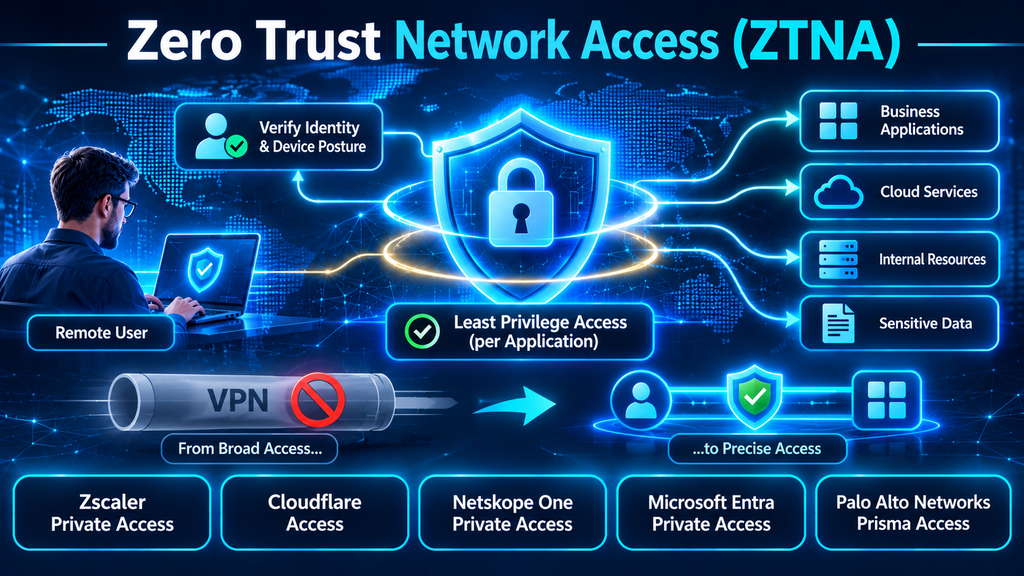
Zero Trust Network Access: Replacing Implicit Trust with Identity-Centric Application Security
Remote work, cloud adoption, third-party collaboration, and distributed applications have changed how employees connect to business systems. Traditional virtual private networks (VPNs) were designed to provide remote users with connectivity to internal networks. However, granting broad network access can create security exposure when a device is compromised, credentials are stolen, or an attacker moves laterally after gaining an initial foothold.
Zero Trust Network Access (ZTNA) takes a different approach. Rather than assuming that a user or device is trustworthy because it has connected to a corporate network, ZTNA evaluates access requests using identity, device posture, application context, and security policies.
The objective is straightforward: users should receive access only to the specific applications and resources they need, under the conditions the organization considers acceptable.
ZTNA is therefore more than a VPN replacement. It is an application-centric access model that can help reduce network exposure, improve segmentation, and support consistent security controls across remote, hybrid, and distributed environments.
What Is Zero Trust Network Access?
Zero Trust Network Access is a security technology that provides controlled access to private applications without automatically granting users access to the wider network.
A ZTNA service typically verifies a combination of:
- User identity and authentication status.
- Device identity and security posture.
- Application and resource being requested.
- User role and group membership.
- Location and connection context.
- Relevant risk signals and access policies.
After evaluating these conditions, the platform establishes an authorized connection to the requested application.
Unlike a traditional network-level VPN connection, a well-designed ZTNA deployment limits access to specific resources. An employee authorized to use an internal finance application does not automatically receive access to unrelated engineering systems or database servers.
The underlying principle is least privilege: grant only the access necessary to perform an approved task.
Why Traditional VPN Access Is Becoming a Security Challenge
VPN technology remains useful in many environments, but broad network connectivity can create operational and security challenges.
1. Excessive network access
Some VPN configurations place remote users on a network segment that can reach multiple internal systems. Even when firewall rules restrict access, maintaining granular permissions across large environments can become difficult.
ZTNA shifts the policy model toward user-to-application access rather than assuming that network membership is sufficient.
2. Increased lateral movement risk
If an attacker compromises a VPN-connected endpoint, the available network paths may provide opportunities to discover and reach additional systems.
ZTNA can reduce this exposure by limiting connections to explicitly authorized applications and services.
3. Difficult access management
Traditional VPN access often depends on network ranges, firewall rules, and group-based permissions. These controls can become complicated as organizations add cloud applications, contractors, temporary employees, and remote locations.
ZTNA can simplify access administration by connecting policies to users, devices, and individual applications.
4. Inconsistent device security
A valid username and password do not prove that a device is safe. A compromised laptop, unmanaged personal device, or outdated endpoint may present significant risk.
ZTNA solutions can integrate with endpoint management and security tools to evaluate device posture before allowing access.
5. Expanding third-party access
Suppliers, contractors, consultants, and support providers frequently require access to internal applications. Providing broad VPN connectivity to these users may grant more access than necessary.
Application-level ZTNA policies can help restrict third-party access to specific systems and services.
How ZTNA Works
Although vendor architectures differ, most ZTNA deployments use a combination of identity verification, policy evaluation, application discovery, and controlled connectivity.
Step 1: Identify the user
The access process begins with authentication. ZTNA commonly integrates with enterprise identity providers and can enforce multifactor authentication (MFA).
The platform determines who is requesting access and whether the user belongs to an authorized group.
Step 2: Evaluate device posture
The solution checks available device information, which may include:
- Operating system and patch status.
- Endpoint detection and response (EDR) status.
- Device management enrollment.
- Disk encryption status.
- Security configuration.
- Certificate or device identity.
- Compliance with organizational policies.
The exact checks depend on integrations, deployment model, and vendor capabilities.
Step 3: Evaluate the access request
The policy engine considers the user, device, requested application, and available contextual signals.
For example, an organization may allow a managed corporate laptop to access an internal development environment while requiring additional authentication or restricting access from an unmanaged device.
Step 4: Establish application-specific connectivity
If the request meets the applicable policy, the platform establishes a connection to the approved application.
Many ZTNA architectures use connectors or service components deployed near private applications. These components help broker connectivity without requiring every remote user to join the internal network.
Step 5: Monitor and reassess access
Some platforms can evaluate changing context during a session and respond when risk conditions change.
For example, a device that becomes noncompliant or a user session that triggers a risk signal may require reauthentication, restricted access, or session termination, depending on policy and product capabilities.
Continuous verification should not be interpreted as every vendor performing identical checks on every packet. Buyers should validate how often policies are reevaluated and which events can trigger access changes.
Core ZTNA Capabilities to Evaluate
A useful ZTNA platform should provide more than a secure remote connection.
| Capability | What it does | Why it matters |
|---|---|---|
| Identity integration | Connects access decisions to enterprise identity providers | Supports centralized authentication and policy management |
| Multifactor authentication | Adds verification beyond passwords | Reduces reliance on stolen credentials |
| Device posture checks | Evaluates endpoint health and compliance | Helps prevent risky devices from accessing private applications |
| Application-level access | Grants access to specific resources | Reduces unnecessary network exposure |
| Microsegmentation | Limits access between users, applications, and workloads | Helps reduce lateral movement |
| Context-aware policies | Uses factors such as location, risk, and device status | Enables more precise access decisions |
| Third-party access | Provides controlled access for contractors and suppliers | Reduces the need for broad VPN permissions |
| Session monitoring | Records or evaluates access activity | Supports investigation and auditing |
| Legacy application support | Enables access to older and non-web applications | Helps modernize complex environments |
| Logging and integrations | Connects access events to security workflows | Improves incident response and visibility |
Leading Zero Trust Network Access Platforms
The following products represent established approaches to ZTNA. They differ in architecture, integration, access methods, and broader security capabilities. Organizations should validate the exact features and licensing available in their target deployment.
1. Zscaler Private Access
Zscaler Private Access (ZPA) is part of the Zscaler Zero Trust Exchange platform. It provides application-specific access to private applications for remote and distributed users.
Relevant capabilities include:
- User-to-application connectivity.
- Identity-based access policies.
- Application segmentation.
- Integration with enterprise identity systems.
- Access for employees and third parties.
- Support for private applications hosted in data centers and cloud environments.
ZPA is worth evaluating when an organization wants to replace broad remote-access VPN connectivity with an application-centric architecture. Buyers should examine application discovery, connector placement, local access requirements, and business continuity options.
Official product information: Zscaler Private Access.
2. Cloudflare Access
Cloudflare Access is part of Cloudflare’s Zero Trust platform. It provides identity-aware access controls for self-hosted applications, infrastructure, and other supported resources.
Relevant capabilities include:
- Identity-based application access.
- Integration with external identity providers.
- Access policies based on user and device context.
- Browser-based access for supported applications.
- Secure access to infrastructure services such as SSH and RDP.
- Integration with the wider Cloudflare One platform.
Cloudflare Access is worth considering when an organization wants to secure internal web applications and infrastructure through a cloud-delivered access layer. Buyers should verify protocol support, connector requirements, device posture options, and the distinction between application access and broader network connectivity.
Official product information: Cloudflare Access.
3. Netskope One Private Access
Netskope One Private Access provides ZTNA capabilities within the broader Netskope One security platform.
Relevant capabilities include:
- Least-privilege access to private applications.
- Agent-based and browser-based access options.
- Identity- and device-aware policy enforcement.
- Support for applications hosted on-premises and in the cloud.
- Integration with data protection and threat prevention capabilities.
- Options for local access and specialized environments.
Netskope is worth evaluating when an organization wants private application access integrated with cloud security, DLP, and wider SSE capabilities. Buyers should test performance, local connectivity, unmanaged-device access, and support for legacy application protocols.
Official product information: Netskope One Private Access.
4. Microsoft Entra Private Access
Microsoft Entra Private Access is an identity-centric ZTNA solution within Microsoft’s Global Secure Access offering.
Relevant capabilities include:
- Secure access to private applications.
- Integration with Microsoft Entra ID.
- Conditional Access policy enforcement.
- Support for on-premises and cloud-hosted private resources.
- Identity-based access controls.
- Integration with Microsoft’s broader security and identity environment.
It is a natural candidate for organizations that already use Microsoft Entra ID and want to extend identity-based access policies to private applications. Buyers should review licensing requirements, application segmentation, connector deployment, and the operational differences between per-application access and broader access configurations.
Official product information: Microsoft Entra Private Access.
5. Palo Alto Networks Prisma Access
Palo Alto Networks provides ZTNA capabilities through Prisma Access, its cloud-delivered security platform. Its ZTNA 2.0 approach emphasizes application-specific access, continuous trust evaluation, and integration with broader security controls.
Relevant capabilities to assess include:
- Private application access.
- Identity-based security policies.
- Application-level segmentation.
- Integration with security inspection capabilities.
- Support for distributed users and locations.
- Centralized policy administration through the broader Palo Alto Networks ecosystem.
Prisma Access is worth evaluating for organizations already using Palo Alto Networks security products or planning a broader SASE architecture. Buyers should assess product packaging, deployment complexity, traffic routing, and the exact capabilities included in the selected subscription.
Official product information: Palo Alto Networks Prisma Access.
ZTNA Platform Comparison
| Platform | Primary strength | Important evaluation area |
|---|---|---|
| Zscaler Private Access | Application-centric private access through a dedicated zero-trust architecture | Connector design, application discovery, and resilience |
| Cloudflare Access | Identity-aware access for self-hosted applications and infrastructure | Protocol support, access methods, and device context |
| Netskope One Private Access | Private access integrated with broader cloud security and data protection | Local access, performance, and legacy application support |
| Microsoft Entra Private Access | Identity-centric access integrated with Microsoft Entra and Conditional Access | Licensing, segmentation, and application configuration |
| Palo Alto Networks Prisma Access | ZTNA integrated with a wider cloud-delivered security platform | Product dependencies, policy design, and deployment architecture |
This comparison is intended to guide evaluation rather than establish a universal ranking. A product that fits a Microsoft-centric environment may not be the best choice for an organization with complex OT networks or extensive third-party access requirements.
ZTNA vs. VPN: Understanding the Difference
ZTNA and VPN technologies both provide connectivity to private resources, but they approach access control differently.
| Area | Traditional VPN | ZTNA |
|---|---|---|
| Access model | Often network-oriented | Application-oriented |
| Trust assumptions | May rely on network membership after authentication | Evaluates identity, device, and policy context |
| Segmentation | Often implemented through network and firewall rules | Can enforce access at individual application level |
| Resource visibility | Internal network resources may be reachable based on routing and permissions | Private applications can remain hidden from unauthorized users |
| Third-party access | May require separate VPN accounts and network restrictions | Can provide narrowly scoped application access |
| Device context | Depends on VPN and endpoint integrations | Commonly central to access policy evaluation |
| Deployment | VPN gateways and network infrastructure | Cloud or self-hosted brokers, connectors, agents, and identity integrations |
| Operational focus | Secure network connectivity | Secure access to specific resources |
ZTNA does not automatically make every VPN unnecessary. Some organizations still require network-level connectivity for legacy systems, specialized protocols, or infrastructure workflows.
A phased transition can be more practical than a complete replacement.
Common ZTNA Deployment Challenges
ZTNA can improve access security, but a poorly planned rollout can create application outages, access failures, and unnecessary complexity.
Incomplete application inventory
Organizations may not know every internal application, dependency, hostname, port, or protocol required by business users.
Before deploying ZTNA, build an application inventory that includes ownership, user groups, dependencies, hosting locations, and access requirements.
Overly broad access policies
Replacing a VPN with a policy that grants broad access to large application ranges does not fully achieve least privilege.
Define access by specific applications, users, groups, and required protocols. Review broad rules regularly.
Legacy application compatibility
Some applications depend on unusual protocols, server-initiated connections, fixed network paths, or older authentication mechanisms.
Test these applications early. A ZTNA platform’s support for web applications does not automatically prove that it can support every legacy workflow.
Device posture gaps
A policy is only as useful as the device information available to it. If endpoint security, device management, or certificate integrations are incomplete, access decisions may be less reliable.
Identify which device signals are essential and test how the platform behaves when a signal is missing or outdated.
Performance and user experience
ZTNA introduces brokers, connectors, policy checks, and sometimes additional traffic inspection. Poor connector placement or inefficient traffic routing can increase latency.
Measure application response times from representative locations and networks before broad deployment.
Resilience and business continuity
Some ZTNA architectures depend on cloud services or regional points of presence. Organizations must understand how access behaves during service outages, connector failures, and loss of connectivity to a control plane.
Review high availability, failover, local access, and emergency access procedures.
How to Implement ZTNA Successfully
A phased implementation helps reduce disruption while establishing a stronger access model.
Phase 1: Inventory applications and users
Document private applications, hosting locations, dependencies, protocols, application owners, and the user groups that need access.
Phase 2: Define identity and device requirements
Determine which identity provider will authenticate users and which device signals will influence access decisions. Establish MFA and device compliance requirements.
Phase 3: Prioritize high-value applications
Start with applications that contain sensitive data or are frequently accessed by remote employees and third parties. Avoid migrating every application simultaneously.
Phase 4: Deploy connectors and access infrastructure
Place connectors close to the applications they serve, taking availability, network paths, and application dependencies into account.
Phase 5: Create least-privilege policies
Define access rules for specific user groups and applications. Avoid broad network ranges or unnecessary protocol permissions.
Phase 6: Pilot with representative users
Include employees, administrators, contractors, and users in different locations. Test managed and unmanaged devices where appropriate.
Phase 7: Monitor and optimize
Review access failures, latency, policy exceptions, application coverage, and suspicious activity. Refine policies before expanding the deployment.
Phase 8: Reduce legacy VPN dependency
Move suitable application workflows to ZTNA and retain VPN connectivity only where a validated technical or business requirement remains.
Questions to Ask Before Buying a ZTNA Solution
A structured proof of concept should test the platform against real applications and access patterns.
- Does the solution provide access to individual applications rather than broad network segments?
- Which identity providers and MFA systems does it support?
- Can it evaluate endpoint compliance and security posture?
- Does it support unmanaged devices and third-party users?
- Which legacy and non-web application protocols are supported?
- How are connectors deployed, updated, and monitored?
- Can access policies adapt when device or user risk changes?
- What happens if a connector or cloud service becomes unavailable?
- How does the solution perform across different geographic locations?
- Can it integrate with SIEM, SOAR, EDR, and identity systems?
- How are privileged administrator sessions controlled and audited?
- What licensing and infrastructure costs apply at the expected scale?
The proof of concept should demonstrate secure application access, reliable performance, manageable policy administration, and practical incident investigation.
The Future of ZTNA: From Remote Access to Continuous Access Governance
ZTNA is evolving beyond the original goal of replacing remote-access VPNs.
Organizations increasingly need to control access for employees, contractors, workloads, service accounts, IoT devices, and automated AI agents. These identities may interact with applications from different locations and under changing risk conditions.
This creates demand for more contextual access decisions.
Device identity, workload identity, user behavior, data sensitivity, and application risk may all influence whether a connection should be allowed. ZTNA is also becoming more closely integrated with SSE and SASE architectures, where access control works alongside web security, DLP, firewall services, and network optimization.
However, convergence does not eliminate the need for careful architecture. Buyers should distinguish application access from workload-to-workload segmentation, network access control, and privileged access management. These capabilities solve related but different problems.
Final Thoughts
Zero Trust Network Access represents a shift from trusting network connections to verifying access to individual applications and resources.
By combining identity verification, device posture, contextual policies, and least-privilege connectivity, ZTNA can reduce unnecessary network exposure and help limit lateral movement. It can also make remote and third-party access easier to govern.
The right implementation begins with application discovery and clear access requirements. Organizations should pilot critical applications, test legacy compatibility, validate performance, and gradually reduce broad VPN access where ZTNA provides an effective alternative.
ZTNA is most valuable when it becomes part of a wider identity and security strategy—not simply another remote-access product.
