Upgrade & Secure Your Future with DevOps, SRE, DevSecOps, MLOps!
We spend hours scrolling social media and waste money on things we forget, but won’t spend 30 minutes a day earning certifications that can change our lives.
Master in DevOps, SRE, DevSecOps & MLOps by DevOps School!
Learn from Guru Rajesh Kumar and double your salary in just one year.
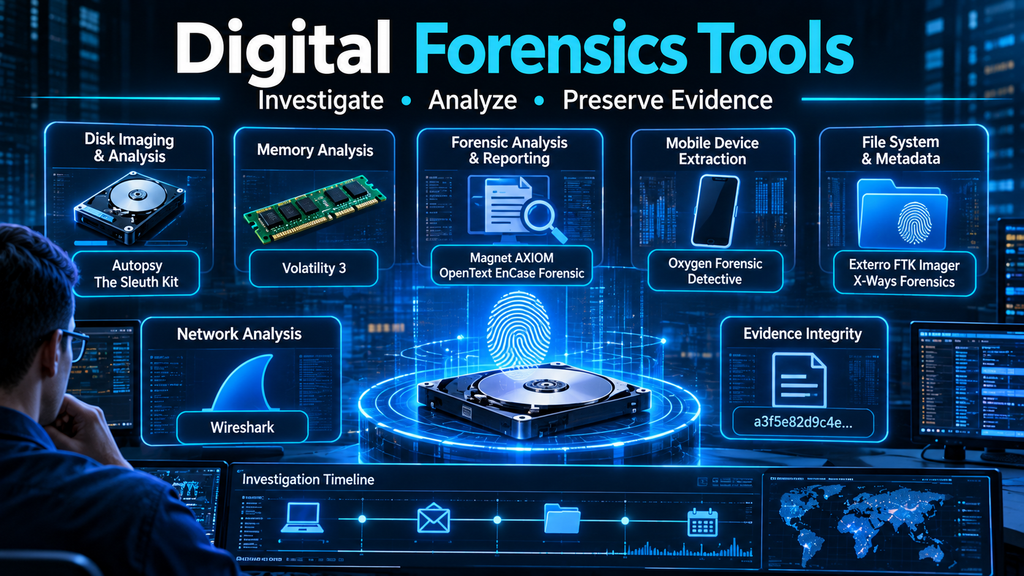
Digital Forensics Tools: Investigating Incidents Through Reliable Evidence Collection and Analysis
When a cyberattack occurs, identifying what happened is only part of the challenge. Security teams must determine how the incident began, which systems were affected, what information was accessed, whether evidence was altered, and how the attacker moved through the environment.
Digital forensics provides the methods and technical capabilities needed to answer these questions. It involves collecting, preserving, examining, and interpreting digital evidence from computers, mobile devices, servers, cloud platforms, networks, and other electronic sources.
Digital forensics tools make this work more systematic. They help investigators acquire forensic images, recover files, examine memory, analyze application artifacts, reconstruct timelines, inspect network activity, and produce reports that support incident response, internal investigations, regulatory inquiries, and legal proceedings.
However, no single tool can investigate every evidence source or answer every investigative question. Selecting the right combination requires understanding the type of evidence, the investigation’s objectives, the operating environment, and the standards required for evidence handling.
What Are Digital Forensics Tools?
Digital forensics tools are software and hardware solutions used to acquire, preserve, analyze, and report on digital evidence.
They help investigators examine information that may not be readily visible through normal operating-system interfaces. This can include deleted files, browser artifacts, system logs, application databases, memory-resident processes, metadata, network sessions, and remnants of user activity.
A typical forensic investigation may involve:
- Identifying devices, accounts, systems, and storage locations relevant to an incident.
- Preserving original evidence and documenting its condition.
- Creating forensic copies or acquiring data using an appropriate method.
- Calculating cryptographic hashes to help verify evidence integrity.
- Examining files, operating-system artifacts, application records, and event logs.
- Reconstructing sequences of activity through timestamps and correlated evidence.
- Identifying suspicious processes, communications, or user actions.
- Producing reproducible findings and an investigation report.
The tools used depend on the evidence source. Disk forensics, memory forensics, mobile forensics, cloud forensics, and network forensics each require different collection and analysis techniques.
Why Digital Forensics Matters in Cybersecurity
1. Understanding Security Incidents
Security alerts identify suspicious activity, but they do not always explain the complete sequence of events.
Digital forensics helps investigators establish what happened before, during, and after an incident. This can reveal the initial access method, attacker actions, affected systems, persistence mechanisms, and potential data exposure.
2. Investigating Data Breaches
When sensitive information is exposed, organizations need to determine which files or records were accessed, copied, modified, or transferred.
Forensic analysis can examine file-system activity, application logs, cloud audit records, browser artifacts, and network evidence to help reconstruct the incident.
3. Detecting Insider Threats
Not every security incident originates outside an organization. Employees, contractors, and privileged users may misuse access intentionally or accidentally.
Forensic tools can help examine file access, removable media activity, authentication events, application usage, and unusual data transfers. Findings must be interpreted carefully because legitimate business activity can resemble suspicious behavior.
4. Supporting Incident Response
Digital forensics helps incident responders move beyond containment and understand the underlying cause of an attack.
Investigators can identify affected endpoints, examine malware execution, determine persistence methods, and establish whether additional systems require investigation.
5. Supporting Legal and Regulatory Investigations
In some cases, digital evidence must be suitable for internal disciplinary proceedings, litigation, regulatory inquiries, or law-enforcement investigations.
This requires documented collection procedures, evidence integrity controls, access records, appropriate authorization, and transparent reporting. A forensic tool alone does not make evidence legally admissible; the complete process and applicable jurisdictional requirements matter.
Major Categories of Digital Forensics Tools
1. Disk and File-System Forensics
Disk forensics focuses on storage media such as hard drives, solid-state drives, removable devices, and forensic disk images.
Investigators use these tools to examine partitions, file systems, directory structures, deleted files, timestamps, metadata, and other storage artifacts.
Common capabilities include:
- Forensic disk imaging.
- File-system examination.
- Deleted-file recovery where technically possible.
- Keyword and artifact searches.
- Hash calculation and known-file identification.
- Examination of partitions and unallocated space.
Representative tools include Autopsy, The Sleuth Kit, Exterro FTK Imager, and X-Ways Forensics.
2. Memory Forensics
Memory forensics examines volatile data captured from a system’s RAM.
Unlike disk evidence, memory can contain information that disappears when a device is powered down. This may include running processes, network connections, loaded modules, command-line activity, and other operating-system artifacts.
Memory analysis can be particularly valuable when investigating fileless malware, suspicious processes, credential theft, and active compromises.
Representative tools include Volatility 3 and MemProcFS.
3. Mobile Device Forensics
Mobile forensics focuses on smartphones, tablets, and related application ecosystems.
Depending on device security, operating-system restrictions, authorization, and acquisition method, investigators may examine:
- Messages and call records.
- Application databases.
- Browser and location artifacts.
- Media files and metadata.
- Device backups.
- Account and synchronization information.
Representative platforms include Cellebrite Inseyets, Magnet AXIOM, MSAB XRY, and Oxygen Forensic Detective.
Access to encrypted or protected devices is not guaranteed. Capabilities vary significantly by device model, operating-system version, security configuration, and lawful acquisition method.
4. Network Forensics
Network forensics examines communications between devices, services, and external systems.
It can help reconstruct connections, identify suspicious traffic, examine protocol behavior, and establish communication patterns associated with an incident.
Common evidence sources include packet captures, flow records, DNS logs, firewall events, proxy logs, and network security monitoring data.
Representative tools include Wireshark, Zeek, NetworkMiner, and Arkime.
5. Cloud Forensics
Cloud investigations involve evidence distributed across cloud infrastructure, SaaS applications, identity systems, storage services, and provider audit logs.
Investigators may need to examine:
- Authentication and access events.
- Cloud API activity.
- File access and sharing history.
- Virtual machine and container activity.
- Storage and configuration changes.
- Administrative actions and role assignments.
Cloud evidence collection often depends on provider logging, retention settings, account permissions, and service-specific APIs. Organizations should plan for evidence availability before an incident occurs.
6. Email and Browser Forensics
Email and browser artifacts can provide valuable evidence about phishing, account compromise, malicious downloads, suspicious links, and user activity.
Investigators may examine message headers, attachments, browser history, cached content, cookies, downloads, and application databases.
The presence of an artifact does not automatically establish who performed an action. Shared devices, synchronized accounts, automated processes, and time-zone differences must be considered.
7. Timeline and Log Analysis
Timeline analysis correlates events from different sources into a chronological view.
This can help investigators understand the order of system activity, identify unusual sequences, and connect evidence from endpoints, applications, networks, and identity systems.
Tools such as Plaso and Timesketch support timeline creation and investigation workflows.
Leading Digital Forensics Tools
The following tools represent a mix of commercial platforms, open-source projects, and specialist utilities. They serve different investigative purposes and should be evaluated according to evidence type, workflow, and operational requirements.
1. Autopsy
Best suited to: Disk and file-system investigations, with a graphical workflow for forensic examination.
Autopsy is an open-source digital forensics platform built around The Sleuth Kit. It provides a graphical environment for examining forensic images and investigating digital artifacts.
Its capabilities support file-system analysis, keyword searching, timeline exploration, and examination of supported artifacts. It is useful for training, academic research, incident investigations, and forensic workflows where an open-source platform is appropriate.
Autopsy’s modular architecture allows additional functionality to be incorporated into an investigation environment.
Evaluation considerations
- Review supported file systems and artifact modules.
- Test processing performance with representative evidence images.
- Validate search and timeline workflows.
- Confirm reporting and case-management requirements.
Official website: https://www.autopsy.com/
2. Magnet AXIOM
Best suited to: Investigations involving multiple digital evidence sources.
Magnet AXIOM is a commercial forensic investigation platform designed to acquire, process, and examine digital evidence. Its workflows can bring together evidence from computers, mobile devices, cloud sources, and other supported data types.
The platform helps investigators analyze digital artifacts and connect findings to their underlying evidence sources. This can be useful when an investigation involves several devices or accounts and requires a consolidated examination environment.
Evaluation considerations
- Confirm support for the specific devices and applications under investigation.
- Evaluate acquisition options and authorization requirements.
- Test artifact parsing and source-level verification.
- Assess collaboration and reporting workflows.
Official website: https://www.magnetforensics.com/products/magnet-axiom/
3. OpenText EnCase Forensic
Best suited to: Established computer forensic workflows and structured evidence examination.
OpenText EnCase Forensic is a commercial digital investigation solution associated with forensic acquisition, examination, and reporting.
Organizations evaluating EnCase should consider its fit with existing forensic procedures, evidence-handling requirements, investigator training, and case-management processes.
Its suitability depends on the evidence types involved and the organization’s requirements for acquisition, processing, analysis, and documentation.
Evaluation considerations
- Validate support for relevant storage devices and file systems.
- Review forensic imaging and verification procedures.
- Test examination and reporting workflows.
- Consider licensing, training, and compatibility with existing processes.
Official website: https://www.opentext.com/products/encase-forensic
4. Exterro FTK Imager
Best suited to: Forensic imaging and preliminary examination of digital evidence.
FTK Imager is a widely used forensic acquisition and preview utility. It helps investigators create forensic images, inspect evidence, and work with supported evidence formats.
It is particularly useful as part of a larger forensic workflow where evidence must be acquired and verified before detailed analysis.
FTK Imager should not be confused with a complete forensic investigation platform. Its role is more focused than that of an end-to-end examination suite.
Evaluation considerations
- Test supported acquisition formats and devices.
- Confirm hash verification procedures.
- Validate evidence handling and export workflows.
- Document the acquisition process and tool configuration.
Official website: https://www.exterro.com/digital-forensics-software/ftk-imager
5. X-Ways Forensics
Best suited to: Advanced computer forensic examination and low-level file-system analysis.
X-Ways Forensics is a commercial forensic work environment that provides detailed examination capabilities for storage media and file systems.
It is often considered by experienced examiners who need granular control over evidence analysis, data structures, and file-system artifacts.
Its technical depth can be valuable in complex investigations, although investigators should account for training and workflow complexity.
Evaluation considerations
- Examine supported file systems and evidence formats.
- Test low-level analysis capabilities.
- Assess scripting and automation requirements.
- Review examiner training and reporting needs.
Official website: https://www.x-ways.net/forensics/
6. Volatility 3
Best suited to: Advanced memory forensics and analysis of volatile system evidence.
Volatility 3 is an open-source memory forensics framework used to analyze memory images.
It supports investigation of operating-system artifacts and can help identify suspicious processes, loaded components, network-related evidence, and other memory-resident information.
Because memory analysis requires technical interpretation, results should be evaluated in context and corroborated with other evidence wherever possible.
Evaluation considerations
- Confirm compatibility with the operating-system memory image.
- Understand available plugins and symbol requirements.
- Validate findings against other evidence sources.
- Document the acquisition method and analysis environment.
Official project: https://volatilityfoundation.org/
7. Wireshark
Best suited to: Network protocol analysis and packet-level investigations.
Wireshark is an open-source network protocol analyzer that allows investigators to inspect packet captures and examine network communications.
It can help identify suspicious connections, unusual protocol behavior, DNS activity, and communication patterns relevant to an incident.
Wireshark is particularly valuable when packet captures are available, but encrypted traffic may limit the visibility of application content.
Evaluation considerations
- Confirm that packet captures cover the relevant incident period.
- Understand protocol decoding and encryption limitations.
- Correlate packet evidence with endpoint and firewall logs.
- Consider storage and performance requirements for large captures.
Official website: https://www.wireshark.org/
8. Oxygen Forensic Detective
Best suited to: Mobile, computer, and supported cloud-source investigations.
Oxygen Forensic Detective is a commercial platform for collecting and analyzing digital evidence from supported devices and services.
Its published capabilities include mobile and computer investigations, cloud data collection, and analysis of application-related artifacts. The vendor documents support across a broad range of devices and application versions, but exact availability depends on the source and acquisition method.
Evaluation considerations
- Verify support for the devices and applications relevant to the investigation.
- Review lawful acquisition methods and access limitations.
- Test artifact interpretation and reporting.
- Assess integration with existing evidence workflows.
Official website: https://www.oxygenforensics.com/products/oxygen-forensic-detective/
Digital Forensics Tool Comparison
| Tool | Primary focus | Deployment model | Notable strength |
|---|---|---|---|
| Autopsy | Disk and file-system forensics | Open source | Accessible graphical investigation workflow |
| Magnet AXIOM | Multi-source investigations | Commercial | Consolidated artifact examination |
| OpenText EnCase Forensic | Computer forensics | Commercial | Structured acquisition and examination workflows |
| Exterro FTK Imager | Evidence acquisition and preview | Free utility | Forensic imaging and verification |
| X-Ways Forensics | Advanced disk analysis | Commercial | Detailed file-system examination |
| Volatility 3 | Memory forensics | Open source | Analysis of volatile memory evidence |
| Wireshark | Network forensics | Open source | Packet-level protocol inspection |
| Oxygen Forensic Detective | Mobile, computer, and cloud investigations | Commercial | Multi-source data collection and analysis |
This comparison describes each tool’s primary role, not a universal performance ranking. A complete forensic capability often requires several tools working together.
The Digital Forensics Investigation Process
A reliable investigation depends on methodology as much as technology. The following stages provide a practical framework.
Step 1: Define the Investigation Scope
Establish the incident, investigative questions, systems involved, time period, and authorization boundaries.
Determine whether the investigation concerns a compromised endpoint, suspected data theft, insider activity, malware execution, cloud account misuse, or another event.
A clearly defined scope prevents unnecessary collection and helps investigators prioritize relevant evidence.
Step 2: Identify and Preserve Evidence
Identify relevant devices, accounts, logs, storage systems, and cloud services.
Preserve evidence using an appropriate acquisition method. Where feasible, avoid making unnecessary changes to original media. For live systems, investigators must balance the need to preserve volatile evidence against the risk of changing system state during collection.
Record the device or source, acquisition time, operator, method, and relevant system details.
Step 3: Acquire Evidence
Create forensic images or collect targeted artifacts according to the investigation requirements.
The acquisition method should be appropriate to the evidence source. Physical disk imaging, logical file collection, memory acquisition, mobile extraction, and cloud API collection are different processes and should not be treated as interchangeable.
Step 4: Verify Evidence Integrity
Use cryptographic hashes, such as SHA-256, to help verify that evidence copies remain unchanged.
Maintain acquisition logs and document the tools, versions, settings, and procedures used. Hash verification supports integrity checks, but it does not by itself prove that the original source was complete or that the acquisition was performed correctly.
Step 5: Examine and Analyze
Use appropriate forensic tools to examine files, file systems, logs, memory, application data, and network records.
Search for relevant artifacts, identify suspicious activity, and develop investigative hypotheses. Avoid treating automated tool output as a definitive conclusion without validating its meaning.
Step 6: Build an Evidence Timeline
Normalize timestamps carefully and account for time zones, clock drift, and differences in how systems record time.
Correlate events from multiple sources to reconstruct the sequence of activity. A timeline can be powerful, but it should distinguish directly observed events from inferred relationships.
Step 7: Corroborate Findings
Where possible, validate important conclusions using independent evidence sources.
For example, an endpoint artifact indicating a file was accessed may be compared with application audit records, authentication events, or network evidence.
Corroboration helps reduce the risk of misinterpretation and strengthens the investigation’s conclusions.
Step 8: Prepare the Investigation Report
A professional report should explain:
- The scope and purpose of the investigation.
- Evidence sources and acquisition methods.
- Tools and versions used.
- Integrity verification procedures.
- Findings and supporting artifacts.
- Limitations and assumptions.
- Conclusions and recommended actions.
Reports should clearly separate observed facts, technical interpretations, and hypotheses.
Common Challenges in Digital Forensics
Encryption and Protected Devices
Full-disk encryption, secure mobile operating systems, and protected application data can restrict access to evidence.
Investigators should not assume that a particular tool can bypass encryption or recover inaccessible information. Lawful access, credentials, backups, provider records, and other evidence sources may be necessary.
Large Volumes of Evidence
Modern environments can produce enormous amounts of data. Collecting everything may be impractical and can increase investigation time.
A risk-based collection strategy should prioritize relevant systems, time periods, and data sources while preserving the ability to expand the investigation when new evidence emerges.
Cloud Evidence Complexity
Cloud environments distribute evidence across provider systems, accounts, regions, and services. Retention policies may also mean that important records are unavailable if logging was not enabled before the incident.
Organizations should configure audit logging, retention, access controls, and evidence export processes in advance.
Anti-Forensic Techniques
Attackers may attempt to delete logs, manipulate timestamps, encrypt data, or interfere with evidence collection.
Investigators should look for inconsistencies across independent evidence sources and document any signs of tampering. The absence of an artifact does not necessarily prove that an event never occurred.
Tool Output and Interpretation
Automated parsing can accelerate investigations, but tools may interpret artifacts differently or fail to support particular versions and formats.
Important findings should be validated through source-level examination and, where practical, independent methods.
Maintaining Evidence Integrity
Poor handling can undermine the reliability of an investigation. Inadequate documentation, uncontrolled access, or changes to original evidence can create avoidable problems.
Organizations should establish clear evidence-handling procedures, access restrictions, audit trails, and secure storage practices.
How to Choose the Right Digital Forensics Tools
Selecting forensic software should begin with investigative requirements rather than brand recognition.
1. Match the Tool to the Evidence Source
Identify whether the primary requirement involves disks, memory, mobile devices, networks, cloud environments, or multiple sources.
A specialist memory-analysis framework may be more useful than a broad investigation suite when the main objective is to examine volatile evidence.
2. Evaluate Acquisition and Preservation
Review how the tool collects evidence, verifies integrity, records acquisition details, and handles original sources.
Check whether the workflow supports the organization’s evidence-handling policies and legal requirements.
3. Review Artifact and Platform Coverage
Test the operating systems, file systems, mobile devices, applications, and cloud services that matter to the organization.
Do not rely only on a vendor’s overall supported-device count. Confirm support for the specific versions and artifacts relevant to actual investigations.
4. Examine Reporting and Reproducibility
Investigators should be able to explain how findings were produced and trace conclusions back to source evidence.
Evaluate report customization, audit trails, export formats, and the ability to preserve case information.
5. Consider Scalability and Performance
Large disk images, extensive cloud records, and multiple endpoint collections can create significant processing demands.
Assess storage, indexing, processing time, hardware requirements, concurrent case handling, and remote acquisition capabilities.
6. Assess Integration
Consider whether the forensic platform can work with existing incident response, endpoint detection, SIEM, case management, and evidence storage systems.
Integration can reduce manual work, but automated collection and response actions must be governed carefully.
7. Compare Total Cost of Ownership
Commercial products may involve licensing, hardware, training, maintenance, and specialist support costs.
Open-source tools may reduce licensing expenditure but still require technical expertise, integration, maintenance, and validation.
The most cost-effective choice is the one that meets investigative requirements reliably over time.
Open-Source vs. Commercial Digital Forensics Tools
Both open-source and commercial solutions play important roles in digital investigations.
Open-source tools such as Autopsy, The Sleuth Kit, Volatility 3, and Wireshark provide transparency, flexibility, and opportunities for customization. They can be valuable for training, research, incident response, and specialist analysis.
Their limitations may include a steeper learning curve, more manual integration, and the need for internal validation and support.
Commercial platforms such as Magnet AXIOM, OpenText EnCase Forensic, X-Ways Forensics, and Oxygen Forensic Detective may provide integrated workflows, vendor support, structured reporting, and specialized acquisition capabilities.
They can reduce the effort required to assemble a complete investigation environment, but licensing costs, platform dependencies, and supported-source limitations should be assessed.
Many mature forensic teams use a combination of both approaches. Commercial platforms may support acquisition and case processing, while open-source utilities provide independent verification or specialized analysis.
Digital Forensics in Incident Response
Digital forensics and incident response are closely connected, but they serve different immediate priorities.
Incident response focuses on identifying, containing, eradicating, and recovering from security incidents. Digital forensics focuses on collecting and interpreting evidence to establish what happened.
The two disciplines work best together.
For example, when ransomware is detected, responders may isolate affected endpoints to prevent further encryption. Forensic investigators may then examine memory, file-system artifacts, event logs, malware samples, and network records to identify the intrusion path and determine whether data was exfiltrated.
Organizations should define how evidence is preserved during containment. Rapid response actions can change system state, so procedures should account for forensic requirements without delaying necessary protection.
Emerging Trends in Digital Forensics
Cloud-Native Investigations
As organizations move workloads and data into cloud services, forensic workflows increasingly need to cover identity events, API activity, virtual infrastructure, SaaS records, and distributed storage.
Cloud providers and application vendors expose different evidence sources, making standardized collection and retention planning increasingly important.
AI-Assisted Evidence Analysis
AI-assisted capabilities may help investigators search large evidence collections, summarize artifacts, identify relationships, and prioritize leads.
These capabilities should be treated as analytical assistance rather than authoritative conclusions. Investigators must validate outputs against original evidence, understand model limitations, and document how AI-assisted analysis was used.
Mobile and Application Forensics
Mobile devices continue to hold substantial investigative value through application databases, synchronized accounts, location artifacts, media, and device logs.
As applications and operating systems change, forensic tools must continually adapt their parsers and acquisition methods.
Remote and Distributed Forensic Collection
Distributed workforces and cloud infrastructure make physical access to devices less practical.
Remote acquisition and endpoint triage can accelerate investigations, but collection methods must account for authorization, evidence integrity, connectivity, and the impact of live collection.
Greater Focus on Evidence Governance
Organizations are increasingly recognizing that forensic readiness must be established before an incident occurs.
This includes logging, retention, access controls, evidence storage, chain-of-custody documentation, and trained personnel.
Building a Digital Forensics-Ready Organization
A forensic program should not begin only after a major security incident.
Organizations can improve readiness through several practical measures:
- Establish an evidence-handling policy: Define authorization, collection, preservation, access, and retention procedures.
- Enable relevant logging: Configure endpoint, identity, cloud, network, and application audit records.
- Prepare secure evidence storage: Restrict access and maintain integrity checks and audit records.
- Maintain a tested toolset: Validate tools and workflows against representative systems before an incident.
- Train investigators: Develop expertise in acquisition, artifact interpretation, reporting, and evidence preservation.
- Coordinate with legal and compliance teams: Understand applicable privacy, employment, regulatory, and jurisdictional requirements.
- Run investigation exercises: Practice evidence collection and incident reconstruction using realistic scenarios.
A well-prepared organization can respond more confidently because it has already established how evidence will be collected, protected, and examined.
Conclusion: Reliable Investigations Begin with Reliable Evidence
Digital forensics tools are essential to understanding modern cyber incidents. They help security teams investigate compromised endpoints, recover and examine digital artifacts, analyze volatile memory, inspect network communications, and reconstruct activity across complex technology environments.
Autopsy, Magnet AXIOM, OpenText EnCase Forensic, Exterro FTK Imager, X-Ways Forensics, Volatility 3, Wireshark, and Oxygen Forensic Detective each serve different parts of the investigative process. Choosing among them requires a clear understanding of evidence sources, acquisition requirements, technical expertise, reporting needs, and operational constraints.
The most effective forensic program is not built around a single product. It combines appropriate tools with disciplined evidence handling, documented procedures, trained investigators, and independent validation.
Ultimately, digital forensics is about more than finding traces of suspicious activity. It is about turning digital evidence into reliable, explainable findings that help organizations understand incidents, make informed decisions, and strengthen their security posture.
