Upgrade & Secure Your Future with DevOps, SRE, DevSecOps, MLOps!
We spend hours scrolling social media and waste money on things we forget, but won’t spend 30 minutes a day earning certifications that can change our lives.
Master in DevOps, SRE, DevSecOps & MLOps by DevOps School!
Learn from Guru Rajesh Kumar and double your salary in just one year.
Introduction
Network analysis tools are platforms designed to help organizations monitor, visualize, and optimize their IT networks. Simply put, these tools provide insights into network performance, connectivity, traffic patterns, and potential bottlenecks. By analyzing network data, IT teams can proactively address issues, improve security, and ensure consistent performance across complex infrastructures.
In , enterprises face increasingly complex network environments, spanning cloud, hybrid, and on-premises infrastructures. With remote work, multi-cloud deployments, and edge computing, effective network analysis has become critical for performance, security, and cost optimization.
Real-world use cases include:
- Monitoring network traffic for performance and congestion
- Visualizing network topology and dependencies
- Detecting and troubleshooting connectivity issues
- Analyzing bandwidth usage and predicting capacity needs
- Identifying security vulnerabilities and abnormal traffic
Buyers should evaluate:
- Real-time monitoring and alerting capabilities
- Network topology visualization
- Traffic analysis and bandwidth monitoring
- Integration with ITSM and observability platforms
- Predictive analytics and capacity planning
- Security monitoring and anomaly detection
- Multi-cloud and hybrid support
- Reporting and compliance dashboards
- Ease of deployment and configuration
- Scalability for enterprise networks
Best for: Network engineers, IT operations teams, security teams, cloud architects, and enterprises managing complex or distributed networks.
Not ideal for: Small organizations with simple network setups or those relying on basic monitoring without advanced analytics needs.
Key Trends in Network Analysis Tools
AI-assisted traffic anomaly detection for faster troubleshooting
- Integration with cloud-native monitoring and observability platforms
- Automated mapping of network topology and dependencies
- Predictive analytics for capacity and performance forecasting
- Security-focused analytics to detect threats and unusual behavior
- Real-time dashboards with customizable alerts
- Multi-cloud and hybrid network support
- Low-code/no-code workflow automation for routine network tasks
- Integration with ITSM, DevOps, and collaboration tools
- Scalable SaaS and hybrid deployment models with subscription-based pricing
How We Selected These Tools
The top 10 network analysis platforms were chosen based on:
- Market adoption and enterprise recognition
- Feature completeness for monitoring, analytics, and troubleshooting
- Reliability and performance across large-scale networks
- Security and compliance posture (RBAC, encryption, audit logs)
- Integration with ITSM, cloud, and DevOps tools
- Predictive analytics and capacity planning capabilities
- Reporting and visualization features
- Multi-cloud and hybrid infrastructure support
- Ease of use and deployment
- Vendor support, documentation, and community presence
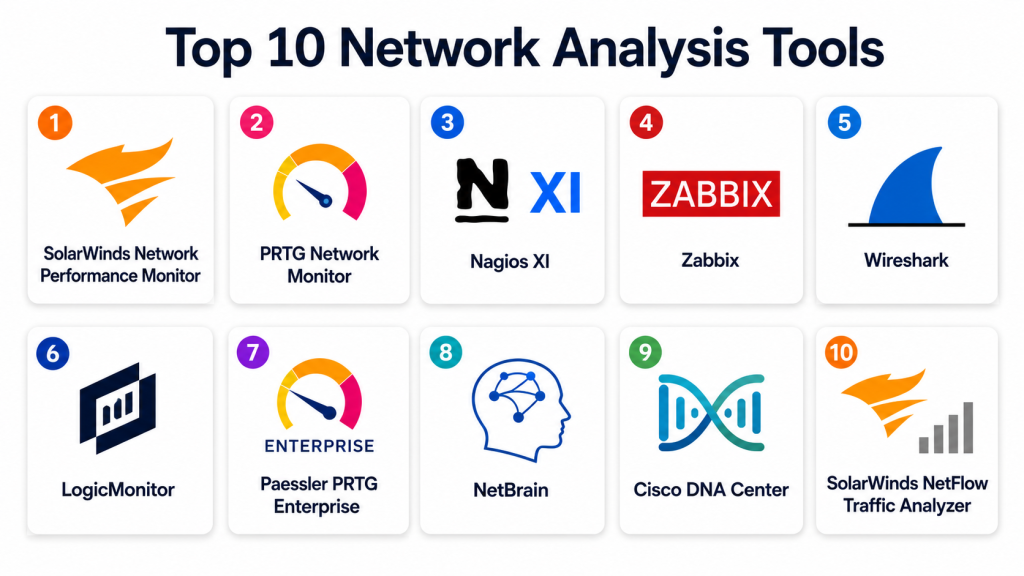
Top 10 Network Analysis Tools
#1 — SolarWinds Network Performance Monitor
Short description: SolarWinds NPM monitors network performance, visualizes topology, and provides alerts to optimize infrastructure reliability.
Key Features
- Real-time performance monitoring
- Automated network mapping
- Customizable dashboards and alerts
- Multi-vendor network support
- Bandwidth and traffic analysis
- Capacity planning tools
- Integration with ITSM platforms
Pros
- Comprehensive monitoring capabilities
- Scalable for large enterprise networks
- Intuitive dashboards for analysis
Cons
- Premium cost for full-featured editions
- Setup can be complex in large environments
- Some advanced features require additional modules
Platforms / Deployment
Windows / Web
Self-hosted / Hybrid
Security & Compliance
SSO, RBAC, encryption; SOC 2 Not publicly stated.
Integrations & Ecosystem
- ITSM platforms (ServiceNow, Jira)
- Cloud monitoring tools
- SNMP and APIs for device integration
- Collaboration tools for alerts
Support & Community
Enterprise support, documentation, training, and active community forums.
#2 — PRTG Network Monitor
Short description: PRTG monitors network devices, bandwidth, and traffic, providing real-time alerts and visualization for IT teams.
Key Features
- Bandwidth and traffic monitoring
- Device health checks
- Real-time dashboards and reporting
- Alerts via email, SMS, or push
- Network mapping and topology visualization
- Custom sensors and thresholds
- Multi-cloud support
Pros
- User-friendly and flexible
- Affordable for SMBs and mid-size enterprises
- Comprehensive sensor-based monitoring
Cons
- UI can be overwhelming with large sensor deployments
- Advanced analytics limited compared to enterprise-grade tools
- Cloud deployment is limited
Platforms / Deployment
Windows / Web / iOS / Android
Self-hosted / Hybrid
Security & Compliance
SSO, RBAC, encryption; Not publicly stated for SOC 2/ISO.
Integrations & Ecosystem
- Slack, Teams for alerts
- Cloud monitoring platforms
- API access for custom automation
- ITSM integration
Support & Community
Documentation, support plans, and community forums.
#3 — Nagios XI
Short description: Nagios XI provides monitoring, alerting, and visualization of network performance for on-premises and hybrid networks.
Key Features
- Real-time performance monitoring
- Custom dashboards and reporting
- Alerting and escalation policies
- Network topology mapping
- Multi-vendor device support
- Capacity and availability monitoring
- API for automation and integration
Pros
- Highly customizable
- Scalable for enterprise networks
- Strong open-source ecosystem
Cons
- Steep learning curve
- Requires manual configuration for complex networks
- Premium features require licensing
Platforms / Deployment
Windows / Linux / Web
Self-hosted / Hybrid
Security & Compliance
SSO, RBAC, encryption; SOC 2 Not publicly stated.
Integrations & Ecosystem
- ITSM tools (ServiceNow, Jira)
- Cloud monitoring
- SNMP, APIs, and scripts for devices
Support & Community
Documentation, enterprise support, and active user community.
#4 — Zabbix
Short description: Zabbix is an open-source network monitoring platform with visualization, alerting, and capacity planning capabilities.
Key Features
- Multi-device monitoring
- Network mapping and topology
- Alerts and escalation rules
- Performance and traffic dashboards
- Historical data analysis
- Automated scripts for remediation
- Multi-cloud and hybrid support
Pros
- Open-source and flexible
- Scalable for large networks
- Strong community and documentation
Cons
- Requires technical expertise to deploy
- Initial configuration is complex
- Advanced reporting requires customization
Platforms / Deployment
Linux / Windows / Web
Self-hosted / Hybrid
Security & Compliance
SSO, RBAC, encryption; Not publicly stated for SOC 2/ISO.
Integrations & Ecosystem
- Cloud monitoring platforms
- ITSM tools
- APIs and custom scripts
- Slack, Teams for notifications
Support & Community
Open-source community, documentation, and professional support for enterprise.
#5 — Wireshark
Short description: Wireshark is a packet analysis tool for detailed network traffic inspection and troubleshooting.
Key Features
- Deep packet inspection
- Real-time traffic capture
- Protocol analysis
- Filtering and search tools
- Visualization of traffic flows
- Export and reporting
- Multi-platform support
Pros
- Powerful for troubleshooting and analysis
- Open-source and free
- Supports wide range of protocols
Cons
- Steep learning curve
- Not designed for enterprise-wide monitoring
- Limited automation capabilities
Platforms / Deployment
Windows / macOS / Linux
Self-hosted
Security & Compliance
Encryption and RBAC Not publicly stated.
Integrations & Ecosystem
- Can integrate with monitoring scripts
- Export data for analysis
- Supports APIs and plugins
Support & Community
Open-source community, documentation, and tutorials.
#6 — LogicMonitor
Short description: LogicMonitor provides cloud-based network monitoring, visualization, and predictive analytics for hybrid environments.
Key Features
- Real-time performance monitoring
- Cloud and hybrid network support
- Predictive analytics for capacity
- Alerts and dashboards
- Automated discovery of devices
- Integration with ITSM and DevOps tools
- Reporting and trend analysis
Pros
- Cloud-native for easy deployment
- AI-assisted analytics
- Scalable for enterprise networks
Cons
- Premium subscription cost
- Some advanced features require configuration
- Learning curve for new users
Platforms / Deployment
Web / iOS / Android
Cloud
Security & Compliance
SSO, MFA, encryption; SOC 2 supported.
Integrations & Ecosystem
- ITSM tools (ServiceNow, Jira)
- Cloud monitoring (AWS, Azure, GCP)
- APIs and alerts to Slack/Teams
Support & Community
Documentation, tutorials, and enterprise support.
#7 — Paessler PRTG Enterprise
Short description: PRTG Enterprise extends the core monitoring platform with high scalability for large networks and multi-location monitoring.
Key Features
- Multi-site monitoring
- Advanced traffic and bandwidth analysis
- Network mapping and topology
- Alerts and escalation
- Custom sensors for specific metrics
- Dashboards and reporting
- Multi-cloud support
Pros
- Scalable for large enterprises
- Flexible sensor-based monitoring
- Customizable dashboards
Cons
- Complexity for initial deployment
- Enterprise edition pricing
- Advanced integrations require configuration
Platforms / Deployment
Windows / Web / iOS / Android
Self-hosted / Hybrid
Security & Compliance
SSO, RBAC, encryption; Not publicly stated for SOC 2/ISO.
Integrations & Ecosystem
- ITSM platforms
- Cloud monitoring
- APIs and custom scripts
- Slack, Teams notifications
Support & Community
Documentation, support plans, and community forums.
#8 — NetBrain
Short description: NetBrain provides network automation and visualization with dynamic mapping and troubleshooting capabilities.
Key Features
- Dynamic network mapping
- Traffic analysis and visualization
- Automated troubleshooting workflows
- Multi-vendor device support
- Integration with monitoring and ITSM tools
- Dashboards and reporting
- Predictive capacity analytics
Pros
- Strong automation for troubleshooting
- Multi-vendor support
- Visual topology mapping
Cons
- High cost for enterprise license
- Setup complexity
- Learning curve for full automation
Platforms / Deployment
Windows / Web
Cloud / Self-hosted / Hybrid
Security & Compliance
SSO, RBAC, encryption; SOC 2 Not publicly stated.
Integrations & Ecosystem
- ITSM tools
- Monitoring and alerting platforms
- APIs for automation
Support & Community
Enterprise support, documentation, tutorials, and training.
#9 — Cisco DNA Center
Short description: Cisco DNA Center provides network analytics, assurance, and automation for enterprise Cisco networks.
Key Features
- Network performance analytics
- Policy-based automation
- Device and topology visualization
- AI-driven insights and recommendations
- Multi-site network monitoring
- Alerts and reporting dashboards
- Integration with Cisco ecosystem
Pros
- Enterprise-grade automation
- AI-assisted insights
- Tight integration with Cisco hardware
Cons
- Limited to Cisco networks
- Premium enterprise pricing
- Requires Cisco expertise
Platforms / Deployment
Web / Cisco platforms
Self-hosted / Cloud
Security & Compliance
SSO, RBAC, MFA, encryption; SOC 2 Not publicly stated.
Integrations & Ecosystem
- Cisco hardware and monitoring tools
- APIs for ITSM integration
- Collaboration tools
Support & Community
Enterprise support, Cisco documentation, training programs.
#10 — SolarWinds NetFlow Traffic Analyzer
Short description: NetFlow Traffic Analyzer provides deep traffic and flow analysis for bandwidth monitoring and network optimization.
Key Features
- Real-time flow monitoring
- Traffic visualization and analysis
- Alerting for anomalies
- Capacity planning and forecasting
- Multi-vendor support
- Custom reporting dashboards
- Integration with SolarWinds NPM
Pros
- Detailed traffic insights
- Scalable for large networks
- Real-time alerting
Cons
- Requires SolarWinds NPM for full functionality
- Premium cost
- Setup complexity
Platforms / Deployment
Windows / Web
Self-hosted / Hybrid
Security & Compliance
SSO, RBAC, encryption; SOC 2 Not publicly stated.
Integrations & Ecosystem
- SolarWinds suite
- ITSM and monitoring tools
- APIs for custom alerts
Support & Community
Enterprise support, documentation, and community forums.
Comparison Table
| Tool Name | Best For | Platform(s) Supported | Deployment | Standout Feature | Public Rating |
|---|---|---|---|---|---|
| SolarWinds NPM | Enterprise networks | Windows / Web | Self-hosted / Hybrid | Topology visualization | N/A |
| PRTG Network Monitor | SMB & mid-market | Windows / Web / iOS / Android | Self-hosted / Hybrid | Sensor-based monitoring | N/A |
| Nagios XI | Multi-vendor networks | Windows / Linux / Web | Self-hosted / Hybrid | Custom dashboards | N/A |
| Zabbix | Open-source monitoring | Linux / Windows / Web | Self-hosted / Hybrid | Multi-device monitoring | N/A |
| Wireshark | Packet-level analysis | Windows / macOS / Linux | Self-hosted | Deep packet inspection | N/A |
| LogicMonitor | Hybrid & cloud | Web / iOS / Android | Cloud | Predictive analytics | N/A |
| PRTG Enterprise | Large-scale networks | Windows / Web / iOS / Android | Self-hosted / Hybrid | Multi-site monitoring | N/A |
| NetBrain | Network automation | Windows / Web | Cloud / Self-hosted / Hybrid | Dynamic mapping | N/A |
| Cisco DNA Center | Cisco networks | Web / Cisco platforms | Self-hosted / Cloud | AI-driven network assurance | N/A |
| SolarWinds NetFlow Analyzer | Bandwidth monitoring | Windows / Web | Self-hosted / Hybrid | Traffic analysis | N/A |
Evaluation & Scoring of Network Analysis Tools
| Tool Name | Core (25%) | Ease (15%) | Integrations (15%) | Security (10%) | Performance (10%) | Support (10%) | Value (15%) | Weighted Total (0–10) |
|---|---|---|---|---|---|---|---|---|
| SolarWinds NPM | 9 | 7 | 8 | 8 | 9 | 8 | 7 | 8.35 |
| PRTG Network Monitor | 8 | 8 | 7 | 7 | 8 | 7 | 7 | 7.65 |
| Nagios XI | 8 | 7 | 8 | 7 | 8 | 7 | 7 | 7.70 |
| Zabbix | 8 | 7 | 7 | 7 | 7 | 7 | 7 | 7.30 |
| Wireshark | 7 | 6 | 6 | 7 | 7 | 6 | 7 | 6.65 |
| LogicMonitor | 9 | 7 | 8 | 8 | 8 | 8 | 7 | 8.05 |
| PRTG Enterprise | 8 | 7 | 8 | 7 | 8 | 7 | 7 | 7.70 |
| NetBrain | 8 | 7 | 7 | 7 | 8 | 7 | 7 | 7.40 |
| Cisco DNA Center | 9 | 7 | 7 | 8 | 9 | 8 | 7 | 8.20 |
| NetFlow Analyzer | 8 | 7 | 7 | 7 | 8 | 7 | 7 | 7.40 |
Scores show comparative strengths in monitoring depth, integrations, scalability, and usability.
Which Network Analysis Tool Is Right for You?
Solo / Freelancer
Wireshark or Zabbix is suitable for packet-level analysis or small networks.
SMB
PRTG Network Monitor, LogicMonitor, or SolarWinds NPM are ideal for small to mid-sized networks needing dashboards, alerts, and reporting.
Mid-Market
Nagios XI, PRTG Enterprise, and NetBrain offer scalability, multi-site monitoring, and advanced automation.
Enterprise
SolarWinds NPM, Cisco DNA Center, and LogicMonitor deliver enterprise-grade insights, AI-driven analytics, and multi-cloud support.
Budget vs Premium
Budget-conscious teams can start with Zabbix or Wireshark. Premium deployments benefit from SolarWinds NPM, LogicMonitor, and Cisco DNA Center for advanced analytics and automation.
Feature Depth vs Ease of Use
Wireshark is highly detailed but requires expertise. LogicMonitor and SolarWinds NPM offer depth with user-friendly dashboards.
Integrations & Scalability
Enterprises should prioritize tools with ITSM, monitoring, and cloud integrations. SolarWinds NPM, NetBrain, and LogicMonitor excel in this area.
Security & Compliance Needs
SOC 2, ISO 27001, and RBAC support is provided by LogicMonitor, SolarWinds, and Cisco DNA Center for regulated environments.
Frequently Asked Questions
What is network analysis software?
It monitors, visualizes, and optimizes network performance, traffic, and connectivity.
Why is network analysis important?
It helps ensure uptime, detect bottlenecks, enhance security, and optimize resources.
Can these tools monitor cloud networks?
Yes. Many tools support hybrid and multi-cloud network monitoring.
Do they support real-time alerts?
Yes. Alerts can be sent via dashboards, email, or mobile notifications.
Are these tools suitable for SMBs?
Yes. PRTG Network Monitor, LogicMonitor, and SolarWinds provide scalable solutions.
Can network analysis detect security threats?
Yes. Many tools include anomaly detection and integration with SIEM solutions.
Do these tools support capacity planning?
Yes. Most enterprise tools provide predictive analytics for network capacity and usage.
How complex is deployment?
Open-source tools may require more setup, while cloud-based platforms offer faster deployment.
Can multiple teams collaborate using these tools?
Yes. Dashboards, alerts, and role-based access enable team collaboration.
How should a team choose the right tool?
Evaluate network size, complexity, integration needs, predictive analytics, security, and budget.
Conclusion
Network analysis tools are critical for monitoring, troubleshooting, and optimizing complex network infrastructures. LogicMonitor, SolarWinds NPM, Cisco DNA Center, and NetBrain provide enterprise-grade insights, AI-driven analytics, and multi-cloud support. SMBs can benefit from PRTG Network Monitor, Zabbix, or Wireshark for cost-effective and scalable monitoring solutions.Teams should shortlist two to three platforms, pilot them in real network environments, validate integrations with monitoring and ITSM tools, review dashboards and alerts, and ensure compliance. This approach guarantees proactive network management, reduced downtime, and optimized IT performance.
