Upgrade & Secure Your Future with DevOps, SRE, DevSecOps, MLOps!
We spend hours scrolling social media and waste money on things we forget, but won’t spend 30 minutes a day earning certifications that can change our lives.
Master in DevOps, SRE, DevSecOps & MLOps by DevOps School!
Learn from Guru Rajesh Kumar and double your salary in just one year.
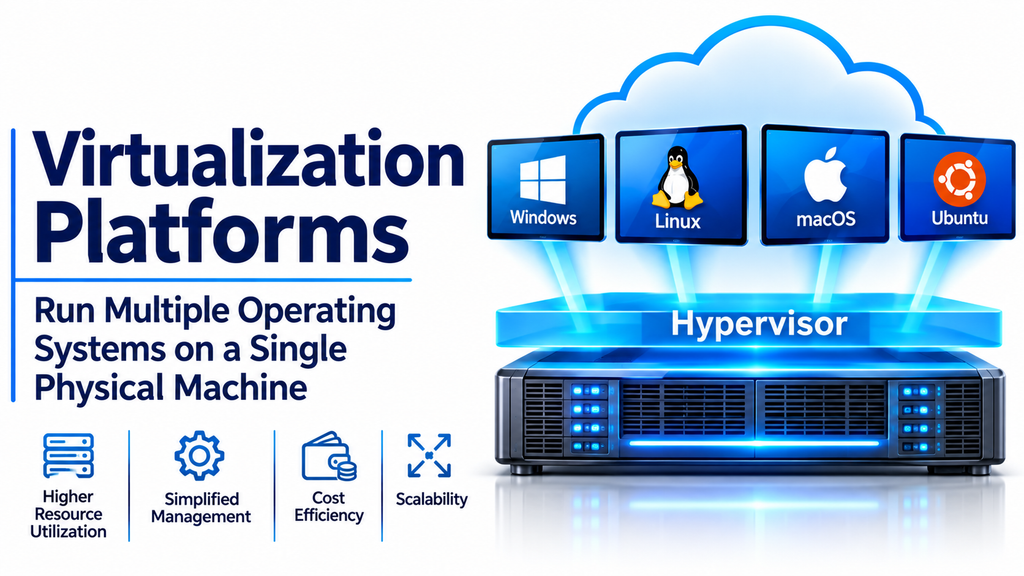
Virtualization platforms have become a fundamental part of modern IT infrastructure. They allow organizations to run multiple virtual systems on a single physical server, helping businesses use computing resources more efficiently while reducing hardware requirements and simplifying infrastructure management.
Instead of dedicating a separate physical computer to every application or workload, virtualization technology creates isolated virtual environments that share the resources of an underlying machine.
Businesses use virtualization platforms to operate servers, desktops, applications, development environments, and testing systems. They also support cloud computing, disaster recovery, and modern data center operations.
As organizations continue to modernize their technology environments, virtualization provides a flexible foundation for managing computing resources.
What Are Virtualization Platforms?
Virtualization platforms are software technologies that create virtual versions of computing resources, including servers, operating systems, storage, networks, and desktops.
A central component of many virtualization environments is the hypervisor. It manages virtual machines and distributes the physical hardware resources they require.
Each virtual machine can run its own operating system and applications independently of other virtual machines hosted on the same physical server.
Common virtualization capabilities include:
- Virtual machine creation: Create multiple virtual computers on physical hardware.
- Resource allocation: Assign CPU, memory, storage, and network resources.
- Isolation: Keep virtual environments separated from one another.
- Snapshot management: Capture virtual machine states for recovery or testing.
- Live migration: Move running virtual machines between compatible hosts.
- Centralized administration: Manage virtual infrastructure through a common interface.
- High availability: Help maintain workloads when supported infrastructure experiences failures.
- Resource monitoring: Track performance and infrastructure utilization.
These capabilities help organizations build scalable IT environments without relying entirely on separate physical machines.
Popular Virtualization Platforms
Several established virtualization platforms support different infrastructure requirements. Some focus on enterprise data centers, while others emphasize open-source flexibility, desktop virtualization, or cloud-based infrastructure.
VMware vSphere: Enterprise Server Virtualization
VMware vSphere is a widely recognized enterprise virtualization platform designed to manage virtual machines and physical server resources.
Its architecture includes ESXi, a hypervisor that runs directly on server hardware, and centralized management capabilities through vCenter Server.
Organizations use vSphere to consolidate workloads, allocate infrastructure resources, and manage virtual machine environments across multiple hosts.
Key capabilities:
- ESXi hypervisor technology.
- Centralized virtual machine management.
- Virtual machine migration.
- Resource allocation and monitoring.
- High availability capabilities.
- Integration with enterprise infrastructure.
Best suited for: Large organizations, enterprise data centers, and businesses operating established VMware environments.
Consideration: Organizations should evaluate current licensing, subscription models, product editions, and infrastructure compatibility before implementation.
Microsoft Hyper-V: Virtualization for Windows Environments
Microsoft Hyper-V is a hypervisor technology that enables organizations to create and manage virtual machines on supported Windows Server systems and Windows editions.
It is commonly used in environments that already depend on Microsoft technologies.
Hyper-V supports virtual machine management, virtual networking, checkpoints, and integration with Windows-based infrastructure.
Organizations can use it to consolidate servers, create testing environments, and operate multiple virtual machines on compatible physical hardware.
Key capabilities:
- Hardware-assisted virtualization.
- Virtual machine creation and management.
- Virtual networking.
- Virtual machine checkpoints.
- Resource allocation.
- Integration with Windows Server environments.
Best suited for: Windows-focused businesses, IT departments, developers, and organizations managing Microsoft-based infrastructure.
Consideration: Evaluate host hardware compatibility, licensing requirements, management tools, and backup integration.
Proxmox VE: Open-Source Virtualization Management
Proxmox Virtual Environment (VE) is an open-source platform that combines virtualization and centralized infrastructure management.
It supports KVM-based virtual machines and Linux Containers (LXC), providing flexibility for organizations that need different types of virtualized workloads.
Its browser-based management interface allows administrators to create virtual machines, configure storage, manage networking, and monitor infrastructure.
Proxmox VE also offers clustering and backup-related capabilities that make it attractive to small and medium-sized organizations.
Key capabilities:
- KVM virtual machine management.
- LXC container support.
- Web-based administration.
- Cluster management.
- Storage integration.
- Backup and recovery features.
Best suited for: Small businesses, IT professionals, laboratories, developers, and organizations interested in open-source infrastructure.
Consideration: Although the platform is accessible, production deployments still require technical knowledge of Linux, networking, storage, and infrastructure security.
Oracle VM VirtualBox: Desktop and Development Virtualization
Oracle VM VirtualBox is a desktop virtualization application that allows users to run guest operating systems inside virtual machines on supported host computers.
It is frequently used for software development, operating system testing, education, and personal experimentation.
Users can install multiple operating systems without replacing their primary desktop environment.
VirtualBox also supports virtual machine snapshots, shared folders, and virtual networking options.
Key capabilities:
- Cross-platform desktop virtualization.
- Multiple guest operating systems.
- Virtual machine snapshots.
- Shared folders.
- Virtual networking.
- Development and testing environments.
Best suited for: Developers, students, IT learners, and professionals who need local virtual machines.
Consideration: Desktop virtualization performance depends on the host computer’s available CPU, memory, and storage resources.
Red Hat OpenShift Virtualization: Virtual Machines and Containers
Red Hat OpenShift Virtualization extends the OpenShift platform with capabilities for managing virtual machines alongside containerized workloads.
It is designed for organizations that want to modernize their infrastructure without immediately abandoning traditional virtual machine applications.
The platform provides a Kubernetes-based management environment where supported virtual machines and containers can operate together.
This approach can help organizations gradually transition from traditional virtualization toward cloud-native infrastructure.
Key capabilities:
- Virtual machine management.
- Kubernetes-based orchestration.
- Container and VM integration.
- Centralized infrastructure administration.
- Hybrid cloud deployment options.
- Application modernization support.
Best suited for: Enterprises adopting Kubernetes, organizations modernizing legacy applications, and businesses combining virtual machines with containers.
Consideration: OpenShift environments require careful planning, technical expertise, and appropriate infrastructure resources.
KVM: Kernel-Based Virtual Machine Virtualization
Kernel-based Virtual Machine (KVM) is a virtualization technology built into the Linux kernel.
It allows Linux systems to function as hypervisors and host multiple virtual machines.
KVM is widely used in enterprise infrastructure, private cloud environments, and open-source virtualization solutions.
It is also an important technology behind several virtualization management platforms.
Key capabilities:
- Linux kernel integration.
- Hardware-assisted virtualization.
- Support for multiple guest operating systems.
- Virtual machine isolation.
- Resource management through supporting tools.
- Integration with Linux virtualization ecosystems.
Best suited for: Linux administrators, infrastructure engineers, cloud providers, and organizations building customized virtualization environments.
Consideration: KVM provides the underlying virtualization technology, but organizations may need additional management tools for centralized administration and monitoring.
Nutanix AHV: Enterprise Hyperconverged Virtualization
Nutanix AHV is a virtualization solution integrated with the Nutanix infrastructure platform.
It is designed to operate virtual machines within a hyperconverged infrastructure environment, combining computing, storage, and virtualization management.
The platform provides organizations with a way to manage virtual workloads through a centralized infrastructure environment.
Its integration with Nutanix infrastructure can simplify certain aspects of resource management and operational administration.
Key capabilities:
- Enterprise virtual machine management.
- Hyperconverged infrastructure integration.
- Centralized administration.
- Virtual machine migration capabilities.
- Resource management.
- Infrastructure monitoring.
Best suited for: Enterprises, organizations using Nutanix infrastructure, and businesses looking to simplify data center operations.
Consideration: Evaluate hardware compatibility, licensing, infrastructure dependencies, and the overall cost of adopting the Nutanix ecosystem.
Comparing Popular Virtualization Platforms
| Platform | Main technology or focus | Suitable environment |
|---|---|---|
| VMware vSphere | ESXi and enterprise virtualization | Enterprise data centers |
| Microsoft Hyper-V | Windows-based hypervisor | Microsoft environments |
| Proxmox VE | KVM and LXC | Open-source infrastructure |
| Oracle VirtualBox | Desktop virtualization | Development and testing |
| Red Hat OpenShift Virtualization | Kubernetes-based VM management | Cloud-native infrastructure |
| KVM | Linux-based virtualization | Linux and cloud environments |
| Nutanix AHV | Hyperconverged virtualization | Enterprise infrastructure |
The platforms differ in architecture, licensing, management complexity, and deployment requirements. Selecting one should depend on actual workloads and operational needs.
Types of Virtualization
Virtualization is not limited to creating virtual machines. It includes several technology categories that address different infrastructure requirements.
Server Virtualization
Server virtualization divides the resources of a physical server into multiple virtual machines.
Each virtual machine operates independently and can run different applications or operating systems.
This approach helps organizations consolidate servers and improve infrastructure utilization.
Desktop Virtualization
Desktop virtualization allows users to access desktop environments hosted on centralized infrastructure.
It is commonly used for remote working, centralized administration, and providing consistent desktop experiences across multiple devices.
Network Virtualization
Network virtualization creates logical network resources independently of the underlying physical networking hardware.
It can simplify network segmentation, traffic management, and infrastructure configuration.
Storage Virtualization
Storage virtualization combines or abstracts physical storage resources into logical storage pools.
Administrators can manage storage capacity more efficiently without requiring applications to interact directly with every physical storage device.
Application Virtualization
Application virtualization separates applications from certain aspects of the underlying operating system.
It can help organizations deliver software with reduced installation dependencies and improve application management.
Important Features to Evaluate Before Choosing a Virtualization Platform
Choosing virtualization software requires evaluating performance, scalability, compatibility, and management capabilities.
Hypervisor Architecture
The hypervisor determines how virtual machines interact with physical hardware.
Type 1 hypervisors run directly on server hardware, while Type 2 hypervisors operate on top of a host operating system.
For production server environments, Type 1 hypervisors are commonly preferred because they provide a dedicated virtualization layer.
Resource Allocation
A virtualization platform should allow administrators to allocate CPU, memory, storage, and network resources according to workload requirements.
Incorrect resource allocation can create performance problems when multiple virtual machines compete for the same physical resources.
Virtual Machine Migration
Migration allows virtual machines to move between compatible hosts.
This capability can support maintenance, workload balancing, and infrastructure upgrades.
Check whether the platform supports live migration and identify any network, storage, or licensing requirements.
Storage Management
Virtual machines depend on storage systems for operating systems, applications, and user data.
Look for support for suitable storage technologies, snapshots, provisioning methods, and backup integrations.
High Availability
High availability helps maintain access to virtual workloads when supported infrastructure components fail.
Depending on the platform, this may involve restarting virtual machines on healthy hosts or maintaining workloads through redundant infrastructure.
High availability is not a replacement for a complete disaster recovery strategy.
Security and Isolation
Virtualization platforms should provide controls for protecting virtual machines and administrative access.
Important features include role-based access control, secure management interfaces, isolation between workloads, logging, and integration with organizational identity systems.
Monitoring and Reporting
Infrastructure administrators need visibility into resource usage, virtual machine performance, and host health.
Centralized monitoring helps identify bottlenecks and plan capacity upgrades before performance problems affect users.
Common Business Applications of Virtualization Platforms
Virtualization supports many modern business and IT operations.
Data center consolidation: Organizations can run multiple virtual servers on fewer physical machines, reducing hardware requirements.
Software development: Developers can create isolated testing environments for different operating systems and software configurations.
Disaster recovery: Virtual machine backups and recovery capabilities can help organizations restore workloads after infrastructure failures.
Cloud infrastructure: Virtualization provides an important foundation for many private and public cloud computing environments.
Legacy application support: Older applications can continue operating within supported virtual machine environments without requiring separate physical hardware.
Education and training: Students and IT professionals can experiment with operating systems and networking configurations using virtual machines.
Business continuity: Virtualization can support workload mobility and recovery planning across compatible infrastructure.
Virtualization vs. Containerization
Virtualization and containerization both help organizations run isolated workloads, but they use different architectural approaches.
Traditional virtual machines generally include their own guest operating systems, while containers share the host operating system kernel.
| Feature | Virtual Machines | Containers |
|---|---|---|
| Operating system | Separate guest OS per VM | Shared host kernel |
| Resource overhead | Generally higher | Generally lower |
| Isolation | Virtual hardware-level isolation | Process and namespace-based isolation |
| Startup | Usually slower | Usually faster |
| Workloads | Full operating systems and applications | Individual applications and services |
| Examples | VMware vSphere, Hyper-V, KVM | Docker, containerd |
Virtual machines remain useful when applications require separate operating systems or stronger infrastructure-level separation.
Containers are particularly useful for modern application deployment and microservices architectures.
Many organizations use both technologies together rather than treating them as competing solutions.
Common Challenges in Virtualization Implementation
Virtualization can improve infrastructure efficiency, but poorly planned deployments can introduce operational difficulties.
- Resource overcommitment: Assigning too many virtual resources can reduce performance.
- Storage bottlenecks: Shared storage may become a limitation when workloads generate heavy disk activity.
- Licensing complexity: Different virtualization products have different subscription and licensing structures.
- Security misconfiguration: Weak administrative permissions or outdated hypervisors can expose infrastructure.
- Backup limitations: Virtual machine snapshots should not be treated as complete independent backups.
- Management complexity: Large virtual environments require monitoring, capacity planning, and technical expertise.
- Vendor dependency: Migrating between virtualization platforms may require careful planning and workload compatibility testing.
A pilot deployment and workload assessment can help organizations identify these challenges before expanding their virtualization infrastructure.
How to Choose the Right Virtualization Platform
The right virtualization platform depends on the organization’s size, technical environment, application requirements, and long-term infrastructure strategy.
VMware vSphere is worth considering for established enterprise virtualization environments. Microsoft Hyper-V can suit organizations that rely heavily on Windows Server. Proxmox VE and KVM provide flexible open-source approaches, while Oracle VirtualBox is useful for desktop testing and development.
Red Hat OpenShift Virtualization is relevant to organizations combining traditional virtual machines with Kubernetes workloads, while Nutanix AHV is designed for businesses using its hyperconverged infrastructure ecosystem.
Before selecting a platform, evaluate:
- Number of virtual machines required.
- Server hardware compatibility.
- Operating system and application requirements.
- Storage and network performance.
- High availability and disaster recovery.
- Centralized administration capabilities.
- Security and access management.
- Licensing and long-term operating costs.
Organizations should also consider administrator training, vendor support, and the complexity of migrating existing workloads.
Building an Efficient Virtualization Environment
Virtualization platforms provide the foundation for flexible, scalable, and centrally managed IT infrastructure.
They help organizations consolidate workloads, simplify server administration, create development environments, and support cloud computing strategies.
VMware vSphere, Microsoft Hyper-V, Proxmox VE, Oracle VirtualBox, Red Hat OpenShift Virtualization, KVM, and Nutanix AHV each address different virtualization requirements.
The best platform is one that supports existing workloads while providing the performance, security, flexibility, and management capabilities required for future growth.
With appropriate infrastructure planning, resource allocation, monitoring, and backup procedures, virtualization can help organizations build a more efficient and resilient technology environment.
