Upgrade & Secure Your Future with DevOps, SRE, DevSecOps, MLOps!
We spend hours scrolling social media and waste money on things we forget, but won’t spend 30 minutes a day earning certifications that can change our lives.
Master in DevOps, SRE, DevSecOps & MLOps by DevOps School!
Learn from Guru Rajesh Kumar and double your salary in just one year.
Introduction
CAE Simulation Software helps engineers test, validate, and improve product designs using computer-based simulations before physical prototypes are built. CAE stands for Computer-Aided Engineering, and it is commonly used for structural analysis, thermal analysis, fluid flow, crash testing, vibration, fatigue, electromagnetics, multiphysics, and manufacturing simulation.
In the 2026+ engineering market, CAE simulation matters because companies need faster product development, lower prototype costs, better safety validation, sustainability improvements, and stronger digital engineering workflows. Instead of testing every design only in a lab, teams can simulate real-world conditions early and reduce design risk.
Common real-world use cases include:
- Structural stress and deformation analysis
- Fluid flow and aerodynamics simulation
- Thermal and heat transfer analysis
- Crash, impact, and safety simulation
- Electronics cooling and electromagnetic simulation
- Product durability, fatigue, and vibration testing
Buyers should evaluate:
- Simulation physics coverage
- Accuracy and solver reliability
- CAD and PLM integrations
- Meshing quality and automation
- High-performance computing support
- Cloud or on-premise deployment options
- Usability for engineers and analysts
- Reporting and visualization tools
- Security and access control
- Licensing cost and scalability
Best for: mechanical engineers, simulation analysts, product designers, automotive teams, aerospace teams, manufacturing companies, electronics engineers, R&D teams, and enterprises that need reliable virtual testing.
Not ideal for: teams that only need basic 3D modeling, simple drafting, visual rendering, or non-engineering design reviews. For very simple projects, lightweight CAD tools, spreadsheet calculations, or basic validation tools may be enough.
Key Trends in CAE Simulation Software
- AI-assisted simulation setup is growing: CAE tools are starting to use AI for geometry cleanup, meshing suggestions, simulation setup, result interpretation, and design optimization.
- Cloud-based simulation is becoming more common: Engineering teams want scalable compute resources without always buying large local hardware clusters.
- Multiphysics simulation is becoming standard: Real products often involve structural, thermal, fluid, electrical, and motion behavior together, so buyers want tools that can connect multiple physics domains.
- Simulation is moving earlier in design: Product designers now use simulation during concept design, not only at the final validation stage.
- Digital twins are increasing CAE value: Simulation models are being connected with real-world operating data to support predictive maintenance and lifecycle engineering.
- HPC and GPU acceleration matter more: Large models, fluid simulation, crash analysis, and complex multiphysics workflows need faster compute and better solver performance.
- Automation is reducing repetitive analyst work: Templates, parametric studies, design exploration, and optimization workflows help teams run more design variants.
- CAD/PLM integration is a major buying factor: Teams want simulation tools that work smoothly with existing CAD, PDM, PLM, and manufacturing systems.
- Security expectations are rising: Engineering data often includes sensitive IP, so buyers now ask about SSO, MFA, encryption, audit logs, access control, and compliance documentation.
- Flexible licensing is important: CAE software can be expensive, so teams compare subscriptions, token-based licensing, cloud credits, solver modules, and enterprise agreements.
How We Selected These Tools
The tools below were selected using a practical SaaS/product and engineering software evaluation approach:
- Strong recognition in CAE, simulation, multiphysics, or engineering analysis
- Broad adoption across industries such as automotive, aerospace, manufacturing, electronics, energy, and research
- Feature completeness across structural, thermal, fluid, electromagnetic, crash, motion, and multiphysics workflows
- Solver maturity, accuracy reputation, and performance signals
- CAD, PLM, HPC, cloud, and enterprise ecosystem compatibility
- Fit for different customer segments, including freelancers, SMBs, mid-market engineering teams, and enterprises
- Availability of documentation, training, community, and professional support
- Deployment flexibility across desktop, cloud, hybrid, and self-managed environments
- Practical value for both design engineers and specialist simulation analysts
- Conservative treatment of security, compliance, and public ratings
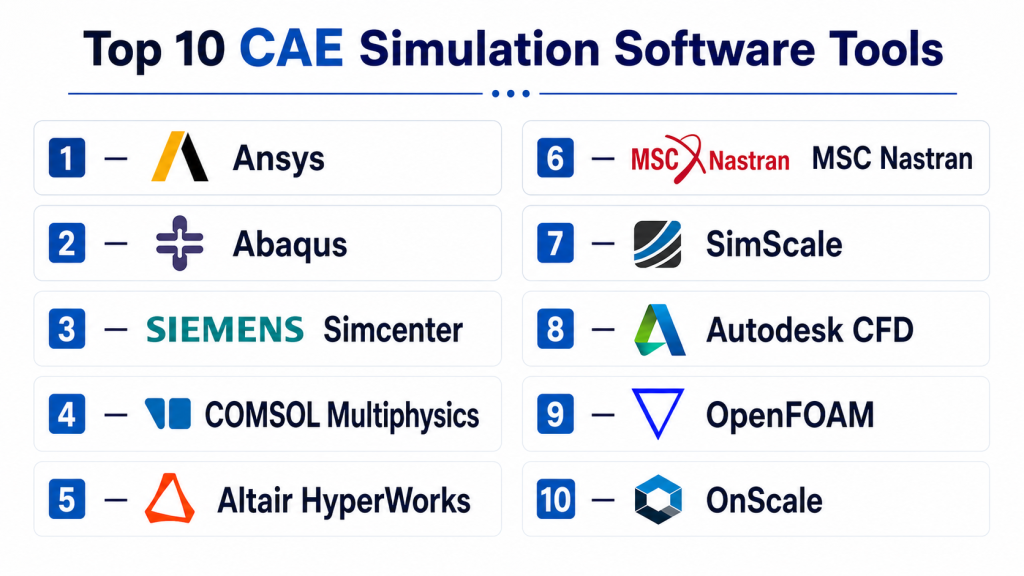
Top 10 CAE Simulation Software Tools
#1 — Ansys
Short description: Ansys is a broad CAE simulation platform used for structural analysis, CFD, electronics, thermal simulation, multiphysics, safety analysis, and system-level engineering. It is widely used by enterprise engineering teams in aerospace, automotive, energy, electronics, and manufacturing.
Key Features
- Structural, thermal, fluid, electromagnetic, and multiphysics simulation
- Advanced solver portfolio for complex engineering analysis
- High-performance computing support
- CAD and geometry preparation workflows
- Simulation automation and design exploration
- Electronics cooling and electromagnetic simulation options
- Enterprise-grade engineering simulation ecosystem
Pros
- Very broad simulation coverage
- Strong fit for complex enterprise engineering problems
- Mature solver ecosystem and professional support network
Cons
- Licensing and implementation can be expensive
- Learning curve can be high for new users
- May be too advanced for basic design validation needs
Platforms / Deployment
Windows / Linux
Deployment: Desktop / Cloud-connected / Hybrid depending on product and setup
Security & Compliance
Security and compliance details such as SSO, SAML, MFA, RBAC, audit logs, encryption, SOC 2, ISO 27001, GDPR, and HIPAA should be verified for the selected Ansys product and deployment. If not confirmed for the specific plan, write Not publicly stated.
Integrations & Ecosystem
Ansys has a strong engineering ecosystem and is commonly connected with CAD, PLM, HPC, and enterprise simulation workflows.
- CAD integrations
- HPC and cluster workflows
- PLM and enterprise engineering workflows
- Electronics and mechanical simulation workflows
- Scripting and automation
- Design optimization workflows
Support & Community
Ansys has extensive documentation, training resources, certification-style learning paths, professional services, partner support, and a large engineering user community. Support depth depends on license type, region, and enterprise agreement.
#2 — Abaqus
Short description: Abaqus is a powerful simulation tool known for advanced finite element analysis, nonlinear structural simulation, contact analysis, materials modeling, and complex mechanical behavior. It is commonly used in automotive, aerospace, manufacturing, consumer products, and research.
Key Features
- Advanced finite element analysis
- Nonlinear structural simulation
- Contact and large deformation analysis
- Material modeling for complex behavior
- Static, dynamic, and thermal-mechanical workflows
- Strong solver capability for demanding mechanical problems
- Integration with broader Dassault Systèmes engineering workflows
Pros
- Excellent for nonlinear and complex structural analysis
- Strong research and enterprise engineering adoption
- Useful for advanced materials, contact, and durability studies
Cons
- Requires simulation expertise for best results
- Interface and workflow can feel complex for beginners
- Licensing and enterprise setup can be costly
Platforms / Deployment
Windows / Linux
Deployment: Desktop / Enterprise / Hybrid depending on setup
Security & Compliance
Security and compliance details such as SSO, SAML, MFA, RBAC, audit logs, encryption, SOC 2, ISO 27001, GDPR, and HIPAA are Not publicly stated unless confirmed for the exact Dassault Systèmes product environment and deployment.
Integrations & Ecosystem
Abaqus is often used in advanced engineering and research workflows where solver depth matters more than beginner simplicity.
- CAD and geometry workflows
- Dassault Systèmes ecosystem
- Material modeling workflows
- Scripting and automation
- HPC workflows
- Structural simulation pipelines
Support & Community
Abaqus has strong technical documentation, professional support options, partner resources, and a large engineering and academic user base. Support availability depends on license and region.
#3 — Siemens Simcenter
Short description: Siemens Simcenter is a broad engineering simulation and testing platform covering 3D CAE, systems simulation, CFD, thermal, durability, acoustics, and product validation workflows. It is suited for companies that want simulation connected with design, testing, and PLM.
Key Features
- Multidiscipline simulation portfolio
- Structural, thermal, CFD, acoustics, and durability workflows
- Systems simulation and 1D simulation options
- Test and simulation data integration
- CAD and PLM ecosystem alignment
- Design exploration and optimization
- Enterprise engineering workflow support
Pros
- Strong fit for enterprise digital engineering workflows
- Good connection between simulation, testing, and PLM
- Useful for complex product development environments
Cons
- Implementation can be complex
- Best value often comes in Siemens-centered environments
- May require specialist training and structured rollout
Platforms / Deployment
Windows / Linux support may vary by product
Deployment: Desktop / Enterprise / Hybrid
Security & Compliance
Security and compliance details such as SSO, SAML, MFA, RBAC, audit logs, encryption, SOC 2, ISO 27001, GDPR, and HIPAA should be verified directly for the chosen Siemens deployment. If not confirmed, write Not publicly stated.
Integrations & Ecosystem
Simcenter is strong when connected with Siemens design, manufacturing, and lifecycle management workflows.
- Siemens NX workflows
- Teamcenter PLM workflows
- CAD integrations
- Test data workflows
- HPC workflows
- Systems engineering workflows
Support & Community
Siemens provides enterprise support, documentation, training resources, partner services, and implementation support. Support depth depends on product package and enterprise agreement.
#4 — COMSOL Multiphysics
Short description: COMSOL Multiphysics is a simulation platform focused on multiphysics modeling, where multiple physical effects interact in the same model. It is popular with researchers, advanced engineering teams, product developers, and companies working on complex physics problems.
Key Features
- Multiphysics modeling environment
- Structural, thermal, fluid, chemical, electrical, and acoustic simulation options
- Equation-based modeling flexibility
- Application builder for simulation apps
- CAD import and geometry tools
- Parametric studies and optimization
- Strong research and advanced engineering fit
Pros
- Excellent for coupled physics problems
- Flexible modeling environment for advanced users
- Useful for research, R&D, and custom simulation workflows
Cons
- Requires strong technical understanding
- Can be slower to learn than simpler simulation tools
- Module selection and licensing need careful review
Platforms / Deployment
Windows / macOS / Linux
Deployment: Desktop / Server / Hybrid depending on setup
Security & Compliance
Security and compliance details such as SSO, SAML, MFA, RBAC, audit logs, encryption, SOC 2, ISO 27001, GDPR, and HIPAA are Not publicly stated unless confirmed for the exact product and server deployment.
Integrations & Ecosystem
COMSOL is useful for teams that need flexible multiphysics modeling and custom simulation applications.
- CAD import workflows
- MATLAB integration options depending on setup
- Application Builder
- Server deployment options
- Optimization workflows
- Custom equation-based modeling
Support & Community
COMSOL has strong documentation, example models, training material, webinars, and professional support. It also has a strong academic and research community.
#5 — Altair HyperWorks
Short description: Altair HyperWorks is a CAE and simulation platform used for structural analysis, optimization, CFD, electromagnetics, manufacturing simulation, and data-driven engineering workflows. It is known for design optimization and broad solver support.
Key Features
- Structural simulation and finite element analysis
- Topology and design optimization
- CFD and multiphysics options depending on package
- Pre-processing and post-processing tools
- Solver portfolio for different simulation needs
- Lightweighting and performance optimization workflows
- Manufacturing and system simulation options
Pros
- Strong design optimization capabilities
- Broad CAE portfolio for engineering teams
- Useful for automotive, aerospace, manufacturing, and product design
Cons
- Tool portfolio can feel complex to navigate
- Training is important for advanced workflows
- Licensing structure should be reviewed carefully
Platforms / Deployment
Windows / Linux
Deployment: Desktop / Cloud-connected / Hybrid depending on product and setup
Security & Compliance
Security and compliance details such as SSO, SAML, MFA, RBAC, audit logs, encryption, SOC 2, ISO 27001, GDPR, and HIPAA are Not publicly stated unless confirmed directly for the selected Altair environment.
Integrations & Ecosystem
Altair HyperWorks fits well in simulation-led design, optimization, and enterprise engineering environments.
- CAD integrations
- Solver ecosystem
- HPC workflows
- Optimization workflows
- Data analytics and AI-assisted engineering options
- Manufacturing simulation workflows
Support & Community
Altair provides documentation, training, professional support, learning resources, and enterprise services. Support depth depends on plan and region.
#6 — MSC Nastran
Short description: MSC Nastran is a well-known finite element analysis solver used for structural analysis, dynamics, vibration, aeroelasticity, and advanced engineering validation. It is widely used in aerospace, automotive, defense, and high-end engineering environments.
Key Features
- Finite element structural analysis
- Linear and nonlinear analysis workflows
- Dynamics and vibration analysis
- Fatigue and durability workflows depending on setup
- Aerospace and automotive validation use cases
- Large model solving capability
- Integration with pre/post-processing tools
Pros
- Strong reputation for structural simulation
- Useful for demanding aerospace and automotive workflows
- Mature solver for engineering validation
Cons
- Not a beginner-friendly standalone environment
- Often requires additional pre/post-processing tools
- Best suited for experienced simulation teams
Platforms / Deployment
Windows / Linux
Deployment: Desktop / Enterprise / HPC / Hybrid depending on setup
Security & Compliance
Security and compliance information such as SSO, SAML, MFA, RBAC, audit logs, encryption, SOC 2, ISO 27001, GDPR, and HIPAA is Not publicly stated unless confirmed for the selected deployment.
Integrations & Ecosystem
MSC Nastran is commonly part of larger simulation environments where solver reliability and structural validation matter.
- Pre/post-processing tools
- FEA model workflows
- HPC environments
- Aerospace analysis workflows
- Automotive durability workflows
- Enterprise CAE pipelines
Support & Community
MSC Nastran has long-standing professional usage, documentation, training resources, and support channels through the vendor ecosystem. Support depends on license and agreement.
#7 — SimScale
Short description: SimScale is a cloud-native simulation platform used for CFD, FEA, thermal analysis, and engineering simulation through a browser-based environment. It is useful for teams that want simulation without managing heavy local infrastructure.
Key Features
- Browser-based simulation workflow
- Cloud-based compute resources
- CFD, structural, and thermal simulation options
- Collaboration and project sharing
- Geometry preparation and meshing workflows
- Result visualization in the cloud
- Accessible simulation environment for distributed teams
Pros
- No need for heavy local workstation setup
- Good for distributed teams and quick collaboration
- Easier access for SMBs and design engineers
Cons
- Cloud dependency may not fit every security policy
- Very advanced workflows may require specialist validation
- Performance and cost depend on usage and project size
Platforms / Deployment
Web
Deployment: Cloud
Security & Compliance
Security features may vary by plan. Details such as SSO, SAML, MFA, RBAC, audit logs, encryption, SOC 2, ISO 27001, GDPR, and HIPAA should be verified directly for the selected plan. If not confirmed, write Not publicly stated.
Integrations & Ecosystem
SimScale is useful for teams that want cloud-based simulation connected with modern engineering collaboration.
- CAD imports
- Web-based collaboration
- Cloud compute workflows
- CFD and FEA workflows
- Result sharing
- API or automation options may vary by plan
Support & Community
SimScale has documentation, tutorials, learning resources, user support, and community content. Support depth may vary between free, professional, and enterprise plans.
#8 — Autodesk CFD
Short description: Autodesk CFD is simulation software focused on computational fluid dynamics and thermal analysis. It is used by engineers designing products, buildings, electronics, and systems where fluid flow and heat transfer matter.
Key Features
- Fluid flow simulation
- Thermal analysis
- Electronics cooling workflows
- Building airflow and HVAC-related analysis
- CAD geometry workflows
- Result visualization and reporting
- Design comparison workflows
Pros
- Useful for fluid and thermal design validation
- Fits Autodesk-centered engineering workflows
- Good for design-stage CFD analysis
Cons
- Not a full general-purpose multiphysics platform
- Advanced CFD specialists may need deeper tools for complex cases
- Best value depends on Autodesk ecosystem fit
Platforms / Deployment
Windows
Deployment: Desktop / Autodesk-connected workflow
Security & Compliance
Autodesk account and admin features may vary by plan. Product-specific details such as SSO, SAML, MFA, RBAC, audit logs, encryption, SOC 2, ISO 27001, GDPR, and HIPAA should be verified directly. If not confirmed, write Not publicly stated.
Integrations & Ecosystem
Autodesk CFD fits design teams already working with Autodesk CAD and engineering tools.
- Autodesk CAD workflows
- Geometry import
- Thermal simulation workflows
- Fluid flow workflows
- Design comparison
- Engineering reporting workflows
Support & Community
Autodesk CFD has documentation, support options, training content, and Autodesk ecosystem resources. Support depth depends on subscription and region.
#9 — OpenFOAM
Short description: OpenFOAM is an open-source CFD software framework used for fluid flow, heat transfer, turbulence, multiphase flow, and custom simulation development. It is popular with researchers, CFD specialists, and technical teams that need flexible open-source simulation workflows.
Key Features
- Open-source CFD framework
- Fluid dynamics and heat transfer simulation
- Custom solver development
- Turbulence and multiphase flow modeling
- Strong scripting and automation potential
- HPC and Linux-based workflows
- Large technical user community
Pros
- Free and open-source
- Highly flexible for advanced CFD users
- Strong fit for research and custom solver development
Cons
- Steep learning curve for beginners
- Requires command-line and CFD expertise
- Commercial support depends on third-party providers
Platforms / Deployment
Linux / Windows options may vary / macOS options may vary
Deployment: Self-hosted / Open-source / HPC
Security & Compliance
As an open-source simulation framework, built-in enterprise features such as SSO, SAML, MFA, RBAC, audit logs, SOC 2, ISO 27001, GDPR, and HIPAA are Not publicly stated for the core software. Security depends on the user’s infrastructure and deployment practices.
Integrations & Ecosystem
OpenFOAM is strongest for technical teams that need CFD flexibility and are comfortable building custom workflows.
- Linux and HPC workflows
- Mesh tools
- Post-processing tools
- Custom solver development
- Scripting automation
- Research and academic workflows
Support & Community
OpenFOAM has a strong technical community, documentation resources, tutorials, and third-party training or support providers. It may not suit teams needing simple vendor-led onboarding.
#10 — OnScale
Short description: OnScale is a cloud simulation platform focused on engineering simulation for advanced physics, including mechanical, thermal, acoustic, and electronic-related use cases depending on product direction and setup. It is useful for teams interested in cloud simulation and scalable compute workflows.
Key Features
- Cloud-based simulation workflows
- Support for advanced physics use cases depending on setup
- Scalable compute approach
- Browser-oriented access depending on product environment
- Engineering simulation automation
- Result visualization workflows
- Useful for R&D and design validation teams
Pros
- Cloud-based approach can reduce local hardware dependency
- Useful for scalable simulation workflows
- Good fit for teams exploring modern simulation delivery models
Cons
- Product capabilities and packaging should be verified before purchase
- May not replace full enterprise CAE suites for all use cases
- Security and compliance details must be reviewed carefully
Platforms / Deployment
Web / Cloud options may vary
Deployment: Cloud
Security & Compliance
Security and compliance details such as SSO, SAML, MFA, RBAC, audit logs, encryption, SOC 2, ISO 27001, GDPR, and HIPAA are Not publicly stated unless confirmed directly for the selected product plan and deployment.
Integrations & Ecosystem
OnScale is best evaluated for cloud-first simulation workflows and specific physics requirements.
- Cloud simulation workflows
- CAD or geometry import options may vary
- Scalable compute workflows
- Result visualization
- Automation workflows
- API or platform integrations may vary by plan
Support & Community
Support and community details are Varies / Not publicly stated depending on product plan, enterprise arrangement, and current offering.
Comparison Table
| Tool Name | Best For | Platform(s) Supported | Deployment | Standout Feature | Public Rating |
|---|---|---|---|---|---|
| Ansys | Enterprise multiphysics simulation | Windows, Linux | Desktop / Hybrid | Broad simulation physics portfolio | N/A |
| Abaqus | Nonlinear structural analysis and advanced FEA | Windows, Linux | Desktop / Enterprise / Hybrid | Advanced nonlinear FEA solver | N/A |
| Siemens Simcenter | Enterprise simulation, test, and PLM-connected workflows | Windows, Linux support may vary | Desktop / Enterprise / Hybrid | Simulation connected with digital engineering workflows | N/A |
| COMSOL Multiphysics | Multiphysics research and advanced engineering | Windows, macOS, Linux | Desktop / Server / Hybrid | Flexible coupled physics modeling | N/A |
| Altair HyperWorks | Optimization, structural CAE, and engineering simulation | Windows, Linux | Desktop / Hybrid | Design optimization and broad solver ecosystem | N/A |
| MSC Nastran | Structural validation, dynamics, and aerospace workflows | Windows, Linux | Desktop / HPC / Hybrid | Mature structural FEA solver | N/A |
| SimScale | Cloud-based CFD, FEA, and thermal simulation | Web | Cloud | Browser-based cloud simulation | N/A |
| Autodesk CFD | Fluid flow and thermal simulation | Windows | Desktop | Design-stage CFD inside Autodesk workflows | N/A |
| OpenFOAM | Open-source CFD and custom solver development | Linux, Windows/macOS options vary | Self-hosted / Open-source | Flexible open-source CFD framework | N/A |
| OnScale | Cloud-first simulation and scalable compute workflows | Web / Cloud options vary | Cloud | Cloud simulation delivery model | N/A |
Evaluation & Scoring of CAE Simulation Software
| Tool Name | Core (25%) | Ease (15%) | Integrations (15%) | Security (10%) | Performance (10%) | Support (10%) | Value (15%) | Weighted Total (0–10) |
|---|---|---|---|---|---|---|---|---|
| Ansys | 10 | 6 | 10 | 8 | 9 | 9 | 6 | 8.45 |
| Abaqus | 9 | 5 | 8 | 7 | 9 | 8 | 6 | 7.65 |
| Siemens Simcenter | 9 | 6 | 10 | 8 | 9 | 9 | 6 | 8.25 |
| COMSOL Multiphysics | 9 | 6 | 8 | 6 | 8 | 8 | 7 | 7.65 |
| Altair HyperWorks | 9 | 6 | 9 | 7 | 9 | 8 | 7 | 8.00 |
| MSC Nastran | 9 | 5 | 8 | 6 | 9 | 8 | 6 | 7.45 |
| SimScale | 7 | 8 | 7 | 7 | 8 | 7 | 8 | 7.40 |
| Autodesk CFD | 7 | 7 | 8 | 7 | 7 | 8 | 7 | 7.30 |
| OpenFOAM | 8 | 4 | 7 | 5 | 8 | 7 | 10 | 7.15 |
| OnScale | 7 | 7 | 6 | 6 | 8 | 6 | 7 | 6.80 |
These scores are comparative and should not be treated as a universal ranking for every engineering team. An enterprise aerospace team may rank Ansys, Abaqus, Siemens Simcenter, or MSC Nastran higher because of solver depth and validation workflows. A startup may prefer SimScale or Autodesk CFD for easier access. A research team may value COMSOL or OpenFOAM because of flexibility. Always test tools with your own geometry, materials, boundary conditions, solver requirements, and validation data.
Which CAE Simulation Software Tool Is Right for You?
Solo / Freelancer
Solo engineers and independent consultants usually need a balance of cost, usability, and project fit.
Good choices:
- SimScale for cloud-based simulation without heavy local hardware
- COMSOL Multiphysics for advanced multiphysics consulting and research projects
- Autodesk CFD for Autodesk-centered fluid and thermal workflows
- OpenFOAM for expert CFD users who want open-source flexibility
Freelancers should avoid buying a broad enterprise suite unless client work clearly requires it. A focused tool that matches the project type is usually better than a large platform with unused modules.
SMB
Small and mid-sized engineering companies need practical simulation tools that improve product development without creating too much overhead.
Good choices:
- Ansys for broader simulation needs and mature workflows
- Altair HyperWorks for optimization-focused engineering
- SimScale for cloud access and easier collaboration
- Autodesk CFD for fluid and thermal design-stage validation
- COMSOL Multiphysics for multiphysics R&D and custom modeling
SMBs should start with their most common simulation problems. Structural, CFD, thermal, and multiphysics needs may point to different tools.
Mid-Market
Mid-market engineering teams usually need stronger collaboration, repeatable simulation standards, and better integration with design tools.
Recommended options:
- Ansys for broad multiphysics simulation
- Altair HyperWorks for structural optimization and advanced CAE
- Siemens Simcenter for integrated product development and testing workflows
- Abaqus for complex nonlinear structural problems
- COMSOL Multiphysics for coupled physics applications
At this level, teams should standardize meshing practices, material libraries, reporting templates, validation rules, and design review workflows.
Enterprise
Enterprise buyers need scalability, governance, validated solvers, IT security, support, and integration with PLM or digital engineering systems.
Strong enterprise-fit options:
- Ansys for broad CAE coverage
- Siemens Simcenter for PLM-connected engineering simulation
- Abaqus for advanced FEA and nonlinear analysis
- Altair HyperWorks for optimization and CAE workflows
- MSC Nastran for structural validation and aerospace-style requirements
Enterprise teams should validate solver credibility, auditability, data control, HPC integration, license management, user permissions, support terms, and long-term roadmap fit.
Budget vs Premium
Budget-sensitive teams may consider OpenFOAM if they have CFD expertise and can manage technical setup. SimScale can also be practical when cloud access reduces local hardware needs.
Premium tools such as Ansys, Abaqus, Siemens Simcenter, Altair HyperWorks, and COMSOL Multiphysics can justify their cost when accuracy, solver depth, support, validation, and enterprise reliability are important.
Feature Depth vs Ease of Use
If feature depth is the priority, Ansys, Abaqus, Siemens Simcenter, COMSOL Multiphysics, Altair HyperWorks, and MSC Nastran are strong choices. These platforms support complex simulations but usually require trained analysts.
If ease of access matters more, SimScale and Autodesk CFD may feel more approachable depending on the use case. They can help design teams run useful simulations without building a heavy CAE environment from day one.
Integrations & Scalability
Integration needs depend on how your engineering team works.
- CAD-heavy teams should check CAD import, geometry cleanup, and design update workflows.
- Enterprise teams should check PLM, PDM, HPC, and license server integration.
- CFD teams should check meshing, solver control, turbulence models, and post-processing.
- Structural teams should check material models, contact, nonlinear behavior, and fatigue workflows.
- R&D teams should check customization, scripting, and multiphysics flexibility.
Scalability also depends on training, solver governance, templates, model validation, compute resources, and internal simulation standards.
Security & Compliance Needs
CAE models often contain highly sensitive engineering IP, customer designs, material data, defense components, aerospace structures, medical devices, and proprietary product information.
Important security questions include:
- Does the vendor support MFA?
- Is SSO or SAML available?
- Are role-based permissions available?
- Are audit logs available?
- Is data encrypted in transit and at rest?
- Where is cloud simulation data stored?
- Can projects be restricted by team, role, or client?
- Are SOC 2, ISO 27001, GDPR, or HIPAA details clearly documented?
- Can the platform support internal IT and customer security reviews?
- Does the workflow allow local processing for sensitive projects?
If security details are not clearly available, treat them as Not publicly stated and verify directly with the vendor before enterprise use.
Frequently Asked Questions
What is CAE simulation software?
CAE simulation software helps engineers test product behavior digitally. It can simulate stress, heat, fluid flow, vibration, impact, electromagnetics, and other real-world conditions before physical testing.
What is the difference between CAD and CAE?
CAD is used to design the product geometry. CAE is used to analyze how that design performs under real-world conditions such as load, pressure, heat, vibration, or airflow.
Which CAE software is best for beginners?
SimScale and Autodesk CFD may be easier starting points for certain users. However, beginners should choose based on the type of simulation they need, such as structural, thermal, CFD, or multiphysics.
Which CAE software is best for enterprise teams?
Ansys, Siemens Simcenter, Abaqus, Altair HyperWorks, and MSC Nastran are strong enterprise options. The best choice depends on industry, solver requirements, PLM integration, and validation needs.
Which tool is best for multiphysics simulation?
COMSOL Multiphysics and Ansys are strong options for multiphysics workflows. Siemens Simcenter and Altair also support broad simulation needs depending on the selected modules.
Which CAE software is best for CFD?
Ansys, SimScale, Autodesk CFD, OpenFOAM, and Siemens Simcenter are common CFD options. The best choice depends on accuracy needs, solver control, usability, and cloud or local compute requirements.
Is open-source CAE software good enough?
Open-source tools like OpenFOAM can be very powerful for expert users. However, they require technical skill, setup effort, validation discipline, and often more internal support.
What are common mistakes when choosing CAE software?
Common mistakes include choosing based only on brand name, ignoring solver requirements, underestimating training, skipping validation, not checking CAD integration, and overlooking compute costs.
Is cloud CAE simulation safe?
Cloud CAE can be safe when properly managed, but buyers must verify access control, encryption, data storage, compliance documentation, and project permission settings before uploading sensitive engineering data.
How much does CAE simulation software cost?
Pricing varies widely. Some tools use subscriptions, modules, tokens, cloud credits, enterprise licenses, or open-source models. Buyers should compare total cost, not only license price.
Can CAE software replace physical testing?
CAE can reduce physical testing and improve design confidence, but it usually does not replace all physical testing. Critical products still require validation, certification, and real-world testing.
How important is meshing in CAE simulation?
Meshing is very important because poor mesh quality can lead to inaccurate results or solver failures. Good tools help automate meshing, but engineers still need to understand mesh quality and convergence.
Can non-experts use CAE software?
Some tools are becoming easier for design engineers, but simulation still requires engineering judgment. Non-experts should use templates, training, review processes, and specialist validation for important decisions.
What alternatives exist to CAE simulation software?
Alternatives include physical prototyping, lab testing, spreadsheet calculations, simplified engineering calculators, built-in CAD simulation tools, and outsourcing simulation to specialist consultants.
Conclusion
CAE Simulation Software helps engineering teams test ideas faster, reduce design risk, lower prototype costs, and make better product decisions before manufacturing. The best tool depends on the type of simulation, industry, team skill, budget, compute needs, and required accuracy. Ansys is strong for broad enterprise simulation. Abaqus is excellent for complex nonlinear structural analysis. Siemens Simcenter fits organizations that want simulation connected with testing and lifecycle workflows. COMSOL Multiphysics is powerful for coupled physics and R&D. Altair HyperWorks is strong for optimization, while MSC Nastran remains important for structural validation. SimScale and OnScale support cloud-first simulation models, Autodesk CFD is useful for design-stage fluid and thermal analysis, and OpenFOAM offers flexible open-source CFD for expert users.
