Upgrade & Secure Your Future with DevOps, SRE, DevSecOps, MLOps!
We spend hours scrolling social media and waste money on things we forget, but won’t spend 30 minutes a day earning certifications that can change our lives.
Master in DevOps, SRE, DevSecOps & MLOps by DevOps School!
Learn from Guru Rajesh Kumar and double your salary in just one year.
Introduction
DDoS protection tools help businesses defend websites, applications, APIs, DNS services, and cloud infrastructure from distributed denial-of-service attacks. In simple words, these tools detect abnormal traffic spikes, filter malicious requests, absorb attack traffic, and keep real users connected during an attack.
DDoS protection matters because modern businesses depend heavily on uptime. A single outage can affect sales, customer trust, platform availability, brand reputation, and operational continuity. These tools are commonly used for eCommerce websites, SaaS platforms, financial services, gaming platforms, media portals, APIs, cloud workloads, and high-traffic enterprise applications.
Buyers should evaluate mitigation capacity, Layer 3/4/7 protection, automation, latency impact, CDN/WAF integration, cloud compatibility, reporting, support, pricing model, and ease of deployment.
Best for: Security teams, DevOps teams, platform engineers, SaaS companies, enterprises, cloud-native businesses, financial platforms, gaming companies, and high-traffic websites.
Not ideal for: Very small static websites with low traffic and minimal risk, teams that only need basic hosting-level protection, or businesses already fully covered by managed cloud security bundles.
Key Trends in DDoS Protection Tools
- AI-assisted traffic analysis is becoming more important for detecting attack patterns faster.
- Layer 7 application protection is now a priority because attackers increasingly target APIs, login pages, and dynamic web apps.
- Integrated CDN, WAF, and DDoS security is becoming a common buying preference.
- Always-on protection is replacing purely on-demand scrubbing for mission-critical platforms.
- Cloud-native DDoS protection is growing for AWS, Azure, and Google Cloud workloads.
- API security and bot defense are becoming closely linked with DDoS mitigation.
- Hybrid deployment models are useful for enterprises with both data center and cloud workloads.
- Cost protection and billing transparency are becoming important during large-scale attacks.
- Real-time dashboards and attack analytics help teams understand attack source, type, and business impact.
- Compliance-driven industries increasingly prefer tools with audit logs, RBAC, SSO, and enterprise support.
How We Selected These Tools
The tools below were selected using practical buyer-focused criteria:
- Market adoption and recognition in DDoS mitigation.
- Coverage across network, transport, and application-layer attacks.
- Suitability for cloud, hybrid, and enterprise environments.
- Integration with CDN, WAF, DNS, SIEM, and cloud platforms.
- Strength of automation and real-time mitigation.
- Performance and reliability for high-traffic workloads.
- Enterprise security controls such as RBAC, MFA, SSO, and logging.
- Availability of documentation, onboarding, and managed support.
- Fit for different buyer segments, from SMB to enterprise.
- Overall value compared with complexity and operating cost.
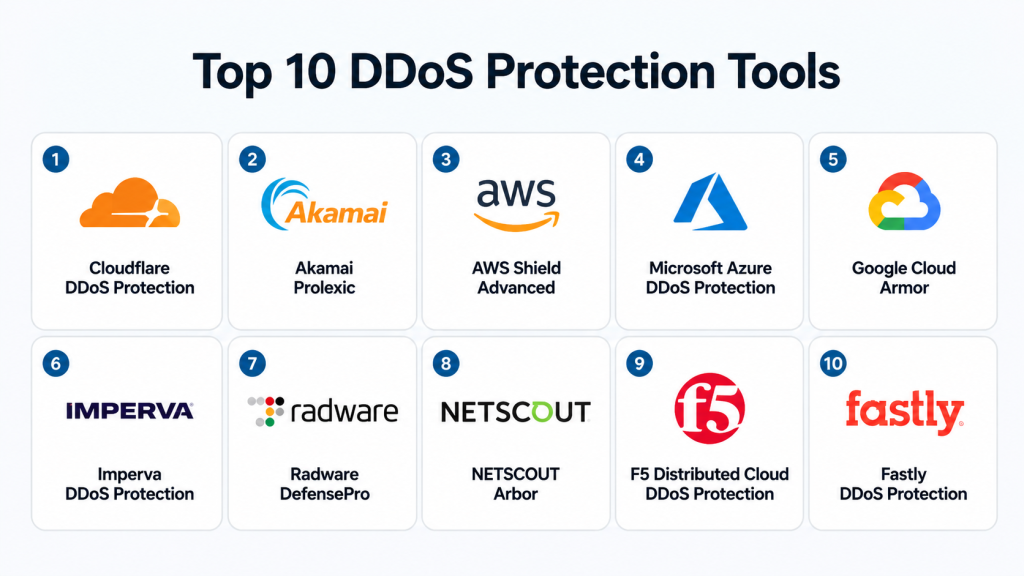
Top 10 DDoS Protection Tools
#1 — Cloudflare DDoS Protection
Short description: Cloudflare DDoS Protection is a widely used edge-based security service designed to protect websites, APIs, applications, and networks from volumetric and application-layer attacks. It is suitable for startups, SMBs, SaaS platforms, and large enterprises. Cloudflare combines DDoS mitigation with CDN, DNS, WAF, bot protection, and zero-trust services. It is often preferred by teams that want strong protection with simple deployment.
Key Features
- Always-on DDoS protection across Cloudflare’s global edge network.
- Protection for Layer 3, Layer 4, and Layer 7 attacks.
- Integrated CDN, DNS, WAF, bot management, and rate limiting.
- Automated traffic filtering and mitigation.
- API protection and application security controls.
- Real-time security analytics and dashboards.
- Enterprise-grade access control and account security options.
Pros
- Easy to deploy for websites and applications.
- Strong ecosystem with CDN, WAF, DNS, and bot protection.
- Suitable for both small businesses and large enterprises.
Cons
- Advanced controls may require higher-tier plans.
- Complex enterprise configurations may need expert tuning.
- Some features depend on selected plan and use case.
Platforms / Deployment
Web / Cloud / Hybrid
Security & Compliance
SSO/SAML, MFA, encryption, audit logs, RBAC, SOC 2, ISO 27001, GDPR: available or commonly supported depending on plan and product area. Some compliance details may vary by service.
Integrations & Ecosystem
Cloudflare has a broad ecosystem and works well with modern web, cloud, and security stacks. It is commonly used alongside web hosting platforms, cloud services, SIEM tools, DevOps workflows, and application security programs.
- DNS and CDN integrations.
- WAF and bot protection.
- API security and rate limiting.
- SIEM and logging integrations.
- Cloud and hybrid application support.
- Developer APIs and automation options.
Support & Community
Cloudflare offers documentation, community resources, enterprise support, onboarding assistance, and managed service options depending on plan. Its user community and learning resources are strong.
#2 — Akamai Prolexic
Short description: Akamai Prolexic is an enterprise-grade DDoS protection platform built for large-scale, mission-critical environments. It is commonly used by financial services, media companies, gaming platforms, public sector organizations, and global enterprises. Akamai focuses on high-capacity mitigation, traffic scrubbing, and advanced attack response. It is best suited for organizations with serious uptime and resilience requirements.
Key Features
- Protection against volumetric, protocol, and application-layer attacks.
- Global scrubbing and traffic mitigation capabilities.
- Always-on and on-demand protection models.
- Enterprise traffic routing and mitigation workflows.
- Managed security support and expert response.
- Detailed attack visibility and reporting.
- Works with complex enterprise network architectures.
Pros
- Strong fit for large enterprises and high-risk industries.
- Mature DDoS mitigation experience.
- Good for complex, high-volume traffic environments.
Cons
- May be too advanced for small businesses.
- Implementation can require network and security expertise.
- Pricing is usually enterprise-oriented.
Platforms / Deployment
Cloud / Hybrid
Security & Compliance
Enterprise security controls are available, including access control, reporting, and managed security workflows. Specific compliance details should be validated during procurement.
Integrations & Ecosystem
Akamai fits well into enterprise security and network environments. It can work with CDN, DNS, WAF, SIEM, and managed security workflows.
- CDN and edge security ecosystem.
- DNS protection options.
- WAF and application security integration.
- Enterprise traffic routing.
- SIEM and reporting workflows.
- Managed security operations support.
Support & Community
Akamai provides enterprise documentation, managed onboarding, professional services, and expert support. Community visibility is lower than developer-first tools, but enterprise support is strong.
#3 — AWS Shield Advanced
Short description: AWS Shield Advanced is a managed DDoS protection service for businesses running workloads on Amazon Web Services. It is especially useful for teams using Amazon CloudFront, Elastic Load Balancing, Route 53, AWS Global Accelerator, and public-facing AWS resources. It provides enhanced detection, mitigation, visibility, and response support. It is best for AWS-first organizations.
Key Features
- Managed DDoS protection for AWS workloads.
- Protection for CloudFront, Route 53, ELB, and other AWS services.
- Advanced attack detection and mitigation.
- Access to AWS DDoS Response Team for eligible customers.
- Cost protection features for certain attack-related scaling charges.
- Integration with AWS WAF and AWS Firewall Manager.
- Detailed metrics and event visibility.
Pros
- Strong native fit for AWS environments.
- Good integration with AWS security and monitoring tools.
- Useful for cloud-native applications and APIs.
Cons
- Best value is mainly for AWS-hosted workloads.
- Not a universal multi-cloud DDoS solution by default.
- Requires AWS security knowledge for best results.
Platforms / Deployment
Cloud
Security & Compliance
Supports AWS security ecosystem controls such as IAM, logging, encryption options, and integration with AWS security services. Specific compliance depends on AWS service configuration and customer environment.
Integrations & Ecosystem
AWS Shield Advanced works deeply within the AWS ecosystem and is often combined with WAF, CloudFront, Route 53, and monitoring tools.
- AWS WAF.
- Amazon CloudFront.
- Route 53.
- Elastic Load Balancing.
- AWS Firewall Manager.
- CloudWatch and security monitoring tools.
Support & Community
AWS offers strong documentation, enterprise support plans, architecture guidance, and cloud security resources. Community knowledge is broad due to AWS adoption.
#4 — Microsoft Azure DDoS Protection
Short description: Microsoft Azure DDoS Protection is designed for organizations running workloads on Microsoft Azure. It provides always-on monitoring and automatic mitigation for Azure resources. It is a practical choice for businesses already using Azure Virtual Network, Application Gateway, Azure Firewall, and related services. It works best when teams want native protection inside Azure.
Key Features
- Native DDoS protection for Azure workloads.
- Always-on traffic monitoring.
- Adaptive tuning based on application traffic patterns.
- Attack analytics and mitigation reports.
- Integration with Azure Monitor and Microsoft security tools.
- Protection for public IP resources in Azure.
- Easy enablement for Azure-based infrastructure.
Pros
- Strong fit for Azure-native environments.
- Simple deployment for teams already using Azure.
- Good integration with Microsoft security ecosystem.
Cons
- Less suitable for non-Azure workloads.
- Advanced use cases may require Azure networking expertise.
- Coverage depends on correct Azure architecture.
Platforms / Deployment
Cloud
Security & Compliance
Uses Azure security controls, identity management, logging, and monitoring. Compliance depends on Azure environment configuration and selected Microsoft services.
Integrations & Ecosystem
Azure DDoS Protection fits naturally with Microsoft cloud infrastructure and security services.
- Azure Virtual Network.
- Azure Monitor.
- Microsoft Defender ecosystem.
- Azure Firewall.
- Application Gateway.
- Log Analytics and SIEM workflows.
Support & Community
Microsoft provides documentation, cloud support plans, partner support, and strong enterprise onboarding. Azure community resources are also widely available.
#5 — Google Cloud Armor
Short description: Google Cloud Armor is a cloud security service for protecting applications and services hosted on Google Cloud. It combines DDoS defense with web application protection, security policies, and threat intelligence. It is useful for teams running global applications behind Google Cloud load balancing. It is best for organizations already invested in Google Cloud infrastructure.
Key Features
- DDoS protection for Google Cloud workloads.
- WAF rules and custom security policies.
- Adaptive protection and threat intelligence.
- IP allowlists, denylists, and geo-based controls.
- Integration with Google Cloud Load Balancing.
- Protection for applications, APIs, and services.
- Logging and monitoring through Google Cloud tools.
Pros
- Strong choice for Google Cloud-native applications.
- Combines DDoS defense with WAF-style controls.
- Good for global application delivery.
Cons
- Best suited for Google Cloud users.
- May require cloud security knowledge.
- Multi-cloud coverage may need additional architecture.
Platforms / Deployment
Cloud
Security & Compliance
Uses Google Cloud identity, logging, encryption, and security controls. Specific certifications and compliance depend on Google Cloud services and customer configuration.
Integrations & Ecosystem
Google Cloud Armor integrates well with Google Cloud infrastructure and security workflows.
- Google Cloud Load Balancing.
- Cloud Logging.
- Cloud Monitoring.
- Security Command Center.
- Google Cloud IAM.
- API and application protection workflows.
Support & Community
Google Cloud provides official documentation, enterprise support options, architecture guidance, and active cloud community resources.
#6 — Imperva DDoS Protection
Short description: Imperva DDoS Protection helps protect websites, networks, applications, and DNS services from traffic-based attacks. It is commonly considered by organizations that want DDoS mitigation along with broader application security. Imperva is suitable for mid-market and enterprise buyers. It is especially relevant where WAF, bot protection, API security, and DDoS defense need to work together.
Key Features
- Protection against network, protocol, and application-layer attacks.
- Website, network, and DNS DDoS protection options.
- Integration with WAF and application security services.
- Traffic monitoring and attack analytics.
- Automated mitigation workflows.
- Support for cloud and hybrid environments.
- Security operations visibility and reporting.
Pros
- Good combination of DDoS and application security.
- Suitable for enterprises with mixed environments.
- Helpful where WAF and DDoS need unified management.
Cons
- Advanced setup may require security expertise.
- Pricing and packaging can vary.
- May be more than needed for small websites.
Platforms / Deployment
Cloud / Hybrid
Security & Compliance
Enterprise security features are available, including access controls and reporting. Specific certifications and controls should be confirmed based on product package.
Integrations & Ecosystem
Imperva works well in web application security ecosystems and can support security operations teams.
- WAF integration.
- API security workflows.
- Bot protection.
- SIEM and logging workflows.
- DNS protection.
- Cloud and hybrid deployment support.
Support & Community
Imperva provides enterprise support, documentation, onboarding resources, and managed security expertise. Community visibility is moderate, while enterprise support is strong.
#7 — Radware DefensePro
Short description: Radware DefensePro is a DDoS protection and attack mitigation platform focused on real-time detection and automated response. It is used by enterprises, service providers, data centers, and organizations that need dedicated DDoS protection. Radware is known for behavioral detection, network protection, and hybrid deployment options. It is a strong fit for infrastructure-heavy environments.
Key Features
- Behavioral DDoS detection and mitigation.
- Network and application-layer attack protection.
- Real-time attack signature generation.
- Hardware, virtual, cloud, and hybrid deployment options.
- Protection for data centers and service provider networks.
- Attack analytics and visibility.
- Automated mitigation workflows.
Pros
- Strong for data center and infrastructure protection.
- Flexible deployment options.
- Good fit for enterprises and service providers.
Cons
- May require specialized security operations knowledge.
- Can be complex for small teams.
- Pricing and deployment depend on environment.
Platforms / Deployment
Cloud / Self-hosted / Hybrid
Security & Compliance
Security controls vary by deployment and package. Enterprise access control, logging, and policy management are typically available, but exact compliance details should be validated.
Integrations & Ecosystem
Radware fits well into network security and enterprise infrastructure environments.
- Network security tools.
- SIEM workflows.
- Data center infrastructure.
- Cloud DDoS services.
- Managed security operations.
- Service provider environments.
Support & Community
Radware offers documentation, enterprise support, professional services, and managed security expertise. It is more enterprise-focused than community-led.
#8 — NETSCOUT Arbor
Short description: NETSCOUT Arbor is a DDoS protection solution commonly used by service providers, telecoms, large enterprises, and organizations operating critical network infrastructure. It focuses heavily on network visibility, traffic analysis, and large-scale DDoS mitigation. Arbor is often selected where network-level visibility is as important as mitigation. It is best for mature security and network operations teams.
Key Features
- Network-layer DDoS detection and mitigation.
- Traffic visibility and flow analysis.
- Service provider and enterprise network protection.
- Large-scale attack detection workflows.
- Integration with network operations processes.
- Reporting and attack forensics.
- Support for complex infrastructure environments.
Pros
- Strong fit for telecoms and service providers.
- Deep network visibility.
- Suitable for high-scale infrastructure defense.
Cons
- Not ideal for simple website-only protection.
- Requires network security expertise.
- Deployment may be complex for smaller teams.
Platforms / Deployment
Self-hosted / Hybrid / Cloud options may vary
Security & Compliance
Varies / Not publicly stated. Enterprise access, reporting, and operational controls depend on deployment and licensing.
Integrations & Ecosystem
NETSCOUT Arbor is designed for network and security operations ecosystems.
- Network monitoring tools.
- Traffic flow systems.
- SIEM and SOC workflows.
- Service provider infrastructure.
- Routing and scrubbing workflows.
- Enterprise reporting systems.
Support & Community
NETSCOUT provides enterprise support, documentation, and professional services. Community resources are limited compared with cloud-native tools.
#9 — F5 Distributed Cloud DDoS Protection
Short description: F5 Distributed Cloud DDoS Protection helps organizations protect applications, APIs, and infrastructure across cloud, edge, and hybrid environments. It is useful for enterprises that already use F5 for application delivery, WAF, load balancing, and security. F5 focuses on application availability and multi-environment protection. It is suitable for complex enterprise architectures.
Key Features
- DDoS protection for applications and infrastructure.
- Multi-cloud and hybrid deployment support.
- Integration with F5 application delivery and security tools.
- Protection for APIs and web applications.
- Traffic visibility and mitigation controls.
- Edge and distributed cloud security options.
- Enterprise policy management.
Pros
- Strong fit for existing F5 customers.
- Good for complex hybrid and multi-cloud environments.
- Combines application delivery and security capabilities.
Cons
- May be complex for smaller teams.
- Best value often comes within broader F5 ecosystem.
- Pricing and setup may require enterprise planning.
Platforms / Deployment
Cloud / Hybrid
Security & Compliance
Enterprise controls such as access management, logging, and security policy features are available depending on product configuration. Specific compliance details should be confirmed during evaluation.
Integrations & Ecosystem
F5 has a strong ecosystem for enterprise application delivery and security.
- F5 BIG-IP ecosystem.
- WAF and API protection.
- Load balancing and traffic management.
- Multi-cloud networking.
- SIEM and monitoring tools.
- Enterprise security workflows.
Support & Community
F5 offers enterprise documentation, professional services, support tiers, and a strong network of partners and specialists.
#10 — Fastly DDoS Protection
Short description: Fastly DDoS Protection is an edge-based protection service designed for modern web applications, APIs, and high-performance digital platforms. It is especially useful for teams that care about speed, caching, edge delivery, and security in one platform. Fastly combines DDoS defense with CDN, WAF, bot protection, and edge observability. It is a good fit for developer-friendly and performance-sensitive teams.
Key Features
- Edge-based DDoS mitigation.
- Protection for websites, APIs, and applications.
- CDN and WAF integration.
- Real-time visibility and logs.
- Developer-friendly configuration model.
- API-first ecosystem.
- Performance-focused edge delivery.
Pros
- Strong for performance-sensitive applications.
- Good developer experience.
- Useful combination of CDN, WAF, and DDoS protection.
Cons
- Advanced configuration may require technical expertise.
- Best suited for teams comfortable with edge platforms.
- Some features may depend on selected package.
Platforms / Deployment
Cloud
Security & Compliance
Enterprise security controls are available depending on plan. Compliance details should be validated based on selected services and contract.
Integrations & Ecosystem
Fastly works well with modern DevOps, API, CDN, and observability workflows.
- CDN and edge compute.
- WAF integration.
- API workflows.
- Logging and observability tools.
- CI/CD-friendly configuration.
- Security operations integrations.
Support & Community
Fastly provides documentation, developer resources, enterprise support, and onboarding options. Its developer community is active compared with many enterprise-only tools.
Comparison Table
| Tool Name | Best For | Platform(s) Supported | Deployment | Standout Feature | Public Rating |
|---|---|---|---|---|---|
| Cloudflare DDoS Protection | SMB to enterprise websites and APIs | Web | Cloud / Hybrid | Broad CDN, DNS, WAF, and DDoS ecosystem | N/A |
| Akamai Prolexic | Large enterprises and high-risk industries | Web / Network | Cloud / Hybrid | Enterprise-grade global mitigation | N/A |
| AWS Shield Advanced | AWS-hosted workloads | AWS Cloud | Cloud | Native AWS DDoS protection | N/A |
| Microsoft Azure DDoS Protection | Azure workloads | Azure Cloud | Cloud | Native Azure traffic protection | N/A |
| Google Cloud Armor | Google Cloud applications | Google Cloud | Cloud | DDoS plus WAF-style security policies | N/A |
| Imperva DDoS Protection | App security and DDoS combined | Web / Network | Cloud / Hybrid | DDoS with WAF and app security | N/A |
| Radware DefensePro | Data centers and service providers | Network / Web | Cloud / Self-hosted / Hybrid | Behavioral DDoS detection | N/A |
| NETSCOUT Arbor | Telecoms and large network operators | Network | Self-hosted / Hybrid | Deep network traffic visibility | N/A |
| F5 Distributed Cloud DDoS Protection | Hybrid and multi-cloud enterprises | Web / Network | Cloud / Hybrid | Application delivery plus DDoS security | N/A |
| Fastly DDoS Protection | Performance-sensitive apps and APIs | Web | Cloud | Edge-native security and delivery | N/A |
Evaluation & Scoring of DDoS Protection Tools
| Tool Name | Core (25%) | Ease (15%) | Integrations (15%) | Security (10%) | Performance (10%) | Support (10%) | Value (15%) | Weighted Total (0–10) |
|---|---|---|---|---|---|---|---|---|
| Cloudflare DDoS Protection | 9 | 9 | 9 | 8 | 9 | 8 | 9 | 8.75 |
| Akamai Prolexic | 9 | 7 | 8 | 9 | 9 | 9 | 7 | 8.30 |
| AWS Shield Advanced | 8 | 8 | 9 | 8 | 8 | 8 | 8 | 8.10 |
| Microsoft Azure DDoS Protection | 8 | 8 | 8 | 8 | 8 | 8 | 8 | 8.00 |
| Google Cloud Armor | 8 | 8 | 8 | 8 | 8 | 8 | 8 | 8.00 |
| Imperva DDoS Protection | 8 | 7 | 8 | 8 | 8 | 8 | 7 | 7.65 |
| Radware DefensePro | 9 | 6 | 7 | 8 | 9 | 8 | 7 | 7.85 |
| NETSCOUT Arbor | 8 | 6 | 7 | 8 | 9 | 8 | 7 | 7.60 |
| F5 Distributed Cloud DDoS Protection | 8 | 7 | 8 | 8 | 8 | 8 | 7 | 7.65 |
| Fastly DDoS Protection | 8 | 8 | 8 | 8 | 9 | 8 | 8 | 8.10 |
These scores are comparative, not absolute. A higher score does not automatically mean the tool is best for every business. Cloud-native tools score better when used inside their own ecosystem, while enterprise platforms may score higher for complex architecture and high-risk environments. Always validate performance, support, pricing, and integrations through a pilot before purchase.
Which DDoS Protection Tool Is Right for You?
Solo / Freelancer
Solo users, consultants, small publishers, and independent website owners usually need simple protection, easy setup, and predictable pricing. Cloudflare is often the easiest starting point because it combines DNS, CDN, and DDoS protection in one platform. Fastly may also work well for developer-focused users who need performance and edge delivery.
For very small sites, basic hosting-level DDoS protection may be enough unless the website is high-risk or revenue-critical.
SMB
SMBs should prioritize ease of deployment, automated mitigation, dashboard visibility, and bundled security features. Cloudflare, Fastly, Imperva, and cloud-native options like AWS Shield Advanced, Azure DDoS Protection, or Google Cloud Armor are practical choices depending on where workloads run.
The best SMB choice is usually the one that reduces operational burden while covering websites, APIs, and customer-facing apps.
Mid-Market
Mid-market companies often need stronger reporting, WAF integration, API protection, support, and multi-environment coverage. Imperva, Cloudflare, Fastly, F5, and cloud-native platforms can be strong options.
At this stage, buyers should evaluate not only mitigation capacity but also logging, SIEM integration, incident response, and security team workflows.
Enterprise
Enterprises should focus on resilience, SLAs, managed support, attack response, hybrid architecture, and compliance. Akamai Prolexic, Radware DefensePro, NETSCOUT Arbor, F5 Distributed Cloud, Cloudflare Enterprise, and Imperva are strong candidates.
Large organizations should run a formal proof of concept and test routing, failover, reporting, support response, and integration with SOC workflows.
Budget vs Premium
Budget-focused buyers should begin with cloud-native or bundled CDN/WAF/DDoS options. Premium buyers should consider Akamai, Radware, NETSCOUT, F5, or enterprise Cloudflare/Imperva packages when downtime risk is high.
The right budget decision depends on the financial cost of downtime. If one hour of outage is expensive, premium mitigation may be justified.
Feature Depth vs Ease of Use
Cloudflare and Fastly are strong for ease and modern edge workflows. Akamai, Radware, NETSCOUT, and F5 provide deeper enterprise controls but may require more expertise.
Choose simplicity when your team is small. Choose depth when your architecture, risk, and compliance needs are complex.
Integrations & Scalability
AWS Shield Advanced is best for AWS-heavy environments. Azure DDoS Protection is best for Azure workloads. Google Cloud Armor is best for Google Cloud applications. Cloudflare, Akamai, Imperva, Fastly, F5, Radware, and NETSCOUT are better suited when broader or hybrid coverage is needed.
Scalability should include both traffic volume and operational scalability.
Security & Compliance Needs
Regulated industries should evaluate RBAC, audit logs, SSO, MFA, reporting, data handling, incident response support, and compliance documentation. Enterprises should avoid choosing based only on mitigation capacity.
Security teams should also check whether the DDoS tool integrates with WAF, SIEM, SOC workflows, ticketing, and cloud security systems.
Frequently Asked Questions
What is a DDoS protection tool?
A DDoS protection tool detects and blocks malicious traffic floods designed to make websites, applications, APIs, or networks unavailable. It helps keep services online during attacks.
How much do DDoS protection tools cost?
Pricing varies widely. Some tools are bundled with CDN or cloud services, while enterprise platforms use custom pricing based on traffic, risk, capacity, and support needs.
Is CDN-based DDoS protection enough?
It can be enough for many websites and web applications. However, complex networks, data centers, and regulated enterprises may need dedicated or hybrid DDoS mitigation.
What is the difference between WAF and DDoS protection?
A WAF protects applications from malicious web requests, while DDoS protection focuses on traffic floods and availability attacks. Many businesses need both together.
Which DDoS tool is best for AWS?
AWS Shield Advanced is usually the most native option for AWS workloads. Cloudflare, Akamai, Imperva, Fastly, and F5 may also be considered depending on architecture.
Which DDoS tool is best for Azure?
Microsoft Azure DDoS Protection is the natural choice for Azure-hosted workloads. It works well when applications already use Azure networking and monitoring tools.
Which DDoS tool is best for Google Cloud?
Google Cloud Armor is usually the best native option for Google Cloud applications. It combines DDoS protection with security policies and cloud integration.
What common mistakes should buyers avoid?
Common mistakes include choosing only by price, ignoring Layer 7 attacks, not testing failover, skipping logging requirements, and failing to validate support response.
Can DDoS protection stop all attacks?
No tool can guarantee perfect protection against every attack. Strong DDoS protection reduces risk, improves resilience, and helps teams respond faster.
How long does implementation take?
Simple DNS or CDN-based setups can be quick. Enterprise network, hybrid, or service provider deployments may require planning, routing changes, testing, and security review.
Do DDoS tools support APIs?
Many modern DDoS tools support API protection through rate limiting, WAF integration, bot detection, traffic analysis, and edge security controls.
When should a company switch DDoS providers?
Switch when current protection causes latency, lacks Layer 7 defense, has poor support, weak reporting, limited integrations, or does not fit cloud and compliance needs.
Conclusion
DDoS protection tools are no longer optional for businesses that depend on digital availability. The right platform can protect websites, applications, APIs, DNS, cloud workloads, and network infrastructure from disruptive attacks. However, there is no single best tool for every organization. Cloudflare and Fastly are strong for modern web and edge use cases. AWS Shield Advanced, Azure DDoS Protection, and Google Cloud Armor are excellent choices for cloud-native environments. Akamai, Radware, NETSCOUT, F5, and Imperva are better suited for enterprises with larger, more complex security requirements. The best next step is to shortlist two or three tools, compare them against your architecture, run a pilot, validate security controls, and confirm support quality before making a final decision.
