Upgrade & Secure Your Future with DevOps, SRE, DevSecOps, MLOps!
We spend hours scrolling social media and waste money on things we forget, but won’t spend 30 minutes a day earning certifications that can change our lives.
Master in DevOps, SRE, DevSecOps & MLOps by DevOps School!
Learn from Guru Rajesh Kumar and double your salary in just one year.
Introduction
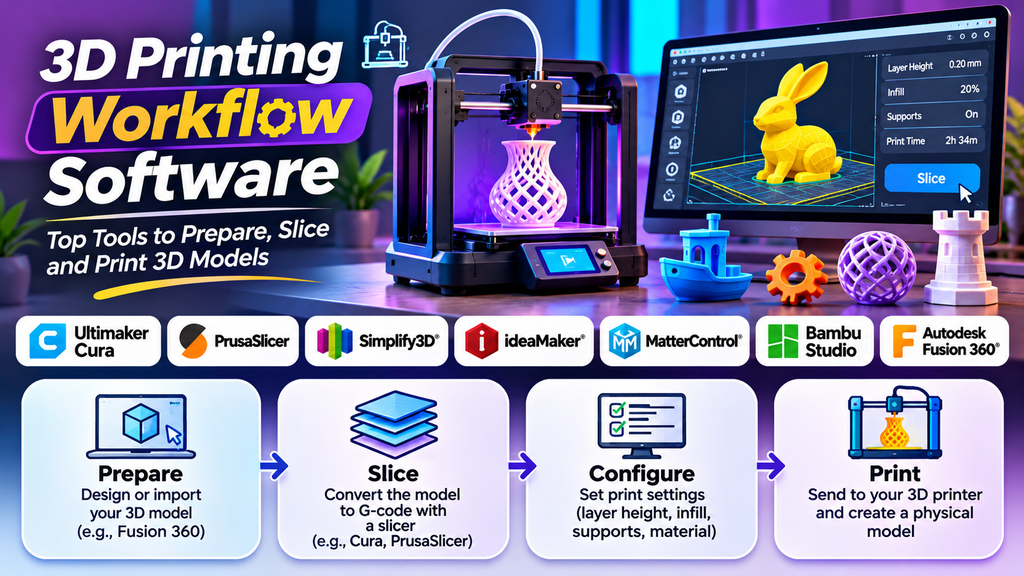
3D printing workflow software helps users move from a digital design to a finished physical object. These tools support different stages of the process, including model preparation, slicing, printer configuration, print monitoring, and design modification. Choosing suitable software can improve print quality, reduce material waste, and make the overall workflow more efficient.
What Is 3D Printing Workflow Software?
3D printing workflow software includes applications used to prepare, process, and manage models before and during printing. Slicers divide a 3D model into layers and generate printer instructions, while CAD applications help users design precise parts. Some tools also support printer monitoring, project organization, and model repair.
Best 3D Printing Workflow Software
- Ultimaker Cura
Ultimaker Cura is a popular slicing application with accessible settings for layer height, infill, supports, speed, and material profiles. It supports many printer workflows through compatible configurations and extensions.
Best for: Beginners and general-purpose FDM printing.
- PrusaSlicer
PrusaSlicer offers detailed slicing controls, customizable supports, and tools for preparing complex models. It supports Prusa printers and can also be configured for compatible third-party printers.
Best for: Users who want detailed control over slicing and print preparation.
- Simplify3D
Simplify3D is a commercial slicing tool offering detailed control over print processes, supports, and multi-part jobs. Users should verify current pricing and printer compatibility before selecting it.
Best for: Users who need advanced slicing controls.
- ideaMaker
ideaMaker provides configurable slicing settings and printer profiles for preparing 3D models. Its features can support different printing requirements, depending on the printer and workflow.
Best for: Users seeking flexible print preparation.
- MatterControl
MatterControl combines model preparation with features for managing aspects of a 3D printing workflow. Available functions and supported printers should be checked against the current version.
Best for: Users who prefer integrated model preparation and print management.
- Bambu Studio
Bambu Studio provides slicing and print preparation features designed around Bambu Lab printers. Its integrated workflow can simplify the process for users with compatible equipment.
Best for: Bambu Lab printer owners.
- Autodesk Fusion
Autodesk Fusion is primarily a CAD and product development application. It enables users to design precise components and prepare models for downstream manufacturing workflows, including 3D printing.
Best for: Engineering parts, product design, and creating printable models.
Comparison of Popular 3D Printing Workflow Software
Ultimaker Cura — Accessible slicing and general-purpose printing.
PrusaSlicer — Detailed print preparation and customizable settings.
Simplify3D — Commercial slicing with advanced controls.
ideaMaker — Configurable slicing and printer profiles.
MatterControl — Model preparation and print-management features.
Bambu Studio — Integrated workflow for Bambu Lab printers.
Autodesk Fusion — CAD modeling and product development.
How to Choose the Right 3D Printing Workflow Software
- Check printer compatibility and supported file formats.
- Consider whether you need CAD modeling, slicing, printer control, or a combination.
- Review features such as support generation, model repair, material profiles, and multi-material printing.
- Compare costs, licensing terms, and learning requirements.
- Test a representative model before committing to a particular workflow.
Key Features to Look For
- Model import and file compatibility.
- Slicing and printer instruction generation.
- Adjustable layer height, infill, speed, and support settings.
- Material and printer profiles.
- Layer-by-layer preview and print-time estimates.
- Model repair and mesh validation.
- Printer monitoring or management, where supported.
Tips for an Efficient 3D Printing Workflow
- Verify the model’s dimensions and orientation before slicing.
- Use a compatible printer and material profile.
- Preview every layer to identify gaps and unsupported areas.
- Run small test prints when adjusting unfamiliar settings.
- Keep track of successful print profiles and material settings.
- Update software carefully and confirm compatibility after major changes.
- Organize design files and sliced projects with clear names.
Common Mistakes to Avoid
Using an incorrect printer profile, skipping the layer preview, or selecting unsuitable material settings can cause failed prints. Other issues include poor bed adhesion, excessive supports, and incorrect model dimensions. A reliable workflow includes checking the model, reviewing the slicer preview, confirming printer settings, and inspecting the first layers after printing begins.
Conclusion
3D printing workflow software helps connect digital design with physical production. Cura and PrusaSlicer are useful slicing options, Simplify3D and ideaMaker offer alternative control-focused workflows, MatterControl combines printing-related tools, Bambu Studio supports Bambu Lab workflows, and Autodesk Fusion helps create precise CAD models.
The best choice depends on your printer, project requirements, experience, and budget. By selecting compatible tools and following a consistent preparation process, you can improve print reliability and make 3D printing more efficient.
