Upgrade & Secure Your Future with DevOps, SRE, DevSecOps, MLOps!
We spend hours scrolling social media and waste money on things we forget, but won’t spend 30 minutes a day earning certifications that can change our lives.
Master in DevOps, SRE, DevSecOps & MLOps by DevOps School!
Learn from Guru Rajesh Kumar and double your salary in just one year.
Introduction
3D rendering and ray tracing tools help designers, architects, animators, game developers, and product visualization teams turn digital models into realistic images and animations. These tools simulate lighting, shadows, reflections, materials, and surface details to produce visually convincing results.
From architectural walkthroughs and product advertisements to cinematic visual effects and real-time gaming, rendering software plays an important role in modern digital production. Choosing the right tool depends on project requirements, hardware, workflow, budget, and the level of visual quality needed.
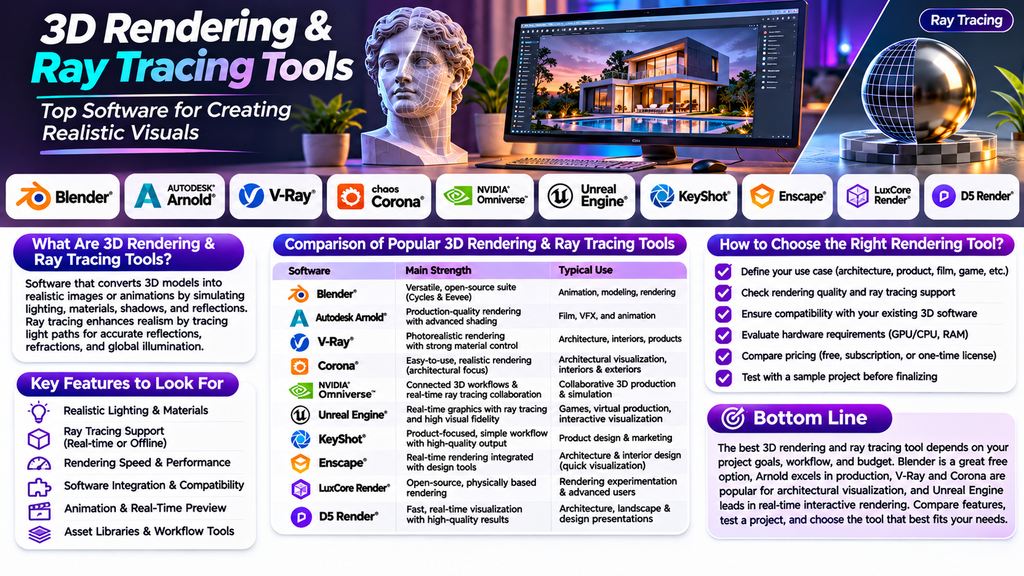
What Are 3D Rendering & Ray Tracing Tools?
3D rendering software converts a three-dimensional scene into a two-dimensional image or animation. It calculates how objects, materials, lighting, cameras, and the environment appear from a chosen viewpoint.
Ray tracing is a rendering technique that simulates the paths of light rays as they interact with surfaces. It can produce realistic reflections, refractions, shadows, and global illumination. Some applications use real-time ray tracing, while others use offline rendering for more detailed, high-quality output.
Best 3D Rendering & Ray Tracing Tools
1. Blender
Blender is a popular open-source 3D creation suite that includes modeling, animation, rendering, compositing, and simulation features. Its Cycles renderer supports physically based path tracing, while Eevee provides a faster real-time rendering workflow.
Best for: Independent artists, animation studios, creators, and budget-conscious teams.
2. Autodesk Arnold
Arnold is a production renderer widely used for visual effects, animation, and complex scenes. It is designed to deliver predictable, high-quality results and supports advanced lighting and shading workflows.
Best for: Film production, visual effects, and professional animation pipelines.
3. V-Ray
V-Ray is a rendering solution used in architecture, interior design, product visualization, and visual effects. It offers physically based lighting and materials, with workflows that can integrate with supported 3D modeling applications.
Best for: Architectural visualization, interiors, and photorealistic product imagery.
4. Chaos Corona
Corona is a renderer particularly associated with architectural visualization. Its accessible controls and lighting workflow help artists create realistic interiors, exteriors, and design presentations.
Best for: Architects, interior designers, and visualization studios.
5. NVIDIA Omniverse
NVIDIA Omniverse provides a platform for connecting 3D workflows, collaborating on scenes, and developing physically based visualizations. Its capabilities can support real-time rendering and ray-tracing workflows on compatible hardware.
Best for: Collaborative 3D production, simulation, and industrial visualization.
6. Unreal Engine
Unreal Engine is a real-time 3D creation platform used in games, virtual production, architectural visualization, and interactive experiences. It includes real-time lighting and ray-tracing capabilities, depending on the rendering pipeline and hardware.
Best for: Interactive visualization, game development, virtual production, and real-time experiences.
7. KeyShot
KeyShot focuses on product visualization and rendering. Its interface and material library help users create polished product images without building an unnecessarily complicated rendering workflow.
Best for: Product designers, manufacturers, and marketing teams creating product imagery.
8. Chaos Enscape
Enscape offers real-time visualization integrated with supported architecture and design applications. Designers can explore projects interactively and communicate design decisions through rendered views and walkthroughs.
Best for: Architects and interior designers who need quick visual feedback.
9. LuxCoreRender
LuxCoreRender is an open-source physically based rendering engine designed to simulate realistic light transport. It can be useful for users who want to explore advanced rendering techniques in supported workflows.
Best for: Technical artists, rendering enthusiasts, and users interested in open-source rendering.
10. D5 Render
D5 Render is a real-time rendering application aimed largely at architectural visualization and design presentation. It supports rapid scene visualization and can help teams produce convincing images and walkthroughs.
Best for: Architecture firms, landscape designers, and interior visualization professionals.
Comparison of Popular 3D Rendering & Ray Tracing Tools
| Software | Main strength | Typical use |
|---|---|---|
| Blender | Flexible open-source creation suite | Animation, modeling, rendering |
| Autodesk Arnold | Production-quality rendering | Film and visual effects |
| V-Ray | Photorealistic visualization | Architecture and products |
| Chaos Corona | Accessible architectural rendering | Interiors and exteriors |
| NVIDIA Omniverse | Connected 3D workflows | Collaboration and simulation |
| Unreal Engine | Real-time interactive graphics | Games and virtual production |
| KeyShot | Product-focused visualization | Product design and marketing |
| Enscape | Real-time design feedback | Architecture and interiors |
| LuxCoreRender | Open-source physically based rendering | Rendering experimentation |
| D5 Render | Fast architectural visualization | Design presentations |
Features, compatibility, licensing, and hardware requirements can vary by version. Check the vendor’s current documentation before choosing a tool.
Key Features to Look For
Realistic Lighting and Materials
Look for accurate material controls, environment lighting, global illumination, and realistic reflections. These features can improve the quality of product renders, interiors, and cinematic scenes.
Ray Tracing Support
Ray tracing can improve shadows, reflections, and light interactions. Check whether the software offers real-time ray tracing, offline path tracing, or both, and verify the hardware needed.
Rendering Speed and Performance
Rendering performance depends on scene complexity, image resolution, renderer settings, available memory, and CPU or GPU capability. Test representative scenes before committing to a production workflow.
Integration With Existing Software
Choose a tool that works with your modeling, CAD, animation, or architecture application. Reliable import options and compatible materials can reduce repetitive setup work.
Animation and Real-Time Preview
If you create walkthroughs, product animations, or interactive content, look for timeline controls, camera animation, preview rendering, and export options suited to your production needs.
Asset Libraries and Workflow Tools
Materials, lighting presets, environments, and reusable assets can speed up scene preparation. Collaboration features and render management may also matter for larger teams.
How to Choose the Right 3D Rendering Software
Start by identifying the type of content you need to produce. Architects may prioritize realistic interiors and fast design reviews, while film artists may need advanced shading and production pipeline integration. Product designers may prefer simple material setup and polished output.
Next, evaluate your hardware and budget. Some tools work well on modest systems, while demanding ray-tracing workflows benefit from compatible graphics hardware and sufficient memory. Compare subscription costs, free options, commercial licensing, and training requirements.
Finally, test the software using a real project. Render the same scene in your shortlisted tools and compare image quality, time required, ease of editing, stability, and export flexibility.
Tips for Better Rendering Results
- Use appropriate lighting: Combine suitable environment lighting with intentional key and fill lights.
- Choose realistic materials: Set roughness, reflectivity, transparency, and surface detail carefully.
- Optimize geometry: Remove unnecessary detail and use suitable levels of complexity.
- Test at lower quality first: Preview composition and lighting before starting final renders.
- Use denoising carefully: Check that it reduces noise without removing important details.
- Manage color consistently: Use a suitable color-management workflow to keep results predictable.
- Save reusable presets: Store materials, lighting setups, and camera settings for future projects.
- Check the final output: Review resolution, shadows, reflections, and small details before delivery.
Common Mistakes to Avoid
A common mistake is increasing render quality before fixing lighting, composition, and materials. This wastes time without necessarily improving the final image. Another issue is selecting a renderer without checking compatibility with the existing 3D workflow.
Ignoring hardware limits can also lead to slow renders or memory problems. In addition, overly reflective materials, unrealistic lighting, and excessive post-processing can make an image look less convincing. Build the scene carefully and test changes incrementally.
Conclusion
3D rendering and ray tracing tools help transform digital models into realistic visuals for architecture, product design, animation, games, and visual effects. Blender offers a versatile open-source option, Arnold supports demanding production workflows, V-Ray and Corona are popular for architectural visualization, and Unreal Engine supports interactive real-time experiences.
The best choice depends on your project, technical requirements, budget, and preferred workflow. Compare the available features, test sample projects, and select a renderer that balances image quality, speed, compatibility, and ease of use.
