Upgrade & Secure Your Future with DevOps, SRE, DevSecOps, MLOps!
We spend hours scrolling social media and waste money on things we forget, but won’t spend 30 minutes a day earning certifications that can change our lives.
Master in DevOps, SRE, DevSecOps & MLOps by DevOps School!
Learn from Guru Rajesh Kumar and double your salary in just one year.
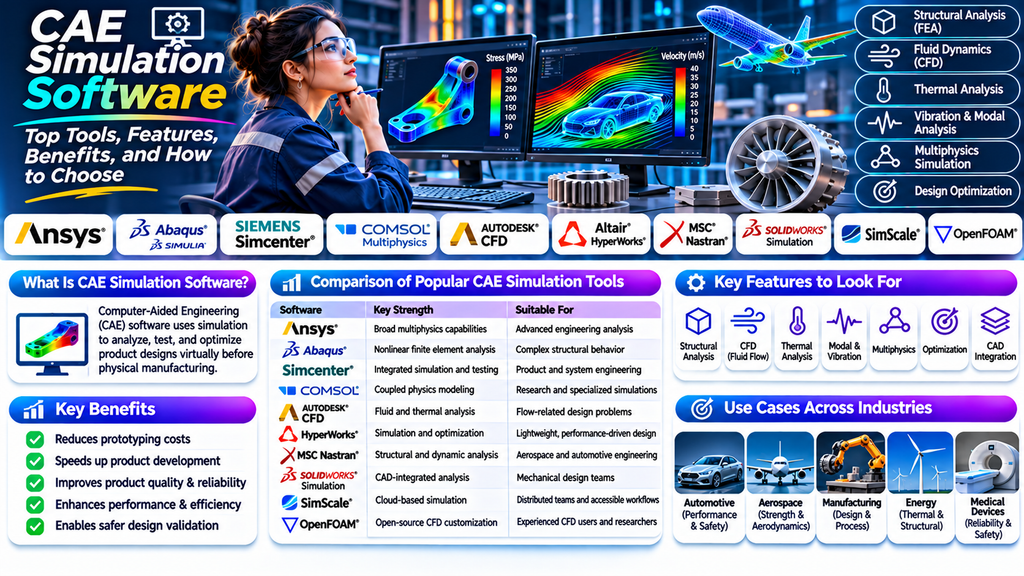
Computer-Aided Engineering (CAE) simulation software helps engineers analyze, test, and optimize product designs virtually before building physical prototypes. By simulating real-world conditions, CAE tools can help organizations reduce development costs, improve product performance, and identify design weaknesses early.
What Is CAE Simulation Software?
CAE simulation software uses mathematical models, numerical methods, and computer-based simulations to predict how products and systems behave under different conditions. Engineers use these tools to evaluate stress, deformation, vibration, heat transfer, fluid flow, and other physical phenomena.
CAE is widely used in automotive, aerospace, manufacturing, construction, electronics, energy, and medical device industries. It often works alongside CAD software, allowing teams to analyze digital designs before manufacturing begins.
Top CAE Simulation Software Tools
1. ANSYS
ANSYS offers a broad suite of engineering simulation tools for structural analysis, fluid dynamics, electromagnetics, thermal analysis, and multiphysics simulations. It is commonly used for complex engineering problems across industrial sectors.
2. Abaqus
Abaqus is known for advanced finite element analysis, particularly nonlinear problems involving complex materials, contact, deformation, and structural behavior. It is used in automotive, aerospace, and research applications.
3. Siemens Simcenter
Simcenter provides integrated simulation and testing capabilities for mechanical systems, fluids, thermal behavior, acoustics, and system performance. It can support product development from early design through validation.
4. COMSOL Multiphysics
COMSOL Multiphysics is designed for modeling interactions between physical phenomena, including heat transfer, fluid flow, structural mechanics, and electromagnetic fields. Its flexible modeling environment is useful for research and specialized engineering applications.
5. Autodesk CFD
Autodesk CFD focuses on computational fluid dynamics and thermal simulation. Engineers can use it to study airflow, fluid movement, and heat transfer in product and building designs.
6. Altair HyperWorks
Altair HyperWorks supports simulation-driven design, structural analysis, optimization, and lightweight engineering. It is used in industries where performance, material efficiency, and weight reduction are important.
7. MSC Nastran
MSC Nastran is an established structural analysis solver used for finite element analysis, including stress, vibration, and dynamic response. It is frequently applied in aerospace, automotive, and heavy engineering.
8. SolidWorks Simulation
SolidWorks Simulation integrates with the SolidWorks CAD environment to help designers evaluate stress, displacement, frequency, and thermal behavior. It can be convenient for teams that want analysis within their existing design workflow.
9. SimScale
SimScale is a cloud-based engineering simulation platform that supports structural mechanics, fluid dynamics, and thermal analysis. Its browser-based workflow can help teams access simulation tools without managing all the computing infrastructure locally.
10. OpenFOAM
OpenFOAM is an open-source computational fluid dynamics toolbox used for simulating fluid flow and related physical processes. It offers flexibility for experienced users who need customizable simulation workflows.
Key Features of CAE Simulation Software
- Structural analysis: evaluates stress, strain, displacement, and deformation.
- Computational fluid dynamics: analyzes airflow, liquid flow, pressure, and turbulence.
- Thermal analysis: studies temperature distribution and heat transfer.
- Modal and vibration analysis: identifies natural frequencies and dynamic responses.
- Multiphysics simulation: evaluates interactions between different physical systems.
- Optimization tools: helps compare design alternatives and improve performance.
- CAD integration: connects simulation workflows with product design models.
- Visualization and reporting: presents results through plots, contours, animations, and reports.
Benefits of Using CAE Simulation Software
Reduced Prototyping Costs
Virtual testing allows engineers to evaluate multiple design alternatives before investing in physical prototypes.
Faster Product Development
Simulation can help teams identify design problems earlier, reduce repeated testing, and make informed design decisions.
Improved Product Quality
Engineers can investigate potential failure points and assess whether designs meet performance requirements.
Better Performance and Efficiency
Simulation-driven optimization helps teams evaluate material use, structural strength, thermal behavior, and fluid performance.
Safer Design Validation
Engineers can investigate challenging operating conditions virtually before conducting appropriate physical validation tests.
CAE Simulation Software Comparison
| Software | Key Strength | Suitable For |
|---|---|---|
| ANSYS | Broad multiphysics capabilities | Advanced engineering analysis |
| Abaqus | Nonlinear finite element analysis | Complex structural behavior |
| Siemens Simcenter | Integrated simulation and testing | Product and system engineering |
| COMSOL Multiphysics | Coupled physics modeling | Research and specialized simulations |
| Autodesk CFD | Fluid and thermal analysis | Flow-related design problems |
| Altair HyperWorks | Simulation and optimization | Lightweight, performance-driven design |
| MSC Nastran | Structural and dynamic analysis | Aerospace and automotive engineering |
| SolidWorks Simulation | CAD-integrated analysis | Mechanical design teams |
| SimScale | Cloud-based simulation | Distributed teams and accessible workflows |
| OpenFOAM | Open-source CFD customization | Experienced CFD users and researchers |
Capabilities, licensing, and available modules vary by product and edition. Evaluate current vendor documentation before making a purchasing decision.
How to Choose the Right CAE Simulation Software
- Define your engineering needs: identify whether you require structural, thermal, fluid, electromagnetic, or multiphysics analysis.
- Check CAD compatibility: make sure the software works with your existing design tools and file formats.
- Assess ease of use: consider the learning curve, available training, and your team’s simulation experience.
- Evaluate computing requirements: check hardware, cloud options, model size, and solver performance.
- Compare total costs: include licensing, training, implementation, support, and computing resources.
- Review validation capabilities: look for appropriate verification, reporting, and correlation with physical test results.
- Test with a real project: run a representative model before committing to a platform.
Common Mistakes to Avoid
- Choosing software based only on popularity instead of engineering requirements.
- Using inaccurate material properties or boundary conditions.
- Ignoring mesh quality and convergence checks.
- Treating simulation results as a replacement for all physical testing.
- Overlooking training, support, and integration costs.
- Comparing tools without testing them on representative workloads.
Conclusion
CAE simulation software plays an important role in modern product development by helping engineers predict performance, identify potential issues, and improve designs before manufacturing. Tools such as ANSYS, Abaqus, Siemens Simcenter, COMSOL Multiphysics, and Altair HyperWorks support different engineering needs and levels of complexity.
The best CAE solution depends on your analysis requirements, existing design workflow, budget, computing resources, and team’s expertise. By evaluating these factors carefully and validating simulation results against appropriate engineering evidence, organizations can build a more efficient and reliable product development process.
Frequently Asked Questions
What does CAE stand for?
CAE stands for Computer-Aided Engineering. It refers to using software-based engineering analysis and simulation to evaluate product designs and systems.
What is CAE simulation used for?
It is used to analyze structural strength, deformation, vibration, fluid flow, heat transfer, and other physical behaviors before or alongside physical testing.
What is the difference between CAD and CAE?
CAD focuses on creating and modifying digital designs, while CAE focuses on analyzing how those designs may perform under specified conditions.
Is CAE software suitable for beginners?
Yes. Some tools provide guided workflows and CAD integration, while advanced simulations often require knowledge of engineering principles, numerical methods, and model validation.
Is open-source CAE software available?
Yes. OpenFOAM is a well-known open-source option for computational fluid dynamics. Suitability depends on the analysis task and the user’s technical experience.
