Upgrade & Secure Your Future with DevOps, SRE, DevSecOps, MLOps!
We spend hours scrolling social media and waste money on things we forget, but won’t spend 30 minutes a day earning certifications that can change our lives.
Master in DevOps, SRE, DevSecOps & MLOps by DevOps School!
Learn from Guru Rajesh Kumar and double your salary in just one year.
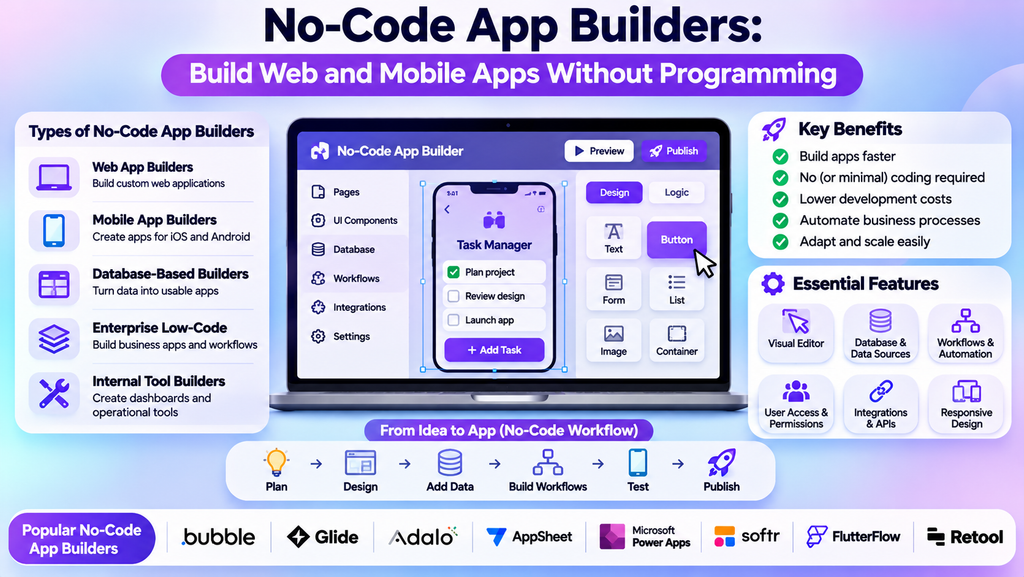
No-Code App Builders: Best Tools to Create Apps Without Programming
Building an application traditionally requires programming knowledge, development resources, and time for testing and maintenance. No-code app builders offer an alternative by allowing users to create applications through visual editors, drag-and-drop components, templates, and workflow automation.
These platforms help entrepreneurs, small businesses, marketers, and internal teams turn ideas into working applications with less manual coding. However, the best platform depends on the type of app, its data requirements, integrations, security needs, and plans for future growth.
What Are No-Code App Builders?
No-code app builders are software platforms that let users create applications using visual development tools instead of writing most of the application code themselves. Users can arrange screens, configure forms, connect data sources, define workflows, and publish apps using graphical interfaces.
They can be used to build customer portals, booking systems, directories, internal business tools, marketplaces, simple ecommerce experiences, and prototypes. Some platforms focus on web applications, while others specialize in mobile apps or business process automation.
No-code does not mean no technical planning. Data structures, permissions, testing, integrations, and ongoing maintenance still require careful attention.
Types of No-Code App Builders
1. Web App Builders
Web app builders help users create browser-based applications with interactive screens, user accounts, databases, and workflows.
Bubble is a popular option for building web applications visually. It can suit projects that need custom workflows and interactive functionality, though complex applications still require thoughtful design and testing.
2. Mobile App Builders
Mobile app builders help create applications designed for smartphones and tablets. Depending on the platform, they may support native app features, mobile-friendly interfaces, integrations, and publishing workflows.
Adalo and Glide are examples of visual app-building platforms. Compare their current publishing options and capabilities carefully, especially if you need app-store distribution or device-specific features.
3. Spreadsheet- and Database-Based App Builders
Some platforms turn spreadsheet data or structured records into usable business applications. These tools can be helpful for inventory tracking, employee directories, field operations, and lightweight customer relationship workflows.
Glide and AppSheet can support data-driven business applications. The best choice depends on the data source, user access requirements, and the complexity of the workflows.
4. Enterprise Low-Code Platforms
Low-code platforms provide visual development features while allowing custom code or more advanced technical configuration where needed. They can support larger business processes and integrations.
Microsoft Power Apps is an example of a platform used to build business applications within supported Microsoft environments. Although it reduces coding requirements, complex enterprise solutions may still need developers and administrators.
5. Workflow and Internal Tool Builders
These platforms help teams build internal dashboards, approval systems, operational tools, and interfaces connected to business data.
Retool is widely associated with internal tools and data-connected applications. Its suitability depends on the team’s technical requirements, data access model, and deployment needs.
Popular No-Code App Builders Compared
| Platform | Common use case |
|---|---|
| Bubble | Custom interactive web applications |
| Glide | Data-driven business apps and internal tools |
| Adalo | Visual mobile app creation |
| AppSheet | Business apps based on connected data |
| Microsoft Power Apps | Business applications and process automation |
| Softr | Portals, directories, and client-facing apps |
| FlutterFlow | Visual app development with options for more technical customization |
| Retool | Internal tools and data-connected interfaces |
Platform capabilities differ, and some are better described as low-code rather than strictly no-code. Verify current features, pricing, deployment options, and export limitations before choosing.
Essential Features to Look For
Visual editor: A clear drag-and-drop interface can make it easier to design screens and adjust layouts.
Database and data connections: Check how the platform stores records, connects to external data sources, and handles relationships between data.
Workflow automation: Look for conditional actions, notifications, approvals, scheduled tasks, and other workflows relevant to your app.
User authentication and permissions: Applications may need login functionality, role-based access, and controls that prevent users from seeing unauthorized information.
Responsive design: Confirm that the app works appropriately on mobile, tablet, and desktop screens.
Integrations and APIs: Check compatibility with payment providers, email tools, CRM systems, analytics platforms, and other services you need.
Testing and debugging: Preview modes, error logs, and testing tools can help identify issues before release.
Security and scalability: Review access controls, data protection, backups, performance limits, and the platform’s ability to support expected usage.
Export and portability: Understand whether you can export data, application code, or other assets if you later migrate to a different platform.
Benefits of No-Code App Builders
- Faster prototyping: Teams can test an idea before investing in a fully custom application.
- Reduced development barriers: Non-programmers can create useful workflows and interfaces.
- Lower initial costs: Some projects can be launched with fewer development resources, depending on complexity.
- Greater business agility: Teams can adjust forms, workflows, and screens as requirements evolve.
- Improved process automation: Repetitive tasks can be converted into structured digital workflows.
- Better collaboration: Business users and technical teams can work together on application requirements.
- Rapid validation: A prototype or minimum viable product can help test whether a solution meets user needs.
No-code tools do not eliminate every cost or technical challenge. Subscription fees, integration work, platform limits, security reviews, and future migration may affect the total cost of ownership.
How to Choose the Right No-Code App Builder
Define the Application Type
Start by deciding whether you need a web app, mobile app, customer portal, internal tool, marketplace, or workflow automation solution. Different platforms are optimized for different use cases.
List Your Required Features
Write down essential functions such as user registration, search, payments, notifications, file uploads, reports, and integrations. Separate must-have features from optional enhancements.
Evaluate Data and Security Needs
Consider the sensitivity of the data, user roles, access restrictions, retention requirements, and applicable privacy obligations. Avoid selecting a platform based only on how quickly a prototype can be assembled.
Check Integration Options
Verify that the platform connects to your existing databases, CRM, payment services, email tools, and APIs. Some integrations may require paid plans or additional configuration.
Compare Pricing and Usage Limits
Review user limits, storage, workflow executions, app publishing, custom domains, and premium integrations. Estimate costs based on realistic usage rather than the smallest introductory plan.
Consider Long-Term Flexibility
Check how easily you can maintain the app, add features, export data, and move to another platform. If the application is business-critical, evaluate vendor reliability and available support.
A Practical App-Building Workflow
- Identify the problem: Define the user need and the process the app should improve.
- Map the user journey: List the screens, actions, and decisions users will encounter.
- Create a simple prototype: Build the minimum set of screens needed to demonstrate the idea.
- Design the data structure: Define records, fields, relationships, and access permissions.
- Build the workflows: Configure forms, buttons, notifications, and conditional actions.
- Connect integrations: Add only the external services required for the first release.
- Test permissions and errors: Check valid and invalid inputs, user roles, and unexpected situations.
- Test on target devices: Review layout, usability, loading performance, and accessibility.
- Publish carefully: Configure domains or app distribution, security settings, and analytics.
- Monitor and improve: Gather feedback, fix defects, and add features based on real usage.
No-Code App Development Best Practices
Start small: Build the core use case first rather than trying to deliver every possible feature at launch.
Design for users: Use clear navigation, meaningful labels, simple forms, and helpful error messages.
Protect data: Apply least-privilege access, secure authentication, and suitable privacy controls.
Test workflows thoroughly: Confirm that automations run correctly and failures are visible to the people responsible for resolving them.
Keep integrations manageable: Every connection adds configuration and maintenance requirements. Use only what the app needs.
Document important logic: Record how workflows, data relationships, and permissions work so future maintenance is easier.
Plan for growth: Monitor performance and usage limits as the number of users, records, and automated actions increases.
Maintain ownership awareness: Understand platform terms, export capabilities, and the consequences of migrating the app later.
Common Mistakes to Avoid
- Choosing a platform before defining the app’s requirements.
- Building too many features before validating the main idea.
- Overlooking database structure and user permissions.
- Assuming a visually complete prototype is ready for production.
- Ignoring privacy, security, accessibility, or data retention.
- Underestimating recurring subscription and usage-based costs.
- Adding unnecessary integrations and automation.
- Failing to test on the devices users actually rely on.
- Neglecting backups, monitoring, documentation, and maintenance.
No-Code vs. Low-Code Development
| Area | No-code | Low-code |
|---|---|---|
| Main approach | Visual development with minimal or no hand-written code | Visual development supplemented by code where needed |
| Typical users | Business users, entrepreneurs, and non-programmers | Technical teams and users with some development knowledge |
| Flexibility | Depends on the platform’s built-in features | Often allows deeper customization |
| Best suited for | Standard workflows, prototypes, and supported app types | More complex integrations and customized applications |
The distinction is not absolute. Many platforms combine no-code interfaces with optional code, APIs, or developer features.
Conclusion
No-code app builders make application development more accessible by combining visual design, data management, and workflow automation. They can help businesses validate ideas, digitize processes, and launch useful applications without building everything from scratch.
