Upgrade & Secure Your Future with DevOps, SRE, DevSecOps, MLOps!
We spend hours scrolling social media and waste money on things we forget, but won’t spend 30 minutes a day earning certifications that can change our lives.
Master in DevOps, SRE, DevSecOps & MLOps by DevOps School!
Learn from Guru Rajesh Kumar and double your salary in just one year.
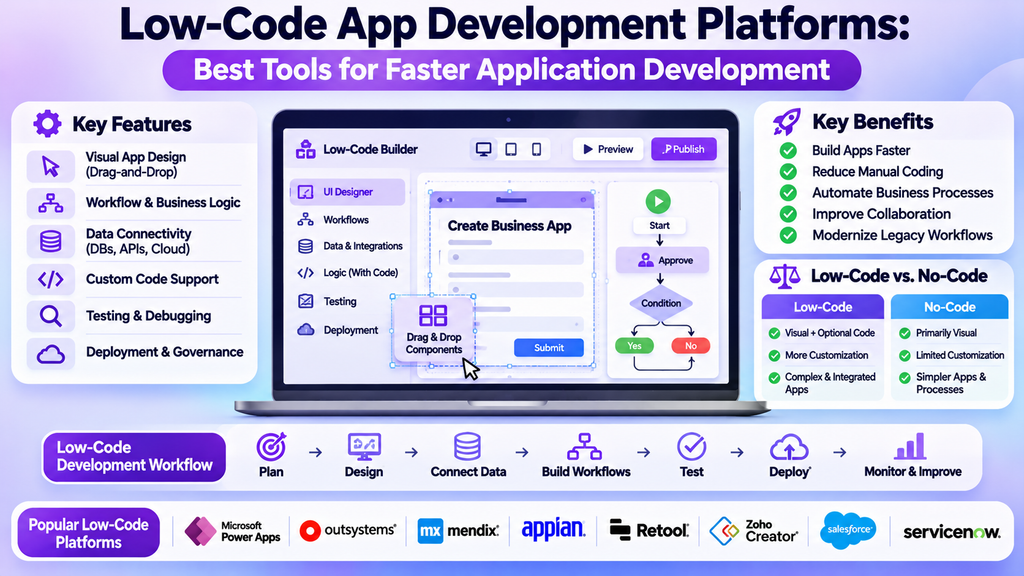
Low-Code App Development Platforms: Best Tools for Faster Application Development
Low-code app development platforms help organizations build applications using visual interfaces, reusable components, workflow designers, and optional programming. They can reduce the amount of manual coding required while allowing development teams to create business applications, automate processes, and connect existing systems.
These platforms are useful for organizations that want to modernize workflows, develop internal tools, improve customer experiences, and deliver applications more efficiently. However, choosing the right platform requires evaluating integration needs, security, scalability, licensing, and the technical skills available within the team.
What Are Low-Code App Development Platforms?
Low-code app development platforms provide visual tools for designing interfaces, defining business logic, managing data, and deploying applications. Developers can often extend these capabilities with custom code when a project requires more specialized functionality.
Unlike traditional development, where much of the application is created through hand-written code, low-code development relies on configurable components and visual workflows. It does not eliminate programming entirely; rather, it can reduce repetitive coding and help teams focus on business requirements.
Common applications include employee portals, approval systems, customer service tools, inventory applications, reporting dashboards, and operational workflows.
Types of Low-Code Development Platforms
1. Enterprise Application Platforms
Enterprise platforms support business applications that require structured workflows, integration with existing systems, access controls, and governance.
Microsoft Power Apps is commonly used to create business applications within the Microsoft ecosystem. It can connect with supported data sources and Microsoft services, depending on configuration and licensing.
2. Full-Stack Application Development Platforms
These platforms provide tools for building user interfaces, application logic, data connections, and deployment workflows. They can be useful for applications that need more customization than a basic form or dashboard.
OutSystems and Mendix are established examples of low-code application development platforms designed to support business and enterprise use cases.
3. Workflow and Process Automation Platforms
Some platforms focus on automating approvals, notifications, data processing, and repetitive business tasks. They may combine workflow designers with application-building features.
Microsoft Power Automate supports workflow automation across supported services. It can complement application development by connecting actions, data, and business processes.
4. Internal Tool Development Platforms
Internal tool platforms help teams build interfaces for operational databases, business systems, and administrative workflows.
Retool is an example of a platform used to build data-connected internal tools. Its suitability depends on the team’s data environment, security requirements, and deployment preferences.
5. Low-Code Mobile Application Platforms
Some low-code platforms help teams create mobile-friendly business applications. Depending on the product, these may support responsive interfaces, device capabilities, offline workflows, and deployment options.
Before selecting a mobile-focused platform, verify supported operating systems, distribution methods, device integrations, and any restrictions that apply to the required app features.
Popular Low-Code App Development Platforms Compared
| Platform | Common use case |
|---|---|
| Microsoft Power Apps | Business applications and Microsoft-connected workflows |
| OutSystems | Enterprise application development |
| Mendix | Business applications and model-driven development |
| Appian | Process automation and business applications |
| Retool | Internal tools connected to business data |
| Zoho Creator | Custom business applications and workflows |
| Salesforce Platform | Applications extending Salesforce data and processes |
| ServiceNow App Engine | Applications and workflows within the ServiceNow environment |
The best choice depends on the complexity of the application, available integrations, licensing, and the ecosystem your organization already uses. Features and plan limitations can change, so confirm current vendor documentation before making a decision.
Essential Features to Look For
Visual application designer: Drag-and-drop components and visual screen editors can accelerate interface development.
Workflow and business logic tools: Conditional rules, approvals, notifications, and reusable processes help automate routine work.
Data connectivity: Check support for databases, APIs, cloud services, and existing business applications.
Role-based access: Applications should support suitable authentication, permissions, and controls over sensitive data.
Custom code support: Developers may need to extend built-in functionality for specialized requirements.
Testing and debugging: Look for tools that help identify errors, validate workflows, and test changes before deployment.
Deployment and environment management: Development, testing, and production environments help teams manage changes more safely.
Monitoring and analytics: Logs, usage metrics, and performance monitoring can help teams diagnose issues and understand adoption.
Governance and security: Enterprise teams may require centralized administration, audit trails, policy controls, and compliance support.
Scalability and portability: Evaluate expected user volumes, performance limits, data export, and options for moving applications if requirements change.
Benefits of Low-Code App Development
- Faster delivery: Reusable components and visual development can shorten the time needed to build common features.
- Reduced repetitive coding: Developers can spend less time implementing standard forms, workflows, and interfaces.
- Improved collaboration: Business stakeholders can help define requirements through visual prototypes and workflow models.
- Process automation: Manual approvals and repetitive tasks can be converted into structured digital processes.
- Application modernization: Organizations can replace selected spreadsheets or legacy workflows with managed applications.
- Consistent development practices: Shared components and governance policies can help teams follow common standards.
- Flexible customization: Optional code and integrations can support requirements beyond basic templates.
Low-code does not automatically make every project faster or cheaper. Complex integrations, poorly defined requirements, licensing costs, and governance work can still require significant effort.
Low-Code vs. No-Code Development
| Area | Low-code | No-code |
|---|---|---|
| Development approach | Visual tools with optional coding | Primarily visual configuration |
| Typical users | Developers and technically skilled business teams | Business users and non-programmers |
| Customization | Often supports deeper technical extensions | Depends mainly on built-in capabilities |
| Common applications | Complex business systems and integrated workflows | Prototypes, simpler apps, and standard processes |
| Technical oversight | Often important for complex applications | Still needed for security, data, and production readiness |
The distinction is not absolute. Many platforms combine visual development with optional coding, APIs, and advanced configuration.
How to Choose the Right Low-Code Platform
Define Business Requirements
Identify the process the application should improve, its users, required features, and the outcomes you want to measure. Clear requirements help prevent unnecessary complexity.
Evaluate Existing Systems
List the databases, CRM systems, identity providers, and business applications the new solution must connect to. Confirm that supported connectors or APIs can meet those needs.
Review Security and Governance
Assess authentication, permissions, audit logging, data residency, retention, and applicable compliance requirements. Establish who can create, publish, and maintain applications.
Compare Total Cost
Consider user licensing, developer licensing, premium connectors, environments, usage limits, external services, training, and ongoing support. Evaluate costs against realistic usage.
Assess Technical Flexibility
Determine whether built-in features are sufficient or whether custom code, APIs, specialized components, or external services will be necessary.
Test Scalability and Performance
Build a small proof of concept using realistic data and workflows. Test performance, concurrent access, error handling, and the behavior of critical integrations.
Check Vendor Support and Portability
Review documentation, support options, release practices, export capabilities, and the effort required to migrate data or rebuild the application elsewhere.
A Practical Low-Code Development Workflow
- Identify the problem: Define the process, user needs, and expected business outcome.
- Map the workflow: Document current steps, decisions, approvals, and pain points.
- Design the application: Create a simple model of the screens, navigation, and data.
- Configure data sources: Define relationships, validation rules, and permissions.
- Build the core functionality: Use reusable components and visual logic wherever practical.
- Connect integrations: Configure APIs and supported connectors, applying appropriate access controls.
- Test thoroughly: Check normal scenarios, invalid inputs, permissions, performance, and failure conditions.
- Review security and governance: Confirm that the application follows organizational policies before release.
- Deploy in stages: Use controlled testing and release processes to reduce operational risk.
- Monitor and improve: Gather feedback, review logs, fix defects, and refine the application over time.
Low-Code Development Best Practices
Start with a focused use case: Build the essential workflow first and expand after validating its value.
Design for users: Use clear labels, predictable navigation, accessible forms, and useful error messages.
Use reusable components: Shared elements improve consistency and reduce repeated work.
Protect data: Apply least-privilege permissions, secure authentication, and appropriate data-handling practices.
Document integrations: Record data sources, API dependencies, credentials ownership, and failure-handling procedures.
Maintain development environments: Separate testing from production when supported, and review changes before release.
Monitor application performance: Track errors, response times, usage, and automation failures.
Plan ownership: Establish who maintains the application, approves changes, and responds to incidents.
Common Low-Code Development Mistakes
- Selecting a platform before documenting business and technical requirements.
- Building a large application without validating the core workflow.
- Giving users broader data access than they need.
- Overlooking integration limits, licensing, or usage-based charges.
- Treating visual development as a substitute for testing.
- Failing to document workflows and dependencies.
- Allowing too many disconnected applications to grow without governance.
- Ignoring accessibility and mobile usability.
- Launching without a maintenance and support plan.
Low-Code Platforms vs. Traditional Development
Low-code platforms are not replacements for every form of software engineering. They can be effective when an application’s requirements fit the platform’s model and supported integrations.
Traditional development may be more suitable when a project needs highly specialized architecture, detailed control over infrastructure, unusual performance requirements, or capabilities that the chosen low-code platform cannot provide efficiently.
Organizations can also combine approaches: low-code for standard business workflows and custom development for specialized services or components. The decision should be based on technical fit, long-term ownership, security, and total cost rather than development speed alone.
Conclusion
Low-code app development platforms help teams create business applications and automate workflows using visual tools, reusable components, and optional programming. They can accelerate delivery, improve collaboration, and make selected business processes easier to manage.
The right platform should fit your requirements, integrate reliably with existing systems, meet security and governance needs, and remain practical to maintain. Begin with a clearly defined problem, test a focused solution, and establish a plan for support and continuous improvement.
