Upgrade & Secure Your Future with DevOps, SRE, DevSecOps, MLOps!
We spend hours scrolling social media and waste money on things we forget, but won’t spend 30 minutes a day earning certifications that can change our lives.
Master in DevOps, SRE, DevSecOps & MLOps by DevOps School!
Learn from Guru Rajesh Kumar and double your salary in just one year.
Introduction
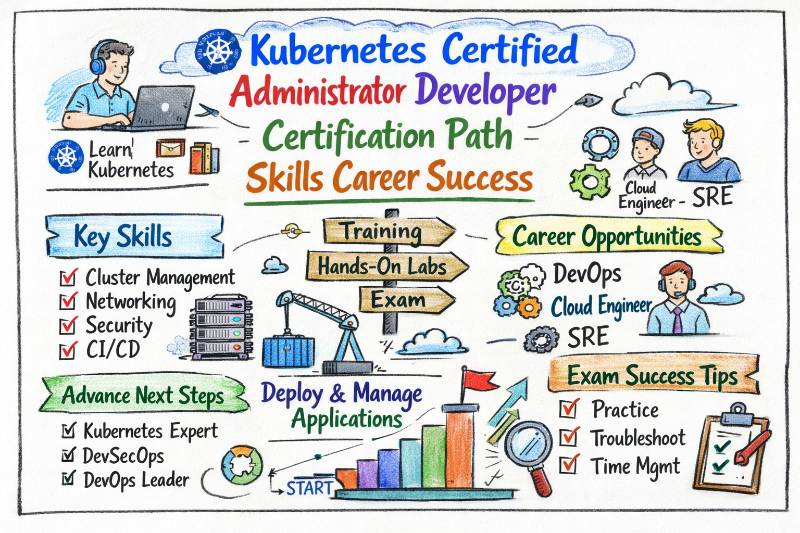
Kubernetes is now the foundation of modern cloud-native infrastructure. From startups to large enterprises, almost every organization uses Kubernetes to run containerized applications at scale. As companies move toward automation, microservices, and distributed systems, the demand for professionals who can manage and build Kubernetes environments continues to grow rapidly. The Kubernetes Certified Administrator & Developer (KCAD) certification is designed for engineers and managers who want strong, real-world Kubernetes expertise. This certification focuses on both cluster administration and application deployment, making it one of the most practical and career-impacting certifications in the cloud and DevOps ecosystem. This guide explains everything in detail — certification structure, skills, preparation roadmap, career value, learning paths, role mapping, and expert guidance to help you succeed.
Certification Table
| Certification | Track | Level | Who it’s for | Prerequisites | Skills Covered | Recommended Order |
|---|---|---|---|---|---|---|
| Kubernetes Certified Administrator & Developer (KCAD) | Kubernetes / DevOps | Intermediate to Advanced | DevOps Engineers, Cloud Engineers, Platform Engineers, Developers, IT Professionals | Linux basics, Containers, Docker, Networking, DevOps fundamentals | Kubernetes architecture, cluster setup, workloads, networking, storage, security, troubleshooting, CI/CD integration | After Docker & DevOps fundamentals |
About Kubernetes Certified Administrator & Developer (KCAD)
What it is
KCAD is a professional certification that validates your ability to design, deploy, manage, scale, secure, and troubleshoot Kubernetes clusters and containerized applications. Unlike many certifications that focus only on theory, KCAD emphasizes hands-on operational knowledge, making it highly valuable for real-world production environments. This certification covers both administrator and developer responsibilities, which means you learn how to manage clusters as well as deploy and run applications efficiently.
Who should take it
This certification is ideal for:
- DevOps Engineers working with containers and CI/CD
- Kubernetes Administrators managing production clusters
- Cloud Engineers deploying applications on Kubernetes
- Platform Engineers building internal developer platforms
- Software Developers deploying microservices
- IT Professionals transitioning to cloud-native roles
- Engineering Managers overseeing container-based systems
Skills you’ll gain
After completing KCAD, you will gain deep technical and operational skills, including:
- Understanding Kubernetes architecture and core components
- Installing and configuring Kubernetes clusters
- Managing Pods, Deployments, StatefulSets, and DaemonSets
- Configuring Services, Ingress, and Networking policies
- Working with Persistent Volumes and storage systems
- Managing Kubernetes security, RBAC, and secrets
- Monitoring, logging, and observability setup
- Implementing autoscaling and load balancing
- Integrating CI/CD pipelines with Kubernetes
- Troubleshooting cluster failures and application issues
- Managing production-grade Kubernetes environments
Real-world projects you should be able to do after it
Once certified, you should be able to perform real production tasks such as:
- Deploy a highly available Kubernetes cluster
- Run microservices-based applications at scale
- Configure Horizontal Pod Autoscaling and resource limits
- Implement secure RBAC and namespace isolation
- Deploy CI/CD pipelines for automated Kubernetes deployments
- Troubleshoot failed containers, pods, and nodes
- Deploy stateful workloads like databases
- Set up persistent storage using PV and PVC
- Implement monitoring using Prometheus and Grafana
- Optimize cluster performance and resource usage
Preparation Plan
7–14 Days (Fast Track – For Experienced Engineers)
- Revise Kubernetes architecture and concepts
- Practice kubectl commands daily
- Deploy real sample applications
- Focus heavily on troubleshooting
- Practice networking and storage scenarios
30 Days (Standard Preparation Plan)
Week 1 – Kubernetes Fundamentals
Week 2 – Cluster Setup, Networking, and Storage
Week 3 – Security, RBAC, Monitoring, Logging
Week 4 – CI/CD Integration and Troubleshooting
Practice real deployments and cluster management daily.
60 Days (Complete Mastery Plan)
- Multi-node cluster deployment
- High availability setup
- Advanced networking and ingress
- Kubernetes security deep dive
- Production CI/CD automation
- Performance tuning and scaling
- Disaster recovery and backup
- Real-world troubleshooting scenarios
This plan ensures full production-level expertise.
Common Mistakes
1. Studying Theory Without Hands-On Practice
One of the biggest mistakes is reading documentation and watching videos without actually deploying clusters. Kubernetes is not a theory-based skill. It is operational.
If you do not:
- Create pods
- Deploy applications
- Break things intentionally
- Troubleshoot errors
You will struggle in both the exam and real-world scenarios.
Solution: Practice daily in a real lab environment. Deploy sample applications repeatedly until it becomes natural.
2. Memorizing Commands Instead of Understanding Concepts
Some learners try to memorize kubectl commands without understanding what they actually do. This leads to confusion when facing slightly different scenarios.
For example:
- Knowing how to create a deployment is not enough.
- You must understand how replicas, selectors, labels, and rolling updates work together.
Solution: Focus on understanding Kubernetes objects and how they interact internally.
3. Ignoring Kubernetes Architecture
Many candidates skip understanding control plane components such as:
- API Server
- Scheduler
- Controller Manager
- etcd
Without understanding architecture, troubleshooting becomes very difficult.
Solution: Learn how Kubernetes processes a request internally. Understand what happens when you run a command.
4. Weak Networking Knowledge
Networking is one of the hardest areas for many learners. Common weak points include:
- Difference between ClusterIP, NodePort, and LoadBalancer
- Ingress configuration
- DNS inside cluster
- Network policies
If networking concepts are not clear, services will not work properly.
Solution: Practice exposing applications using all service types. Test connectivity and understand traffic flow.
5. Skipping Storage Concepts
Storage is often ignored, but in production environments, it is critical.
Learners commonly misunderstand:
- Persistent Volumes (PV)
- Persistent Volume Claims (PVC)
- Storage Classes
- StatefulSets
Without storage knowledge, you cannot manage databases or stateful applications.
Solution: Deploy a database in Kubernetes and attach persistent storage. Practice scaling and restarting it.
6. Not Practicing Troubleshooting
Kubernetes rarely works perfectly in production. Pods fail, nodes go down, images crash.
Many learners focus only on happy-path deployment.
They do not practice:
- Checking pod logs
- Describing objects
- Debugging failed containers
- Fixing misconfigured YAML
Solution: Break your own deployments and fix them. Troubleshooting skills are critical.
7. Ignoring Security and RBAC
Security is a major part of Kubernetes administration. Common mistakes include:
- Not understanding Roles and RoleBindings
- Skipping Service Accounts
- Ignoring namespace isolation
- Weak secrets management
Security misconfigurations are very common in real systems.
Solution: Practice creating RBAC policies and restrict access to specific namespaces.
8. Not Writing Clean YAML Files
Kubernetes relies heavily on YAML configuration. Beginners often:
- Make indentation errors
- Misplace fields
- Use incorrect API versions
- Copy-paste without understanding
Small YAML mistakes can cause large deployment failures.
Solution: Write YAML from scratch instead of always copying templates. Validate and test configurations.
9. Lack of Real Production Simulation
Many learners only use single-node local clusters. Real environments are multi-node and highly available.
Without practicing:
- Multi-node setups
- Resource limits
- Autoscaling
- Rolling updates
You may not understand real cluster behavior.
Solution: Simulate production scenarios as much as possible.
10. Poor Time Management During Preparation
Some learners spend too much time on small topics and ignore important ones like networking and troubleshooting.
Others try to rush preparation without consistent practice.
Solution: Follow a structured 30–60 day roadmap with weekly targets.
Best Next Certification After KCAD
Same Track (Kubernetes)
- Kubernetes Advanced / Kubernetes Security
Cross Track (Security)
- DevSecOps Certified Professional
Leadership Track
- DevOps Architect / DevOps Manager
Choose Your Path
DevOps Path
Focus on automation, CI/CD, containers, and infrastructure as code. Kubernetes is the central orchestration platform in DevOps environments and is critical for modern application delivery.
DevSecOps Path
Focus on Kubernetes security, policy enforcement, compliance, and secure container deployment. This path ensures systems are not only scalable but also secure and compliant.
SRE Path
Focus on reliability, monitoring, observability, and performance optimization. Kubernetes plays a major role in building highly reliable and scalable systems.
AIOps / MLOps Path
Use Kubernetes for machine learning model deployment, automation, and intelligent infrastructure management. Kubernetes is widely used in ML and AI production environments.
DataOps Path
Focus on scalable data pipelines, distributed systems, and containerized data processing platforms powered by Kubernetes.
FinOps Path
Focus on Kubernetes cost optimization, resource usage efficiency, capacity planning, and financial governance of cloud infrastructure.
Role → Recommended Certifications Mapping
| Role | Recommended Certifications |
|---|---|
| DevOps Engineer | KCAD → DevOps Certified Professional |
| SRE | KCAD → SRE Certified Professional |
| Platform Engineer | KCAD → Kubernetes Advanced |
| Cloud Engineer | KCAD → Cloud Architect |
| Security Engineer | KCAD → DevSecOps Certified Professional |
| Data Engineer | KCAD → DataOps Certified Professional |
| FinOps Practitioner | KCAD → FinOps Certified Professional |
| Engineering Manager | KCAD → DevOps Manager |
Next Certifications to Take
Same Track (Kubernetes Depth)
- Kubernetes Advanced (Cluster Operations & Scaling)
Go deeper into multi-cluster operations, advanced networking, storage patterns, performance tuning, and production troubleshooting.
Cross-Track (Security + Governance)
- DevSecOps Certified Professional
Build skills in securing Kubernetes workloads, container image security, policy-as-code, RBAC hardening, and secure CI/CD pipelines.
Leadership Track (Architecture + Management)
- DevOps Architect / DevOps Manager
Move into platform strategy, cloud-native architecture decisions, governance, team enablement, cost/risk ownership, and enterprise rollout planning.
Top Institutions Offering Training & Certification Support
DevOpsSchool
DevOpsSchool is known for its industry-oriented Kubernetes training with deep hands-on labs, real production scenarios, and strong certification guidance. The training focuses on building practical cluster management and deployment skills so learners can confidently handle real-world Kubernetes environments. Their structured learning path helps professionals move from fundamentals to advanced operational expertise.
Cotocus
Cotocus provides enterprise-grade Kubernetes and DevOps training focused on real-world infrastructure deployment and automation. Their programs emphasize practical implementation, cloud-native architecture, and operational excellence. Learners gain exposure to real production scenarios, which helps build confidence in managing scalable Kubernetes platforms.
ScmGalaxy
ScmGalaxy specializes in DevOps and Kubernetes skill development with a strong focus on automation, infrastructure engineering, and real implementation strategies. Their training is designed to bridge the gap between theoretical knowledge and real-world Kubernetes usage, helping professionals become job-ready.
BestDevOps
BestDevOps offers industry-aligned Kubernetes and DevOps certification preparation with hands-on practice and real deployment scenarios. Their training focuses on practical skills, production-ready architecture, and troubleshooting, enabling learners to gain strong operational confidence.
DevSecOpsSchool
DevSecOpsSchool focuses on Kubernetes security, compliance, and secure deployment practices. Their training helps professionals understand container security, policy enforcement, and governance, ensuring Kubernetes environments remain protected and compliant.
SRESchool
SRESchool emphasizes reliability engineering, monitoring, observability, and performance optimization using Kubernetes. Their programs help learners build stable, highly available, and fault-tolerant Kubernetes systems suitable for production environments.
AIOpsSchool
AIOpsSchool combines Kubernetes with intelligent automation and AI-driven operations. Their training focuses on automated infrastructure management, predictive monitoring, and self-healing systems built on Kubernetes platforms.
DataOpsSchool
DataOpsSchool focuses on Kubernetes-powered data pipelines, distributed data processing, and scalable data architecture. Their training helps professionals deploy and manage large-scale data workloads efficiently using Kubernetes.
FinOpsSchool
FinOpsSchool specializes in Kubernetes cost optimization, resource utilization, and financial governance of cloud infrastructure. Their programs help professionals manage Kubernetes environments efficiently while controlling cloud expenses and improving cost visibility.
Frequently Asked Questions (General )
1. Is Kubernetes Certified Administrator & Developer (KCAD) difficult?
KCAD is moderately challenging because Kubernetes has many moving parts like networking, storage, and troubleshooting. However, if you practice daily with hands-on labs, it becomes very manageable.
2. How much time do I need to prepare for KCAD?
Most learners prepare in 30–60 days. If you already work with Docker and Kubernetes basics, 2–4 weeks is often enough with focused practice.
3. What are the prerequisites for KCAD?
You should know:
- Basic Linux commands
- Docker and containers
- Basic networking (DNS, ports, load balancing concepts)
- DevOps basics like CI/CD fundamentals
4. Can a beginner take KCAD?
Yes, but a beginner should first learn Docker + container basics and do basic Kubernetes practice (pods, deployments, services). After that, KCAD becomes a realistic target.
5. What is the best sequence to learn before KCAD?
A practical sequence is:
- Linux basics
- Docker basics
- Kubernetes fundamentals
- Workloads + networking + storage
- Security + RBAC + troubleshooting
- Mock practice and revision
6. How practical is KCAD compared to other certifications?
KCAD is highly practical because it focuses on real cluster and application tasks like deployments, services, scaling, storage, and troubleshooting. It is designed to map closely to real jobs.
7. What topics make KCAD feel difficult for many learners?
Most learners struggle with:
- Networking (Services, Ingress, DNS)
- Storage (PV, PVC, Stateful apps)
- RBAC and security
- Troubleshooting pods/nodes
These areas become easy once you practice real scenarios.
8. Do I need coding skills to pass KCAD?
You don’t need advanced coding. However, basic skills in:
- YAML reading/writing
- Simple scripting (bash)
- Understanding app configuration
will help you work faster and avoid errors.
9. Is KCAD valuable for career growth in India and globally?
Yes. Kubernetes is widely used across:
- SaaS companies
- enterprises
- cloud providers
- startups
So KCAD adds strong credibility and improves job opportunities in both India and global markets.
10. What job roles can KCAD help me get?
KCAD supports roles like:
- DevOps Engineer
- Kubernetes Administrator
- Platform Engineer
- Cloud Engineer
- Site Reliability Engineer (SRE)
- Cloud Support / Production Engineer
11. Does KCAD help with salary increase?
In many companies, Kubernetes skills are paid well because they directly impact infrastructure stability and delivery speed. KCAD can help you negotiate better roles and compensation, especially if you back it with projects.
12. What real career outcomes can I expect after KCAD?
After KCAD, you can expect:
- Better shortlisting for DevOps/Platform roles
- Strong confidence in production Kubernetes work
- Ability to lead Kubernetes migration or platform initiatives
- More responsibility in CI/CD and cloud operations
FAQs on Kubernetes Certified Administrator & Developer (KCAD)
1. What is Kubernetes Certified Administrator & Developer (KCAD)?
KCAD is a professional certification that validates your ability to deploy, manage, scale, secure, and troubleshoot Kubernetes clusters and containerized applications. It combines both administrator and developer responsibilities, making it highly practical for real-world environments.
2. Who should take the KCAD certification?
This certification is ideal for DevOps Engineers, Cloud Engineers, Platform Engineers, Kubernetes Administrators, and Software Developers who work with containers and cloud-native applications. It is also useful for IT professionals moving into Kubernetes and DevOps roles.
3. What skills are tested in KCAD?
KCAD tests your knowledge and practical ability in Kubernetes architecture, cluster installation, workload management, networking, storage, security, monitoring, scaling, and troubleshooting of real production scenarios.
4. Is KCAD certification difficult to pass?
The certification is moderately challenging, especially for those without hands-on experience. However, with regular practice, real cluster deployment, and strong understanding of Kubernetes concepts, most learners can successfully pass it.
5. How long does it take to prepare for KCAD?
Preparation time depends on your experience. Beginners may take 45–60 days, while professionals with Kubernetes experience may prepare in 2–4 weeks with focused hands-on practice and revision.
6. Do I need prior Kubernetes or Docker knowledge?
Yes, basic knowledge of Linux, containers, Docker, and cloud concepts is recommended before attempting KCAD. This foundation helps you understand Kubernetes faster and more effectively.
7. What career benefits does KCAD provide?
KCAD improves your technical credibility and opens opportunities for roles like DevOps Engineer, Kubernetes Administrator, Cloud Engineer, Platform Engineer, and SRE. Certified professionals often receive better job offers and salary growth.
8. What should I do after completing KCAD?
After KCAD, you can move to advanced Kubernetes certifications, DevSecOps for security specialization, or DevOps Architect/Manager certifications for leadership roles. This helps you grow both technically and professionally.
Conclusion
Kubernetes has become one of the most critical skills in modern cloud and DevOps engineering. Organizations rely on Kubernetes to build scalable, automated, and resilient infrastructure. The Kubernetes Certified Administrator & Developer (KCAD) certification provides strong, real-world Kubernetes expertise and helps professionals advance into high-demand roles such as DevOps Engineer, Platform Engineer, SRE, and Cloud Architect.