Upgrade & Secure Your Future with DevOps, SRE, DevSecOps, MLOps!
We spend hours scrolling social media and waste money on things we forget, but won’t spend 30 minutes a day earning certifications that can change our lives.
Master in DevOps, SRE, DevSecOps & MLOps by DevOps School!
Learn from Guru Rajesh Kumar and double your salary in just one year.
Introduction
Resource management tools help organizations plan, allocate, and monitor the people, equipment, budgets, and other resources required to complete projects successfully. By providing visibility into resource availability and workload, these platforms help managers reduce scheduling conflicts, prevent overutilization, and make better planning decisions.
Businesses use resource management software to balance workloads, forecast future demand, identify skill gaps, and coordinate resources across multiple projects. These capabilities are particularly valuable for consulting firms, IT departments, marketing agencies, construction companies, and project-driven organizations.
What Are Resource Management Tools?
Resource management tools are software platforms that help organizations understand what resources are available, where they are assigned, and how effectively they are being used.
They typically support resource scheduling, capacity planning, workload management, skills tracking, utilization reporting, and forecasting. Some platforms focus primarily on employee availability, while others connect resource planning with project schedules, budgets, and portfolio management.
Popular Resource Management Tools
1. Resource Guru
Resource Guru provides resource scheduling, availability calendars, leave management, and workload visibility. Teams can view bookings and identify scheduling conflicts before assigning people or equipment to new work.
Best for: Agencies, consultancies, and teams managing shared resources across projects.
2. Float
Float focuses on resource planning and team scheduling. Managers can allocate employees to projects, review availability, forecast capacity, and compare planned workloads with team availability.
Best for: Professional services teams and organizations coordinating multiple projects.
3. Runn
Runn combines resource planning with project forecasting, capacity management, and financial visibility. It helps managers evaluate future workloads and understand how staffing decisions may affect project performance.
Best for: Consultancies, software companies, and project-based businesses.
4. Kantata
Kantata provides professional services automation and resource management capabilities, including staffing, capacity planning, project visibility, and financial management.
Best for: Professional services organizations managing complex client engagements.
5. Planview
Planview supports enterprise resource management, capacity planning, portfolio management, and strategic work planning. It helps organizations evaluate resource demand across projects and align staffing decisions with business priorities.
Best for: Large enterprises managing resources across multiple portfolios and departments.
6. Smartsheet
Smartsheet offers collaborative project planning, workload tracking, dashboards, and resource-related reporting. Teams can use its configurable sheets and views to coordinate assignments and monitor project schedules.
Best for: Teams that need flexible planning and shared resource visibility.
7. Microsoft Project
Microsoft Project provides scheduling, resource assignments, workload analysis, and project planning features. It can help project managers understand resource commitments and identify conflicts across scheduled activities.
Best for: Organizations that require structured project schedules and detailed resource planning.
8. monday.com
monday.com supports customizable work management, workload views, scheduling, dashboards, and automation. Teams can configure boards to coordinate assignments and monitor team capacity.
Best for: Cross-functional teams seeking flexible resource and workflow tracking.
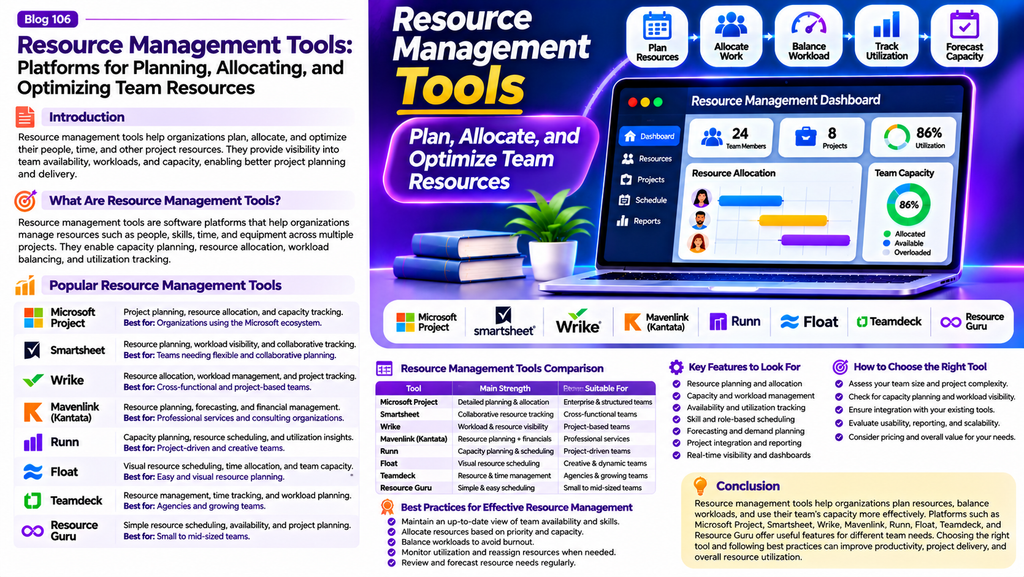
Resource Management Tools Comparison
| Platform | Main Strength | Suitable For |
|---|---|---|
| Resource Guru | Resource booking and availability | Agencies and consultancies |
| Float | Visual resource scheduling | Project-based teams |
| Runn | Capacity and financial forecasting | Consultancies and software firms |
| Kantata | Professional services resource management | Client-service organizations |
| Planview | Enterprise capacity planning | Large enterprises |
| Smartsheet | Collaborative planning | Cross-functional teams |
| Microsoft Project | Schedule-based resource planning | Complex projects |
| monday.com | Flexible workload tracking | Business teams |
Essential Features to Look For
Resource scheduling: Assign people, equipment, and other resources to projects according to availability and requirements.
Capacity planning: Compare available capacity with upcoming demand to identify shortages and overbooking.
Workload visualization: See how assignments are distributed across individuals and teams.
Skills and role management: Match project requirements with employees who have the necessary skills and experience.
Forecasting: Estimate future resource needs using project schedules, demand forecasts, and expected workloads.
Utilization reporting: Review how resources are allocated and distinguish productive project work from other activities where appropriate.
Conflict detection: Identify overlapping assignments, unavailable employees, and scheduling conflicts.
Integrations and reporting: Connect resource plans with project management, finance, HR, and time-tracking systems.
How to Choose the Right Resource Management Tool
Start by identifying your primary challenge. If scheduling shared employees and equipment is the main concern, a booking-focused platform may be appropriate. If you need to forecast staffing needs across several projects, consider a tool with capacity planning and scenario analysis.
Evaluate usability, integrations, reporting, permissions, scalability, and total cost. Confirm that managers can access reliable availability data and that employees can keep their schedules up to date.
Test the software with a representative team or project portfolio before committing. Assess whether it reduces scheduling conflicts and improves visibility without creating unnecessary administrative work.
Best Practices for Effective Resource Management
- Maintain accurate information about availability, skills, and planned leave.
- Review resource demand before approving new projects.
- Assign work according to capacity and relevant expertise.
- Monitor workload imbalances and address persistent overbooking.
- Forecast upcoming resource requirements regularly.
- Coordinate resource decisions across teams instead of planning in isolation.
- Use utilization metrics alongside quality, employee well-being, and project outcomes.
- Review completed projects to improve future estimates and staffing plans.
Conclusion
Resource management tools help organizations allocate people and other resources more effectively, improve capacity visibility, and reduce scheduling conflicts. Platforms such as Resource Guru, Float, Runn, Kantata, Planview, Smartsheet, Microsoft Project, and monday.com offer different capabilities for resource planning and optimization.
The right solution depends on organizational size, project complexity, scheduling needs, and forecasting requirements. With accurate data and consistent planning practices, resource management software can improve workload balance, support better decisions, and help teams deliver projects more reliably.
