Upgrade & Secure Your Future with DevOps, SRE, DevSecOps, MLOps!
We spend hours scrolling social media and waste money on things we forget, but won’t spend 30 minutes a day earning certifications that can change our lives.
Master in DevOps, SRE, DevSecOps & MLOps by DevOps School!
Learn from Guru Rajesh Kumar and double your salary in just one year.
Introduction
Text analytics platforms help businesses understand large volumes of written content such as customer reviews, support tickets, emails, survey responses, social media posts, call transcripts, documents, and chat conversations. In simple words, these platforms use AI and natural language processing to find meaning, sentiment, topics, entities, patterns, risks, and trends inside text data.
Text analytics matters now because companies are handling more unstructured text than ever. Customer conversations, online feedback, compliance documents, internal knowledge, and support interactions all contain valuable insights, but manual review is slow and inconsistent.
Common use cases include:
- Customer sentiment analysis
- Support ticket classification
- Voice-of-customer analytics
- Document intelligence
- Risk and compliance monitoring
- Topic discovery and trend analysis
Buyers should evaluate:
- Sentiment and emotion analysis
- Topic modeling and classification
- Entity extraction
- Document processing
- Custom model training
- Multilingual support
- API quality
- Security and compliance
- Dashboard and reporting features
- Integration with CRM, helpdesk, BI, and data platforms
Best for: customer experience teams, product managers, marketing teams, support leaders, compliance teams, data analysts, AI teams, SaaS companies, financial services, healthcare, retail, telecom, and enterprises managing large text datasets.
Not ideal for: teams with very small text volumes, companies that only need simple keyword search, or users who can manage feedback manually through spreadsheets or basic survey tools.
Key Trends in Text Analytics Platforms
- Text analytics is moving beyond basic sentiment scoring toward deeper intent, emotion, topic, and root-cause analysis.
- Generative AI is helping summarize long documents, customer conversations, tickets, and open-ended survey responses.
- More platforms are adding conversational analytics for call center transcripts, chat logs, and customer support interactions.
- Enterprises are prioritizing privacy, access control, audit logs, and governance for sensitive text data.
- Multilingual text analytics is becoming more important for global companies.
- Integration with CRM, helpdesk, contact center, BI, and data warehouse platforms is now a major buying factor.
- No-code and low-code workflows are helping business teams build classification and insight models without heavy engineering support.
- AI quality monitoring is becoming important because language models can misclassify context, tone, or domain-specific meaning.
- Text analytics is increasingly used with multimodal AI, combining text with voice, image, video, and structured data.
- Pricing is shifting toward usage-based models, making cost forecasting important for high-volume text processing.
How We Selected These Tools
The following tools were selected using practical SaaS and AI product evaluation logic:
- Recognition and adoption across enterprise, developer, and analytics teams
- Strength of natural language processing and text analytics capabilities
- Support for sentiment, entity extraction, classification, summarization, and topic analysis
- Integration with business systems such as CRM, helpdesk, BI, and cloud data platforms
- API maturity and developer experience
- Fit for different organization sizes, from SMBs to enterprises
- Security and governance capabilities where publicly known
- Ease of use for business users and technical users
- Scalability for high-volume text processing
- Practical value across customer experience, compliance, support, and document workflows
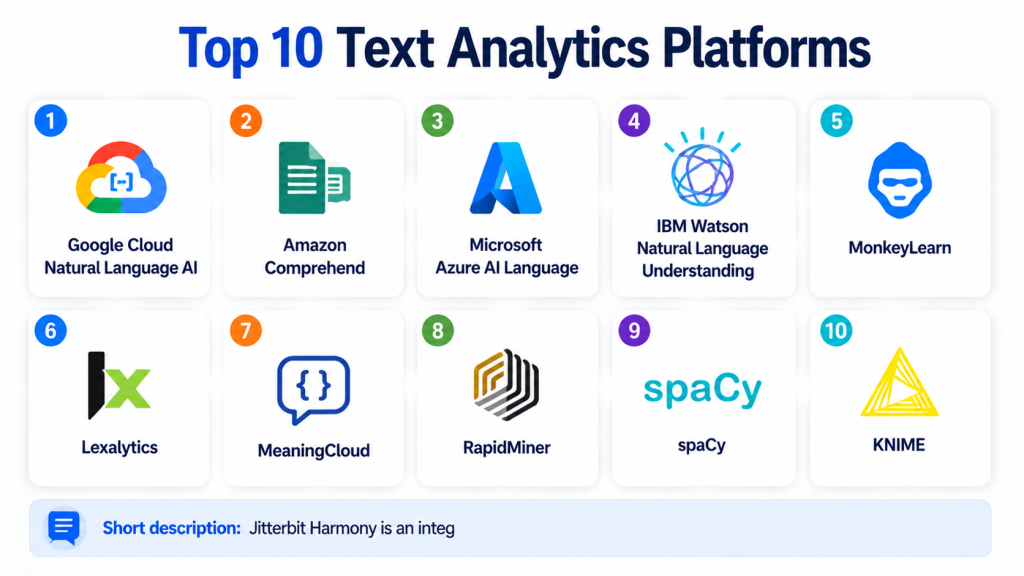
Top 10 Text Analytics Platforms
#1 — Google Cloud Natural Language AI
Short description:
Google Cloud Natural Language AI is a cloud-based text analytics service for extracting meaning from unstructured text.
It helps teams analyze sentiment, entities, syntax, categories, and document-level meaning through APIs.
The platform is useful for developers and data teams that want managed NLP without building models from scratch.
It fits organizations already using Google Cloud for data, AI, and analytics workloads.
Teams can use it for customer feedback analysis, content classification, entity extraction, and document intelligence.
It is especially useful when text analytics needs to scale across large datasets.
The platform works best for API-driven workflows and cloud-native applications.
Teams needing highly customized business dashboards may need additional analytics tools around it.
Key Features
- Sentiment analysis
- Entity recognition
- Content classification
- Syntax analysis
- API-based NLP workflows
- Integration with Google Cloud services
- Scalable managed infrastructure
Pros
- Strong fit for Google Cloud users
- Easy API-based integration
- Good for scalable NLP workloads
Cons
- Less suitable for teams needing full no-code dashboards
- Custom workflows may require engineering support
- Best value comes inside Google Cloud ecosystem
Platforms / Deployment
Cloud
Security & Compliance
Security is managed through Google Cloud identity, access control, encryption, and platform security controls. Compliance applicability depends on configuration and organizational requirements.
Integrations & Ecosystem
Google Cloud Natural Language AI works well with cloud-native data and AI workflows.
- Google Cloud Storage
- BigQuery
- Vertex AI
- Dataflow
- Cloud Functions
- API-based applications
Support & Community
Google Cloud provides documentation, tutorials, support plans, and enterprise resources. Community support is strong across Google Cloud AI services.
#2 — Amazon Comprehend
Short description:
Amazon Comprehend is a managed natural language processing service from AWS.
It helps teams extract insights from text using sentiment analysis, entity recognition, key phrase extraction, language detection, and classification.
The platform is useful for AWS-based organizations that want cloud-native text analytics without managing NLP infrastructure.
It can support customer feedback analysis, document classification, compliance workflows, and support ticket analysis.
Amazon Comprehend also supports custom classification and custom entity recognition for domain-specific use cases.
It works well for teams already using AWS data lakes, storage, and analytics tools.
The platform is API-driven and developer-friendly.
Teams outside AWS may need to evaluate integration effort carefully.
Key Features
- Sentiment analysis
- Entity recognition
- Key phrase extraction
- Language detection
- Topic modeling and classification
- Custom classification support
- Integration with AWS data services
Pros
- Strong fit for AWS-first teams
- Managed service reduces infrastructure effort
- Supports both standard and custom NLP workflows
Cons
- Best suited for AWS environments
- Complex dashboards may require additional tools
- Costs should be reviewed for high-volume processing
Platforms / Deployment
Cloud
Security & Compliance
Security is managed through AWS IAM, encryption, and AWS platform controls. Compliance applicability depends on configuration, region, and organizational requirements.
Integrations & Ecosystem
Amazon Comprehend integrates naturally with AWS data, analytics, and AI services.
- Amazon S3
- AWS Lambda
- Amazon SageMaker
- Amazon Redshift
- AWS Glue
- AWS IAM
Support & Community
AWS provides detailed documentation, support plans, training resources, and a large developer ecosystem.
#3 — Microsoft Azure AI Language
Short description:
Microsoft Azure AI Language is a managed text analytics and language AI platform inside the Azure AI ecosystem.
It supports sentiment analysis, key phrase extraction, entity recognition, language detection, summarization, and conversational language understanding.
The platform is useful for enterprises already using Microsoft Azure, Microsoft identity tools, and Microsoft business applications.
It can help teams analyze customer feedback, support tickets, documents, and conversational data.
Azure AI Language fits organizations that need enterprise governance and cloud-native language services.
It is suitable for both developer-led and business workflow use cases.
The platform integrates well with broader Azure AI and data services.
Teams outside the Microsoft ecosystem may prefer more platform-neutral options.
Key Features
- Sentiment and opinion mining
- Entity recognition
- Key phrase extraction
- Language detection
- Text summarization
- Conversational language understanding
- Integration with Azure AI services
Pros
- Strong fit for Microsoft and Azure users
- Useful for enterprise language AI workflows
- Good integration with business and cloud systems
Cons
- Best value comes inside Azure ecosystem
- Advanced workflows may need multiple Azure services
- Learning curve for teams new to Azure AI
Platforms / Deployment
Cloud
Security & Compliance
Security is managed through Azure identity, access control, encryption, and governance features. Compliance applicability depends on configuration and service usage.
Integrations & Ecosystem
Azure AI Language connects well with Microsoft’s business and cloud ecosystem.
- Azure Machine Learning
- Azure Data Lake
- Microsoft Entra ID
- Power Platform
- Azure Functions
- Microsoft business applications
Support & Community
Microsoft provides documentation, enterprise support, learning resources, and strong community support across Azure AI services.
#4 — IBM Watson Natural Language Understanding
Short description:
IBM Watson Natural Language Understanding is a text analytics service used to analyze meaning, sentiment, entities, concepts, keywords, categories, and emotion from text.
It is suitable for enterprises that need NLP capabilities as part of broader AI, automation, and document intelligence workflows.
The platform can support customer analytics, risk review, content classification, and knowledge extraction.
IBM Watson is often considered by organizations with enterprise AI and governance requirements.
It can help teams analyze structured and unstructured text across business workflows.
The platform is useful where explainability, enterprise support, and established vendor presence matter.
It may be more suitable for enterprise buyers than small teams seeking simple lightweight tools.
Teams should validate pricing, deployment, and customization requirements before adoption.
Key Features
- Sentiment and emotion analysis
- Entity and keyword extraction
- Concept and category analysis
- Document-level text understanding
- API-based NLP workflows
- Enterprise AI ecosystem fit
- Customization options depending on use case
Pros
- Strong enterprise AI positioning
- Useful for complex text understanding workflows
- Good fit for regulated and large organizations
Cons
- May be more than small teams need
- Implementation can require planning
- Pricing and deployment details may vary
Platforms / Deployment
Cloud / Hybrid options may vary
Security & Compliance
Enterprise security controls may be available. Specific compliance details are Not publicly stated unless confirmed for a specific plan.
Integrations & Ecosystem
IBM Watson Natural Language Understanding fits into enterprise AI, automation, and document processing workflows.
- APIs
- Enterprise applications
- Data platforms
- Automation workflows
- Knowledge management systems
- AI and analytics pipelines
Support & Community
IBM provides enterprise documentation, onboarding, and support options. Community strength is strongest in enterprise AI and business automation environments.
#5 — MonkeyLearn
Short description:
MonkeyLearn is a text analytics platform focused on making NLP easier for business teams and analysts.
It helps users classify text, extract data, analyze sentiment, and build custom workflows without heavy coding.
The platform is useful for customer feedback analysis, survey responses, support tickets, product reviews, and social media text.
MonkeyLearn is often selected by teams that want practical text analytics without building custom NLP infrastructure.
It offers a more business-friendly experience compared with developer-only APIs.
The tool can help teams organize unstructured feedback into actionable categories.
It is suitable for marketing, support, product, and operations teams.
Organizations with very complex enterprise AI needs may require a broader platform.
Key Features
- Sentiment analysis
- Text classification
- Keyword extraction
- Custom text analysis models
- Dashboard and reporting workflows
- No-code and low-code capabilities
- Integrations with business tools
Pros
- Easy for non-technical teams to use
- Good for customer feedback and survey analysis
- Practical no-code text analytics workflows
Cons
- May not match the depth of cloud AI platforms
- Advanced enterprise governance may vary
- Very custom NLP use cases may require additional tools
Platforms / Deployment
Cloud
Security & Compliance
Security details are Not publicly stated unless confirmed for a specific plan.
Integrations & Ecosystem
MonkeyLearn is designed for business text analytics and workflow integration.
- Spreadsheets
- Helpdesk tools
- Survey tools
- Business dashboards
- APIs
- Automation workflows
Support & Community
MonkeyLearn provides documentation and onboarding resources. Support availability may vary by plan.
#6 — Lexalytics
Short description:
Lexalytics is a text analytics platform focused on sentiment analysis, entity extraction, categorization, and natural language processing for business use cases.
It is often used by organizations analyzing customer feedback, social media, reviews, surveys, and support conversations.
The platform is suitable for teams that need deeper text understanding than simple keyword tracking.
Lexalytics can support industry-specific text analytics and configurable analysis workflows.
It is valuable for businesses that want to convert unstructured text into structured insight.
The platform can be used by customer experience, product, marketing, and analytics teams.
It may be especially useful for companies that need text analytics across multiple channels.
Teams should evaluate deployment options and customization needs before choosing it.
Key Features
- Sentiment analysis
- Entity extraction
- Text categorization
- Theme and topic detection
- Multichannel text analytics
- Customizable NLP workflows
- Business insight extraction
Pros
- Strong focus on business text analytics
- Useful for customer feedback and social listening
- Supports deeper analysis than basic keyword tools
Cons
- May require configuration for best results
- Pricing and deployment details may vary
- Less developer-mainstream than large cloud platforms
Platforms / Deployment
Cloud / Self-hosted / Hybrid options may vary
Security & Compliance
Security and compliance details are Not publicly stated unless confirmed for a specific plan or deployment.
Integrations & Ecosystem
Lexalytics fits into customer experience, analytics, and feedback intelligence workflows.
- Customer feedback systems
- Survey platforms
- Social listening workflows
- BI tools
- APIs
- Data pipelines
Support & Community
Lexalytics provides vendor documentation and support resources. Community visibility is more specialized around business text analytics.
#7 — MeaningCloud
Short description:
MeaningCloud is a text analytics platform that provides APIs for sentiment analysis, topic extraction, text classification, language identification, and entity recognition.
It is useful for developers, analysts, and companies that need flexible NLP services for structured insight extraction.
The platform can support media monitoring, customer feedback analysis, document classification, and social listening.
MeaningCloud is API-friendly and can be used in custom applications and analytics workflows.
It is suitable for teams that want practical language processing without building NLP models from scratch.
The platform supports multiple language-related tasks through a modular API approach.
It may be a good fit for teams that need lightweight integration and text enrichment.
Large enterprise buyers should validate support, governance, and scale needs carefully.
Key Features
- Sentiment analysis
- Topic extraction
- Entity recognition
- Text classification
- Language identification
- API-based NLP services
- Support for custom dictionaries and categories
Pros
- Flexible API-based NLP workflows
- Useful for text enrichment and classification
- Good fit for developers and analysts
Cons
- May require technical integration
- Business dashboards may need external tools
- Enterprise governance details may vary
Platforms / Deployment
Cloud / API-based
Security & Compliance
Security and compliance details are Not publicly stated unless confirmed for a specific plan.
Integrations & Ecosystem
MeaningCloud can be integrated into applications, analytics systems, and data pipelines.
- REST APIs
- BI workflows
- Media monitoring tools
- Customer feedback systems
- Data enrichment pipelines
- Custom applications
Support & Community
MeaningCloud provides documentation and support resources. Community presence is more developer-focused and specialized.
#8 — RapidMiner
Short description:
RapidMiner is a data science and machine learning platform that can support text analytics through data preparation, modeling, and workflow automation.
It is useful for teams that want text analytics as part of broader analytics and machine learning projects.
The platform can help users process text data, build classification models, and create predictive workflows.
RapidMiner is suitable for analysts, data scientists, and business teams that prefer visual workflows.
It can support customer feedback analysis, text classification, document mining, and predictive analytics.
The platform is broader than a dedicated text analytics API.
This makes it useful for teams that want to combine text data with structured business data.
Teams needing only simple sentiment analysis may prefer a lighter tool.
Key Features
- Visual data science workflows
- Text processing and mining capabilities
- Machine learning model building
- Data preparation and transformation
- Workflow automation
- Integration with data sources
- Analytics and predictive modeling support
Pros
- Useful for combining text and structured data
- Visual workflow experience helps analysts
- Broader data science capabilities beyond NLP
Cons
- May be more platform than some teams need
- Text analytics depth depends on workflow design
- Requires learning for advanced use cases
Platforms / Deployment
Cloud / Desktop / Enterprise deployment options may vary
Security & Compliance
Enterprise security options may be available. Specific compliance details are Not publicly stated.
Integrations & Ecosystem
RapidMiner integrates with data sources, analytics workflows, and enterprise systems.
- Databases
- Data warehouses
- Spreadsheets
- BI tools
- Machine learning workflows
- APIs and extensions
Support & Community
RapidMiner provides documentation, training resources, and support options. It has community visibility in data science and analytics environments.
#9 — spaCy
Short description:
spaCy is an open-source NLP library widely used by developers and data science teams for production-focused text processing.
It is not a SaaS platform in the traditional sense, but it is a powerful tool for building custom text analytics systems.
spaCy supports tokenization, entity recognition, part-of-speech tagging, dependency parsing, classification, and custom NLP pipelines.
It is useful for teams that want full control over NLP workflows and deployment architecture.
Developers can use spaCy to build domain-specific text analytics applications.
It is especially strong for engineering-led teams that prefer open-source flexibility.
spaCy works well in custom applications, pipelines, and internal analytics systems.
Business teams without technical support may prefer managed platforms.
Key Features
- Open-source NLP library
- Named entity recognition
- Text classification workflows
- Tokenization and parsing
- Custom model training
- Production-focused pipeline design
- Python developer ecosystem
Pros
- Strong open-source flexibility
- Good for custom NLP applications
- No vendor lock-in for core workflows
Cons
- Requires development skills
- No built-in business dashboard
- Security and compliance depend on deployment environment
Platforms / Deployment
Self-hosted / Hybrid / Python-based environments
Security & Compliance
Security depends on how the library is deployed and managed. Compliance details are Not publicly stated.
Integrations & Ecosystem
spaCy integrates well with Python, ML, and data engineering workflows.
- Python applications
- ML pipelines
- APIs
- Data processing systems
- Custom dashboards
- Model training workflows
Support & Community
spaCy has strong open-source documentation and community support. Enterprise support depends on third-party services or internal teams.
#10 — KNIME
Short description:
KNIME is an analytics and data science platform that can support text mining and NLP workflows through visual data pipelines.
It is useful for analysts and data teams that want to process, classify, and analyze text without writing everything from scratch.
The platform supports data preparation, machine learning, automation, and integration with many data sources.
KNIME can be used for customer feedback analysis, document classification, text preprocessing, and sentiment workflows.
It is broader than a dedicated text analytics API, making it useful when text must be combined with structured data.
The visual workflow model helps teams build repeatable analytics processes.
KNIME is suitable for data science teams, business analysts, and enterprise analytics groups.
Teams needing instant managed NLP APIs may prefer cloud-native text analytics services.
Key Features
- Visual analytics workflows
- Text mining and preprocessing
- Machine learning workflow support
- Data integration and transformation
- Automation and repeatable pipelines
- Extension ecosystem
- Support for structured and unstructured data
Pros
- Good visual workflow environment
- Useful for combining text with other data
- Strong fit for analytics and data science teams
Cons
- Not a pure text analytics SaaS tool
- Advanced NLP may require extensions or setup
- Business users may need training for complex workflows
Platforms / Deployment
Windows / macOS / Linux / Cloud / Self-hosted / Hybrid options may vary
Security & Compliance
Enterprise security controls may be available depending on deployment. Specific compliance details are Not publicly stated.
Integrations & Ecosystem
KNIME connects with many data sources, analytics tools, and machine learning workflows.
- Databases
- Data warehouses
- Spreadsheets
- BI tools
- Python and R workflows
- Extensions and connectors
Support & Community
KNIME has strong documentation, community resources, examples, and enterprise support options depending on plan.
Comparison Table
| Tool Name | Best For | Platform(s) Supported | Deployment | Standout Feature | Public Rating |
|---|---|---|---|---|---|
| Google Cloud Natural Language AI | Cloud-native NLP APIs | Web / API / Google Cloud | Cloud | Scalable text analysis APIs | N/A |
| Amazon Comprehend | AWS-based text analytics | Web / API / AWS | Cloud | Managed NLP with custom classification | N/A |
| Microsoft Azure AI Language | Enterprise language AI workflows | Web / API / Azure | Cloud | Sentiment, entities, summarization, and language understanding | N/A |
| IBM Watson Natural Language Understanding | Enterprise NLP and document intelligence | Web / API | Cloud / Hybrid | Enterprise-grade natural language understanding | N/A |
| MonkeyLearn | Business-friendly feedback analytics | Web / API | Cloud | No-code text classification and sentiment analysis | N/A |
| Lexalytics | Customer feedback and sentiment intelligence | Web / API | Cloud / Hybrid | Business-focused sentiment and theme extraction | N/A |
| MeaningCloud | Developer-friendly NLP APIs | Web / API | Cloud | Modular NLP APIs for text enrichment | N/A |
| RapidMiner | Broader data science with text analytics | Desktop / Web / Enterprise environments | Cloud / Varies | Visual data science workflows with text mining | N/A |
| spaCy | Custom open-source NLP systems | Python / Linux / macOS / Windows | Self-hosted / Hybrid | Production-focused open-source NLP library | N/A |
| KNIME | Visual analytics and text mining | Windows / macOS / Linux / Web options | Cloud / Self-hosted / Hybrid | Visual workflows for structured and text data | N/A |
Evaluation & Scoring of Text Analytics Platforms
| Tool Name | Core (25%) | Ease (15%) | Integrations (15%) | Security (10%) | Performance (10%) | Support (10%) | Value (15%) | Weighted Total (0–10) |
|---|---|---|---|---|---|---|---|---|
| Google Cloud Natural Language AI | 8 | 8 | 9 | 8 | 9 | 8 | 7 | 8.10 |
| Amazon Comprehend | 8 | 8 | 9 | 8 | 9 | 8 | 7 | 8.10 |
| Microsoft Azure AI Language | 9 | 8 | 9 | 8 | 8 | 8 | 7 | 8.25 |
| IBM Watson Natural Language Understanding | 8 | 7 | 8 | 8 | 8 | 8 | 7 | 7.75 |
| MonkeyLearn | 7 | 9 | 7 | 6 | 7 | 7 | 8 | 7.35 |
| Lexalytics | 8 | 7 | 7 | 6 | 8 | 7 | 7 | 7.30 |
| MeaningCloud | 7 | 8 | 7 | 6 | 7 | 7 | 8 | 7.25 |
| RapidMiner | 8 | 7 | 8 | 7 | 8 | 8 | 8 | 7.75 |
| spaCy | 8 | 6 | 9 | 6 | 8 | 9 | 9 | 7.95 |
| KNIME | 8 | 7 | 9 | 7 | 8 | 9 | 8 | 8.00 |
These scores are comparative and should be used as a practical shortlist guide.
A high score does not mean the tool is the best for every business.
Cloud APIs are strong for scale and managed infrastructure, while open-source tools offer flexibility and control.
Business-friendly platforms are better for non-technical teams, while developer libraries need engineering support.
Teams should test real text samples before making a final decision.
Which Text Analytics Platform Is Right for You?
Solo / Freelancer
Solo users should choose tools that are easy to test and do not require complex setup. MeaningCloud, MonkeyLearn, spaCy, and cloud APIs can be practical choices depending on technical comfort. If coding is comfortable, spaCy gives strong flexibility. If no-code workflows are preferred, MonkeyLearn may be easier.
SMB
Small and mid-sized businesses should focus on ease of use, cost control, and fast time to insight. MonkeyLearn, MeaningCloud, Google Cloud Natural Language AI, Amazon Comprehend, and Azure AI Language can work well. SMBs should avoid overbuilding custom NLP systems unless they have clear technical resources.
Mid-Market
Mid-market teams often need better integrations, dashboards, custom classification, and workflow automation. Azure AI Language, Amazon Comprehend, Google Cloud Natural Language AI, RapidMiner, KNIME, and Lexalytics are useful options. The right choice depends on whether the team prefers cloud APIs, analytics workflows, or business-friendly text intelligence.
Enterprise
Enterprises should prioritize governance, access control, auditability, scalability, and integration with existing systems. Microsoft Azure AI Language, Amazon Comprehend, Google Cloud Natural Language AI, IBM Watson Natural Language Understanding, KNIME, and RapidMiner are strong candidates. Enterprises with custom NLP teams may also use spaCy as part of internal platforms.
Budget vs Premium
Open-source tools like spaCy can reduce software cost but require engineering time. Cloud APIs can be cost-effective for predictable usage but may become expensive at high volume. Premium platforms may offer better onboarding, dashboards, support, and enterprise controls, which can justify the cost for larger teams.
Feature Depth vs Ease of Use
If ease of use matters most, MonkeyLearn and managed cloud NLP services are good starting points. If feature depth and customization matter more, spaCy, KNIME, RapidMiner, and cloud AI platforms can provide more control. Business users should avoid developer-heavy tools unless technical support is available.
Integrations & Scalability
The best text analytics platform should connect with CRM systems, helpdesk tools, survey platforms, BI tools, data warehouses, contact center platforms, and automation workflows. API quality is especially important when text analytics must run inside production systems or data pipelines.
Security & Compliance Needs
Security-focused teams should review RBAC, SSO, encryption, audit logs, data retention, data residency, and compliance requirements. This is especially important when analyzing customer conversations, healthcare text, legal documents, financial records, or employee communications.
Frequently Asked Questions
1. What is a text analytics platform?
A text analytics platform is software that helps analyze unstructured text and turn it into structured insights. It can detect sentiment, topics, entities, keywords, intent, categories, and trends.
2. How is text analytics different from keyword search?
Keyword search finds exact words or phrases, while text analytics tries to understand meaning, context, tone, and relationships. Text analytics is better for large-scale feedback, support, compliance, and document analysis.
3. What pricing models do text analytics platforms use?
Pricing may be based on API usage, number of documents, text volume, users, workflows, model training, or enterprise contracts. Buyers should estimate monthly text volume before choosing a platform.
4. How long does implementation usually take?
Simple API-based use cases can be implemented quickly, while enterprise workflows may take longer due to data preparation, integrations, security review, and custom model training. The timeline depends on data quality and complexity.
5. What are common mistakes when choosing a text analytics tool?
Common mistakes include ignoring data quality, choosing a tool without testing real text, relying only on generic sentiment scores, and underestimating integration needs. Teams should always run a pilot with real business data.
6. Are text analytics platforms secure?
Many platforms offer security controls, but details vary by vendor and plan. Teams should verify encryption, access control, audit logs, data retention, and compliance requirements before uploading sensitive text.
7. Can text analytics platforms handle multiple languages?
Many tools support multilingual analysis, but language coverage and quality vary. Buyers should test the exact languages, dialects, and domain-specific vocabulary they need before finalizing a platform.
8. Which integrations matter most for text analytics?
Important integrations include CRM, helpdesk, contact center software, survey tools, BI platforms, data warehouses, cloud storage, and automation systems. API quality is also important for custom workflows.
9. Should I choose a cloud NLP API or a business analytics platform?
Choose a cloud NLP API if you have developers and need scalable text processing. Choose a business analytics platform if your team needs dashboards, no-code workflows, reports, and faster business-user adoption.
10. What are alternatives to text analytics platforms?
Alternatives include manual review, spreadsheets, search tools, BI dashboards, open-source NLP libraries, custom machine learning models, and generative AI tools. However, dedicated platforms usually provide better structure and repeatability.
Conclusion
Text analytics platforms help businesses turn unstructured language into useful insight. They are valuable for customer feedback analysis, support ticket classification, sentiment monitoring, document intelligence, compliance review, and business decision-making. The best tool depends on your team’s technical skill, text volume, cloud ecosystem, security needs, integration requirements, and budget. Google Cloud Natural Language AI, Amazon Comprehend, and Azure AI Language are strong cloud-native choices. MonkeyLearn and Lexalytics are useful for business-friendly customer feedback analysis. spaCy, KNIME, and RapidMiner are strong when teams need control, customization, and broader analytics workflows.
