Upgrade & Secure Your Future with DevOps, SRE, DevSecOps, MLOps!
We spend hours scrolling social media and waste money on things we forget, but won’t spend 30 minutes a day earning certifications that can change our lives.
Master in DevOps, SRE, DevSecOps & MLOps by DevOps School!
Learn from Guru Rajesh Kumar and double your salary in just one year.
Introduction
Notebook environments are interactive workspaces where users can write code, run experiments, view results, document logic, and share analysis in one place. They are widely used by data scientists, analysts, machine learning engineers, researchers, students, and developers.
Notebook environments matter because modern data work is no longer just about writing scripts. Teams need collaboration, reproducibility, cloud compute, GPU access, experiment tracking, security, and integration with data platforms. A good notebook environment helps users move from exploration to production more smoothly.
Common use cases include:
- Data exploration and analysis
- Machine learning model development
- AI and generative AI experiments
- Research and academic computing
- Data storytelling and technical documentation
Buyers should evaluate:
- Ease of use
- Language support
- Compute options
- Collaboration features
- Version control
- Security controls
- Package management
- Data integrations
- GPU support
- Cost and scalability
Best for: Data scientists, ML engineers, analysts, researchers, students, AI teams, engineering teams, and organizations working with Python, R, SQL, notebooks, and machine learning workflows.
Not ideal for: Teams that only need basic dashboards, static reports, or simple spreadsheet analysis without coding or experimentation.
Key Trends in Notebook Environments
- AI-assisted coding is becoming a major feature inside notebook workflows.
- Cloud-hosted notebooks are replacing many local-only setups because teams need shared compute and collaboration.
- GPU and accelerator access is becoming more important for AI, deep learning, and large model experiments.
- Reproducible environments are now critical because teams must avoid “works on my machine” issues.
- Notebook governance is becoming important for enterprises using notebooks in regulated data workflows.
- Integration with MLOps platforms is growing as teams move experiments into production.
- Collaboration features such as comments, shared workspaces, and version history are now expected.
- Security controls like RBAC, SSO, secrets management, and audit logs are becoming stronger buying factors.
- Hybrid notebook workflows are common because teams use local development, cloud compute, and enterprise platforms together.
- Notebook-to-production workflows are improving through pipelines, jobs, and deployment integrations.
How We Selected These Tools
The tools were selected based on:
- Market adoption and broad user recognition
- Strength for data science, analytics, AI, and ML workflows
- Ease of use for beginners and professionals
- Support for Python, R, SQL, and other common languages
- Compute flexibility, including local, cloud, and GPU options
- Collaboration and sharing capabilities
- Integration with data platforms, Git, cloud storage, and ML tools
- Security and governance readiness
- Documentation, community, and support strength
- Fit across solo users, SMBs, mid-market teams, and enterprises
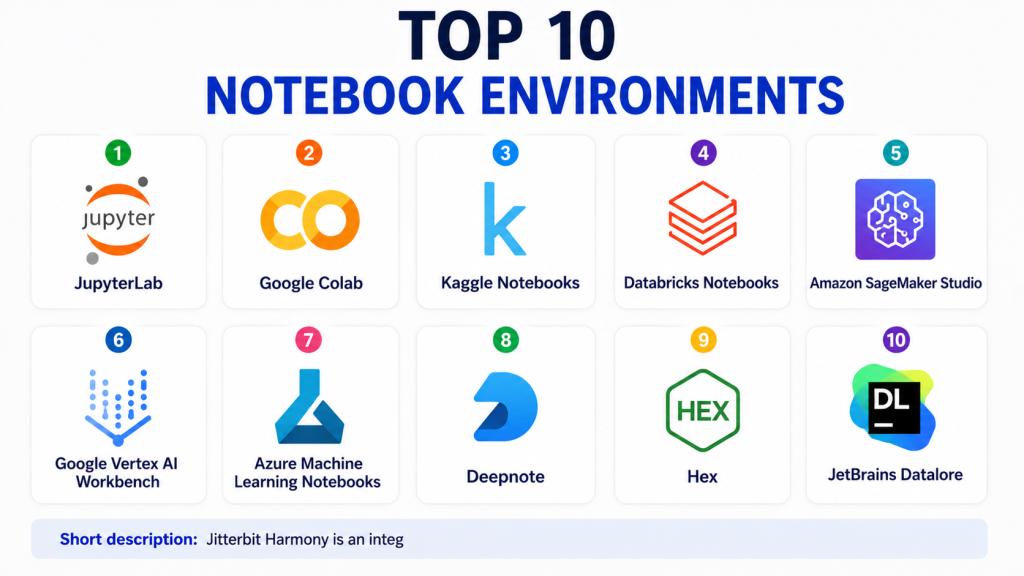
Top 10 Notebook Environments
#1 — JupyterLab
Short description:JupyterLab is one of the most widely used open-source notebook environments for data science, research, analytics, and machine learning. It provides an interactive workspace where users can write code, run cells, view charts, document logic, and work with notebooks, terminals, text files, and data files. JupyterLab is popular because it is flexible, extensible, and language-friendly through kernels. It is commonly used with Python, R, Julia, and other languages. It works well for individual users, universities, research labs, and enterprise teams that want open notebook workflows. JupyterLab can run locally, on servers, or inside larger platforms. It is powerful but requires setup, environment management, and governance planning for enterprise use. It is best for teams that want open, flexible, and widely supported notebook development.
Key Features
- Interactive notebook interface
- Support for multiple programming languages through kernels
- File browser, terminals, and text editor
- Rich visual output support
- Large extension ecosystem
- Local and server-based usage
- Strong support for Python data science workflows
Pros
- Open-source and widely adopted
- Flexible for research, analytics, and ML
- Large community and ecosystem
Cons
- Enterprise governance requires extra setup
- Environment management can be challenging
- Collaboration is limited without additional tools
Platforms / Deployment
Web / Windows / macOS / Linux
Self-hosted / Hybrid
Security & Compliance
Security depends on deployment and configuration. Authentication, access control, encryption, and audit logging require setup through the hosting environment. Specific certifications are not publicly stated.
Integrations & Ecosystem
JupyterLab integrates with many data science libraries, development tools, and cloud platforms through extensions and kernels.
- Python libraries
- R and Julia kernels
- Git extensions
- Conda environments
- Docker
- Cloud-hosted notebook services
Support & Community
JupyterLab has very strong open-source documentation, community support, tutorials, extensions, and adoption across education, research, and enterprise data science.
#2 — Google Colab
Short description:Google Colab is a cloud-based notebook environment popular among students, researchers, developers, and data scientists. It allows users to run Python notebooks in the browser without installing a local environment. Colab is especially useful for quick experiments, learning, prototyping, and AI model testing. It provides access to cloud compute, including GPU options depending on availability and plan. Colab integrates naturally with Google Drive and many Python libraries. It is easy for beginners because setup is minimal. It is also useful for sharing notebooks and collaborating on lightweight projects. For enterprise governance and long-running production workloads, teams may need more controlled platforms.
Key Features
- Browser-based Python notebooks
- No local setup required
- GPU and accelerator options may be available
- Google Drive integration
- Easy sharing and collaboration
- Preinstalled common data science libraries
- Useful for education and prototyping
Pros
- Very easy to start
- Good for learning and experiments
- Helpful for quick AI and ML prototyping
Cons
- Runtime limits may apply
- Less control than self-managed environments
- Not ideal for strict enterprise governance
Platforms / Deployment
Web
Cloud
Security & Compliance
Google account-based access and sharing controls are available. Enterprise-grade security depends on broader Google account and workspace configuration. Specific compliance details should be validated directly.
Integrations & Ecosystem
Google Colab works well with Python tools and Google ecosystem services.
- Google Drive
- Python libraries
- TensorFlow
- PyTorch
- GitHub notebooks
- Google Cloud tools
Support & Community
Colab has broad community adoption, many tutorials, and strong learning resources. Formal support depends on account type and service plan.
#3 — Kaggle Notebooks
Short description:Kaggle Notebooks is a cloud notebook environment designed for data science competitions, learning, public datasets, and machine learning experiments. It is widely used by data science learners and practitioners who want access to datasets, notebooks, and community examples in one place. Kaggle Notebooks supports Python and R workflows and provides cloud compute for experimentation. It is especially useful for practicing machine learning, sharing solutions, and learning from public notebooks. Users can explore datasets and build models without heavy setup. It is not mainly designed as an enterprise production environment. It is best for learning, experimentation, competitions, and public data science work.
Key Features
- Cloud-based notebook execution
- Access to public datasets
- Python and R support
- Competition-friendly workflows
- GPU options may be available
- Public and private notebook options
- Community examples and shared notebooks
Pros
- Excellent for learning and competitions
- Easy access to datasets
- Strong community knowledge sharing
Cons
- Not ideal for enterprise production workflows
- Compute and runtime limits may apply
- Limited governance compared with enterprise platforms
Platforms / Deployment
Web
Cloud
Security & Compliance
Security controls are based on platform account and notebook sharing settings. Enterprise compliance details are not publicly stated for all use cases.
Integrations & Ecosystem
Kaggle Notebooks works well with common data science libraries and public datasets.
- Python
- R
- TensorFlow
- PyTorch
- Public datasets
- Competition datasets
Support & Community
Kaggle has a strong data science community, public notebooks, discussion forums, and many learning examples.
#4 — Databricks Notebooks
Short description:Databricks Notebooks are collaborative notebooks built into the Databricks data and AI platform. They are designed for data engineering, data science, machine learning, analytics, and lakehouse workflows. Databricks Notebooks support collaboration across data teams and integrate with large-scale Spark processing. They are especially useful when teams need notebooks connected to production-grade data pipelines, governance, and scalable compute. Users can work with Python, SQL, Scala, and R depending on the environment. Databricks Notebooks are strong for enterprise data and AI teams. They are more platform-oriented than lightweight notebook tools. They are best for teams that need notebooks connected to large data, ML workflows, and governed environments.
Key Features
- Collaborative notebooks
- Support for Python, SQL, Scala, and R
- Scalable Spark compute
- Lakehouse data access
- Jobs and workflow integration
- MLflow support
- Governance and catalog integration
Pros
- Strong for enterprise data and AI workflows
- Good collaboration for data teams
- Scales well for large datasets
Cons
- Requires Databricks platform adoption
- Cost management needs planning
- May be too advanced for simple notebook needs
Platforms / Deployment
Web
Cloud / Hybrid
Security & Compliance
SSO/SAML, RBAC, encryption, audit logs, and enterprise security controls are commonly available. Specific compliance details should be validated based on cloud, region, and plan.
Integrations & Ecosystem
Databricks Notebooks integrate deeply with data, AI, and lakehouse ecosystems.
- Delta Lake
- MLflow
- Spark
- AWS
- Azure
- Google Cloud
Support & Community
Databricks provides enterprise support, documentation, training, partner support, and a strong technical community.
#5 — Amazon SageMaker Studio
Short description:Amazon SageMaker Studio is a cloud-based development environment for machine learning on AWS. It gives data scientists and ML engineers a managed workspace for notebooks, experiments, training, deployment, and model monitoring. SageMaker Studio is especially useful for teams already using AWS data and compute services. It supports the full machine learning lifecycle, from data preparation to model hosting. The environment helps reduce infrastructure setup for ML workflows. It is strong for production-oriented AI and ML teams. However, users need AWS knowledge to manage costs, permissions, and architecture well. It is best for organizations that want managed notebook and ML workflows inside AWS.
Key Features
- Managed notebooks
- Integrated ML development workspace
- Model training and deployment support
- Experiment tracking capabilities
- Pipeline and workflow support
- Integration with AWS data services
- Scalable compute options
Pros
- Strong fit for AWS users
- Supports end-to-end ML workflows
- Managed infrastructure reduces setup work
Cons
- AWS knowledge is required
- Costs can become complex
- May feel heavy for simple notebooks
Platforms / Deployment
Web
Cloud
Security & Compliance
AWS security controls commonly include IAM, encryption, logging, monitoring, network controls, and access management. Specific compliance depends on configuration and region.
Integrations & Ecosystem
SageMaker Studio integrates closely with AWS services and ML workflows.
- Amazon S3
- AWS Glue
- Amazon Redshift
- Amazon ECR
- AWS Lambda
- Amazon CloudWatch
Support & Community
AWS provides documentation, support plans, training resources, architecture guidance, and a large cloud community.
#6 — Google Vertex AI Workbench
Short description:Google Vertex AI Workbench is a managed notebook environment for machine learning and data science on Google Cloud. It helps users create notebooks, connect to Google Cloud data services, use managed compute, and build ML workflows. It is useful for data scientists and ML engineers working with BigQuery, Cloud Storage, and Vertex AI services. Vertex AI Workbench supports production-oriented machine learning workflows while still giving users familiar notebook experiences. It is strong for Google Cloud users who need managed environments and integration with cloud AI tools. It can support experimentation, model development, and deployment workflows. Teams outside Google Cloud may prefer platform-neutral tools. It is best for cloud-native ML teams using Google Cloud.
Key Features
- Managed notebook instances
- Integration with Vertex AI
- Access to Google Cloud data services
- Scalable compute options
- Support for ML development workflows
- Security controls through Google Cloud
- Notebook-based experimentation
Pros
- Strong fit for Google Cloud users
- Good integration with BigQuery and Vertex AI
- Managed environment reduces setup effort
Cons
- Best experience is inside Google Cloud
- Cloud cost planning is important
- Requires Google Cloud knowledge
Platforms / Deployment
Web
Cloud
Security & Compliance
Google Cloud security controls commonly include IAM, encryption, audit logs, network controls, and access management. Specific compliance depends on configuration and service usage.
Integrations & Ecosystem
Vertex AI Workbench integrates strongly with Google Cloud analytics and AI services.
- BigQuery
- Cloud Storage
- Vertex AI
- Dataflow
- Pub/Sub
- Google Cloud APIs
Support & Community
Google Cloud provides documentation, support plans, training resources, and community support.
#7 — Azure Machine Learning Notebooks
Short description:Azure Machine Learning Notebooks provide managed notebook experiences inside Microsoft Azure Machine Learning. They are useful for data scientists and ML engineers who want to build, train, test, and deploy models using Azure services. The environment supports Python-based notebooks and integration with Azure compute, storage, and model management workflows. It works well for organizations already using Microsoft cloud, Microsoft identity, and Azure data services. Azure ML Notebooks support enterprise workflows where security, governance, and collaboration matter. They are suitable for production-oriented ML projects as well as experimentation. The platform may require Azure knowledge to use effectively. It is best for Microsoft-centered organizations building AI and ML workloads.
Key Features
- Managed notebook environments
- Azure compute integration
- Model training and deployment workflows
- Experiment tracking
- Pipeline support
- Integration with Azure data services
- Enterprise identity and access controls
Pros
- Strong fit for Microsoft ecosystem users
- Good for enterprise ML workflows
- Supports production model lifecycle
Cons
- Best experience is within Azure
- Setup may require cloud knowledge
- Cost management needs attention
Platforms / Deployment
Web
Cloud
Security & Compliance
Azure security controls commonly include RBAC, identity integration, encryption, audit logs, network controls, and monitoring. Specific compliance depends on configuration and region.
Integrations & Ecosystem
Azure ML Notebooks integrate with Microsoft data, AI, and development tools.
- Azure Data Lake
- Azure Synapse
- Microsoft Fabric
- Power BI
- Azure DevOps
- Azure Kubernetes Service
Support & Community
Microsoft provides documentation, enterprise support, training resources, partner support, and community forums.
#8 — Deepnote
Short description:Deepnote is a collaborative notebook platform designed for data teams that want shared analysis, teamwork, and a modern notebook experience. It supports Python, SQL, data visualization, comments, sharing, and workspace collaboration. Deepnote is useful for analysts, data scientists, and teams that want notebooks to feel more collaborative and organized than traditional local files. It is suitable for exploratory analysis, data storytelling, dashboards, and team-based data projects. The platform is especially attractive for teams that need real-time collaboration and easy sharing. It can connect to databases and data warehouses. It is less focused on heavy enterprise ML operations than some cloud ML platforms. It is best for collaborative analytics and lightweight data science workflows.
Key Features
- Collaborative cloud notebooks
- Python and SQL support
- Real-time teamwork features
- Database connections
- Interactive visual outputs
- Sharing and publishing options
- Workspace organization
Pros
- Strong collaboration experience
- Easy to use for data teams
- Good for analysis and storytelling
Cons
- May not replace full MLOps platforms
- Advanced enterprise needs should be reviewed
- Best fit depends on supported integrations
Platforms / Deployment
Web
Cloud
Security & Compliance
Access controls and workspace permissions are available. Specific compliance details should be validated directly.
Integrations & Ecosystem
Deepnote integrates with data sources and tools used by analytics teams.
- SQL databases
- Cloud warehouses
- Python libraries
- GitHub
- Google Drive
- Collaboration workflows
Support & Community
Deepnote provides documentation, support resources, and a growing community among data teams.
#9 — Hex
Short description:Hex is a collaborative analytics workspace that combines notebooks, SQL, Python, dashboards, and data apps. It is designed for data teams that want to move from analysis to shareable insights more smoothly. Hex helps analysts and data scientists build notebooks, reports, interactive apps, and stakeholder-friendly outputs. It is useful for business analytics, product analytics, data storytelling, and internal decision support. Hex supports both code-based and collaborative workflows. It is especially strong when teams need polished outputs from notebook-style analysis. It may not be a full replacement for large ML platforms, but it is very useful for analytics teams. It is best for teams that want notebooks connected to business-facing deliverables.
Key Features
- SQL and Python notebook workflows
- Collaborative analytics workspace
- Interactive data apps
- Dashboard and report sharing
- Database and warehouse connections
- Versioning and workspace organization
- Stakeholder-friendly publishing
Pros
- Strong for analytics teams
- Good bridge between notebooks and dashboards
- Useful collaboration and sharing features
Cons
- Not mainly a full MLOps platform
- Advanced ML deployment needs other tools
- Best suited for analytics and data apps
Platforms / Deployment
Web
Cloud
Security & Compliance
Enterprise security features may include access controls, SSO, and permissions. Specific certifications should be validated directly.
Integrations & Ecosystem
Hex connects well with modern analytics and warehouse environments.
- Snowflake
- BigQuery
- Databricks
- PostgreSQL
- Python libraries
- Git workflows
Support & Community
Hex provides documentation, customer support, examples, and resources for modern data teams.
#10 — JetBrains Datalore
Short description:JetBrains Datalore is a collaborative notebook platform for data science, analytics, and reporting. It supports Python, SQL, and team-based notebook workflows. Datalore is useful for users who want a polished notebook environment with collaboration, data connections, and publishing features. It is suitable for analysts, researchers, educators, and data science teams. The platform helps users work with notebooks in the browser while maintaining organized projects and shared outputs. It offers a familiar experience for users who appreciate JetBrains-style developer tools. Datalore can support lightweight analytics, data exploration, and reporting workflows. It is best for teams that want a collaborative notebook environment without building their own infrastructure.
Key Features
- Cloud notebook environment
- Python and SQL support
- Team collaboration features
- Data connections
- Report publishing
- Interactive visual output
- Project-based workspace organization
Pros
- User-friendly notebook experience
- Good for collaboration and reporting
- Strong fit for Python and SQL analysis
Cons
- May not replace enterprise ML platforms
- Advanced deployment needs may require other tools
- Integration depth should be validated by use case
Platforms / Deployment
Web
Cloud
Security & Compliance
Workspace permissions and access controls are available. Specific compliance certifications are not publicly stated for every plan.
Integrations & Ecosystem
Datalore connects with common data sources and Python-based workflows.
- SQL databases
- Python libraries
- Cloud storage
- Git workflows
- Visualization libraries
- Data files
Support & Community
JetBrains provides documentation, product support, and learning resources. Community adoption is stronger among notebook and developer-tool users.
Comparison Table
| Tool Name | Best For | Platform(s) Supported | Deployment | Standout Feature | Public Rating |
|---|---|---|---|---|---|
| JupyterLab | Open-source notebook workflows | Web / Windows / macOS / Linux | Self-hosted / Hybrid | Flexible open notebook environment | N/A |
| Google Colab | Learning and quick ML experiments | Web | Cloud | Easy browser-based Python notebooks | N/A |
| Kaggle Notebooks | Competitions and public datasets | Web | Cloud | Dataset and competition integration | N/A |
| Databricks Notebooks | Enterprise lakehouse and AI teams | Web | Cloud / Hybrid | Scalable collaborative data notebooks | N/A |
| Amazon SageMaker Studio | AWS machine learning teams | Web | Cloud | Managed ML notebook workspace | N/A |
| Google Vertex AI Workbench | Google Cloud ML teams | Web | Cloud | Managed notebooks for Vertex AI | N/A |
| Azure Machine Learning Notebooks | Microsoft cloud AI teams | Web | Cloud | Azure-integrated ML notebooks | N/A |
| Deepnote | Collaborative data analysis | Web | Cloud | Real-time notebook collaboration | N/A |
| Hex | Analytics notebooks and data apps | Web | Cloud | Notebook-to-data-app workflow | N/A |
| JetBrains Datalore | Collaborative Python and SQL notebooks | Web | Cloud | Polished team notebook workspace | N/A |
Evaluation & Scoring of Notebook Environments
| Tool Name | Core (25%) | Ease (15%) | Integrations (15%) | Security (10%) | Performance (10%) | Support (10%) | Value (15%) | Weighted Total |
|---|---|---|---|---|---|---|---|---|
| JupyterLab | 9 | 7 | 9 | 6 | 8 | 9 | 10 | 8.35 |
| Google Colab | 8 | 9 | 8 | 6 | 7 | 7 | 9 | 7.85 |
| Kaggle Notebooks | 7 | 9 | 7 | 6 | 7 | 7 | 9 | 7.45 |
| Databricks Notebooks | 9 | 8 | 9 | 9 | 9 | 9 | 7 | 8.65 |
| Amazon SageMaker Studio | 9 | 7 | 9 | 9 | 9 | 9 | 7 | 8.45 |
| Google Vertex AI Workbench | 9 | 7 | 9 | 9 | 9 | 9 | 7 | 8.45 |
| Azure Machine Learning Notebooks | 9 | 8 | 9 | 9 | 8 | 9 | 7 | 8.50 |
| Deepnote | 8 | 9 | 8 | 7 | 7 | 8 | 8 | 7.95 |
| Hex | 8 | 9 | 9 | 8 | 8 | 8 | 8 | 8.30 |
| JetBrains Datalore | 8 | 8 | 8 | 7 | 7 | 8 | 8 | 7.75 |
These scores are comparative and should be used for shortlisting only. Enterprise platforms usually score higher in security, scalability, and support. Open-source and beginner-friendly tools often score higher in value and ease of use. The best notebook environment depends on user skill level, compute needs, collaboration needs, and security requirements.
Which Notebook Environment Is Right for You?
Solo / Freelancer
Solo users usually need fast setup, low cost, and flexibility. JupyterLab, Google Colab, Kaggle Notebooks, and Datalore are practical options. If you want full local control, JupyterLab is a strong choice. If you want no setup, Google Colab is easier.
SMB
Small businesses should choose tools that support collaboration without heavy infrastructure. Deepnote, Hex, Google Colab, and Datalore can work well for analytics teams. If the SMB already uses AWS, Azure, or Google Cloud, managed cloud notebook services may also be useful.
Mid-Market
Mid-market teams often need collaboration, workspace management, data connections, and stronger access controls. Hex, Deepnote, Databricks Notebooks, SageMaker Studio, Vertex AI Workbench, and Azure ML Notebooks are strong options depending on the data platform.
Enterprise
Enterprises should prioritize governance, identity integration, auditability, scalable compute, private networking, and data access controls. Databricks Notebooks, SageMaker Studio, Vertex AI Workbench, and Azure ML Notebooks are strong enterprise options. JupyterLab can also work when properly governed and hosted internally.
Budget vs Premium
Free and low-cost tools like JupyterLab, Google Colab, and Kaggle Notebooks are good for learning and prototyping. Premium platforms provide stronger collaboration, security, compute management, support, and enterprise governance. The true cost should include setup time, cloud usage, security review, and operational support.
Feature Depth vs Ease of Use
Google Colab and Kaggle Notebooks are easiest for quick starts. JupyterLab is deeper and more flexible but needs environment management. Hex and Deepnote improve collaboration. Databricks, SageMaker, Vertex AI, and Azure ML Notebooks provide deeper production and enterprise capabilities.
Integrations & Scalability
If your team uses AWS, SageMaker Studio is a natural fit. If you use Google Cloud, Vertex AI Workbench is strong. If you use Azure, Azure ML Notebooks are practical. If you use lakehouse workflows, Databricks Notebooks are powerful. For general open workflows, JupyterLab remains highly flexible.
Security & Compliance Needs
Security-focused teams should evaluate SSO, RBAC, audit logs, encryption, secrets management, private networking, data access permissions, and workspace controls. Enterprise teams should avoid unmanaged notebook sprawl because it can create data leakage and governance risks.
Frequently Asked Questions
1. What is a notebook environment?
A notebook environment is an interactive workspace where users can write code, run it step by step, view outputs, add notes, create charts, and document analysis in one place.
2. How is a notebook different from an IDE?
An IDE is mainly built for software development, while a notebook is built for interactive exploration, analysis, documentation, and experiments. Notebooks are popular in data science because results are visible next to the code.
3. Which notebook environment is best for beginners?
Google Colab and Kaggle Notebooks are good for beginners because they run in the browser and need little setup. JupyterLab is also excellent, but it may require local installation and environment management.
4. How much do notebook environments cost?
Costs vary widely. Some tools are free or open-source, while cloud and enterprise notebook platforms may charge based on users, compute, storage, GPU usage, and support level.
5. What are common mistakes when choosing a notebook environment?
Common mistakes include ignoring security, skipping environment reproducibility, choosing tools without data integrations, underestimating compute costs, and allowing unmanaged notebooks across teams.
6. Can notebook environments support machine learning?
Yes, notebook environments are widely used for machine learning. They support data exploration, model training, evaluation, visualization, and sometimes deployment workflows depending on the platform.
7. Are cloud notebooks better than local notebooks?
Cloud notebooks are better for collaboration, managed compute, and easy access from anywhere. Local notebooks are better when users need full control, offline work, or custom environments.
8. What integrations matter most?
Important integrations include cloud storage, databases, warehouses, Git, package managers, ML libraries, visualization libraries, identity systems, and collaboration tools.
9. When should a company switch notebook environments?
A company should consider switching when notebooks become hard to manage, collaboration is weak, security risks increase, environments are not reproducible, or teams need scalable compute and governance.
10. What are alternatives to notebook environments?
Alternatives include IDEs, BI tools, data science platforms, script-based workflows, dashboard tools, and MLOps platforms. The right alternative depends on whether the team needs exploration, reporting, or production deployment.
Conclusion
Notebook environments are essential for modern data science, analytics, AI experimentation, research, and technical documentation. The best choice depends on user skill level, collaboration needs, cloud strategy, security requirements, and production maturity. JupyterLab is the most flexible open-source option. Google Colab and Kaggle Notebooks are excellent for learning and quick experiments. Databricks Notebooks, SageMaker Studio, Vertex AI Workbench, and Azure ML Notebooks are strong for enterprise and cloud-native ML workflows. Deepnote, Hex, and Datalore are useful for collaborative analytics and team-based notebook work.
