Upgrade & Secure Your Future with DevOps, SRE, DevSecOps, MLOps!
We spend hours scrolling social media and waste money on things we forget, but won’t spend 30 minutes a day earning certifications that can change our lives.
Master in DevOps, SRE, DevSecOps & MLOps by DevOps School!
Learn from Guru Rajesh Kumar and double your salary in just one year.
Introduction
Event Streaming Platforms help organizations move, process, and react to real-time data as events happen. In simple English, an event is something that happens in a system, such as a payment completed, order placed, sensor alert triggered, user clicked, shipment updated, or fraud signal detected. Event streaming platforms collect these events, move them reliably, and allow applications, analytics systems, and automation workflows to respond quickly.
Event streaming matters in and beyond because businesses need real-time decisions, AI-ready pipelines, faster customer experiences, and scalable system integration. Common use cases include fraud detection, real-time analytics, IoT data processing, microservices communication, payment processing, customer behavior tracking, and log/event pipelines.
Buyers should evaluate:
- Throughput and latency
- Scalability
- Reliability and fault tolerance
- Message ordering and delivery guarantees
- Cloud, self-hosted, or hybrid deployment
- Security controls
- Ecosystem and integrations
- Developer experience
- Monitoring and observability
- Pricing and operational complexity
Best for: platform engineers, DevOps teams, data engineers, backend developers, architects, fintech teams, ecommerce companies, IoT platforms, telecom, SaaS businesses, and enterprises building real-time systems.
Not ideal for: very small applications with simple batch jobs, teams that only need basic scheduled data transfer, or businesses without real-time processing needs.
Key Trends in Event Streaming Platforms
- Real-time AI pipelines: Event streams are becoming important for feeding AI systems with fresh operational, customer, and machine data.
- Cloud-native streaming adoption: Managed event streaming services are growing because they reduce infrastructure management.
- Kafka-compatible ecosystems: Many platforms now support Kafka APIs or Kafka-style workflows to reduce migration friction.
- Serverless event streaming: Teams want event streaming without managing brokers, clusters, partitions, and capacity manually.
- Event-driven microservices: Modern application architecture increasingly uses events to decouple services and improve scalability.
- Stronger governance and security: Access control, encryption, audit logs, schema management, and data policies are now important.
- Streaming plus analytics: Businesses want event streaming connected directly with real-time dashboards, warehouses, and lakehouses.
- Hybrid and multi-cloud streaming: Enterprises need event flow across cloud providers, on-premises systems, and edge locations.
- Schema registry and data contracts: Teams are using schemas to avoid breaking downstream consumers.
- Cost optimization: Buyers are reviewing broker cost, storage retention, network transfer, managed service pricing, and operational effort.
How We Selected These Tools
The tools were selected using practical evaluation logic:
- Strong recognition in event streaming, messaging, and real-time data platforms
- Adoption across enterprise, cloud-native, and developer-first environments
- Support for high-throughput and low-latency workloads
- Reliability, replication, durability, and fault-tolerance capabilities
- Integration with analytics, microservices, cloud platforms, and data systems
- Security features such as authentication, authorization, encryption, and access control
- Developer experience, documentation, SDKs, and ecosystem maturity
- Suitability for cloud, self-hosted, hybrid, and managed deployments
- Fit for different use cases such as IoT, microservices, analytics, and real-time pipelines
- Balance between feature depth, ease of use, scalability, and long-term value
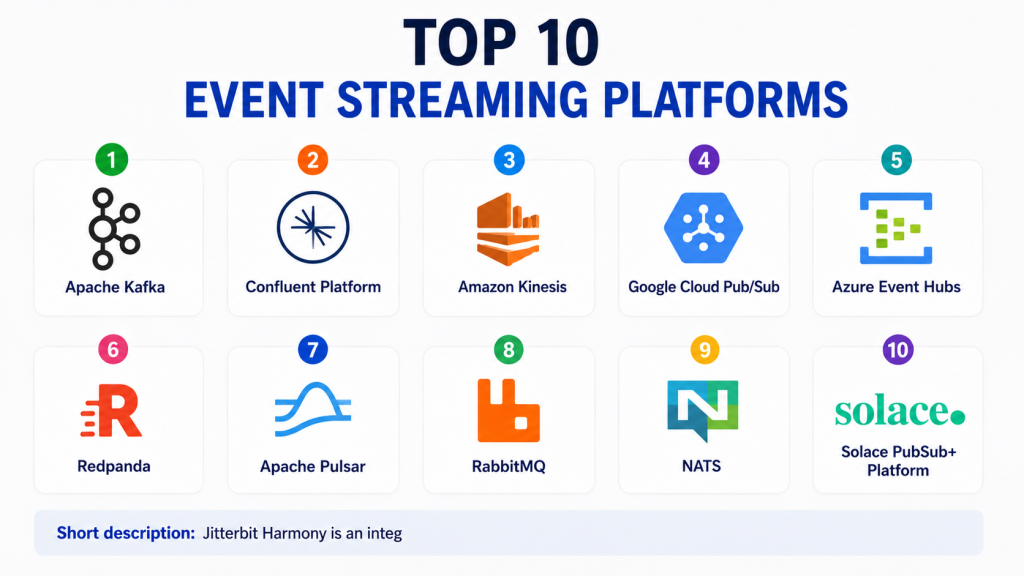
Top 10 Event Streaming Platforms
#1 — Apache Kafka
Short description:Apache Kafka is one of the most widely used open-source event streaming platforms for high-throughput, distributed data pipelines.
It is commonly used for real-time analytics, microservices communication, log aggregation, fraud detection, and event-driven architecture.
Kafka works by storing events in topics that producers write to and consumers read from.
It is highly scalable and can handle large volumes of event data when designed properly.
Kafka has a strong ecosystem around connectors, stream processing, schema management, and monitoring.
It is suitable for engineering teams that need control, flexibility, and proven scalability.
However, operating Kafka clusters requires technical expertise and strong monitoring practices.
It is best for companies that want a powerful, open-source event streaming foundation.
Key Features
- Distributed event streaming
- High-throughput message processing
- Topic-based publish and subscribe model
- Durable event storage
- Consumer groups for scalable processing
- Strong connector ecosystem
- Stream processing support through related tools
Pros
- Highly scalable and widely adopted
- Strong open-source ecosystem
- Flexible for many real-time use cases
Cons
- Operational complexity can be high
- Requires careful partition and retention planning
- Monitoring and tuning need experienced teams
Platforms / Deployment
Linux / Cloud infrastructure / Kubernetes
Self-hosted / Cloud / Hybrid
Security & Compliance
Supports authentication, authorization, encryption, ACLs, and audit-friendly configuration depending on setup. Compliance depends on deployment and surrounding infrastructure.
Integrations & Ecosystem
Apache Kafka has one of the strongest ecosystems in event streaming.
- Kafka Connect
- Stream processing tools
- Data warehouses
- Data lakes
- Monitoring platforms
- Microservices frameworks
Support & Community
Apache Kafka has strong open-source community support, extensive documentation, enterprise support through vendors, and a large developer ecosystem.
#2 — Confluent Platform
Short description:Confluent Platform is an enterprise event streaming platform built around Apache Kafka.
It adds managed capabilities, governance, connectors, schema registry, security, monitoring, and operational tooling.
Confluent is used by enterprises that want Kafka power with more production-ready management features.
It supports real-time data pipelines, streaming analytics, event-driven microservices, and hybrid data movement.
The platform is available as managed cloud service and self-managed software depending on business needs.
Confluent is especially useful when teams need Kafka at scale but want better governance and operational support.
Its ecosystem helps reduce the effort needed to build and manage streaming applications.
It is best for enterprises standardizing on Kafka-based event streaming.
Key Features
- Kafka-based event streaming
- Managed cloud and self-managed options
- Schema Registry
- Kafka Connect ecosystem
- Stream governance features
- Monitoring and operational tools
- Enterprise security controls
Pros
- Strong enterprise Kafka experience
- Rich ecosystem and tooling
- Good for hybrid and large-scale streaming programs
Cons
- Can be costly for large workloads
- Kafka concepts still require learning
- Advanced use cases need architecture planning
Platforms / Deployment
Web / Linux / Kubernetes
Cloud / Self-hosted / Hybrid
Security & Compliance
Supports SSO, RBAC, encryption, ACLs, audit logs, and enterprise governance features depending on edition and deployment. Specific certifications should be verified with the vendor.
Integrations & Ecosystem
Confluent provides strong integration coverage through connectors and Kafka-compatible patterns.
- Databases
- Cloud warehouses
- SaaS applications
- Data lakes
- Stream processing tools
- APIs and connectors
Support & Community
Confluent offers enterprise support, documentation, training, managed services, professional services, and a strong Kafka-focused ecosystem.
#3 — Amazon Kinesis
Short description:Amazon Kinesis is a managed event streaming and real-time data processing service from AWS.
It is designed for collecting, processing, and analyzing streaming data at scale.
Kinesis is commonly used for application logs, clickstreams, IoT telemetry, video streams, metrics, and real-time analytics.
It works well for organizations already using AWS services for data storage, analytics, and application workloads.
Kinesis reduces infrastructure management because AWS handles much of the operational layer.
It can connect with services for storage, processing, monitoring, and analytics.
However, pricing and service design should be reviewed carefully for high-volume workloads.
It is best for AWS-centric teams that want managed real-time data streaming.
Key Features
- Managed streaming data service
- Real-time ingestion and processing
- Integration with AWS analytics services
- Scalable stream processing
- Data delivery to storage and analytics tools
- Monitoring through AWS services
- Support for multiple streaming use cases
Pros
- Good fit for AWS environments
- Reduces broker management effort
- Useful for real-time analytics and data pipelines
Cons
- Best value is inside AWS ecosystem
- Pricing can become complex
- Portability may be limited compared with open-source options
Platforms / Deployment
Web / AWS ecosystem
Cloud / Managed service
Security & Compliance
Supports AWS IAM, encryption, access policies, monitoring, and security controls. Specific compliance depends on AWS service configuration and account setup.
Integrations & Ecosystem
Amazon Kinesis integrates naturally with AWS services.
- Amazon S3
- AWS Lambda
- Amazon Redshift
- Amazon OpenSearch
- AWS Glue
- CloudWatch
Support & Community
AWS provides documentation, enterprise support plans, training, partner services, and a large cloud community.
#4 — Google Cloud Pub/Sub
Short description:Google Cloud Pub/Sub is a managed messaging and event ingestion service for building event-driven systems on Google Cloud.
It helps applications publish and subscribe to messages across distributed services.
Pub/Sub is often used for microservices communication, data ingestion, real-time analytics, and asynchronous processing.
It is designed to scale automatically and reduce the operational burden of managing messaging infrastructure.
The service fits well with Google Cloud analytics, serverless, data processing, and AI services.
It is useful for teams that want cloud-native event delivery without managing brokers.
However, teams outside Google Cloud should evaluate portability and integration needs.
It is best for Google Cloud users building scalable event-driven applications.
Key Features
- Managed publish-subscribe messaging
- Automatic scaling
- Push and pull subscription models
- Event-driven application support
- Integration with Google Cloud data services
- Message retention and delivery controls
- Serverless-friendly architecture
Pros
- Easy to operate compared with self-managed brokers
- Strong fit for Google Cloud workloads
- Good for event-driven and asynchronous systems
Cons
- Best suited to Google Cloud ecosystem
- Not the same as Kafka-style log streaming
- Pricing and architecture need planning at scale
Platforms / Deployment
Web / Google Cloud ecosystem
Cloud / Managed service
Security & Compliance
Supports IAM, encryption, access controls, audit logging, and Google Cloud security controls. Specific compliance depends on cloud configuration.
Integrations & Ecosystem
Google Cloud Pub/Sub integrates with Google Cloud services and cloud-native applications.
- Cloud Functions
- Cloud Run
- Dataflow
- BigQuery
- Cloud Storage
- Monitoring tools
Support & Community
Google Cloud provides documentation, support plans, training resources, partner support, and a strong cloud developer community.
#5 — Azure Event Hubs
Short description:Azure Event Hubs is a managed event ingestion and streaming service from Microsoft Azure.
It is designed for large-scale telemetry, application logs, real-time analytics, and event-driven systems.
Event Hubs is often used by teams already working with Azure, Microsoft data tools, and enterprise cloud workloads.
It can ingest millions of events and connect with processing and analytics services in the Azure ecosystem.
The service supports Kafka-compatible endpoints for some use cases, which helps teams migrate or integrate Kafka workloads.
It reduces infrastructure management compared with self-hosted streaming platforms.
However, architecture and pricing should be planned carefully for high-volume event pipelines.
It is best for Microsoft Azure users building real-time data ingestion and analytics systems.
Key Features
- Managed event ingestion
- High-throughput streaming
- Kafka-compatible endpoint support
- Azure ecosystem integration
- Event retention controls
- Real-time analytics support
- Scalable consumer processing
Pros
- Strong fit for Azure environments
- Reduces operational overhead
- Useful Kafka compatibility option
Cons
- Best value is inside Azure ecosystem
- Advanced design requires cloud architecture skills
- Pricing can vary with throughput and retention needs
Platforms / Deployment
Web / Azure ecosystem
Cloud / Managed service
Security & Compliance
Supports Microsoft identity, role-based access, encryption, private networking options, and audit capabilities depending on configuration.
Integrations & Ecosystem
Azure Event Hubs integrates with Microsoft cloud and analytics services.
- Azure Stream Analytics
- Azure Functions
- Azure Synapse
- Azure Data Lake
- Microsoft Fabric
- Monitoring and logging tools
Support & Community
Microsoft provides documentation, enterprise support, training resources, partner assistance, and a large Azure developer ecosystem.
#6 — Redpanda
Short description:Redpanda is a Kafka-compatible event streaming platform designed for high performance and simpler operations.
It provides Kafka API compatibility while using its own architecture to reduce operational overhead.
Redpanda is useful for teams that want Kafka-style event streaming but prefer a simpler deployment and management model.
It supports real-time applications, streaming data pipelines, microservices, analytics, and event-driven systems.
The platform can be deployed self-managed or consumed through managed options depending on business needs.
Its biggest strength is Kafka compatibility with a focus on performance and operational simplicity.
However, teams should validate ecosystem compatibility for their specific connectors and workloads.
It is best for engineering teams seeking a modern Kafka-compatible alternative.
Key Features
- Kafka API compatibility
- High-performance streaming
- Simpler broker architecture
- Self-managed and managed options
- Low-latency event processing
- Topic-based streaming
- Developer-friendly operations
Pros
- Kafka-compatible experience
- Designed for performance and simpler operations
- Good for modern streaming workloads
Cons
- Ecosystem maturity should be validated against Kafka needs
- Some teams may prefer standard Apache Kafka
- Enterprise features vary by edition
Platforms / Deployment
Linux / Kubernetes / Cloud infrastructure
Cloud / Self-hosted / Hybrid
Security & Compliance
Supports enterprise security features depending on deployment and edition. Specific certifications should be verified with the vendor.
Integrations & Ecosystem
Redpanda supports Kafka-compatible integrations and streaming workflows.
- Kafka clients
- Stream processing tools
- Databases
- Cloud data platforms
- Monitoring systems
- APIs and connectors
Support & Community
Redpanda provides documentation, community resources, commercial support, and managed service options.
#7 — Apache Pulsar
Short description:Apache Pulsar is an open-source distributed messaging and event streaming platform designed for scalable, multi-tenant workloads.
It supports both streaming and queueing patterns, making it flexible for different architecture needs.
Pulsar separates compute and storage, which can help with scalability and operational design.
It is used for real-time data pipelines, messaging, IoT, microservices, and event-driven systems.
Pulsar supports topics, subscriptions, message retention, geo-replication, and multi-tenancy.
It is powerful for teams that need flexible messaging patterns beyond traditional streaming.
However, it may have a steeper operational learning curve for teams new to Pulsar.
It is best for technical teams that need scalable open-source messaging and streaming.
Key Features
- Distributed messaging and streaming
- Multi-tenancy support
- Separate compute and storage architecture
- Multiple subscription models
- Geo-replication support
- Message retention and replay
- Open-source flexibility
Pros
- Flexible messaging and streaming patterns
- Strong multi-tenancy capabilities
- Good for large distributed systems
Cons
- Operational complexity can be high
- Smaller ecosystem than Kafka
- Requires skilled engineering support
Platforms / Deployment
Linux / Kubernetes / Cloud infrastructure
Self-hosted / Cloud / Hybrid
Security & Compliance
Supports authentication, authorization, encryption, and access controls depending on configuration. Compliance depends on deployment and operational controls.
Integrations & Ecosystem
Apache Pulsar supports integrations for data pipelines and streaming applications.
- Pulsar Functions
- Stream processing tools
- Databases
- Cloud storage
- Connectors
- APIs and client libraries
Support & Community
Apache Pulsar has open-source community support, documentation, and commercial support through vendors and service providers.
#8 — RabbitMQ
Short description:RabbitMQ is a widely used open-source message broker that supports reliable messaging for distributed applications.
While it is not always used as a high-volume event streaming log like Kafka, it is important in event-driven and asynchronous architectures.
RabbitMQ is often used for task queues, microservices messaging, background jobs, workflow communication, and application integration.
It supports routing, exchanges, queues, acknowledgements, and multiple messaging protocols.
RabbitMQ is useful for teams that need dependable message delivery and flexible routing patterns.
It is easier to understand for many traditional messaging use cases compared with full streaming platforms.
However, it may not be ideal for very large event replay and long-term event log workloads.
It is best for application messaging, task queues, and moderate event-driven systems.
Key Features
- Reliable message broker
- Queue-based messaging
- Flexible routing with exchanges
- Message acknowledgements
- Multiple protocol support
- Clustering options
- Plugin ecosystem
Pros
- Mature and widely adopted
- Strong for task queues and application messaging
- Flexible routing patterns
Cons
- Not ideal for massive event log replay
- Scaling model differs from Kafka-style platforms
- Requires operational planning for high availability
Platforms / Deployment
Linux / Windows / macOS / Cloud infrastructure
Self-hosted / Cloud / Hybrid
Security & Compliance
Supports authentication, access control, TLS encryption, and permissions depending on configuration. Compliance depends on deployment and infrastructure.
Integrations & Ecosystem
RabbitMQ integrates well with application frameworks and backend services.
- Microservices frameworks
- Worker queues
- Backend applications
- Monitoring tools
- Messaging protocols
- Cloud deployment platforms
Support & Community
RabbitMQ has strong open-source documentation, community support, plugin resources, and commercial support options through vendors.
#9 — NATS
Short description:NATS is a lightweight, high-performance messaging system designed for cloud-native, edge, and distributed systems.
It supports publish-subscribe messaging, request-reply patterns, and streaming through NATS JetStream.
NATS is commonly used for microservices communication, control planes, IoT, edge messaging, and distributed applications.
It is known for simplicity, speed, and low operational overhead.
NATS can be a strong choice when teams need fast messaging without the heavier complexity of some streaming platforms.
JetStream adds persistence, replay, and streaming capabilities for event-driven workloads.
However, teams needing a large Kafka-style ecosystem should compare integrations carefully.
It is best for cloud-native teams that value lightweight, fast, and simple messaging.
Key Features
- Lightweight publish-subscribe messaging
- Request-reply support
- JetStream persistence and replay
- Cloud-native architecture
- Edge and distributed system support
- Simple operations
- Low-latency messaging
Pros
- Fast and lightweight
- Good for microservices and edge use cases
- Simpler operations than many heavy platforms
Cons
- Smaller ecosystem than Kafka
- May not fit all large analytics streaming needs
- Requires architecture validation for complex workloads
Platforms / Deployment
Linux / Windows / macOS / Kubernetes / Cloud infrastructure
Self-hosted / Cloud / Hybrid
Security & Compliance
Supports authentication, authorization, TLS, and permissions depending on configuration. Compliance depends on deployment and operational controls.
Integrations & Ecosystem
NATS integrates well with cloud-native systems and distributed applications.
- Microservices
- Kubernetes environments
- Edge systems
- IoT workloads
- APIs and client libraries
- Monitoring tools
Support & Community
NATS has documentation, open-source community support, commercial support options, and growing adoption in cloud-native environments.
#10 — Solace PubSub+ Platform
Short description:Solace PubSub+ Platform is an enterprise event streaming and event broker platform designed for hybrid, multi-cloud, and event-driven architecture.
It supports event distribution across applications, cloud services, IoT systems, and enterprise environments.
Solace is useful for organizations that need event mesh capabilities across multiple locations and systems.
The platform supports publish-subscribe messaging, event management, governance, and real-time integration.
It is often considered by enterprises with complex integration and distributed event routing needs.
Solace can help connect legacy systems, cloud services, and modern applications through event-driven patterns.
However, it may be more platform than smaller teams need.
It is best for enterprises building governed event-driven architecture across hybrid systems.
Key Features
- Enterprise event broker
- Event mesh capabilities
- Hybrid and multi-cloud support
- Publish-subscribe messaging
- Event management and governance
- Real-time integration
- Support for distributed event-driven systems
Pros
- Strong for enterprise event mesh use cases
- Good hybrid and multi-cloud support
- Useful for complex integration environments
Cons
- May be too advanced for simple streaming needs
- Requires architecture planning
- Pricing and deployment details should be validated
Platforms / Deployment
Web / Enterprise systems / Cloud infrastructure
Cloud / Self-hosted / Hybrid
Security & Compliance
Supports enterprise security features such as authentication, authorization, encryption, and access controls. Specific certifications should be verified with the vendor.
Integrations & Ecosystem
Solace PubSub+ integrates with enterprise applications and cloud-native systems.
- Cloud platforms
- Enterprise applications
- IoT systems
- APIs
- Messaging protocols
- Integration platforms
Support & Community
Solace provides documentation, enterprise support, onboarding resources, professional services, and event-driven architecture guidance.
Comparison Table
| Tool Name | Best For | Platform(s) Supported | Deployment | Standout Feature | Public Rating |
|---|---|---|---|---|---|
| Apache Kafka | Open-source event streaming | Linux / Cloud / Kubernetes | Self-hosted / Cloud / Hybrid | High-throughput distributed streaming | N/A |
| Confluent Platform | Enterprise Kafka streaming | Web / Linux / Kubernetes | Cloud / Self-hosted / Hybrid | Kafka with enterprise governance and tooling | N/A |
| Amazon Kinesis | AWS real-time data streaming | Web / AWS ecosystem | Cloud | Managed AWS-native streaming | N/A |
| Google Cloud Pub/Sub | Google Cloud event messaging | Web / Google Cloud ecosystem | Cloud | Serverless publish-subscribe messaging | N/A |
| Azure Event Hubs | Azure event ingestion | Web / Azure ecosystem | Cloud | Managed Azure streaming with Kafka compatibility | N/A |
| Redpanda | Kafka-compatible modern streaming | Linux / Kubernetes / Cloud | Cloud / Self-hosted / Hybrid | Kafka API compatibility with simpler operations | N/A |
| Apache Pulsar | Multi-tenant open-source streaming | Linux / Kubernetes / Cloud | Self-hosted / Cloud / Hybrid | Streaming and messaging in one platform | N/A |
| RabbitMQ | Application messaging and queues | Linux / Windows / macOS / Cloud | Self-hosted / Cloud / Hybrid | Reliable queue-based messaging | N/A |
| NATS | Lightweight cloud-native messaging | Linux / Windows / macOS / Kubernetes | Self-hosted / Cloud / Hybrid | Fast lightweight messaging with JetStream | N/A |
| Solace PubSub+ Platform | Enterprise event mesh | Web / Enterprise systems / Cloud | Cloud / Self-hosted / Hybrid | Hybrid and multi-cloud event mesh | N/A |
Evaluation & Scoring of Event Streaming Platforms
| Tool Name | Core (25%) | Ease (15%) | Integrations (15%) | Security (10%) | Performance (10%) | Support (10%) | Value (15%) | Weighted Total |
|---|---|---|---|---|---|---|---|---|
| Apache Kafka | 9 | 6 | 9 | 8 | 9 | 8 | 9 | 8.25 |
| Confluent Platform | 9 | 8 | 9 | 9 | 9 | 9 | 7 | 8.55 |
| Amazon Kinesis | 8 | 8 | 8 | 9 | 8 | 9 | 7 | 8.05 |
| Google Cloud Pub/Sub | 8 | 9 | 8 | 9 | 8 | 8 | 8 | 8.30 |
| Azure Event Hubs | 8 | 8 | 8 | 9 | 8 | 9 | 8 | 8.25 |
| Redpanda | 8 | 8 | 8 | 8 | 9 | 8 | 8 | 8.15 |
| Apache Pulsar | 8 | 6 | 7 | 8 | 8 | 7 | 8 | 7.45 |
| RabbitMQ | 7 | 8 | 8 | 8 | 7 | 8 | 9 | 7.80 |
| NATS | 7 | 8 | 7 | 8 | 8 | 7 | 9 | 7.70 |
| Solace PubSub+ Platform | 8 | 7 | 8 | 8 | 8 | 8 | 7 | 7.75 |
These scores are comparative and should be treated as a practical starting point, not as a universal ranking. A platform with a lower score may still be the best fit if it matches your architecture, cloud provider, team skills, and workload pattern. Always test real throughput, latency, security, integration, and operational requirements before selecting a platform.
Which Event Streaming Platform Is Right for You?
Solo / Freelancer
Solo developers usually do not need a heavy event streaming platform unless they are building real-time applications. For learning and small projects, Apache Kafka, RabbitMQ, NATS, or Redpanda can be useful. If you want simple messaging, RabbitMQ or NATS may be easier to start with than Kafka.
SMB
SMBs should focus on ease of setup, low operational burden, and clear use cases. Managed services such as Amazon Kinesis, Google Cloud Pub/Sub, Azure Event Hubs, or Confluent Cloud can reduce infrastructure work. For simple background jobs and application messaging, RabbitMQ or NATS may be enough.
Mid-Market
Mid-market companies often need reliable streaming for analytics, microservices, customer activity tracking, and operational data movement. Apache Kafka, Confluent Platform, Redpanda, Pulsar, and managed cloud services are strong candidates. The right choice depends on team skills, cloud provider, event volume, and governance needs.
Enterprise
Enterprises should evaluate reliability, security, compliance, governance, hybrid deployment, monitoring, and support. Confluent Platform, Apache Kafka, Azure Event Hubs, Amazon Kinesis, Google Cloud Pub/Sub, Solace PubSub+, and Redpanda are strong enterprise candidates. Large organizations should also evaluate schema governance, disaster recovery, and operational support.
Budget vs Premium
Open-source tools like Apache Kafka, Apache Pulsar, RabbitMQ, NATS, and Apache-based ecosystems can reduce license costs but increase operational responsibility. Premium or managed platforms like Confluent, Kinesis, Pub/Sub, Event Hubs, and Solace reduce management effort but may increase recurring costs.
Feature Depth vs Ease of Use
Apache Kafka and Confluent offer deep streaming capabilities, but Kafka requires expertise. Google Cloud Pub/Sub and Azure Event Hubs are easier for cloud-native workloads. RabbitMQ and NATS are simpler for application messaging. Solace is strong for enterprise event mesh use cases.
Integrations & Scalability
If you are deeply invested in AWS, Amazon Kinesis is a natural fit. For Google Cloud, Pub/Sub is practical. For Azure, Event Hubs is strong. For Kafka-based ecosystems, Apache Kafka, Confluent, and Redpanda should be evaluated. For hybrid enterprise integration, Solace PubSub+ can be useful.
Security & Compliance Needs
Security-focused teams should validate authentication, authorization, encryption, RBAC, audit logs, private networking, schema governance, data retention, and access policies. Event streaming often moves business-critical data, so security must be designed from the beginning.
Frequently Asked Questions
1. What is an event streaming platform?
An event streaming platform collects, stores, and delivers real-time events between systems. It helps applications react quickly when something happens, such as an order, payment, click, alert, or sensor reading.
2. How is event streaming different from messaging?
Messaging usually focuses on sending messages between services or queues. Event streaming often stores ordered event logs that can be replayed and consumed by multiple systems for analytics, automation, and real-time processing.
3. Is Apache Kafka the same as event streaming?
Apache Kafka is one of the most popular event streaming platforms, but it is not the only option. Other platforms include Confluent, Redpanda, Pulsar, Kinesis, Pub/Sub, Event Hubs, RabbitMQ, NATS, and Solace.
4. Which event streaming platform is best for beginners?
RabbitMQ and NATS are easier for many beginners because they are simpler for basic messaging. Kafka is very powerful, but it requires more understanding of topics, partitions, brokers, consumers, and retention.
5. Which platform is best for enterprises?
Confluent Platform, Apache Kafka, Azure Event Hubs, Amazon Kinesis, Google Cloud Pub/Sub, Redpanda, and Solace PubSub+ are strong enterprise options. The best choice depends on cloud provider, governance needs, scale, and team skills.
6. How much do event streaming platforms cost?
Costs vary by deployment model, event volume, retention, throughput, storage, network transfer, support, and managed service usage. Open-source tools may reduce license costs but require more operational effort.
7. What are common implementation mistakes?
Common mistakes include poor topic design, weak monitoring, unclear event ownership, no schema governance, underestimating retention costs, and ignoring failure handling. A strong architecture plan is important.
8. Can event streaming platforms support real-time analytics?
Yes, event streaming platforms are commonly used for real-time analytics. They can feed dashboards, warehouses, lakehouses, fraud systems, monitoring platforms, and AI pipelines with fresh event data.
9. What is schema registry in event streaming?
A schema registry stores and manages event data structures. It helps producers and consumers agree on message formats, reducing the risk of breaking downstream applications when event fields change.
10. Are managed streaming services better than self-hosted platforms?
Managed services reduce infrastructure work and are easier for many teams. Self-hosted platforms provide more control but require engineering effort for scaling, monitoring, upgrades, security, and disaster recovery.
Conclusion
Event Streaming Platforms are now a key part of modern real-time architecture because they help systems react faster, share data reliably, and support analytics, automation, AI, and microservices at scale. The best platform depends on workload size, cloud provider, team skills, security requirements, and operational model. Apache Kafka and Confluent are strong for Kafka-based enterprise streaming, Amazon Kinesis works well for AWS users, Google Cloud Pub/Sub fits Google Cloud workloads, Azure Event Hubs is practical for Microsoft Azure teams, and Redpanda offers a modern Kafka-compatible option. RabbitMQ and NATS are useful for simpler messaging needs, while Solace PubSub+ fits enterprise event mesh use cases.
