Upgrade & Secure Your Future with DevOps, SRE, DevSecOps, MLOps!
We spend hours scrolling social media and waste money on things we forget, but won’t spend 30 minutes a day earning certifications that can change our lives.
Master in DevOps, SRE, DevSecOps & MLOps by DevOps School!
Learn from Guru Rajesh Kumar and double your salary in just one year.
Introduction
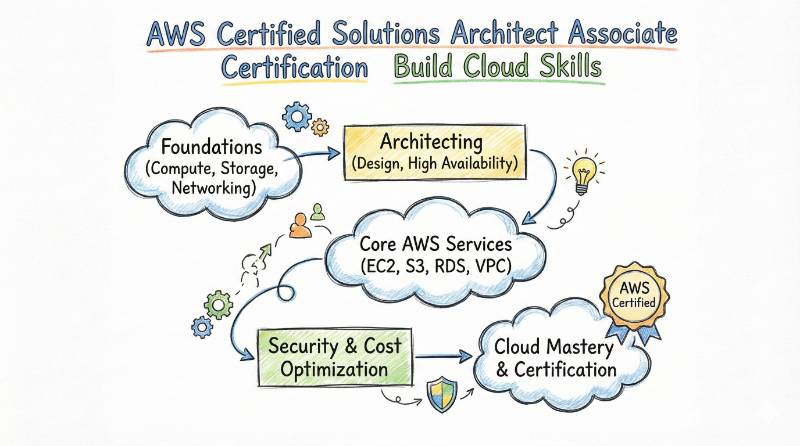
Cloud projects fail more often because of bad design choices than because of a lack of coding skill. A small mistake in networking, security, scaling, or cost planning can turn a simple application into a constant firefight. That is why AWS Certified Solutions Architect – Associate matters. It teaches you how to design AWS systems that are reliable, secure, scalable, and cost-aware—using the right services for the right job. This certification is ideal for engineers who build or support applications on AWS, and also for managers who review architecture decisions and want confidence in what “good design” looks like. By the end of your preparation, you should be able to read any cloud requirement and convert it into a clear AWS architecture plan—without confusion, without over-engineering, and without wasting money.
What this certification really proves
AWS Certified Solutions Architect – Associate proves you can:
- Design multi-tier architectures that are resilient and scalable
- Pick the right compute, storage, network, and database for a workload
- Secure access and data in a practical way
- Optimize for cost without breaking performance
Who should take AWS Certified Solutions Architect – Associate
This is a strong fit if you are:
- A software engineer building apps that run on AWS
- A cloud engineer handling AWS accounts, networking, IAM, and deployments
- A platform engineer building internal platforms and shared cloud foundations
- A DevOps / SRE professional supporting reliability and scale
- An engineering manager who needs solid cloud architecture judgment (even if you do not write infra daily)
Prerequisites (simple and realistic)
You do not need a perfect background to start.
The provider’s page states there are no strict prerequisites, but recommends:
- basic knowledge of Linux/Windows
- familiarity with AWS or another cloud platform
Practical tip: if you can already explain VPC basics, IAM basics, and how an app uses a database + cache, you are ready to begin.
What you will learn (the exam-style domains)
The curriculum on the official page is organized into 4 domains.
Domain 1: Design Resilient Architectures
You learn how to:
- design multi-tier solutions
- build for high availability / fault tolerance
- use decoupling patterns
- choose resilient storage options
Domain 2: Design High-Performing Architectures
You learn how to choose:
- elastic and scalable compute
- high-performing storage
- right-fit networking
- correct database services
Domain 3: Design Secure Applications and Architectures
You learn:
- secure access (IAM strategy)
- secure application tiers
- data security choices (encryption, key mgmt, controls)
Domain 4: Design Cost-Optimized Architectures
You learn:
- cost-effective storage
- cost-aware compute + database choices
- cost-optimized network architectures
Certification roadmap table (what to take before/after)
| Certification | Track | Level | Who it’s for | Prerequisites | Skills covered | Recommended order |
|---|---|---|---|---|---|---|
| AWS Certified Solutions Architect – Associate | Architecture | Associate | Engineers, DevOps/SRE, cloud/platform teams | Basic Linux/Windows + basic cloud familiarity | VPC, IAM, compute, storage, databases, HA, cost | 1 |
| AWS Certified Solutions Architect – Professional | Architecture | Professional | Senior architects, leads, complex enterprise design | Strong AWS architecture experience | advanced architectures, migrations, governance patterns | 2 (same track) |
| AWS Certified Cloud Practitioner | Cloud Fundamentals | Foundational | Beginners, managers needing AWS basics | None | core AWS concepts, billing, security basics | 0 (optional) |
| AWS Certified Developer – Associate | Application | Associate | Developers building on AWS | Basic AWS + coding familiarity | SDK usage, app services, deployment patterns | 2 (cross-track) |
| AWS Certified SysOps Administrator – Associate | Operations | Associate | Ops/CloudOps/SRE running workloads | Basic AWS ops familiarity | monitoring, operations, automation, incident response | 2 (cross-track) |
| AWS Certified DevOps Engineer – Professional | DevOps | Professional | DevOps leads, automation owners | Strong CI/CD + AWS | automation, pipelines, governance, reliability at scale | 3 (cross-track) |
| AWS Certified Security – Specialty | Security | Specialty | Security engineers, cloud security champions | IAM + networking + security fundamentals | threat controls, encryption, logging, compliance | 3 (cross-track) |
| AWS Certified Advanced Networking – Specialty | Networking | Specialty | Network/cloud network engineers | strong networking basics | hybrid networking, routing, connectivity patterns | later (specialization) |
| AWS Certified Data Analytics – Specialty | Data | Specialty | Data engineers using AWS | data fundamentals + AWS basics | ingestion, storage, analytics patterns | later (specialization) |
| AWS Certified Database – Specialty | Data | Specialty | DBA/data platform engineers | database fundamentals + AWS basics | database selection, performance, migration, HA | later (specialization) |
Mini-sections for AWS Certified Solutions Architect – Associate
What it is
AWS Certified Solutions Architect – Associate validates that you can design and recommend AWS architectures that are resilient, secure, performant, and cost-optimized. It focuses more on decision-making than memorizing service lists.
Who should take it
- Software engineers deploying apps to AWS
- Cloud/Platform engineers designing AWS foundations
- DevOps and SRE professionals supporting AWS production systems
- Engineering managers who review architecture, cost, and risk decisions
Skills you’ll gain
- Designing multi-tier architectures with clear boundaries
- Choosing the right compute pattern (VM, containers, serverless)
- Storage selection (object, block, file) and when to use each
- Building secure identity access patterns (IAM principles)
- Designing scalable databases and caching strategies
- Networking decisions (VPC structure, routing, connectivity choices)
- Reliability patterns (autoscaling, multi-AZ thinking, decoupling)
- Cost optimization habits (right-sizing, storage class decisions)
Real-world projects you should be able to do after it
- Build a high-availability web app with multi-tier design and failover approach
- Design a secure VPC network with public/private tiers and controlled access
- Create a serverless workflow that scales automatically and controls cost
- Design a data storage strategy for logs + analytics + backup lifecycle
- Plan a migration of a small on-prem app to AWS with minimal downtime
- Create a cost-optimized architecture for a startup workload with growth path
- Build a decoupled system using queues/events to prevent cascading failures
Preparation plan (7–14 days / 30 days / 60 days)
7–14 days plan (fast-track for people already using AWS)
Goal: revise architecture patterns and remove gaps quickly.
- Days 1–2: VPC basics, routing, subnets, security groups, NACLs
- Days 3–4: IAM core concepts, least privilege thinking, common mistakes
- Days 5–6: Compute patterns (VM, containers, serverless) + scaling design
- Days 7–8: Storage choices + backup + lifecycle + durability tradeoffs
- Days 9–10: Databases + caching + read/write scaling approach
- Days 11–12: Resilience patterns + decoupling + failure scenarios
- Days 13–14: Cost optimization patterns + final review + mock tests
Use the official domains list as your checklist.
30 days plan (balanced for working engineers)
Goal: learn deeply but steadily.
- Week 1: AWS foundations (IAM + VPC + core compute)
- Week 2: Storage + databases + messaging/decoupling patterns
- Week 3: Security + monitoring mindset + reliability design
- Week 4: Cost optimization + design review practice + mock exams
Daily habit (30–60 minutes):
- 20 minutes reading concepts
- 30 minutes lab/architecture drawing
- 10 minutes “why this choice” notes
60 days plan (beginner-friendly, strongest long-term retention)
Goal: build real confidence, not just exam readiness.
- Weeks 1–2: Fundamentals (cloud basics, IAM, VPC)
- Weeks 3–4: App architecture (compute + storage + databases)
- Weeks 5–6: Security + resilience patterns (designing for failure)
- Weeks 7–8: Cost + performance tuning + full mock exams + revision
This path works best if you want real project skill, not only a certificate.
Common mistakes (bullets)
- Studying services one by one instead of learning architecture patterns
- Ignoring VPC basics (many wrong answers happen here)
- Mixing up security responsibilities and over-trusting “default” settings
- Not practicing tradeoff thinking (cost vs performance vs resilience)
- Memorizing terms without doing hands-on labs
- Skipping cost-optimized designs (easy scoring area if practiced)
Best next certification after this
A clean next step is AWS Certified Solutions Architect – Professional (same track), because it extends architecture depth and pushes you into advanced scenarios. The provider’s page clearly mentions training for both associate and professional levels.
Choose your path (6 learning paths)
This section is for people who want a career direction, not just an exam.
Path 1: DevOps
You focus on delivery speed + stability.
- After SAA: strengthen CI/CD, infra automation, monitoring mindset
- Best outcome: you can design deployable architectures, not just diagrams
Path 2: DevSecOps
You focus on “secure by design”.
- After SAA: go deeper into IAM strategy, logging, key management, guardrails
- Best outcome: fewer incidents caused by misconfigurations
Path 3: SRE
You focus on reliability, scaling, and incident readiness.
- After SAA: practice failure scenarios, autoscaling strategy, decoupling, cost vs reliability
- Best outcome: you design systems that behave well under load and failure
Path 4: AIOps / MLOps
You focus on monitoring + automation intelligence.
- After SAA: learn observability signals, anomaly detection logic, deployment patterns for models
- Best outcome: you reduce noise and improve response speed
Path 5: DataOps
You focus on data pipelines and data reliability.
- After SAA: build data storage and processing patterns, governance mindset, cost controls for data
- Best outcome: pipelines become stable and repeatable
Path 6: FinOps
You focus on cloud cost ownership.
- After SAA: learn cost allocation, budgeting patterns, right-sizing workflows, and optimization loops
- Best outcome: teams ship faster without cost surprises
Role → Recommended certifications mapping
| Role | Recommended certifications (order) |
|---|---|
| DevOps Engineer | AWS Certified Solutions Architect – Associate → (cross-track) AWS Developer Associate → (cross-track) AWS DevOps Engineer Professional |
| SRE | AWS Certified Solutions Architect – Associate → AWS SysOps Administrator Associate → (cross-track) AWS DevOps Engineer Professional |
| Platform Engineer | AWS Certified Solutions Architect – Associate → AWS Advanced Networking Specialty (later) → AWS Solutions Architect Professional |
| Cloud Engineer | AWS Certified Solutions Architect – Associate → AWS SysOps Administrator Associate → AWS Solutions Architect Professional |
| Security Engineer | AWS Certified Solutions Architect – Associate → AWS Security Specialty → (leadership) Cloud Security / Governance focus |
| Data Engineer | AWS Certified Solutions Architect – Associate → AWS Data Analytics Specialty → AWS Database Specialty |
| FinOps Practitioner | AWS Certified Solutions Architect – Associate → FinOps-focused learning + cost optimization practice → cloud governance/leadership |
| Engineering Manager | AWS Certified Solutions Architect – Associate (conceptual mastery) → Architecture review skills → leadership track specialization |
Next certifications to take (3 options)
Option 1: Same track (Architecture depth)
- AWS Certified Solutions Architect – Professional
Best when you want senior architect roles and large-system design ownership.
Option 2: Cross-track (practical job impact)
- AWS Certified SysOps Administrator – Associate (ops + monitoring)
- OR AWS Certified Developer – Associate (app + deployment mindset)
Option 3: Leadership (architecture ownership)
- Architecture governance + cost ownership + security guardrails
This is less about one exam and more about being the person who can review designs, control risk, and guide teams.
Top institutions that help with training + certifications
DevOpsSchool
DevOpsSchool runs structured training with instructor-led formats and hands-on emphasis. Their program page highlights ~40 hours duration and 50+ lab projects, which suits professionals who learn by doing.
Cotocus
Cotocus is commonly positioned as a practical learning partner for engineers who want guided support. It can be helpful if you want structured mentoring and real-world alignment.
Scmgalaxy
Scmgalaxy is often used by learners who want organized course progression and repeatable learning paths. It works well when you need a consistent study routine.
BestDevOps
BestDevOps is typically chosen by professionals who want focused upskilling for DevOps and cloud roles. It can fit learners who prefer direct, job-oriented preparation.
devsecopsschool
devsecopsschool is useful if your goal is cloud architecture plus security guardrails. It aligns best with DevSecOps learners who want secure-by-design thinking.
sreschool
sreschool is a good match if you want to connect architecture choices with reliability outcomes. It helps build the “design for failure” mindset used in production SRE work.
aiopsschool
aiopsschool supports learners who want monitoring intelligence and automation thinking. It pairs well after you understand core cloud architecture foundations.
dataopsschool
dataopsschool fits learners building data pipelines and platforms. It helps connect storage, processing choices, and reliability practices in data systems.
finopsschool
finopsschool is relevant if your role includes cloud cost ownership. It supports optimization habits and practical cost governance thinking.
Testimonials (learner feedback)
Below are examples of training feedback shown on the program page:
- Abhinav Gupta (Pune): shared that the training felt interactive and helped build confidence.
- Indrayani (India): mentioned strong hands-on examples and effective query resolution.
- Vinayakumar (Project Manager, Bangalore): appreciated the trainer’s knowledge and delivery.
FAQs — difficulty, time, prerequisites, sequence, value, outcomes
1) Is AWS Solutions Architect – Associate hard?
It is moderately challenging. It becomes easier when you study architecture patterns and do labs, not just reading.
2) How much time do I need to prepare?
Typical ranges:
- 7–14 days (if you already work on AWS)
- 30 days (balanced)
- 60 days (best for beginners)
3) Do I need coding experience?
No. Coding helps, but the focus is on architecture choices and tradeoffs.
4) Do I need real AWS job experience first?
Not mandatory, but basic cloud familiarity helps. The provider page also states there are no strict prerequisites, while recommending basic OS/cloud familiarity.
5) Is this certification valuable for managers?
Yes—especially for managers who review architecture, cost, and risk decisions.
6) Should I do Cloud Practitioner before this?
Optional. If you are new to AWS, it can make the start easier.
7) What is the best study strategy?
Use the domain list as your checklist, and practice “why this choice” for every service decision.
8) What is the biggest reason people fail?
They memorize services but cannot pick the best design under constraints (cost, availability, security).
9) Can a DevOps engineer benefit from this certification?
Yes. It improves your architecture thinking, which improves your CI/CD and reliability decisions.
10) What job roles can improve after this?
Cloud engineer, junior solutions architect, platform engineer, DevOps engineer, SRE, and technical lead paths.
11) How should I sequence my next certification?
Pick one based on your work:
- architecture depth (professional)
- operations depth (SysOps)
- app depth (Developer)
12) Does this help salary and career growth?
It can help when combined with hands-on projects, because it gives employers confidence that you can design workable systems.
FAQs on AWS Certified Solutions Architect – Associate
Q1) What should I master first: IAM or VPC?
Start with IAM basics (identity, permissions, least privilege), then move to VPC (subnets, routing, security boundaries). Both are core.
Q2) How do I avoid “service confusion”?
Do not learn services in isolation. Learn them as patterns:
- “public web tier + private app tier + database tier”
- “async processing with queue”
- “cache in front of database”
Q3) What is the fastest way to improve my exam accuracy?
After each practice question, write a one-line reason:
- “This option fails availability”
- “This option costs more for same outcome”
- “This option violates least privilege”
Q4) Should I focus more on cost or security?
Both matter. A strong answer often balances:
- secure access + encryption (security)
- right sizing + storage class + scaling (cost)
Q5) What kind of projects should I build for confidence?
Build small but complete systems:
- web app + database + cache
- event-driven function pipeline
- VPC with clearly separated tiers
Q6) I work on another cloud. Can I still pass?
Yes. Your cloud thinking helps. You must learn AWS-specific service choices and architecture tradeoffs.
Q7) What is the best “final week” plan?
- revise domain checklist
- do 2–3 full mocks
- redo wrong questions with written reasons
- review security + VPC + cost patterns again
Q8) What should I do after passing?
Do 2 things immediately:
- build one real project end-to-end
- pick a next certification aligned to your role (Ops, Dev, Security, or Architecture depth)
Conclusion
AWS Certified Solutions Architect – Associate is one of the cleanest ways to build real cloud architecture judgment. It trains you to think in resilient design, performance choices, security decisions, and cost control — the exact skills teams need in production. If you follow a structured plan, practice hands-on projects, and learn tradeoffs instead of memorization, you will not only pass the certification — you will start making better architecture decisions at work.
