Upgrade & Secure Your Future with DevOps, SRE, DevSecOps, MLOps!
We spend hours scrolling social media and waste money on things we forget, but won’t spend 30 minutes a day earning certifications that can change our lives.
Master in DevOps, SRE, DevSecOps & MLOps by DevOps School!
Learn from Guru Rajesh Kumar and double your salary in just one year.
Introduction
OCR & Document Capture Software helps organizations convert paper documents, scanned files, images, PDFs, forms, invoices, receipts, IDs, and handwritten content into searchable, editable, and structured digital data. In simple terms, it helps businesses capture information from documents and move it into workflows, databases, ERPs, CRMs, content systems, or analytics tools.
This matters in 2026 and beyond because companies are still dealing with high volumes of paper, scanned PDFs, email attachments, and unstructured documents. Manual data entry is slow, costly, and error-prone. Modern OCR and intelligent document capture tools use AI, machine learning, layout detection, entity extraction, and workflow automation to improve speed and accuracy.
Real-world use cases include invoice processing, KYC document capture, insurance claims, medical records digitization, HR onboarding, contract extraction, bank statement processing, and archive conversion.
Buyers should evaluate OCR accuracy, AI extraction, supported document types, handwritten text support, workflow automation, integrations, security, deployment options, scalability, and human review features.
Best for: finance teams, banks, insurance companies, healthcare providers, logistics teams, HR departments, government agencies, legal teams, shared service centers, and enterprises handling high document volumes.
Not ideal for: users who only scan a few documents occasionally, teams that only need basic PDF reading, or businesses that do not need structured data extraction, compliance controls, or workflow automation.
Key Trends in OCR & Document Capture Software
AI-powered intelligent document processing is replacing basic OCR by extracting meaning, fields, tables, entities, and context from documents.
- Human-in-the-loop review is becoming important for improving accuracy in invoices, claims, legal documents, and regulated workflows.
- Low-code capture workflows are helping operations teams configure document routing, validation, approvals, and exceptions without heavy development.
- Multilingual OCR is now a key requirement for global businesses processing documents across regions and languages.
- Handwriting recognition is improving, especially for forms, medical notes, field reports, and historical records.
- Cloud-native document capture APIs are growing because SaaS platforms need OCR, classification, and extraction inside their own applications.
- Compliance and auditability are major buying factors as captured documents often contain personal, financial, legal, and health data.
- Integration with ERP, ECM, CRM, and RPA tools is becoming essential for end-to-end automation.
- Template-free extraction is gaining attention because businesses want tools that can understand different document layouts without building rules for every format.
- Data validation and exception handling are now expected so teams can catch low-confidence fields before data enters business systems.
How We Selected These Tools
- Market recognition across OCR, intelligent document processing, enterprise capture, and document automation.
- Strength of OCR accuracy, field extraction, classification, table capture, and document understanding.
- Support for structured, semi-structured, and unstructured documents.
- Fit across SMB, mid-market, enterprise, and developer-first use cases.
- Integration ecosystem with ERP, ECM, RPA, cloud storage, workflow platforms, and APIs.
- Security posture signals such as encryption, access control, audit trails, and role-based permissions.
- Deployment flexibility across cloud, self-hosted, and hybrid needs.
- Scalability for high-volume document processing.
- Usability for business users, operations teams, and technical teams.
- Support, documentation, onboarding, and ecosystem maturity.
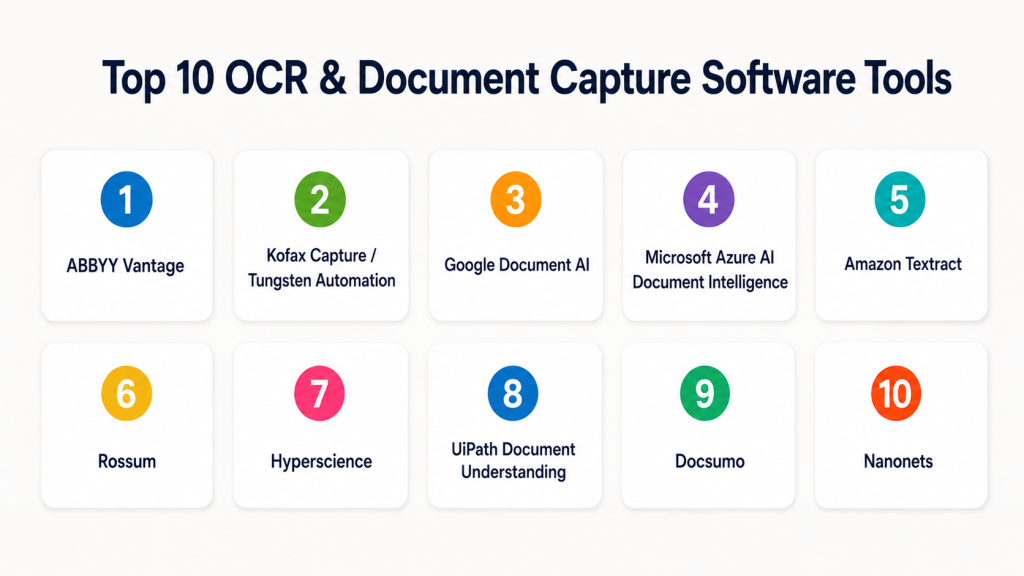
Top 10 OCR & Document Capture Software Tools
#1 — ABBYY Vantage
Short description (2–3 lines): ABBYY Vantage is an intelligent document processing platform that uses OCR, AI, and machine learning to extract data from business documents. It is best for enterprises that need scalable document capture, classification, and extraction workflows.
Key Features
- AI-based OCR and intelligent document processing.
- Document classification and data extraction.
- Pre-trained skills for common document types.
- Human review and validation workflows.
- API and workflow integration support.
- Support for structured and semi-structured documents.
- Enterprise-grade automation capabilities.
Pros
- Strong OCR and document understanding capabilities.
- Good fit for high-volume enterprise workflows.
- Supports complex capture and validation use cases.
Cons
- May require implementation planning.
- Can be more advanced than small teams need.
- Pricing and deployment details may vary by use case.
Platforms / Deployment
Web / Windows
Cloud / Hybrid
Security & Compliance
Supports enterprise access controls, encryption, and audit-related features. Specific certifications should be validated directly during procurement.
Integrations & Ecosystem
ABBYY Vantage is designed to connect OCR and extraction into enterprise automation workflows.
- RPA platforms
- ERP systems
- ECM platforms
- Workflow automation tools
- APIs
- Business process systems
Support & Community
ABBYY provides enterprise support, documentation, professional services, and partner implementation options. It is strongest for organizations with mature automation and document capture needs.
#2 — Kofax Capture / Tungsten Automation
Short description (2–3 lines): Kofax Capture, now under Tungsten Automation branding, is a mature enterprise document capture platform used for scanning, OCR, classification, extraction, and workflow automation. It is well suited for large organizations with high document volumes.
Key Features
- Batch document scanning and capture.
- OCR and data extraction.
- Document classification.
- Validation and exception handling.
- Integration with business systems.
- Support for centralized and distributed capture.
- Enterprise workflow automation capabilities.
Pros
- Strong for high-volume enterprise capture.
- Mature platform with deep capture capabilities.
- Good fit for finance, government, insurance, and shared services.
Cons
- Can require specialist implementation.
- May be complex for smaller organizations.
- User experience depends on configuration quality.
Platforms / Deployment
Web / Windows
Cloud / Self-hosted / Hybrid
Security & Compliance
Supports enterprise access controls, audit trails, role-based permissions, and secure capture workflows. Specific certifications should be validated directly.
Integrations & Ecosystem
Kofax/Tungsten tools are widely used in enterprise automation environments.
- ERP systems
- ECM systems
- RPA workflows
- Scanners and capture devices
- Business process tools
- APIs and connectors
Support & Community
Enterprise support, documentation, partner implementation, and professional services are available. It is best for organizations with structured capture operations.
#3 — Google Document AI
Short description (2–3 lines): Google Document AI is a cloud-based document understanding platform that uses machine learning to extract data from documents. It is useful for developers and enterprises building AI-powered document processing workflows.
Key Features
- AI-based document parsing.
- Pre-trained processors for common document types.
- Custom document extraction models.
- OCR and layout understanding.
- API-first integration.
- Support for structured and semi-structured documents.
- Scalable cloud processing.
Pros
- Strong developer and cloud-native fit.
- Useful for custom AI document workflows.
- Scales well for application-driven processing.
Cons
- Requires technical implementation.
- Best suited for teams comfortable with cloud services.
- Business users may need a front-end workflow layer.
Platforms / Deployment
Web / APIs
Cloud
Security & Compliance
Supports Google Cloud security controls, IAM, encryption, logging, and cloud governance features. Specific compliance coverage depends on configuration and region.
Integrations & Ecosystem
Google Document AI fits well into cloud-native data, analytics, and automation pipelines.
- Google Cloud services
- APIs
- Data pipelines
- Storage systems
- Analytics platforms
- Custom applications
Support & Community
Google provides documentation, cloud support plans, developer resources, and community knowledge. It is strongest for technical teams and cloud-first organizations.
#4 — Microsoft Azure AI Document Intelligence
Short description (2–3 lines): Microsoft Azure AI Document Intelligence helps extract text, tables, key-value pairs, and structured data from documents using AI. It is best for organizations already invested in Azure and Microsoft-based automation.
Key Features
- OCR and layout extraction.
- Prebuilt models for invoices, receipts, IDs, and forms.
- Custom model training.
- Table and key-value extraction.
- API-based processing.
- Integration with Azure services.
- Scalable cloud deployment.
Pros
- Strong fit for Microsoft and Azure environments.
- Useful for developer-led document automation.
- Good support for custom extraction models.
Cons
- Requires technical setup.
- Not a complete capture workflow platform by itself.
- Best results depend on model design and data quality.
Platforms / Deployment
Web / APIs
Cloud
Security & Compliance
Supports Azure security controls such as identity management, encryption, role-based access, and logging. Specific compliance depends on Azure service configuration and region.
Integrations & Ecosystem
Azure AI Document Intelligence works well in Microsoft-centered data and automation architectures.
- Azure services
- Power Automate
- Microsoft 365 workflows
- APIs
- Data platforms
- Custom applications
Support & Community
Microsoft provides documentation, support plans, developer resources, and a large Azure community. It is a strong option for technical teams already using Microsoft cloud.
#5 — Amazon Textract
Short description (2–3 lines): Amazon Textract is an AWS service that extracts text, handwriting, tables, and form data from scanned documents and images. It is best for developers and cloud teams building document processing into applications.
Key Features
- OCR for printed and handwritten text.
- Table and form extraction.
- API-based document processing.
- Integration with AWS services.
- Support for asynchronous processing.
- Scalable cloud infrastructure.
- Useful for forms, invoices, and scanned documents.
Pros
- Strong cloud-native scalability.
- Good fit for AWS-based applications.
- Useful for automated extraction pipelines.
Cons
- Requires developer implementation.
- Not a full business-user capture platform alone.
- Workflow and validation layers may need separate tools.
Platforms / Deployment
Web / APIs
Cloud
Security & Compliance
Supports AWS security controls such as IAM, encryption, logging, and access management. Specific compliance depends on AWS configuration and region.
Integrations & Ecosystem
Amazon Textract fits well into AWS-based automation and data processing pipelines.
- AWS Lambda
- Amazon S3
- Amazon Comprehend
- Databases
- APIs
- Custom applications
Support & Community
AWS provides technical documentation, support plans, SDKs, and a large developer ecosystem. It is strongest for engineering-led workflows.
#6 — Rossum
Short description (2–3 lines): Rossum is an AI-powered document processing platform focused on extracting data from invoices, purchase orders, and business documents. It is useful for finance, procurement, and operations teams handling semi-structured documents.
Key Features
- AI-based data extraction.
- Invoice and purchase order processing.
- Human review and validation interface.
- Document classification.
- Workflow automation.
- API and integration support.
- Learning from user corrections.
Pros
- Strong for finance and operations workflows.
- Business-friendly validation experience.
- Useful for semi-structured document processing.
Cons
- Best fit is document extraction, not broad ECM.
- May require setup for complex document types.
- Pricing and implementation vary by volume.
Platforms / Deployment
Web
Cloud
Security & Compliance
Supports access controls, encryption, and workflow governance features. Specific certifications should be validated directly.
Integrations & Ecosystem
Rossum works well where extracted document data must flow into finance and business systems.
- ERP systems
- Accounting platforms
- Procurement tools
- APIs
- Workflow automation
- Email inbox workflows
Support & Community
Rossum provides documentation, onboarding, customer support, and implementation guidance. It is practical for teams processing recurring business documents.
#7 — Hyperscience
Short description (2–3 lines): Hyperscience is an intelligent document processing platform focused on automating data extraction from complex forms, handwriting, and enterprise documents. It is often used in regulated industries with high-volume operations.
Key Features
- AI-based document capture.
- Handwriting recognition.
- Human-in-the-loop validation.
- Classification and extraction.
- Workflow automation.
- Support for complex forms.
- Enterprise-grade processing and monitoring.
Pros
- Strong for complex document operations.
- Good fit for regulated and high-volume industries.
- Human review improves confidence and quality control.
Cons
- More suitable for enterprise teams than small users.
- Implementation may require planning.
- Not ideal for simple one-off OCR tasks.
Platforms / Deployment
Web
Cloud / Hybrid
Security & Compliance
Supports enterprise security controls, access management, and audit-oriented workflows. Specific certifications should be validated directly.
Integrations & Ecosystem
Hyperscience is designed for high-volume document workflows connected to enterprise operations.
- Core business systems
- Workflow platforms
- APIs
- Enterprise data systems
- Claims systems
- Back-office automation
Support & Community
Hyperscience provides enterprise support, onboarding, professional services, and documentation. It is strongest for organizations with large-scale document operations.
#8 — UiPath Document Understanding
Short description (2–3 lines): UiPath Document Understanding combines OCR, AI extraction, validation, and robotic process automation. It is best for companies already using UiPath or planning end-to-end document automation.
Key Features
- OCR engine integration.
- Document classification.
- Data extraction and validation.
- Human-in-the-loop review.
- RPA workflow integration.
- Support for invoices, forms, receipts, and custom documents.
- Automation pipeline support.
Pros
- Strong when OCR is part of broader automation.
- Good fit for RPA-led teams.
- Useful for exception handling and workflow routing.
Cons
- Best value comes with UiPath ecosystem usage.
- Requires automation design skills.
- May be too much for basic OCR needs.
Platforms / Deployment
Web / Windows
Cloud / Self-hosted / Hybrid
Security & Compliance
Supports UiPath enterprise security controls, role-based access, audit features, and automation governance. Specific certifications should be validated directly.
Integrations & Ecosystem
UiPath Document Understanding fits well when document capture triggers downstream automation.
- UiPath robots
- ERP systems
- CRM systems
- Email workflows
- APIs
- Business applications
Support & Community
UiPath has documentation, academy resources, enterprise support, partner ecosystem, and a large automation community.
#9 — Docsumo
Short description (2–3 lines): Docsumo is an AI-based document processing platform for extracting data from invoices, bank statements, tax forms, and business documents. It is useful for finance, lending, insurance, and operations teams.
Key Features
- AI-based OCR and data extraction.
- Invoice, bank statement, and form processing.
- Validation workflows.
- API access.
- Document classification.
- Data export to business systems.
- Human review support.
Pros
- Useful for finance and lending document workflows.
- Good fit for structured extraction use cases.
- Supports business-user validation.
Cons
- May need configuration for unusual document types.
- Not a full enterprise content management platform.
- Advanced requirements may need implementation support.
Platforms / Deployment
Web
Cloud
Security & Compliance
Supports secure data handling features, access controls, and workflow controls. Specific certifications should be confirmed directly.
Integrations & Ecosystem
Docsumo connects document extraction to finance, lending, insurance, and back-office systems.
- Accounting tools
- Lending platforms
- APIs
- Workflow systems
- Cloud storage
- Business applications
Support & Community
Docsumo provides onboarding, documentation, support, and implementation assistance. It is useful for teams focused on financial document extraction.
#10 — Nanonets
Short description (2–3 lines): Nanonets is an AI OCR and document processing platform for extracting data from invoices, receipts, IDs, forms, and custom documents. It is suited for teams that want flexible AI extraction with workflow automation.
Key Features
- AI-powered OCR.
- Custom document extraction models.
- Invoice and receipt processing.
- Workflow automation.
- Human review and validation.
- API access.
- Export to business systems.
Pros
- Flexible for different document types.
- Good for automation-focused teams.
- Offers business and developer-friendly workflows.
Cons
- Model performance depends on training data and document quality.
- Complex use cases may need setup.
- Not a complete ECM platform.
Platforms / Deployment
Web / APIs
Cloud
Security & Compliance
Supports access controls and secure processing features. Specific certifications should be validated directly.
Integrations & Ecosystem
Nanonets works well when teams want to extract structured data from varied documents and push it into workflows.
- Accounting platforms
- ERP tools
- APIs
- Cloud storage
- Workflow automation
- Spreadsheets and databases
Support & Community
Nanonets provides documentation, support, onboarding resources, and API guidance. It is practical for teams that want AI OCR without building models from scratch.
Comparison Table
| Tool Name | Best For | Platform(s) Supported | Deployment | Standout Feature | Public Rating |
|---|---|---|---|---|---|
| ABBYY Vantage | Enterprise intelligent document processing | Web, Windows | Cloud, Hybrid | AI OCR with document skills and validation | N/A |
| Kofax Capture / Tungsten Automation | High-volume enterprise capture | Web, Windows | Cloud, Self-hosted, Hybrid | Mature batch capture and classification | N/A |
| Google Document AI | Cloud-native AI document extraction | Web, APIs | Cloud | Custom and prebuilt AI processors | N/A |
| Microsoft Azure AI Document Intelligence | Azure-based document extraction | Web, APIs | Cloud | Prebuilt and custom extraction models | N/A |
| Amazon Textract | AWS document OCR and extraction | Web, APIs | Cloud | Text, handwriting, forms, and tables extraction | N/A |
| Rossum | Finance and invoice processing | Web | Cloud | AI extraction with validation workflows | N/A |
| Hyperscience | Complex enterprise document operations | Web | Cloud, Hybrid | Human-in-the-loop automation for complex documents | N/A |
| UiPath Document Understanding | RPA-connected document automation | Web, Windows | Cloud, Self-hosted, Hybrid | OCR connected with automation bots | N/A |
| Docsumo | Financial document extraction | Web | Cloud | Bank statement, invoice, and form extraction | N/A |
| Nanonets | Flexible AI OCR workflows | Web, APIs | Cloud | Custom AI OCR models and workflow automation | N/A |
Evaluation & Scoring of OCR & Document Capture Software
| Tool Name | Core (25%) | Ease (15%) | Integrations (15%) | Security (10%) | Performance (10%) | Support (10%) | Value (15%) | Weighted Total |
|---|---|---|---|---|---|---|---|---|
| ABBYY Vantage | 9 | 7 | 9 | 8 | 9 | 8 | 7 | 8.20 |
| Kofax Capture / Tungsten Automation | 9 | 6 | 9 | 8 | 9 | 8 | 7 | 8.05 |
| Google Document AI | 8 | 7 | 9 | 8 | 9 | 8 | 8 | 8.10 |
| Microsoft Azure AI Document Intelligence | 8 | 7 | 9 | 8 | 9 | 8 | 8 | 8.10 |
| Amazon Textract | 8 | 7 | 9 | 8 | 9 | 8 | 8 | 8.10 |
| Rossum | 8 | 8 | 8 | 8 | 8 | 8 | 8 | 8.00 |
| Hyperscience | 9 | 7 | 8 | 8 | 9 | 8 | 7 | 8.10 |
| UiPath Document Understanding | 8 | 7 | 9 | 8 | 8 | 9 | 7 | 8.00 |
| Docsumo | 8 | 8 | 8 | 7 | 8 | 7 | 8 | 7.75 |
| Nanonets | 8 | 8 | 8 | 7 | 8 | 7 | 8 | 7.75 |
These scores are comparative and should be used as a decision-support guide, not as a universal ranking. A cloud engineering team may prefer Google Document AI, Azure AI Document Intelligence, or Amazon Textract, while an enterprise operations team may prefer ABBYY, Kofax/Tungsten, Hyperscience, or UiPath. Finance teams may find Rossum, Docsumo, or Nanonets more practical for invoice and statement workflows.
Which OCR & Document Capture Software Tool Is Right for You?
Solo / Freelancer
Solo users usually need simple OCR, searchable PDFs, and occasional document extraction. They may not need enterprise platforms with complex workflow automation.
Good options:
- Nanonets for flexible AI OCR.
- Docsumo for finance-related extraction.
- Cloud OCR tools if API usage is needed.
- Basic PDF OCR tools if only simple scanning is required.
SMB
SMBs should look for ease of use, low implementation effort, strong templates, good validation screens, and simple integrations with accounting, CRM, or storage systems.
Good options:
- Rossum for invoice and purchase order processing.
- Nanonets for flexible document extraction.
- Docsumo for finance and lending workflows.
- UiPath Document Understanding if automation is already planned.
Mid-Market
Mid-market companies usually need better scalability, integrations, human review workflows, and department-level automation. They should focus on tools that support both business users and technical teams.
Good options:
- ABBYY Vantage for intelligent document processing.
- Rossum for finance operations.
- UiPath Document Understanding for RPA-driven workflows.
- Google Document AI, Azure AI Document Intelligence, or Amazon Textract for developer-led cloud workflows.
Enterprise
Enterprises need scalability, governance, security, auditability, exception handling, deployment flexibility, and integration with core systems. They should also evaluate vendor support and implementation ecosystem.
Good options:
- ABBYY Vantage for enterprise IDP.
- Kofax Capture / Tungsten Automation for mature high-volume capture.
- Hyperscience for complex enterprise documents.
- UiPath Document Understanding for automation-first enterprises.
- Cloud AI services for developer-led custom platforms.
Budget vs Premium
Budget-focused teams should start with a narrow use case such as invoice extraction, receipt OCR, or form capture. Premium platforms are better when there are high volumes, compliance risk, multiple document types, and complex downstream workflows.
Budget-friendly scenarios:
- Basic OCR.
- Low-volume invoice extraction.
- Simple data capture.
- Small team document workflows.
Premium scenarios:
- High-volume batch capture.
- Regulated data processing.
- Complex forms and handwriting.
- Enterprise workflow automation.
- Multi-system integration.
Feature Depth vs Ease of Use
Ease of use matters when business teams own the workflow. Feature depth matters when document layouts vary, accuracy requirements are high, or documents feed critical systems.
Choose ease of use when:
- Document types are predictable.
- Users are non-technical.
- You need fast setup.
- Manual review volume is manageable.
Choose feature depth when:
- You process many document formats.
- You need custom extraction models.
- You need high accuracy.
- You need audit-ready workflows.
- You handle regulated or sensitive data.
Integrations & Scalability
OCR and capture tools deliver the most value when they connect to the systems where the extracted data is used. Buyers should validate integrations before purchase.
Important integration areas include:
- ERP systems
- Accounting platforms
- CRM tools
- ECM platforms
- Cloud storage
- RPA tools
- APIs
- Data warehouses
- Workflow automation platforms
Security & Compliance Needs
Security is critical because OCR workflows often process invoices, IDs, medical records, bank statements, tax documents, contracts, and customer data.
Important security checks include:
- Encryption
- Role-based access control
- SSO and MFA
- Audit logs
- Data retention controls
- Data residency
- Human review permissions
- API security
- Redaction support
- Vendor compliance documentation
Frequently Asked Questions
What is OCR & Document Capture Software?
OCR & Document Capture Software converts scanned documents, images, PDFs, and forms into searchable text or structured data. It helps teams reduce manual entry and automate document-heavy workflows.
How is OCR different from intelligent document processing?
OCR extracts text from documents, while intelligent document processing goes further by understanding layout, identifying fields, classifying document types, and validating extracted data.
Which teams benefit most from OCR tools?
Finance, HR, legal, healthcare, banking, insurance, logistics, government, and operations teams benefit the most. Any team handling repeated document intake can gain value.
What documents can OCR tools process?
Common documents include invoices, receipts, forms, IDs, contracts, bank statements, purchase orders, insurance claims, medical records, and scanned PDFs.
Are OCR tools accurate?
Accuracy depends on scan quality, document layout, language, handwriting, and model training. Many modern tools improve accuracy using AI, validation workflows, and human review.
What pricing models are common?
Pricing may be based on users, pages processed, documents processed, API calls, workflow volume, or enterprise agreements. Pricing varies, so buyers should confirm directly with vendors.
How long does implementation take?
Simple OCR workflows can start quickly, while enterprise capture projects may require document analysis, integration work, model training, testing, and user training.
What is the biggest mistake when choosing OCR software?
The biggest mistake is testing only clean sample documents. Buyers should test real-world files, including poor scans, rotated pages, handwritten fields, stamps, tables, and mixed layouts.
Can OCR tools integrate with ERP or accounting systems?
Yes, many OCR tools can send extracted data into ERP, accounting, CRM, workflow, and storage systems. Integration quality should be validated during a pilot.
Is cloud OCR safe for sensitive documents?
Cloud OCR can be safe when proper security controls are in place, but buyers should review encryption, access controls, data retention, compliance documentation, and data residency.
Can OCR read handwriting?
Some modern OCR and document capture tools support handwriting recognition, but accuracy varies by handwriting quality, form design, language, and model capability.
What are alternatives to OCR & document capture tools?
Alternatives include manual data entry, basic scanner software, PDF editors, RPA tools, custom AI models, document management systems, and enterprise content management platforms.
Conclusion
OCR & Document Capture Software is now a core part of digital operations because businesses need faster, more accurate ways to process paper, scans, PDFs, forms, invoices, IDs, and other document-heavy workflows. The right tool depends on your document volume, accuracy needs, integration requirements, security expectations, and internal skill level. ABBYY, Kofax/Tungsten, and Hyperscience are strong for enterprise capture. Google Document AI, Azure AI Document Intelligence, and Amazon Textract are strong for developer-led cloud workflows. Rossum, Docsumo, and Nanonets are practical for finance and business document extraction, while UiPath is valuable when OCR connects to larger automation programs.
