Upgrade & Secure Your Future with DevOps, SRE, DevSecOps, MLOps!
We spend hours scrolling social media and waste money on things we forget, but won’t spend 30 minutes a day earning certifications that can change our lives.
Master in DevOps, SRE, DevSecOps & MLOps by DevOps School!
Learn from Guru Rajesh Kumar and double your salary in just one year.
Introduction
Site Search Tools help visitors search content inside a website, online store, documentation portal, help center, marketplace, or digital product. In simple terms, they make the search box on a website smarter, faster, and more useful.
This matters in 2026 and beyond because users expect quick answers, relevant results, typo tolerance, filters, recommendations, and AI-assisted discovery. A poor search experience can increase bounce rate, reduce conversions, and create support pressure. A strong site search tool helps visitors find products, articles, documentation, FAQs, services, and support content faster.
Real-world use cases include ecommerce product search, documentation search, blog search, help center search, marketplace search, SaaS app search, and website content discovery.
Buyers should evaluate relevance quality, speed, indexing method, filtering, analytics, AI features, personalization, API flexibility, security, pricing, and ease of integration.
Best for: ecommerce teams, SaaS companies, publishers, documentation teams, marketplaces, support teams, developers, product managers, and marketing teams.
Not ideal for: very small websites with only a few pages, teams that only need basic CMS search, or companies that need full enterprise knowledge search across internal systems instead of public-facing site search.
Key Trends in Site Search Tools
AI-powered search answers are becoming more common, especially for documentation, support portals, and knowledge-heavy websites.
- Semantic search is improving results by understanding meaning instead of relying only on exact keywords.
- Vector search and hybrid search are becoming important for modern apps that combine keyword, semantic, and AI-based retrieval.
- Ecommerce search personalization is growing because stores want results based on behavior, inventory, location, price, and user intent.
- Search analytics are becoming essential for understanding zero-result queries, content gaps, failed product searches, and user demand.
- Headless and API-first search is now popular because websites, mobile apps, and SaaS products need flexible search experiences.
- Documentation search is becoming more conversational as users expect direct answers from product docs, developer guides, and help centers.
- Privacy and access control matter more for logged-in portals, SaaS dashboards, and member-only content.
- No-code site search setup is still important for marketers and small teams that do not have search engineers.
- Open-source search engines are gaining attention among teams that want control, self-hosting, and lower infrastructure lock-in.
How We Selected These Tools
- Market adoption and recognition across website search, ecommerce search, documentation search, and application search.
- Strength of relevance, speed, typo tolerance, ranking, filtering, faceting, and indexing controls.
- Fit across small websites, SMBs, mid-market companies, enterprises, and developer-first teams.
- Support for AI search, semantic search, vector search, or advanced relevance tuning where applicable.
- Integration ecosystem with CMS platforms, ecommerce platforms, documentation tools, APIs, and frontend frameworks.
- Security posture signals such as API security, role controls, encryption, and access management.
- Ease of setup for non-technical teams and flexibility for developers.
- Scalability for large catalogs, large content libraries, and high-traffic websites.
- Quality of analytics, reporting, and relevance optimization tools.
- Support resources, documentation, community strength, and implementation ecosystem.
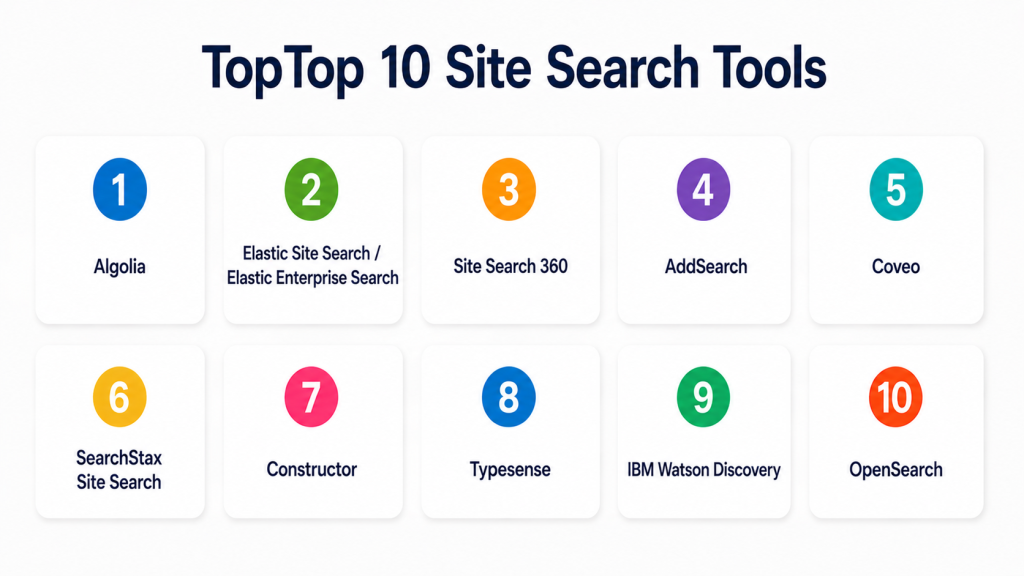
Top 10 Site Search Tools
#1 — Algolia
Short description (2–3 lines): Algolia is a hosted search and discovery platform used for website search, ecommerce search, app search, and marketplace search. It is best for teams that need fast, highly customizable, API-first search experiences.
Key Features
- Fast hosted search infrastructure.
- Typo tolerance and query suggestions.
- Facets, filters, and ranking controls.
- Personalization and relevance tuning.
- Search analytics and performance insights.
- APIs and SDKs for developers.
- Ecommerce and application search support.
Pros
- Very strong speed and user experience.
- Developer-friendly implementation.
- Good fit for ecommerce, SaaS, marketplaces, and content sites.
Cons
- Pricing may rise with scale and usage.
- Requires thoughtful relevance tuning for best results.
- Non-technical teams may need developer support.
Platforms / Deployment
Web / APIs
Cloud
Security & Compliance
Supports API security, access controls, admin permissions, and secure hosted search workflows. Specific certifications should be validated directly.
Integrations & Ecosystem
Algolia has a strong ecosystem for modern web, ecommerce, and app search.
- Ecommerce platforms
- CMS platforms
- JavaScript frameworks
- Mobile applications
- APIs and SDKs
- Analytics and personalization workflows
Support & Community
Algolia provides detailed documentation, SDK guides, support plans, tutorials, and a strong developer community. It is one of the most mature options for API-first site search.
#2 — Elastic Site Search / Elastic Enterprise Search
Short description (2–3 lines): Elastic provides flexible search infrastructure for websites, applications, documentation portals, and enterprise use cases. It is best for teams that want strong control over indexing, relevance, and deployment.
Key Features
- Full-text search and relevance tuning.
- Semantic and vector search capabilities.
- API-first search development.
- Custom indexing pipelines.
- Search analytics and monitoring.
- Flexible deployment options.
- Strong developer and infrastructure ecosystem.
Pros
- Highly flexible for custom search needs.
- Strong fit for technical teams.
- Supports cloud, self-hosted, and hybrid deployment models.
Cons
- Requires technical expertise.
- Setup can be more complex than plug-and-play tools.
- Business-user search tuning may depend on implementation.
Platforms / Deployment
Web / Windows / macOS / Linux
Cloud / Self-hosted / Hybrid
Security & Compliance
Supports role-based access control, encryption, audit logs, SSO/SAML options, and secure deployment patterns depending on plan and configuration. Specific certifications should be validated directly.
Integrations & Ecosystem
Elastic works well for teams that need search across websites, applications, logs, databases, and custom content.
- APIs
- Databases
- CMS platforms
- Web applications
- Cloud platforms
- Developer tools
Support & Community
Elastic has strong documentation, enterprise support options, training resources, community forums, and a large developer ecosystem.
#3 — Site Search 360
Short description (2–3 lines): Site Search 360 is a hosted site search tool designed for websites, content portals, ecommerce sites, and documentation pages. It is useful for teams that want a simpler implementation than building search from scratch.
Key Features
- Website crawling and indexing.
- Customizable search UI.
- Filters and facets.
- Search analytics.
- Autocomplete and suggestions.
- Result ranking controls.
- Support for content and ecommerce search.
Pros
- Easier setup than developer-heavy search engines.
- Good fit for content websites and business sites.
- Useful analytics for improving site content.
Cons
- May not offer the same flexibility as fully custom search engines.
- Advanced enterprise use cases may need more configuration.
- Deep AI capabilities may vary by plan and setup.
Platforms / Deployment
Web
Cloud
Security & Compliance
Supports secure hosted search workflows and admin controls. Specific certifications are not publicly stated here.
Integrations & Ecosystem
Site Search 360 fits websites that need practical site search without large engineering effort.
- CMS websites
- Ecommerce websites
- Documentation portals
- JavaScript-based websites
- Custom websites
- Analytics workflows
Support & Community
Support resources, documentation, and onboarding guidance are available. It is suitable for marketing and web teams that need manageable site search.
#4 — AddSearch
Short description (2–3 lines): AddSearch is a hosted site search platform for websites, documentation sites, ecommerce pages, and content-heavy portals. It is best for teams that want a managed site search experience with customization options.
Key Features
- Hosted website search.
- Site crawling and indexing.
- Search UI customization.
- Filters and result ranking.
- Search analytics.
- Autocomplete support.
- API and integration options.
Pros
- Simple hosted setup for site search.
- Good for content-heavy websites.
- Practical for SMBs and marketing teams.
Cons
- May not be as flexible as self-hosted search infrastructure.
- Complex enterprise permissions may require extra planning.
- Advanced AI features may vary by plan.
Platforms / Deployment
Web
Cloud
Security & Compliance
Supports secure hosted search and admin controls. Specific certifications are not publicly stated here.
Integrations & Ecosystem
AddSearch works well with website and CMS search workflows where a hosted index is preferred.
- CMS platforms
- Business websites
- Documentation sites
- Ecommerce websites
- APIs
- Search analytics tools
Support & Community
AddSearch provides documentation and support resources. It is a practical choice for teams that want managed site search without building from scratch.
#5 — Coveo
Short description (2–3 lines): Coveo is an AI-powered search and relevance platform used for websites, ecommerce, support portals, and enterprise knowledge experiences. It is best for organizations that need advanced relevance, personalization, and search analytics.
Key Features
- AI-powered relevance tuning.
- Personalized search results.
- Search analytics and insights.
- Ecommerce and support search.
- Connectors and APIs.
- Recommendations and content discovery.
- Enterprise-grade search workflows.
Pros
- Strong relevance and personalization features.
- Useful for support, ecommerce, and digital experience search.
- Good fit for larger organizations with complex search needs.
Cons
- May require implementation planning.
- Can be more advanced than simple site search needs.
- Pricing and packaging vary by use case.
Platforms / Deployment
Web / iOS / Android
Cloud
Security & Compliance
Supports access controls, secure indexing, permissions, and enterprise governance features. Specific certifications should be validated directly.
Integrations & Ecosystem
Coveo fits teams that need search connected to customer experience, support, commerce, and enterprise content.
- Salesforce
- ServiceNow
- CMS platforms
- Ecommerce platforms
- Knowledge bases
- APIs and SDKs
Support & Community
Coveo provides documentation, enterprise support, implementation partners, developer resources, and customer success options.
#6 — SearchStax Site Search
Short description (2–3 lines): SearchStax Site Search is a managed search solution built for websites, especially teams using CMS platforms and content-heavy digital experiences. It is useful for marketers and developers who want search with analytics and relevance controls.
Key Features
- Managed site search.
- CMS-focused search support.
- Search analytics.
- Relevance controls.
- Autocomplete and suggestions.
- Facets and filters.
- Developer and marketer-friendly tools.
Pros
- Good for CMS-driven websites.
- Useful balance of technical and business controls.
- Strong fit for content and marketing teams.
Cons
- Best value depends on CMS and search use case.
- May not fit very small websites.
- Advanced customization may still need developer help.
Platforms / Deployment
Web
Cloud
Security & Compliance
Supports secure managed search workflows and admin controls. Specific certifications should be validated directly.
Integrations & Ecosystem
SearchStax is often used where website search needs to work closely with CMS content and digital experience workflows.
- CMS platforms
- Drupal
- Sitecore
- Web applications
- APIs
- Analytics workflows
Support & Community
SearchStax provides documentation, support, onboarding resources, and implementation guidance. It is useful for teams running serious content websites.
#7 — Constructor
Short description (2–3 lines): Constructor is a product discovery and search platform focused on ecommerce. It is best for retailers and online stores that need product search, recommendations, personalization, and merchandising controls.
Key Features
- Ecommerce product search.
- Personalization and ranking.
- Product recommendations.
- Merchandising controls.
- Search analytics.
- Browse and category optimization.
- AI-assisted product discovery.
Pros
- Strong ecommerce search focus.
- Useful for conversion-driven product discovery.
- Good fit for retailers with large catalogs.
Cons
- Not designed for general content website search.
- May be too specialized for blogs or documentation sites.
- Best suited for commerce teams with enough traffic and catalog complexity.
Platforms / Deployment
Web / APIs
Cloud
Security & Compliance
Supports secure API-based workflows and enterprise access controls. Specific certifications should be validated directly.
Integrations & Ecosystem
Constructor works best in ecommerce environments where search, browse, recommendations, and merchandising are connected.
- Ecommerce platforms
- Product catalogs
- Analytics tools
- Personalization workflows
- APIs
- Merchandising systems
Support & Community
Constructor provides customer support, implementation guidance, documentation, and ecommerce-focused onboarding resources.
#8 — Typesense
Short description (2–3 lines): Typesense is an open-source search engine focused on fast typo-tolerant search for websites, apps, and developer products. It is useful for teams that want developer control with a simpler search engine experience.
Key Features
- Fast full-text search.
- Typo tolerance.
- Facets and filters.
- Sorting and ranking controls.
- API-first implementation.
- Open-source self-hosting option.
- Managed cloud option.
Pros
- Developer-friendly and relatively simple to use.
- Strong for fast app and website search.
- Offers open-source flexibility.
Cons
- Requires technical setup for self-hosting.
- Not a full enterprise digital experience platform.
- Advanced AI and personalization may require custom work.
Platforms / Deployment
Web / Linux / Docker
Cloud / Self-hosted / Hybrid
Security & Compliance
Supports API keys and secure deployment patterns. Specific certifications depend on hosting and configuration.
Integrations & Ecosystem
Typesense is practical for developers building custom search into modern websites and apps.
- APIs
- JavaScript apps
- CMS integrations
- Ecommerce search
- Documentation search
- Custom applications
Support & Community
Typesense has documentation, open-source community support, and managed support options. It is strong for developer-led search projects.
#9 — Meilisearch
Short description (2–3 lines): Meilisearch is an open-source search engine designed for fast, developer-friendly website and application search. It is best for teams that want lightweight, self-hosted or managed search with a good developer experience.
Key Features
- Full-text search.
- Typo tolerance.
- Faceted search.
- Fast indexing and search responses.
- API-first setup.
- Open-source deployment.
- Managed cloud availability.
Pros
- Simple developer experience.
- Good for small to mid-sized app search use cases.
- Open-source option reduces lock-in.
Cons
- Requires technical setup for self-hosting.
- Enterprise governance features may need planning.
- Advanced personalization may require extra development.
Platforms / Deployment
Web / Linux / Docker
Cloud / Self-hosted / Hybrid
Security & Compliance
Supports API key-based access and secure deployment patterns. Specific certifications depend on hosting provider and implementation.
Integrations & Ecosystem
Meilisearch fits teams building fast website, app, ecommerce, and documentation search.
- APIs
- JavaScript frameworks
- CMS sites
- Ecommerce catalogs
- Documentation sites
- Custom applications
Support & Community
Meilisearch has strong documentation, an open-source community, developer examples, and managed service support options.
#10 — Luigi’s Box
Short description (2–3 lines): Luigi’s Box is a search and product discovery platform focused mainly on ecommerce websites. It helps online stores improve product search, recommendations, autocomplete, and conversion-focused discovery.
Key Features
- Ecommerce site search.
- Autocomplete and suggestions.
- Product recommendations.
- Search analytics.
- Personalization features.
- Merchandising controls.
- Product discovery optimization.
Pros
- Strong ecommerce focus.
- Useful for improving product findability.
- Helpful analytics for search and merchandising teams.
Cons
- Less suited for general documentation or blog search.
- Best value comes from ecommerce use cases.
- May not fit developer-first custom search needs.
Platforms / Deployment
Web
Cloud
Security & Compliance
Supports secure hosted workflows and access controls. Specific certifications are not publicly stated here.
Integrations & Ecosystem
Luigi’s Box works well with online stores that need search, recommendations, and product discovery improvements.
- Ecommerce platforms
- Product catalogs
- Analytics workflows
- Merchandising tools
- Recommendation workflows
- Website search interfaces
Support & Community
Luigi’s Box provides support resources, onboarding, documentation, and ecommerce search guidance. It is practical for retailers and online stores.
Comparison Table
| Tool Name | Best For | Platform(s) Supported | Deployment | Standout Feature | Public Rating |
|---|---|---|---|---|---|
| Algolia | Fast app, website, and ecommerce search | Web, APIs | Cloud | High-speed API-first search | N/A |
| Elastic Site Search / Elastic Enterprise Search | Custom technical search | Web, Windows, macOS, Linux | Cloud, Self-hosted, Hybrid | Flexible search infrastructure | N/A |
| Site Search 360 | Managed website search | Web | Cloud | Easy hosted site search setup | N/A |
| AddSearch | Content-heavy websites | Web | Cloud | Simple managed site search | N/A |
| Coveo | AI-powered relevance and personalization | Web, iOS, Android | Cloud | Advanced AI relevance tuning | N/A |
| SearchStax Site Search | CMS-driven websites | Web | Cloud | CMS-focused managed search | N/A |
| Constructor | Ecommerce product discovery | Web, APIs | Cloud | AI product search and merchandising | N/A |
| Typesense | Developer-friendly open-source search | Web, Linux, Docker | Cloud, Self-hosted, Hybrid | Fast typo-tolerant search | N/A |
| Meilisearch | Lightweight app and site search | Web, Linux, Docker | Cloud, Self-hosted, Hybrid | Simple open-source search engine | N/A |
| Luigi’s Box | Ecommerce search and recommendations | Web | Cloud | Product discovery analytics | N/A |
Evaluation & Scoring of Site Search Tools
| Tool Name | Core (25%) | Ease (15%) | Integrations (15%) | Security (10%) | Performance (10%) | Support (10%) | Value (15%) | Weighted Total (0–10) |
|---|---|---|---|---|---|---|---|---|
| Algolia | 9 | 8 | 9 | 8 | 9 | 8 | 7 | 8.30 |
| Elastic Site Search / Elastic Enterprise Search | 9 | 6 | 8 | 8 | 9 | 8 | 8 | 8.05 |
| Site Search 360 | 8 | 8 | 7 | 7 | 8 | 7 | 8 | 7.65 |
| AddSearch | 7 | 8 | 7 | 7 | 8 | 7 | 8 | 7.40 |
| Coveo | 9 | 7 | 9 | 8 | 8 | 8 | 7 | 8.05 |
| SearchStax Site Search | 8 | 7 | 8 | 8 | 8 | 8 | 7 | 7.75 |
| Constructor | 9 | 7 | 8 | 8 | 9 | 8 | 7 | 8.05 |
| Typesense | 8 | 7 | 8 | 7 | 9 | 7 | 9 | 7.95 |
| Meilisearch | 8 | 8 | 8 | 7 | 8 | 7 | 9 | 7.95 |
| Luigi’s Box | 8 | 8 | 7 | 7 | 8 | 7 | 8 | 7.65 |
These scores are comparative and should not be treated as a universal ranking. Algolia is strong for high-speed API-first search, while Coveo is stronger for AI relevance and enterprise digital experiences. Constructor and Luigi’s Box are better for ecommerce product discovery, while Typesense and Meilisearch are practical for developer-led open-source search. The best choice depends on your website type, content volume, technical resources, budget, and search goals.
Which Site Search Tools Tool Is Right for You?
Solo / Freelancer
Solo users usually need a simple search box that works without heavy setup. They should avoid complex search infrastructure unless they are building a technical product.
Good options:
- Site Search 360 for simple hosted website search.
- AddSearch for managed site search.
- Meilisearch if you are technical and want open-source control.
- Typesense if you need fast developer-friendly search.
SMB
SMBs need search that is easy to launch, affordable, and useful for visitors. They should focus on setup time, analytics, content indexing, and basic customization.
Good options:
- Site Search 360 for business websites.
- AddSearch for content-heavy sites.
- Algolia for fast site and app search.
- Luigi’s Box for ecommerce stores.
- Meilisearch for technical teams that want control.
Mid-Market
Mid-market teams usually need stronger analytics, filters, relevance tuning, ecommerce support, and integrations with CMS or product catalogs.
Good options:
- Algolia for app, marketplace, and ecommerce search.
- SearchStax Site Search for CMS-driven websites.
- Constructor for ecommerce product discovery.
- Coveo for AI-powered relevance and personalization.
- Typesense for developer-owned search experiences.
Enterprise
Enterprises need scalable indexing, governance, relevance control, analytics, security, support, and integration with complex website ecosystems.
Good options:
- Coveo for advanced AI relevance and personalization.
- Algolia for high-performance digital search.
- Elastic for custom search infrastructure.
- SearchStax for CMS search at scale.
- Constructor for ecommerce product discovery.
- Typesense or Meilisearch for open-source-driven teams with engineering support.
Budget vs Premium
Budget-focused teams should start with simple managed tools or open-source engines. Premium tools are better when search directly affects revenue, support cost, user activation, or content discovery.
Budget-friendly scenarios:
- Small websites.
- Blogs and documentation sites.
- Low traffic.
- Developer-controlled open-source search.
- Basic site search replacement.
Premium scenarios:
- Ecommerce product discovery.
- High-traffic websites.
- Marketplace search.
- Advanced personalization.
- AI-assisted search.
- Complex filtering and ranking.
- Strong analytics and merchandising.
Feature Depth vs Ease of Use
Ease of use matters when marketing or content teams manage search. Feature depth matters when search drives revenue, user activation, or product experience.
Choose ease of use when:
- You need quick setup.
- Your content is simple.
- You do not have search engineers.
- You only need basic filters and analytics.
Choose feature depth when:
- You need advanced relevance tuning.
- You have a large catalog.
- You need personalization.
- You need semantic or AI search.
- You need APIs and custom frontend control.
Integrations & Scalability
Site search should fit your website stack. Before choosing, check whether the tool works with your CMS, ecommerce platform, frontend framework, data pipeline, and analytics stack.
Important integration areas include:
- CMS platforms
- Ecommerce platforms
- Product catalogs
- Documentation systems
- JavaScript frameworks
- APIs
- Analytics platforms
- Cloud infrastructure
- Mobile apps
- Personalization tools
Security & Compliance Needs
Security matters when site search includes private pages, logged-in user content, customer portals, product data, or restricted documentation.
Important security checks include:
- API key management.
- Private indexing.
- Role-based access.
- SSO for admin users.
- Data encryption.
- Secure crawler settings.
- Access-controlled search.
- Audit logs where needed.
- Data retention rules.
- Vendor security documentation.
Frequently Asked Questions
What is a Site Search Tool?
A Site Search Tool helps visitors search within a website, online store, help center, documentation portal, or web application. It improves the search box experience by showing faster and more relevant results.
How is site search different from Google search?
Google search helps users find pages across the public web. Site search focuses only on your website or app content and gives you more control over ranking, filters, design, and analytics.
Which websites need site search?
Ecommerce stores, blogs, marketplaces, SaaS apps, documentation sites, help centers, universities, media sites, and large business websites benefit most from site search.
What are common pricing models?
Pricing may be based on search volume, indexed records, API calls, traffic, features, users, or enterprise contracts. Pricing varies, so buyers should confirm directly with vendors.
How long does implementation take?
Simple hosted site search can be added quickly, while custom API-first or ecommerce search may require indexing, frontend work, relevance tuning, and analytics setup.
What is the biggest mistake when choosing a site search tool?
The biggest mistake is choosing based only on price. Teams should also test relevance quality, typo handling, filtering, speed, analytics, and how well the tool handles real user queries.
What is semantic site search?
Semantic site search understands user intent and meaning rather than only matching exact keywords. It can help users find relevant results even when they use different words.
Can site search improve conversions?
Yes, especially for ecommerce and SaaS websites. When users find products, docs, pricing pages, or support answers faster, they are more likely to take action.
Do site search tools support analytics?
Many site search tools provide analytics such as popular queries, zero-result searches, click behavior, conversion impact, and content gaps. Analytics are important for improving search quality.
Can developers build their own site search?
Yes, developers can build custom search using tools like Elastic, Typesense, Meilisearch, or OpenSearch-style infrastructure. However, this requires setup, hosting, maintenance, and relevance tuning.
What are alternatives to site search tools?
Alternatives include built-in CMS search, ecommerce platform search, database search, custom search engines, public search engine indexing, or full enterprise search platforms.
How should a team start with site search?
Start by reviewing top search use cases, indexing important content, testing real user queries, checking zero-result searches, and improving filters, synonyms, and ranking over time.
Conclusion
Site Search Tools are now an important part of modern digital experience because users expect fast, relevant, and helpful search inside websites, stores, documentation portals, and apps. The right tool depends on your content type, website size, technical skills, budget, and business goal. Algolia is strong for fast API-first search, Coveo is strong for AI relevance, Constructor and Luigi’s Box are strong for ecommerce, SearchStax is useful for CMS-driven websites, and Typesense or Meilisearch are practical for developer-led open-source search.
