Upgrade & Secure Your Future with DevOps, SRE, DevSecOps, MLOps!
We spend hours scrolling social media and waste money on things we forget, but won’t spend 30 minutes a day earning certifications that can change our lives.
Master in DevOps, SRE, DevSecOps & MLOps by DevOps School!
Learn from Guru Rajesh Kumar and double your salary in just one year.
Introduction
Product Analytics Tools help product, growth, engineering, marketing, and leadership teams understand how users interact with a digital product. In simple words, these tools show what users do inside an app, website, SaaS platform, mobile app, or digital service after they sign up, log in, click, explore, upgrade, drop off, or return.
This matters in 2026 and beyond because product teams cannot depend only on traffic numbers or sales reports. They need to understand activation, onboarding, feature adoption, retention, churn risk, funnel drop-offs, customer journeys, and product-led growth signals. Good product analytics helps teams make better decisions based on behavior, not assumptions.
Common use cases include onboarding analysis, funnel tracking, retention analysis, feature adoption, cohort reporting, user segmentation, product experiments, and revenue-impact analysis.
Buyers should evaluate event tracking, funnel analysis, retention reports, cohort analysis, session replay, experimentation, data quality controls, integrations, privacy, scalability, and ease of use.
Best for: SaaS teams, product managers, growth teams, founders, UX teams, mobile app teams, data analysts, customer success teams, and product-led companies.
Not ideal for: very small websites that only need traffic reporting, teams with no event tracking plan, or companies that only need basic marketing analytics instead of product behavior analytics.
Key Trends in Product Analytics Tools
AI-assisted product insights are becoming more common, helping teams detect unusual behavior, summarize trends, and suggest possible reasons for funnel changes.
- Event governance is now critical because poor event naming, duplicate tracking, and inconsistent properties can make analytics unreliable.
- Product analytics and experimentation are merging as teams want to connect feature usage, A/B tests, retention, and release impact in one workflow.
- Session replay is becoming part of analytics workflows because teams want to see both quantitative data and actual user behavior.
- Warehouse-native analytics is growing as companies want analytics connected directly to their cloud data warehouse.
- Privacy-first product analytics matters more because product data often includes user behavior, account metadata, device data, and business-sensitive usage patterns.
- Self-serve analytics is now expected so product managers and growth teams can answer questions without waiting for data teams.
- Mobile and cross-platform analytics are more important because users interact across web, mobile, desktop, and embedded product experiences.
- Retention and lifecycle analytics are becoming board-level metrics for SaaS and subscription companies.
- Open-source and self-hosted options are gaining attention among technical teams that want more control over data, deployment, and cost.
How We Selected These Tools
- Market adoption and recognition across product analytics, growth analytics, user behavior analytics, and digital product measurement.
- Feature completeness for event tracking, funnels, cohorts, retention, segmentation, dashboards, and user journeys.
- Fit across startups, SMBs, mid-market companies, enterprise teams, and developer-led organizations.
- Strength of integrations with data warehouses, customer data platforms, experimentation tools, CRMs, marketing platforms, and engineering workflows.
- Security posture signals such as user permissions, access control, data governance, audit controls, and privacy features.
- Ease of implementation for product and engineering teams.
- Quality of reporting for product managers, growth teams, analysts, and executives.
- Scalability for high-volume event tracking and large user bases.
- Support for modern product-led growth workflows.
- Overall value compared with complexity, pricing, and implementation effort.
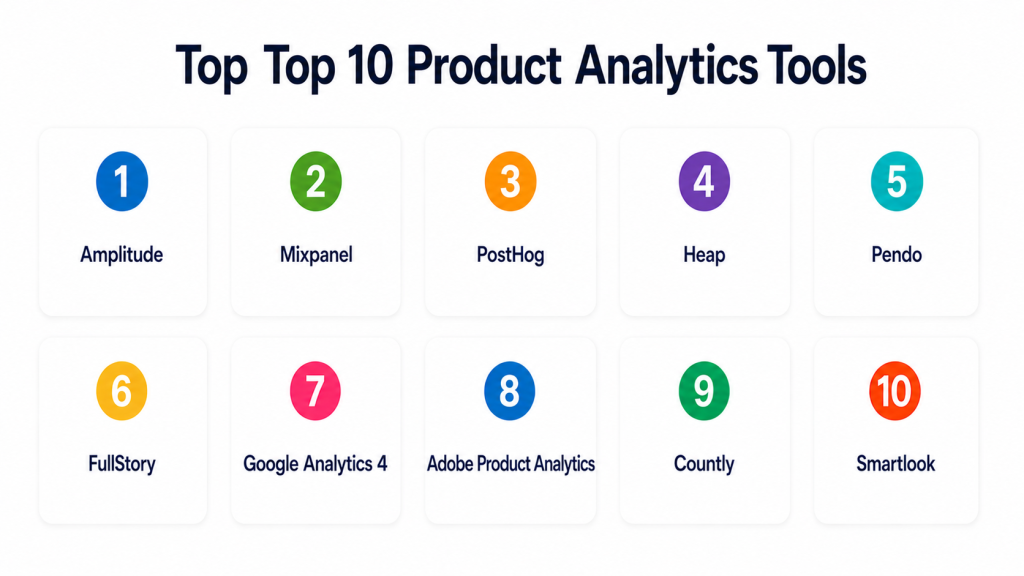
Top 10 Product Analytics Tools
#1 — Amplitude
Short description = Amplitude is a product analytics platform built for tracking user behavior, funnels, cohorts, retention, and product growth. It is best for SaaS, mobile app, digital product, and product-led growth teams.
Key Features
- Event-based product analytics.
- Funnel and conversion analysis.
- Cohort and retention reporting.
- User journey and path analysis.
- Experimentation and feature impact analysis.
- Behavioral segmentation.
- Data governance and tracking controls.
Pros
- Strong for product-led growth and retention analysis.
- Useful for product managers, growth teams, and analysts.
- Good depth for user journey and cohort reporting.
Cons
- Requires proper event planning.
- May feel complex for teams new to product analytics.
- Pricing and usage can vary based on scale and requirements.
Platforms / Deployment
Web / iOS / Android
Cloud
Security & Compliance
Supports user permissions, access controls, data governance features, and enterprise security options. Specific certifications should be validated directly.
Integrations & Ecosystem
Amplitude works well with modern product, data, and growth stacks.
- Data warehouses
- Customer data platforms
- Marketing tools
- Experimentation tools
- Mobile apps
- APIs and SDKs
Support & Community
Amplitude provides documentation, learning resources, customer support, product education, and a strong product analytics community.
#2 — Mixpanel
Short description = Mixpanel is a product analytics tool focused on event tracking, funnels, retention, cohorts, and user segmentation. It is useful for product, growth, marketing, and data teams that want self-serve behavior analytics.
Key Features
- Event-based analytics.
- Funnel analysis.
- Retention and cohort tracking.
- User segmentation.
- Product dashboards.
- Group analytics for account-based products.
- Integrations with data and marketing tools.
Pros
- Strong funnel and retention analysis.
- Easy for product and growth teams to explore data.
- Good fit for SaaS and mobile app teams.
Cons
- Requires clean event instrumentation.
- Can become noisy if event governance is weak.
- Advanced reporting may need analytics experience.
Platforms / Deployment
Web / iOS / Android
Cloud
Security & Compliance
Supports access controls, team permissions, data controls, and enterprise security options. Specific certifications should be validated directly.
Integrations & Ecosystem
Mixpanel connects well with analytics, marketing, and data workflows.
- Data warehouses
- CDPs
- Marketing automation tools
- Mobile SDKs
- Product tools
- APIs
Support & Community
Mixpanel provides documentation, support, learning content, implementation guides, and an active product analytics user base.
#3 — PostHog
Short description = PostHog is an open-source product analytics platform that includes analytics, session replay, feature flags, experiments, and user behavior tracking. It is best for developer-led product teams that want flexibility and control.
Key Features
- Product analytics and event tracking.
- Funnels and retention reports.
- Session replay.
- Feature flags.
- A/B testing and experimentation.
- Self-hosted and cloud options.
- Developer-focused integrations.
Pros
- Combines analytics, replay, feature flags, and experiments.
- Open-source option gives more deployment control.
- Strong fit for technical product teams.
Cons
- Advanced setup may require engineering support.
- Less ideal for teams wanting only simple dashboards.
- Self-hosting requires maintenance.
Platforms / Deployment
Web / Linux
Cloud / Self-hosted / Hybrid
Security & Compliance
Supports user permissions, deployment controls, and self-hosting options. Specific certifications should be validated directly.
Integrations & Ecosystem
PostHog fits technical product teams that want analytics close to engineering workflows.
- APIs
- Data warehouses
- Feature flag workflows
- Session replay
- Developer tools
- Product stacks
Support & Community
PostHog has documentation, community support, developer resources, and paid support options. It is strong among engineering-led teams.
#4 — Heap
Short description = Heap is a digital analytics platform known for capturing user interactions and helping teams analyze behavior without manually defining every event upfront. It is best for product and growth teams that want faster behavior discovery.
Key Features
- Automatic event capture.
- Funnel and journey analysis.
- User segmentation.
- Retention reporting.
- Session replay options.
- Data governance features.
- Product usage insights.
Pros
- Reduces some upfront event tracking burden.
- Useful for discovering user behavior after launch.
- Good fit for teams that need faster analytics setup.
Cons
- Auto-captured data still needs governance.
- Teams may need cleanup to avoid data clutter.
- Advanced analysis may require thoughtful setup.
Platforms / Deployment
Web / iOS / Android
Cloud
Security & Compliance
Supports access controls, permissions, and enterprise data governance features. Specific certifications should be validated directly.
Integrations & Ecosystem
Heap connects with product, marketing, and data tools to support user behavior analysis.
- Data warehouses
- CDPs
- Marketing tools
- Session replay workflows
- Product tools
- APIs
Support & Community
Heap provides documentation, support resources, onboarding assistance, and analytics education for product and growth teams.
#5 — Pendo
Short description= Pendo combines product analytics, in-app guides, feedback, and product adoption tools. It is best for product teams that want to understand usage and improve onboarding or feature adoption inside the product.
Key Features
- Product usage analytics.
- In-app guides and walkthroughs.
- Feature adoption tracking.
- User feedback collection.
- Product roadmapping support.
- Segmentation and engagement reports.
- Account and user-level analytics.
Pros
- Good for product adoption and onboarding.
- Combines analytics with in-app guidance.
- Useful for customer success and product teams.
Cons
- May be broader than teams needing only analytics.
- Implementation requires product tagging and planning.
- Pricing may vary by product scope and usage.
Platforms / Deployment
Web / iOS / Android
Cloud
Security & Compliance
Supports user permissions, access controls, and enterprise security features. Specific certifications should be validated directly.
Integrations & Ecosystem
Pendo fits product-led teams that want analytics connected with user education and adoption workflows.
- CRM systems
- Customer success tools
- Product tools
- Data platforms
- Mobile apps
- Feedback workflows
Support & Community
Pendo provides documentation, onboarding resources, customer success support, product education, and a strong community around product adoption.
#6 — FullStory
Short description = FullStory is a digital experience analytics platform focused on session replay, user behavior, frustration signals, funnels, and product experience insights. It is best for UX, product, support, and conversion teams.
Key Features
- Session replay.
- Funnel and conversion analysis.
- User behavior search.
- Frustration and error signals.
- Segmentation.
- Heatmap-style interaction insights.
- Digital experience monitoring.
Pros
- Strong for seeing user behavior visually.
- Helpful for debugging UX and conversion issues.
- Useful for product, support, and engineering collaboration.
Cons
- Not a complete replacement for event-first analytics tools.
- Session replay requires careful privacy configuration.
- High-volume usage may need sampling and governance.
Platforms / Deployment
Web / iOS / Android
Cloud
Security & Compliance
Supports privacy controls, access controls, data masking options, and enterprise security features. Specific certifications should be validated directly.
Integrations & Ecosystem
FullStory works well alongside analytics, support, and product tools to explain what users experienced.
- Support tools
- Product analytics platforms
- Bug tracking tools
- Data platforms
- CRM tools
- APIs
Support & Community
FullStory provides documentation, support resources, onboarding help, and product education focused on digital experience analytics.
#7 — Google Analytics 4
Short description= Google Analytics 4 is an event-based analytics platform for websites and apps. While often used for marketing analytics, it can also support basic product analytics for web and mobile experiences.
Key Features
- Event-based tracking.
- Web and app analytics.
- Conversion tracking.
- Funnel and path exploration.
- Audience segmentation.
- Integration with Google marketing tools.
- BigQuery export options.
Pros
- Widely adopted and familiar to many teams.
- Useful for web, app, and campaign measurement.
- Strong integration with Google ecosystem.
Cons
- Less product-focused than dedicated tools like Amplitude or Mixpanel.
- Setup and reporting can feel complex.
- Event governance still requires planning.
Platforms / Deployment
Web / iOS / Android
Cloud
Security & Compliance
Supports Google account security, access controls, permissions, and privacy-related configuration options. Specific compliance depends on implementation and region.
Integrations & Ecosystem
Google Analytics 4 works well when product data needs to connect with marketing measurement.
- Google Ads
- Google Tag Manager
- Looker Studio
- BigQuery
- Firebase
- Search Console
Support & Community
Google provides documentation, help resources, community forums, training content, and partner support options.
#8 — Adobe Product Analytics
Short description = Adobe Product Analytics is designed for product teams that need journey analysis, behavior insights, and product usage reporting within Adobe’s broader analytics ecosystem. It is best for enterprises already using Adobe Experience Cloud.
Key Features
- Product behavior analytics.
- User journey analysis.
- Segmentation.
- Funnel and conversion reporting.
- Integration with Adobe Analytics data.
- Cross-channel insights.
- Enterprise reporting and governance.
Pros
- Strong fit for Adobe ecosystem customers.
- Useful for enterprise customer journey analysis.
- Good for teams combining marketing and product data.
Cons
- Best suited for larger organizations.
- May require Adobe ecosystem knowledge.
- Not ideal for small teams seeking simple product analytics.
Platforms / Deployment
Web
Cloud
Security & Compliance
Supports enterprise access controls, permissions, governance, and Adobe ecosystem security features. Specific certifications should be validated directly.
Integrations & Ecosystem
Adobe Product Analytics works best when connected to Adobe’s broader digital experience and analytics stack.
- Adobe Analytics
- Adobe Experience Cloud
- Customer journey tools
- Data platforms
- Marketing tools
- Enterprise reporting workflows
Support & Community
Adobe provides enterprise support, training, documentation, customer success resources, and partner-led implementation options.
#9 — Countly
Short description = Countly is a product analytics platform with mobile, web, and desktop analytics, available in cloud and self-hosted deployment options. It is useful for teams that want more control over analytics deployment and data.
Key Features
- Product analytics for web and mobile apps.
- Event tracking and funnels.
- Retention and cohort analysis.
- Crash analytics options.
- Push notification support.
- Self-hosted deployment option.
- User profiles and segmentation.
Pros
- Good for teams needing deployment control.
- Useful for mobile and web product analytics.
- Self-hosting can support data ownership needs.
Cons
- May require technical maintenance if self-hosted.
- Smaller ecosystem than larger analytics platforms.
- Advanced reporting may require setup effort.
Platforms / Deployment
Web / iOS / Android / Linux
Cloud / Self-hosted / Hybrid
Security & Compliance
Supports access controls, self-hosting options, and data control features. Specific certifications should be validated directly.
Integrations & Ecosystem
Countly fits teams that need product analytics across platforms with deployment flexibility.
- Mobile apps
- Web apps
- APIs
- Data exports
- Push notification workflows
- Custom dashboards
Support & Community
Countly provides documentation, community resources, enterprise support options, and onboarding help depending on plan.
#10 — Smartlook
Short description= Smartlook is a product analytics and behavior analytics tool focused on session replay, events, funnels, and heatmaps for websites and mobile apps. It is useful for UX, product, and growth teams that want visual behavior insights.
Key Features
- Session replay.
- Event tracking.
- Funnel analysis.
- Heatmaps.
- Mobile app analytics.
- User journey insights.
- Error and behavior investigation support.
Pros
- Good balance of behavior analytics and product insights.
- Useful for UX and conversion analysis.
- Supports both web and mobile apps.
Cons
- Not as deep as enterprise product analytics suites.
- Session replay requires privacy configuration.
- Advanced data workflows may need other tools.
Platforms / Deployment
Web / iOS / Android
Cloud
Security & Compliance
Supports access controls, privacy controls, and data masking features. Specific certifications should be validated directly.
Integrations & Ecosystem
Smartlook works well for product teams that want to combine events, funnels, and visual session insights.
- Web apps
- Mobile apps
- Analytics tools
- Support tools
- Bug tracking tools
- APIs
Support & Community
Smartlook provides documentation, product support, onboarding resources, and help content for product and UX teams.
Comparison Table
| Tool Name | Best For | Platform(s) Supported | Deployment | Standout Feature | Public Rating |
|---|---|---|---|---|---|
| Amplitude | Product-led growth analytics | Web, iOS, Android | Cloud | Cohorts, funnels, retention, and journeys | N/A |
| Mixpanel | Self-serve product analytics | Web, iOS, Android | Cloud | Event-based funnels and retention reports | N/A |
| PostHog | Developer-led product analytics | Web, Linux | Cloud, Self-hosted, Hybrid | Analytics, replay, feature flags, and experiments | N/A |
| Heap | Auto-captured behavior analytics | Web, iOS, Android | Cloud | Automatic event capture | N/A |
| Pendo | Product adoption and in-app guidance | Web, iOS, Android | Cloud | Analytics combined with in-app guides | N/A |
| FullStory | Digital experience analytics | Web, iOS, Android | Cloud | Session replay and behavior investigation | N/A |
| Google Analytics 4 | Basic web and app product analytics | Web, iOS, Android | Cloud | Event-based web and app tracking | N/A |
| Adobe Product Analytics | Enterprise journey analytics | Web | Cloud | Product insights inside Adobe ecosystem | N/A |
| Countly | Self-hosted and mobile analytics | Web, iOS, Android, Linux | Cloud, Self-hosted, Hybrid | Deployment control and product analytics | N/A |
| Smartlook | UX behavior and product insights | Web, iOS, Android | Cloud | Session replay with funnels and events | N/A |
Evaluation & Scoring of Product Analytics Tools
| Tool Name | Core (25%) | Ease (15%) | Integrations (15%) | Security (10%) | Performance (10%) | Support (10%) | Value (15%) | Weighted Total (0–10) |
|---|---|---|---|---|---|---|---|---|
| Amplitude | 9 | 7 | 9 | 8 | 8 | 8 | 7 | 8.10 |
| Mixpanel | 9 | 8 | 8 | 8 | 8 | 8 | 7 | 8.15 |
| PostHog | 8 | 7 | 8 | 8 | 8 | 7 | 9 | 7.95 |
| Heap | 8 | 8 | 8 | 8 | 8 | 8 | 7 | 7.95 |
| Pendo | 8 | 8 | 8 | 8 | 8 | 8 | 7 | 7.95 |
| FullStory | 8 | 8 | 8 | 8 | 8 | 8 | 7 | 7.95 |
| Google Analytics 4 | 7 | 7 | 9 | 8 | 8 | 8 | 9 | 7.95 |
| Adobe Product Analytics | 9 | 6 | 9 | 9 | 9 | 9 | 6 | 8.00 |
| Countly | 8 | 7 | 7 | 8 | 8 | 7 | 8 | 7.60 |
| Smartlook | 7 | 8 | 7 | 7 | 8 | 7 | 8 | 7.50 |
These scores are comparative and should be treated as a practical selection guide, not a final verdict. Mixpanel and Amplitude are strong for core product analytics. PostHog is strong for technical teams that want open-source flexibility. Pendo is better when product adoption and in-app guidance matter. FullStory and Smartlook are useful when teams need visual behavior insights through session replay.
Which Product Analytics Tools Tool Is Right for You?
Solo / Freelancer
Solo users usually need simple product usage tracking, basic funnels, and clear dashboards. They should avoid enterprise tools unless the product has meaningful user volume and growth goals.
Good options:
- Google Analytics 4 for basic web and app events.
- PostHog for developer-led analytics with control.
- Smartlook for visual behavior insights.
- Mixpanel if product funnels are important.
SMB
SMBs should focus on tools that are easy to implement, affordable, and strong enough for onboarding, conversion, and retention analysis.
Good options:
- Mixpanel for self-serve product analytics.
- Amplitude for growth and retention analysis.
- PostHog for teams with developer support.
- Pendo for onboarding and adoption.
- Smartlook for session replay and UX insights.
Mid-Market
Mid-market teams often need more mature event governance, segmentation, retention, integrations, and customer journey reporting.
Good options:
- Amplitude for product-led growth teams.
- Mixpanel for funnel and retention workflows.
- Heap for auto-capture and behavior discovery.
- Pendo for product adoption programs.
- FullStory for UX and support investigation.
Enterprise
Enterprises need governance, access controls, scalable data collection, integrations, security review, and executive reporting.
Good options:
- Adobe Product Analytics for Adobe ecosystem enterprises.
- Amplitude for advanced product analytics.
- Mixpanel for enterprise self-serve analytics.
- Pendo for adoption and customer success alignment.
- FullStory for experience analytics.
- Countly for teams needing deployment control.
Budget vs Premium
Budget-focused teams should start with tools that cover core events, funnels, and retention without heavy setup. Premium tools are better when product analytics drives revenue, retention, onboarding, customer success, and executive decisions.
Budget-friendly scenarios:
- Early-stage SaaS products.
- Small mobile apps.
- Basic feature tracking.
- Simple onboarding funnels.
- Developer-led analytics.
Premium scenarios:
- Large product teams.
- Complex user journeys.
- Enterprise governance.
- Account-based analytics.
- Product-led growth programs.
- Multi-platform analytics.
Feature Depth vs Ease of Use
Ease of use matters when product managers need quick answers. Feature depth matters when teams need cohort analysis, lifecycle reporting, experimentation, session replay, and advanced segmentation.
Choose ease of use when:
- Your team is new to analytics.
- You need simple dashboards.
- You have limited analyst support.
- You want fast adoption.
Choose feature depth when:
- You need retention analysis.
- You manage complex onboarding.
- You run experiments.
- You need session replay.
- You track multiple user roles.
- You need account-level reporting.
Integrations & Scalability
Product analytics becomes stronger when connected with the rest of the product and revenue stack.
Important integrations include:
- Data warehouses
- Customer data platforms
- Feature flag tools
- Experimentation platforms
- CRM systems
- Customer success tools
- Marketing automation tools
- Support tools
- Mobile SDKs
- BI platforms
Security & Compliance Needs
Product analytics tools handle user behavior data, account metadata, device details, and sometimes sensitive product usage patterns. Security and privacy should be reviewed early.
Important checks include:
- Role-based access control.
- SSO/SAML.
- MFA.
- Audit logs.
- Data retention controls.
- Data deletion workflows.
- Data residency.
- Privacy masking.
- Consent management.
- Self-hosted options if needed.
- Vendor compliance documentation.
Frequently Asked Questions
What is a Product Analytics Tool?
A Product Analytics Tool tracks how users interact with a digital product. It helps teams understand onboarding, funnels, feature usage, retention, churn signals, and user journeys.
How is product analytics different from web analytics?
Web analytics focuses on traffic, pages, campaigns, and conversions. Product analytics focuses on user behavior inside a product, such as signups, activation, feature usage, retention, and engagement.
Which teams use product analytics?
Product managers, growth teams, UX teams, founders, engineers, data analysts, customer success teams, and marketing teams use product analytics to understand user behavior and improve products.
What are common pricing models?
Pricing may be based on monthly tracked users, events, sessions, feature usage, seats, data volume, or enterprise plans. Pricing varies, so buyers should confirm directly with vendors.
How long does implementation take?
Implementation depends on event planning, SDK setup, data quality, dashboards, and team training. Simple tracking can start quickly, but mature analytics needs careful instrumentation.
What is the biggest mistake in product analytics?
The biggest mistake is tracking too many random events without a clear measurement plan. Teams should define key user actions, naming rules, properties, and business questions first.
What is event tracking?
Event tracking records user actions such as signup, login, search, button click, feature use, checkout, upgrade, invite sent, or project created. Events are the foundation of product analytics.
What is cohort analysis?
Cohort analysis groups users by shared behavior or time period, such as users who signed up in the same month or completed onboarding. It helps teams study retention and engagement patterns.
Do product analytics tools support session replay?
Some tools include session replay, while others focus mainly on event analytics. Session replay helps teams visually understand user behavior, bugs, and friction points.
Can product analytics help reduce churn?
Yes. Product analytics can show which users are inactive, where onboarding fails, which features drive retention, and which behaviors predict churn risk.
Are product analytics tools secure?
Many product analytics tools support access controls, SSO, data permissions, privacy controls, and enterprise security features. Buyers should validate security details before rollout.
What are alternatives to product analytics tools?
Alternatives include web analytics tools, BI dashboards, data warehouse reports, CRM reports, session replay tools, customer success platforms, and custom event pipelines.
Conclusion
Product Analytics Tools help teams move from opinion-based product decisions to behavior-based product decisions. The best tool depends on your product type, team maturity, budget, technical skills, and growth goals. Amplitude and Mixpanel are strong for core product analytics. PostHog is useful for developer-led and open-source-friendly teams. Pendo is strong for product adoption and in-app guidance. FullStory and Smartlook help teams understand user experience visually. Google Analytics 4 can support basic product tracking, while Adobe Product Analytics fits larger enterprises in the Adobe ecosystem.
