Upgrade & Secure Your Future with DevOps, SRE, DevSecOps, MLOps!
We spend hours scrolling social media and waste money on things we forget, but won’t spend 30 minutes a day earning certifications that can change our lives.
Master in DevOps, SRE, DevSecOps & MLOps by DevOps School!
Learn from Guru Rajesh Kumar and double your salary in just one year.
Introduction
Kanban tools help teams visualize work using boards, columns, and cards. In simple words, Kanban shows where every task stands, such as “To Do,” “In Progress,” “Review,” and “Done.” This makes work easier to track, prioritize, move, and complete without relying only on meetings, emails, or spreadsheets.
Kanban tools matter because modern teams need clear visibility, faster delivery, and fewer hidden blockers. Whether a team is managing software tasks, marketing campaigns, sales pipelines, hiring workflows, content calendars, support requests, or operations work, Kanban makes progress visible and easier to manage.
Common use cases include sprint boards, task tracking, editorial planning, client work, bug tracking, support queues, hiring pipelines, design workflows, and personal productivity.
Buyers should evaluate board flexibility, automation, collaboration, integrations, reporting, workload visibility, mobile access, permissions, security, templates, scalability, and pricing.
Best for: software teams, marketing teams, agencies, operations teams, freelancers, product managers, support teams, HR teams, remote teams, and businesses that need simple visual work tracking.
Not ideal for: teams that need heavy portfolio management, complex resource planning, detailed financial forecasting, or formal project scheduling where Gantt-heavy project management tools may be better.
Key Trends in Kanban Tools Platforms
- AI-assisted task management is becoming more useful: Kanban tools are adding AI features for task summaries, priority suggestions, status updates, meeting notes, and workflow recommendations.
- Automation is now expected: Teams want cards to move automatically, reminders to trigger, due dates to update, and repetitive task routing to happen without manual effort.
- Kanban is expanding beyond software teams: Marketing, HR, sales, operations, finance, and customer support teams now use Kanban boards for everyday workflow visibility.
- Hybrid work needs better async collaboration: Comments, file sharing, mentions, updates, checklists, and activity history help teams work without constant meetings.
- Reporting and workload visibility are improving: Teams want cycle time, blocked tasks, workload views, aging cards, completed work, and delivery bottleneck insights.
- Integrations are a major buying factor: Kanban tools must connect with chat apps, email, calendars, cloud storage, CRM tools, developer tools, design tools, and automation platforms.
- Security and admin controls matter more: Larger teams need SSO, MFA, role-based access, audit logs, workspace controls, guest permissions, and data governance.
- No-code workflow customization is growing: Custom fields, forms, templates, automations, dashboards, and approval flows help teams adapt Kanban to different departments.
- Personal and team productivity are merging: Many platforms now support both personal boards and team-level workspaces.
- Flexible views are becoming standard: Teams want Kanban boards along with lists, calendars, timelines, tables, dashboards, and workload views.
How We Selected These Tools
The Kanban tools in this list were selected based on practical workflow needs, market recognition, feature depth, and fit across different team sizes.
- Market adoption and recognition among project teams, agile teams, agencies, freelancers, and operations teams.
- Strength of Kanban board features, card management, columns, swimlanes, labels, checklists, and workflows.
- Ease of use for beginners and flexibility for advanced teams.
- Automation support for recurring work, status changes, reminders, and task routing.
- Integration ecosystem with chat, email, cloud storage, calendars, CRM, developer tools, and automation platforms.
- Reporting features such as dashboards, workload views, task progress, and delivery insights.
- Security and governance signals such as SSO, MFA, RBAC, audit logs, encryption, and admin controls.
- Scalability for solo users, SMBs, mid-market teams, and enterprise organizations.
- Support quality, documentation, templates, onboarding resources, and community strength.
- Overall value based on usability, customization, collaboration, automation, and long-term team adoption.
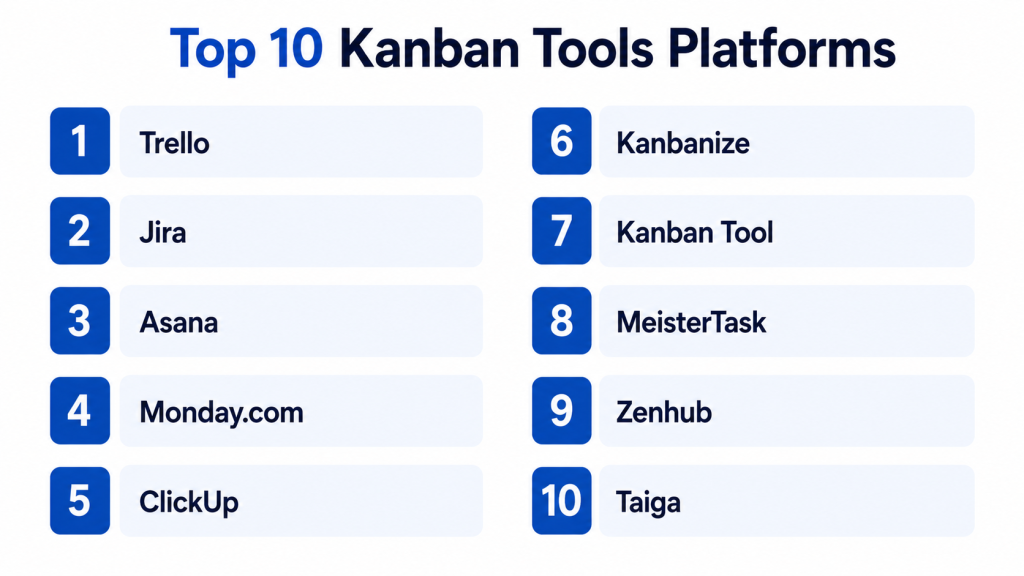
Top 10 Kanban Tools Platforms
#1 — Trello
Short description: Trello is one of the most popular Kanban-style tools for visual task management. It uses boards, lists, and cards to help individuals and teams manage simple projects, workflows, personal tasks, content plans, and client work.
Key Features
- Visual boards, lists, and cards.
- Labels, due dates, checklists, and attachments.
- Built-in automation for simple workflow rules.
- Templates for common project types.
- Power-Ups for added functionality.
- Calendar and timeline-style views in selected plans.
- Team collaboration through comments and mentions.
Pros
- Very easy to learn and use.
- Great for personal productivity and small team workflows.
- Strong visual simplicity for everyday task tracking.
Cons
- Limited for complex portfolio management.
- Advanced reporting and resource planning are not its strongest areas.
- Large boards can become difficult to manage without structure.
Platforms / Deployment
Web / Windows / macOS / iOS / Android.
Cloud.
Security & Compliance
Security features may vary by plan and vendor configuration. Confirm SSO/SAML, MFA, RBAC, audit logs, encryption, SOC 2, ISO 27001, GDPR, HIPAA, and data retention directly with the vendor.
Integrations & Ecosystem
Trello works well for lightweight team collaboration and connects with many productivity tools through Power-Ups and automation.
- Calendar tools.
- Cloud storage.
- Communication apps.
- Developer tools.
- Automation platforms.
- Reporting add-ons.
Support & Community
Trello has documentation, templates, help resources, and a large user community. It is especially beginner-friendly for teams starting with Kanban.
#2 — Jira
Short description: Jira is a powerful agile project management and issue tracking platform widely used by software, product, engineering, IT, and DevOps teams. Its Kanban boards are strong for backlog management, bug tracking, continuous delivery, and technical workflows.
Key Features
- Kanban and Scrum boards.
- Backlog and issue tracking.
- Custom workflows and fields.
- Bug tracking and release management.
- Roadmaps and agile reporting.
- Developer tool integrations.
- Automation rules for technical workflows.
Pros
- Strong for software and engineering teams.
- Highly customizable for complex workflows.
- Excellent integration with development and DevOps tools.
Cons
- Can feel complex for non-technical teams.
- Admin governance is important at scale.
- Simple teams may find it heavier than needed.
Platforms / Deployment
Web / Windows / macOS / iOS / Android.
Cloud / Self-hosted / Hybrid depending on edition and setup.
Security & Compliance
Security features may vary by product edition and deployment. Confirm SSO/SAML, MFA, RBAC, audit logs, encryption, SOC 2, ISO 27001, GDPR, HIPAA, and data residency with the vendor.
Integrations & Ecosystem
Jira has a strong ecosystem for technical delivery, agile teams, DevOps pipelines, and product workflows.
- Code repositories.
- CI/CD tools.
- Incident management platforms.
- Documentation tools.
- Product roadmapping tools.
- Marketplace apps.
Support & Community
Jira has extensive documentation, community forums, training resources, marketplace apps, and enterprise support options. It is best for teams with structured agile or technical workflows.
#3 — Asana
Short description: Asana is a work management platform that supports Kanban boards, lists, timelines, calendars, goals, and portfolio views. It is useful for marketing, operations, product, HR, and cross-functional teams that need clear visual task tracking plus broader project visibility.
Key Features
- Board, list, timeline, calendar, and workload views.
- Task assignments, due dates, subtasks, and dependencies.
- Project templates and reusable workflows.
- Forms for work intake.
- Automation rules.
- Goals and portfolio tracking.
- Dashboards and reporting.
Pros
- Strong balance of visual Kanban and broader work management.
- Easy for cross-functional business teams.
- Good for tracking projects across departments.
Cons
- Advanced portfolio features may require higher plans.
- Large workspaces need naming and workflow discipline.
- Not as technical as Jira for software development teams.
Platforms / Deployment
Web / Windows / macOS / iOS / Android.
Cloud.
Security & Compliance
Security features may vary by plan. Confirm SSO/SAML, MFA, RBAC, audit logs, encryption, SOC 2, ISO 27001, GDPR, HIPAA, and data retention directly with the vendor.
Integrations & Ecosystem
Asana connects with many collaboration, productivity, reporting, and automation tools. It is useful when work spans multiple departments.
- Chat and communication tools.
- Cloud storage.
- Calendar tools.
- Forms and intake workflows.
- Reporting tools.
- Automation platforms.
Support & Community
Asana offers documentation, templates, learning resources, support options, and a large user community. It is practical for teams that want Kanban plus structured project visibility.
#4 — Monday.com
Short description: Monday.com is a flexible work management platform with strong visual boards, customizable columns, automations, dashboards, and multiple work views. It is suitable for teams that want Kanban-style workflows with high customization.
Key Features
- Customizable Kanban boards.
- Multiple views including table, timeline, calendar, Gantt, and dashboard.
- Workflow automation.
- Forms for work intake.
- Custom fields and templates.
- Dashboards and reporting.
- Workload and resource visibility in selected plans.
Pros
- Highly visual and flexible.
- Useful across many departments and workflow types.
- Strong customization and dashboard options.
Cons
- Flexibility can create messy workspaces without governance.
- Advanced features may increase cost.
- Teams may need time to design clean workflows.
Platforms / Deployment
Web / Windows / macOS / iOS / Android.
Cloud.
Security & Compliance
Security features may vary by plan. Confirm SSO/SAML, MFA, RBAC, audit logs, encryption, SOC 2, ISO 27001, GDPR, HIPAA, and enterprise controls directly with the vendor.
Integrations & Ecosystem
Monday.com supports many business workflows across departments and connects with common productivity and collaboration tools.
- CRM tools.
- Communication platforms.
- Calendar apps.
- Cloud storage.
- Developer tools.
- Automation and reporting systems.
Support & Community
Monday.com provides documentation, templates, onboarding resources, support options, and learning content. It is useful for teams that want flexible workflow design.
#5 — ClickUp
Short description: ClickUp is an all-in-one productivity and project management platform with Kanban boards, lists, docs, goals, dashboards, automations, and time tracking. It is useful for teams that want multiple work views and broad task management in one workspace.
Key Features
- Kanban boards, lists, calendars, timelines, and Gantt views.
- Tasks, subtasks, checklists, and custom fields.
- Docs, whiteboards, goals, and dashboards.
- Workflow automation.
- Time tracking and workload views.
- Templates and spaces for team organization.
- AI-assisted writing and summaries in selected plans.
Pros
- Broad feature set for many team types.
- Good value for teams wanting many tools together.
- Highly customizable for different workflows.
Cons
- Can feel overwhelming for new users.
- Workspace setup needs planning.
- Too many features may distract simple teams.
Platforms / Deployment
Web / Windows / macOS / Linux / iOS / Android.
Cloud.
Security & Compliance
Security features may vary by plan. Confirm SSO/SAML, MFA, RBAC, audit logs, encryption, SOC 2, ISO 27001, GDPR, HIPAA, and retention controls directly with the vendor.
Integrations & Ecosystem
ClickUp connects with productivity, communication, storage, developer, and automation tools. It is useful for teams trying to centralize work.
- Chat and communication tools.
- Cloud storage.
- Calendar tools.
- Developer tools.
- Time tracking systems.
- Automation platforms.
Support & Community
ClickUp provides documentation, templates, webinars, support resources, and a large user community. It is popular with teams that want a flexible all-in-one workspace.
#6 — Kanbanize
Short description: Kanbanize is a Kanban-focused project and portfolio management platform designed for teams that want visual workflow management, workflow analytics, dependencies, and enterprise-level Kanban practices. It is useful for software, operations, engineering, and process improvement teams.
Key Features
- Advanced Kanban boards.
- Portfolio and workflow management.
- Swimlanes and card dependencies.
- Work-in-progress limits.
- Cycle time and workflow analytics.
- Automation rules.
- Support for scaled Kanban practices.
Pros
- Strong Kanban-specific feature depth.
- Useful for teams serious about flow management.
- Good analytics for improving delivery performance.
Cons
- May be too advanced for simple task boards.
- Learning curve is higher than Trello.
- Best value comes when teams understand Kanban methods.
Platforms / Deployment
Web / iOS / Android.
Cloud.
Security & Compliance
Security features may vary by plan. Confirm SSO, MFA, RBAC, audit logs, encryption, GDPR, SOC 2, ISO 27001, HIPAA, and enterprise controls directly with the vendor.
Integrations & Ecosystem
Kanbanize works well for teams that want Kanban boards connected to delivery, operations, and portfolio visibility.
- Developer tools.
- APIs.
- Automation tools.
- Analytics workflows.
- Business collaboration tools.
- Portfolio management workflows.
Support & Community
Kanbanize provides documentation, support resources, onboarding content, and Kanban-focused learning material. It is best for teams practicing mature workflow management.
#7 — Kanban Tool
Short description: Kanban Tool is a visual task and workflow management platform focused on Kanban boards, time tracking, analytics, and team collaboration. It is useful for small teams, consultants, service teams, and businesses that want straightforward Kanban with performance insights.
Key Features
- Visual Kanban boards.
- Swimlanes and task cards.
- Time tracking.
- Analytics and workflow metrics.
- Team collaboration features.
- Custom board structures.
- Task history and activity tracking.
Pros
- Simple and Kanban-focused.
- Useful for tracking work and time together.
- Good fit for teams wanting fewer distractions.
Cons
- Smaller ecosystem than broader work management tools.
- May lack advanced portfolio management.
- Interface may feel less modern than some competitors.
Platforms / Deployment
Web / iOS / Android.
Cloud / Self-hosted depending on plan and setup.
Security & Compliance
Security features may vary by deployment and plan. Confirm SSO, MFA, RBAC, audit logs, encryption, GDPR, SOC 2, ISO 27001, HIPAA, and data handling needs directly with the vendor.
Integrations & Ecosystem
Kanban Tool is useful when teams want Kanban boards with time tracking and analytics without heavy platform complexity.
- Calendar tools.
- Time tracking workflows.
- APIs.
- Business productivity tools.
- Reporting workflows.
- Team collaboration systems.
Support & Community
Kanban Tool provides documentation, support resources, and guidance for Kanban workflows. It is practical for smaller teams that want focused visual work management.
#8 — MeisterTask
Short description: MeisterTask is a visual task and Kanban-style project management tool for teams that want simple boards, automation, checklists, collaboration, and task tracking. It is useful for small teams, creative teams, agencies, and everyday project workflows.
Key Features
- Kanban-style project boards.
- Task cards with checklists, due dates, and attachments.
- Automation actions.
- Team collaboration and comments.
- Time tracking in selected plans.
- Agenda-style personal task view.
- Integration with mind mapping and productivity tools.
Pros
- Clean and easy-to-use interface.
- Good for creative and small team workflows.
- Simple automation helps reduce manual updates.
Cons
- Less powerful for enterprise portfolio management.
- Advanced reporting may be limited.
- Not ideal for complex agile engineering workflows.
Platforms / Deployment
Web / Windows / macOS / iOS / Android.
Cloud.
Security & Compliance
Security features may vary by plan. Confirm SSO, MFA, RBAC, audit logs, encryption, GDPR, SOC 2, ISO 27001, HIPAA, and retention requirements directly with the vendor.
Integrations & Ecosystem
MeisterTask fits lightweight project and productivity workflows, especially for teams that like visual task boards.
- Calendar tools.
- Productivity apps.
- Communication tools.
- Automation tools.
- File sharing tools.
- Mind mapping workflows.
Support & Community
MeisterTask provides documentation, help resources, templates, and support options. It is suitable for teams that value simplicity and visual clarity.
#9 — Zenhub
Short description: Zenhub is a project management and Kanban platform built for software teams working closely with GitHub. It helps engineering teams manage issues, boards, sprints, roadmaps, and delivery tracking without moving too far away from developer workflows.
Key Features
- Kanban boards connected to GitHub workflows.
- Issue tracking and sprint planning.
- Roadmaps and release planning.
- Team velocity and reporting.
- Developer workflow visibility.
- Automation for software delivery.
- Support for engineering team collaboration.
Pros
- Strong fit for GitHub-centered software teams.
- Keeps project tracking close to development work.
- Good for agile engineering visibility.
Cons
- Less relevant for non-technical teams.
- Best value depends on GitHub usage.
- Not a general-purpose business Kanban tool.
Platforms / Deployment
Web.
Cloud.
Security & Compliance
Security features may vary by plan and integration setup. Confirm SSO, MFA, RBAC, audit logs, encryption, GDPR, SOC 2, ISO 27001, HIPAA, and GitHub-related access controls directly with the vendor.
Integrations & Ecosystem
Zenhub is strongest in engineering environments where GitHub is the main development system.
- GitHub.
- Software issue workflows.
- Roadmap planning.
- Sprint tracking.
- Developer reporting.
- CI/CD-adjacent workflows.
Support & Community
Zenhub provides documentation, support resources, and software-team-focused learning content. It is best for product and engineering teams using GitHub heavily.
#10 — Taiga
Short description: Taiga is an open-source project management platform with Kanban and Scrum support. It is useful for agile teams, startups, developers, and organizations that want an open-source-friendly project tracking option with visual boards.
Key Features
- Kanban boards.
- Scrum backlog and sprint support.
- User stories, tasks, and issues.
- Team collaboration features.
- Agile reporting basics.
- Open-source-friendly model.
- Self-hosting options.
Pros
- Good for teams that prefer open-source tools.
- Supports both Kanban and Scrum workflows.
- Useful for agile teams wanting more control.
Cons
- May require technical skills for self-hosting.
- Smaller ecosystem than large commercial platforms.
- Enterprise support and advanced governance should be reviewed.
Platforms / Deployment
Web / Linux.
Cloud / Self-hosted / Hybrid depending on setup.
Security & Compliance
Security depends on deployment model, hosting, configuration, and operational practices. Confirm SSO, MFA, RBAC, audit logs, encryption, GDPR, SOC 2, ISO 27001, HIPAA, and compliance requirements based on your setup.
Integrations & Ecosystem
Taiga works well for agile teams that want a flexible, open-source-friendly project management tool.
- Code repositories.
- Issue tracking workflows.
- Agile team processes.
- APIs.
- Self-hosted infrastructure.
- Developer workflows.
Support & Community
Taiga has open-source community resources, documentation, and support options depending on edition and deployment. It is best for teams comfortable with agile and technical setup.
Comparison Table: Top 10
| Tool Name | Best For | Platform(s) Supported | Deployment | Standout Feature | Public Rating |
|---|---|---|---|---|---|
| Trello | Simple visual Kanban boards | Web, Windows, macOS, iOS, Android | Cloud | Easy boards, lists, and cards | N/A |
| Jira | Software and agile Kanban | Web, Windows, macOS, iOS, Android | Cloud / Self-hosted / Hybrid | Advanced issue and workflow tracking | N/A |
| Asana | Cross-functional Kanban and work management | Web, Windows, macOS, iOS, Android | Cloud | Boards plus goals, timelines, and portfolios | N/A |
| Monday.com | Custom visual workflows | Web, Windows, macOS, iOS, Android | Cloud | Flexible boards and dashboards | N/A |
| ClickUp | All-in-one Kanban and productivity | Web, Windows, macOS, Linux, iOS, Android | Cloud | Boards, docs, goals, and automation | N/A |
| Kanbanize | Advanced Kanban and flow analytics | Web, iOS, Android | Cloud | Flow metrics and scaled Kanban | N/A |
| Kanban Tool | Focused Kanban with time tracking | Web, iOS, Android | Cloud / Self-hosted | Kanban boards with analytics and time tracking | N/A |
| MeisterTask | Simple visual task boards | Web, Windows, macOS, iOS, Android | Cloud | Clean Kanban task management | N/A |
| Zenhub | GitHub-connected Kanban for engineering | Web | Cloud | GitHub-native project tracking | N/A |
| Taiga | Open-source agile Kanban | Web, Linux | Cloud / Self-hosted / Hybrid | Open-source Kanban and Scrum support | N/A |
Evaluation & Scoring of Kanban Tools Platforms
| Tool Name | Core (25%) | Ease (15%) | Integrations (15%) | Security (10%) | Performance (10%) | Support (10%) | Value (15%) | Weighted Total (0–10) |
|---|---|---|---|---|---|---|---|---|
| Trello | 8 | 10 | 8 | 8 | 8 | 8 | 9 | 8.40 |
| Jira | 10 | 7 | 10 | 9 | 8 | 9 | 8 | 8.80 |
| Asana | 9 | 9 | 9 | 8 | 8 | 8 | 8 | 8.50 |
| Monday.com | 9 | 9 | 9 | 8 | 8 | 8 | 8 | 8.50 |
| ClickUp | 9 | 8 | 9 | 8 | 8 | 8 | 9 | 8.45 |
| Kanbanize | 9 | 7 | 8 | 8 | 8 | 8 | 7 | 8.00 |
| Kanban Tool | 8 | 8 | 7 | 7 | 8 | 7 | 8 | 7.65 |
| MeisterTask | 7 | 9 | 7 | 7 | 8 | 8 | 8 | 7.70 |
| Zenhub | 8 | 8 | 8 | 8 | 8 | 8 | 8 | 8.00 |
| Taiga | 7 | 7 | 7 | 7 | 7 | 7 | 9 | 7.25 |
These scores are comparative and should be used as a shortlist guide. Jira is strongest for software and technical Kanban. Trello and MeisterTask are easier for simple boards. Asana, Monday.com, and ClickUp are strong for broader team work management. Kanbanize is better for advanced Kanban analytics. Zenhub is best for GitHub-centered engineering teams, while Taiga is useful for open-source-friendly agile teams.
Which Kanban Tools Platform Is Right for You?
Solo / Freelancer
Solo users and freelancers usually need simple boards, fast setup, and low overhead. Trello is one of the easiest choices for personal workflows, client tasks, and content planning. MeisterTask is another clean option for visual task tracking.
ClickUp can be useful if the freelancer wants tasks, docs, calendars, and dashboards in one place. Kanban Tool may be useful for freelancers who want time tracking along with visual task management.
Recommended tools: Trello, MeisterTask, ClickUp, Kanban Tool.
SMB
Small and mid-sized businesses usually need visual work tracking, easy collaboration, automations, and integrations. Asana and Monday.com are strong choices for cross-functional teams. ClickUp is useful for teams that want many features in one tool. Trello works well when the workflow is simple.
For support teams, operations teams, or agencies that want workflow metrics, Kanbanize or Kanban Tool may also be useful.
Recommended tools: Asana, Monday.com, ClickUp, Trello, Kanbanize.
Mid-Market
Mid-market organizations need better reporting, workflow control, integrations, and scalability. Jira is strong for software teams. Asana, Monday.com, and ClickUp are strong for business teams. Kanbanize is useful when the organization wants deeper Kanban analytics and workflow improvement.
Zenhub is a practical choice for engineering teams that work closely with GitHub. Smarter governance and workspace design become important at this stage.
Recommended tools: Jira, Asana, Monday.com, ClickUp, Kanbanize, Zenhub.
Enterprise
Enterprise teams need security, governance, reporting, integrations, auditability, and workflow consistency. Jira is strong for enterprise software and DevOps teams. Asana and Monday.com are strong for enterprise work management across departments. ClickUp may fit teams that want a broad workspace. Kanbanize is relevant for scaled Kanban and flow management.
Enterprises should evaluate SSO, MFA, RBAC, audit logs, data residency, compliance documentation, admin controls, and integration governance before making a final decision.
Recommended tools: Jira, Asana, Monday.com, ClickUp, Kanbanize.
Budget vs Premium
Budget-conscious teams should evaluate Trello, Taiga, MeisterTask, and ClickUp depending on the level of features needed. These tools can support simple Kanban workflows without requiring a large investment.
Premium buyers should consider Jira, Asana, Monday.com, ClickUp, and Kanbanize when they need stronger automation, reporting, security, integrations, and enterprise controls.
Feature Depth vs Ease of Use
For ease of use, Trello, MeisterTask, and Kanban Tool are strong options. They are simpler to learn and work well for lightweight workflows.
For feature depth, Jira, Asana, Monday.com, ClickUp, and Kanbanize offer stronger reporting, automation, customization, and governance. They are better for teams with more complex workflows.
Integrations & Scalability
If your team works in software development, Jira or Zenhub may be best. If your team uses many business tools, Asana, Monday.com, and ClickUp offer strong integration ecosystems. If you need open-source control, Taiga is worth evaluating.
For workflow analytics and scaled Kanban, Kanbanize is a strong choice. For simple visual planning, Trello remains easy and practical.
Security & Compliance Needs
Kanban tools often store project plans, customer details, product roadmaps, internal tasks, files, and operational workflows. Buyers should check SSO, MFA, RBAC, audit logs, guest permissions, encryption, data retention, data residency, and compliance documentation.
Larger organizations should involve IT, security, and procurement teams before choosing a Kanban platform. The tool should make work visible without exposing sensitive information to the wrong users.
Frequently Asked Questions (FAQs)
What is a Kanban tool?
A Kanban tool is software that helps teams visualize work using boards, columns, and cards. It shows what needs to be done, what is in progress, what is blocked, and what is complete.
Which Kanban tool is best for beginners?
Trello, MeisterTask, and Kanban Tool are beginner-friendly options. They are easy to set up and work well for simple visual task management.
Which Kanban tool is best for software teams?
Jira is one of the strongest choices for software teams because it supports issue tracking, agile workflows, development integrations, bug tracking, and release planning.
What is the difference between Kanban and Scrum?
Kanban focuses on continuous flow and visualizing work. Scrum uses fixed sprint cycles, roles, ceremonies, and sprint planning. Some tools support both methods.
Can Kanban tools be used outside software development?
Yes. Marketing, HR, sales, operations, finance, customer support, agencies, and freelancers all use Kanban boards to manage work visually.
Are Kanban tools secure?
They can be secure when configured properly. Buyers should review SSO, MFA, RBAC, audit logs, encryption, workspace permissions, guest access, and compliance documentation.
How are Kanban tools priced?
Pricing usually depends on users, workspaces, automation, storage, views, reporting, integrations, security features, and enterprise controls. Teams should calculate cost based on real usage.
What are common mistakes when using Kanban tools?
Common mistakes include too many columns, no work-in-progress limits, unclear ownership, outdated cards, poor naming, lack of review, and using boards without improving workflow habits.
Can Kanban tools replace project management software?
Sometimes. For simple visual workflows, Kanban tools may be enough. For complex timelines, budgets, dependencies, portfolios, and resource planning, broader project management tools may be better.
What is a work-in-progress limit?
A work-in-progress limit controls how many tasks can be active in a column at one time. It helps teams avoid overload and focus on finishing work before starting more.
When should a company switch Kanban tools?
A company should switch when the current tool lacks reporting, integrations, security controls, automation, scalability, or workflow flexibility needed by the team.
What are alternatives to Kanban tools?
Alternatives include spreadsheets, task management apps, project management software, Scrum tools, workflow automation platforms, ticketing systems, and custom internal dashboards.
Conclusion
Kanban tools help teams make work visible, reduce confusion, and improve delivery flow. The best platform depends on your workflow, team size, technical needs, budget, and security requirements. Trello and MeisterTask are excellent for simple visual boards. Jira is strong for software and agile teams. Asana, Monday.com, and ClickUp provide broader work management with Kanban views. Kanbanize is useful for advanced flow analytics. Kanban Tool is practical for focused Kanban and time tracking. Zenhub is best for GitHub-based engineering teams, while Taiga works well for open-source-friendly agile teams.
