Upgrade & Secure Your Future with DevOps, SRE, DevSecOps, MLOps!
We spend hours scrolling social media and waste money on things we forget, but won’t spend 30 minutes a day earning certifications that can change our lives.
Master in DevOps, SRE, DevSecOps & MLOps by DevOps School!
Learn from Guru Rajesh Kumar and double your salary in just one year.
Introduction
GRC (Governance, Risk & Compliance) Database Administration Tools are specialized platforms designed to help organizations manage, monitor, and optimize their database environments while ensuring regulatory compliance and security. In simple terms, these tools centralize database administration tasks, enforce policies, track access, and provide insights into performance, risks, and compliance gaps.
In +, with hybrid and multi-cloud database environments becoming standard, businesses are facing increasing demands to streamline operations, maintain security, and adhere to strict regulatory frameworks like GDPR, HIPAA, and SOC 2. GRC-driven database administration tools help enterprises mitigate risks, ensure data integrity, and optimize operational efficiency.
Real-world use cases:
- Centralized administration of heterogeneous database environments.
- Real-time monitoring and auditing of database access.
- Automating compliance reporting for regulated industries.
- Enforcing policies for database configuration, access, and change management.
- Tracking performance metrics and ensuring high availability.
Evaluation criteria buyers should consider:
- Multi-database support (SQL, NoSQL, cloud-native databases)
- Role-based access control (RBAC) and permission management
- Policy enforcement and configuration management
- Real-time monitoring and alerting capabilities
- Audit trail creation and compliance reporting
- Integration with IAM and SIEM systems
- Scalability for enterprise workloads
- Cloud, on-premises, and hybrid deployment options
- Backup, recovery, and performance monitoring tools
- Ease of use and administrative automation
Best for: Database administrators, IT managers, compliance officers, and enterprise IT teams managing large or complex database environments.
Not ideal for: Small businesses with limited database infrastructure, low compliance requirements, or teams that rely primarily on native database tools.
Key Trends in Database Administration Tools
- AI-Driven Automation: Leveraging AI to optimize queries, automate routine administrative tasks, and predict performance bottlenecks.
- Unified Multi-Cloud Management: Tools supporting hybrid and multi-cloud environments for seamless administration.
- Policy-Driven Governance: Automated enforcement of corporate and regulatory policies across all databases.
- Real-Time Performance Monitoring: Continuous tracking of database performance and anomaly detection.
- Compliance Automation: Simplified reporting for GDPR, HIPAA, SOC 2, and other regulatory standards.
- Integration with DevOps Pipelines: APIs and connectors for CI/CD environments to manage database schema changes.
- Enhanced Security: Support for encryption, key management, and access auditing.
- Self-Healing and Predictive Maintenance: Automated recovery and predictive alerts to prevent downtime.
- User Activity Analytics: Tracking and analyzing database user behavior to mitigate insider threats.
- Cost and Resource Optimization: Intelligent workload management to reduce infrastructure costs and improve efficiency.
How We Selected These Tools (Methodology)
- Evaluated market adoption across enterprises, regulated industries, and global organizations.
- Assessed feature completeness for monitoring, auditing, compliance, and performance optimization.
- Reviewed reliability and scalability across on-premises, cloud, and hybrid deployments.
- Analyzed security posture, including RBAC, encryption, and audit capabilities.
- Verified integration potential with IAM, SIEM, DevOps, and analytics platforms.
- Considered customer fit for SMB, mid-market, and enterprise segments.
- Examined compliance readiness for GDPR, HIPAA, SOC 2, and industry standards.
- Reviewed administration and ease of use, including dashboards, automation, and reporting.
- Checked vendor support services and community resources.
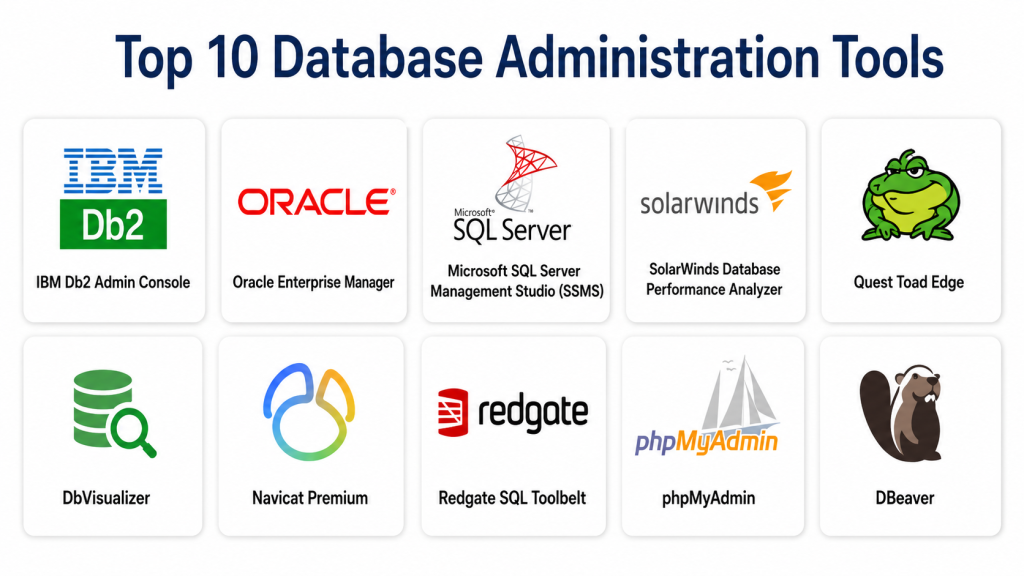
Top 10 Database Administration Tools
#1 — IBM Db2 Admin Console
Short description: IBM Db2 Admin Console provides comprehensive database administration, monitoring, and compliance management for Db2 databases. It is designed for enterprise IT teams requiring centralized control and advanced reporting.
Key Features
- Centralized Db2 instance management
- Real-time monitoring and alerting
- Policy enforcement for access and configuration
- Performance optimization and workload balancing
- Compliance and audit reporting
Pros
- Enterprise-grade scalability
- Comprehensive policy enforcement
Cons
- Limited to IBM Db2
- Complex configuration
Platforms / Deployment
- Web / Linux / Windows
- On-premises / Cloud
Security & Compliance
- RBAC, audit logs, encryption
- SOC 2, ISO 27001, HIPAA
Integrations & Ecosystem
- IBM Cloud services
- SIEM tools
- APIs for DevOps automation
Support & Community
- IBM enterprise support
- Extensive documentation
#2 — Oracle Enterprise Manager
Short description: Oracle Enterprise Manager allows administrators to manage Oracle databases with centralized dashboards, automation, and compliance monitoring, ideal for large Oracle deployments.
Key Features
- Multi-database support for Oracle
- Automated patching and backup
- Policy and compliance enforcement
- Performance and resource monitoring
- Real-time alerting and reporting
Pros
- Deep Oracle integration
- Automation reduces administrative overhead
Cons
- High cost for smaller teams
- Steep learning curve
Platforms / Deployment
- Web / Linux / Windows
- On-premises / Cloud
Security & Compliance
- RBAC, encryption, audit logs
- ISO 27001, SOC 2, GDPR
Integrations & Ecosystem
- Oracle Cloud services
- SIEM and IAM integrations
- APIs for DevOps workflows
Support & Community
- Oracle enterprise support
- Detailed knowledge base
#3 — Microsoft SQL Server Management Studio (SSMS)
Short description: SSMS is a robust tool for SQL Server administration, providing configuration, monitoring, and maintenance features for Microsoft database environments.
Key Features
- Query execution and optimization
- Database backup and restore
- Role-based access management
- Performance monitoring and tuning
- Compliance reporting
Pros
- Free and integrated with SQL Server
- Familiar interface for Microsoft teams
Cons
- Limited cross-platform database support
- Manual setup for advanced monitoring
Platforms / Deployment
- Windows
- On-premises / Cloud (Azure)
Security & Compliance
- RBAC, audit logs, encryption
- GDPR, SOC 2
Integrations & Ecosystem
- Azure cloud services
- PowerShell scripting
- DevOps pipeline integration
Support & Community
- Microsoft support tiers
- Active developer community
#4 — SolarWinds Database Performance Analyzer
Short description: SolarWinds Database Performance Analyzer provides database monitoring, performance tuning, and administration for multi-vendor environments including SQL Server, Oracle, and MySQL.
Key Features
- Query performance analysis
- Wait-time analysis and bottleneck detection
- Multi-database support
- Customizable alerts and dashboards
- Compliance and audit reporting
Pros
- Multi-platform support
- Intuitive dashboards and alerts
Cons
- Advanced features require paid tiers
- May be complex for small deployments
Platforms / Deployment
- Windows / Linux / Web
- Cloud / On-premises
Security & Compliance
- RBAC, audit logs
- Not publicly stated
Integrations & Ecosystem
- SIEM and analytics tools
- APIs for automation
- DevOps integrations
Support & Community
- Professional support
- Documentation and community forums
#5 — Quest Toad Edge
Short description: Toad Edge provides simplified database administration, monitoring, and development support for open-source and commercial databases like MySQL and PostgreSQL.
Key Features
- Schema and query management
- Backup and restore tools
- Performance monitoring
- Role and permission management
- Cross-platform support
Pros
- Lightweight and easy to use
- Open-source database support
Cons
- Limited enterprise compliance features
- Smaller feature set than enterprise tools
Platforms / Deployment
- Windows / macOS / Linux
- On-premises / Cloud
Security & Compliance
- RBAC, audit logs
- Not publicly stated
Integrations & Ecosystem
- APIs for automation
- DevOps pipelines
- Cloud connectors
Support & Community
- Vendor support
- Active user community
#6 — DbVisualizer
Short description: DbVisualizer is a universal database administration tool for developers and DBAs, offering monitoring, query management, and cross-platform database support.
Key Features
- Multi-database query tool
- Database object management
- Performance monitoring
- Backup and restore features
- Customizable dashboards
Pros
- Cross-platform support
- Developer-friendly interface
Cons
- Limited automated compliance reporting
- Advanced security features require add-ons
Platforms / Deployment
- Windows / macOS / Linux
- On-premises / Cloud
Security & Compliance
- RBAC, audit logs
- Not publicly stated
Integrations & Ecosystem
- APIs for automation
- DevOps integration
- Cloud connectors
Support & Community
- Vendor support
- User forums and tutorials
#7 — Navicat Premium
Short description: Navicat Premium provides database administration, development, and monitoring across multiple database types, including Oracle, MySQL, SQL Server, and PostgreSQL.
Key Features
- Cross-platform database management
- Data modeling and migration
- Backup and restore automation
- Query and report generation
- Role-based permissions
Pros
- Multi-database support
- User-friendly interface
Cons
- Limited advanced compliance features
- Costly for small teams
Platforms / Deployment
- Windows / macOS / Linux
- Cloud / On-premises
Security & Compliance
- RBAC, encryption
- Not publicly stated
Integrations & Ecosystem
- API for automation
- SIEM and DevOps pipelines
Support & Community
- Professional support
- Community forums
#8 — Redgate SQL Toolbelt
Short description: SQL Toolbelt by Redgate provides a suite of database administration, development, and monitoring tools for SQL Server environments.
Key Features
- Deployment automation
- Schema and data comparison
- Monitoring and alerting
- Backup and recovery
- Compliance reporting
Pros
- Extensive SQL Server support
- Automation and CI/CD ready
Cons
- Limited non-SQL Server database support
- Licensing costs
Platforms / Deployment
- Windows
- On-premises / Cloud
Security & Compliance
- RBAC, audit logs
- Not publicly stated
Integrations & Ecosystem
- CI/CD pipelines
- DevOps automation
- APIs
Support & Community
- Redgate support
- Active developer community
#9 — phpMyAdmin
Short description: phpMyAdmin is an open-source administration tool for MySQL and MariaDB databases, providing web-based database management and query execution.
Key Features
- Query execution and database management
- User and permission management
- Import/export tools
- Backup and restore
- Multi-language support
Pros
- Free and open-source
- Lightweight web-based tool
Cons
- Limited enterprise features
- Security depends on deployment configuration
Platforms / Deployment
- Web
- On-premises / Cloud
Security & Compliance
- User access control
- Not publicly stated
Integrations & Ecosystem
- API for automation
- Cloud deployment support
Support & Community
- Community support
- Extensive online documentation
#10 — DBeaver
Short description: DBeaver is a universal database administration tool supporting multiple databases, with monitoring, query execution, and data visualization capabilities.
Key Features
- Multi-database support
- SQL editor and query builder
- Data visualization and reporting
- Backup and restore
- User and role management
Pros
- Cross-platform and multi-database support
- Open-source version available
Cons
- Advanced compliance and security features limited
- Some enterprise features require paid version
Platforms / Deployment
- Windows / macOS / Linux
- On-premises / Cloud
Security & Compliance
- RBAC, audit logs
- Not publicly stated
Integrations & Ecosystem
- APIs for automation
- DevOps pipelines
- Cloud connectors
Support & Community
- Vendor support for enterprise edition
- Active user community
Comparison Table (Top 10)
| Tool Name | Best For | Platform(s) Supported | Deployment | Standout Feature | Public Rating |
|---|---|---|---|---|---|
| IBM Db2 Admin Console | IBM Db2 enterprises | Web/Windows/Linux | Cloud/On-prem | Centralized Db2 management | N/A |
| Oracle Enterprise Manager | Oracle environments | Web/Linux/Windows | Cloud/On-prem | Automation & compliance | N/A |
| Microsoft SSMS | SQL Server environments | Windows | On-prem/Cloud | Native integration | N/A |
| SolarWinds DPA | Multi-vendor DB monitoring | Web/Windows/Linux | Cloud/On-prem/Hybrid | Performance analysis | N/A |
| Toad Edge | Open-source DBs | Windows/macOS/Linux | On-prem/Cloud | Lightweight administration | N/A |
| DbVisualizer | Multi-platform DB admin | Windows/macOS/Linux | On-prem/Cloud | Developer-friendly interface | N/A |
| Navicat Premium | Cross-platform DBs | Windows/macOS/Linux | Cloud/On-prem | Multi-database support | N/A |
| Redgate SQL Toolbelt | SQL Server enterprises | Windows | On-prem/Cloud | Deployment automation | N/A |
| phpMyAdmin | MySQL/MariaDB | Web | On-prem/Cloud | Free, web-based management | N/A |
| DBeaver | Multi-database universality | Windows/macOS/Linux | On-prem/Cloud | Open-source with enterprise option | N/A |
Evaluation & Scoring of Database Administration Tools
| Tool Name | Core (25%) | Ease (15%) | Integrations (15%) | Security (10%) | Performance (10%) | Support (10%) | Value (15%) | Weighted Total |
|---|---|---|---|---|---|---|---|---|
| IBM Db2 Admin Console | 9 | 8 | 8 | 9 | 9 | 8 | 7 | 8.3 |
| Oracle Enterprise Manager | 9 | 8 | 8 | 9 | 9 | 8 | 7 | 8.3 |
| Microsoft SSMS | 8 | 8 | 7 | 8 | 8 | 8 | 8 | 7.9 |
| SolarWinds DPA | 8 | 7 | 8 | 8 | 8 | 7 | 7 | 7.7 |
| Toad Edge | 7 | 8 | 7 | 7 | 7 | 7 | 7 | 7.2 |
| DbVisualizer | 7 | 8 | 7 | 7 | 7 | 7 | 7 | 7.2 |
| Navicat Premium | 7 | 8 | 7 | 7 | 7 | 7 | 7 | 7.2 |
| Redgate SQL Toolbelt | 8 | 7 | 7 | 7 | 7 | 7 | 7 | 7.4 |
| phpMyAdmin | 6 | 8 | 6 | 6 | 6 | 6 | 8 | 6.7 |
| DBeaver | 7 | 8 | 7 | 7 | 7 | 7 | 7 | 7.2 |
Interpretation: Weighted scores reflect comparative strengths across core functionality, ease of use, integration flexibility, security, performance, support, and value.
Which Database Administration Tool Is Right for You?
Solo / Freelancer
- phpMyAdmin or DBeaver for lightweight, cross-platform management.
SMB
- Toad Edge or SolarWinds DPA for multi-database support with simple administration.
Mid-Market
- Microsoft SSMS, Navicat Premium, or Redgate SQL Toolbelt for advanced monitoring and integration.
Enterprise
- IBM Db2 Admin Console, Oracle Enterprise Manager, or SolarWinds DPA for centralized, regulatory-compliant administration.
Budget vs Premium
- Free or low-cost tools like DBeaver and phpMyAdmin are suitable for SMBs.
- Premium enterprise tools provide automation, compliance, and performance optimization at scale.
Feature Depth vs Ease of Use
- Enterprise tools offer advanced features but require training.
- Developer-focused tools provide ease of use with limited compliance automation.
Integrations & Scalability
- Ensure API connectivity for DevOps, SIEM, and IAM integrations.
- Multi-cloud and hybrid support enhances scalability and flexibility.
Security & Compliance Needs
- Enterprise environments benefit from RBAC, encryption, and audit log support.
- Compliance-ready tools streamline GDPR, SOC 2, and HIPAA adherence.
Frequently Asked Questions (FAQs)
1: What is a Database Administration Tool?
A platform that enables monitoring, managing, and maintaining databases efficiently while ensuring security and compliance.
2: Can these tools manage multiple database types?
Many enterprise tools support SQL, NoSQL, and cloud-native databases across vendors.
3: Do they help with regulatory compliance?
Yes, tools provide auditing, reporting, and policy enforcement to comply with GDPR, HIPAA, and SOC 2.
4: Are open-source tools effective for small teams?
Yes, DBeaver and phpMyAdmin provide lightweight solutions suitable for smaller setups.
5: Can these tools automate backups?
Most enterprise tools offer backup automation and scheduling to reduce administrative overhead.
6: Do they monitor database performance?
Yes, real-time monitoring and performance analytics are core features of many tools.
7: Are integrations available with DevOps pipelines?
Enterprise and developer-focused tools provide APIs and connectors for CI/CD workflows.
8: Can these tools detect security threats?
Some tools include anomaly detection, audit trails, and alerting to mitigate risks.
9: Is cloud deployment supported?
Yes, most modern tools support on-premises, cloud, or hybrid deployments.
10: How often should databases be audited?
Continuous monitoring is recommended, complemented by periodic compliance audits.
Conclusion
Database administration tools are essential for managing complex environments, ensuring security, and maintaining compliance. SMBs can leverage open-source or lightweight tools, while mid-market and enterprise organizations benefit from IBM, Oracle, or SolarWinds solutions. Evaluate your environment, compliance requirements, and scalability needs, shortlist 2–3 tools, and pilot them for optimized database administration.
