Upgrade & Secure Your Future with DevOps, SRE, DevSecOps, MLOps!
We spend hours scrolling social media and waste money on things we forget, but won’t spend 30 minutes a day earning certifications that can change our lives.
Master in DevOps, SRE, DevSecOps & MLOps by DevOps School!
Learn from Guru Rajesh Kumar and double your salary in just one year.
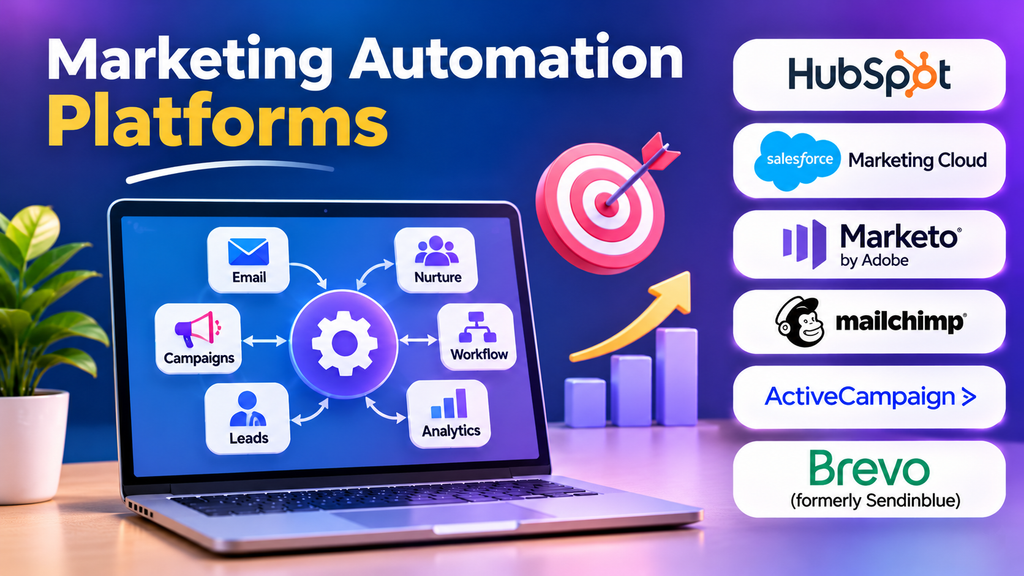
Marketing teams often spend significant time repeating the same tasks: sending follow-up emails, assigning leads, updating customer records, segmenting audiences, and tracking campaign activity. As a business grows, coordinating these tasks manually becomes harder and increases the risk of missed opportunities.
Marketing automation platforms help organizations coordinate these activities through rules, triggers, customer data, and scheduled workflows. Their value goes beyond sending messages automatically. A well-designed system connects customer behavior with relevant communication, helping teams respond consistently while preserving control over timing, targeting, and customer preferences.
What Marketing Automation Actually Does
Marketing automation software coordinates recurring marketing activities based on defined conditions and customer interactions. A platform might send a welcome email after registration, notify a sales representative when a lead meets specific criteria, or start a follow-up sequence when a customer abandons a shopping cart.
Depending on the product, automation can cover email campaigns, lead nurturing, audience segmentation, campaign analytics, customer journeys, and integrations with CRM systems.
Automation does not mean every interaction should be automated. Complex customer concerns, sensitive situations, and high-value sales conversations may still require human judgment.
The Core Components of an Automation Workflow
A useful automation workflow combines several elements rather than relying on a single trigger.
Triggers and Entry Conditions
A trigger determines when a workflow starts. Examples include a form submission, a purchase, a subscription event, or a change in a contact’s status.
Entry conditions determine who qualifies. A workflow might apply only to new subscribers who have provided the required marketing consent, rather than every contact in a database.
Segmentation and Decision Rules
Segmentation groups contacts according to relevant characteristics or behavior. Decision rules determine what happens next.
For example, a software company could send educational content to a new trial user and offer a product demonstration to someone who has repeatedly explored a particular feature. The workflow should use reliable signals and provide appropriate ways for contacts to manage their preferences.
Messages and Follow-Ups
Automation can deliver messages through supported channels, such as email, and may coordinate additional activities through connected systems. The available channels depend on the platform.
Timing, frequency limits, personalization, and suppression rules are important. A workflow that sends too many messages can damage trust even if every message is technically relevant.
Measurement and Optimization
Teams should track delivery, engagement, conversions, unsubscribe activity, and downstream outcomes where available. These measurements help identify ineffective steps and determine whether automation contributes to the intended business result.
Marketing Automation Platforms Worth Considering
The market includes platforms designed for different levels of complexity, from small-business email automation to enterprise-scale customer journeys and account-based marketing.
HubSpot Marketing Hub
HubSpot Marketing Hub combines marketing automation with tools for lead management, forms, landing pages, reporting, and CRM-connected workflows.
It can be a practical option for teams that want marketing and sales activities coordinated within a shared customer platform. Businesses should evaluate which automation features are included in their selected plan, how contact-based pricing scales, and whether advanced reporting or integrations require additional products.
Adobe Marketo Engage
Adobe Marketo Engage focuses on marketing automation for organizations with sophisticated lead management, nurturing, and business-to-business marketing requirements.
It can suit teams coordinating long buying journeys, detailed segmentation, and marketing-to-sales handoffs. Implementation and administration may require specialist expertise, so buyers should assess campaign complexity, integration requirements, governance, and the resources needed to maintain the system.
ActiveCampaign
ActiveCampaign combines email marketing, automation workflows, contact management, and customer engagement capabilities. It can be relevant to businesses that want to build behavior-based follow-ups without adopting a larger enterprise marketing stack.
Before choosing it, examine the available automation actions, integrations, reporting requirements, contact limits, and plan restrictions. A small team should also consider how much ongoing work will be needed to maintain its workflows.
Salesforce Marketing Cloud
Salesforce Marketing Cloud provides marketing and customer engagement capabilities for organizations coordinating campaigns across multiple channels and customer segments. The specific capabilities depend on the product and configuration selected within the Salesforce marketing ecosystem.
It may be suitable for organizations with complex customer journeys and established Salesforce processes. Buyers should confirm which product components are required, how data moves between systems, and what implementation and administration will cost.
Oracle Eloqua
Oracle Eloqua is an enterprise marketing automation platform commonly associated with business-to-business demand generation, lead nurturing, and campaign management.
It can be worth evaluating when marketing teams need to coordinate complex campaigns and integrate with enterprise sales processes. Organizations should account for implementation effort, data governance, reporting needs, and the specialist skills required to administer the platform.
Brevo
Brevo provides email marketing, marketing automation, and customer communication capabilities, with additional functionality depending on the selected plan and product configuration.
It may appeal to smaller organizations that want to coordinate email campaigns and customer follow-ups without building a large enterprise marketing stack. Buyers should verify automation limits, contact and sending allowances, available integrations, and the features included in their chosen plan.
Comparing Platforms by Operational Fit
| Platform | Potential fit | Main consideration |
|---|---|---|
| HubSpot Marketing Hub | Teams connecting marketing activities with CRM workflows | Plan limits and scaling costs |
| Adobe Marketo Engage | Complex B2B lead nurturing and campaign operations | Administration and implementation effort |
| ActiveCampaign | Behavior-based email and customer automation | Workflow limits and integration needs |
| Salesforce Marketing Cloud | Multi-channel customer engagement at scale | Product configuration and ecosystem complexity |
| Oracle Eloqua | Enterprise B2B demand generation | Specialist skills and implementation requirements |
| Brevo | Businesses coordinating email and customer communication | Plan-specific limits and capabilities |
These platforms are not direct substitutes in every situation. The most suitable choice depends on the campaign lifecycle, existing technology stack, internal skills, and level of control required.
Choosing Between Small-Business and Enterprise Automation
A smaller business may need only a welcome sequence, a few audience segments, abandoned-cart messages, and basic conversion reporting. A simpler platform can reduce setup time and make campaigns easier to maintain.
An enterprise marketing team may need multiple brands, regional permissions, advanced lead scoring, complex customer journeys, extensive integrations, and coordinated sales handoffs. Those requirements can justify a more sophisticated system, but they also increase implementation and governance demands.
The important distinction is not the number of features a platform advertises. It is whether the organization can use those features reliably without creating unnecessary complexity.
Integration Requirements That Matter
Marketing automation rarely operates in isolation. It may depend on customer information from a CRM, transaction events from an e-commerce system, analytics data from a website, or consent preferences from another application.
Before purchasing a platform, determine which system owns each important customer attribute. For example, the commerce system may be authoritative for purchase status, while the CRM manages sales ownership.
Also verify how integrations handle failed synchronization, duplicate records, field mapping, event timing, and changes to customer preferences. A workflow that relies on delayed or inaccurate data may send the wrong message at the wrong time.
For more complex environments, test the entire data path from the original event to the resulting campaign action.
Privacy, Consent, and Deliverability
Automation can increase the volume of communication, making governance particularly important.
Marketing teams should maintain appropriate consent records, provide clear unsubscribe mechanisms, honor communication preferences, and define rules for suppressing contacts who should not receive a message. Applicable requirements depend on the audience, jurisdiction, channel, and purpose of the communication.
Email deliverability also requires ongoing attention. Domain authentication, list hygiene, bounce handling, complaint monitoring, and responsible sending practices can affect whether messages reach inboxes.
Automation should not be used to bypass consent or continue messaging contacts who have opted out. Verify how the platform propagates suppression and preference changes across connected systems.
Common Automation Mistakes
Building too many workflows too early: A large collection of overlapping automations becomes difficult to audit. Start with a small set of high-value journeys and expand when performance and maintenance are understood.
Using poor-quality contact data: Incorrect attributes can send customers irrelevant messages. Establish validation and ownership rules before relying on segmentation.
Ignoring frequency limits: Multiple workflows may contact the same person within a short period. Coordinate communication rules across campaigns instead of evaluating each workflow independently.
Automating without a clear objective: A sequence should serve a defined purpose, such as onboarding, education, or conversion. Every workflow should have a measurable outcome and a clear stopping condition.
Failing to test exceptions: Duplicate triggers, missing fields, failed integrations, and unexpected customer actions can create loops or incorrect messages. Test normal and unusual scenarios before launch.
Measuring activity instead of results: The number of automated emails sent is not a business outcome. Evaluate engagement, conversion, retention, and other measures appropriate to the campaign.
A Practical Plan for Implementation
A focused rollout reduces risk and helps teams learn which automations create genuine value.
- Identify one repetitive marketing task with a clear business objective.
- Map the customer journey, including entry conditions, decisions, messages, and exit rules.
- Audit the data and integrations required by the workflow.
- Choose a platform that supports the use case within a realistic budget.
- Configure consent, suppression, access controls, and frequency rules.
- Test the workflow with representative records and unusual scenarios.
- Monitor results, errors, and customer feedback before expanding automation.
For example, a training academy could begin with a registration confirmation, a course information sequence, and a follow-up for prospective students who request more details. The academy could then assess whether the workflow improves attendance at consultations or completed registrations compared with its existing process.
Making Marketing Automation Work for Your Business
Marketing automation is most effective when it connects reliable customer information with timely, relevant communication. HubSpot and ActiveCampaign may fit teams seeking accessible marketing workflows, while Marketo Engage, Salesforce Marketing Cloud, and Oracle Eloqua can be relevant to more complex enterprise operations. Brevo offers another option for organizations coordinating email and customer communications.
Before committing, define the customer journey you want to improve, confirm that the required data and integrations are available, and calculate the ongoing cost of operating the workflows. Start small, measure meaningful outcomes, and automate additional activities only when the benefits outweigh the complexity.
