Upgrade & Secure Your Future with DevOps, SRE, DevSecOps, MLOps!
We spend hours scrolling social media and waste money on things we forget, but won’t spend 30 minutes a day earning certifications that can change our lives.
Master in DevOps, SRE, DevSecOps & MLOps by DevOps School!
Learn from Guru Rajesh Kumar and double your salary in just one year.
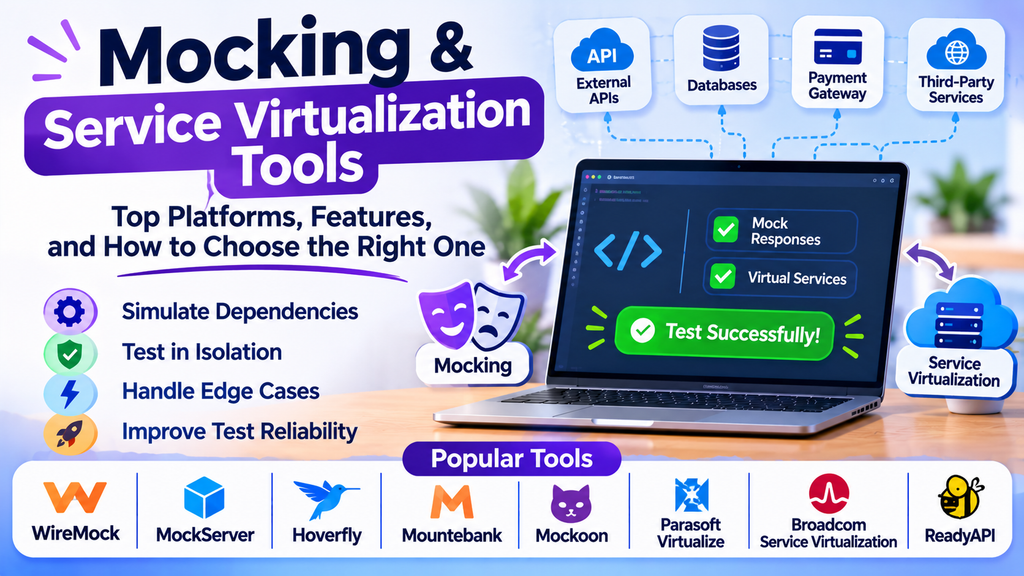
Mocking and service virtualization tools are important in modern software development and testing. Applications often depend on third-party APIs, payment gateways, databases, microservices, and external systems. Testing every component with real dependencies can be expensive, slow, or unreliable.
These tools provide simulated dependencies so teams can test application behavior under predictable conditions. They help developers detect integration problems early, reproduce failures, and continue testing even when dependent services are unavailable.
What Are Mocking and Service Virtualization Tools?
Mocking replaces a dependency with a controlled substitute that imitates the behavior required by a test. Developers commonly use mocks, stubs, and fakes to isolate a unit of code and verify its behavior.
Service virtualization simulates the behavior of more complex dependencies, such as APIs, databases, message queues, and enterprise services. It can reproduce expected responses, delays, errors, and other conditions without requiring access to the actual system.
Mocking vs. Service Virtualization
- Mocking: Usually focuses on individual components or dependencies within a test.
- Service virtualization: Typically models external services or systems for integration and end-to-end testing.
- Shared purpose: Both help teams test predictable scenarios while reducing dependence on real services.
Popular Mocking and Service Virtualization Tools
1. WireMock
WireMock is a widely used tool for mocking HTTP APIs. It lets teams configure request matching, response bodies, headers, delays, and error scenarios.
Best for: Developers testing REST APIs and applications that depend on HTTP services.
2. MockServer
MockServer allows teams to create expectations for incoming requests and return configured responses. It can be used in development, automated testing, and integration environments.
Best for: API testing where requests and responses need to be controlled precisely.
3. Hoverfly
Hoverfly is an API simulation tool that captures and simulates HTTP and HTTPS interactions. It can help teams test applications without repeatedly calling real external services.
Best for: Simulating external HTTP dependencies and creating repeatable integration tests.
4. Mountebank
Mountebank is an open-source service virtualization tool that supports simulating different types of service interactions. It can help teams reproduce dependency behavior in controlled environments.
Best for: Teams that need flexible service simulation across multiple protocols.
5. Mockoon
Mockoon provides a user-friendly environment for creating mock APIs locally. Developers can define endpoints, configure responses, and use mock services during frontend and backend development.
Best for: Developers who need quick local API mocks without building a complete backend first.
6. Parasoft Virtualize
Parasoft Virtualize provides service virtualization capabilities for simulating dependent systems and complex service interactions. It is designed for enterprise testing environments.
Best for: Organizations testing complex integrations with unavailable or costly dependencies.
7. Broadcom Service Virtualization
Broadcom Service Virtualization supports simulation of dependent services to help teams test applications when real systems are unavailable or difficult to access.
Best for: Enterprise teams that need controlled testing of complex service dependencies.
8. ReadyAPI
ReadyAPI provides API testing capabilities, and its ecosystem includes service virtualization features through supported products and integrations. Teams should verify which capabilities are available in their selected edition.
Best for: Teams looking to coordinate API testing with related simulation workflows.
Mocking and Service Virtualization Tools Comparison
| Tool | Main focus | Suitable use |
|---|---|---|
| WireMock | HTTP API mocking | REST API and integration tests |
| MockServer | Configurable request and response simulation | Controlled API testing |
| Hoverfly | HTTP service simulation | Repeatable dependency testing |
| Mountebank | Multi-protocol service simulation | Flexible integration testing |
| Mockoon | Local mock API creation | Frontend and backend development |
| Parasoft Virtualize | Enterprise service virtualization | Complex enterprise integrations |
| Broadcom Service Virtualization | Enterprise dependency simulation | Large distributed applications |
| ReadyAPI | API testing with related virtualization capabilities | API quality workflows |
Product capabilities, supported protocols, and licensing can vary by version and edition. Confirm the current offering before selecting a platform.
Key Features to Consider
When comparing tools, look for capabilities that match your application’s dependencies and testing requirements.
- Request and response configuration: Define predictable responses for different inputs.
- Error simulation: Test timeouts, server errors, invalid data, and unavailable dependencies.
- Latency simulation: Reproduce slow services and network delays.
- Protocol support: Check compatibility with HTTP, messaging systems, or other required protocols.
- Data-driven behavior: Return different responses based on request parameters or test conditions.
- Automation integration: Run simulations as part of automated tests and CI/CD pipelines.
- Recording and playback: Capture real interactions when supported and replay them in controlled tests.
- Ease of maintenance: Keep mock definitions understandable and synchronized with API contracts.
- Security: Avoid exposing credentials, tokens, or confidential data in recorded interactions.
How to Choose the Right Tool
Begin by identifying what needs to be simulated. If your main requirement is mocking REST APIs, a tool such as WireMock, MockServer, or Mockoon may be sufficient. If your application depends on complex enterprise systems or multiple protocols, a service virtualization platform may be more appropriate.
Consider the technical skills of your team, the complexity of dependencies, the need for realistic failure scenarios, and the available budget. Open-source tools can be effective for many development workflows, while commercial enterprise platforms may offer additional governance, support, and advanced simulation capabilities.
Run a proof of concept using real application scenarios. Verify that the tool can reproduce successful responses, errors, timeouts, and important edge cases. Also evaluate how easily simulated behavior can be updated when APIs change.
Best Practices for Mocking and Service Virtualization
- Define clearly what each mock or virtual service is intended to simulate.
- Use realistic request and response formats based on API contracts.
- Include success, failure, timeout, and boundary scenarios.
- Keep mock definitions version-controlled alongside relevant test code.
- Avoid making mocks more permissive than the actual service.
- Update simulated behavior when dependencies or contracts change.
- Use real integration tests periodically to verify that mocks still represent actual systems.
- Avoid storing secrets or sensitive production data in recorded interactions.
- Make test environments reproducible so failures can be investigated consistently.
- Document important differences between simulated and real service behavior.
Mocks should support testing, not replace every real integration test. A balanced testing strategy uses simulation for control and repeatability while retaining integration checks against actual dependencies.
Common Challenges
Mocks can become outdated when APIs change. A test suite may pass against a simulated service while failing against the real system if the mock does not accurately reflect actual behavior. Overly simplistic responses may also hide problems involving authentication, data consistency, timing, or service interactions.
Teams can reduce these risks by maintaining API contracts, reviewing mock definitions, and periodically validating simulations against real services. They should also document which behaviors are simulated and which have been verified through actual integration testing.
Conclusion
Mocking and service virtualization tools help teams isolate dependencies, simulate external systems, and test application behavior under controlled conditions. WireMock, MockServer, Hoverfly, Mountebank, Mockoon, Parasoft Virtualize, Broadcom Service Virtualization, and ReadyAPI offer different approaches to dependency simulation and API testing.
The right tool depends on the protocols involved, dependency complexity, automation requirements, team expertise, and budget. Used alongside real integration tests, these tools can improve test reliability, reduce development delays, and make complex application workflows easier to validate.
