Upgrade & Secure Your Future with DevOps, SRE, DevSecOps, MLOps!
We spend hours scrolling social media and waste money on things we forget, but won’t spend 30 minutes a day earning certifications that can change our lives.
Master in DevOps, SRE, DevSecOps & MLOps by DevOps School!
Learn from Guru Rajesh Kumar and double your salary in just one year.
Introduction
Document generation software helps businesses automatically create documents from templates, data, rules, and workflows. In simple English, it takes information from systems like CRM, ERP, forms, databases, spreadsheets, or apps and turns it into polished documents such as contracts, invoices, proposals, reports, certificates, letters, quotes, and PDFs.
This matters in 2026 and beyond because teams need faster document creation, fewer manual errors, better compliance control, and stronger integration with business systems. Manual copy-paste work wastes time and often creates version mistakes, wrong customer details, missed clauses, and approval delays.
Common use cases include sales proposal generation, contract creation, invoice generation, HR letter creation, customer onboarding documents, compliance reports, and automated PDF generation from web applications.
Buyers should evaluate template flexibility, data merging, API support, workflow automation, eSignature support, security, integrations, scalability, document formats, and ease of use.
Best for: sales teams, legal teams, HR teams, finance teams, operations teams, developers, SaaS companies, SMBs, mid-market firms, and enterprises that create repeatable documents at scale.
Not ideal for: users who only create simple one-time documents, teams that do not need automation, or businesses that only need basic word processing without templates, data merging, or integrations.
Key Trends in Document Generation Software
AI-assisted document drafting is helping teams create first drafts, summaries, clauses, and reusable text faster.
- API-first document generation is growing because SaaS platforms and internal apps need automated PDF, Word, and report creation.
- No-code template builders are becoming popular for business users who do not want developer dependency.
- CRM-based document generation is now important for sales quotes, proposals, contracts, and renewal documents.
- Dynamic templates with conditional logic are replacing static templates.
- eSignature-ready document flows are becoming standard for contracts, HR letters, and customer agreements.
- Compliance and audit trails are more important as generated documents often contain legal, financial, or personal data.
- Cloud document generation is common, but regulated businesses may still prefer hybrid or self-hosted options.
- Brand governance is becoming important so generated documents remain consistent across teams and regions.
- Integration with workflow automation tools is helping teams connect document creation with approvals, notifications, and storage.
How We Selected These Tools
- Strong market recognition in document generation, document automation, contract creation, and business document workflows.
- Practical feature depth for templates, data merging, conditional logic, and document output formats.
- Fit across SMB, mid-market, enterprise, and developer-first use cases.
- Integration strength with CRM, ERP, cloud storage, eSignature, forms, and workflow tools.
- Security posture signals such as access control, audit logs, encryption, and admin permissions.
- Ease of use for business teams and flexibility for technical teams.
- Scalability for high-volume document generation.
- Support for common formats such as PDF, Word, HTML, and business documents.
- Quality of onboarding, documentation, support resources, and partner ecosystem.
- Overall value compared with complexity and implementation effort.
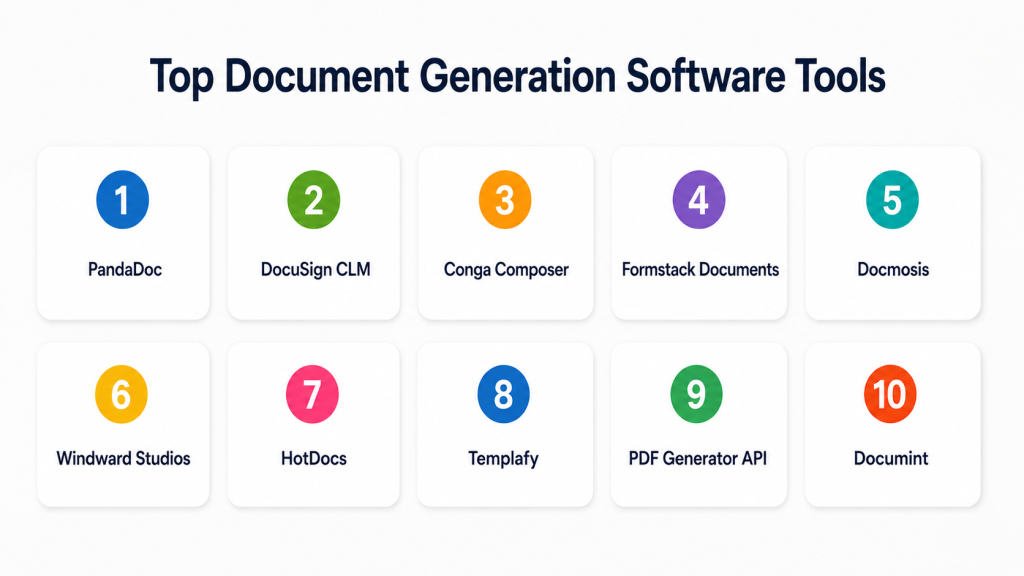
Top Document Generation Software Tools
#1 — PandaDoc
Short description: PandaDoc helps teams create proposals, quotes, contracts, and sales documents from reusable templates. It is best for sales, revenue, and customer-facing teams that need document generation with approval and eSignature workflows.
Key Features
- Proposal and quote generation.
- Reusable templates and content library.
- CRM-based data merge.
- eSignature support.
- Approval workflows.
- Document tracking and analytics.
- Payment collection support in some workflows.
Pros
- Very strong for sales document generation.
- Easy for non-technical users.
- Combines generation, tracking, approval, and signing.
Cons
- Not ideal for complex developer-first PDF generation.
- Advanced workflow needs may require higher plans.
- Less suited for deep legal document assembly.
Platforms / Deployment
Web / iOS / Android
Cloud
Security & Compliance
Supports access controls, audit trails, encryption, and eSignature workflow security. Specific certifications vary by plan and should be validated directly.
Integrations & Ecosystem
PandaDoc connects well with business systems where customer and deal data need to flow into documents.
- CRM systems
- Payment tools
- Cloud storage
- eSignature workflows
- Workflow automation tools
- APIs and webhooks
Support & Community
PandaDoc provides documentation, onboarding resources, customer support, and templates. It has strong adoption among sales and revenue teams.
#2 — DocuSign CLM
Short description: DocuSign CLM helps teams generate, route, review, approve, and manage agreements. It is best for organizations that need contract generation connected with approval and signature workflows.
Key Features
- Contract generation from templates.
- Clause and template management.
- Approval routing.
- eSignature integration.
- Contract repository.
- Workflow tracking.
- CRM and business system integrations.
Pros
- Strong for agreement-heavy organizations.
- Good fit for legal, sales, procurement, and operations.
- Connects document generation with contract lifecycle workflows.
Cons
- Can require implementation planning.
- May be too complex for simple document generation.
- Pricing and packaging can vary.
Platforms / Deployment
Web / iOS / Android
Cloud
Security & Compliance
Supports access controls, audit trails, encryption, role-based workflows, and agreement security features. Specific certifications should be confirmed during procurement.
Integrations & Ecosystem
DocuSign CLM works well when document generation must connect with approvals, signatures, and contract storage.
- CRM systems
- ERP systems
- Cloud storage
- eSignature workflows
- Business process tools
- APIs and connectors
Support & Community
DocuSign offers documentation, enterprise support, onboarding services, and a mature digital agreement ecosystem.
#3 — Conga Composer
Short description: Conga Composer is a document generation solution often used by Salesforce teams. It helps create proposals, quotes, contracts, invoices, reports, and other documents from CRM data.
Key Features
- CRM-driven document generation.
- Template-based output.
- Data merge from structured records.
- Batch document generation.
- Support for Word, PDF, and presentation-style outputs.
- Workflow and automation support.
- eSignature and storage integrations.
Pros
- Strong fit for Salesforce-centered teams.
- Useful for repeatable sales and operations documents.
- Can generate documents directly from business data.
Cons
- Best value is often tied to CRM maturity.
- Template setup may require admin knowledge.
- Not always simple for non-technical users.
Platforms / Deployment
Web
Cloud
Security & Compliance
Supports enterprise access controls through connected platforms and Conga configuration. Specific certifications are not publicly stated here.
Integrations & Ecosystem
Conga Composer is strong where CRM records are the main source of document data.
- Salesforce
- CRM workflows
- eSignature tools
- Cloud storage
- Business applications
- APIs and automation tools
Support & Community
Conga provides documentation, customer support, training resources, and implementation partners. Salesforce admin experience is helpful.
#4 — Formstack Documents
Short description: Formstack Documents generates documents from forms, CRMs, spreadsheets, and apps. It is useful for HR, finance, legal, operations, and admin teams that want no-code document generation.
Key Features
- Template-based document generation.
- Data merge from forms and apps.
- Automated delivery.
- PDF and Word document creation.
- eSignature integrations.
- Cloud storage integrations.
- No-code workflow support.
Pros
- Simple for business users.
- Good for form-based document workflows.
- Useful across many departments.
Cons
- Less suited for advanced legal lifecycle management.
- Complex workflows may need extra automation tools.
- Enterprise governance depth may be limited.
Platforms / Deployment
Web
Cloud
Security & Compliance
Supports access controls, encryption, and workflow security features. Specific certifications vary and should be validated directly.
Integrations & Ecosystem
Formstack Documents works well when document data comes from forms, submissions, CRM records, or spreadsheets.
- Online forms
- CRM systems
- Cloud storage
- eSignature tools
- Spreadsheets
- Workflow automation platforms
Support & Community
Formstack provides support, documentation, templates, and onboarding resources. It is friendly for no-code teams.
#5 — Docmosis
Short description: Docmosis is a document generation platform for creating PDF, Word, and other documents from templates and data. It is useful for developers and businesses that need automated document output from applications.
Key Features
- Template-based document generation.
- Support for PDF and Word outputs.
- API-based generation.
- Conditional logic and data merge.
- Batch document generation.
- Cloud and self-hosted options.
- Developer-friendly integration model.
Pros
- Strong for application-driven document generation.
- Flexible deployment options.
- Good fit for developers and technical teams.
Cons
- May require technical setup.
- Less focused on business-user proposal workflows.
- UI experience may not be as sales-focused as other tools.
Platforms / Deployment
Web / Windows / Linux
Cloud / Self-hosted / Hybrid
Security & Compliance
Supports controlled deployment models and secure document processing options. Specific certifications are not publicly stated here.
Integrations & Ecosystem
Docmosis is practical for teams that want to generate documents from custom apps, databases, and internal systems.
- Custom applications
- Databases
- APIs
- Workflow engines
- Business portals
- Internal systems
Support & Community
Docmosis provides documentation, developer resources, support, and implementation guidance. It is stronger for technical users than casual business users.
#6 — Windward Studios
Short description: Windward Studios provides document automation and reporting software for generating Word, Excel, PowerPoint, PDF, and HTML documents from structured data. It is useful for developers, enterprises, and reporting-heavy teams.
Key Features
- Document and report generation.
- Support for multiple output formats.
- Template design in familiar office tools.
- Data merging from databases and applications.
- API and developer support.
- Conditional logic.
- Enterprise deployment options.
Pros
- Strong for complex reports and data-driven documents.
- Good output format flexibility.
- Useful for technical and enterprise use cases.
Cons
- Can require technical configuration.
- May be more complex than simple proposal tools.
- Business users may need training.
Platforms / Deployment
Web / Windows / Linux
Cloud / Self-hosted / Hybrid
Security & Compliance
Supports enterprise deployment and access control patterns. Specific certifications are not publicly stated here.
Integrations & Ecosystem
Windward is useful when teams need to generate polished reports and documents from structured business data.
- Databases
- Business applications
- APIs
- Reporting systems
- Cloud platforms
- Custom software
Support & Community
Windward provides technical documentation, support, and enterprise assistance. It is well suited for teams with developer involvement.
#7 — HotDocs
Short description: HotDocs is a document generation and document assembly platform commonly used in legal, insurance, banking, and government environments. It is best for complex documents with conditional logic and structured questions.
Key Features
- Advanced document assembly.
- Interview-style data collection.
- Conditional logic.
- Legal and regulated document templates.
- Data reuse across documents.
- High-volume document generation.
- Cloud, self-hosted, and hybrid deployment options.
Pros
- Strong for complex legal and regulated documents.
- Handles rule-based document generation well.
- Good for professional services and compliance-heavy teams.
Cons
- Can be more complex than newer no-code platforms.
- Template setup may require expertise.
- Not ideal for simple sales proposals.
Platforms / Deployment
Web / Windows
Cloud / Self-hosted / Hybrid
Security & Compliance
Supports permissions and controlled document generation workflows. Specific certifications are not publicly stated here.
Integrations & Ecosystem
HotDocs works well where structured interviews and complex document rules are required.
- Legal systems
- Case management tools
- Business databases
- Custom applications
- APIs
- Enterprise workflows
Support & Community
HotDocs provides documentation, enterprise support, and implementation guidance. It is trusted in specialized document assembly environments.
#8 — Templafy
Short description: Templafy helps enterprises generate consistent, compliant, and on-brand documents from approved templates and content. It is best for large organizations that need document governance and brand control.
Key Features
- Centralized template management.
- Brand-compliant document generation.
- Approved content libraries.
- Microsoft Office and Google Workspace support.
- Admin controls.
- Dynamic document assembly.
- Enterprise governance features.
Pros
- Strong for brand consistency.
- Useful for distributed enterprise teams.
- Helps reduce outdated or incorrect templates.
Cons
- Less focused on developer-first PDF generation.
- Best suited for larger organizations.
- Requires template governance planning.
Platforms / Deployment
Web / Windows / macOS
Cloud
Security & Compliance
Supports enterprise user management, access control, and governance features. Specific certifications should be validated directly.
Integrations & Ecosystem
Templafy fits well where teams create business documents using approved templates inside productivity suites.
- Microsoft Office
- Google Workspace
- Digital asset systems
- CRM systems
- eSignature tools
- Enterprise content platforms
Support & Community
Templafy provides enterprise onboarding, customer success, documentation, and support. It is strongest for organizations with formal brand and document governance.
#9 — PDF Generator API
Short description: PDF Generator API helps developers and SaaS teams generate PDFs from templates and structured data. It is useful for apps that need invoices, reports, labels, certificates, tickets, and transactional documents.
Key Features
- API-based PDF generation.
- Template editor.
- Data merge from applications.
- Batch PDF generation.
- Webhook and automation support.
- Developer-focused workflows.
- Cloud-based document rendering.
Pros
- Strong for developer and SaaS use cases.
- Good for automated PDF output.
- Simple fit for transactional documents.
Cons
- Less suitable for non-technical teams without developer support.
- Not a full contract lifecycle platform.
- Focus is mainly PDF generation.
Platforms / Deployment
Web
Cloud
Security & Compliance
Supports secure API-based document generation. Specific certifications are not publicly stated here.
Integrations & Ecosystem
PDF Generator API is best when documents are generated directly from applications, databases, or user actions.
- SaaS applications
- Databases
- APIs
- Webhooks
- Workflow tools
- Internal portals
Support & Community
Support includes developer documentation and technical assistance. It is mainly designed for product teams and software developers.
#10 — Documint
Short description: Documint is a document generation tool for creating PDFs and business documents from data sources and templates. It is useful for teams that need lightweight, practical document generation without heavy enterprise complexity.
Key Features
- Template-based document generation.
- PDF generation.
- Data merge.
- Integration with business tools.
- Simple document workflows.
- Automation support.
- Reusable templates.
Pros
- Simple and practical for small teams.
- Good for lightweight document generation.
- Easier than complex enterprise platforms.
Cons
- May not fit large enterprise governance needs.
- Advanced workflow and compliance controls may be limited.
- Integration depth may vary by use case.
Platforms / Deployment
Web
Cloud
Security & Compliance
Not publicly stated.
Integrations & Ecosystem
Documint is useful for teams that want to generate documents from common business data without complex infrastructure.
- CRM tools
- Automation platforms
- Forms
- Databases
- Cloud storage
- Business apps
Support & Community
Support and documentation are available, but depth may vary compared with larger enterprise vendors. Best fit is lightweight business document generation.
Comparison Table
| Tool Name | Best For | Platform(s) Supported | Deployment | Standout Feature | Public Rating |
|---|---|---|---|---|---|
| PandaDoc | Sales proposals and quotes | Web, iOS, Android | Cloud | Sales document generation with eSignature | N/A |
| DocuSign CLM | Contract and agreement workflows | Web, iOS, Android | Cloud | Contract generation and lifecycle workflow | N/A |
| Conga Composer | Salesforce-based document generation | Web | Cloud | CRM-driven document creation | N/A |
| Formstack Documents | No-code document generation | Web | Cloud | Form and app-based document creation | N/A |
| Docmosis | Developer-driven document generation | Web, Windows, Linux | Cloud, Self-hosted, Hybrid | API-based PDF and Word generation | N/A |
| Windward Studios | Complex reporting and enterprise documents | Web, Windows, Linux | Cloud, Self-hosted, Hybrid | Multi-format data-driven document generation | N/A |
| HotDocs | Legal and regulated document assembly | Web, Windows | Cloud, Self-hosted, Hybrid | Rule-based complex document assembly | N/A |
| Templafy | Enterprise template governance | Web, Windows, macOS | Cloud | Brand-compliant document generation | N/A |
| PDF Generator API | SaaS and developer PDF generation | Web | Cloud | API-first PDF generation | N/A |
| Documint | Lightweight business document generation | Web | Cloud | Simple template-based PDF generation | N/A |
Evaluation & Scoring of Document Generation Software
| Tool Name | Core (25%) | Ease (15%) | Integrations (15%) | Security (10%) | Performance (10%) | Support (10%) | Value (15%) | Weighted Total |
|---|---|---|---|---|---|---|---|---|
| PandaDoc | 8 | 9 | 8 | 8 | 8 | 8 | 8 | 8.15 |
| DocuSign CLM | 9 | 7 | 9 | 9 | 8 | 8 | 7 | 8.15 |
| Conga Composer | 8 | 7 | 9 | 8 | 8 | 8 | 7 | 7.85 |
| Formstack Documents | 8 | 8 | 8 | 7 | 8 | 7 | 8 | 7.75 |
| Docmosis | 8 | 7 | 8 | 7 | 8 | 7 | 8 | 7.65 |
| Windward Studios | 9 | 6 | 8 | 8 | 8 | 7 | 7 | 7.65 |
| HotDocs | 9 | 6 | 7 | 8 | 8 | 7 | 7 | 7.55 |
| Templafy | 8 | 8 | 8 | 8 | 8 | 8 | 7 | 7.90 |
| PDF Generator API | 7 | 8 | 8 | 7 | 8 | 7 | 8 | 7.60 |
| Documint | 7 | 8 | 7 | 6 | 7 | 6 | 8 | 7.00 |
These scores are comparative and should not be treated as universal rankings. A developer-first team may prefer Docmosis, Windward Studios, or PDF Generator API, while a sales team may get better value from PandaDoc or Conga Composer. A legal team may prefer DocuSign CLM or HotDocs. Always compare tools against your document volume, data sources, security needs, and workflow complexity.
Which Document Generation Software Is Right for You?
Solo / Freelancer
Solo users usually need simple templates, fast document creation, PDF output, and easy sharing. They do not need a large enterprise platform unless their documents are legally complex or client workflows are repetitive.
Good options:
- PandaDoc for proposals and client documents.
- Formstack Documents for form-based document generation.
- Documint for lightweight PDF generation.
- PDF Generator API if the user has technical needs.
SMB
SMBs should focus on ease of use, affordability, simple integrations, and fast implementation. The best choice is usually a tool that solves daily document work without requiring a large technical team.
Good options:
- PandaDoc for sales documents.
- Formstack Documents for no-code generation.
- Documint for simple business documents.
- PDF Generator API for app-based PDF needs.
Mid-Market
Mid-market companies often need stronger CRM integration, approvals, template control, and better workflow visibility. These teams should focus on tools that reduce manual work across departments.
Good options:
- Conga Composer for CRM-driven generation.
- DocuSign CLM for contract workflows.
- Templafy for brand and template governance.
- Docmosis for technical document generation.
Enterprise
Enterprises need security, governance, scalability, auditability, and strong integration with core systems. They should also consider implementation support, admin controls, and long-term maintainability.
Good options:
- DocuSign CLM for contract lifecycle generation.
- Windward Studios for complex enterprise reporting.
- HotDocs for legal and regulated document assembly.
- Templafy for enterprise template governance.
- Conga Composer for CRM-heavy sales operations.
Budget vs Premium
Budget-focused buyers should start with tools that are simple to launch and solve one or two high-value use cases. Premium tools are better when document workflows are complex, regulated, or high-volume.
Budget-friendly scenarios:
- Simple PDF generation.
- Small sales proposal workflows.
- Form-based documents.
- Basic reusable templates.
Premium scenarios:
- Contract lifecycle management.
- Enterprise reporting.
- Legal document assembly.
- Brand governance.
- High-volume API generation.
Feature Depth vs Ease of Use
Ease of use matters when business teams own the process. Feature depth matters when documents have complex rules, many data sources, conditional sections, approvals, and compliance requirements.
Choose ease of use when:
- Templates are simple.
- Users are non-technical.
- Fast rollout matters.
- You need proposals, quotes, or forms.
Choose feature depth when:
- You need advanced conditional logic.
- Documents are legally sensitive.
- You generate from databases or applications.
- You need multi-format output.
- Compliance and auditability matter.
Integrations & Scalability
Document generation becomes more valuable when connected to real business data. Buyers should check CRM, ERP, HR, finance, cloud storage, eSignature, API, and workflow integration support.
Strong integration fit examples:
- Conga Composer for Salesforce-driven teams.
- DocuSign CLM for agreement workflows.
- Docmosis and Windward Studios for custom application workflows.
- Formstack Documents for forms and no-code automation.
- Templafy for productivity suite-based document governance.
Security & Compliance Needs
Security is important because generated documents often include customer data, pricing, contracts, financial records, employee information, or legal content.
Important checks include:
- SSO and MFA
- Role-based access control
- Encryption
- Audit logs
- Admin controls
- Data retention options
- Approval history
- Template permissions
- API security
- Vendor compliance documentation
Frequently Asked Questions
What is document generation software?
Document generation software creates documents automatically from templates, data, and rules. It helps teams produce PDFs, contracts, proposals, reports, letters, invoices, and other business documents faster.
How is document generation different from document automation?
Document generation focuses mainly on creating the document output. Document automation is broader and may include approvals, routing, signing, storage, reminders, and lifecycle workflows.
Which teams use document generation software?
Sales, legal, HR, finance, operations, customer success, procurement, and software teams use document generation. Developers also use it to create PDFs and reports from apps.
What are common document generation use cases?
Common use cases include proposals, quotes, contracts, invoices, offer letters, compliance reports, certificates, onboarding documents, and customer statements.
What pricing models are common?
Pricing may be based on users, document volume, templates, API calls, workflows, storage, or enterprise plans. Pricing varies, so buyers should confirm directly with the vendor.
Is document generation software secure?
Many tools support access controls, encryption, audit logs, and admin permissions. However, security varies by vendor and plan, so buyers should validate details during procurement.
Can document generation tools connect with CRM systems?
Yes, many tools connect with CRM systems to generate quotes, proposals, contracts, and renewal documents using customer and deal data.
Do developers need document generation APIs?
Developers need APIs when documents must be generated directly from applications, portals, databases, or user actions. API-first tools are better for SaaS and internal software teams.
What is the biggest mistake when choosing a tool?
The biggest mistake is choosing a tool before mapping templates, data sources, output formats, approval needs, and security requirements. Workflow clarity should come before vendor selection.
Can document generation tools replace manual Word templates?
Yes, in many cases. They can reduce manual editing, standardize branding, pull data automatically, and produce consistent outputs. However, teams still need clean templates and good source data.
What are alternatives to document generation software?
Alternatives include word processors, spreadsheets, document automation platforms, contract lifecycle tools, workflow automation tools, and custom-built document generation scripts.
How should a company start with document generation?
Start with one high-volume document type, such as proposals, invoices, contracts, or HR letters. Build a template, connect the data source, test output quality, and expand gradually.
Conclusion
Document generation software helps businesses create accurate, consistent, and professional documents without repeating the same manual work every day. The best tool depends on your use case. PandaDoc is strong for sales documents, DocuSign CLM fits contract workflows, Conga Composer works well for CRM-driven teams, Docmosis and Windward Studios are better for developer and enterprise document generation, while Templafy is useful for brand-controlled enterprise documents.
