Upgrade & Secure Your Future with DevOps, SRE, DevSecOps, MLOps!
We spend hours scrolling social media and waste money on things we forget, but won’t spend 30 minutes a day earning certifications that can change our lives.
Master in DevOps, SRE, DevSecOps & MLOps by DevOps School!
Learn from Guru Rajesh Kumar and double your salary in just one year.
Introduction
Speech recognition platforms convert spoken language into written text. In simple words, they help software understand human speech from calls, meetings, videos, podcasts, voice commands, customer support recordings, medical notes, and live conversations. These platforms are used for transcription, captions, voice analytics, accessibility, contact center automation, compliance review, and AI-powered workflow automation.
Speech recognition matters in and beyond because businesses are creating more audio and video content than ever before. Teams need faster ways to search, summarize, analyze, and act on spoken information. Modern platforms now support real-time transcription, speaker diarization, multilingual recognition, domain-specific vocabulary, and integration with AI assistants.
Real-world use cases include:
- Call center transcription and quality review
- Meeting notes and summaries
- Video captions and subtitles
- Healthcare and legal documentation
- Voice search and command systems
Buyers should evaluate:
- Accuracy across accents and languages
- Real-time transcription support
- Speaker diarization
- Custom vocabulary
- API quality
- Security and privacy controls
- Deployment flexibility
- Pricing structure
- Integration options
- Support and documentation
Best for: developers, product teams, contact centers, media teams, healthcare teams, legal teams, enterprise IT teams, SaaS companies, education platforms, and AI application builders.
Not ideal for: teams that only need occasional manual transcription, very small projects with no automation needs, or use cases where human transcription is required for legal or regulatory accuracy.
Key Trends in Speech Recognition Platforms
- Real-time speech recognition is becoming more important for live meetings, customer support, and voice assistants.
- Multilingual and accent-aware transcription is now a major buying factor for global teams.
- Speech recognition is increasingly combined with summarization, sentiment analysis, and conversation intelligence.
- Contact centers are using speech-to-text data for coaching, compliance, and customer experience improvement.
- Privacy and data retention controls are becoming more important for healthcare, legal, and financial use cases.
- Custom vocabulary and domain-specific recognition are now expected for technical, medical, and industry-specific terms.
- Developers prefer API-first platforms that can be embedded into apps, workflows, and AI products.
- Hybrid and self-hosted options matter for organizations with strict data control requirements.
- Speech recognition is expanding into multimodal AI workflows with audio, text, video, and analytics together.
- Pricing is shifting toward usage-based models based on audio hours, real-time minutes, or API volume.
How We Selected These Tools
The tools in this list were selected using practical evaluation logic:
- Recognition in speech recognition, transcription, or voice AI markets
- Strength of automatic speech recognition features
- Support for real-time and batch transcription
- Language, accent, and speaker recognition capabilities
- API maturity and developer ecosystem
- Security posture and enterprise readiness where clearly known
- Integration with cloud, media, contact center, and AI workflows
- Fit for startups, SMBs, mid-market, and enterprise teams
- Documentation quality and support availability
- Practical usefulness across business and technical use cases
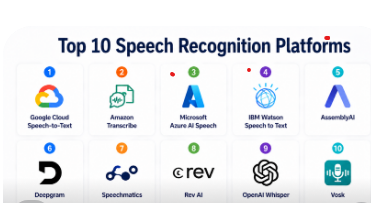
Top 10 Speech Recognition Platforms
#1 — Google Cloud Speech-to-Text
Short description: Google Cloud Speech-to-Text is a cloud-based speech recognition platform for converting audio into text. It is useful for developers, enterprises, media teams, contact centers, and AI product builders. The platform supports real-time and batch transcription workflows. It can be used for captions, call analytics, voice commands, meeting transcription, and audio search. It fits especially well for organizations already using Google Cloud. Developers can connect it with other Google Cloud services for analytics, storage, and AI workflows. It is a strong choice when scalability, language support, and API-based integration are important.
Key Features
- Real-time and batch speech recognition
- Support for multiple languages
- Speaker diarization support
- Custom vocabulary and speech adaptation
- Automatic punctuation
- Integration with Google Cloud services
- API-first developer workflow
Pros
- Strong fit for Google Cloud users
- Scalable for high-volume transcription
- Good API ecosystem for developers
Cons
- Best value comes inside Google Cloud
- Pricing can vary by usage volume
- Advanced setup may require cloud knowledge
Platforms / Deployment
Cloud
Security & Compliance
Uses Google Cloud security controls such as IAM, encryption, access management, and audit logging. Compliance depends on configuration and service usage.
Integrations & Ecosystem
Google Cloud Speech-to-Text fits into cloud-native voice and AI workflows.
- Google Cloud Storage
- BigQuery
- Contact center workflows
- Media processing pipelines
- AI and analytics tools
- API-based applications
Support & Community
Strong documentation, developer guides, cloud support options, and a large technical community.
#2 — Amazon Transcribe
Short description: Amazon Transcribe is AWS’s managed speech recognition service for converting speech into text. It is useful for developers, contact centers, media teams, healthcare workflows, and enterprises using AWS. The platform supports batch and streaming transcription. It can help process customer calls, videos, meetings, interviews, and voice-enabled applications. Amazon Transcribe also supports features such as speaker identification, custom vocabulary, and automatic punctuation. It fits well for teams already using AWS storage, analytics, and machine learning services. It is a strong option for AWS-first organizations needing scalable speech-to-text workflows.
Key Features
- Batch and streaming transcription
- Custom vocabulary support
- Speaker identification
- Automatic punctuation
- Channel identification
- Integration with AWS services
- Contact center and media workflow support
Pros
- Strong fit for AWS users
- Scalable managed service
- Good integration with AWS data and AI tools
Cons
- Best suited for AWS environments
- Costs depend on audio usage
- Advanced workflows require AWS knowledge
Platforms / Deployment
Cloud
Security & Compliance
Uses AWS security controls such as IAM, encryption, access controls, logging, and private networking options. Compliance depends on AWS configuration and service usage.
Integrations & Ecosystem
Amazon Transcribe connects well with AWS workflows.
- Amazon S3
- Amazon Connect
- AWS Lambda
- CloudWatch
- Amazon Comprehend
- Data lake workflows
Support & Community
Strong AWS documentation, developer resources, cloud support plans, and broad community adoption.
#3 — Microsoft Azure AI Speech
Short description: Microsoft Azure AI Speech is a speech recognition and speech AI platform for transcription, speech translation, voice applications, and enterprise AI workflows. It is useful for developers, enterprises, call centers, accessibility teams, and product teams. The platform supports real-time and batch transcription. It can be used for meeting transcription, customer service analytics, captions, voice assistants, and multilingual applications. Azure AI Speech fits naturally into Microsoft cloud and enterprise environments. It also supports customization for domain-specific vocabulary and use cases. It is a strong option for organizations already using Azure, Microsoft identity, and enterprise productivity tools.
Key Features
- Real-time and batch speech-to-text
- Custom speech recognition
- Speech translation capabilities
- Speaker recognition features
- Integration with Azure AI services
- Enterprise identity support
- API and SDK support
Pros
- Strong fit for Microsoft ecosystem users
- Good enterprise integration
- Useful for multilingual and accessibility workflows
Cons
- Best value comes inside Azure
- Advanced customization may need technical setup
- Pricing varies by usage and features
Platforms / Deployment
Cloud / Hybrid / Varies
Security & Compliance
Supports Microsoft cloud security controls such as role-based access, encryption, identity integration, and audit capabilities. Compliance depends on configuration.
Integrations & Ecosystem
Azure AI Speech integrates with Microsoft and cloud workflows.
- Azure AI services
- Azure Storage
- Microsoft Teams workflows
- Power Platform
- Azure DevOps
- Enterprise applications
Support & Community
Strong Microsoft documentation, learning resources, support options, and large developer ecosystem.
#4 — IBM Watson Speech to Text
Short description: IBM Watson Speech to Text is a speech recognition platform designed for transcription, voice automation, and enterprise AI workflows. It is useful for businesses that need speech-to-text capabilities with enterprise integration. The platform can support customer service, call analytics, voice applications, media transcription, and business automation. IBM’s speech technology is relevant for teams that need customization and integration with broader IBM AI services. It can be useful in regulated or enterprise environments where governance and control matter. The platform supports API-based workflows. It is a practical option for organizations already using IBM cloud or AI products.
Key Features
- Speech-to-text transcription
- Real-time and batch processing support
- Language model customization
- Acoustic model customization options
- API-based integration
- Enterprise AI workflow support
- Integration with IBM ecosystem
Pros
- Suitable for enterprise AI environments
- Supports customization workflows
- Good fit for IBM ecosystem users
Cons
- May be less simple for small teams
- Best value depends on IBM platform adoption
- Pricing and deployment details may vary
Platforms / Deployment
Cloud / Varies
Security & Compliance
Enterprise security controls may be available depending on IBM service configuration. Specific compliance details should be verified with the vendor.
Integrations & Ecosystem
IBM Watson Speech to Text connects with enterprise and AI workflows.
- IBM Cloud
- IBM AI services
- APIs
- Contact center workflows
- Data analytics workflows
- Business automation systems
Support & Community
IBM provides documentation, enterprise support, training resources, and professional services options.
#5 — AssemblyAI
Short description: AssemblyAI is an API-first speech recognition platform focused on transcription and audio intelligence. It is useful for developers, SaaS builders, media platforms, podcast tools, call analytics products, and AI applications. The platform provides automatic speech recognition along with features for summarization, topic detection, sentiment, speaker labels, and audio analysis. AssemblyAI is especially useful for teams that want to build speech-powered products quickly. It offers a developer-friendly API and clear workflow for processing audio and video files. It can support both simple transcription and richer audio intelligence use cases. It is a strong option for modern product teams building AI-driven audio features.
Key Features
- Speech-to-text API
- Speaker diarization
- Summarization and audio intelligence features
- Topic and sentiment analysis options
- Automatic punctuation
- Async transcription workflow
- Developer-focused API documentation
Pros
- Developer-friendly platform
- Strong audio intelligence features
- Good for SaaS and AI product builders
Cons
- Cloud-first approach may not fit all data policies
- Advanced usage can increase costs
- Not ideal for teams needing full self-hosting
Platforms / Deployment
Cloud
Security & Compliance
Security features may include API authentication and enterprise controls. Specific compliance details should be verified with the vendor.
Integrations & Ecosystem
AssemblyAI is built for API-based audio workflows.
- SaaS applications
- Media platforms
- Podcast tools
- Contact center applications
- AI workflows
- Developer pipelines
Support & Community
Good documentation, developer guides, support resources, and active developer-focused adoption.
#6 — Deepgram
Short description: Deepgram is a speech recognition and voice AI platform built for developers and enterprises that need fast and scalable transcription. It supports real-time and batch transcription workflows. Deepgram is useful for contact centers, voice agents, media transcription, meeting tools, and AI applications. The platform focuses on speed, accuracy, scalability, and API-based integration. It can support custom models and domain-specific speech recognition workflows. Deepgram is also relevant for teams building conversational AI and voice automation products. It is a strong choice for technical teams that need flexible speech recognition infrastructure.
Key Features
- Real-time and batch transcription
- Low-latency speech recognition
- Custom vocabulary and model options
- Speaker diarization
- Language detection and multilingual support
- API and SDK support
- Voice AI workflow support
Pros
- Strong developer and API experience
- Good for real-time voice applications
- Useful for contact center and AI product workflows
Cons
- May require technical setup
- Pricing depends on usage volume
- Some enterprise features may vary by plan
Platforms / Deployment
Cloud / Self-hosted / Hybrid / Varies
Security & Compliance
Enterprise security options may be available, including private deployment and access controls. Specific compliance details should be verified with the vendor.
Integrations & Ecosystem
Deepgram works well in real-time voice and AI workflows.
- Contact center systems
- Voice agents
- Media platforms
- Streaming applications
- APIs and SDKs
- AI application pipelines
Support & Community
Provides documentation, developer resources, support options, and an active voice AI developer ecosystem.
#7 — Speechmatics
Short description: Speechmatics is a speech recognition platform focused on accurate transcription across diverse accents, languages, and audio environments. It is useful for media companies, enterprises, contact centers, accessibility teams, and developers. The platform supports automatic speech recognition for recorded and live audio. Speechmatics is often considered when multilingual and accent coverage are important. It can be used for captions, subtitles, call transcription, media indexing, and voice analytics. The platform supports API-based workflows and deployment flexibility. It is a strong option for organizations that need speech recognition across global audiences.
Key Features
- Automatic speech recognition
- Multilingual transcription
- Accent-aware recognition focus
- Real-time and batch transcription support
- Speaker diarization options
- API-based integration
- Media and enterprise workflow support
Pros
- Strong focus on accent and language coverage
- Useful for media and global teams
- Good fit for transcription-heavy workflows
Cons
- Pricing may vary by volume and use case
- Advanced deployment may require vendor discussion
- Some enterprise details may not be publicly stated
Platforms / Deployment
Cloud / Self-hosted / Hybrid / Varies
Security & Compliance
Security and compliance details vary by deployment and contract. Specific certifications should be verified with the vendor.
Integrations & Ecosystem
Speechmatics fits into media, enterprise, and developer workflows.
- Media transcription systems
- Captioning workflows
- APIs
- Contact center workflows
- Analytics platforms
- Enterprise applications
Support & Community
Provides documentation, developer resources, customer support, and enterprise onboarding options.
#8 — Rev AI
Short description: Rev AI is a speech recognition API from Rev focused on automatic transcription for developers and businesses. It is useful for media platforms, researchers, product teams, call analytics tools, and teams that need speech-to-text automation. The platform supports asynchronous and streaming speech recognition workflows. Rev AI can be used for captions, meeting transcription, content search, and voice analytics. It offers API access for teams building speech features into applications. Rev is also known for transcription-related services, which can be useful for teams comparing automated and human-assisted workflows. Rev AI is a practical option for developers needing straightforward speech recognition.
Key Features
- Speech-to-text API
- Streaming and async transcription
- Speaker diarization
- Custom vocabulary support
- Automatic punctuation
- Language support varies by service
- Developer-friendly API workflow
Pros
- Straightforward API-based transcription
- Useful for media and product teams
- Practical for automated speech-to-text workflows
Cons
- Advanced enterprise features may vary
- Best suited for transcription-focused use cases
- Pricing depends on usage volume
Platforms / Deployment
Cloud
Security & Compliance
Security features may include API authentication and access controls. Specific compliance details are not publicly stated here.
Integrations & Ecosystem
Rev AI works well with product and media workflows.
- APIs
- Media applications
- Captioning tools
- Research workflows
- Call analytics systems
- Content management workflows
Support & Community
Provides documentation, developer resources, and support options. Community strength is strongest among transcription and media users.
#9 — OpenAI Whisper
Short description: OpenAI Whisper is an automatic speech recognition model known for multilingual transcription and translation capabilities. It is widely used by developers, researchers, startups, and technical teams that want flexible speech-to-text workflows. Whisper can be used in local, self-hosted, cloud, or API-based environments depending on implementation. It is useful for transcription, subtitles, audio search, research, and AI application development. Technical teams value Whisper because it can be integrated into custom pipelines. It is not a traditional enterprise platform by itself unless deployed through managed services or custom infrastructure. It is a strong option for teams that want model-level flexibility.
Key Features
- Multilingual speech recognition
- Speech translation capabilities
- Open model ecosystem availability
- Local or self-hosted implementation options
- Useful for transcription and captioning
- Developer-friendly integration possibilities
- Strong fit for custom AI workflows
Pros
- Flexible for technical teams
- Useful for multilingual transcription
- Can support self-hosted workflows
Cons
- Requires technical implementation
- Enterprise support depends on deployment choice
- Not a complete managed speech platform by itself
Platforms / Deployment
Windows / macOS / Linux / Cloud / Self-hosted / Hybrid
Security & Compliance
Not publicly stated for self-managed deployments. Security depends on hosting environment, access controls, infrastructure, and implementation.
Integrations & Ecosystem
Whisper can fit into many developer and AI workflows.
- Python workflows
- Local applications
- Media pipelines
- AI assistants
- Captioning systems
- Custom APIs
Support & Community
Strong developer adoption and community resources. Enterprise support depends on the chosen implementation or provider.
#10 — Vosk
Short description: Vosk is an open-source speech recognition toolkit that supports offline speech recognition for developers and technical teams. It is useful for applications that need local processing, low-cost speech recognition, or operation without constant internet access. Vosk supports multiple languages and can run on different platforms, including desktop, server, and embedded environments. It is often used by developers building custom voice applications. The tool is not a full enterprise speech platform, but it is valuable for self-hosted and offline use cases. It can be useful in privacy-sensitive or edge environments. Vosk is a good option for teams that want open-source control.
Key Features
- Offline speech recognition
- Open-source toolkit
- Multiple language support
- Lightweight deployment options
- Works across different operating systems
- Developer-friendly APIs
- Suitable for embedded and edge use cases
Pros
- Good for offline and self-hosted use cases
- Open-source and flexible
- Useful for privacy-sensitive local processing
Cons
- Requires technical setup
- Accuracy may vary by language and audio quality
- Not a full managed enterprise platform
Platforms / Deployment
Windows / macOS / Linux / Android / iOS / Self-hosted
Security & Compliance
Not publicly stated. Security depends on local deployment, device controls, and application architecture.
Integrations & Ecosystem
Vosk fits into custom developer and edge workflows.
- Python
- Java
- Node.js
- Android apps
- Desktop applications
- Embedded systems
Support & Community
Open-source documentation and community support are available. Enterprise support is not publicly stated.
Comparison Table
| Tool Name | Best For | Platform(s) Supported | Deployment | Standout Feature | Public Rating |
|---|---|---|---|---|---|
| Google Cloud Speech-to-Text | Google Cloud speech workflows | Web / API-based workflows | Cloud | Scalable cloud transcription | N/A |
| Amazon Transcribe | AWS-first transcription teams | Web / API-based workflows | Cloud | AWS-native speech recognition | N/A |
| Microsoft Azure AI Speech | Microsoft ecosystem enterprises | Web / API-based workflows | Cloud / Hybrid / Varies | Enterprise speech and translation workflows | N/A |
| IBM Watson Speech to Text | IBM enterprise AI users | Web / API-based workflows | Cloud / Varies | Customizable enterprise speech recognition | N/A |
| AssemblyAI | Developer-first audio intelligence | Web / API-based workflows | Cloud | Transcription plus audio intelligence | N/A |
| Deepgram | Real-time voice AI applications | Web / API-based workflows | Cloud / Self-hosted / Hybrid / Varies | Low-latency speech recognition | N/A |
| Speechmatics | Global multilingual transcription | Web / API-based workflows | Cloud / Self-hosted / Hybrid / Varies | Accent-aware transcription focus | N/A |
| Rev AI | Simple transcription API workflows | Web / API-based workflows | Cloud | Straightforward speech-to-text API | N/A |
| OpenAI Whisper | Custom multilingual transcription | Windows / macOS / Linux | Cloud / Self-hosted / Hybrid | Flexible multilingual ASR model | N/A |
| Vosk | Offline and edge speech recognition | Windows / macOS / Linux / Android / iOS | Self-hosted | Offline open-source recognition | N/A |
Evaluation & Scoring of Speech Recognition Platforms
| Tool Name | Core (25%) | Ease (15%) | Integrations (15%) | Security (10%) | Performance (10%) | Support (10%) | Value (15%) | Weighted Total (0–10) |
|---|---|---|---|---|---|---|---|---|
| Google Cloud Speech-to-Text | 9 | 8 | 9 | 9 | 9 | 9 | 8 | 8.65 |
| Amazon Transcribe | 9 | 8 | 9 | 9 | 9 | 9 | 8 | 8.65 |
| Microsoft Azure AI Speech | 9 | 8 | 9 | 9 | 9 | 9 | 8 | 8.65 |
| IBM Watson Speech to Text | 8 | 7 | 8 | 8 | 8 | 8 | 7 | 7.75 |
| AssemblyAI | 8 | 9 | 8 | 7 | 8 | 8 | 8 | 8.10 |
| Deepgram | 9 | 8 | 8 | 8 | 9 | 8 | 8 | 8.40 |
| Speechmatics | 8 | 8 | 8 | 7 | 8 | 8 | 8 | 7.95 |
| Rev AI | 7 | 8 | 7 | 7 | 8 | 7 | 8 | 7.45 |
| OpenAI Whisper | 8 | 7 | 8 | 6 | 8 | 7 | 9 | 7.60 |
| Vosk | 6 | 6 | 7 | 6 | 6 | 6 | 9 | 6.60 |
These scores are comparative and should be used as a buyer guide, not as a universal ranking. Cloud platforms score strongly in scalability, integrations, and support. Developer-first platforms score well for API usability and product-building speed. Open-source tools score well for flexibility and value but require more technical ownership. The best choice depends on accuracy needs, language coverage, deployment model, privacy requirements, and budget.
Which Speech Recognition Platform Is Right for You?
Solo / Freelancer
Solo users should choose a tool based on cost, ease of use, and technical skill. OpenAI Whisper and Vosk are good options for technical users who want flexibility and control. Rev AI and AssemblyAI are practical for users who want simple API-based transcription without managing infrastructure.
If you create podcasts, videos, interviews, or research transcripts, a simple cloud transcription API may be enough. If privacy or offline use matters, Vosk or a self-managed Whisper workflow may be better.
SMB
SMBs should focus on reliable transcription, predictable pricing, and easy integration. AssemblyAI, Deepgram, Rev AI, Google Cloud Speech-to-Text, Amazon Transcribe, and Azure AI Speech can all work depending on the existing stack.
If the business already uses AWS, Google Cloud, or Azure, choosing the matching cloud speech platform can reduce integration complexity. If the SMB is building a SaaS product with audio intelligence, AssemblyAI or Deepgram may be easier to embed.
Mid-Market
Mid-market companies often need better controls, dashboards, API reliability, team workflows, and integration with customer support or analytics systems. Deepgram, AssemblyAI, Speechmatics, Google Cloud Speech-to-Text, Amazon Transcribe, and Azure AI Speech are strong candidates.
At this stage, teams should test accuracy across real audio samples, not only clean demo files. They should evaluate accents, background noise, domain vocabulary, speaker separation, latency, and total cost.
Enterprise
Enterprises should prioritize security, scalability, compliance readiness, access control, auditability, support, and integration with existing cloud platforms. Google Cloud Speech-to-Text, Amazon Transcribe, Azure AI Speech, IBM Watson Speech to Text, Deepgram, and Speechmatics are strong enterprise options.
Large organizations should involve security, legal, compliance, IT, and data governance teams early. Speech data can contain sensitive personal, financial, medical, or business information, so privacy controls matter.
Budget vs Premium
Budget-sensitive teams may prefer OpenAI Whisper, Vosk, or simple usage-based APIs. Open-source tools can reduce licensing costs but require engineering time, hosting, maintenance, and monitoring.
Premium platforms may offer better support, managed infrastructure, customization, enterprise security, and stronger reliability. The premium choice makes sense when speech recognition becomes part of a business-critical workflow.
Feature Depth vs Ease of Use
If ease of use is the main priority, managed APIs such as AssemblyAI, Rev AI, Amazon Transcribe, Google Cloud Speech-to-Text, and Azure AI Speech are practical. If deeper control is needed, Deepgram, Speechmatics, Whisper, or Vosk may be better depending on the use case.
Feature depth should be evaluated carefully. Some teams need only transcription, while others need diarization, translation, summarization, sentiment, custom vocabulary, or real-time streaming.
Integrations & Scalability
Integration is critical for production use. Buyers should check support for APIs, SDKs, webhooks, cloud storage, contact center platforms, media workflows, analytics tools, and AI pipelines.
Scalability matters when processing thousands of calls, meetings, or videos. Teams should test throughput, latency, rate limits, failure handling, and cost at expected usage levels.
Security & Compliance Needs
Speech data can be sensitive, so buyers should check encryption, access controls, data retention, audit logs, SSO, private deployment options, and regional data handling. For healthcare, legal, banking, and government use cases, security review is essential.
Open-source tools can offer more control, but the organization becomes responsible for hosting, access control, monitoring, and compliance processes. Managed platforms can reduce operational effort but require vendor review.
Frequently Asked Questions
1. What is a speech recognition platform?
A speech recognition platform converts spoken audio into written text. It can be used for transcription, captions, voice commands, call analytics, meeting notes, and AI-powered audio workflows.
2. How are speech recognition platforms priced?
Most platforms use usage-based pricing based on audio minutes, hours, streaming duration, API calls, or advanced features. Enterprise plans may include custom pricing, support, and deployment options.
3. How long does implementation take?
A basic API integration can be quick for technical teams. Larger deployments may take longer because they require security review, vocabulary tuning, workflow design, data retention planning, and integration testing.
4. What are common mistakes when choosing speech recognition tools?
Common mistakes include testing only clean audio, ignoring accents, skipping noise testing, not checking real-time latency, overlooking data privacy, and failing to estimate costs at production volume.
5. What is speaker diarization?
Speaker diarization identifies who spoke when in an audio recording. It is useful for meetings, interviews, call centers, podcasts, and any workflow where multiple speakers need to be separated.
6. Can speech recognition platforms handle multiple languages?
Many modern platforms support multiple languages, but quality can vary by language, accent, audio quality, and domain vocabulary. Buyers should test the exact languages and accents they need.
7. Are open-source speech recognition tools good enough?
Open-source tools can be good for technical teams that need flexibility, offline processing, or cost control. However, managed platforms may offer easier scaling, support, and enterprise controls.
8. What security features should buyers check?
Buyers should check encryption, access controls, audit logs, data retention policies, SSO, private deployment, and whether audio is stored or used for service improvement. Sensitive audio needs careful governance.
9. Can speech recognition work in real time?
Yes, many platforms support real-time or streaming transcription. Buyers should test latency, stability, accuracy, and integration with live systems before using it in customer-facing workflows.
10. What integrations matter most?
Important integrations include cloud storage, contact center platforms, video systems, meeting tools, CRM systems, analytics platforms, and AI pipelines. API and SDK quality are also important for developers.
Conclusion
Speech recognition platforms help organizations convert audio into useful, searchable, and actionable text. The best tool depends on your use case, audio quality, language needs, budget, privacy requirements, and existing technology stack. Google Cloud Speech-to-Text, Amazon Transcribe, and Azure AI Speech are strong choices for cloud-first enterprises. AssemblyAI, Deepgram, Speechmatics, and Rev AI are practical for developers, SaaS teams, and media workflows. IBM Watson Speech to Text fits enterprise AI environments. OpenAI Whisper and Vosk are useful for technical teams that want flexibility, self-hosting, or offline processing.
