Upgrade & Secure Your Future with DevOps, SRE, DevSecOps, MLOps!
We spend hours scrolling social media and waste money on things we forget, but won’t spend 30 minutes a day earning certifications that can change our lives.
Master in DevOps, SRE, DevSecOps & MLOps by DevOps School!
Learn from Guru Rajesh Kumar and double your salary in just one year.
Data Loss Prevention Tools: Choosing the Right Controls for Email, Endpoints, Cloud Apps, and AI
A sensitive spreadsheet can leave an organization in seconds. An employee may attach it to a personal email, upload it to an unapproved cloud drive, paste its contents into an AI assistant, or copy it to a removable device. The action may be accidental, careless, or deliberate. In each case, the security team faces the same challenge: protecting important information without making ordinary work unnecessarily difficult.
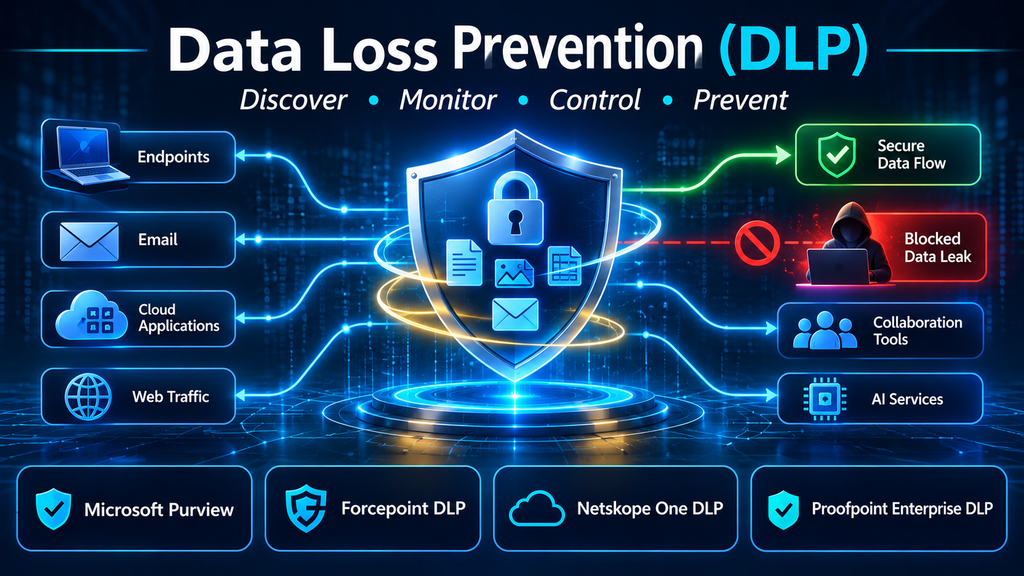
Data Loss Prevention (DLP) tools are designed to address that challenge. They identify sensitive information, monitor how it is used and transferred, and apply controls when an activity violates organizational policy. Depending on the product and deployment, those controls can include warnings, audit events, encryption, quarantine, access restrictions, or blocking.
But DLP is not a single feature that can be switched on across an entire business. Coverage differs across email, endpoints, web traffic, cloud applications, collaboration platforms, and AI services. A product that protects Microsoft 365 documents may not provide equivalent control over files copied to a USB drive or uploaded through a personal browser session.
The most effective selection process therefore begins with the organization’s data flows—not a vendor feature checklist.
What DLP actually protects
DLP focuses on preventing inappropriate exposure, movement, or use of sensitive information. The information itself may include:
- Personally identifiable information and customer records
- Payment card and financial information
- Health and employee records
- Intellectual property, source code, and engineering designs
- Legal documents, contracts, and confidential communications
- Authentication secrets, credentials, and access tokens
- Business plans, merger information, and internal financial reports
DLP systems use different methods to recognize protected content. These may include predefined sensitive information types, regular expressions, keyword and dictionary matching, document fingerprinting, exact data matching, file classification, and machine-learning-based content analysis.
The detection method matters. A rule that searches for a pattern resembling a payment card number can produce false positives if it does not validate the number or consider surrounding context. A fingerprinting method may be more appropriate for identifying a particular confidential document even after it has been renamed or modified.
DLP also needs to understand the action being performed. Reading a confidential document is not necessarily a violation. Sending it to an external recipient, copying it to an unmanaged device, or uploading it to an unauthorized service may be.
That distinction is what separates useful data protection from indiscriminate blocking.
The three states of data—and why channel coverage matters
DLP is commonly discussed in terms of three data states.
Data at rest
Data at rest is stored in repositories such as file shares, cloud storage, collaboration workspaces, databases, and document management systems.
DLP controls can help discover sensitive content in these locations, identify oversharing, and apply restrictions or remediation. However, discovery and enforcement are not always the same capability. A product may identify an exposed file without being able to change its permissions or remove it.
Data in use
Data in use is being accessed or handled by a user, application, or process. Examples include opening a document, printing it, copying text, taking certain file actions, or transferring information to removable media.
Endpoint DLP is particularly important here because the organization needs visibility into actions performed on managed devices. Coverage depends on the operating system, agent, browser, application, and policy configuration.
Data in motion
Data in motion is being transferred between users, devices, applications, and external destinations. Email, web uploads, cloud sharing, messaging, and network transfers are common examples.
Network and cloud DLP controls can inspect supported traffic and apply policies before information reaches an unauthorized destination. Encrypted traffic, unmanaged devices, unsupported applications, and direct connections can create visibility gaps that must be considered in the architecture.
A complete program needs to understand all three states. A control that protects data in a repository but cannot observe its movement to a personal cloud account leaves an important part of the risk untreated.
The DLP deployment models buyers should understand
Different products approach DLP through different enforcement points. These approaches can be combined, but they should not be assumed to offer interchangeable coverage.
Endpoint DLP
Endpoint DLP monitors activity on managed workstations and laptops. It can help control copying to removable storage, printing, clipboard operations, file transfers, and supported application activity.
Its strength is visibility into user actions on the device. Its trade-off is deployment and maintenance: operating-system support, endpoint agents, application compatibility, and device management all affect coverage.
Email DLP
Email DLP inspects messages and attachments for sensitive information. Depending on the implementation, it can warn users, block messages, encrypt content, quarantine communications, or route messages for review.
Email remains an important control point, but it is only one channel. A policy that prevents an employee from emailing a spreadsheet externally does not necessarily prevent the same employee from uploading it to an unmanaged web application.
Cloud and SaaS DLP
Cloud DLP protects information stored in or transferred through cloud applications. It can inspect files, sharing actions, uploads, downloads, and other supported activities.
The key procurement question is whether the product can enforce policies consistently across the organization’s actual cloud applications, including sanctioned and unsanctioned services. API-based inspection and inline traffic inspection provide different visibility and response characteristics.
Network and web DLP
Network DLP inspects supported traffic moving through security gateways or cloud-delivered enforcement services. It can help identify sensitive uploads to web destinations and restrict unauthorized transfers.
This approach is useful when organizations need control over web traffic, but encrypted sessions, direct-to-cloud connectivity, browser choice, and remote-user routing must be considered.
Unified enterprise DLP
Unified DLP aims to apply shared data classification and policy logic across multiple channels. The practical value is reduced policy fragmentation: the same sensitive data definition can inform controls across endpoints, email, cloud services, and web activity.
The word unified should still be tested. Some platforms share policy administration but rely on separate agents, connectors, modules, or licensing for enforcement in different locations.
DLP platforms worth evaluating
The following products represent distinct approaches to enterprise data protection. Their capabilities overlap, but their strengths and deployment considerations differ. Vendor descriptions establish advertised functionality; they should not be treated as independent proof of effectiveness.
Microsoft Purview Data Loss Prevention
Microsoft Purview Data Loss Prevention provides policy-based protection across supported Microsoft 365 services, devices, and selected non-Microsoft locations and inline web traffic scenarios.
Microsoft documents DLP coverage for services including Exchange, SharePoint, OneDrive, Teams, Office applications, Windows and supported macOS devices, on-premises repositories, and other configured locations. Its detection approach can use sensitive information types, keywords, regular expressions, validation, proximity matching, and machine-learning methods. The available locations and controls depend on configuration and licensing.
Purview is a natural candidate for organizations already standardized on Microsoft 365 and its information protection ecosystem. Central policy management and integration with Microsoft workloads can reduce the need to build an entirely separate policy framework for those environments.
The trade-off is that coverage is not automatically identical across every workload. Different locations have different prerequisites, deployment steps, and supported actions. Organizations with substantial non-Microsoft infrastructure should test the specific integrations and enforcement points they require.
Best suited to: Microsoft-centric organizations seeking to connect DLP with Microsoft 365 information protection, endpoint controls, and compliance workflows.
Validate before buying: Confirm the required licenses, endpoint onboarding, supported operating systems, non-Microsoft app coverage, and the precise actions available in each location.
Forcepoint Data Loss Prevention
Forcepoint DLP is positioned as an enterprise data protection platform spanning endpoint, web, email, cloud, and other channels. Forcepoint describes centralized policy enforcement, predefined policy and classifier templates, compliance support, and risk-aware controls.
Its broad deployment options are relevant to organizations operating across on-premises, cloud, and hybrid environments. The ability to coordinate policy across channels can be valuable where data protection requirements are shared by different business units and regions.
The main evaluation challenge is operational complexity. Broad coverage does not remove the work involved in tuning policies, deploying enforcement components, managing exceptions, and coordinating controls with existing security infrastructure.
Best suited to: Enterprises that need broad, cross-channel DLP and have the resources to operate a dedicated data protection program.
Validate before buying: Map the proposed architecture to actual endpoints, email systems, cloud applications, and network paths. Ask which components are required for each enforcement channel and how policy changes are propagated.
Netskope One Data Loss Prevention
Netskope One DLP emphasizes cloud-delivered data protection across cloud applications, web traffic, endpoints, email, and supported AI-related workflows. Netskope describes content classification and contextual controls that consider identity, device, behavior, browser, location, and activity.
Its cloud and inline security architecture makes it relevant to organizations whose data moves frequently between SaaS applications, web services, remote users, and managed devices. Contextual user coaching is also an important part of its advertised approach: users can receive explanations when an action violates policy, rather than every event becoming a silent block or help-desk issue.
The key consideration is the organization’s traffic and application architecture. Buyers should determine which activities are inspected inline, which are covered through API integrations, and which require endpoint components. These methods can differ in their ability to see activity and intervene before data leaves.
Best suited to: Cloud-first and hybrid organizations that want DLP closely integrated with secure web, SaaS, and broader security service edge controls.
Validate before buying: Test coverage for personal cloud accounts, unmanaged applications, endpoint transfers, email, and AI services. Establish where inline inspection is required and where API-based controls are sufficient.
Proofpoint Enterprise DLP
Proofpoint Enterprise DLP focuses on data loss risk associated with people and their interactions with information. Proofpoint describes enterprise DLP across email, cloud, and endpoint channels, with centralized policy, classification, alert management, and the use of content and behavioral context.
This people-centric approach is relevant when the organization is concerned not only with what information is moving, but also with the circumstances and behavior surrounding the movement. For example, an unusual burst of downloads followed by transfers to personal storage may warrant different treatment from an ordinary, approved business exchange.
The important distinction is that behavioral context complements content inspection; it does not replace it. Organizations should determine which signals are collected, how incidents are correlated, and what response actions are available in the proposed deployment.
Best suited to: Organizations prioritizing people-centric data protection, insider-risk investigation, and coordinated email, endpoint, and cloud DLP.
Validate before buying: Ask how content and behavioral signals are correlated, what endpoint and cloud integrations are required, and how investigation workflows connect to existing security operations.
Comparing the platforms by operational fit
| Platform | Main evaluation appeal | Important consideration |
|---|---|---|
| Microsoft Purview DLP | Integration with Microsoft 365, information protection, and compliance workflows | Location-specific prerequisites, licensing, and non-Microsoft coverage |
| Forcepoint DLP | Broad enterprise and hybrid channel coverage | Deployment and policy-management complexity |
| Netskope One DLP | Cloud, web, SaaS, endpoint, and contextual enforcement | Inline versus API visibility and traffic architecture |
| Proofpoint Enterprise DLP | People-centric data loss and insider-risk context | Validate channel coverage, signal correlation, and response workflow |
There is no universally best DLP platform. A Microsoft-heavy organization may gain value from Purview’s native ecosystem integration, while a cloud-first organization may prioritize Netskope’s inline cloud and web architecture. Forcepoint deserves consideration where broad enterprise deployment flexibility is important, and Proofpoint is relevant where people-centric risk and insider threat investigation are central.
The correct choice depends on where sensitive information actually moves and how the organization intends to enforce policy.
Why DLP projects fail after deployment
DLP failures are often operational rather than technological. A product can detect sensitive information accurately in a test environment and still become ineffective when deployed across thousands of users and applications.
Policies are too broad
A rule that blocks every external transfer of a file containing a customer identifier may disrupt legitimate work. Business processes often require approved sharing with auditors, suppliers, legal advisers, or service providers.
Policies should distinguish approved destinations, business purposes, user roles, and data classifications. Exceptions need owners, expiry dates, and periodic review.
Detection creates too many false positives
A keyword or pattern match can identify content that resembles sensitive information without proving that it is sensitive. Poorly tuned rules create alert fatigue and encourage users to seek workarounds.
Use multiple signals where appropriate: validated patterns, document fingerprints, labels, context, and user activity. Measure precision against representative business data before enforcing broad blocking rules.
Channel gaps remain hidden
A company may deploy email DLP and assume it has solved data leakage. Employees can still use browser uploads, collaboration tools, personal cloud accounts, removable media, or unsanctioned AI services.
Map the actual data movement paths before choosing enforcement points. Include managed and unmanaged devices, remote users, mobile workflows, and third-party collaboration.
Blocking is enabled too early
Immediate blocking can interrupt critical workflows and create resistance from business teams. A staged rollout is usually more sustainable: begin with discovery and audit, move to user warnings and coaching, then enforce blocking for well-understood high-risk scenarios.
Nobody owns policy maintenance
DLP policies change as business processes, regulations, applications, and data types change. Without ownership, old exceptions accumulate and new data repositories remain outside policy coverage.
Assign responsibility across security, privacy, legal, IT, data owners, and business operations. Establish a regular review process for policies, incidents, exceptions, and coverage gaps.
A practical DLP implementation roadmap
A successful implementation should begin with a defined risk problem and expand in measurable stages.
Step 1: Identify critical information
Create an inventory of sensitive data categories and their business owners. Prioritize the information whose exposure would cause material financial, legal, privacy, or competitive harm.
Avoid beginning with hundreds of generic rules. Start with a manageable set of high-value data types and validate how accurately they can be identified.
Step 2: Map where the information travels
Document the repositories, applications, devices, and external destinations that handle the selected data. Include email, collaboration, cloud storage, web uploads, endpoints, removable media, and AI services.
The map should identify which enforcement point can observe each activity and what happens when traffic bypasses that point.
Step 3: Define policy by risk and business context
A useful policy describes the sensitive data, the risky action, the relevant users or destinations, and the intended response.
For example, a policy might warn a user when a confidential engineering file is uploaded to an unapproved cloud service, but block the transfer if the destination is personal storage. A different rule may permit approved external sharing after encryption or authorization.
Step 4: Pilot in monitor-only mode
Deploy policies to a representative group and collect events without immediately blocking normal work. Review false positives, business exceptions, unsupported file types, and missing telemetry.
Involve the teams that own the data and applications. Their feedback helps distinguish genuine exposure from legitimate workflows.
Step 5: Introduce graduated enforcement
Move from audit to user notification, justification prompts, restricted sharing, quarantine, encryption, and blocking as appropriate. Use the least disruptive control that adequately addresses the risk.
Not every policy needs a hard block. Some activities are better handled through coaching, approval, or additional monitoring.
Step 6: Integrate incident response
DLP incidents should provide enough context for an analyst to understand what data was involved, who performed the action, which application or device was used, where the data was going, and what policy was triggered.
Integrate high-priority events with SIEM, SOAR, insider-risk, or case-management workflows where appropriate. Define when an event requires investigation, user outreach, manager involvement, or formal escalation.
Step 7: Measure and improve
Review policy effectiveness and operational impact. A mature program measures both protection and friction.
Useful indicators include:
- Sensitive data incidents by channel and data type
- Confirmed policy violations versus false positives
- Blocked and user-overridden actions
- Repeat violations and coaching outcomes
- Time to investigate and resolve incidents
- Coverage of critical repositories, endpoints, and applications
- Number and age of policy exceptions
- High-risk data transfers that occur outside monitored channels
The objective is not to maximize the number of blocked events. It is to reduce meaningful data exposure while preserving legitimate business activity.
DLP in the age of generative AI
Generative AI adds new destinations and workflows to the data protection problem. Employees may paste source code, customer records, contracts, or internal strategy documents into public AI services. Enterprise copilots and custom AI applications may also retrieve sensitive content from connected repositories.
DLP can help identify and control sensitive information in supported AI interactions, but coverage varies by application and integration. Some controls inspect browser or network traffic; others depend on application connectors, endpoint capabilities, or native audit events.
A practical AI data protection policy should answer four questions:
- Which AI services are approved for business use?
- What categories of information may users submit to each service?
- Which technical controls can inspect or restrict those interactions?
- How are AI applications, agents, and connected data sources monitored?
Organizations should test actual user workflows. A browser policy that covers one managed browser does not automatically protect a desktop application, mobile client, API integration, or custom agent.
DLP should also work alongside identity controls, data classification, AI governance, and application-level authorization. Preventing a sensitive prompt from leaving a managed endpoint is useful, but it does not solve an overprivileged RAG system that returns confidential information to an unauthorized user.
Questions to ask during a DLP proof of concept
Before selecting a platform, test it against realistic data and workflows.
- Can it accurately identify the sensitive information categories that matter to the organization?
- Can it detect modified documents, embedded files, images, and supported file formats?
- Which endpoint actions can it monitor and restrict?
- Does it inspect email, web uploads, cloud sharing, and collaboration activity?
- How does it handle personal cloud accounts and unsanctioned applications?
- Can it distinguish approved business sharing from risky external transfers?
- What happens when a device is offline or a user works outside the corporate network?
- Which AI applications and interaction paths are supported?
- Can users receive contextual explanations or request justified exceptions?
- How are incidents correlated with user, device, application, and destination context?
- What integrations are available for SIEM, SOAR, identity, and case management?
- Which features require separate modules, agents, connectors, or licenses?
Run the same scenarios through each shortlisted product. For example, attempt to send a synthetic customer record through email, upload it to a personal cloud account, copy it to removable storage, and submit it to a test AI service. Compare detection, enforcement, user experience, incident detail, and administrative effort.
This approach reveals more than a feature matrix because it tests whether the product can protect the organization’s real data paths.
The right DLP tool is the one that closes the real gaps
DLP remains an essential control for organizations that handle customer information, financial records, intellectual property, regulated data, and confidential business material. Its effectiveness depends on more than content detection. It requires visibility into data movement, context-aware policies, carefully selected enforcement points, and a sustainable operating model.
Microsoft Purview is a strong candidate for Microsoft-oriented environments. Forcepoint is worth evaluating for broad enterprise and hybrid DLP requirements. Netskope is relevant where cloud, web, SaaS, and inline controls are central. Proofpoint deserves attention when people-centric data risk and insider-threat context are important.
The most useful procurement question is not which platform has the longest list of features. It is whether the product can reliably identify the organization’s critical information, understand risky use across the channels employees actually use, and apply proportionate controls without obstructing legitimate work.
A DLP program succeeds when sensitive information remains protected as it moves—not simply when a dashboard reports that a policy exists.
