Upgrade & Secure Your Future with DevOps, SRE, DevSecOps, MLOps!
We spend hours scrolling social media and waste money on things we forget, but won’t spend 30 minutes a day earning certifications that can change our lives.
Master in DevOps, SRE, DevSecOps & MLOps by DevOps School!
Learn from Guru Rajesh Kumar and double your salary in just one year.
Secure Web Gateway: Protecting Users, Data, and Applications Across Internet Traffic
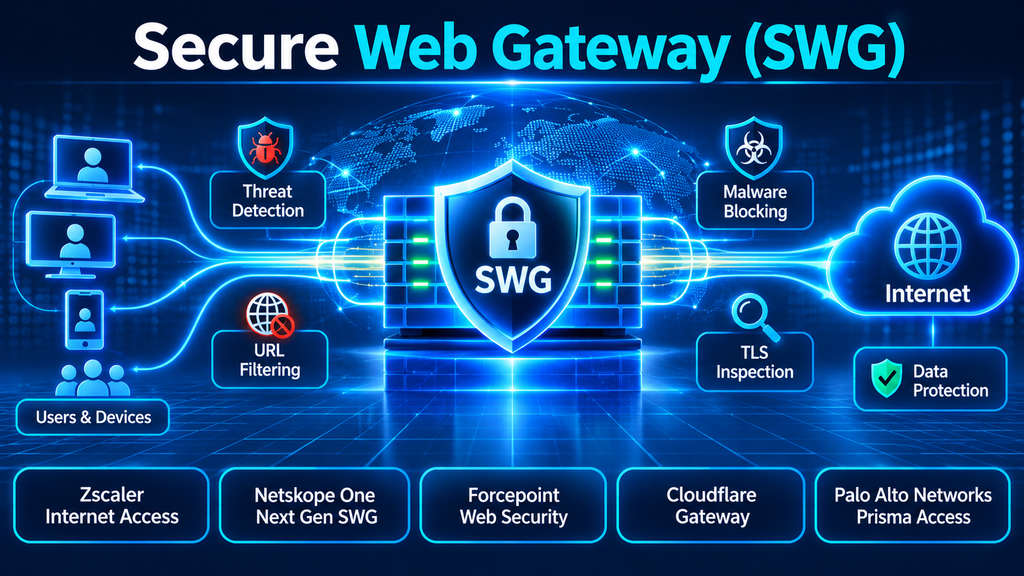
A secure web gateway sits between users and the websites or internet services they access, inspecting traffic and enforcing organizational security policies. Its role has expanded beyond blocking malicious URLs: modern SWG platforms may also inspect encrypted traffic, prevent downloads of harmful content, enforce acceptable-use policies, and help control data moving to web applications.
The buying decision is no longer just about which gateway blocks the most websites. Organizations need to consider remote-user coverage, TLS inspection, cloud application visibility, policy consistency, performance, and how the gateway fits into a wider SASE or zero-trust architecture.
What a Secure Web Gateway Actually Does
A secure web gateway (SWG) is a security control that examines inbound and outbound web traffic and applies policies before users reach internet destinations or transfer information to them.
Traditionally, SWGs were deployed as on-premises proxy appliances or virtual appliances at the network perimeter. Employees’ web traffic was routed through these gateways, where security teams could filter URLs, inspect downloads, and enforce acceptable-use rules.
That architecture becomes less convenient when employees work from home, use mobile devices, or connect directly to cloud applications. Modern cloud-delivered SWGs move inspection and policy enforcement closer to users, reducing the need to route all traffic through a central corporate data center.
Common SWG capabilities include:
- URL and category filtering: Allow or block websites based on reputation, category, or organizational policy.
- Malware and threat protection: Inspect downloads and web content for malicious files, phishing activity, and other threats.
- TLS inspection: Decrypt and inspect eligible encrypted web traffic, subject to privacy, legal, and technical constraints.
- Application control: Apply different policies to specific web applications, services, or activities.
- Data loss prevention: Detect and restrict sensitive information being uploaded or submitted through web channels.
- DNS security: Block access to malicious domains and suspicious destinations.
- User and device-aware policies: Apply controls based on identity, device posture, location, and risk.
- Reporting and investigation: Provide visibility into web activity, policy decisions, and security events.
Not every product includes every capability in the same package. Some functions may require additional subscriptions, integrations, agents, or cloud security services.
Why Traditional Web Filtering Is No Longer Enough
A basic web filter can block access to known malicious or inappropriate websites. That remains useful, but modern web activity involves more than visiting a URL.
Employees upload documents to cloud storage, exchange files through collaboration platforms, access generative AI services, and use browser-based business applications. A gateway that only checks website categories may not understand what information is being transferred or which action a user is performing.
Consider an employee who accesses a legitimate file-sharing service. Blocking the entire service may disrupt business operations. Allowing unrestricted access may create data exposure.
A more capable SWG can distinguish between activities where supported—for example, allowing normal browsing while restricting sensitive file uploads to an unapproved destination.
The same issue applies to encrypted traffic. HTTPS protects information in transit, but it can also conceal malicious downloads or data transfers from security controls that cannot inspect the content.
TLS inspection can reduce this blind spot, although it requires careful handling of certificates, privacy exceptions, application compatibility, and performance.
The Architecture Choice: Cloud SWG, On-Premises Gateway, or Hybrid?
The deployment model affects user experience, operational effort, resilience, and the way traffic is routed.
Cloud-delivered SWG
A cloud SWG directs user traffic to a distributed security service for inspection and policy enforcement. Users can receive consistent protection whether they are in an office, at home, or traveling.
This model is attractive to organizations with distributed workforces and multiple locations. It can reduce dependence on physical gateway appliances and centralized traffic backhauling.
However, performance depends on the provider’s network coverage, traffic-steering design, inspection capacity, and connectivity from the user’s location.
On-premises SWG
An on-premises gateway places inspection infrastructure within the organization’s network or data center.
It can suit environments with established network architectures, specialized routing requirements, local control needs, or operational constraints that make cloud migration difficult.
The trade-off is infrastructure responsibility. The organization must manage capacity, upgrades, resilience, certificates, and the routing of remote-user traffic.
Hybrid SWG
A hybrid design combines local and cloud enforcement. For example, offices may use local gateways while remote users connect to a cloud inspection service.
This can support gradual migration and accommodate different network environments. It also introduces policy-consistency challenges: administrators must ensure that different enforcement points interpret rules in the same way.
The best model depends on where users work, how traffic is routed, which applications need inspection, and what operational responsibilities the organization wants to retain.
Secure Web Gateway Platforms Worth Evaluating
The following products represent several approaches to web security, from dedicated cloud-delivered SWG services to broader security service edge platforms. They are not interchangeable in every deployment, so the relevant comparison is capability and architectural fit rather than a universal ranking.
1. Zscaler Internet Access
Zscaler Internet Access (ZIA) is a cloud-delivered security service edge platform that includes secure web gateway capabilities.
Its approach centers on inspecting internet and SaaS traffic through a cloud-native proxy architecture. Zscaler describes capabilities including URL filtering, TLS/SSL inspection, advanced threat protection, cloud sandboxing, DNS security, and data loss prevention.
Why consider it: ZIA is relevant to organizations seeking to move web security away from centralized appliance-based inspection. Its cloud architecture is designed to apply policies to users across locations without requiring all traffic to return to a corporate data center.
What to validate: Test traffic steering, application compatibility, certificate deployment, regional service performance, and the handling of traffic that must bypass inspection. Also confirm which security functions are included in the proposed subscription.
Official product information: Zscaler Internet Access.
2. Netskope One Next Gen SWG
Netskope One Next Gen SWG combines web filtering with inline inspection of web and cloud application traffic.
Netskope describes capabilities that include TLS inspection, threat protection, application and activity controls, data loss prevention, and behavior analytics. Its broader platform places particular emphasis on understanding data and user activity across web and cloud services.
Why consider it: This approach is relevant when web security and cloud application governance are closely connected. Rather than treating every cloud service as a simple website, the platform can apply more contextual controls to supported applications and activities.
What to validate: Examine the depth of application-level controls, DLP policy requirements, supported traffic-steering methods, and the effect of TLS inspection on business-critical applications. Check which capabilities require additional licensing.
Official product information: Netskope Next Gen SWG.
3. Forcepoint Web Security
Forcepoint Web Security focuses on protecting web traffic while extending data security controls to browser and cloud application activity.
Its published capabilities include URL and content filtering, advanced threat detection, inline data loss prevention, and visibility into unsanctioned SaaS and generative AI applications. Forcepoint also describes integration with its broader data security and remote browser isolation offerings.
Why consider it: Forcepoint is worth evaluating when preventing sensitive information from leaving through web uploads, forms, and cloud storage is a major requirement. Its emphasis on extending DLP policies to web sessions may be relevant to organizations trying to maintain consistent data controls across channels.
What to validate: Review the relationship between Web Security and the wider Forcepoint Data Security Cloud, including licensing, policy administration, supported file types, and the scope of integration with other Forcepoint services.
Official product information: Forcepoint Web Security.
4. Cloudflare Gateway
Cloudflare Gateway is a cloud-native secure web gateway within the Cloudflare One platform.
Its published capabilities include DNS and HTTP filtering, TLS inspection, antivirus inspection, application controls, remote browser isolation, and integration with data loss prevention and SaaS security capabilities.
Cloudflare also offers multiple deployment approaches, including a device client and policy enforcement for network locations. This can be useful when an organization wants to extend web controls beyond managed laptops.
Why consider it: Cloudflare Gateway is relevant to organizations evaluating web security alongside a wider zero-trust network architecture. Its integration with other Cloudflare One services may reduce the number of separate enforcement platforms required for some environments.
What to validate: Compare the available policy controls across plan levels, log retention, support requirements, device-client deployment, and the differences between DNS-only filtering and full HTTP inspection. Organizations with advanced requirements should confirm which capabilities are included in their selected plan.
Official product information: Cloudflare Gateway.
5. Palo Alto Networks Prisma Access
Palo Alto Networks Prisma Access is a cloud-delivered security platform that provides secure access and threat protection for users, applications, and data.
It is broader than a standalone SWG. Its relevance to this category comes from its internet security and traffic-inspection capabilities within a wider SASE architecture.
Why consider it: Organizations already using Palo Alto Networks security products may evaluate Prisma Access when they want web protection as part of a consolidated cloud-delivered security design. It can be relevant where web access, remote-user connectivity, and broader network security policies need to be coordinated.
What to validate: Determine which SWG functions are included in the proposed Prisma Access configuration, how licensing is structured, and whether the platform’s broader capabilities match the organization’s actual requirements. Compare its operational model with dedicated SWG services before committing to a wider architecture.
Official product information: Prisma Access.
Comparing the SWG Platforms
| Platform | Architectural emphasis | Notable capabilities | Evaluation focus |
|---|---|---|---|
| Zscaler Internet Access | Cloud-delivered SSE | Web filtering, TLS inspection, threat protection, DLP | Traffic steering, service coverage, subscription scope |
| Netskope One Next Gen SWG | Cloud and data-centric SSE | Cloud application controls, threat protection, DLP, behavior analytics | Application-level policy depth and data controls |
| Forcepoint Web Security | Web security with data protection | Inline DLP, threat detection, SaaS and AI visibility | DLP integration, licensing, policy consistency |
| Cloudflare Gateway | Cloud-native SWG within Cloudflare One | DNS/HTTP filtering, TLS inspection, antivirus, RBI | Plan limits, deployment model, log retention |
| Prisma Access | Broader SASE security platform | Cloud-delivered access and security controls | SWG entitlement, ecosystem fit, operational complexity |
This comparison reflects published product positioning and capabilities, not independent performance testing. Actual feature availability depends on licensing, deployment configuration, supported traffic types, and product integrations.
The Technical Decisions That Matter Most
TLS inspection and certificate management
Encrypted traffic inspection is one of the most important—and most operationally sensitive—SWG capabilities.
To inspect HTTPS content, a gateway typically acts as an intermediary, establishing separate encrypted connections with the user and destination. The organization deploys a trusted inspection certificate to managed devices so that the gateway can inspect eligible traffic.
This creates several considerations:
- Certificate deployment and renewal must be reliable.
- Some applications use certificate pinning or other mechanisms that can conflict with interception.
- Sensitive categories, such as banking or healthcare services, may require inspection exclusions.
- Legal, privacy, and employee-monitoring obligations must be considered.
- Inspection capacity must be tested under realistic traffic conditions.
A product demonstration should include both successful inspection and a controlled example of an application that needs an exception.
Traffic steering and bypass prevention
A gateway can only enforce policies on traffic it actually receives.
Organizations should understand how the platform routes traffic from managed endpoints, branch offices, mobile devices, and unmanaged devices. Common approaches include endpoint agents, explicit proxies, proxy auto-configuration files, tunnels, and network-level routing.
A pilot should test whether users can bypass inspection through alternative browsers, direct connections, unmanaged network paths, or unsupported protocols.
The goal is not necessarily to force every packet through one inspection point. It is to establish clear policy coverage and understand where exceptions exist.
Identity and device context
A web request should not be evaluated only by its destination.
A request from a managed corporate device using a verified account may warrant different treatment from a request from an unmanaged device or a compromised identity.
Look for integration with identity providers, endpoint security tools, and device-posture systems. Confirm how policies behave when identity or device information is unavailable.
Data protection
Modern web security must account for information leaving the organization, not just threats entering it.
DLP controls can inspect uploads, form submissions, and supported cloud application activities for sensitive information. Useful capabilities may include predefined data identifiers, custom patterns, exact data matching, document fingerprinting, and policy actions such as blocking, alerting, or coaching users.
The practical question is whether the product can identify the data and activity that matter to the organization without producing excessive false positives.
Logging and incident investigation
Security teams need more than a list of blocked URLs. Useful logs should provide context about the user, device, destination, application, policy decision, and relevant threat or data classification.
Check whether logs can be exported to the organization’s SIEM or data lake, how long they are retained, and whether investigation workflows preserve enough context to reconstruct an event.
How to Evaluate an SWG Through a Practical Pilot
A proof of concept should test realistic user activity rather than relying only on a vendor demonstration.
A useful pilot can include the following scenarios:
- Malicious destination test: Confirm that known test threats and disallowed categories are blocked according to policy.
- Encrypted traffic test: Verify that eligible HTTPS traffic is inspected and that approved exclusions work as expected.
- File transfer test: Attempt permitted and restricted downloads and uploads, including supported file types.
- Sensitive data test: Submit controlled test data to approved and unapproved web applications to evaluate DLP behavior.
- Cloud application test: Check whether the gateway can distinguish relevant activities within the SaaS applications used by the business.
- Remote-user test: Validate policy enforcement for users outside the corporate network.
- Performance test: Measure browsing experience, latency, application compatibility, and the effect of inspection under realistic load.
- Logging test: Send events to the SIEM and verify that analysts can investigate a blocked request or suspected data transfer.
Use synthetic or approved test data. Do not upload real sensitive records to unapproved destinations during a product evaluation.
Common SWG Deployment Mistakes
Enabling broad TLS inspection without exception planning. This can break applications, create privacy concerns, and generate support issues. Build a tested exception process before expanding inspection.
Blocking entire applications unnecessarily. A blanket block may disrupt legitimate work when a more precise activity-based policy would be sufficient.
Ignoring unmanaged devices. Remote and contractor access can create gaps if the gateway protects only devices with a corporate endpoint agent.
Creating inconsistent policies across locations. Hybrid deployments can leave users subject to different rules depending on how traffic is routed. Define a common policy model and document justified exceptions.
Overlooking operational costs. Licensing is only part of the cost. Certificate management, endpoint deployment, network changes, log storage, support, and policy tuning all require resources.
Treating every alert as an incident. Tune detections and reporting to distinguish policy violations, suspicious activity, and routine browsing events.
Questions to Ask Before Selecting an SWG
Before purchasing, ask vendors to demonstrate the following:
- Which web protocols and traffic types are inspected?
- How is TLS inspection deployed and managed?
- How are certificate-pinned and privacy-sensitive applications handled?
- What traffic-steering options are available for remote users and branch offices?
- Can policies distinguish between application access and specific application activities?
- Which DLP functions are native, and which require separate subscriptions?
- How does the product identify malicious downloads and previously unknown threats?
- What happens when the cloud service or a local connectivity path becomes unavailable?
- How are logs retained, exported, and integrated with SIEM platforms?
- Which features are included in the proposed license?
- What deployment and ongoing policy-management effort should the organization expect?
Ask for a live demonstration using the organization’s own policy scenarios. A convincing demonstration should show how the gateway handles a legitimate workflow, a risky destination, an encrypted session, and a potentially sensitive upload.
Choosing the Right SWG Approach
The right secure web gateway depends on the organization’s architecture and security priorities.
A company modernizing its network perimeter may prefer a cloud-delivered SWG that reduces backhauling and provides consistent remote-user protection. An organization focused on cloud application governance may place greater weight on granular application controls and inline DLP. Businesses already committed to a wider SASE ecosystem may prefer a gateway that fits their existing identity, network, and security operations workflows.
The most important evaluation is not the length of a feature list. It is whether the product can inspect the traffic the organization needs to protect, enforce policies without creating unnecessary disruption, and provide enough context for security teams to investigate and respond.
Run a pilot with representative users, applications, devices, and data policies before choosing. That is the most reliable way to discover whether an SWG will strengthen web security while keeping everyday work practical.
