Upgrade & Secure Your Future with DevOps, SRE, DevSecOps, MLOps!
We spend hours scrolling social media and waste money on things we forget, but won’t spend 30 minutes a day earning certifications that can change our lives.
Master in DevOps, SRE, DevSecOps & MLOps by DevOps School!
Learn from Guru Rajesh Kumar and double your salary in just one year.
Introduction
Distributed tracing tools track requests and transactions as they flow through complex, multi-service applications. By visualizing the entire request path across services, containers, and cloud environments, these tools help teams identify performance bottlenecks, latency issues, and root causes in real time.
These tools are essential in modern cloud-native and microservices architectures. As organizations adopt containerization, serverless computing, and multi-cloud environments, understanding end-to-end service behavior becomes critical to maintain performance, reliability, and user satisfaction.
Real-world use cases include tracking API performance, monitoring microservices communication, diagnosing slow database queries, optimizing transaction paths, and improving release quality. Teams rely on these insights to improve system reliability, reduce downtime, and enhance customer experiences.
Buyers should evaluate tracing granularity, real-time analytics, scalability, integrations with monitoring and CI/CD tools, visualization, alerting capabilities, AI-assisted root cause analysis, multi-cloud support, security controls, and pricing.
Best for: DevOps engineers, SREs, platform teams, cloud-native architects, enterprises, SaaS providers, and organizations with microservices or distributed applications.
Not ideal for: small monolithic applications, single-server setups, or projects without complex service dependencies.
Key Trends in Distributed Tracing Tools
- AI-assisted anomaly detection to automatically identify slow services or abnormal patterns.
- Integration with APM and observability stacks for unified performance insights.
- Serverless and microservices tracing for containerized and cloud-native environments.
- Automated root cause analysis to reduce MTTR (Mean Time to Recovery).
- Multi-cloud and hybrid environment support for cross-platform transactions.
- OpenTelemetry adoption for standardized instrumentation and interoperability.
- Real-time dashboards and analytics to visualize service dependencies.
- Tracing integrated with CI/CD pipelines for release validation.
- Correlation with logs and metrics for comprehensive observability.
- Role-based access and encryption for secure distributed tracing.
How We Selected These Tools
- Market adoption and recognition among enterprises and DevOps teams.
- Completeness of tracing and observability features.
- Performance and reliability in high-throughput environments.
- Security posture including encrypted traces and access controls.
- Integration with APM, logging, CI/CD, and monitoring tools.
- Scalability for small teams to large enterprises.
- Ease of deployment, dashboards, and analytics.
- Support for multi-cloud, containers, and serverless applications.
- Vendor support, documentation, and community adoption.
- Practical value based on real-world performance troubleshooting.
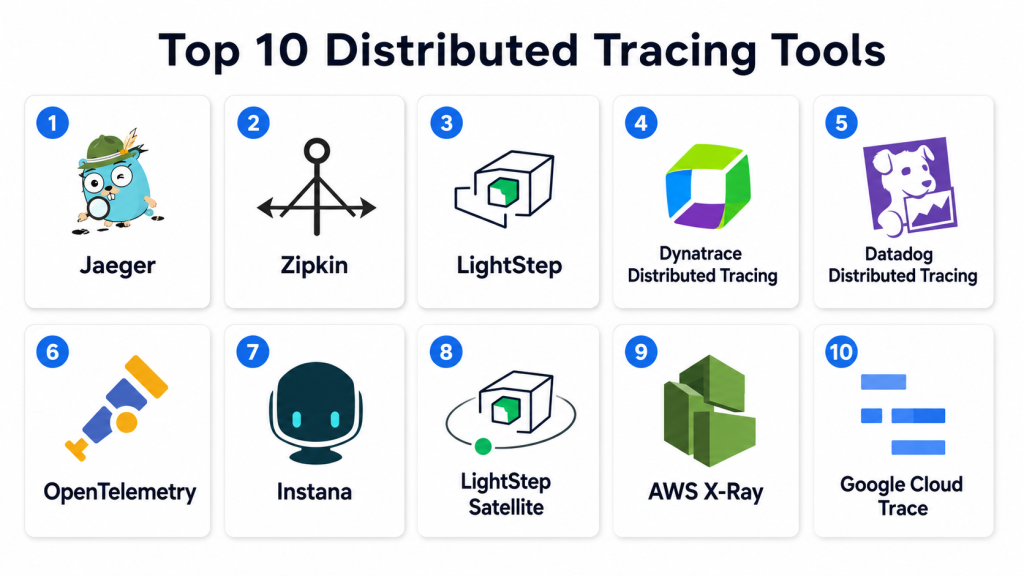
Top 10 Distributed Tracing Tools
#1 — Jaeger
Short description: Jaeger is an open-source distributed tracing tool used to monitor and troubleshoot complex microservices architectures.
Key Features
- End-to-end transaction tracing.
- Root cause analysis of performance issues.
- Visual service dependency maps.
- Multi-language SDK support.
- Integration with OpenTelemetry.
- Sampling and storage flexibility.
- Analytics dashboards for latency and throughput.
Pros
- Open-source and free.
- Strong community support.
- Easy integration with cloud-native architectures.
Cons
- Requires manual setup for storage backends.
- Lacks enterprise-grade support out-of-the-box.
- UI may be less polished than commercial solutions.
Platforms / Deployment
Linux / macOS / Windows
Self-hosted / Cloud
Security & Compliance
Supports role-based access and encrypted communication. Enterprise certifications not publicly stated.
Integrations & Ecosystem
- Kubernetes
- Docker
- Prometheus
- Grafana
- CI/CD pipelines
Support & Community
Open-source community with active contributions and forums.
#2 — Zipkin
Short description: Zipkin is an open-source distributed tracing system for collecting timing data from microservices and analyzing latency.
Key Features
- Distributed request tracing.
- Latency analysis and visualization.
- Supports multiple storage backends.
- Sampling strategies for large traffic volumes.
- Multi-language client support.
- REST API for trace retrieval.
- Integration with dashboards.
Pros
- Lightweight and developer-friendly.
- Flexible storage options.
- Open-source with community contributions.
Cons
- Limited analytics compared to commercial tools.
- UI and visualization less advanced.
- Requires integration effort for large deployments.
Platforms / Deployment
Linux / macOS / Windows
Self-hosted / Cloud
Security & Compliance
Encryption supported; role-based access depends on deployment configuration.
Integrations & Ecosystem
- Spring Boot
- Kubernetes
- Prometheus
- Grafana
- CI/CD pipelines
Support & Community
Strong open-source community support; documentation available.
#3 — LightStep
Short description: LightStep provides enterprise-grade distributed tracing and observability, designed for modern cloud-native applications.
Key Features
- Full-service dependency mapping.
- Real-time distributed tracing analytics.
- Integration with OpenTelemetry.
- Root cause detection with AI assistance.
- Multi-cloud support.
- Customizable dashboards.
- CI/CD and alerting integrations.
Pros
- Enterprise-ready with AI insights.
- Cloud-native optimized.
- Strong visualization and dashboards.
Cons
- Premium pricing for smaller teams.
- May require onboarding and setup.
- Less suited for simple monolithic applications.
Platforms / Deployment
Web / Linux / macOS / Windows
Cloud / Hybrid
Security & Compliance
Supports RBAC, MFA, encrypted data transfer, and audit logging.
Integrations & Ecosystem
- Kubernetes, Docker
- AWS, Azure, GCP
- Prometheus, Grafana
- CI/CD pipelines
- Slack, PagerDuty
Support & Community
Enterprise support with documentation and onboarding; active professional community.
#4 — Dynatrace Distributed Tracing
Short description: Dynatrace provides AI-driven full-stack observability including automatic distributed tracing for complex applications.
Key Features
- Automatic trace capture across services.
- AI-powered root cause analysis.
- Full-stack metrics and logs correlation.
- Kubernetes and container support.
- Multi-cloud environment tracking.
- Visualization dashboards.
- CI/CD integration.
Pros
- Fully automated tracing.
- Strong AI-driven insights.
- Excellent cloud-native support.
Cons
- Enterprise pricing.
- Complexity for small teams.
- Requires training for advanced features.
Platforms / Deployment
Web / Linux / Windows / macOS
Cloud / Hybrid
Security & Compliance
Supports encryption, RBAC, audit logs, and enterprise compliance standards.
Integrations & Ecosystem
- Kubernetes, Docker
- AWS, Azure, GCP
- CI/CD pipelines
- Slack, Jira
- Prometheus
Support & Community
Enterprise support available; active documentation and forums.
#5 — Datadog Distributed Tracing
Short description: Datadog provides end-to-end observability including distributed tracing, metrics, and logs correlation for cloud-native applications.
Key Features
- Distributed tracing across services.
- Service dependency maps.
- Real-time performance analytics.
- AI-assisted anomaly detection.
- Multi-cloud and container support.
- Alerting and dashboards.
- CI/CD pipeline integration.
Pros
- Cloud-native and multi-platform.
- Real-time visualization.
- Integrated metrics and logging.
Cons
- Cost scales with number of hosts/services.
- Advanced features require premium plans.
- Complexity for new users.
Platforms / Deployment
Web / Linux / Windows / macOS
Cloud
Security & Compliance
Supports RBAC, encrypted transmission, and audit logging.
Integrations & Ecosystem
- Kubernetes, Docker
- AWS, Azure, GCP
- CI/CD pipelines
- Slack, PagerDuty
- Grafana
Support & Community
Vendor documentation, professional support, and active community.
#6 — OpenTelemetry
Short description: OpenTelemetry is an open-source observability framework for distributed tracing, metrics, and logging across applications.
Key Features
- Vendor-agnostic instrumentation.
- Distributed tracing and metrics collection.
- SDKs for multiple programming languages.
- Integration with popular backends.
- Supports multi-cloud and hybrid deployments.
- Open standard for observability.
- CI/CD integration support.
Pros
- Open-source and free.
- Standardized and flexible.
- Vendor-neutral instrumentation.
Cons
- Requires backend for storage and visualization.
- Setup complexity can be high.
- Minimal out-of-the-box dashboards.
Platforms / Deployment
Linux / Windows / macOS
Self-hosted / Cloud
Security & Compliance
Depends on backend configuration; encryption and access control supported.
Integrations & Ecosystem
- Jaeger, Zipkin, LightStep
- Prometheus, Grafana
- Kubernetes, Docker
- CI/CD pipelines
- Slack
Support & Community
Active open-source community; documentation maintained.
#7 — Instana
Short description: Instana automatically traces distributed applications with AI-driven root cause analysis for microservices and cloud-native applications.
Key Features
- Automatic distributed tracing.
- AI-assisted performance insights.
- Microservices and container monitoring.
- Real-time dashboards.
- Multi-cloud support.
- CI/CD integration.
- Alerting and incident management.
Pros
- Fully automated and developer-friendly.
- AI-driven root cause analysis.
- Strong cloud-native support.
Cons
- Enterprise pricing.
- Complexity for small teams.
- Learning curve for advanced dashboards.
Platforms / Deployment
Web / Linux / Windows / macOS
Cloud / Hybrid
Security & Compliance
Supports RBAC, encryption, and audit logging.
Integrations & Ecosystem
- Kubernetes, Docker
- AWS, Azure, GCP
- CI/CD pipelines
- Slack, PagerDuty
- Prometheus
Support & Community
Enterprise support available; documentation and training provided.
#8 — LightStep Satellite
Short description: LightStep Satellite provides distributed tracing with a focus on observability for multi-cloud and hybrid environments.
Key Features
- Trace collection and analysis.
- Dependency maps and service graphs.
- Multi-cloud support.
- Root cause analysis.
- Metrics correlation.
- CI/CD integration.
- Custom dashboards.
Pros
- Enterprise-grade analytics.
- Multi-cloud optimization.
- AI-assisted root cause detection.
Cons
- Premium pricing.
- Complexity for smaller deployments.
- Requires onboarding.
Platforms / Deployment
Web / Linux / Windows / macOS
Cloud / Hybrid
Security & Compliance
Supports encryption, RBAC, and audit logs.
Integrations & Ecosystem
- Kubernetes, Docker
- AWS, Azure, GCP
- CI/CD pipelines
- Slack, Jira
- Grafana
Support & Community
Professional support with active enterprise documentation.
#9 — AWS X-Ray
Short description: AWS X-Ray is a cloud-native distributed tracing service for applications running on AWS.
Key Features
- End-to-end tracing of AWS services.
- Latency and error visualization.
- Service map generation.
- Anomaly detection.
- Multi-environment support.
- Integration with CI/CD pipelines.
- Logs and metrics correlation.
Pros
- Native AWS integration.
- Fully managed and scalable.
- Easy to visualize service interactions.
Cons
- Best for AWS workloads.
- Limited multi-cloud support.
- Advanced analytics features are basic.
Platforms / Deployment
Web / Linux / Windows / macOS
Cloud
Security & Compliance
Supports IAM-based access control, encrypted traces. AWS compliance certifications apply.
Integrations & Ecosystem
- AWS Lambda, ECS, EKS
- CI/CD pipelines
- CloudWatch, CloudTrail
- Slack notifications
- Grafana
Support & Community
AWS documentation and support available; strong AWS community.
#10 — Google Cloud Trace
Short description: Google Cloud Trace provides distributed tracing for applications on Google Cloud, offering latency analysis and performance insights.
Key Features
- Tracing for Google Cloud workloads.
- Latency and performance analysis.
- Service dependency maps.
- CI/CD integration.
- Metrics and logs correlation.
- Multi-service visualization.
- Real-time dashboards.
Pros
- Native Google Cloud integration.
- Fully managed and scalable.
- Provides detailed latency metrics.
Cons
- Best for Google Cloud workloads.
- Limited multi-cloud support.
- Advanced features require expertise.
Platforms / Deployment
Web / Linux / Windows / macOS
Cloud
Security & Compliance
Supports IAM-based access, encryption, audit logs. Google Cloud certifications apply.
Integrations & Ecosystem
- Google Cloud Platform services
- CI/CD pipelines
- Slack, PagerDuty
- Kubernetes / GKE
- Cloud Monitoring
Support & Community
Google support and community resources available.
Comparison Table
| Tool Name | Best For | Platform(s) Supported | Deployment | Standout Feature | Public Rating |
|---|---|---|---|---|---|
| Jaeger | Open-source microservices | Linux, macOS, Windows | Self-hosted / Cloud | Open-source tracing | N/A |
| Zipkin | Open-source developers | Linux, macOS, Windows | Self-hosted / Cloud | Lightweight tracing | N/A |
| LightStep | Enterprise observability | Web, Linux, Windows | Cloud / Hybrid | AI-driven root cause analysis | N/A |
| Dynatrace | Enterprise cloud-native | Web, Linux, Windows, macOS | Cloud / Hybrid | Automatic full-stack tracing | N/A |
| Datadog | Cloud-native teams | Web, Linux, Windows, macOS | Cloud / Hybrid | Integrated APM + tracing | N/A |
| OpenTelemetry | Standardized observability | Linux, macOS, Windows | Self-hosted / Cloud | Vendor-neutral instrumentation | N/A |
| Instana | Enterprise microservices | Web, Linux, Windows, macOS | Cloud / Hybrid | Automated tracing with AI | N/A |
| LightStep Satellite | Multi-cloud enterprise | Web, Linux, Windows | Cloud / Hybrid | Multi-cloud trace analytics | N/A |
| AWS X-Ray | AWS-native apps | Web, Linux, Windows, macOS | Cloud | Native AWS distributed tracing | N/A |
| Google Cloud Trace | GCP-native apps | Web, Linux, Windows, macOS | Cloud | Native Google Cloud tracing | N/A |
Evaluation & Scoring of Distributed Tracing Tools
| Tool Name | Core (25%) | Ease (15%) | Integrations (15%) | Security (10%) | Performance (10%) | Support (10%) | Value (15%) | Weighted Total |
|---|---|---|---|---|---|---|---|---|
| Jaeger | 9 | 8 | 8 | 8 | 8 | 7 | 9 | 8.25 |
| Zipkin | 8 | 8 | 7 | 8 | 8 | 7 | 9 | 8.00 |
| LightStep | 10 | 7 | 9 | 9 | 9 | 8 | 8 | 8.65 |
| Dynatrace | 10 | 7 | 9 | 9 | 9 | 8 | 7 | 8.40 |
| Datadog | 9 | 8 | 9 | 8 | 8 | 8 | 8 | 8.35 |
| OpenTelemetry | 8 | 7 | 8 | 7 | 7 | 7 | 9 | 7.75 |
| Instana | 10 | 7 | 9 | 9 | 9 | 8 | 7 | 8.35 |
| LightStep Satellite | 10 | 7 | 9 | 9 | 9 | 8 | 7 | 8.35 |
| AWS X-Ray | 8 | 8 | 8 | 8 | 8 | 7 | 8 | 8.00 |
| Google Cloud Trace | 8 | 8 | 8 | 8 | 8 | 7 | 8 | 8.00 |
Scoring is comparative, balancing functionality, integrations, usability, and enterprise readiness.
Which Distributed Tracing Tool Is Right for You?
Solo / Freelancer
Jaeger, Zipkin, or OpenTelemetry provide free, open-source tracing solutions suitable for individual developers or small projects.
SMB
Datadog, AppSignal, or Scout APM (if integrated) are appropriate for small to mid-sized teams needing cloud-friendly tracing and analytics.
Mid-Market
LightStep, Instana, and Datadog offer enterprise-grade tracing with analytics and multi-service visualization.
Enterprise
Dynatrace, LightStep Satellite, AWS X-Ray, and Google Cloud Trace deliver AI-assisted, automated, and full-stack tracing for complex, multi-cloud architectures.
Budget vs Premium
Open-source tools reduce cost but may require operational effort. Enterprise solutions provide automation, analytics, and support at a higher price point.
Feature Depth vs Ease of Use
Dynatrace, Instana, and LightStep provide deep insights but require setup. Jaeger and Zipkin are lightweight and flexible but less polished for enterprise dashboards.
Integrations & Scalability
Ensure CI/CD, container, cloud, and multi-service integration for scalable observability.
Security & Compliance Needs
Check RBAC, encrypted traces, audit logs, and compliance certifications for regulated environments.
Frequently Asked Questions
What is distributed tracing?
Distributed tracing tracks requests across services to visualize dependencies, latency, and performance.
Why use distributed tracing?
It identifies bottlenecks, detects errors, and helps optimize multi-service or microservices architectures.
Can it monitor serverless applications?
Yes. Most tools support serverless functions, containers, and multi-cloud workloads.
How does it integrate with CI/CD?
Traces can be correlated with deployments to detect regressions and performance impacts.
Is distributed tracing secure?
Yes, most tools support encryption, access controls, and audit logging.
What platforms are supported?
Linux, Windows, macOS, web, and cloud-native environments.
Can it handle high traffic?
Yes, enterprise tools like Dynatrace, Instana, and LightStep scale for high-throughput systems.
Are open-source tools reliable?
Jaeger, Zipkin, and OpenTelemetry are widely adopted and reliable but may require self-hosted configuration.
How do AI features help?
AI detects anomalies, predicts performance degradation, and assists in root cause analysis.
How to choose the right tool?
Consider team size, application architecture, cloud provider, multi-service complexity, and budget.
Conclusion
Distributed tracing tools are vital for understanding complex, multi-service applications. Open-source solutions like Jaeger, Zipkin, and OpenTelemetry suit smaller teams, while Dynatrace, LightStep, Instana, and cloud-native tools like AWS X-Ray and Google Cloud Trace provide AI-assisted insights and full-stack observability for enterprises. Teams should shortlist tools based on architecture, integrations, ease of use, and budget, then validate deployment in CI/CD pipelines and cloud environments to optimize performance and reliability.
