Upgrade & Secure Your Future with DevOps, SRE, DevSecOps, MLOps!
We spend hours scrolling social media and waste money on things we forget, but won’t spend 30 minutes a day earning certifications that can change our lives.
Master in DevOps, SRE, DevSecOps & MLOps by DevOps School!
Learn from Guru Rajesh Kumar and double your salary in just one year.
Introduction
Digital training is most effective when learning content is clear, engaging, and easy to access. eLearning authoring tools help educators, instructional designers, and businesses transform information into online courses that may include videos, quizzes, animations, scenarios, and interactive activities.
These tools are used to create employee onboarding programs, product training, compliance courses, academic lessons, and professional development content. The right authoring software can help teams develop consistent learning materials without building an entire course from scratch.
What Are eLearning Authoring Tools?
eLearning authoring tools are software applications used to create digital learning content. Depending on the product, creators can design slide-based lessons, interactive modules, software simulations, assessments, and responsive courses for different screen sizes.
Some tools focus on ease of use and rapid course creation, while others offer advanced interactions, branching scenarios, and detailed control over course design. Certain products also support standards such as SCORM or xAPI for use with compatible learning management systems.
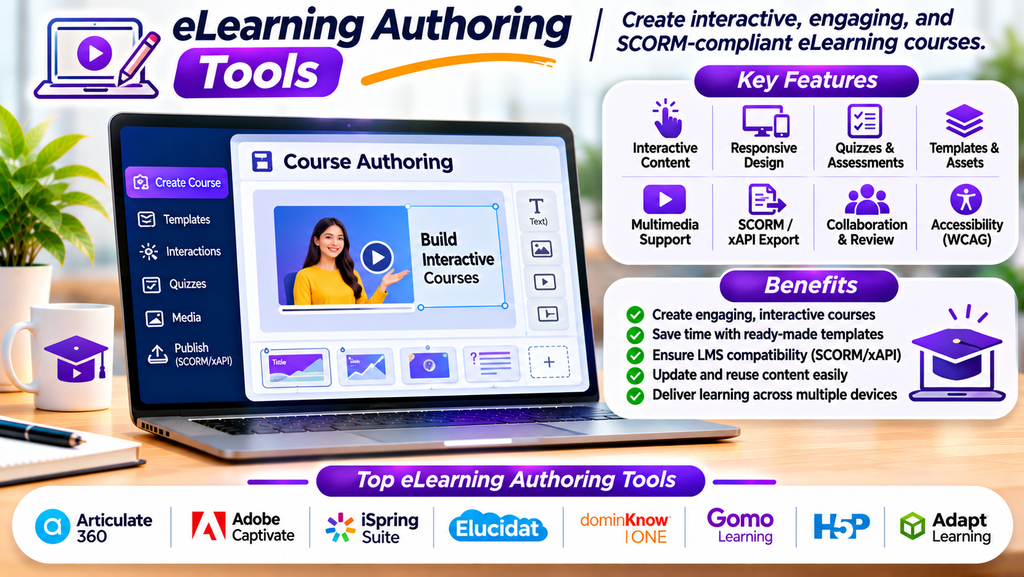
Top eLearning Authoring Tools
1. Articulate 360
Articulate 360 includes Storyline and Rise for building interactive and responsive online courses. It offers templates, assessment options, and collaboration features.
Best for: Instructional designers creating polished, interactive corporate training.
2. Adobe Captivate
Adobe Captivate supports responsive eLearning content, software simulations, demonstrations, and interactive learning experiences.
Best for: Teams creating software training and simulation-based courses.
3. iSpring Suite
iSpring Suite works with PowerPoint-based workflows to help users create online courses, quizzes, dialogue simulations, and other learning materials.
Best for: Trainers who want to turn presentations into structured eLearning courses.
4. Elucidat
Elucidat is a cloud-based authoring platform designed to help teams produce and manage digital learning content at scale.
Best for: Larger organizations creating consistent training across departments or regions.
5. dominKnow | ONE
dominKnow | ONE supports collaborative course authoring and responsive content creation, with options for reuse and team-based workflows.
Best for: Organizations developing and maintaining large course libraries.
6. Gomo Learning
Gomo Learning enables cloud-based course authoring and supports content delivery across devices. Its collaborative workflow can help distributed teams work on learning projects.
Best for: Teams creating responsive courses collaboratively.
7. H5P
H5P provides tools for creating interactive learning content such as quizzes, presentations, interactive videos, and other activities. Integration options depend on the host platform.
Best for: Educators and content creators who need flexible interactive learning components.
8. Adapt Learning
Adapt Learning is an open-source framework for creating responsive eLearning content. It offers flexibility for teams that have the technical skills to configure and maintain their learning solutions.
Best for: Organizations seeking an adaptable, open-source authoring approach.
Product capabilities, pricing, licensing, and supported publishing formats vary by vendor and plan.
Essential Features to Look For
- Course templates: Speed up development with reusable layouts and learning structures.
- Interactive content: Create quizzes, clickable elements, scenarios, and knowledge checks.
- Responsive design: Make courses usable on supported desktops, tablets, and phones.
- Multimedia support: Incorporate audio, video, illustrations, and animations.
- Assessment tools: Evaluate knowledge with questions, scoring, and feedback.
- Accessibility options: Support inclusive learning experiences and relevant accessibility standards.
- LMS compatibility: Check support for publishing formats and standards required by your LMS.
- Collaboration: Allow subject-matter experts, reviewers, and designers to work together.
- Content reuse: Update or repurpose modules without rebuilding everything.
- Analytics support: Ensure the published course can provide the tracking information your learning platform needs.
Benefits of eLearning Authoring Tools
Faster Course Development
Templates and reusable components can reduce the time required to build training materials.
More Engaging Learning
Interactive questions, simulations, and multimedia can encourage learners to participate rather than simply read text.
Consistent Training
Reusable layouts and shared design standards help organizations maintain consistency across courses.
Easier Content Updates
Digital modules can often be revised when policies, products, or procedures change.
Flexible Learning Access
Responsive content can make learning more convenient across supported devices.
Better Assessment Opportunities
Quizzes and scenarios allow creators to check understanding and give learners feedback during a course.
How to Choose the Right Authoring Tool
- Define the course type: Decide whether you need slide-based lessons, interactive scenarios, software simulations, or short learning modules.
- Assess your team’s skills: Choose a tool that matches your designers’ technical experience.
- Check LMS compatibility: Confirm the publishing formats and tracking standards required by your learning platform.
- Review accessibility: Test whether the tool supports the accessibility requirements of your audience.
- Compare collaboration features: Consider review workflows, shared libraries, and team permissions.
- Evaluate localization: If you serve multiple regions, examine translation and language-management capabilities.
- Calculate total cost: Include subscriptions, hosting, training, maintenance, and content migration.
- Create a pilot course: Build a representative module and test it with real learners before committing.
Best Practices for Creating eLearning Content
- Begin with measurable learning objectives.
- Organize lessons into short, logically ordered sections.
- Use interactions to reinforce learning rather than add decoration.
- Include meaningful feedback for quiz answers.
- Follow consistent visual and instructional design standards.
- Test courses on the devices and browsers your learners use.
- Check accessibility, captions, navigation, and readability.
- Preview published content in the intended LMS.
- Review learner feedback and assessment results to improve future versions.
Conclusion
eLearning authoring tools make it easier to transform subject knowledge into structured digital learning experiences. Platforms such as Articulate 360, Adobe Captivate, iSpring Suite, Elucidat, dominKnow | ONE, Gomo Learning, H5P, and Adapt Learning offer different approaches to course creation.
The best option depends on course complexity, authoring skills, collaboration needs, accessibility requirements, LMS compatibility, and budget. A strong authoring workflow combines the right software with clear learning objectives, thoughtful instructional design, and regular testing.
