Upgrade & Secure Your Future with DevOps, SRE, DevSecOps, MLOps!
We spend hours scrolling social media and waste money on things we forget, but won’t spend 30 minutes a day earning certifications that can change our lives.
Master in DevOps, SRE, DevSecOps & MLOps by DevOps School!
Learn from Guru Rajesh Kumar and double your salary in just one year.
Introduction
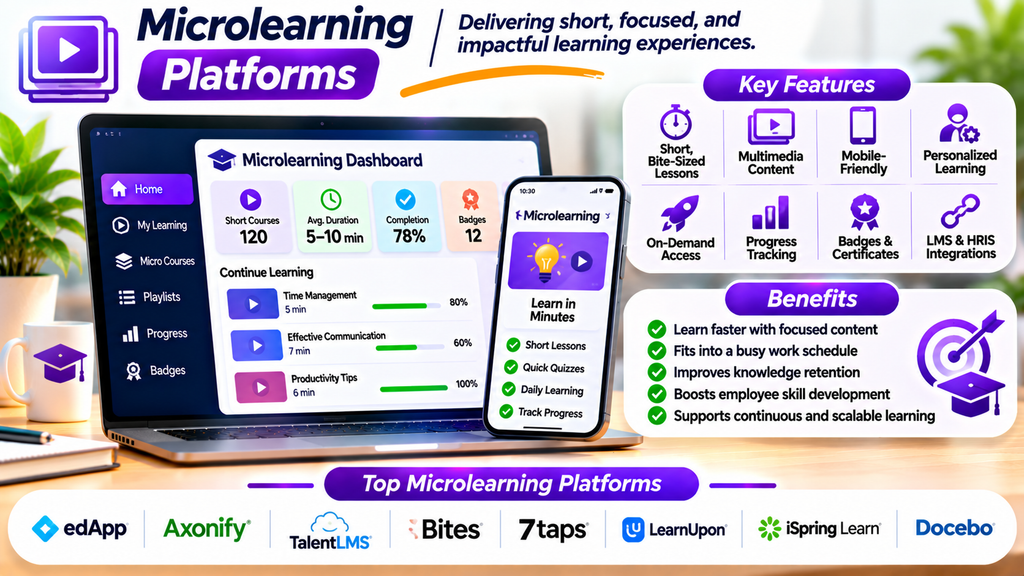
Modern learners often need training that fits into busy schedules and helps them apply knowledge quickly. Microlearning platforms deliver short, focused learning experiences through bite-sized videos, quizzes, interactive activities, flashcards, and brief lessons.
Instead of asking learners to complete lengthy courses in one sitting, microlearning breaks information into smaller modules focused on specific skills or topics. Businesses use this approach for employee onboarding, product knowledge, compliance refreshers, sales enablement, and ongoing professional development.
What Are Microlearning Platforms?
Microlearning platforms are digital tools designed to create, deliver, organize, or track short learning experiences. A lesson may take only a few minutes to complete and focus on one clearly defined learning outcome.
Depending on the platform, learners may access content through mobile apps, web browsers, messaging tools, or an existing learning management system. Some platforms specialize in creating microlearning content, while others provide a broader training environment with short lessons and learning paths.
Top Microlearning Platforms
1. Axonify
Axonify focuses on frontline employee training through short learning sessions, reinforcement activities, and knowledge checks.
Best for: Retail, hospitality, and other organizations with frontline workforces.
2. EdApp (SC Training)
EdApp, now known as SC Training, provides mobile-friendly course creation and delivery with features designed for short lessons, quizzes, and employee training.
Best for: Organizations delivering mobile-first workforce training.
3. 7taps
7taps is designed for creating compact learning experiences that can be shared through simple links and accessed without the complexity of a traditional course.
Best for: Teams that need to create and distribute quick training content.
4. eduMe
eduMe focuses on workforce learning, including short training experiences for deskless and distributed employees.
Best for: Organizations training mobile, frontline, and distributed teams.
5. Qstream
Qstream uses short challenges and spaced repetition to reinforce knowledge over time. Its approach can help learners revisit important concepts instead of relying on one-time training sessions.
Best for: Sales, healthcare, and other knowledge-intensive teams that need ongoing reinforcement.
6. TalentCards
TalentCards uses digital flashcards to deliver concise training content through mobile devices, supporting quick learning and knowledge reinforcement.
Best for: Teams that need simple, mobile-based training for employees on the move.
7. OttoLearn
OttoLearn emphasizes personalized microlearning and repeated practice to help learners retain information over time.
Best for: Organizations that need ongoing skill practice and knowledge reinforcement.
8. Kahoot!
Kahoot! offers game-based quizzes and learning activities that can be used for short training sessions, knowledge checks, and interactive review.
Best for: Teams and educators seeking engaging quiz-based learning experiences.
The tools differ in their primary purpose: some are full workforce training platforms, while others specialize in content creation, reinforcement, flashcards, or interactive quizzes. Confirm current features and integrations before choosing a solution.
Essential Features to Look For
- Short learning modules: Create focused lessons around one skill or learning objective.
- Mobile accessibility: Let learners access content on supported phones, tablets, and computers.
- Interactive activities: Use quizzes, flashcards, scenarios, and short videos to encourage participation.
- Spaced repetition: Reinforce important concepts at suitable intervals where supported.
- Progress tracking: Monitor completion, participation, and assessment results.
- Personalized learning: Recommend content based on role, skill level, or learning needs where available.
- Content creation tools: Build and update lessons without unnecessarily complex production workflows.
- Notifications and reminders: Encourage learners to return to training at appropriate times.
- Reporting and analytics: Identify knowledge gaps and evaluate learning activity.
- Integrations: Check compatibility with your LMS, HR systems, and communication tools.
Benefits of Microlearning Platforms
Easier Learning in Busy Schedules
Short lessons can fit into brief periods between other responsibilities, making training more convenient.
Better Knowledge Reinforcement
Frequent review and spaced practice can help learners revisit important information over time.
Focused Skill Development
Each module can address a specific task, procedure, product feature, or knowledge gap.
Faster Content Updates
Short modules can be easier to revise when policies, products, or procedures change.
Flexible Mobile Learning
Mobile-friendly delivery can help employees learn when they have suitable time and access.
Measurable Training Activity
Progress reports and knowledge checks can help organizations evaluate participation and identify topics that need further support.
Microlearning is not ideal for every subject. Complex topics may still require longer lessons, hands-on practice, mentoring, or instructor-led training.
How to Choose the Right Microlearning Platform
- Define the learning goal: Decide whether you need onboarding, compliance refreshers, product training, or ongoing skill development.
- Understand your audience: Consider employees’ roles, schedules, devices, languages, and access to reliable connectivity.
- Check content formats: Confirm support for videos, flashcards, quizzes, scenarios, or other formats your program needs.
- Evaluate reinforcement features: Look for spaced repetition or recurring practice if long-term retention is a priority.
- Review analytics: Ensure you can measure meaningful outcomes, not only lesson completion.
- Check integrations: Confirm compatibility with your existing learning and HR systems.
- Assess usability: Test the learner experience and content-creation workflow.
- Compare costs: Review licensing, learner limits, implementation, support, and content-production expenses.
- Run a pilot: Test a small learning program and gather feedback before expanding.
Best Practices for Microlearning
- Focus each lesson on one clear learning objective.
- Keep content concise without removing essential context.
- Use examples that relate directly to real tasks.
- Add knowledge checks and useful feedback.
- Reinforce critical concepts over time.
- Make lessons accessible and easy to navigate on mobile devices.
- Avoid turning every topic into a quiz or game.
- Combine short modules with practical application where appropriate.
- Review learner feedback and performance data to improve content.
- Measure whether learning improves job performance, not just completion rates.
Conclusion
Microlearning platforms help organizations deliver focused training in short, accessible learning experiences. Tools such as Axonify, SC Training, 7taps, eduMe, Qstream, TalentCards, OttoLearn, and Kahoot! offer different ways to create lessons, reinforce knowledge, and engage learners.
The best platform depends on your audience, training objectives, preferred content formats, analytics needs, integrations, and budget. Microlearning is most effective when each lesson has a clear purpose and short activities are supported by regular reinforcement and opportunities to apply new skills.
