Upgrade & Secure Your Future with DevOps, SRE, DevSecOps, MLOps!
We spend hours scrolling social media and waste money on things we forget, but won’t spend 30 minutes a day earning certifications that can change our lives.
Master in DevOps, SRE, DevSecOps & MLOps by DevOps School!
Learn from Guru Rajesh Kumar and double your salary in just one year.
Introduction
Learning Management Systems, commonly called LMS platforms, are software tools that help organizations create, deliver, manage, track, and report on training programs. In simple English, an LMS gives companies, schools, training providers, and teams one place to manage courses, learners, assessments, certificates, content, and learning progress.
LMS platforms matter because learning is no longer limited to classrooms or one-time training sessions. Companies need continuous employee training, compliance learning, customer education, partner enablement, onboarding, skills development, and remote learning support. A strong LMS helps reduce manual training work, improve learner engagement, track completion, and prove training impact.
Common real-world use cases include employee onboarding, compliance training, sales training, customer training, certification programs, online courses, partner education, and internal skill development.
Buyers should evaluate:
- Course creation and content management
- Learner experience and mobile access
- Assessment and quiz features
- Reporting and analytics
- Certification and compliance tracking
- Integrations with HR, CRM, and collaboration tools
- Security and user permissions
- Scalability for different learner groups
- Support for blended learning
- Pricing and implementation effort
Best for: HR teams, training managers, L&D leaders, schools, universities, coaching businesses, SaaS companies, compliance teams, customer success teams, and enterprises that need structured learning delivery.
Not ideal for: very small teams with only occasional training needs may not need a full LMS immediately. In such cases, video libraries, shared documents, simple course builders, or webinar tools may be enough until learning operations become more structured.
Key Trends in Learning Management Systems LMS
- AI-assisted learning support: LMS platforms are adding AI features for course recommendations, learning summaries, content suggestions, skill gap insights, and learner support.
- Personalized learning paths: Companies want training that adapts to roles, departments, skills, experience levels, and career goals instead of giving the same course to everyone.
- Skills-based learning: LMS platforms are moving beyond course completion and helping teams map learning to real skills, job roles, capabilities, and development plans.
- Mobile-first learning: Learners expect to access lessons, quizzes, videos, assignments, and certificates from mobile devices without depending only on desktop access.
- Compliance and audit readiness: Regulated industries need proof of training completion, policy acknowledgement, certification renewals, and clean audit trails.
- Blended learning support: Many organizations combine self-paced courses, live sessions, classroom training, coaching, workshops, and assessments inside one LMS.
- Better integrations: LMS platforms are expected to connect with HRIS, CRM, identity providers, video tools, collaboration platforms, content libraries, and analytics systems.
- Customer and partner education: Companies increasingly use LMS tools not only for employees but also for customers, partners, resellers, and external communities.
- Learning analytics: L&D leaders want more visibility into completion rates, learner engagement, course performance, assessment results, and training impact.
- Flexible deployment and pricing: Buyers are comparing cloud, self-hosted, open-source, enterprise, and lightweight LMS options based on budget, security, control, and scalability.
How We Selected These Tools
The following LMS platforms were selected using practical buyer-focused evaluation logic:
- Market adoption and mindshare: Tools widely recognized by learning teams, HR leaders, educators, and training providers were prioritized.
- Feature completeness: Platforms with strong course management, learner tracking, assessments, reporting, certifications, and integrations were considered stronger.
- Customer fit across segments: The list includes enterprise LMS platforms, academic LMS tools, SMB-friendly solutions, customer training platforms, and open-source options.
- Ease of use: Learner and administrator usability were important because adoption depends on simple access and clean workflows.
- Content and course delivery: Tools that support video, documents, quizzes, SCORM-style learning, blended learning, and structured learning paths received stronger consideration.
- Security posture signals: Platforms suitable for employee data, learner records, permissions, and compliance reporting were favored.
- Integration ecosystem: HRIS, CRM, SSO, video, collaboration, eCommerce, and analytics integrations were important factors.
- Scalability: Tools that support multiple teams, departments, regions, learner groups, and content libraries were prioritized.
- Reporting and analytics: Strong dashboards, completion tracking, compliance reports, and learner progress visibility were considered key.
- Support and community strength: Documentation, onboarding, partner ecosystem, customer support, and community activity were considered.
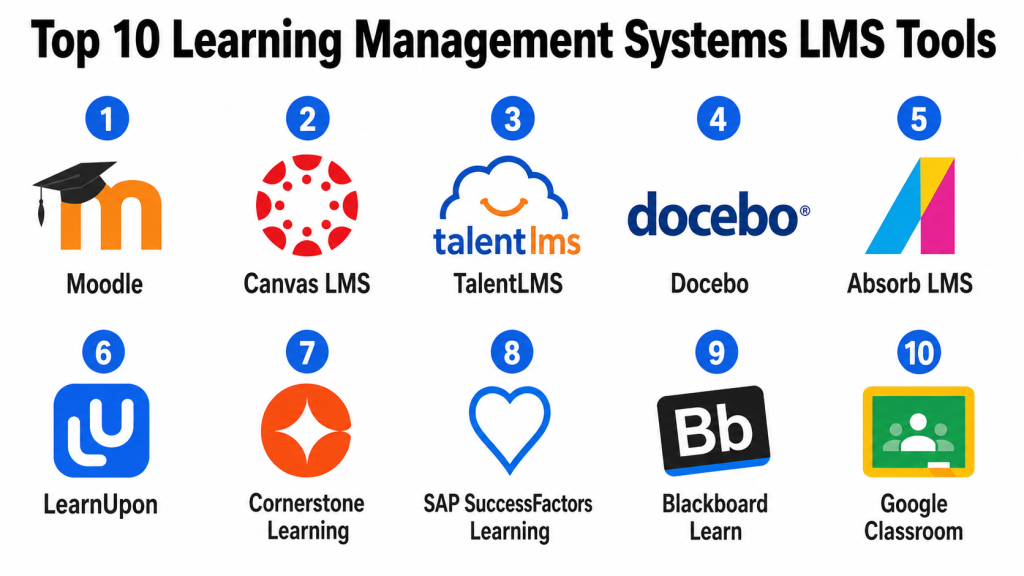
Top 10 Learning Management Systems LMS Tools
#1 — Moodle
Short description: Moodle is a widely used open-source LMS for schools, universities, training providers, and organizations that need flexible learning management. It is known for customization, strong community support, and self-hosted or managed hosting options.
Key Features
- Course creation and learning management
- Open-source customization
- Quizzes, assignments, and grading
- Learner progress tracking
- Plugins and extensions
- Mobile app support
- Multi-language learning environments
Pros
- Flexible and highly customizable.
- Strong global community and plugin ecosystem.
- Good fit for education and organizations needing control.
Cons
- Self-hosted setups require technical management.
- User experience depends heavily on configuration.
- Customization can become complex without proper governance.
Platforms / Deployment
Web / iOS / Android
Cloud / Self-hosted / Hybrid
Security & Compliance
Moodle supports user roles, permissions, authentication options, and access controls. Exact security certifications depend on hosting provider, deployment model, and implementation setup.
SOC 2 / ISO 27001 / GDPR / HIPAA: Not publicly stated.
Integrations & Ecosystem
Moodle has a strong plugin ecosystem and can connect with many education, identity, content, collaboration, and reporting tools.
- SSO and identity systems
- Video conferencing tools
- Content authoring tools
- Student information systems
- Analytics and reporting plugins
- Payment and eCommerce extensions
Support & Community
Moodle has one of the strongest LMS communities, with documentation, forums, partners, plugins, and implementation service providers. Support depends on whether the organization uses community support, in-house administration, or a managed Moodle partner.
#2 — Canvas LMS
Short description: Canvas LMS is a learning management platform widely used by schools, universities, and education institutions. It supports course delivery, assignments, grading, communication, mobile learning, and integrations for academic environments.
Key Features
- Course management and content delivery
- Assignments, quizzes, and grading
- Student communication tools
- Mobile learning support
- Calendar and course scheduling
- Learning analytics
- Third-party education integrations
Pros
- Strong fit for academic learning environments.
- Clean learner and instructor experience.
- Good ecosystem for education technology integrations.
Cons
- May be more education-focused than corporate training-focused.
- Advanced customization depends on setup and institutional needs.
- Pricing and implementation may vary by organization.
Platforms / Deployment
Web / iOS / Android
Cloud
Security & Compliance
Canvas LMS supports user roles, permissions, authentication, and education-focused access controls. Specific certifications and compliance details should be confirmed with the vendor or hosting provider.
SOC 2 / ISO 27001 / GDPR / HIPAA: Not publicly stated.
Integrations & Ecosystem
Canvas connects well with academic technology tools, content systems, assessment platforms, video tools, and student information systems.
- Student information systems
- Video conferencing platforms
- Assessment tools
- Content libraries
- Plagiarism detection tools
- Analytics platforms
Support & Community
Canvas provides documentation, training resources, support options, and a strong education community. Support depth depends on institutional package and service agreement.
#3 — TalentLMS
Short description: TalentLMS is a cloud-based LMS designed for businesses that need a simple way to create, deliver, and track training. It is especially useful for SMBs, growing companies, and teams that want fast setup with practical learning features.
Key Features
- Course creation and learner management
- Quizzes and assessments
- Certifications and completion tracking
- User groups and branches
- Reporting and analytics
- Mobile learning support
- eCommerce and external training support
Pros
- Easy to set up and manage.
- Good fit for SMBs and growing teams.
- Supports employee, customer, and partner training.
Cons
- May not fit very complex enterprise learning needs.
- Advanced customization may be limited compared with open-source or enterprise platforms.
- Some features may depend on selected plan.
Platforms / Deployment
Web / iOS / Android
Cloud
Security & Compliance
TalentLMS supports common LMS security features such as user roles, permissions, authentication controls, and learner data management. Specific certifications should be verified during vendor review.
SOC 2 / ISO 27001 / GDPR / HIPAA: Not publicly stated.
Integrations & Ecosystem
TalentLMS integrates with business, communication, content, and automation tools. It is practical for teams that need training workflows connected with daily operations.
- HR systems
- Communication tools
- Video conferencing tools
- eCommerce tools
- SSO providers
- Automation platforms
Support & Community
TalentLMS provides documentation, help resources, onboarding guidance, and customer support. It is generally approachable for small and mid-sized teams without large technical departments.
#4 — Docebo
Short description: Docebo is an enterprise-grade LMS and learning platform designed for employee training, customer education, partner enablement, and scalable learning programs. It is useful for organizations that need strong automation, integrations, and learning analytics.
Key Features
- Employee and external training management
- AI-assisted learning recommendations
- Learning paths and content management
- Certifications and compliance tracking
- Reporting and analytics
- Extended enterprise learning support
- Integration marketplace
Pros
- Strong fit for enterprise learning programs.
- Good for customer, partner, and employee training.
- Strong automation and integration capabilities.
Cons
- May be more complex than needed for small teams.
- Implementation requires planning and learning strategy.
- Pricing and modules may vary based on use case.
Platforms / Deployment
Web / iOS / Android
Cloud
Security & Compliance
Docebo supports enterprise learning security patterns such as permissions, authentication options, and learner data controls. Specific certifications and compliance details should be confirmed during procurement.
SOC 2 / ISO 27001 / GDPR / HIPAA: Not publicly stated.
Integrations & Ecosystem
Docebo has a strong ecosystem for enterprise learning and can connect with HR, CRM, content, collaboration, and analytics systems.
- HRIS platforms
- CRM systems
- SSO providers
- Content libraries
- Collaboration tools
- Analytics and data systems
Support & Community
Docebo provides enterprise support, implementation resources, documentation, and customer success options. Support experience may depend on contract, plan, and implementation scope.
#5 — Absorb LMS
Short description: Absorb LMS is a learning management platform built for corporate training, compliance, employee development, customer training, and partner education. It is designed for organizations that need a polished learner experience and strong administration.
Key Features
- Course and content management
- Learner portals and branding
- Compliance and certification tracking
- Reporting and dashboards
- eCommerce support
- Mobile learning
- Automation and administrative workflows
Pros
- Strong learner experience and administration features.
- Good fit for internal and external training.
- Useful for compliance-heavy training programs.
Cons
- May require setup time for complex learning programs.
- Pricing and advanced features may vary by package.
- Smaller teams may not need the full feature depth.
Platforms / Deployment
Web / iOS / Android
Cloud
Security & Compliance
Absorb LMS supports business-grade learning data controls, permissions, and security-oriented administration. Exact certifications and compliance coverage should be confirmed during vendor review.
SOC 2 / ISO 27001 / GDPR / HIPAA: Not publicly stated.
Integrations & Ecosystem
Absorb LMS integrates with HR systems, CRM tools, identity platforms, content providers, and business applications.
- HRIS platforms
- CRM tools
- SSO providers
- Content authoring tools
- eCommerce systems
- Reporting and analytics tools
Support & Community
Absorb provides documentation, onboarding support, customer success resources, and implementation help. Support quality may vary by plan and organization size.
#6 — LearnUpon
Short description: LearnUpon is a cloud LMS designed for employee training, customer education, partner training, and extended enterprise learning. It is useful for companies that need to train multiple audiences from one platform.
Key Features
- Multi-audience training portals
- Course management and learning paths
- Certifications and compliance tracking
- Reporting and analytics
- eCommerce support
- Integrations with business systems
- Learner engagement features
Pros
- Strong fit for customer, partner, and employee training.
- Easy to manage multiple learning audiences.
- Practical for scaling structured training programs.
Cons
- May be more than needed for simple internal training.
- Advanced requirements may need careful configuration.
- Pricing may depend on learner volume and features.
Platforms / Deployment
Web
Cloud
Security & Compliance
LearnUpon supports role-based learning access, user management, and business security controls. Specific certifications and compliance details should be confirmed with the vendor.
SOC 2 / ISO 27001 / GDPR / HIPAA: Not publicly stated.
Integrations & Ecosystem
LearnUpon connects with HR, CRM, SSO, webinar, content, and automation tools to support learning delivery across different audiences.
- HRIS systems
- CRM platforms
- Webinar tools
- SSO providers
- Content authoring tools
- Automation and analytics tools
Support & Community
LearnUpon provides support resources, onboarding guidance, documentation, and customer success assistance. It is often valued by teams running structured multi-audience training.
#7 — Cornerstone Learning
Short description: Cornerstone Learning is an enterprise learning platform used for employee development, compliance training, skills management, content delivery, and workforce learning. It is best suited for large organizations with complex learning and talent needs.
Key Features
- Enterprise learning management
- Compliance training and certifications
- Skills and development support
- Content management and learning paths
- Reporting and analytics
- Talent and performance ecosystem alignment
- Global workforce learning support
Pros
- Strong fit for large enterprises.
- Good for compliance, skills, and workforce development.
- Connects learning with broader talent management.
Cons
- May be too complex for smaller teams.
- Implementation can require structured planning.
- Administration may need trained internal owners.
Platforms / Deployment
Web / iOS / Android
Cloud
Security & Compliance
Cornerstone Learning supports enterprise-grade learning administration, permissions, and access controls. Specific security certifications and compliance coverage should be validated during vendor evaluation.
SOC 2 / ISO 27001 / GDPR / HIPAA: Not publicly stated.
Integrations & Ecosystem
Cornerstone connects learning with HR, talent, performance, compliance, content, and enterprise systems.
- HRIS systems
- Talent management tools
- Performance management platforms
- Content providers
- Identity systems
- Analytics platforms
Support & Community
Cornerstone provides enterprise documentation, implementation support, customer success resources, and a large customer ecosystem. Support experience may vary by service level and implementation partner.
#8 — SAP SuccessFactors Learning
Short description: SAP SuccessFactors Learning is an enterprise LMS within the SAP SuccessFactors HCM suite. It is designed for companies that need structured learning, compliance, certification tracking, workforce development, and integration with SAP HR processes.
Key Features
- Enterprise learning management
- Compliance and certification tracking
- Learning assignment automation
- Course catalogs and curricula
- Reporting and analytics
- Integration with SAP SuccessFactors HCM
- Role-based learning workflows
Pros
- Strong fit for organizations using SAP SuccessFactors.
- Good for enterprise compliance and workforce learning.
- Connects learning with broader HR and talent data.
Cons
- Can be complex for smaller teams.
- Implementation may require specialist support.
- Best value comes when used within the SAP ecosystem.
Platforms / Deployment
Web / iOS / Android
Cloud
Security & Compliance
SAP SuccessFactors Learning supports enterprise access controls and HR data security patterns. Specific compliance certifications and controls should be confirmed during procurement.
SOC 2 / ISO 27001 / GDPR / HIPAA: Not publicly stated.
Integrations & Ecosystem
SAP SuccessFactors Learning integrates closely with SAP HR, talent, performance, compliance, and enterprise systems.
- SAP SuccessFactors HCM
- Talent management systems
- Performance management workflows
- Compliance systems
- Identity providers
- Enterprise analytics
Support & Community
SAP provides documentation, implementation partners, enterprise support, and a global customer ecosystem. Support quality may depend on service contract and partner involvement.
#9 — Blackboard Learn
Short description: Blackboard Learn is a learning management system widely used in education, higher education, and institutional learning environments. It supports course delivery, assignments, communication, grading, and academic learning workflows.
Key Features
- Course content management
- Assignments and assessments
- Gradebook and instructor tools
- Student communication features
- Learning analytics
- Mobile access
- Academic workflow support
Pros
- Strong fit for education and institutional learning.
- Supports structured academic course management.
- Useful for instructors managing learners, assignments, and grades.
Cons
- May not be ideal for corporate training needs.
- User experience depends on implementation and configuration.
- Advanced customization may require administrator expertise.
Platforms / Deployment
Web / iOS / Android
Cloud / Hybrid
Security & Compliance
Blackboard Learn supports user roles, academic permissions, access controls, and institutional learning data management. Specific compliance certifications should be verified based on deployment and vendor agreement.
SOC 2 / ISO 27001 / GDPR / HIPAA: Not publicly stated.
Integrations & Ecosystem
Blackboard Learn integrates with education systems, content tools, assessment platforms, video tools, and student information systems.
- Student information systems
- Video conferencing tools
- Assessment platforms
- Content repositories
- Plagiarism checking tools
- Learning analytics systems
Support & Community
Blackboard provides documentation, institutional support, implementation resources, and training materials. Community strength is stronger in education and academic technology environments.
#10 — Google Classroom
Short description: Google Classroom is a simple learning and classroom management tool used by educators, schools, and training groups that need easy assignment sharing, communication, and learning organization. It is best suited for lightweight learning workflows rather than complex corporate LMS needs.
Key Features
- Class and course organization
- Assignment creation and submission
- Student communication
- Google Workspace integration
- File sharing and collaboration
- Basic grading workflows
- Simple learner access
Pros
- Very easy to use for educators and learners.
- Strong fit for Google Workspace users.
- Good for simple classroom-style learning workflows.
Cons
- Not a full enterprise LMS.
- Limited advanced analytics and compliance training features.
- Less suitable for complex certification or corporate training programs.
Platforms / Deployment
Web / iOS / Android
Cloud
Security & Compliance
Google Classroom uses Google account and Workspace-based access controls. Specific compliance details depend on the Google Workspace edition and organizational setup.
SOC 2 / ISO 27001 / GDPR / HIPAA: Not publicly stated.
Integrations & Ecosystem
Google Classroom connects closely with Google Workspace tools, making it useful for simple learning environments where documents, slides, meetings, and storage are already managed in Google.
- Google Drive
- Google Docs
- Google Slides
- Google Meet
- Google Calendar
- Google Forms
Support & Community
Google Classroom has wide usage, broad documentation, educator resources, and community support. Formal support depends on the Google Workspace edition and organization setup.
Comparison Table
| Tool Name | Best For | Platform(s) Supported | Deployment | Standout Feature | Public Rating |
|---|---|---|---|---|---|
| Moodle | Customizable open-source learning environments | Web, iOS, Android | Cloud / Self-hosted / Hybrid | Open-source flexibility | N/A |
| Canvas LMS | Schools, colleges, and academic learning | Web, iOS, Android | Cloud | Strong education-focused experience | N/A |
| TalentLMS | SMB and growing business training | Web, iOS, Android | Cloud | Easy setup for business training | N/A |
| Docebo | Enterprise employee, customer, and partner training | Web, iOS, Android | Cloud | AI-assisted enterprise learning | N/A |
| Absorb LMS | Corporate training and compliance programs | Web, iOS, Android | Cloud | Polished learner and admin experience | N/A |
| LearnUpon | Multi-audience training programs | Web | Cloud | Employee, customer, and partner portals | N/A |
| Cornerstone Learning | Large enterprise workforce learning | Web, iOS, Android | Cloud | Learning connected with talent development | N/A |
| SAP SuccessFactors Learning | SAP-centered enterprise learning | Web, iOS, Android | Cloud | Learning integrated with SAP HCM | N/A |
| Blackboard Learn | Institutional and academic learning | Web, iOS, Android | Cloud / Hybrid | Academic course and grading workflows | N/A |
| Google Classroom | Lightweight classroom learning | Web, iOS, Android | Cloud | Simple Google Workspace-based learning | N/A |
Evaluation & Scoring of Learning Management Systems LMS
The scoring below is comparative and based on practical LMS evaluation criteria. A higher score does not mean a platform is the best choice for every organization. It means the platform performs strongly against this model for features, usability, integrations, security expectations, reliability, support, and value.
| Tool Name | Core (25%) | Ease (15%) | Integrations (15%) | Security (10%) | Performance (10%) | Support (10%) | Value (15%) | Weighted Total (0–10) |
|---|---|---|---|---|---|---|---|---|
| Moodle | 8.8 | 7.4 | 8.7 | 8.0 | 8.2 | 8.5 | 9.0 | 8.42 |
| Canvas LMS | 8.7 | 8.3 | 8.5 | 8.3 | 8.6 | 8.4 | 7.8 | 8.39 |
| TalentLMS | 8.2 | 8.8 | 8.0 | 8.0 | 8.3 | 8.1 | 8.5 | 8.31 |
| Docebo | 9.0 | 8.0 | 8.8 | 8.5 | 8.7 | 8.3 | 7.6 | 8.44 |
| Absorb LMS | 8.7 | 8.4 | 8.4 | 8.3 | 8.6 | 8.2 | 7.8 | 8.39 |
| LearnUpon | 8.5 | 8.5 | 8.2 | 8.2 | 8.4 | 8.2 | 8.0 | 8.32 |
| Cornerstone Learning | 9.0 | 7.2 | 8.6 | 8.7 | 8.8 | 8.4 | 7.3 | 8.30 |
| SAP SuccessFactors Learning | 8.8 | 7.1 | 8.6 | 8.7 | 8.7 | 8.3 | 7.2 | 8.20 |
| Blackboard Learn | 8.5 | 7.8 | 8.3 | 8.2 | 8.4 | 8.1 | 7.6 | 8.18 |
| Google Classroom | 7.0 | 9.2 | 7.5 | 8.0 | 8.2 | 7.8 | 9.0 | 8.00 |
These scores are useful for comparison, but they should not be treated as a final buying decision. Docebo, Cornerstone Learning, SAP SuccessFactors Learning, and Absorb LMS are stronger for enterprise learning. TalentLMS and LearnUpon are practical for growing businesses and multi-audience training. Moodle is strong when flexibility and control matter. Canvas and Blackboard Learn are stronger for academic environments. Google Classroom is simple and useful for lightweight learning needs.
Which Learning Management Systems LMS Tool Is Right for You?
Solo / Freelancer
Solo trainers, coaches, and independent educators may not need a large enterprise LMS. A simple course platform, video library, Google Classroom, or lightweight learning tool may be enough for basic lessons, assignments, and communication.
However, if you sell training programs, issue certificates, manage multiple learner groups, or need structured course tracking, TalentLMS, Moodle, or LearnUpon-style tools may be more useful.
SMB
Small and growing businesses should focus on ease of setup, simple course creation, learner tracking, certificates, reporting, and affordable pricing. TalentLMS, LearnUpon, Absorb LMS, and Moodle can be practical options depending on technical comfort and training needs.
SMBs should avoid buying a complex LMS before defining their training process. Start with employee onboarding, compliance training, role-based learning, and basic reporting before adding advanced features.
Mid-Market
Mid-market companies usually need stronger integrations, branded learner portals, manager visibility, compliance tracking, customer education, and structured analytics. Docebo, Absorb LMS, LearnUpon, TalentLMS, and Moodle can be strong choices.
At this stage, companies should think about scale. The LMS should support different departments, learner groups, business units, external users, and content types without creating administrative overload.
Enterprise
Enterprises need scalability, governance, security, compliance reporting, multi-region support, role-based learning, advanced analytics, integrations, and structured learning operations. Cornerstone Learning, SAP SuccessFactors Learning, Docebo, Absorb LMS, and Canvas-style enterprise deployments may be strong fits.
Enterprise buyers should plan for implementation, change management, data migration, content migration, HRIS integration, SSO, user permissions, reporting needs, and support models.
Budget vs Premium
Budget-focused buyers should consider whether open-source or lightweight cloud LMS platforms can meet their needs. Moodle and Google Classroom can be cost-effective depending on use case, but technical setup and support should be considered.
Premium platforms are better when the organization needs advanced reporting, compliance tracking, AI-assisted learning, multiple portals, enterprise integrations, customer training, partner training, and strong support.
Feature Depth vs Ease of Use
Feature-rich LMS platforms offer more control, automation, analytics, security, certifications, and integration options. However, they may require more setup, training, and administration.
Ease-of-use platforms are better when fast adoption matters. Choose deeper platforms when training is business-critical, compliance-heavy, or used across many teams and audiences.
Integrations & Scalability
A good LMS should connect with HRIS, CRM, SSO, video conferencing, content authoring tools, collaboration platforms, payment tools, and analytics systems.
Scalability matters if your organization expects more learners, more courses, more departments, external customers, partners, or regional training programs. Choose an LMS that can grow without forcing an early migration.
Security & Compliance Needs
LMS platforms store learner names, progress, quiz results, certificates, completion records, and sometimes sensitive compliance data. Security should be reviewed carefully before rollout.
Look for role-based access, SSO, MFA, encryption, audit logs, user permissions, data retention options, and compliance reporting. Regulated industries should involve HR, IT, legal, and security teams before selecting a platform.
Frequently Asked Questions FAQs
1. What is a Learning Management System LMS?
A Learning Management System is software used to create, deliver, manage, and track training programs. It helps organizations manage courses, learners, assessments, certificates, and learning reports in one place.
2. Who uses LMS platforms?
LMS platforms are used by businesses, schools, universities, training providers, HR teams, compliance teams, customer success teams, and organizations that need structured learning delivery.
3. How much does an LMS cost?
LMS pricing varies by vendor, learner count, active users, selected features, support level, hosting model, and implementation needs. Some platforms use subscription pricing, while others offer custom enterprise pricing.
4. What is the biggest mistake when choosing an LMS?
The biggest mistake is choosing a platform before defining learning goals. Buyers should clearly map use cases, learner groups, content types, reporting needs, integrations, and support requirements first.
5. Can an LMS support compliance training?
Yes, many LMS platforms support compliance training through required courses, completion tracking, certificates, reminders, reports, and audit-ready records. The depth of compliance support varies by platform.
6. Do LMS platforms support mobile learning?
Many LMS platforms support mobile learning through responsive web access or mobile apps. Buyers should test the learner experience on mobile before selecting a platform.
7. Can an LMS integrate with HRIS tools?
Yes, many LMS platforms integrate with HRIS systems to sync employee data, departments, roles, managers, and learning assignments. Integration quality depends on the LMS and HRIS combination.
8. What is the difference between LMS and LXP?
An LMS usually focuses on structured training management, course delivery, compliance, and tracking. An LXP focuses more on personalized learning discovery, recommendations, content experience, and learner-driven development.
9. Is open-source LMS software a good choice?
Open-source LMS software can be a good choice when an organization needs control, customization, and flexibility. However, it may require technical skills, hosting, maintenance, security management, and support planning.
10. When should a company switch LMS platforms?
A company should consider switching when the current LMS is hard to use, lacks integrations, has weak reporting, cannot scale, creates admin burden, or does not support modern learning needs.
Conclusion
Learning Management Systems help organizations turn training into a structured, trackable, and scalable process. A good LMS can support employee onboarding, compliance training, customer education, partner enablement, academic learning, skills development, and certification programs. But the best LMS depends on context. A school may need strong academic workflows, while a business may need compliance tracking, HRIS integration, and employee development. A training provider may need eCommerce and certificates, while an enterprise may need governance, reporting, and multi-audience learning.There is no single best LMS for every organization. Moodle is strong for flexibility and control. Canvas and Blackboard Learn are strong for education. TalentLMS is practical for SMBs. Docebo, Absorb LMS, LearnUpon, Cornerstone Learning, and SAP SuccessFactors Learning are stronger for structured business and enterprise learning. Google Classroom works well for simple classroom-style needs.
