Upgrade & Secure Your Future with DevOps, SRE, DevSecOps, MLOps!
We spend hours scrolling social media and waste money on things we forget, but won’t spend 30 minutes a day earning certifications that can change our lives.
Master in DevOps, SRE, DevSecOps & MLOps by DevOps School!
Learn from Guru Rajesh Kumar and double your salary in just one year.
Introduction
Chat Apps are communication tools that help people and teams send messages, share files, create group conversations, make voice or video calls, and collaborate in real time. In simple words, chat apps make workplace and personal communication faster, more organized, and easier to manage than long email threads.
Chat apps matter because modern teams work across locations, departments, devices, and time zones. Businesses need faster decision-making, secure communication, searchable conversations, integrations with daily tools, and better collaboration between employees, customers, partners, and communities.
Common use cases include team messaging, customer support, project collaboration, remote work communication, community discussions, file sharing, video meetings, and cross-functional team coordination.
Buyers should evaluate:
- Ease of messaging and navigation
- Group chat and channel management
- Voice and video calling
- File sharing and storage options
- Search and message history
- Security and privacy controls
- Admin and compliance features
- Integrations with business tools
- Mobile and desktop experience
- Pricing and scalability
Best for: remote teams, startups, SMBs, enterprises, customer support teams, communities, educators, agencies, project teams, and organizations that need fast and structured communication.
Not ideal for: teams that only need formal approvals, long-form documentation, or highly structured project tracking. In those cases, email, project management tools, knowledge bases, or document collaboration platforms may be better.
Key Trends in Chat Apps
- AI-assisted communication: Many chat apps are adding AI features for message summaries, smart replies, meeting notes, search assistance, and automated task suggestions.
- Unified collaboration: Chat is becoming part of a larger collaboration workspace that includes meetings, files, calendars, tasks, workflows, and knowledge sharing.
- Stronger security controls: Businesses expect SSO, MFA, role-based permissions, encryption, retention policies, audit logs, and admin controls.
- Async-first teamwork: Teams are using threads, scheduled messages, recordings, summaries, and searchable history to reduce meeting overload.
- Workflow automation: Chat apps are increasingly used to trigger alerts, approvals, reminders, customer updates, and IT or DevOps workflows.
- External collaboration: Companies need secure guest access, shared channels, client workspaces, and partner communication features.
- Mobile-first communication: Employees expect a smooth experience across desktop and mobile, especially for field teams, sales teams, and distributed workers.
- Community and customer engagement: Chat apps are also used for user groups, support communities, learning groups, and creator-led audiences.
- Interoperability with business systems: Strong integrations with CRM, project management, helpdesk, cloud storage, calendar, and developer tools are now important.
- Governance and compliance: Larger organizations need message retention, legal hold, export controls, data residency options, and permission management.
How We Selected These Tools
The top Chat Apps in this guide were selected using a practical evaluation model focused on communication quality, reliability, business fit, and collaboration value. The selection considered:
- Market adoption and recognition among business and consumer users
- Feature completeness across messaging, calling, channels, files, and search
- Fit for different users, including individuals, SMBs, enterprises, communities, and secure teams
- Ease of use across web, desktop, and mobile apps
- Integration ecosystem with workplace, productivity, CRM, support, and developer tools
- Security posture signals such as encryption, SSO, permissions, and admin controls
- Performance and reliability for real-time communication
- Collaboration features such as threads, channels, groups, file sharing, and meetings
- Support resources, documentation, and community strength
- Practical trade-offs such as pricing, learning curve, governance, and data control
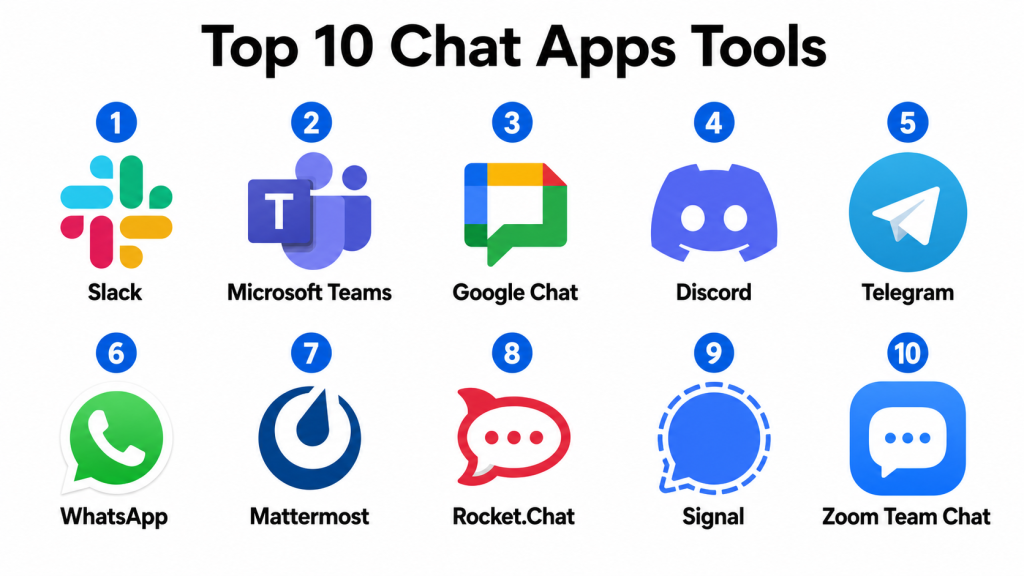
Top 10 Chat Apps Tools
#1 — Slack
Short description: Slack is a workplace chat app designed for team messaging, channels, integrations, workflow automation, and real-time collaboration. It is popular among startups, technology teams, agencies, and enterprises that need organized business communication.
Key Features
- Channels for team and project conversations
- Direct messages and group chats
- File sharing and searchable history
- Voice and video huddles
- Workflow automation
- App integrations and bots
- Guest access and external collaboration
Pros
- Strong integration ecosystem for business and technical teams.
- Excellent channel-based communication model.
- Useful for fast-moving teams and cross-functional collaboration.
Cons
- Can become noisy without good channel discipline.
- Advanced admin and retention features may require higher plans.
- Message history limits may apply depending on plan.
Platforms / Deployment
Web / Windows / macOS / Linux / iOS / Android
Cloud
Security & Compliance
Supports common enterprise security features such as SSO, MFA, access controls, workspace permissions, admin controls, and data protection options depending on plan and configuration. Specific compliance details should be validated during procurement.
Integrations & Ecosystem
Slack has one of the strongest app ecosystems in the chat app category and connects with many business, developer, support, and productivity tools.
- Project management tools
- CRM platforms
- Helpdesk systems
- Developer tools
- Cloud storage apps
- Workflow automation tools
Support & Community
Slack provides documentation, admin resources, support options, and a large user community. It is widely adopted across business and technology teams.
#2 — Microsoft Teams
Short description: Microsoft Teams is a business communication platform for chat, meetings, calls, file collaboration, and workplace productivity. It is especially useful for organizations already using Microsoft workplace tools.
Key Features
- Team channels and direct messages
- Video meetings and calling
- File sharing and document collaboration
- Calendar and meeting integration
- App integrations
- Enterprise admin controls
- Guest and external collaboration
Pros
- Strong fit for Microsoft-centered organizations.
- Combines chat, meetings, files, and productivity workflows.
- Good enterprise administration and governance options.
Cons
- Interface can feel heavy for users who only need simple chat.
- Best value is inside the Microsoft ecosystem.
- Setup and permissions may require admin planning.
Platforms / Deployment
Web / Windows / macOS / Linux / iOS / Android
Cloud
Security & Compliance
Supports Microsoft identity, access controls, MFA, SSO, encryption, retention, admin policies, and compliance-related controls depending on plan and configuration.
Integrations & Ecosystem
Microsoft Teams works deeply with Microsoft business tools and also supports third-party apps.
- Microsoft productivity tools
- Calendar systems
- File collaboration workflows
- Business apps
- Developer and automation tools
- Enterprise identity systems
Support & Community
Microsoft provides documentation, enterprise support options, admin guidance, training resources, and a large global user community.
#3 — Google Chat
Short description: Google Chat is a messaging and collaboration tool within the Google Workspace ecosystem. It supports direct messages, group spaces, file sharing, and team collaboration for organizations that rely on Google tools.
Key Features
- Direct and group messaging
- Spaces for team collaboration
- File sharing through Google Drive
- Threaded conversations
- Integration with Google Workspace tools
- Search across conversations
- Web and mobile access
Pros
- Works smoothly with Google Workspace.
- Simple option for teams already using Gmail, Drive, and Calendar.
- Easy to adopt for basic team communication.
Cons
- May not offer the same third-party ecosystem depth as Slack.
- Advanced community or workflow needs may require other tools.
- Best value is inside Google Workspace.
Platforms / Deployment
Web / iOS / Android
Cloud
Security & Compliance
Security depends on Google Workspace configuration. Supports Google account security, admin controls, data protection, access management, and identity options depending on plan.
Integrations & Ecosystem
Google Chat works naturally with Google Workspace and can connect with business workflows.
- Google Drive
- Google Calendar
- Google Meet
- Gmail workflows
- Automation tools
- Workspace apps
Support & Community
Google provides product documentation, admin support depending on plan, and a large user community across business and education environments.
#4 — Discord
Short description: Discord is a chat, voice, and community platform used for communities, creators, gaming groups, learning groups, developer communities, and informal team communication. It offers servers, channels, voice rooms, roles, and community engagement features.
Key Features
- Servers and channels
- Voice and video conversations
- Roles and permissions
- Community moderation tools
- Screen sharing
- Bots and integrations
- Mobile and desktop apps
Pros
- Strong for communities and real-time voice interaction.
- Flexible roles and channel structure.
- Good option for creator, gaming, learning, and developer communities.
Cons
- Not primarily designed for formal enterprise collaboration.
- Business compliance and governance needs may be limited.
- Large communities require active moderation.
Platforms / Deployment
Web / Windows / macOS / Linux / iOS / Android
Cloud
Security & Compliance
Supports account security, roles, permissions, moderation controls, and privacy settings. Enterprise compliance details are not publicly stated for every use case and should be validated if used for business purposes.
Integrations & Ecosystem
Discord has a strong bot and community ecosystem, especially for creators, developers, gaming, and community-led groups.
- Bots and automation
- Community moderation tools
- Streaming workflows
- Developer tools
- Event workflows
- Notification integrations
Support & Community
Discord provides help resources, community support, developer documentation, and a large user ecosystem. It is especially strong for communities and real-time group interaction.
#5 — Telegram
Short description: Telegram is a messaging app used for private chats, groups, channels, communities, file sharing, and broadcast-style communication. It is popular among communities, creators, small businesses, and users who need fast messaging across devices.
Key Features
- Direct messages and group chats
- Large groups and broadcast channels
- File sharing
- Voice and video calling
- Bots and automation
- Cross-device sync
- Public and private communities
Pros
- Fast and lightweight messaging experience.
- Strong for groups, channels, and community broadcasts.
- Good bot ecosystem for automation.
Cons
- Business administration and compliance features may be limited.
- Not ideal for structured enterprise collaboration.
- Moderation becomes important in large public groups.
Platforms / Deployment
Web / Windows / macOS / Linux / iOS / Android
Cloud
Security & Compliance
Supports privacy features, account security settings, and encrypted communication options depending on chat type. Enterprise compliance details are not publicly stated for every business use case.
Integrations & Ecosystem
Telegram supports bots, channels, and automation workflows that are useful for communities and lightweight business communication.
- Bots
- Broadcast channels
- Community workflows
- Notification systems
- Automation tools
- Developer APIs
Support & Community
Telegram provides documentation for users and developers, support resources, and a large global user community.
#6 — WhatsApp
Short description: WhatsApp is a widely used messaging app for personal communication, small business conversations, groups, voice calls, video calls, and customer communication. It is especially useful where mobile-first messaging is common.
Key Features
- Direct and group messaging
- Voice and video calls
- File, image, and document sharing
- End-to-end encrypted personal chats
- Business profiles through WhatsApp Business
- Broadcast and customer communication options
- Mobile-first experience
Pros
- Very familiar to many users.
- Strong mobile messaging experience.
- Useful for small businesses and customer conversations.
Cons
- Limited structured collaboration compared with workplace chat tools.
- Business governance and admin controls may be limited for complex teams.
- Not ideal for long-term knowledge management.
Platforms / Deployment
Web / Windows / macOS / iOS / Android
Cloud-connected messaging
Security & Compliance
Personal chats support end-to-end encryption. Business and enterprise usage depends on configuration and product type. Specific compliance requirements should be validated before using it for sensitive business workflows.
Integrations & Ecosystem
WhatsApp supports business communication through business tools and messaging workflows.
- Customer messaging workflows
- Business profiles
- CRM-connected messaging through supported solutions
- Notification workflows
- Customer support workflows
- Mobile communication channels
Support & Community
WhatsApp provides user help resources and business support options depending on product type. Its biggest strength is broad user familiarity and adoption.
#7 — Mattermost
Short description: Mattermost is a secure team messaging and collaboration platform often used by technical teams, security-conscious organizations, and companies that need more control over deployment. It supports cloud and self-hosted options.
Key Features
- Team channels and messaging
- Self-hosted deployment option
- File sharing and search
- Integrations and webhooks
- Workflow and incident collaboration
- Admin controls and permissions
- Developer-friendly collaboration features
Pros
- Strong option for teams needing data control.
- Good fit for technical, DevOps, and security-sensitive environments.
- Supports self-hosted and controlled deployment models.
Cons
- Self-hosting requires technical administration.
- User experience may feel more technical than mainstream apps.
- Smaller teams may not need the deployment flexibility.
Platforms / Deployment
Web / Windows / macOS / Linux / iOS / Android
Cloud / Self-hosted / Hybrid
Security & Compliance
Supports enterprise security expectations such as access controls, permissions, identity integrations, and self-hosted control. Specific compliance details depend on deployment, edition, and configuration.
Integrations & Ecosystem
Mattermost integrates well with developer, operations, and workflow systems.
- DevOps tools
- Incident management workflows
- Webhooks and APIs
- Identity providers
- Project management systems
- Automation tools
Support & Community
Mattermost provides documentation, support options, deployment guides, and a strong technical community. It is especially relevant for engineering and security-focused teams.
#8 — Rocket.Chat
Short description: Rocket.Chat is an open-source-friendly communication platform for team chat, customer messaging, and secure collaboration. It supports cloud and self-managed deployment options, making it useful for organizations that need control and customization.
Key Features
- Team messaging and channels
- Omnichannel customer communication
- Self-managed deployment option
- Voice and video integrations
- User roles and permissions
- Apps and marketplace extensions
- APIs and customization options
Pros
- Flexible deployment and customization options.
- Useful for teams needing control over communication infrastructure.
- Can support both internal chat and customer messaging workflows.
Cons
- Self-managed setup requires technical expertise.
- Advanced features may require paid plans or configuration.
- User experience depends on deployment quality and administration.
Platforms / Deployment
Web / Windows / macOS / Linux / iOS / Android
Cloud / Self-hosted / Hybrid
Security & Compliance
Supports common security features such as permissions, admin controls, identity integrations, and self-managed data control. Specific compliance details depend on deployment and configuration.
Integrations & Ecosystem
Rocket.Chat has a flexible integration ecosystem for internal collaboration and customer communication.
- CRM systems
- Helpdesk tools
- Developer APIs
- Webhooks
- Identity providers
- Customer messaging workflows
Support & Community
Rocket.Chat provides documentation, community resources, commercial support options, and developer materials. It is suitable for organizations that want flexibility and control.
#9 — Signal
Short description: Signal is a privacy-focused messaging app designed for secure personal and group communication. It is useful for individuals, small groups, journalists, activists, and teams that prioritize private messaging over business collaboration features.
Key Features
- End-to-end encrypted messaging
- Group chats
- Voice and video calls
- Disappearing messages
- File and media sharing
- Mobile and desktop apps
- Privacy-focused design
Pros
- Strong privacy-focused messaging experience.
- Simple and lightweight for secure communication.
- Good for sensitive personal or small-group conversations.
Cons
- Not a full business collaboration platform.
- Limited integrations and admin controls.
- Not ideal for enterprise workflow management.
Platforms / Deployment
Windows / macOS / Linux / iOS / Android
Cloud-connected messaging
Security & Compliance
Signal is known for privacy-focused end-to-end encrypted messaging. Enterprise compliance, admin governance, and business retention controls are not the main focus and should be evaluated carefully for business use.
Integrations & Ecosystem
Signal is intentionally simple and does not focus on broad business integrations.
- Secure messaging workflows
- Private group communication
- Voice and video calls
- Media sharing
- Desktop companion apps
- Minimal external integrations
Support & Community
Signal provides help resources, documentation, and a strong privacy-focused user community. It is best for secure communication rather than business workflow collaboration.
#10 — Zoom Team Chat
Short description: Zoom Team Chat is a messaging and collaboration tool connected with Zoom’s meeting and communication ecosystem. It supports team messaging, channels, file sharing, meetings, and collaboration workflows.
Key Features
- Team chat and channels
- Direct messages
- File sharing
- Meeting integration
- Searchable conversations
- External collaboration options
- Cross-device access
Pros
- Strong fit for teams already using Zoom meetings.
- Connects chat with video communication workflows.
- Easy adoption for organizations familiar with Zoom.
Cons
- May not replace deeper collaboration platforms for every team.
- Best value comes when used with Zoom’s broader ecosystem.
- Integration depth should be validated for complex workflows.
Platforms / Deployment
Web / Windows / macOS / Linux / iOS / Android
Cloud
Security & Compliance
Supports common business communication security features such as account controls, admin settings, encryption options, and user permissions depending on plan and configuration. Specific compliance details should be validated during procurement.
Integrations & Ecosystem
Zoom Team Chat connects with Zoom meetings and workplace communication workflows.
- Video meetings
- Calendar systems
- Productivity tools
- Collaboration workflows
- Contact and communication systems
- Business app integrations
Support & Community
Zoom provides documentation, support resources, admin guidance, and a large user community. It is useful for teams that already rely on Zoom for meetings.
Comparison Table
| Tool Name | Best For | Platform(s) Supported | Deployment | Standout Feature | Public Rating |
|---|---|---|---|---|---|
| Slack | Business team messaging and integrations | Web, Windows, macOS, Linux, iOS, Android | Cloud | Channels and app ecosystem | N/A |
| Microsoft Teams | Microsoft-centered workplace collaboration | Web, Windows, macOS, Linux, iOS, Android | Cloud | Chat, meetings, and files in one workspace | N/A |
| Google Chat | Google Workspace team communication | Web, iOS, Android | Cloud | Simple messaging inside Google Workspace | N/A |
| Discord | Communities and real-time voice chat | Web, Windows, macOS, Linux, iOS, Android | Cloud | Servers, voice channels, and community roles | N/A |
| Telegram | Groups, channels, and fast messaging | Web, Windows, macOS, Linux, iOS, Android | Cloud | Large communities and bot automation | N/A |
| Mobile-first personal and business messaging | Web, Windows, macOS, iOS, Android | Cloud-connected messaging | Familiar mobile messaging experience | N/A | |
| Mattermost | Secure and self-hostable team chat | Web, Windows, macOS, Linux, iOS, Android | Cloud / Self-hosted / Hybrid | Data control and technical team collaboration | N/A |
| Rocket.Chat | Customizable open-source-friendly chat | Web, Windows, macOS, Linux, iOS, Android | Cloud / Self-hosted / Hybrid | Flexible deployment and customer messaging | N/A |
| Signal | Privacy-focused secure messaging | Windows, macOS, Linux, iOS, Android | Cloud-connected messaging | End-to-end encrypted private messaging | N/A |
| Zoom Team Chat | Teams already using Zoom meetings | Web, Windows, macOS, Linux, iOS, Android | Cloud | Chat connected with Zoom meetings | N/A |
Evaluation & Scoring of Chat Apps
| Tool Name | Core (25%) | Ease (15%) | Integrations (15%) | Security (10%) | Performance (10%) | Support (10%) | Value (15%) | Weighted Total (0–10) |
|---|---|---|---|---|---|---|---|---|
| Slack | 9.0 | 8.7 | 9.5 | 8.7 | 9.0 | 8.8 | 8.0 | 8.83 |
| Microsoft Teams | 9.0 | 8.0 | 9.0 | 9.2 | 8.8 | 8.8 | 8.4 | 8.73 |
| Google Chat | 8.0 | 8.8 | 8.2 | 8.6 | 8.5 | 8.0 | 8.5 | 8.34 |
| Discord | 8.5 | 8.8 | 8.0 | 7.8 | 8.8 | 8.0 | 8.7 | 8.42 |
| Telegram | 8.2 | 9.0 | 8.0 | 8.0 | 8.8 | 7.8 | 8.8 | 8.39 |
| 7.8 | 9.5 | 7.5 | 8.2 | 9.0 | 7.8 | 9.0 | 8.36 | |
| Mattermost | 8.5 | 7.8 | 8.5 | 9.0 | 8.5 | 8.2 | 8.0 | 8.34 |
| Rocket.Chat | 8.4 | 7.8 | 8.4 | 8.8 | 8.3 | 8.0 | 8.2 | 8.28 |
| Signal | 7.5 | 9.0 | 6.5 | 9.2 | 8.5 | 7.5 | 8.5 | 8.02 |
| Zoom Team Chat | 8.0 | 8.5 | 8.0 | 8.5 | 8.7 | 8.5 | 8.2 | 8.32 |
These scores are comparative and should be used as a shortlisting guide. A higher score does not mean one tool is best for every team. Slack may be stronger for integrations, Microsoft Teams may be better for Microsoft-centered organizations, and Signal may be better for privacy-focused small groups. Buyers should validate security, integrations, user adoption, administration, and pricing before making a final decision.
Which Chat App Tool Is Right for You?
Solo / Freelancer
Solo professionals usually need a simple, reliable, and easy-to-use chat app. WhatsApp, Telegram, Signal, Google Chat, or Slack can be practical depending on the type of work.
If privacy is the main priority, Signal is a strong choice. If client communication is mobile-first, WhatsApp may be more practical. If work needs integrations and organized channels, Slack can be a better fit.
SMB
Small and medium businesses should focus on ease of use, team channels, file sharing, integrations, video calls, mobile access, and pricing. Slack, Microsoft Teams, Google Chat, Zoom Team Chat, and Rocket.Chat are strong options.
If the team already uses Microsoft tools, Microsoft Teams is practical. If the team uses Google Workspace, Google Chat is easier to adopt. If the business needs app integrations and flexible workflows, Slack is strong.
Mid-Market
Mid-market companies usually need structured channels, admin controls, guest access, integrations, search, workflow automation, and security settings. Slack, Microsoft Teams, Mattermost, Rocket.Chat, and Zoom Team Chat are good options.
If engineering or DevOps teams need strong integrations, Slack or Mattermost can work well. If the organization needs controlled deployment, Mattermost or Rocket.Chat should be evaluated.
Enterprise
Enterprise organizations should focus on governance, compliance, identity management, retention policies, admin controls, integrations, scalability, and support. Microsoft Teams, Slack, Mattermost, Rocket.Chat, and Zoom Team Chat are strong starting points.
Microsoft Teams is a strong fit for Microsoft-centered enterprises. Slack is strong for integration-heavy teams. Mattermost and Rocket.Chat are useful when self-hosting or data control matters.
Budget vs Premium
Budget-conscious users may consider WhatsApp, Telegram, Signal, Discord, Google Chat, or basic business plans from larger platforms. These can work well for simple communication and smaller groups.
Premium buyers should evaluate Slack, Microsoft Teams, Mattermost, Rocket.Chat, and Zoom Team Chat when governance, integrations, admin controls, support, and business scalability matter.
Feature Depth vs Ease of Use
WhatsApp, Telegram, Signal, and Google Chat are simple and easy to adopt. Slack, Microsoft Teams, Mattermost, and Rocket.Chat offer more business features but require more planning and administration.
Discord is easy for communities and voice-based groups, but it may not meet formal business governance needs. The right choice depends on whether the goal is casual messaging, business collaboration, customer communication, or secure team operations.
Integrations & Scalability
Chat apps become more powerful when they connect with project management, CRM, helpdesk, cloud storage, calendars, monitoring tools, developer systems, and automation platforms. Strong integrations reduce context switching and help teams act faster.
Before choosing a chat app, map your daily workflows. For example, a sales team may need CRM alerts, while an engineering team may need deployment notifications and incident channels.
Security & Compliance Needs
Chat apps may store sensitive business conversations, files, customer information, internal decisions, and personal data. Buyers should review SSO, MFA, encryption, guest access, retention policies, audit logs, admin controls, and data export options.
For regulated organizations, IT, legal, security, and compliance teams should review the platform before rollout. Casual chat tools may be easy to use but may not provide enough governance for sensitive business communication.
Frequently Asked Questions
1. What are chat apps?
Chat apps are software tools used for sending messages, creating group conversations, sharing files, making calls, and collaborating in real time. They are used by individuals, teams, businesses, and communities.
2. What is the difference between a chat app and email?
Email is better for formal, long-form, and external communication. Chat apps are better for fast conversations, quick decisions, team updates, informal collaboration, and real-time communication.
3. Which chat app is best for business teams?
Slack, Microsoft Teams, Google Chat, Zoom Team Chat, Mattermost, and Rocket.Chat are strong options for business teams. The best choice depends on existing tools, security needs, integrations, and budget.
4. Which chat app is best for communities?
Discord, Telegram, Slack, and Circle-style community platforms can work for communities. Discord is strong for real-time voice and member roles, while Telegram is useful for large groups and broadcast channels.
5. Are chat apps secure?
Many chat apps include security features such as encryption, access controls, admin permissions, and identity options. However, security varies by tool, plan, configuration, and use case.
6. What features should businesses look for in a chat app?
Businesses should look for channels, direct messages, search, file sharing, calls, integrations, admin controls, guest access, security settings, mobile apps, and support options.
7. Can chat apps replace project management tools?
Not fully. Chat apps are good for communication, but project management tools are better for tasks, timelines, dependencies, ownership, and structured project tracking.
8. What are common mistakes when using chat apps?
Common mistakes include too many channels, unclear naming, notification overload, poor message discipline, using chat as a document store, and not setting rules for external guests.
9. Which chat app is best for privacy?
Signal is strong for privacy-focused messaging. Mattermost and Rocket.Chat are useful for organizations that need more deployment control. Buyers should still review security and compliance requirements carefully.
10. Can chat apps integrate with business tools?
Yes, many chat apps integrate with CRM, helpdesk, project management, cloud storage, calendars, monitoring tools, developer platforms, and automation systems.
Conclusion
Chat Apps help people and organizations communicate faster, collaborate better, and stay connected across teams, customers, communities, and devices. The best chat app depends on the use case. Slack is strong for business integrations and channel-based teamwork. Microsoft Teams is practical for Microsoft-centered organizations. Google Chat works well for Google Workspace users. Discord and Telegram are strong for communities. WhatsApp is useful for mobile-first communication. Mattermost and Rocket.Chat are better when control and flexible deployment matter. Signal is best for privacy-focused small-group messaging, while Zoom Team Chat works well for teams already using Zoom.
