Upgrade & Secure Your Future with DevOps, SRE, DevSecOps, MLOps!
We spend hours scrolling social media and waste money on things we forget, but won’t spend 30 minutes a day earning certifications that can change our lives.
Master in DevOps, SRE, DevSecOps & MLOps by DevOps School!
Learn from Guru Rajesh Kumar and double your salary in just one year.
Introduction
Kubernetes Management Platforms help teams deploy, manage, secure, monitor, scale, and govern Kubernetes clusters across cloud, on-premises, hybrid, and edge environments. In simple words, these platforms make Kubernetes easier to operate by giving teams a central place to manage clusters, workloads, users, policies, networking, security, and application delivery.
Kubernetes matters because many organizations now use containers to run modern applications, microservices, APIs, data workloads, platform engineering systems, and DevOps pipelines. However, Kubernetes can become complex when teams manage multiple clusters, cloud providers, environments, namespaces, security rules, and deployment workflows manually.
Common use cases include multi-cluster management, container orchestration, GitOps deployment, platform engineering, hybrid cloud operations, developer self-service, security policy enforcement, workload scaling, and production monitoring.
Buyers should evaluate cluster lifecycle management, multi-cloud support, security controls, RBAC, GitOps support, observability, policy management, integrations, automation, cost visibility, scalability, and support quality.
Best for: DevOps teams, platform engineers, SRE teams, cloud teams, infrastructure teams, security teams, enterprises, SaaS companies, fintech, telecom, healthcare, retail, and organizations running containerized production workloads.
Not ideal for: very small teams running only one simple application, businesses without container expertise, or teams that only need basic container hosting instead of full Kubernetes operations and governance.
Key Trends in Kubernetes Management Platforms
- Multi-cluster management is now a core requirement: Teams often manage clusters across cloud, on-premises, edge, staging, production, and regional environments.
- Platform engineering is driving adoption: Organizations want Kubernetes platforms that provide developer self-service, golden paths, templates, policy guardrails, and controlled automation.
- GitOps is becoming a standard operating model: Teams increasingly manage Kubernetes changes through Git-based workflows, pull requests, approvals, and automated synchronization.
- Security and governance are stronger priorities: RBAC, admission controls, policy-as-code, image scanning, secrets management, audit logs, and network policies are now important buying factors.
- Hybrid and multi-cloud support matters more: Organizations want freedom to run workloads across different environments without rebuilding their operating model each time.
- Cost visibility is becoming important: Kubernetes can waste resources if requests, limits, autoscaling, and cluster sizing are not managed properly.
- Observability is becoming deeply integrated: Teams need logs, metrics, traces, events, alerts, workload health, and cluster performance visibility in one operational view.
- Edge Kubernetes is growing: Retail, telecom, factories, logistics, healthcare, and remote branches need Kubernetes management for distributed locations.
- AI-assisted operations are emerging carefully: Some platforms are adding recommendations, anomaly detection, incident context, and optimization insights, but buyers should validate real value.
- Application delivery and infrastructure management are merging: Kubernetes platforms increasingly combine cluster management, CI/CD, GitOps, policy, security, and monitoring.
How We Selected These Tools
The tools in this list were selected using practical buyer-focused evaluation criteria:
- Strong recognition in Kubernetes management, container orchestration, platform engineering, or cloud-native operations.
- Ability to manage cluster lifecycle, workload deployment, user access, policies, and operational visibility.
- Support for cloud, on-premises, hybrid, multi-cloud, or edge Kubernetes environments.
- Security capabilities such as RBAC, SSO, policy enforcement, audit logs, image controls, and secrets integration where available.
- Fit for different buyer segments, including SMBs, mid-market companies, enterprises, developers, SRE teams, and platform teams.
- Integration with CI/CD, GitOps, observability, cloud providers, identity tools, service mesh, and security platforms.
- Scalability for production workloads, multi-team environments, and multiple clusters.
- Ease of adoption for administrators and developers.
- Support quality, documentation, training resources, and community strength.
- Overall value based on feature depth, operational efficiency, ecosystem maturity, and long-term platform fit.
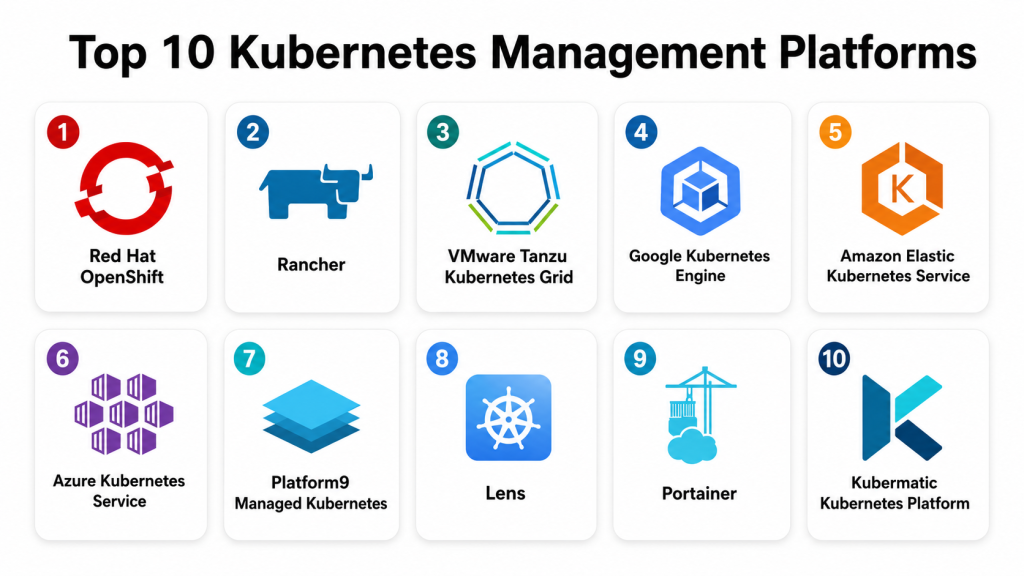
Top 10 Kubernetes Management Platforms
#1 — Red Hat OpenShift
Short description: Red Hat OpenShift is an enterprise Kubernetes platform that includes cluster management, developer tools, security controls, automation, and application delivery capabilities. It is best for organizations that need a supported, enterprise-grade Kubernetes platform across hybrid environments.
Key Features
- Enterprise Kubernetes distribution with integrated management.
- Built-in developer console and application deployment workflows.
- Operator framework for lifecycle automation.
- Integrated image registry and build capabilities.
- Strong RBAC, policy, and security controls.
- Hybrid cloud and on-premises deployment options.
- Support for containers, platform services, and virtualization use cases.
Pros
- Strong enterprise support and mature Kubernetes platform capabilities.
- Good fit for regulated and complex environments.
- Useful developer and operations experience in one platform.
Cons
- Can require skilled administrators and platform engineers.
- More complex than lightweight Kubernetes tools.
- Cost and licensing should be reviewed carefully for large deployments.
Platforms / Deployment
Web / Linux
Cloud / Self-hosted / Hybrid
Security & Compliance
Supports RBAC, SSO integration, audit logs, network policies, image controls, security context constraints, secrets integration, and enterprise security workflows. Specific compliance certifications and regulatory mappings should be validated directly based on deployment and subscription.
Integrations & Ecosystem
OpenShift has a broad enterprise ecosystem across cloud-native, DevOps, security, and hybrid infrastructure workflows.
- CI/CD tools
- GitOps workflows
- Service mesh
- Monitoring and logging tools
- Cloud providers
- Storage and networking platforms
- Red Hat ecosystem services
Support & Community
Red Hat provides enterprise support, documentation, training, professional services, partner resources, and a strong open-source community foundation. It is best for organizations that need production-grade Kubernetes with vendor support.
#2 — Rancher
Short description: Rancher is a Kubernetes management platform for managing multiple Kubernetes clusters across cloud, on-premises, and edge environments. It is widely used by teams that want centralized cluster operations, access control, and workload management.
Key Features
- Multi-cluster Kubernetes management.
- Centralized authentication and RBAC.
- Cluster provisioning and lifecycle management.
- App catalog and workload management.
- Policy and security controls.
- Monitoring and logging integrations.
- Edge and hybrid Kubernetes support.
Pros
- Strong multi-cluster management experience.
- Flexible across different Kubernetes distributions.
- Good fit for hybrid and edge environments.
Cons
- Requires Kubernetes knowledge for production operations.
- Advanced security and governance need careful configuration.
- Large deployments require strong operational planning.
Platforms / Deployment
Web / Linux
Cloud / Self-hosted / Hybrid
Security & Compliance
Supports RBAC, authentication integration, audit-related visibility, cluster access controls, namespaces, projects, and security policy integrations. Specific certifications and compliance coverage should be validated directly.
Integrations & Ecosystem
Rancher is known for broad Kubernetes ecosystem compatibility and flexible infrastructure support.
- Cloud Kubernetes services
- On-premises clusters
- Edge clusters
- Monitoring tools
- Logging tools
- GitOps workflows
- Storage and networking integrations
Support & Community
Rancher has strong documentation, community usage, enterprise support options through its vendor ecosystem, and broad adoption among Kubernetes administrators. It is useful for teams managing Kubernetes across mixed environments.
#3 — VMware Tanzu Kubernetes Grid
Short description: VMware Tanzu Kubernetes Grid helps organizations run and manage Kubernetes clusters across VMware and cloud environments. It is best for teams already invested in VMware infrastructure and enterprise application modernization.
Key Features
- Kubernetes cluster lifecycle management.
- Integration with VMware infrastructure.
- Support for modern application platforms.
- Centralized cluster operations.
- Networking and storage integration.
- Policy and governance support.
- Hybrid cloud deployment options.
Pros
- Strong fit for VMware-centered organizations.
- Useful for application modernization programs.
- Good alignment with enterprise infrastructure teams.
Cons
- Best value appears when used with VMware ecosystem.
- May be complex for teams without VMware and Kubernetes skills.
- Buyers should validate packaging and operational requirements.
Platforms / Deployment
Web / Linux
Cloud / Self-hosted / Hybrid
Security & Compliance
Supports RBAC, identity integration, cluster-level controls, policy management, workload isolation, and VMware-aligned security workflows. Specific compliance details should be validated directly based on deployment and edition.
Integrations & Ecosystem
Tanzu works well with VMware infrastructure, DevOps pipelines, and enterprise application platforms.
- VMware vSphere
- VMware networking and storage
- CI/CD tools
- Observability tools
- Cloud platforms
- Developer platform workflows
- Enterprise backup and operations tools
Support & Community
VMware provides enterprise documentation, support, partner services, and professional services. Tanzu is most suitable for organizations modernizing applications on VMware and hybrid infrastructure.
#4 — Google Kubernetes Engine
Short description: Google Kubernetes Engine is a managed Kubernetes service that helps teams run Kubernetes clusters on Google Cloud with reduced operational overhead. It is suitable for cloud-native teams that want managed cluster operations, autoscaling, and integration with Google Cloud services.
Key Features
- Managed Kubernetes cluster operations.
- Cluster autoscaling and workload scaling options.
- Integration with Google Cloud services.
- Security and identity controls.
- Observability and logging integration.
- Node management and upgrade workflows.
- Support for standard and autopilot-style operating models depending on use case.
Pros
- Strong managed Kubernetes experience.
- Good fit for Google Cloud-native applications.
- Reduces manual cluster administration burden.
Cons
- Best suited for Google Cloud environments.
- Multi-cloud management may require additional tooling.
- Advanced networking and security still need skilled planning.
Platforms / Deployment
Web / Linux
Cloud
Security & Compliance
Supports identity integration, RBAC, workload identity options, network policies, encryption options, audit logging, and cloud security controls. Specific compliance coverage should be validated based on Google Cloud configuration and selected services.
Integrations & Ecosystem
Google Kubernetes Engine integrates deeply with Google Cloud and cloud-native development workflows.
- Google Cloud services
- Cloud monitoring and logging
- Container registry and artifact workflows
- CI/CD pipelines
- Identity and access management
- Service mesh and networking tools
Support & Community
Google provides documentation, cloud support options, training resources, and a large Kubernetes community connection. It is a strong choice for teams running Kubernetes on Google Cloud.
#5 — Amazon Elastic Kubernetes Service
Short description: Amazon Elastic Kubernetes Service is a managed Kubernetes service for running Kubernetes clusters on AWS. It is best for organizations that use AWS infrastructure and want Kubernetes integrated with AWS networking, identity, storage, and observability services.
Key Features
- Managed Kubernetes control plane.
- Integration with AWS identity and networking.
- Support for managed node groups and serverless-style compute options depending on architecture.
- Cluster scaling and workload scheduling.
- Integration with AWS monitoring and logging.
- Security controls through AWS services.
- Support for production cloud-native workloads.
Pros
- Strong fit for AWS-based environments.
- Good integration with AWS infrastructure services.
- Reduces control plane management burden.
Cons
- AWS knowledge is important for secure and efficient operation.
- Cluster networking and permissions can become complex.
- Multi-cloud management may require additional platforms.
Platforms / Deployment
Web / Linux
Cloud
Security & Compliance
Supports IAM integration, RBAC, encryption options, network controls, audit logging, private cluster patterns, and AWS security services. Specific compliance coverage should be validated based on AWS environment and configuration.
Integrations & Ecosystem
Amazon Elastic Kubernetes Service works naturally with AWS cloud infrastructure and DevOps workflows.
- AWS IAM
- AWS networking services
- AWS storage services
- Container registry
- Monitoring and logging services
- CI/CD workflows
- Security and compliance tools
Support & Community
AWS provides documentation, support plans, training resources, partner services, and a large cloud community. It is a strong choice for organizations already operating on AWS.
#6 — Azure Kubernetes Service
Short description: Azure Kubernetes Service is a managed Kubernetes platform for running containerized workloads on Microsoft Azure. It is well suited for Microsoft-centered organizations using Azure cloud, DevOps tools, identity services, and enterprise infrastructure.
Key Features
- Managed Kubernetes cluster operations.
- Integration with Azure identity and networking.
- Autoscaling and node pool management.
- Monitoring and logging integration.
- Container registry and deployment workflow support.
- Security policy and access controls.
- Hybrid integration options through the broader Azure ecosystem.
Pros
- Strong fit for Azure and Microsoft-first organizations.
- Good integration with Microsoft identity and DevOps workflows.
- Reduces Kubernetes control plane administration.
Cons
- Azure architecture knowledge is required for best results.
- Advanced networking and security require careful planning.
- Multi-cloud governance may need additional tools.
Platforms / Deployment
Web / Linux / Windows containers where supported by workload design
Cloud
Security & Compliance
Supports Azure identity integration, RBAC, network controls, private cluster options, encryption, audit logging, and security policy integrations. Specific compliance coverage should be validated based on Azure configuration and selected services.
Integrations & Ecosystem
Azure Kubernetes Service integrates with Microsoft cloud, DevOps, monitoring, and enterprise security tools.
- Azure identity services
- Azure DevOps
- GitHub workflows
- Azure Monitor
- Azure Container Registry
- Azure networking and storage
- Security and policy tools
Support & Community
Microsoft provides documentation, enterprise support, partner assistance, training, and a large Azure administrator community. It is best for organizations already invested in Microsoft cloud.
#7 — Platform9 Managed Kubernetes
Short description: Platform9 Managed Kubernetes helps teams run managed Kubernetes across public cloud, private cloud, and edge environments. It is suitable for organizations that want a managed control experience without being locked into only one infrastructure provider.
Key Features
- Managed Kubernetes across different infrastructure environments.
- Multi-cluster lifecycle management.
- Support for private cloud and edge use cases.
- Centralized operations and monitoring.
- Automated cluster upgrades and maintenance workflows.
- Policy and governance controls.
- Hybrid deployment support.
Pros
- Useful for hybrid and edge Kubernetes needs.
- Helps reduce operational burden.
- Good fit for organizations wanting managed Kubernetes outside a single cloud provider.
Cons
- Buyers should validate supported infrastructure carefully.
- May require architectural planning for complex environments.
- Ecosystem depth may differ from hyperscaler-native services.
Platforms / Deployment
Web / Linux
Cloud / Self-hosted / Hybrid
Security & Compliance
Supports RBAC, authentication integration, centralized cluster access controls, policy workflows, and operational visibility. Specific certifications and compliance details should be validated directly.
Integrations & Ecosystem
Platform9 fits hybrid cloud, private cloud, and edge Kubernetes operations.
- Public cloud infrastructure
- Private data centers
- Edge environments
- Monitoring tools
- CI/CD workflows
- Storage and networking platforms
Support & Community
Platform9 provides documentation, managed service support, onboarding help, and technical guidance. It is best for teams seeking managed Kubernetes across diverse environments.
#8 — Lens
Short description: Lens is a Kubernetes IDE and management interface used by developers, DevOps engineers, and platform teams to inspect and manage clusters. It is best for users who need a visual, developer-friendly way to work with Kubernetes resources.
Key Features
- Kubernetes cluster dashboard.
- Workload, pod, service, and namespace visibility.
- Log and event inspection.
- Resource editing and troubleshooting.
- Multi-cluster access from one interface.
- Developer-friendly navigation.
- Extension and workflow support depending on setup.
Pros
- Easy visual experience for Kubernetes users.
- Helpful for troubleshooting and daily cluster navigation.
- Good for developers and DevOps engineers working across clusters.
Cons
- Not a full enterprise Kubernetes platform by itself.
- Governance and policy controls depend on cluster configuration.
- Best used with strong RBAC and operational guardrails.
Platforms / Deployment
Windows / macOS / Linux
Self-hosted / Hybrid
Security & Compliance
Security depends heavily on kubeconfig access, cluster RBAC, identity controls, and local workstation security. Specific enterprise compliance features should be validated based on edition and deployment model.
Integrations & Ecosystem
Lens fits developer and operator workflows around Kubernetes troubleshooting, inspection, and resource management.
- Kubernetes clusters
- kubeconfig workflows
- Logs and events
- Local developer tools
- Extensions
- Multi-cluster navigation
Support & Community
Lens has documentation, community awareness, and support options depending on edition. It is best for day-to-day Kubernetes visibility rather than full cluster governance.
#9 — Portainer
Short description: Portainer is a container management platform that supports Docker, Kubernetes, and edge environments. It is useful for small teams, platform beginners, and organizations that want a simpler interface for managing containerized workloads.
Key Features
- Kubernetes and container environment management.
- Web-based interface for workloads and resources.
- User and team access controls.
- App templates and deployment workflows.
- Edge and remote environment management.
- Registry and image-related workflows.
- Simplified operations for container platforms.
Pros
- Easier for teams new to Kubernetes.
- Useful for small and mid-sized environments.
- Supports multiple container management scenarios.
Cons
- May not replace advanced enterprise Kubernetes platforms.
- Large-scale governance needs should be validated.
- Advanced security and compliance workflows may require additional tooling.
Platforms / Deployment
Web / Linux / Windows depending on environment
Cloud / Self-hosted / Hybrid
Security & Compliance
Supports user management, role-based access, authentication options, team permissions, and environment-level access controls. Specific certifications and compliance mappings should be validated directly.
Integrations & Ecosystem
Portainer fits practical container operations and lightweight Kubernetes management needs.
- Kubernetes clusters
- Docker environments
- Container registries
- Edge environments
- Git-based deployment workflows
- Team access management
Support & Community
Portainer provides documentation, community resources, support options, and business editions. It is useful for teams that want simpler container and Kubernetes administration.
#10 — Kubermatic Kubernetes Platform
Short description: Kubermatic Kubernetes Platform helps organizations automate, manage, and operate Kubernetes clusters across cloud, on-premises, edge, and hybrid environments. It is best for enterprises and service providers that need scalable multi-cluster Kubernetes operations.
Key Features
- Multi-cluster Kubernetes lifecycle management.
- Support for cloud, on-premises, and edge environments.
- Automation for provisioning and upgrades.
- Centralized governance and policy controls.
- User and project management.
- Integration with infrastructure providers.
- Enterprise-scale Kubernetes operations.
Pros
- Strong fit for multi-cluster and hybrid Kubernetes operations.
- Useful for service providers and platform teams.
- Automation-focused approach to Kubernetes lifecycle management.
Cons
- Requires Kubernetes and infrastructure expertise.
- May be too advanced for small teams.
- Buyers should validate supported providers and operating model.
Platforms / Deployment
Web / Linux
Cloud / Self-hosted / Hybrid
Security & Compliance
Supports RBAC, authentication integration, cluster governance, policy management, and administrative controls. Specific certifications and compliance coverage should be validated directly.
Integrations & Ecosystem
Kubermatic fits enterprise Kubernetes automation, platform engineering, and service provider environments.
- Cloud providers
- On-premises infrastructure
- Edge environments
- Monitoring tools
- CI/CD workflows
- Storage and networking systems
- Identity providers
Support & Community
Kubermatic provides documentation, enterprise support, professional services, and Kubernetes expertise. It is best for organizations managing Kubernetes at scale across mixed environments.
Comparison Table
| Tool Name | Best For | Platform(s) Supported | Deployment | Standout Feature | Public Rating |
|---|---|---|---|---|---|
| Red Hat OpenShift | Enterprise Kubernetes platform teams | Web, Linux | Cloud / Self-hosted / Hybrid | Enterprise Kubernetes with developer and security controls | N/A |
| Rancher | Multi-cluster Kubernetes management | Web, Linux | Cloud / Self-hosted / Hybrid | Centralized management across different clusters | N/A |
| VMware Tanzu Kubernetes Grid | VMware-centered modernization | Web, Linux | Cloud / Self-hosted / Hybrid | Kubernetes aligned with VMware infrastructure | N/A |
| Google Kubernetes Engine | Google Cloud Kubernetes workloads | Web, Linux | Cloud | Managed Kubernetes on Google Cloud | N/A |
| Amazon Elastic Kubernetes Service | AWS Kubernetes workloads | Web, Linux | Cloud | Managed Kubernetes integrated with AWS services | N/A |
| Azure Kubernetes Service | Azure and Microsoft cloud teams | Web, Linux | Cloud | Managed Kubernetes integrated with Azure ecosystem | N/A |
| Platform9 Managed Kubernetes | Hybrid and edge Kubernetes | Web, Linux | Cloud / Self-hosted / Hybrid | Managed Kubernetes across mixed infrastructure | N/A |
| Lens | Developer Kubernetes visibility | Windows, macOS, Linux | Self-hosted / Hybrid | Visual Kubernetes IDE experience | N/A |
| Portainer | Simple container and Kubernetes management | Web, Linux, Windows | Cloud / Self-hosted / Hybrid | User-friendly container management interface | N/A |
| Kubermatic Kubernetes Platform | Enterprise multi-cluster automation | Web, Linux | Cloud / Self-hosted / Hybrid | Automated Kubernetes lifecycle management | N/A |
Evaluation & Scoring of Kubernetes Management Platforms
The scoring below is comparative and based on common Kubernetes management priorities such as cluster lifecycle, usability, integrations, security, reliability, support, and value. These scores should be treated as a starting point, not a final buying decision.
| Tool Name | Core (25%) | Ease (15%) | Integrations (15%) | Security (10%) | Performance (10%) | Support (10%) | Value (15%) | Weighted Total (0–10) |
|---|---|---|---|---|---|---|---|---|
| Red Hat OpenShift | 10 | 7 | 9 | 9 | 9 | 9 | 7 | 8.65 |
| Rancher | 9 | 8 | 8 | 8 | 8 | 8 | 9 | 8.35 |
| VMware Tanzu Kubernetes Grid | 8 | 7 | 9 | 8 | 8 | 9 | 7 | 8.05 |
| Google Kubernetes Engine | 9 | 8 | 9 | 9 | 9 | 9 | 8 | 8.70 |
| Amazon Elastic Kubernetes Service | 9 | 7 | 9 | 9 | 9 | 9 | 8 | 8.55 |
| Azure Kubernetes Service | 9 | 8 | 9 | 9 | 8 | 9 | 8 | 8.60 |
| Platform9 Managed Kubernetes | 8 | 8 | 8 | 8 | 8 | 8 | 8 | 8.00 |
| Lens | 7 | 9 | 7 | 6 | 7 | 7 | 9 | 7.45 |
| Portainer | 7 | 9 | 7 | 7 | 7 | 8 | 9 | 7.75 |
| Kubermatic Kubernetes Platform | 9 | 7 | 8 | 8 | 8 | 8 | 8 | 8.10 |
Managed cloud services score strongly when the organization already uses that cloud ecosystem. OpenShift scores highly for enterprise platform depth. Rancher and Kubermatic are strong for multi-cluster and hybrid operations. Lens and Portainer are easier to adopt but are better suited for visibility, simplified management, or smaller platform operations rather than complete enterprise governance.
Which Kubernetes Management Platform Is Right for You?
Solo / Freelancer
Solo users usually do not need a heavy Kubernetes management platform. A lightweight local cluster, managed cloud Kubernetes, Lens, or Portainer may be enough for learning, testing, demos, and small client projects.
If the goal is learning Kubernetes, Lens can help visualize resources, while Portainer can simplify workload management. If the goal is production hosting, a managed Kubernetes service may be safer than self-managing everything.
SMB
Small and mid-sized businesses should focus on ease of use, reliable operations, security defaults, documentation, and predictable support. Portainer, Rancher, Google Kubernetes Engine, Azure Kubernetes Service, Amazon Elastic Kubernetes Service, and Platform9 can be practical options.
SMBs should avoid building overly complex Kubernetes platforms too early. The best approach is often to use managed Kubernetes or a simpler management layer until the team gains operational maturity.
Mid-Market
Mid-market organizations usually need better governance, GitOps, multi-cluster visibility, access control, monitoring, cost control, and deployment automation. Rancher, OpenShift, VMware Tanzu, Platform9, Kubermatic, and managed cloud Kubernetes services are strong candidates.
The right platform depends on current infrastructure. VMware-heavy teams may prefer Tanzu. Microsoft-first teams may prefer Azure Kubernetes Service. AWS-based teams may prefer Amazon Elastic Kubernetes Service. Hybrid teams may prefer Rancher, OpenShift, Platform9, or Kubermatic.
Enterprise
Enterprises need scalable cluster lifecycle management, policy enforcement, RBAC, audit logs, identity integration, compliance reporting, service mesh options, CI/CD integration, GitOps, observability, and support. Red Hat OpenShift, Rancher, VMware Tanzu, Kubermatic, and managed cloud Kubernetes services should be reviewed carefully.
Large organizations should run real pilots with multiple teams, multiple clusters, production-style workloads, security policies, backup plans, monitoring, and incident response workflows before finalizing a platform.
Budget vs Premium
Budget-conscious teams may prefer Rancher, Portainer, Lens, or managed cloud Kubernetes services depending on existing cloud usage and internal skills. These tools can reduce operational complexity without requiring large platform investments.
Premium buyers with complex governance, hybrid cloud, compliance, and platform engineering requirements may prefer OpenShift, VMware Tanzu, Kubermatic, Platform9, or enterprise-managed cloud Kubernetes options.
Feature Depth vs Ease of Use
Feature-rich platforms like OpenShift, Rancher, VMware Tanzu, Kubermatic, and managed cloud Kubernetes services provide strong control but require planning and skilled administration.
Ease-focused tools like Lens and Portainer are simpler for daily management and troubleshooting, but they may not replace a full enterprise Kubernetes platform.
Integrations & Scalability
If the organization is already committed to AWS, Amazon Elastic Kubernetes Service is a natural fit. If the organization uses Azure, Azure Kubernetes Service is practical. If the organization uses Google Cloud, Google Kubernetes Engine is strong.
For hybrid and multi-cloud strategies, Rancher, OpenShift, Platform9, and Kubermatic are worth reviewing. For VMware environments, Tanzu may align better with existing infrastructure and operations.
Security & Compliance Needs
Security-focused buyers should prioritize RBAC, SSO, MFA, audit logs, network policies, secrets management, image scanning, admission controls, policy-as-code, and workload isolation.
Compliance-focused teams should validate access logs, deployment approvals, policy enforcement, data handling, encryption, cluster hardening, and vendor support documentation before choosing a platform.
Frequently Asked Questions
What is a Kubernetes Management Platform?
A Kubernetes Management Platform helps teams create, manage, secure, monitor, and operate Kubernetes clusters. It reduces manual work and gives teams better control over containerized workloads.
How is Kubernetes management different from Kubernetes itself?
Kubernetes is the container orchestration system. A Kubernetes management platform adds tools for cluster lifecycle, access control, monitoring, policies, automation, upgrades, and developer workflows.
Why do companies need Kubernetes management tools?
Companies need them because Kubernetes becomes complex when there are many clusters, teams, applications, environments, permissions, and security policies to manage.
What is multi-cluster Kubernetes management?
Multi-cluster management means controlling many Kubernetes clusters from one platform. It helps teams manage access, policies, upgrades, workloads, and visibility across environments.
What pricing models do Kubernetes platforms use?
Pricing may depend on clusters, nodes, users, workloads, support subscriptions, managed service usage, or enterprise editions. Buyers should validate pricing directly with vendors.
What are common Kubernetes management mistakes?
Common mistakes include weak RBAC, no resource limits, poor namespace design, missing monitoring, unmanaged secrets, manual deployments, and lack of cluster upgrade planning.
Is managed Kubernetes better than self-hosted Kubernetes?
Managed Kubernetes reduces operational burden, but self-hosted Kubernetes provides more control. The right choice depends on team skills, compliance needs, cost model, and infrastructure strategy.
Can Kubernetes management platforms improve security?
Yes. They can improve security through RBAC, audit logs, policy enforcement, image controls, network policies, secrets integration, and controlled deployment workflows.
What integrations matter most?
Important integrations include CI/CD tools, GitOps systems, identity providers, observability platforms, container registries, cloud services, service mesh, security scanners, and storage systems.
Should small businesses use Kubernetes management platforms?
Small businesses should use them only if Kubernetes is important to their application delivery. If the workload is simple, managed containers or platform-as-a-service may be easier.
When should a company switch Kubernetes platforms?
A company should consider switching when the current platform lacks scalability, security controls, support, multi-cluster visibility, automation, or integration with the team’s operating model.
What is the best Kubernetes platform for hybrid environments?
Hybrid environments often need tools that support cloud, on-premises, and edge clusters. Rancher, OpenShift, Platform9, Kubermatic, and VMware Tanzu are common options to evaluate.
Conclusion
Kubernetes Management Platforms help organizations run containerized applications with better control, security, visibility, and automation. The best platform depends on infrastructure strategy, team skills, security requirements, cloud provider, budget, and long-term operating model. Red Hat OpenShift is strong for enterprise platform teams, Rancher is valuable for multi-cluster management, VMware Tanzu fits VMware-centered organizations, and managed services from Google, AWS, and Azure are practical for cloud-native teams. Platform9 and Kubermatic are strong for hybrid and edge needs, while Lens and Portainer are useful for simplified visibility and day-to-day management.
