Upgrade & Secure Your Future with DevOps, SRE, DevSecOps, MLOps!
We spend hours scrolling social media and waste money on things we forget, but won’t spend 30 minutes a day earning certifications that can change our lives.
Master in DevOps, SRE, DevSecOps & MLOps by DevOps School!
Learn from Guru Rajesh Kumar and double your salary in just one year.
Introduction
Code editors are specialized software applications that allow developers to write, edit, and debug code efficiently. Unlike simple text editors, code editors provide syntax highlighting, code completion, error detection, and other productivity features that accelerate the development process. They are central to modern software development workflows, whether for web development, application programming, or data engineering.
Developers, teams, and organizations increasingly rely on code editors to maintain high productivity, reduce coding errors, and improve collaboration across projects. Advanced editors now incorporate AI-driven code suggestions, automated refactoring, and seamless integrations with version control and CI/CD pipelines.
Real-world use cases include:
- Writing, editing, and debugging code in multiple programming languages
- Collaborating on shared projects with version control integration
- Running unit tests and debugging in real-time
- Automating repetitive coding tasks using extensions or macros
- Developing web, mobile, or desktop applications efficiently
Evaluation criteria for buyers:
- Language support and syntax highlighting
- Code completion and AI assistance
- Debugging and error detection tools
- Version control and Git integration
- Extensibility through plugins or extensions
- Collaboration features for teams
- Performance and stability
- Security and compliance
- Ease of use and interface
- Pricing and licensing flexibility
Best for: Developers, software engineers, DevOps teams, and organizations of all sizes seeking to improve coding efficiency and maintain code quality.
Not ideal for: Non-developers or casual users needing simple text editing; situations where lightweight editors or online IDEs may suffice.
Key Trends in Code Editors for Modern Development
- AI-Powered Code Assistance: Real-time suggestions, autocompletion, and error detection powered by AI.
- Cross-Language Support: Editors increasingly support multiple languages with intelligent parsing and syntax highlighting.
- Seamless Version Control Integration: Built-in Git, Mercurial, and other VCS support for collaborative workflows.
- Extension Ecosystems: Rich marketplaces allow adding plugins for frameworks, debuggers, and automation.
- Cloud & Remote Development: Support for cloud-based editing, containerized development environments, and remote SSH sessions.
- Collaborative Coding: Real-time pair programming and live collaboration features.
- Security & Compliance: Ensuring safe handling of code, including RBAC and encrypted storage.
- Cross-Platform Availability: Editors running on Windows, macOS, Linux, and in web browsers.
- Performance Optimization: Lightweight editors designed for speed with large codebases.
- Modern UI/UX: Focus on developer-friendly, customizable interfaces.
How We Selected These Tools (Methodology)
- Evaluated market adoption and popularity among developers
- Assessed feature completeness including syntax support, debugging, and productivity tools
- Reviewed performance and reliability signals for large projects
- Analyzed security features and compliance posture
- Verified extensibility and ecosystem integration options
- Tested suitability for individual developers, small teams, and enterprises
- Considered AI-assisted coding and automation capabilities
- Assessed interface usability and onboarding experience
- Evaluated pricing models and licensing flexibility
- Compared industry reputation and user feedback
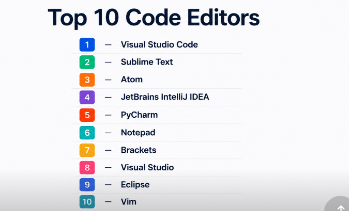
Top 10 Code Editors
#1 — Visual Studio Code
Short description: A lightweight, versatile editor from Microsoft for multiple programming languages, ideal for individual developers and teams.
Key Features
- IntelliSense for code completion and suggestions
- Built-in Git support and version control
- Debugging tools and terminal integration
- Extensive extensions marketplace
- AI-powered code suggestions through Copilot
- Cross-platform support
Pros
- Highly customizable
- Strong community and plugin ecosystem
Cons
- Can become heavy with too many extensions
- Memory usage may spike on large projects
Platforms / Deployment
- Windows / macOS / Linux
- Self-hosted / Cloud via remote SSH
Security & Compliance
- Not publicly stated
Integrations & Ecosystem
Supports extensive integrations through extensions.
- GitHub, GitLab
- Docker, Kubernetes
- Python, Node.js, Java, Go
Support & Community
- Extensive documentation
- Active community forums
- Tutorials and online learning resources
#2 — Sublime Text
Short description: A fast, lightweight editor for developers who prioritize speed and simplicity.
Key Features
- Goto Anything navigation
- Multiple selections for batch editing
- Powerful search and replace
- Plugin support via Package Control
- Minimalist and fast interface
Pros
- Extremely fast and responsive
- Lightweight on system resources
Cons
- Fewer built-in features compared to VS Code
- Limited collaboration tools
Platforms / Deployment
- Windows / macOS / Linux
- Self-hosted
Security & Compliance
- Not publicly stated
Integrations & Ecosystem
- Package Control for plugin ecosystem
- Supports languages including Python, JavaScript, HTML, CSS
Support & Community
- Active forums and plugin community
- Documentation available
- Varies / Not publicly stated
#3 — Atom
Short description: A hackable editor from GitHub with strong community support and deep customization.
Key Features
- Built-in Git and GitHub integration
- Package manager for plugins and themes
- Smart autocompletion
- Cross-platform editing
- Collaboration via Teletype
Pros
- Highly customizable and open-source
- Strong GitHub integration
Cons
- Performance can lag with large files
- Resource-intensive
Platforms / Deployment
- Windows / macOS / Linux
- Self-hosted
Security & Compliance
- Not publicly stated
Integrations & Ecosystem
- GitHub
- Linter, language packages
- AI code completion plugins
Support & Community
- Open-source community support
- Online tutorials and package documentation
#4 — JetBrains IntelliJ IDEA
Short description: A full-featured IDE focused on Java and JVM languages, offering advanced developer tools for enterprise projects.
Key Features
- Smart code completion and refactoring
- Built-in debugger and test runner
- Version control integration
- Database and framework support
- Plugin ecosystem for languages and tools
Pros
- Powerful for enterprise development
- Advanced code analysis and productivity tools
Cons
- Higher learning curve
- Heavier than lightweight editors
Platforms / Deployment
- Windows / macOS / Linux
- Self-hosted
Security & Compliance
- Not publicly stated
Integrations & Ecosystem
- Git, SVN
- Docker, Kubernetes
- Frameworks: Spring, Gradle, Maven
Support & Community
- JetBrains support
- Documentation and tutorials
- Active developer forums
#5 — PyCharm
Short description: JetBrains’ Python-focused IDE, perfect for data science, web development, and AI projects.
Key Features
- Intelligent Python code completion
- Integrated debugger and profiler
- Virtual environment support
- Database and web frameworks support
- Plugin ecosystem
Pros
- Tailored for Python development
- Excellent code inspection and refactoring
Cons
- Resource-heavy
- Licensing cost for professional edition
Platforms / Deployment
- Windows / macOS / Linux
- Self-hosted
Security & Compliance
- Not publicly stated
Integrations & Ecosystem
- Git, GitHub, Docker
- Django, Flask, FastAPI
- Data science packages support
Support & Community
- JetBrains support
- Tutorials and documentation
- Python developer forums
#6 — Notepad++
Short description: Lightweight, Windows-only editor ideal for quick coding tasks and small scripts.
Key Features
- Syntax highlighting for multiple languages
- Macro recording
- Search and replace in files
- Plugin support
- Simple interface
Pros
- Extremely lightweight and fast
- Free and open-source
Cons
- Windows-only
- Limited advanced features
Platforms / Deployment
- Windows
- Self-hosted
Security & Compliance
- Not publicly stated
Integrations & Ecosystem
- Plugins for FTP, Git, and code linting
- Supports C, C++, Python, HTML
Support & Community
- Community forums
- Plugin documentation
#7 — Brackets
Short description: Open-source editor focused on web development with live preview capabilities.
Key Features
- Live preview for HTML/CSS
- Inline editors for quick CSS/JS edits
- Preprocessor support
- Extension library
- Cross-platform support
Pros
- Ideal for front-end developers
- Live preview reduces testing time
Cons
- Limited backend support
- Smaller community than VS Code
Platforms / Deployment
- Windows / macOS / Linux
- Self-hosted
Security & Compliance
- Not publicly stated
Integrations & Ecosystem
- Git integration via plugins
- Extensions for frameworks like Bootstrap
Support & Community
- Open-source community
- Documentation and forums
#8 — Visual Studio
Short description: Microsoft’s full-featured IDE for .NET, C#, and enterprise-level applications.
Key Features
- Integrated debugging and testing tools
- Code navigation and IntelliSense
- Multi-language support
- Version control integration
- Rich plugin ecosystem
Pros
- Excellent for enterprise projects
- Comprehensive debugging and testing
Cons
- Heavy on system resources
- Complexity for small projects
Platforms / Deployment
- Windows / macOS
- Self-hosted
Security & Compliance
- Not publicly stated
Integrations & Ecosystem
- Azure, GitHub, Git
- .NET frameworks
- DevOps pipelines
Support & Community
- Microsoft support
- Extensive documentation
- Developer community
#9 — Eclipse
Short description: Open-source IDE for Java, C/C++, and enterprise applications.
Key Features
- Project management and build tools
- Debugging and profiling
- Plugin marketplace
- Git and SVN integration
- Multi-language support
Pros
- Free and open-source
- Extensible through plugins
Cons
- Heavy and can be slow
- User interface feels outdated
Platforms / Deployment
- Windows / macOS / Linux
- Self-hosted
Security & Compliance
- Not publicly stated
Integrations & Ecosystem
- Maven, Gradle
- Git, SVN
- Java EE, Spring
Support & Community
- Community support
- Tutorials and forums
#10 — Vim
Short description: A highly configurable, command-line-based editor for advanced developers seeking speed and precision.
Key Features
- Modal editing
- Syntax highlighting
- Macros and scripts
- Plugin ecosystem
- Lightweight and fast
Pros
- Extremely fast and efficient
- Low resource usage
Cons
- Steep learning curve
- Limited GUI features
Platforms / Deployment
- Windows / macOS / Linux
- Self-hosted
Security & Compliance
- Not publicly stated
Integrations & Ecosystem
- Git integration via plugins
- Language syntax plugins
Support & Community
- Extensive community
- Online tutorials and documentation
Comparison Table (Top 10)
| Tool Name | Best For | Platform(s) Supported | Deployment | Standout Feature | Public Rating |
|---|---|---|---|---|---|
| Visual Studio Code | All developers | Windows / macOS / Linux | Self-hosted / Cloud | AI code suggestions | N/A |
| Sublime Text | Speed-focused developers | Windows / macOS / Linux | Self-hosted | Lightweight and fast | N/A |
| Atom | Customization lovers | Windows / macOS / Linux | Self-hosted | Hackable open-source | N/A |
| IntelliJ IDEA | Enterprise Java teams | Windows / macOS / Linux | Self-hosted | Advanced refactoring and code analysis | N/A |
| PyCharm | Python developers | Windows / macOS / Linux | Self-hosted | Python-specific tools | N/A |
| Notepad++ | Quick coding tasks | Windows | Self-hosted | Lightweight editor | N/A |
| Brackets | Front-end developers | Windows / macOS / Linux | Self-hosted | Live preview | N/A |
| Visual Studio | Enterprise .NET teams | Windows / macOS | Self-hosted | Full-featured IDE | N/A |
| Eclipse | Java / C/C++ developers | Windows / macOS / Linux | Self-hosted | Plugin extensibility | N/A |
| Vim | Command-line power users | Windows / macOS / Linux | Self-hosted | Modal editing and speed | N/A |
Evaluation & Scoring of Code Editors
| Tool Name | Core (25%) | Ease (15%) | Integrations (15%) | Security (10%) | Performance (10%) | Support (10%) | Value (15%) | Weighted Total (0–10) |
|---|---|---|---|---|---|---|---|---|
| VS Code | 9 | 8 | 9 | 7 | 8 | 8 | 8 | 8.35 |
| Sublime Text | 8 | 9 | 6 | 6 | 9 | 7 | 7 | 7.65 |
| Atom | 7 | 7 | 7 | 6 | 7 | 6 | 6 | 6.85 |
| IntelliJ IDEA | 9 | 7 | 8 | 7 | 8 | 7 | 7 | 7.85 |
| PyCharm | 9 | 7 | 8 | 7 | 8 | 7 | 7 | 7.85 |
| Notepad++ | 6 | 9 | 5 | 6 | 8 | 6 | 9 | 7.05 |
| Brackets | 7 | 8 | 6 | 6 | 7 | 6 | 6 | 6.75 |
| Visual Studio | 9 | 6 | 8 | 7 | 8 | 7 | 7 | 7.65 |
| Eclipse | 8 | 6 | 7 | 7 | 7 | 6 | 7 | 7.05 |
| Vim | 7 | 5 | 5 | 6 | 9 | 6 | 8 | 6.75 |
Scores help developers compare editors based on features, usability, integrations, security, performance, support, and value.
Which Code Editor Tool Is Right for You?
Solo / Freelancer
- Lightweight and fast editors like Sublime Text, Notepad++, or Vim are ideal.
SMB
- Flexible editors with good extensions: VS Code, Atom, Brackets.
Mid-Market
- Editors with collaboration, debugging, and integration capabilities: IntelliJ IDEA, PyCharm.
Enterprise
- Full-featured IDEs with strong refactoring, debugging, and workflow support: Visual Studio, IntelliJ IDEA, PyCharm.
Budget vs Premium
- Budget: Sublime Text, Notepad++, Vim
- Premium: IntelliJ IDEA, PyCharm, Visual Studio
Feature Depth vs Ease of Use
- Deep feature set: IntelliJ IDEA, PyCharm
- Simpler and intuitive: VS Code, Sublime Text
Integrations & Scalability
- Teams needing Git, Docker, CI/CD, and cloud support: VS Code, IntelliJ IDEA, Visual Studio
Security & Compliance Needs
- IDEs with enterprise features and secure extensions: IntelliJ IDEA, Visual Studio
Frequently Asked Questions (FAQs)
What is the typical pricing model?
Most code editors are free or have tiered licensing for professional features.
Which editors are best for beginners?
VS Code, Sublime Text, and Atom offer intuitive interfaces suitable for new developers.
Can these editors handle multiple languages?
Yes, most editors support Python, JavaScript, Java, C++, and more.
Are cloud-based editing options available?
Some editors support remote development via SSH or web-based instances.
How can I collaborate in real-time?
Extensions and plugins like Live Share in VS Code enable live collaboration.
Are debugging tools included?
Yes, IDEs like IntelliJ, PyCharm, and Visual Studio offer integrated debugging.
Can these editors integrate with Git?
Most have built-in Git support or plugin integration.
Do they support AI code suggestions?
Editors like VS Code and PyCharm include AI-assisted code completion.
Which editor is best for large enterprise projects?
IntelliJ IDEA, PyCharm, and Visual Studio are suited for enterprise-scale development.
Are these editors secure for sensitive code?
Security depends on deployment and extensions; enterprise IDEs offer better compliance.
Conclusion
Selecting the right code editor depends on your development needs, team size, and project complexity. Lightweight editors like Sublime Text and Notepad++ suit solo developers, while enterprise IDEs like IntelliJ IDEA, PyCharm, and Visual Studio excel for collaborative and complex projects. Developers should shortlist 2–3 editors, test workflows, and validate integrations before standardizing on one.
