Upgrade & Secure Your Future with DevOps, SRE, DevSecOps, MLOps!
We spend hours scrolling social media and waste money on things we forget, but won’t spend 30 minutes a day earning certifications that can change our lives.
Master in DevOps, SRE, DevSecOps & MLOps by DevOps School!
Learn from Guru Rajesh Kumar and double your salary in just one year.
Introduction
Static code analysis tools help development and security teams review source code without running the application. These tools scan code to find bugs, security weaknesses, code smells, quality issues, dependency risks, and maintainability problems before the software reaches production.
Static code analysis matters because modern software teams release faster, use more open-source components, and manage complex codebases across cloud, mobile, web, and enterprise systems. A good static analysis tool helps teams reduce risk early, improve code quality, and support secure development practices.
Common use cases include secure code review, DevSecOps automation, CI/CD quality gates, compliance checks, pull request scanning, developer coaching, and technical debt reduction.
Buyers should evaluate language support, scan accuracy, false-positive control, IDE integration, CI/CD support, security rules, reporting, scalability, remediation guidance, deployment flexibility, and pricing model.
Best for: software developers, DevOps teams, DevSecOps teams, application security engineers, platform teams, QA teams, and enterprises managing large codebases.
Not ideal for: very small teams with simple scripts, projects with no security requirements, or teams that only need basic linting instead of deeper code quality and security analysis.
Key Trends in Static Code Analysis Tools
- AI-assisted remediation is becoming more common, helping developers understand issues and fix code faster.
- Security scanning is shifting earlier into pull requests, IDEs, and CI/CD pipelines.
- Developer-first workflows are becoming important because teams want actionable results without slowing delivery.
- Cloud and hybrid deployment models are now common for teams with different compliance needs.
- Static analysis is being combined with dependency scanning, secret scanning, and software composition analysis.
- Policy-based quality gates are becoming standard for engineering governance.
- False-positive reduction is a major buyer priority because noisy results reduce developer trust.
- Integration with Git platforms, ticketing tools, and CI/CD systems is now expected.
- Enterprise buyers are focusing more on reporting, audit readiness, RBAC, and security dashboards.
- Open-source and commercial tools are often used together for layered code quality and security coverage.
How We Selected These Tools
- We prioritized tools with strong market adoption and developer awareness.
- We considered feature depth across code quality, security, maintainability, and governance.
- We evaluated support for popular programming languages and frameworks.
- We considered integration strength with Git platforms, CI/CD pipelines, IDEs, and DevOps workflows.
- We reviewed suitability for different team sizes, from individual developers to large enterprises.
- We considered flexibility across cloud, self-hosted, and hybrid deployment models.
- We looked at reporting, dashboards, policy controls, and developer remediation guidance.
- We included a balanced mix of enterprise platforms, developer-first tools, and open-source-friendly options.
- We avoided guessing public ratings, certifications, or compliance claims where details are not confidently known.
- We focused on practical buyer value rather than promotional claims.
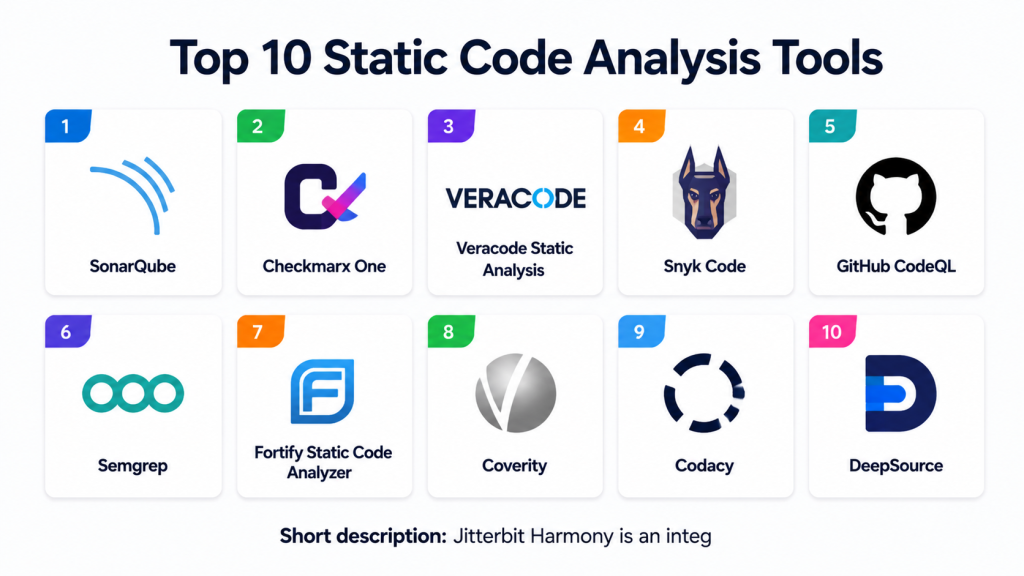
Top 10 Static Code Analysis Tools
#1 — SonarQube
Short description: SonarQube is a widely used static code analysis platform for code quality, security, maintainability, and technical debt tracking. It is suitable for development teams, DevOps teams, and enterprises that want continuous code inspection.
Key Features
- Code quality and security analysis.
- Quality gates for CI/CD pipelines.
- Technical debt and maintainability reporting.
- Support for many popular programming languages.
- Pull request and branch analysis in supported editions.
- Developer-focused issue explanations.
- Self-hosted and cloud options through related offerings.
Pros
- Strong balance of code quality and security checks.
- Good fit for DevOps and CI/CD workflows.
- Large community and broad adoption.
Cons
- Advanced features may require paid editions.
- Rule tuning may be needed to reduce noise.
- Large enterprise setups may require planning.
Platforms / Deployment
Web / Windows / macOS / Linux
Cloud / Self-hosted / Hybrid
Security & Compliance
Enterprise access controls vary by edition and setup. RBAC and authentication options may be available in commercial editions. Specific compliance certifications should be verified directly. If unknown, use “Not publicly stated.”
Integrations & Ecosystem
SonarQube fits well into development pipelines and repository workflows.
- GitHub
- GitLab
- Bitbucket
- Azure DevOps
- Jenkins
- IDE plugins and CI/CD tools
Support & Community
Community support is strong, with broad documentation and active usage. Commercial support varies by edition and subscription.
#2 — Checkmarx One
Short description: Checkmarx One is an application security platform that includes static application security testing for enterprise teams. It is designed for organizations that need secure code scanning, risk visibility, and AppSec governance.
Key Features
- Static application security testing.
- Application security risk management.
- Developer remediation guidance.
- CI/CD and repository integrations.
- Security policy management.
- Support for multiple programming languages.
- Centralized reporting for security teams.
Pros
- Strong enterprise AppSec focus.
- Good fit for regulated and security-sensitive teams.
- Useful for centralized security visibility.
Cons
- May be more complex than lightweight developer tools.
- Pricing may not suit small teams.
- Requires AppSec process maturity for best results.
Platforms / Deployment
Web / Cloud / Hybrid
Self-hosted options may vary by offering
Security & Compliance
Enterprise security features may include access controls and governance workflows. Specific SOC 2, ISO 27001, GDPR, or HIPAA details should be verified directly. If not confirmed, use “Not publicly stated.”
Integrations & Ecosystem
Checkmarx One is built for enterprise development and security workflows.
- Git repositories
- CI/CD pipelines
- IDE integrations
- Issue tracking systems
- Security dashboards
- Policy and reporting workflows
Support & Community
Vendor support is generally enterprise-focused. Documentation, onboarding, and support tiers vary by plan and customer agreement.
#3 — Veracode Static Analysis
Short description: Veracode Static Analysis helps teams identify security vulnerabilities in application code. It is commonly used by security-conscious organizations that need scalable application security testing and governance.
Key Features
- Static application security testing.
- Security vulnerability detection.
- Developer remediation guidance.
- Policy and governance workflows.
- CI/CD integration.
- Centralized security reporting.
- Support for enterprise AppSec programs.
Pros
- Strong application security focus.
- Good fit for enterprise security programs.
- Useful reporting for governance and risk tracking.
Cons
- May be more security-focused than general code quality-focused.
- Setup and process alignment may require planning.
- Pricing details vary by organization and plan.
Platforms / Deployment
Web / Cloud
Hybrid options may vary by offering
Security & Compliance
Enterprise security controls vary by plan and implementation. Compliance and certification details should be verified directly. If not confidently known, write “Not publicly stated.”
Integrations & Ecosystem
Veracode integrates with software delivery and security workflows.
- Git platforms
- CI/CD tools
- IDE workflows
- Ticketing systems
- Security dashboards
- Policy management tools
Support & Community
Vendor-backed support and onboarding are available depending on plan. Documentation and enterprise services may vary by customer agreement.
#4 — Snyk Code
Short description: Snyk Code is a developer-focused static analysis tool that helps find security issues in source code. It is suitable for teams already using Snyk for dependency, container, and infrastructure security.
Key Features
- Static code security scanning.
- Developer-friendly remediation guidance.
- Pull request scanning.
- IDE and Git workflow support.
- Integration with broader Snyk security platform.
- Fast feedback for developers.
- Security-focused analysis.
Pros
- Strong developer-first experience.
- Works well with broader software supply chain security workflows.
- Useful for teams that want early security feedback.
Cons
- Code quality coverage may not be as broad as dedicated quality platforms.
- Best value is often within the broader Snyk ecosystem.
- Pricing and limits vary by plan.
Platforms / Deployment
Web / IDE-supported workflows
Cloud
Security & Compliance
Security controls vary by plan. Enterprise features may include access management and policy controls. Specific compliance certifications should be verified directly.
Integrations & Ecosystem
Snyk Code works well with modern developer and security workflows.
- GitHub
- GitLab
- Bitbucket
- Azure DevOps
- CI/CD tools
- IDE integrations
Support & Community
Documentation is strong, and the developer community is active. Support levels vary by plan.
#5 — GitHub CodeQL
Short description: GitHub CodeQL is a semantic code analysis engine used to find security vulnerabilities and code patterns. It is especially useful for teams working inside GitHub-based development workflows.
Key Features
- Semantic code analysis.
- Security vulnerability detection.
- Query-based code analysis.
- Integration with GitHub code scanning.
- Support for multiple languages.
- Custom query capabilities.
- Pull request security feedback.
Pros
- Strong fit for GitHub-native teams.
- Powerful query-based analysis.
- Useful for advanced security research and AppSec teams.
Cons
- Custom query writing can require expertise.
- Best experience is tied closely to GitHub workflows.
- May need tuning for complex environments.
Platforms / Deployment
Web / Linux / Windows / macOS through development workflows
Cloud / Repository-based workflows
Security & Compliance
Security depends on GitHub organization controls, repository settings, and access policies. Specific compliance details should be verified based on the GitHub plan and organization setup.
Integrations & Ecosystem
CodeQL is deeply connected with GitHub security and development workflows.
- GitHub repositories
- GitHub Actions
- Code scanning alerts
- Pull requests
- Security dashboards
- Custom query packs
Support & Community
Documentation is strong, and security research community usage is significant. Support depends on GitHub plan and enterprise agreement.
#6 — Semgrep
Short description: Semgrep is a fast static analysis tool focused on finding security, correctness, and code pattern issues. It is popular with developers and security teams that want customizable rules and CI/CD-friendly scanning.
Key Features
- Static analysis for security and code patterns.
- Custom rule writing.
- CI/CD integration.
- Pull request scanning.
- Support for many programming languages.
- Developer-friendly findings.
- Open-source and commercial options.
Pros
- Flexible and customizable.
- Good fit for developer-first security teams.
- Useful for writing organization-specific rules.
Cons
- Rule quality depends on configuration.
- Advanced governance features may require commercial plans.
- Requires tuning for best signal quality.
Platforms / Deployment
Web / Windows / macOS / Linux
Cloud / Self-hosted / Hybrid depending on setup
Security & Compliance
Security and enterprise controls vary by edition and deployment model. Specific compliance certifications should be verified directly. If unknown, use “Not publicly stated.”
Integrations & Ecosystem
Semgrep works well in modern DevSecOps workflows.
- GitHub
- GitLab
- Bitbucket
- CI/CD tools
- Command-line workflows
- Custom rules and policy workflows
Support & Community
Community usage is strong, especially among security engineers and developers. Commercial support varies by plan.
#7 — Fortify Static Code Analyzer
Short description: Fortify Static Code Analyzer is an enterprise-focused static application security testing tool. It is designed for organizations that need deep security scanning, compliance support, and centralized AppSec management.
Key Features
- Static application security testing.
- Security vulnerability detection.
- Enterprise policy workflows.
- Centralized reporting.
- Support for multiple languages.
- Integration with development pipelines.
- AppSec governance support.
Pros
- Strong fit for large enterprise security programs.
- Deep security analysis capabilities.
- Useful for regulated and high-risk environments.
Cons
- May require dedicated AppSec expertise.
- Can be complex for smaller teams.
- Licensing and setup may require planning.
Platforms / Deployment
Windows / Linux / Web-based management varies
Cloud / Self-hosted / Hybrid depending on offering
Security & Compliance
Enterprise security features and compliance support vary by deployment and agreement. Specific certifications should be verified directly. If unknown, use “Not publicly stated.”
Integrations & Ecosystem
Fortify supports enterprise-grade security and software delivery workflows.
- CI/CD systems
- IDE workflows
- Issue tracking tools
- Security dashboards
- Policy management
- Enterprise reporting
Support & Community
Vendor support is generally enterprise-oriented. Documentation, professional services, and onboarding support vary by license and agreement.
#8 — Coverity
Short description: Coverity is a static analysis tool focused on finding software defects, quality issues, and security risks. It is often used by organizations building complex, safety-sensitive, or large-scale software systems.
Key Features
- Static code defect detection.
- Security issue identification.
- Support for complex codebases.
- Quality and reliability analysis.
- CI/CD integration.
- Centralized reporting.
- Enterprise workflow support.
Pros
- Strong for complex and large codebases.
- Useful for quality, reliability, and security analysis.
- Good fit for enterprise engineering teams.
Cons
- May require tuning and expert setup.
- Not ideal for very small teams with simple projects.
- Pricing and packaging vary.
Platforms / Deployment
Windows / Linux / Web-based management varies
Cloud / Self-hosted / Hybrid depending on offering
Security & Compliance
Security controls vary by deployment and enterprise configuration. Specific compliance details should be verified directly. If unknown, use “Not publicly stated.”
Integrations & Ecosystem
Coverity integrates with enterprise engineering and quality workflows.
- CI/CD pipelines
- Source code repositories
- Issue trackers
- Build systems
- Reporting dashboards
- Security and quality workflows
Support & Community
Vendor-backed support is available depending on contract. Documentation and onboarding support vary by enterprise setup.
#9 — Codacy
Short description: Codacy is a code quality and static analysis platform that helps teams automate code reviews, detect issues, and maintain consistent standards. It is useful for development teams that want automated quality checks in pull requests.
Key Features
- Automated code review.
- Static analysis and quality checks.
- Pull request feedback.
- Code coverage visibility.
- Support for multiple languages.
- Team dashboards.
- Repository integrations.
Pros
- Easy to adopt for code quality workflows.
- Helpful for pull request standards.
- Good fit for SMB and mid-market teams.
Cons
- May not be as deep as enterprise AppSec platforms.
- Security coverage depends on configuration and supported checks.
- Advanced features vary by plan.
Platforms / Deployment
Web
Cloud / Self-hosted options may vary by offering
Security & Compliance
Security controls and compliance details vary by plan and deployment. If not confidently known, use “Not publicly stated.”
Integrations & Ecosystem
Codacy works well with repository-based engineering workflows.
- GitHub
- GitLab
- Bitbucket
- Pull request checks
- CI/CD workflows
- Code coverage tools
Support & Community
Documentation is available, and support options vary by plan. Community strength is moderate compared with larger open-source ecosystems.
#10 — DeepSource
Short description: DeepSource is a code health platform that helps teams find bugs, quality issues, security risks, and maintainability problems. It is useful for teams that want automated code review and continuous code improvement.
Key Features
- Static analysis for code quality and security.
- Automated code review.
- Issue prioritization.
- Repository integration.
- Autofix support for selected issues.
- Team dashboards.
- Support for multiple languages.
Pros
- Developer-friendly code review workflow.
- Good for continuous quality improvement.
- Useful for small and mid-sized engineering teams.
Cons
- Enterprise depth may vary by requirement.
- Language and rule coverage should be verified.
- Advanced governance needs may require careful review.
Platforms / Deployment
Web
Cloud / Self-hosted options may vary by plan
Security & Compliance
Security and compliance details vary by plan. Specific certifications are not publicly stated unless verified directly.
Integrations & Ecosystem
DeepSource is built around repository and pull request workflows.
- GitHub
- GitLab
- Bitbucket
- Pull request checks
- Team dashboards
- Automated issue tracking
Support & Community
Documentation is available, and support depends on plan. Community visibility is smaller than some larger platforms, but the tool is developer-focused and practical for code health workflows.
Comparison Table
| Tool Name | Best For | Platform(s) Supported | Deployment | Standout Feature | Public Rating |
|---|---|---|---|---|---|
| SonarQube | Code quality and security governance | Web, Windows, macOS, Linux | Cloud / Self-hosted / Hybrid | Quality gates and technical debt tracking | N/A |
| Checkmarx One | Enterprise AppSec programs | Web | Cloud / Hybrid | Centralized application security management | N/A |
| Veracode Static Analysis | Security-focused code scanning | Web | Cloud | Enterprise security policy workflows | N/A |
| Snyk Code | Developer-first secure code scanning | Web, IDE workflows | Cloud | Fast developer security feedback | N/A |
| GitHub CodeQL | GitHub-native semantic code analysis | Web, repository workflows | Cloud | Query-based security analysis | N/A |
| Semgrep | Custom static analysis rules | Web, Windows, macOS, Linux | Cloud / Self-hosted / Hybrid | Flexible rule-based scanning | N/A |
| Fortify Static Code Analyzer | Enterprise security testing | Windows, Linux, Web varies | Cloud / Self-hosted / Hybrid | Deep enterprise SAST coverage | N/A |
| Coverity | Complex code quality and defect analysis | Windows, Linux, Web varies | Cloud / Self-hosted / Hybrid | Defect detection for large codebases | N/A |
| Codacy | Automated code review | Web | Cloud / Self-hosted varies | Pull request quality automation | N/A |
| DeepSource | Continuous code health | Web | Cloud / Self-hosted varies | Automated code quality improvement | N/A |
Evaluation & Scoring of Static Code Analysis Tools
| Tool Name | Core (25%) | Ease (15%) | Integrations (15%) | Security (10%) | Performance (10%) | Support (10%) | Value (15%) | Weighted Total (0–10) |
|---|---|---|---|---|---|---|---|---|
| SonarQube | 9 | 8 | 9 | 8 | 8 | 9 | 9 | 8.60 |
| Checkmarx One | 9 | 7 | 8 | 9 | 8 | 8 | 7 | 8.10 |
| Veracode Static Analysis | 9 | 7 | 8 | 9 | 8 | 8 | 7 | 8.10 |
| Snyk Code | 8 | 9 | 9 | 8 | 8 | 8 | 8 | 8.30 |
| GitHub CodeQL | 9 | 7 | 9 | 9 | 8 | 8 | 8 | 8.35 |
| Semgrep | 8 | 8 | 9 | 8 | 9 | 8 | 9 | 8.40 |
| Fortify Static Code Analyzer | 9 | 6 | 8 | 9 | 8 | 8 | 7 | 7.95 |
| Coverity | 9 | 6 | 8 | 8 | 9 | 8 | 7 | 7.95 |
| Codacy | 7 | 8 | 8 | 7 | 8 | 7 | 8 | 7.55 |
| DeepSource | 7 | 8 | 8 | 7 | 8 | 7 | 8 | 7.55 |
The scores are comparative and should be used as a starting point, not as a final buying decision. A tool with a lower overall score may still be the best choice for a specific language, security model, or team size. Enterprise teams should validate governance, reporting, access controls, and deployment needs before choosing. Developer-first teams should prioritize ease of use, low false positives, and pull request feedback quality.
Which Static Code Analysis Tool Is Right for You?
Solo / Freelancer
Solo developers usually need a tool that is simple, affordable, and easy to connect with repositories. Semgrep, Snyk Code, Codacy, DeepSource, and SonarQube community-focused workflows can be practical choices.
For individual developers, the most important factors are quick setup, clear findings, low noise, and useful remediation guidance. Avoid overly complex enterprise platforms unless client work requires them.
SMB
Small and medium-sized businesses should look for tools that provide automated pull request checks, good repository integrations, and simple dashboards. SonarQube, Snyk Code, Semgrep, Codacy, and DeepSource are strong options.
SMBs should avoid choosing tools only by feature count. The best tool is the one developers will actually use consistently inside daily workflows.
Mid-Market
Mid-market teams often need stronger governance, quality gates, role-based access, and reporting. SonarQube, Snyk Code, Semgrep, Checkmarx One, and Veracode Static Analysis may fit well depending on security maturity.
These teams should also evaluate integration with CI/CD systems, ticketing tools, developer IDEs, and security dashboards.
Enterprise
Enterprises usually need deeper security coverage, centralized policy management, audit-ready reporting, access controls, and scalable scanning. Checkmarx One, Veracode Static Analysis, Fortify Static Code Analyzer, Coverity, SonarQube, and GitHub CodeQL can be strong candidates.
Enterprise buyers should run a pilot across multiple languages, repositories, teams, and application types before standardizing.
Budget vs Premium
Budget-focused teams can start with Semgrep, SonarQube community-style usage, GitHub CodeQL where suitable, or lightweight automated review tools.
Premium platforms may be better for organizations that need formal AppSec governance, support agreements, advanced reporting, and centralized security management.
Feature Depth vs Ease of Use
Tools like Fortify, Coverity, Checkmarx One, and Veracode offer deeper enterprise security capabilities but may require more setup and process maturity.
Tools like Snyk Code, Semgrep, Codacy, and DeepSource are usually easier for developers to adopt quickly.
Integrations & Scalability
For modern engineering teams, integrations are essential. The tool should connect with Git platforms, CI/CD systems, IDEs, ticketing tools, and reporting workflows.
Scalability should be tested with real repositories, monorepos, multiple languages, and large pull request volumes.
Security & Compliance Needs
Security-focused teams should review authentication, access controls, audit logs, data handling, deployment model, reporting, and policy management.
Regulated organizations should verify compliance claims directly with the vendor instead of assuming certifications.
Frequently Asked Questions
What is static code analysis?
Static code analysis is the process of checking source code without running the application. It helps find bugs, security weaknesses, style issues, and maintainability problems early.
Why is static code analysis important?
It helps teams catch problems before production. This reduces security risk, improves code quality, and supports safer software delivery.
Is static code analysis the same as testing?
No. Static analysis reviews code structure and patterns, while testing usually runs the application or specific functions. Both are useful and should work together.
Can static analysis find all security issues?
No tool can find every issue. Static analysis is useful, but it should be combined with dependency scanning, dynamic testing, manual review, and secure coding practices.
Which tool is best for small teams?
Small teams may benefit from SonarQube, Semgrep, Snyk Code, Codacy, or DeepSource. The best choice depends on budget, language support, and workflow.
Which tool is best for enterprise AppSec?
Checkmarx One, Veracode Static Analysis, Fortify Static Code Analyzer, Coverity, SonarQube, and GitHub CodeQL are commonly considered for enterprise use.
How do pricing models usually work?
Pricing often depends on users, repositories, lines of code, applications, scans, or enterprise agreements. Exact pricing varies, so buyers should verify directly.
What are common mistakes when adopting static analysis?
Common mistakes include enabling too many rules, ignoring false positives, not training developers, skipping CI/CD integration, and failing to define ownership for remediation.
Can static analysis slow down CI/CD pipelines?
Yes, if scans are not configured properly. Teams should use incremental scanning, quality gates, and staged scanning policies to balance speed and coverage.
How should teams reduce false positives?
Teams should tune rules, suppress accepted risks carefully, prioritize critical findings, and use developer feedback to improve scan quality over time.
Do static code analysis tools support multiple languages?
Most major tools support multiple languages, but coverage depth varies. Teams should test the tool against their real codebase before purchasing.
Should static analysis run in the IDE or CI/CD pipeline?
Both are useful. IDE scanning gives developers early feedback, while CI/CD scanning enforces team-wide quality and security standards.
Conclusion
Static code analysis tools are important for teams that want cleaner, safer, and more maintainable software. The best tool depends on your development stack, team size, security maturity, budget, and workflow. SonarQube is strong for code quality and technical debt management. Checkmarx One, Veracode, Fortify, and Coverity are better suited for enterprise security programs. Snyk Code, Semgrep, Codacy, and DeepSource are practical for developer-first teams that want fast feedback. GitHub CodeQL is powerful for teams deeply connected to GitHub workflows.
