Upgrade & Secure Your Future with DevOps, SRE, DevSecOps, MLOps!
We spend hours scrolling social media and waste money on things we forget, but won’t spend 30 minutes a day earning certifications that can change our lives.
Master in DevOps, SRE, DevSecOps & MLOps by DevOps School!
Learn from Guru Rajesh Kumar and double your salary in just one year.
Introduction
Git clients are software tools that provide a graphical or command-line interface for interacting with Git repositories. They simplify version control by helping developers commit, branch, merge, and track changes without needing to memorize complex Git commands. Essentially, Git clients act as bridges between developers and the Git system, improving productivity, collaboration, and code management.
Git clients are increasingly important as development teams work across distributed environments, remote setups, and complex DevOps pipelines. Modern teams expect Git clients to integrate seamlessly with CI/CD, security scanning, IDEs, and cloud platforms. Many also rely on Git clients to provide enhanced visualization, conflict resolution, and collaboration capabilities.
Real-world use cases:
- Managing source code across multiple repositories
- Collaborating in distributed teams with pull requests and code reviews
- Resolving merge conflicts visually
- Integrating with CI/CD pipelines for automated builds and deployments
- Monitoring changes and version history in large projects
Evaluation criteria for buyers:
- Ease of use and learning curve
- Support for branching and merging workflows
- Code visualization and conflict resolution tools
- Integration with IDEs, CI/CD pipelines, and cloud services
- Security features such as authentication, encryption, and access control
- Cross-platform support (Windows, macOS, Linux, iOS, Android)
- Licensing and pricing flexibility
- Customizability and plugin ecosystem
- Support and documentation quality
Best for: Software developers, DevOps engineers, teams of any size needing Git-based version control, organizations adopting CI/CD workflows, and educational institutions teaching Git workflows.
Not ideal for: Teams not using Git, casual versioning needs, or non-developer environments where simpler file-sharing or document versioning systems are sufficient.
Key Trends in Git Clients
AI-powered code insights: Clients increasingly provide AI-assisted merge conflict resolution, commit recommendations, and error detection.
- Enhanced collaboration: Integration with code review platforms and team chat applications is improving developer collaboration.
- Cloud-first workflows: Git clients now support cloud-hosted repositories seamlessly, enabling easy synchronization and remote access.
- Cross-platform consistency: More clients offer uniform features across Windows, macOS, and Linux.
- Security and compliance: Built-in MFA, SSO, encryption, and audit logs are becoming standard features.
- Integration with DevOps pipelines: Clients are extending hooks to CI/CD tools, testing frameworks, and deployment platforms.
- Visual history and branch visualization: Enhanced graphing of commits, branches, and merges aids productivity.
- Simplified onboarding: Streamlined setup for new developers, including templates, guided workflows, and preconfigured settings.
- Customizability: Plugin and extension ecosystems allow teams to tailor the client for their workflow.
- Lightweight performance: Clients optimize for speed, memory efficiency, and handling large repositories effectively.
How We Selected These Tools (Methodology)
The top Git clients were chosen based on a combination of practical, real-world criteria:
- Market adoption and developer mindshare
- Feature completeness: branching, merging, pull requests, visualization
- Reliability and performance with small and large repositories
- Security posture and compliance capabilities
- Integration potential with IDEs, CI/CD, and cloud services
- Ecosystem maturity and plugin availability
- Ease of onboarding and user experience
- Suitability for solo developers, SMBs, and enterprise teams
- Documentation quality and community support
- Practical workflow benefits in modern DevOps and software development environments
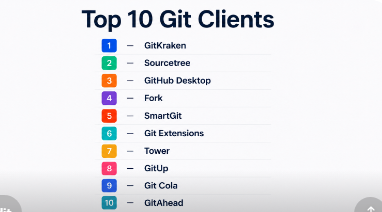
Top 10 Git Clients
#1 — GitKraken
Short description: GitKraken is a cross-platform Git client that provides a visual interface for Git workflows, ideal for developers and teams seeking intuitive repository management.
Key Features
- Visual commit graph and branch management
- Drag-and-drop merge conflict resolution
- Built-in Gitflow support
- GitHub, GitLab, and Bitbucket integration
- Issue tracking integration
- Undo and history management
- Cross-platform support
Pros
- Intuitive visual interface for all Git operations
- Strong integration with popular repository hosting platforms
- Simplifies conflict resolution for beginners and teams
Cons
- Resource-intensive on large repositories
- Some advanced features require paid plans
- Fewer command-line shortcuts than CLI-focused tools
Platforms / Deployment
Windows / macOS / Linux
Cloud / Self-hosted / Hybrid
Security & Compliance
Supports SSH, two-factor authentication, and repository-level access controls. Certifications: Not publicly stated.
Integrations & Ecosystem
GitHub, GitLab, Bitbucket, Jira, Trello, Slack, APIs for custom integrations.
Support & Community
Extensive documentation, active support forums, tutorials, and premium support tiers.
#2 — Sourcetree
Short description: Sourcetree is a free Git client by Atlassian, offering a user-friendly interface for managing Git and Mercurial repositories.
Key Features
- GUI-based Git and Mercurial support
- Visual branch and merge management
- Bitbucket and GitHub integration
- Gitflow support
- File history and commit visualization
- Conflict resolution tools
- Multi-repository management
Pros
- Free and easy to use
- Strong integration with Atlassian tools
- Simplifies Git for beginners
Cons
- Limited advanced features for enterprise workflows
- Less active development compared to other modern clients
- Performance issues with very large repositories
Platforms / Deployment
Windows / macOS
Cloud / Self-hosted / Hybrid
Security & Compliance
Supports SSH keys, OAuth, and repository access permissions. Certifications: Not publicly stated.
Integrations & Ecosystem
Bitbucket, GitHub, Jira, Trello, external CI/CD pipelines.
Support & Community
Documentation is comprehensive; community forums and Atlassian support available.
#3 — GitHub Desktop
Short description: GitHub Desktop provides a simple interface for GitHub repositories, ideal for developers seeking seamless GitHub integration without command-line use.
Key Features
- GitHub repository management
- Visual branch and commit handling
- Pull requests and merge conflict resolution
- Cross-platform support
- Easy cloning and repository setup
- Drag-and-drop commit staging
- Simplified onboarding for new Git users
Pros
- Seamless GitHub integration
- Lightweight and beginner-friendly
- Cross-platform support
Cons
- Limited advanced features for enterprise workflows
- GitHub-only focus may limit flexibility
- No built-in support for non-GitHub hosting
Platforms / Deployment
Windows / macOS
Cloud / Self-hosted / Hybrid
Security & Compliance
Supports SSH keys, OAuth, and repository access control. Certifications: Not publicly stated.
Integrations & Ecosystem
GitHub repositories, pull requests, GitHub Actions, webhooks.
Support & Community
Official GitHub documentation, community forums, tutorials.
#4 — Fork
Short description: Fork is a fast, visual Git client for macOS and Windows, designed for developers who want speed and intuitive GUI workflows.
Key Features
- Visual commit graph and branch handling
- Interactive rebase and merge conflict resolution
- Repository management with drag-and-drop commits
- GitHub, GitLab, and Bitbucket integration
- Staging, undo, and history features
- Repository search and navigation
- Cross-platform support
Pros
- Fast and lightweight
- Intuitive UI for conflict resolution and history navigation
- Supports multiple repository platforms
Cons
- Windows version lacks some macOS features
- Limited collaboration tools for teams
- Some integrations require manual configuration
Platforms / Deployment
Windows / macOS
Cloud / Self-hosted / Hybrid
Security & Compliance
Supports SSH authentication and repository-level permissions. Certifications: Not publicly stated.
Integrations & Ecosystem
GitHub, GitLab, Bitbucket, external CI/CD pipelines, webhooks, APIs.
Support & Community
Documentation available; active online community forums and tutorials.
#5 — SmartGit
Short description: SmartGit is a robust Git client with a professional interface, suitable for enterprise and individual developers managing multiple repositories.
Key Features
- Git and Mercurial support
- Visual commit graph and merge management
- SSH and HTTPS repository access
- Gitflow and Git LFS support
- Conflict resolution and rebase tools
- Multi-repository handling
- Integration with GitHub, GitLab, and Bitbucket
Pros
- Powerful features for advanced users
- Multi-repository and multi-platform support
- Suitable for complex enterprise workflows
Cons
- Learning curve for beginners
- Paid license required for commercial use
- Interface can feel dense for casual users
Platforms / Deployment
Windows / macOS / Linux
Cloud / Self-hosted / Hybrid
Security & Compliance
SSH, HTTPS, repository access controls. Certifications: Not publicly stated.
Integrations & Ecosystem
GitHub, GitLab, Bitbucket, IDEs, CI/CD pipelines.
Support & Community
Official documentation, paid support, active forum community.
#6 — Git Extensions
Short description: Git Extensions is a Windows-focused Git client with powerful visualization and workflow support for developers familiar with Git.
Key Features
- Visual commit and branch graph
- Built-in Git bash support
- Merge conflict resolution
- Repository management
- Gitflow support
- Integrated shell and command-line access
- Lightweight installation
Pros
- Powerful features for Windows developers
- Free and open-source
- Visual and command-line integration
Cons
- Windows-focused; limited macOS/Linux support
- Interface less modern than contemporary clients
- Limited collaboration tools
Platforms / Deployment
Windows / Linux (partial support)
Self-hosted / Hybrid / Cloud through repositories
Security & Compliance
SSH, repository permissions. Certifications: Not publicly stated.
Integrations & Ecosystem
GitHub, GitLab, Bitbucket, CI/CD tools.
Support & Community
Documentation is available; active open-source community.
#7 — Tower
Short description: Tower is a premium Git client with focus on professional developers and teams seeking a polished, high-performance GUI.
Key Features
- Visual branch and commit history
- Merge conflict resolution
- Gitflow and submodule support
- Integration with GitHub, GitLab, Bitbucket, Azure Repos
- Interactive rebase
- Multi-repository management
- Cross-platform sync
Pros
- High-quality UI and workflow efficiency
- Suitable for professional teams and enterprises
- Strong integrations with popular hosting platforms
Cons
- Paid software; free trial only
- May be overkill for small projects or beginners
- Windows and macOS support only
Platforms / Deployment
Windows / macOS
Cloud / Self-hosted / Hybrid
Security & Compliance
SSH and HTTPS access, repository permissions. Certifications: Not publicly stated.
Integrations & Ecosystem
GitHub, GitLab, Bitbucket, Azure Repos, CI/CD pipelines, IDE integrations.
Support & Community
Official support channels, detailed documentation, community forums.
#8 — GitUp
Short description: GitUp is a macOS-only Git client that emphasizes simplicity and speed, ideal for developers seeking lightweight workflows.
Key Features
- Visual Git interface for commits, branches, and merges
- Real-time repository graph
- Undo functionality for Git actions
- Lightweight and fast
- Single-window interface
- Interactive rebase support
Pros
- Extremely fast and lightweight
- Intuitive interface for macOS users
- Real-time visualizations
Cons
- macOS-only
- Limited advanced features for enterprise workflows
- Smaller ecosystem than other clients
Platforms / Deployment
macOS
Self-hosted / Cloud repository hosting
Security & Compliance
SSH access, repository permissions. Certifications: Not publicly stated.
Integrations & Ecosystem
GitHub, GitLab, Bitbucket, external CI/CD tools.
Support & Community
Documentation available; small but dedicated macOS community.
#9 — Git Cola
Short description: Git Cola is an open-source, lightweight Git client with a customizable GUI suitable for Linux and cross-platform users.
Key Features
- Graphical interface for Git commands
- Branching and merging
- Commit history visualization
- Staging and commit management
- Lightweight and customizable
- Multi-platform support
Pros
- Free and open-source
- Lightweight and fast
- Cross-platform availability
Cons
- Limited advanced integrations
- UI can feel basic
- Smaller community than mainstream clients
Platforms / Deployment
Windows / macOS / Linux
Self-hosted / Cloud repository hosting
Security & Compliance
SSH, HTTPS authentication. Certifications: Not publicly stated.
Integrations & Ecosystem
GitHub, GitLab, Bitbucket, CI/CD pipelines.
Support & Community
Open-source documentation, community forums.
#10 — GitAhead
Short description: GitAhead is a GUI Git client focusing on visual commit exploration and management for developers working on complex repositories.
Key Features
- Visual commit and branch exploration
- Advanced history search
- Merge and conflict resolution
- Staging and commit management
- Multi-repository handling
- Cross-platform support
Pros
- Visualizes complex Git histories clearly
- Cross-platform availability
- Easy to navigate large repositories
Cons
- Limited collaboration features
- Smaller user community
- Lacks built-in CI/CD integrations
Platforms / Deployment
Windows / macOS / Linux
Self-hosted / Cloud repository hosting
Security & Compliance
SSH and repository access permissions. Certifications: Not publicly stated.
Integrations & Ecosystem
GitHub, GitLab, Bitbucket, external CI/CD tools.
Support & Community
Documentation available; smaller community support.
Comparison Table
| Tool Name | Best For | Platform(s) Supported | Deployment | Standout Feature | Public Rating |
|---|---|---|---|---|---|
| GitKraken | Developers & teams | Windows / macOS / Linux | Cloud / Self-hosted / Hybrid | Visual commit graph & Gitflow | N/A |
| Sourcetree | Beginners & Atlassian users | Windows / macOS | Cloud / Self-hosted / Hybrid | Free and Atlassian integration | N/A |
| GitHub Desktop | GitHub-focused developers | Windows / macOS | Cloud / Self-hosted / Hybrid | Seamless GitHub integration | N/A |
| Fork | Developers seeking speed | Windows / macOS | Cloud / Self-hosted / Hybrid | Fast visual workflow | N/A |
| SmartGit | Professionals & enterprise | Windows / macOS / Linux | Cloud / Self-hosted / Hybrid | Multi-repository management | N/A |
| Git Extensions | Windows developers | Windows / Linux | Self-hosted / Hybrid / Cloud | GUI + command-line combo | N/A |
| Tower | Professional developers | Windows / macOS | Cloud / Self-hosted / Hybrid | Polished high-performance GUI | N/A |
| GitUp | macOS users | macOS | Cloud / Self-hosted | Real-time visualizations | N/A |
| Git Cola | Linux & cross-platform | Windows / macOS / Linux | Self-hosted / Cloud | Lightweight & customizable | N/A |
| GitAhead | Developers with complex repos | Windows / macOS / Linux | Self-hosted / Cloud | Visual commit exploration | N/A |
Evaluation & Scoring of Git Clients
| Tool Name | Core | Ease | Integrations | Security | Performance | Support | Value | Weighted Total |
|---|---|---|---|---|---|---|---|---|
| GitKraken | 9 | 9 | 9 | 8 | 8 | 8 | 8 | 8.55 |
| Sourcetree | 7 | 9 | 8 | 7 | 7 | 7 | 9 | 7.85 |
| GitHub Desktop | 8 | 9 | 8 | 8 | 8 | 7 | 8 | 8.10 |
| Fork | 8 | 8 | 8 | 7 | 9 | 7 | 8 | 8.00 |
| SmartGit | 9 | 7 | 8 | 8 | 8 | 8 | 7 | 8.05 |
| Git Extensions | 7 | 8 | 7 | 7 | 7 | 6 | 8 | 7.35 |
| Tower | 9 | 8 | 9 | 8 | 9 | 8 | 7 | 8.55 |
| GitUp | 7 | 9 | 6 | 7 | 7 | 6 | 8 | 7.40 |
| Git Cola | 6 | 7 | 6 | 6 | 7 | 6 | 9 | 6.75 |
| GitAhead | 8 | 8 | 7 | 7 | 8 | 7 | 8 | 7.80 |
Scores are comparative and highlight relative strengths for productivity, ease of use, integrations, and team workflows.
Which Git Client Is Right for You?
Solo / Freelancer
- GitHub Desktop for GitHub projects
- GitUp for macOS-only lightweight workflows
- GitKraken for visual branch management
SMB
- GitKraken or Fork for collaborative teams
- Sourcetree for Atlassian-aligned teams
- SmartGit for multi-repository management
Mid-Market
- Tower for polished professional workflows
- GitKraken for visual team coordination
- SmartGit for cross-platform multi-repo teams
Enterprise
- SmartGit for large multi-repo projects
- Tower for enterprise workflow polish
- GitKraken for cross-team collaboration
- Git Extensions for Windows-heavy environments
Budget vs Premium
- Budget: Sourcetree, GitUp, Git Cola
- Premium: Tower, SmartGit, GitKraken
Feature Depth vs Ease of Use
- Feature depth: SmartGit, Tower, GitKraken
- Ease of use: GitHub Desktop, Sourcetree, GitUp
Integrations & Scalability
- Strong integrations: GitKraken, Tower, SmartGit
- Scalable for teams: SmartGit, Tower, GitKraken
Security & Compliance Needs
- SSH, repository permissions, encryption, MFA supported variably
- Enterprise-level workflow requires evaluation of client-specific deployment options
Frequently Asked Questions
What is a Git client?
A Git client provides a user interface to interact with Git repositories, simplifying commits, branching, merging, and collaboration.
Why use a Git client instead of command-line Git?
Clients improve productivity, visualize commit history, simplify conflict resolution, and integrate with workflows.
Which Git client is best for beginners?
GitHub Desktop and Sourcetree are beginner-friendly due to intuitive UI and guided workflows.
Can Git clients integrate with CI/CD tools?
Yes, most Git clients integrate with CI/CD pipelines like GitHub Actions, GitLab CI, Jenkins, and Bitbucket Pipelines.
Are Git clients secure?
Clients support SSH keys, HTTPS authentication, and repository access controls; security depends on deployment and repository hosting.
Can I manage multiple repositories in one client?
Yes, SmartGit, Tower, GitKraken, and Fork provide multi-repository management.
Which client is best for macOS users?
GitUp, Fork, Tower, and GitKraken offer optimized macOS support.
Are there free Git clients?
Yes, Sourcetree, GitUp, Git Cola, and GitHub Desktop are free. Others offer paid or premium features.
How do Git clients handle merge conflicts?
Most provide visual tools to highlight conflicts, allow drag-and-drop resolution, and preview changes before committing.
Do Git clients support enterprise workflows?
Yes, SmartGit, Tower, GitKraken, and Fork support complex workflows, multiple repositories, Gitflow, and enterprise integrations.
Conclusion
Choosing the right Git client depends on team size, workflow complexity, preferred platforms, and integration needs. Beginners may prefer GitHub Desktop or Sourcetree, while professional developers and enterprises benefit from SmartGit, Tower, or GitKraken. Lightweight or macOS-specific users may favor GitUp. Consider running a pilot with two or three clients to test usability, repository handling, integrations, and security before full adoption.
