Upgrade & Secure Your Future with DevOps, SRE, DevSecOps, MLOps!
We spend hours scrolling social media and waste money on things we forget, but won’t spend 30 minutes a day earning certifications that can change our lives.
Master in DevOps, SRE, DevSecOps & MLOps by DevOps School!
Learn from Guru Rajesh Kumar and double your salary in just one year.
Introduction
Data science platforms help teams build, test, deploy, monitor, and manage data science and machine learning projects in one organized environment. In simple English, they give data scientists, ML engineers, analysts, and AI teams the tools they need to work with data, create models, collaborate, and move projects from experiments into real business use.
These platforms matter because companies now depend on AI, predictive analytics, automation, customer intelligence, fraud detection, and operational forecasting. Without a proper platform, teams often struggle with scattered notebooks, unmanaged datasets, unclear model versions, weak governance, and slow deployment.
Common use cases include:
- Building machine learning models
- Running AI and predictive analytics projects
- Managing notebooks, experiments, and datasets
- Deploying models into production
- Monitoring model performance and drift
Buyers should evaluate:
- Notebook and coding environment
- AutoML support
- Experiment tracking
- Model deployment
- MLOps capabilities
- Data integrations
- Collaboration features
- Security and governance
- Scalability
- Pricing and infrastructure cost
Best for: Data scientists, ML engineers, AI teams, analytics teams, research teams, enterprise data teams, and organizations building predictive or AI-powered applications.
Not ideal for: Very small teams that only need spreadsheet analysis, simple BI dashboards, or one-time data exploration without model deployment needs.
Key Trends in Data Science Platforms
- Generative AI integration is becoming a major platform feature for code assistance, data exploration, documentation, and model workflow support.
- MLOps maturity is now a core buying requirement, not an optional add-on.
- AutoML and low-code ML are helping business analysts and citizen data scientists build models faster.
- Model governance is becoming more important because companies need explainability, auditability, and responsible AI controls.
- Cloud-native workspaces are replacing disconnected local notebook setups.
- Feature stores and reusable assets are becoming important for scaling machine learning across teams.
- Model monitoring and drift detection are now expected in production AI workflows.
- Integration with warehouses and lakehouses is becoming essential for enterprise data science.
- Hybrid deployment remains important for regulated companies with strict data control needs.
- Cost control for AI workloads is becoming a serious concern as GPU and cloud usage grows.
How We Selected These Tools
The tools were selected based on:
- Market adoption and recognition in data science and AI workflows
- Strength of notebook, coding, and collaboration features
- Machine learning lifecycle coverage from experiment to deployment
- MLOps, model monitoring, and governance capabilities
- Integration with cloud platforms, warehouses, data lakes, and development tools
- Support for AutoML, low-code, or advanced ML workflows
- Security posture and access control maturity
- Fit for SMB, mid-market, and enterprise teams
- Scalability for larger teams and production workloads
- Practical usefulness for real-world data science teams
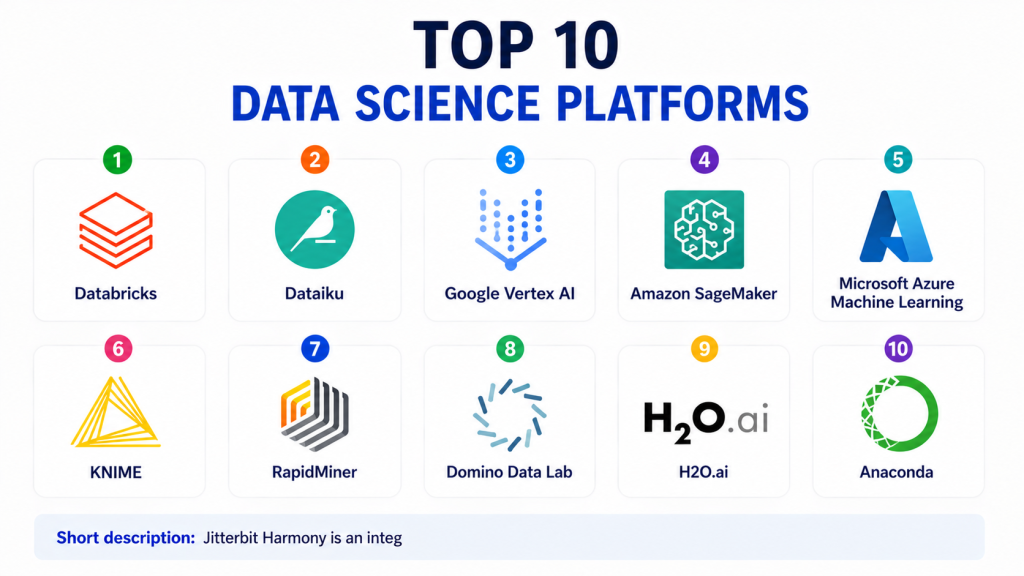
Top 10 Data Science Platforms
#1 — Databricks
Short description:Databricks is a data intelligence and analytics platform widely used for data engineering, data science, machine learning, and AI workloads. It is built around the lakehouse architecture and supports notebooks, collaborative development, ML workflows, and large-scale data processing. Databricks is especially strong for teams working with big data, Spark, lakehouse storage, and enterprise AI projects. Data scientists can use it for experimentation, model training, feature engineering, and deployment workflows. It is suitable for mid-market and enterprise teams that need scalable data and AI capabilities. The platform works well when data engineering and data science teams need to collaborate closely. It can be powerful, but it may require platform knowledge to use fully. It is best for organizations that want data, analytics, and AI in one scalable environment.
Key Features
- Collaborative notebooks
- Lakehouse architecture support
- MLflow integration
- Large-scale Spark processing
- Model training and deployment workflows
- Data engineering and AI workflow support
- Governance and catalog capabilities
Pros
- Strong for big data and AI workloads
- Good collaboration between data engineering and data science teams
- Mature ecosystem for ML and analytics
Cons
- Can require technical expertise
- Cost management needs attention
- May be more advanced than small teams need
Platforms / Deployment
Web
Cloud / Hybrid
Security & Compliance
SSO/SAML, RBAC, encryption, audit logs, and enterprise security controls are commonly available. Specific compliance certifications should be validated based on cloud region, plan, and deployment model.
Integrations & Ecosystem
Databricks integrates strongly with cloud platforms, data lakes, BI tools, orchestration systems, and ML tools.
- AWS
- Azure
- Google Cloud
- MLflow
- Delta Lake
- Power BI and Tableau
Support & Community
Databricks offers documentation, enterprise support, training resources, partner ecosystem support, and a large technical community.
#2 — Dataiku
Short description:Dataiku is an enterprise AI and data science platform designed for both technical and business users. It supports data preparation, machine learning, AutoML, visual workflows, coding notebooks, model deployment, and governance. Dataiku is useful for organizations that want collaboration between data scientists, analysts, business teams, and IT teams. It supports both code-first and low-code workflows, making it suitable for mixed-skill teams. Enterprises often use Dataiku for predictive analytics, customer intelligence, risk modeling, and operational AI. The platform places strong emphasis on governed AI delivery. It is best for teams that need repeatable, collaborative, and controlled data science workflows. Smaller teams may need to evaluate whether the platform depth fits their budget.
Key Features
- Visual data preparation
- AutoML and machine learning workflows
- Code notebooks and custom modeling
- Model deployment and monitoring
- Governance and project management features
- Collaboration across business and technical users
- Integration with enterprise data systems
Pros
- Good balance of low-code and code-first workflows
- Strong collaboration features
- Useful for enterprise AI governance
Cons
- May be complex for very small teams
- Advanced setup may require planning
- Pricing can vary by enterprise needs
Platforms / Deployment
Web
Cloud / Self-hosted / Hybrid
Security & Compliance
SSO/SAML, RBAC, audit logs, encryption, and enterprise access controls are commonly supported. Specific certifications should be validated directly.
Integrations & Ecosystem
Dataiku integrates with databases, warehouses, cloud platforms, BI tools, and ML ecosystems.
- Snowflake
- BigQuery
- Databricks
- AWS
- Azure
- SQL databases
Support & Community
Dataiku provides documentation, enterprise support, onboarding resources, training, and customer success services.
#3 — Google Vertex AI
Short description:Google Vertex AI is a managed machine learning and AI platform for building, training, deploying, and managing models on Google Cloud. It supports notebooks, AutoML, custom training, model deployment, pipelines, model monitoring, and generative AI workflows. Vertex AI is useful for teams already using Google Cloud, BigQuery, and Google data services. It helps data scientists and ML engineers move from experimentation to production with managed infrastructure. The platform supports both custom ML and low-code model development. It is strong for cloud-native AI workflows and scalable model operations. It is best for teams that want managed AI services inside the Google Cloud ecosystem. Teams outside Google Cloud may prefer more neutral platforms.
Key Features
- Managed notebooks and training
- AutoML support
- Model deployment and endpoints
- ML pipelines
- Model monitoring
- Generative AI support
- Integration with Google Cloud data services
Pros
- Strong fit for Google Cloud users
- Managed infrastructure reduces operational effort
- Good support for scalable AI workflows
Cons
- Best experience is within Google Cloud
- Cloud cost planning is important
- Requires cloud and ML workflow knowledge
Platforms / Deployment
Web
Cloud
Security & Compliance
Google Cloud security controls commonly include IAM, encryption, audit logs, access management, and network controls. Specific compliance depends on configuration and region.
Integrations & Ecosystem
Vertex AI integrates deeply with Google Cloud analytics, storage, and AI services.
- BigQuery
- Cloud Storage
- Dataflow
- Pub/Sub
- Looker
- Google Cloud APIs
Support & Community
Google Cloud provides documentation, support plans, training, certifications, and community resources.
#4 — Amazon SageMaker
Short description:Amazon SageMaker is a managed machine learning platform from AWS. It helps teams build, train, tune, deploy, and monitor machine learning models at scale. SageMaker is useful for data scientists, ML engineers, and cloud teams building production AI systems on AWS. It supports notebooks, training jobs, model hosting, pipelines, model monitoring, feature management, and governance workflows. The platform is flexible and powerful for teams with AWS expertise. It can support both custom ML and managed ML workflows. SageMaker is best for organizations already invested in AWS infrastructure. Teams should carefully manage costs and architecture design for large-scale workloads.
Key Features
- Managed notebooks and development environments
- Model training and tuning
- Model deployment and endpoints
- ML pipelines
- Model monitoring
- Feature store capabilities
- Integration with AWS data services
Pros
- Strong fit for AWS-based ML teams
- Broad machine learning lifecycle coverage
- Scalable managed infrastructure
Cons
- AWS knowledge is required
- Costs can become complex
- Many features may feel overwhelming for beginners
Platforms / Deployment
Web
Cloud
Security & Compliance
AWS security controls commonly include IAM, encryption, logging, network controls, and access management. Specific compliance depends on service configuration and account setup.
Integrations & Ecosystem
SageMaker integrates broadly across AWS services and developer workflows.
- Amazon S3
- AWS Glue
- Amazon Redshift
- Amazon ECR
- AWS Lambda
- Amazon CloudWatch
Support & Community
AWS provides documentation, support plans, training resources, architecture guidance, and a large cloud community.
#5 — Microsoft Azure Machine Learning
Short description:Microsoft Azure Machine Learning is a cloud platform for building, training, deploying, and managing machine learning models. It supports notebooks, AutoML, model management, pipelines, deployment endpoints, monitoring, and responsible AI features. It is useful for organizations already using Azure, Microsoft Fabric, Power BI, and enterprise Microsoft identity systems. Azure Machine Learning serves data scientists, ML engineers, and enterprise AI teams. It supports both code-first and designer-based workflows. The platform is suitable for production AI, predictive analytics, and enterprise model governance. It is best for Microsoft-centered organizations that want cloud-managed ML operations. Smaller teams should evaluate complexity and cost before adoption.
Key Features
- Managed notebooks and compute
- AutoML and designer workflows
- Model training and deployment
- ML pipelines
- Model registry and monitoring
- Responsible AI tooling
- Integration with Azure data services
Pros
- Strong fit for Microsoft ecosystem users
- Good enterprise identity and governance alignment
- Supports both code and low-code workflows
Cons
- Best experience is within Azure
- Setup can require cloud platform knowledge
- Cost management needs planning
Platforms / Deployment
Web
Cloud
Security & Compliance
Azure security controls commonly include identity integration, RBAC, encryption, audit logs, monitoring, and network security. Specific compliance depends on configuration and region.
Integrations & Ecosystem
Azure Machine Learning integrates with Microsoft cloud, data, and analytics services.
- Azure Data Lake
- Azure Synapse
- Microsoft Fabric
- Power BI
- Azure DevOps
- Azure Kubernetes Service
Support & Community
Microsoft provides documentation, enterprise support, training resources, partner ecosystem support, and community forums.
#6 — KNIME
Short description:KNIME is an analytics and data science platform known for visual workflow-based data preparation, analysis, and machine learning. It is popular among analysts, data scientists, researchers, and business users who want a low-code approach to data science. KNIME allows users to build workflows using nodes instead of writing every step in code. It supports data cleaning, transformation, modeling, visualization, and automation. KNIME is useful for teams that want transparency and repeatability in analytical workflows. It can also support Python, R, and other extensions for advanced users. The platform is suitable for education, research, SMBs, and enterprise analytics teams. It is a strong choice where visual workflows and flexibility matter.
Key Features
- Visual workflow builder
- Data preparation and transformation
- Machine learning nodes
- Python and R integration
- Workflow automation
- Extension ecosystem
- Collaboration and server options
Pros
- Strong low-code data science experience
- Good for analysts and mixed-skill teams
- Flexible extension ecosystem
Cons
- Complex workflows can become large
- Enterprise deployment may need planning
- Interface may require learning for new users
Platforms / Deployment
Windows / macOS / Linux / Web for server options
Cloud / Self-hosted / Hybrid
Security & Compliance
Security depends on edition and deployment. Enterprise controls may include user management, access controls, and authentication options. Specific certifications are not publicly stated for every option.
Integrations & Ecosystem
KNIME connects with databases, files, programming tools, cloud services, and ML libraries.
- SQL databases
- Python
- R
- Excel
- Cloud storage
- Machine learning libraries
Support & Community
KNIME has strong documentation, a large community, learning resources, extensions, and enterprise support options.
#7 — RapidMiner
Short description:RapidMiner is a data science and machine learning platform focused on visual workflows, predictive analytics, and model development. It is designed to help users prepare data, build models, validate results, and deploy analytics workflows. RapidMiner is useful for analysts, citizen data scientists, and enterprise teams that want a more visual approach to machine learning. It supports data preparation, AutoML-style capabilities, modeling, validation, and automation. The platform can help organizations accelerate machine learning without requiring every user to be an expert programmer. It is suitable for business analytics, risk modeling, customer analytics, and operational prediction. Teams should evaluate current product packaging and enterprise fit before purchase. It is best for organizations seeking accessible machine learning workflows.
Key Features
- Visual machine learning workflows
- Data preparation and blending
- Predictive modeling tools
- Model validation and evaluation
- Automation capabilities
- Integration with data sources
- Support for mixed-skill analytics teams
Pros
- Good for visual ML workflows
- Useful for citizen data scientists
- Helps reduce coding barrier
Cons
- Advanced users may prefer code-first tools
- Enterprise fit depends on requirements
- Product packaging should be reviewed carefully
Platforms / Deployment
Windows / macOS / Linux / Web options may vary
Cloud / Self-hosted / Hybrid
Security & Compliance
Enterprise security features may be available depending on deployment. Specific certifications are not publicly stated for every option.
Integrations & Ecosystem
RapidMiner supports common data and analytics integrations.
- Databases
- Excel and files
- Cloud storage
- Python and R options
- BI tools
- Enterprise data sources
Support & Community
RapidMiner provides documentation, training resources, community support, and enterprise support options depending on edition.
#8 — Domino Data Lab
Short description:Domino Data Lab is an enterprise data science and MLOps platform designed for professional data science teams. It helps organizations manage code, environments, experiments, models, infrastructure, and collaboration. Domino is useful for regulated and complex enterprises that need reproducibility, governance, and control over data science work. It supports popular open-source tools and allows teams to work in preferred languages and notebooks. Domino focuses strongly on enterprise model development and operationalization. It is suitable for teams that need repeatable and auditable data science workflows. The platform can support scale across many users and projects. It is best for mature organizations with serious AI and data science programs.
Key Features
- Reproducible data science environments
- Experiment tracking
- Model deployment workflows
- Infrastructure management
- Collaboration and project governance
- Support for open-source tools
- Enterprise controls for regulated teams
Pros
- Strong for enterprise data science governance
- Supports professional code-first teams
- Useful for reproducibility and collaboration
Cons
- May be too advanced for small teams
- Implementation requires planning
- Pricing is usually enterprise-oriented
Platforms / Deployment
Web
Cloud / Self-hosted / Hybrid
Security & Compliance
Enterprise security controls may include SSO, RBAC, audit logs, encryption, and access management. Specific certifications should be validated directly.
Integrations & Ecosystem
Domino integrates with data, cloud, development, and ML ecosystems.
- AWS
- Azure
- Google Cloud
- Git
- Jupyter
- RStudio
Support & Community
Domino provides enterprise support, onboarding, documentation, and customer success resources.
#9 — H2O.ai
Short description:H2O.ai provides AI and machine learning platforms focused on AutoML, predictive modeling, and enterprise AI workflows. It is known for helping teams build machine learning models faster with automated model development capabilities. H2O.ai is useful for data scientists, analysts, risk teams, finance teams, and enterprises that need predictive analytics at scale. It supports both expert and automated machine learning workflows. Organizations use it for fraud detection, credit risk, customer analytics, forecasting, and operational optimization. H2O.ai can help teams accelerate modeling while still giving technical users control. It is best for teams that want AutoML and machine learning productivity. Buyers should evaluate deployment, governance, and integration requirements carefully.
Key Features
- AutoML capabilities
- Predictive modeling
- Model explainability features
- Enterprise AI workflow support
- Support for structured data use cases
- Integration with data platforms
- Scalable machine learning workflows
Pros
- Strong AutoML capabilities
- Useful for predictive analytics
- Good fit for financial and risk modeling use cases
Cons
- Advanced usage still needs ML knowledge
- Enterprise packaging may vary
- Not every use case fits AutoML workflows
Platforms / Deployment
Web / Python / API options
Cloud / Self-hosted / Hybrid
Security & Compliance
Enterprise security features may be available. Specific compliance certifications should be validated directly.
Integrations & Ecosystem
H2O.ai integrates with common data platforms, programming tools, and enterprise environments.
- Python
- R
- Spark
- Snowflake
- Databricks
- Cloud platforms
Support & Community
H2O.ai has documentation, enterprise support, training resources, and community presence around machine learning and AutoML.
#10 — Anaconda
Short description:Anaconda is a popular platform and distribution for Python and R data science. It is widely used by data scientists, researchers, analysts, and ML teams for package management, environments, notebooks, and open-source analytics workflows. Anaconda is especially useful for teams that rely heavily on Python libraries such as pandas, NumPy, scikit-learn, and Jupyter. It helps simplify environment management and reproducibility. Anaconda is not a full enterprise MLOps platform by itself, but it is a core part of many data science workflows. It is useful for individuals, education, research, and enterprise teams using open-source data science tools. Organizations can use enterprise options for governance and package management needs. It is best for teams that want a strong Python data science foundation.
Key Features
- Python and R data science distribution
- Package and environment management
- Jupyter notebook support
- Open-source library ecosystem
- Reproducible environments
- Enterprise package governance options
- Strong scientific computing support
Pros
- Very popular among data scientists
- Strong open-source ecosystem support
- Useful for reproducible Python environments
Cons
- Not a full MLOps platform by default
- Production deployment needs additional tools
- Enterprise governance depends on selected offering
Platforms / Deployment
Windows / macOS / Linux / Web options may vary
Cloud / Self-hosted / Hybrid
Security & Compliance
Security depends on edition and deployment. Enterprise package governance and access controls may be available. Specific certifications are not publicly stated for every option.
Integrations & Ecosystem
Anaconda works with the broader Python, R, notebook, and ML ecosystem.
- Jupyter
- Python libraries
- R packages
- Git
- Cloud platforms
- ML frameworks
Support & Community
Anaconda has a large community, extensive documentation, learning resources, and commercial support options for organizations.
Comparison Table
| Tool Name | Best For | Platform(s) Supported | Deployment | Standout Feature | Public Rating |
|---|---|---|---|---|---|
| Databricks | Lakehouse AI and big data teams | Web | Cloud / Hybrid | Scalable data and AI workspace | N/A |
| Dataiku | Enterprise AI collaboration | Web | Cloud / Self-hosted / Hybrid | Low-code and code-first AI workflows | N/A |
| Google Vertex AI | Google Cloud ML teams | Web | Cloud | Managed AI and ML lifecycle | N/A |
| Amazon SageMaker | AWS ML teams | Web | Cloud | End-to-end managed ML on AWS | N/A |
| Microsoft Azure Machine Learning | Microsoft cloud AI teams | Web | Cloud | Enterprise ML with Azure integration | N/A |
| KNIME | Visual analytics and low-code data science | Windows / macOS / Linux / Web | Cloud / Self-hosted / Hybrid | Node-based workflow builder | N/A |
| RapidMiner | Visual predictive analytics | Windows / macOS / Linux / Web options | Cloud / Self-hosted / Hybrid | Accessible machine learning workflows | N/A |
| Domino Data Lab | Enterprise data science governance | Web | Cloud / Self-hosted / Hybrid | Reproducible enterprise data science | N/A |
| H2O.ai | AutoML and predictive modeling | Web / Python / API | Cloud / Self-hosted / Hybrid | Automated machine learning | N/A |
| Anaconda | Python and R data science environments | Windows / macOS / Linux / Web options | Cloud / Self-hosted / Hybrid | Package and environment management | N/A |
Evaluation & Scoring of Data Science Platforms
| Tool Name | Core (25%) | Ease (15%) | Integrations (15%) | Security (10%) | Performance (10%) | Support (10%) | Value (15%) | Weighted Total |
|---|---|---|---|---|---|---|---|---|
| Databricks | 9 | 7 | 9 | 9 | 9 | 9 | 7 | 8.45 |
| Dataiku | 9 | 8 | 8 | 8 | 8 | 8 | 7 | 8.10 |
| Google Vertex AI | 9 | 7 | 9 | 9 | 9 | 9 | 7 | 8.45 |
| Amazon SageMaker | 9 | 7 | 9 | 9 | 9 | 9 | 7 | 8.45 |
| Microsoft Azure Machine Learning | 9 | 8 | 9 | 9 | 8 | 9 | 7 | 8.50 |
| KNIME | 7 | 9 | 8 | 7 | 7 | 8 | 9 | 7.85 |
| RapidMiner | 7 | 8 | 7 | 7 | 7 | 7 | 8 | 7.30 |
| Domino Data Lab | 8 | 7 | 8 | 9 | 8 | 9 | 7 | 8.00 |
| H2O.ai | 8 | 8 | 8 | 8 | 8 | 8 | 7 | 7.85 |
| Anaconda | 7 | 8 | 8 | 7 | 7 | 8 | 9 | 7.75 |
These scores are comparative and should be used for shortlisting only. Enterprise platforms often score higher in governance, deployment, and support. Low-code and open-source-friendly platforms may score higher in usability or value. The best choice depends on your team skills, data stack, model deployment needs, and security requirements.
Which Data Science Platform Is Right for You?
Solo / Freelancer
Solo users and independent data scientists usually need affordable, flexible, and easy-to-use tools. Anaconda, KNIME, and cloud notebooks can be practical starting points. If you work heavily with Python, Anaconda is a strong foundation. If you prefer visual workflows, KNIME is easier to start with.
SMB
Small and growing businesses should focus on speed, simplicity, and cost control. KNIME, H2O.ai, Dataiku, and cloud-native services can be useful depending on team skill level. SMBs should avoid overbuying a complex enterprise platform unless they have clear production ML needs.
Mid-Market
Mid-market teams often need collaboration, experiment tracking, deployment, and governance. Databricks, Dataiku, SageMaker, Vertex AI, and Azure Machine Learning are strong options. The right choice depends heavily on the company’s cloud provider and existing data architecture.
Enterprise
Enterprises should prioritize security, governance, compliance, scalability, collaboration, and operational MLOps. Databricks, Dataiku, Domino Data Lab, SageMaker, Vertex AI, and Azure Machine Learning are strong enterprise candidates. Regulated industries should validate auditability, access controls, and model governance carefully.
Budget vs Premium
Budget-focused teams can start with Anaconda, KNIME, and open-source ML tools. Premium platforms provide stronger collaboration, governance, deployment, monitoring, and support. The true cost should include infrastructure, developer time, failed experiments, deployment delays, and model risk.
Feature Depth vs Ease of Use
Dataiku, KNIME, RapidMiner, and H2O.ai are more approachable for mixed-skill teams. Databricks, SageMaker, Vertex AI, Azure Machine Learning, and Domino Data Lab provide deeper technical control and production capabilities. Choose based on whether your users are analysts, data scientists, or ML engineers.
Integrations & Scalability
Cloud-native teams should choose platforms that match their data environment. AWS teams may prefer SageMaker, Google Cloud teams may prefer Vertex AI, Microsoft teams may prefer Azure Machine Learning, and lakehouse teams may prefer Databricks. Integration with Git, data warehouses, storage, CI/CD, and BI tools is important.
Security & Compliance Needs
Security-focused teams should evaluate SSO, RBAC, encryption, audit logs, model governance, data access controls, private networking, and compliance documentation. Regulated companies should also review explainability, approval workflows, model lineage, and monitoring requirements before purchase.
Frequently Asked Questions
1. What is a data science platform?
A data science platform is a workspace for preparing data, building models, tracking experiments, deploying machine learning, and collaborating across teams. It helps move data science from isolated experiments to repeatable business workflows.
2. How is a data science platform different from a BI tool?
A BI tool focuses mainly on dashboards, reports, and business analysis. A data science platform supports model building, machine learning, experimentation, deployment, and model lifecycle management.
3. How much do data science platforms cost?
Costs vary widely based on users, compute, storage, cloud usage, support, and enterprise features. Some tools offer open-source or free options, while enterprise platforms often use custom pricing.
4. What are common mistakes when choosing a data science platform?
Common mistakes include buying too much platform too early, ignoring deployment needs, skipping governance review, underestimating cloud costs, and choosing a tool that does not match the team’s skill level.
5. Do data science platforms support AutoML?
Many modern data science platforms support AutoML or assisted machine learning. AutoML can speed up model development, but teams still need to validate data quality, model fairness, performance, and business fit.
6. Can data science platforms deploy models into production?
Yes, many platforms support model deployment through APIs, batch scoring, real-time endpoints, or integration with cloud services. However, deployment capability varies by product and configuration.
7. Are low-code data science platforms suitable for enterprises?
Yes, low-code platforms can help enterprises involve more business users and analysts in analytics workflows. However, enterprises should still ensure governance, security, model validation, and expert review are in place.
8. What integrations should buyers check first?
Buyers should check integrations with cloud storage, data warehouses, Git, notebooks, BI tools, orchestration tools, model registries, monitoring systems, and identity providers. Integration depth is more important than connector count.
9. When should a company switch data science platforms?
A company should consider switching when the current platform slows collaboration, lacks governance, cannot support production deployment, creates high operational cost, or does not integrate with the modern data stack.
10. What are alternatives to full data science platforms?
Alternatives include notebooks, open-source Python/R tools, cloud notebooks, BI tools, standalone AutoML tools, and custom MLOps stacks. These may work for small teams but become harder to manage as projects scale.
Conclusion
Data science platforms help organizations build, manage, deploy, and govern machine learning and AI work more effectively. The best platform depends on team size, technical skill, cloud provider, data architecture, governance needs, and production maturity. Databricks is strong for lakehouse and big data AI. Dataiku is useful for collaborative enterprise AI. Vertex AI, SageMaker, and Azure Machine Learning are strong choices for cloud-native ML teams. KNIME and RapidMiner help teams that prefer visual workflows. Domino Data Lab supports governed enterprise data science. H2O.ai is strong for AutoML and predictive modeling. Anaconda remains a trusted foundation for Python and R data science.
