Upgrade & Secure Your Future with DevOps, SRE, DevSecOps, MLOps!
We spend hours scrolling social media and waste money on things we forget, but won’t spend 30 minutes a day earning certifications that can change our lives.
Master in DevOps, SRE, DevSecOps & MLOps by DevOps School!
Learn from Guru Rajesh Kumar and double your salary in just one year.
Introduction
A game engine is the software framework primarily designed for the creation and development of video games. In plain English, it is the “power plant” and “construction kit” combined, providing developers with the core functionalitites—such as rendering (2D/3D graphics), physics, sound, scripting, and animation—needed to build interactive experiences without starting from scratch.
By 2026, game engines have transcended entertainment. They are now the foundational infrastructure for the “Industrial Metaverse,” digital twins, and real-time architectural visualization. The rise of Generative AI integrated directly into the editor and the shift toward WebGPU for high-end browser gaming have made engine selection a critical strategic decision for 2026 and beyond.
Real-World Use Cases
- AAA and Indie Gaming: From photorealistic open-world RPGs to minimalist 2D mobile puzzles.
- Architectural Visualization (ArchViz): Creating walkable, real-time 3D models of buildings before they are built.
- Film & Virtual Production: Using LED volumes and real-time rendering to film visual effects in-camera (e.g., The Mandalorian style).
- Automotive & Industrial Twins: Designing dashboards or simulating factory floors to optimize logistics.
- Medical & Educational Simulations: Training surgeons or pilots in risk-free, high-fidelity virtual environments.
Evaluation Criteria for Buyers
- Platform Support: Does it target PC, Console, Mobile, Web, or VR/AR?
- Ease of Use / Learning Curve: Is it visual-scripting friendly (no-code) or C++ heavy?
- Rendering Capabilities: Does it support real-time ray tracing, global illumination, and nanite-level geometry?
- Licensing & Cost: Is it royalty-based, subscription-based, or open-source?
- Asset Ecosystem: How extensive is the marketplace for pre-made 3D models and plugins?
- AI Integration: Does it offer AI-assisted coding, text-to-texture, or automated NPC logic?
- Scalability: Can it handle massive multiplayer environments or large-scale data sets?
- Security & Compliance: Does the vendor provide enterprise-grade data protection for proprietary assets?
Best for: Professional studios, solo indie developers, enterprise simulation teams, and creative agencies looking to build high-fidelity interactive 3D/2D content.
Not ideal for: Simple static websites, basic 2D productivity apps, or hardware-constrained environments where a full engine overhead is unnecessary.
Key Trends in Game Engines
- Generative AI Workflows: Engines now feature “Copilots” for asset generation, allowing developers to generate textures, 3D meshes, and dialogue trees via natural language prompts within the editor.
- Cloud-Native Development: Collaborative editing is the new standard. Multiple developers can work in the same scene simultaneously, with the engine’s “heavy lifting” (rendering/compiling) handled by cloud servers.
- WebGPU Proliferation: The gap between desktop and web games has narrowed significantly. Engines are optimizing for WebGPU to deliver near-native performance directly in browsers.
- Neural Rendering: Traditional rasterization is being supplemented by AI-driven upscaling (DLSS/FSR) and neural radiance fields (NeRFs) to achieve photorealism with lower hardware requirements.
- Unified Ecosystems: Cross-compatibility between engines (via OpenUSD) allows for seamless asset transfer between tools like Unreal, Unity, and Nvidia Omniverse.
- Spatial Computing Focus: With the maturity of headsets like the Apple Vision Pro and Quest 4, engines have introduced “Spatial-First” templates and hand-tracking-centric physics.
- Compliance for Enterprise: As engines enter the medical and gov-tech sectors, SOC 2 and ISO 27001 certifications have become common requirements for engine providers.
- Real-Time Data Integration: High-end engines now feature native connectors for IoT and live data streams, turning game engines into real-time monitoring dashboards for smart cities.
How We Selected These Tools (Methodology)
To determine the top 10 game engines for 2026, we employed a rigorous selection process focused on long-term viability and technical excellence:
- Market Share & Industry Adoption: We analyzed which engines are currently being used by top-tier studios and the rising stars of the indie scene.
- Feature Evolution: Priority was given to engines that have successfully integrated AI and modern rendering tech (e.g., Lumen, Nanite, AI Muse).
- Platform Versatility: We looked for tools that allow “build once, deploy anywhere” across mobile, console, and web.
- Community & Support: The strength of the documentation, the size of the forums, and the availability of tutorials were heavily weighted.
- Security & Enterprise Readiness: We evaluated the engine’s suitability for non-gaming sectors like defense and healthcare.
- Performance Benchmarking: We assessed the engine’s ability to handle high-poly counts and complex physics without significant frame drops.
- Developer Experience: The quality of the IDE (Integrated Development Environment) and the speed of the iteration loop (hot-reloading).
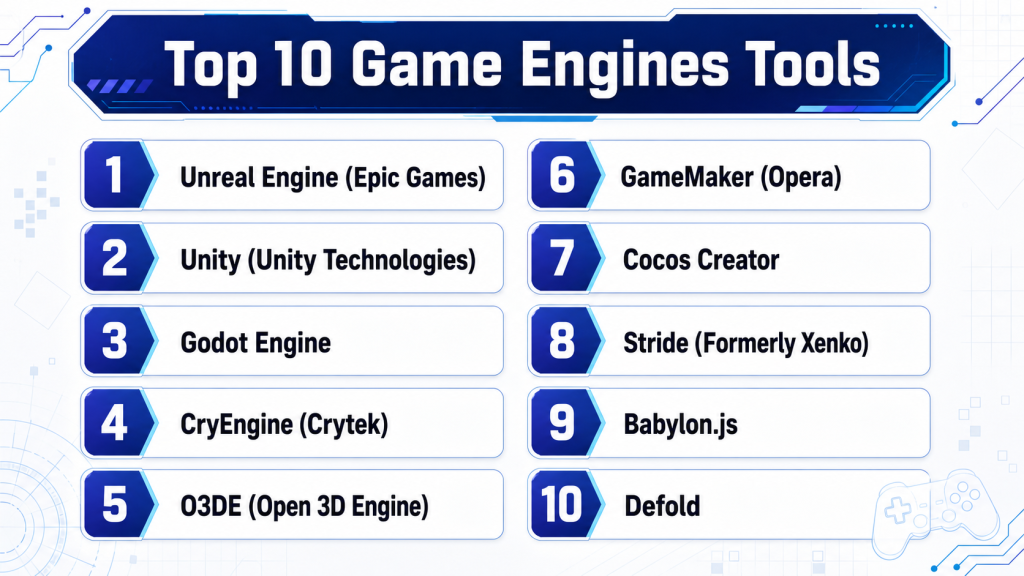
Top 10 Game Engines Tools
#1 — Unreal Engine (Epic Games)
The gold standard for photorealism and high-end production. Unreal Engine 5.x and its successors have redefined what is possible in real-time rendering, making it the primary choice for AAA games and Hollywood films.
Key Features
- Lumen & Nanite: Real-time global illumination and virtualized micro-polygon geometry.
- Metahuman Creator: High-fidelity digital human creation in minutes.
- Blueprints: The industry’s most advanced visual scripting system.
- World Partition: Automated streaming system for massive open worlds.
- UE Assistant AI: Integrated AI for code generation and scene optimization.
- Virtual Production: Native support for LED volumes and multi-user editing.
Pros
- Unrivaled visual fidelity and “out-of-the-box” professional lighting.
- Massive Marketplace with thousands of high-quality, often free, assets (Megascans).
- Access to the full C++ source code for deep customization.
Cons
- Steep learning curve for absolute beginners.
- Large build sizes and high hardware requirements for development.
- Royalty-based pricing can be expensive for high-revenue projects.
Platforms / Deployment
- Windows / macOS / Linux / iOS / Android / PlayStation 5 / Xbox Series X|S / Nintendo Switch
- Cloud / Self-hosted
Security & Compliance
- SOC 2: Compliant
- ISO 27001: Compliant
- Encryption: AES-256 for data at rest and in transit.
Integrations & Ecosystem
Unreal integrates seamlessly with the broader Epic ecosystem and industry-standard creative tools.
- Quixel Megascans (3D scans)
- Perforce & GitHub (Version control)
- Nvidia Omniverse
- Houdini & Maya
Support & Community
Extensive. The Unreal Developer Network (UDN) provides enterprise-level support, while the Epic Dev Community offers millions of tutorials and a robust forum.
#2 — Unity (Unity Technologies)
The world’s most popular engine for mobile and cross-platform development. Unity 6 and its AI-integrated updates focus on performance, scalability, and democratizing high-end features for smaller teams.
Key Features
- Unity Muse: A suite of AI tools for generating textures, sprites, and animations via text.
- Unity Sentis: Allows developers to embed neural networks directly into the game runtime.
- URP & HDRP: Specialized render pipelines for either mobile performance or high-end graphics.
- DOTS (Data-Oriented Technology Stack): High-performance architecture for handling millions of entities.
- Unity Cloud: Integrated version control, asset management, and team collaboration.
Pros
- Best-in-class cross-platform deployment (especially for mobile and XR).
- Massive asset store and third-party plugin ecosystem.
- Easier learning curve compared to Unreal, utilizing C# scripting.
Cons
- The “Unity Runtime Fee” controversy created some trust issues in the community.
- Fragmented render pipelines (URP vs. HDRP) can be confusing for new users.
- Some advanced features require a “Pro” or “Enterprise” subscription.
Platforms / Deployment
- Web / Windows / macOS / Linux / iOS / Android / VisionOS / Consoles
- Cloud-hosted
Security & Compliance
- GDPR: Compliant
- SOC 2: Not publicly stated (Enterprise versions vary)
- MFA & RBAC: Available for Unity Cloud teams.
Integrations & Ecosystem
Unity is the “hub” for many mobile ad networks and analytics tools.
- IronSource & Unity Ads
- Visual Studio (Primary IDE)
- Plastic SCM (Version Control)
- Jira & Slack connectors
Support & Community
Unparalleled community size. If you have a problem, there is likely a YouTube tutorial or a 10-year-old forum thread that solves it.
#3 — Godot Engine
The leading open-source alternative. Godot has seen a massive surge in 2024–2026 as developers look for royalty-free, lightweight solutions that offer full creative freedom.
Key Features
- Scene-Driven Architecture: Everything is a “node,” making project organization incredibly intuitive.
- GDScript: A Python-like language built specifically for the engine.
- Vulkan & D3D12 Support: Modern rendering backends for 3D performance.
- Completely Free: No royalties, no subscription fees, no strings attached.
- GDExtension: Allows high-performance C++ or Rust code without recompiling the engine.
Pros
- Extremely lightweight (the editor is <100MB).
- No-cost licensing makes it ideal for hobbyists and lean indies.
- Fast iteration times and an intuitive UI.
Cons
- 3D performance and features still lag slightly behind Unity and Unreal.
- Smaller asset marketplace and ecosystem.
- Console porting requires third-party “porting houses” due to its open-source license.
Platforms / Deployment
- Web / Windows / macOS / Linux / Android / iOS
- Self-hosted
Security & Compliance
- Open Source: Full transparency, but compliance (SOC 2, etc.) is the responsibility of the developer/studio.
- Audit Logs: N/A
Integrations & Ecosystem
- GitHub/GitLab (Native integration)
- Blender (Excellent .blend file support)
- VS Code extension
Support & Community
Rapidly growing. It is one of the most active communities on Discord and Reddit. Documentation is excellent and community-maintained.
#4 — CryEngine (Crytek)
Famous for “Can it run Crysis?”, this engine is a powerhouse for high-fidelity outdoor environments. It remains a top choice for developers who want “all-in-one” features without needing thousands of plugins.
Key Features
- Sandbox Editor: Real-time, what-you-see-is-what-you-play editing.
- Advanced Physics: Native integration of high-end physics and water simulation.
- SVOGI: Sparse Voxel Octree Global Illumination for stunning lighting.
- Integrated AI System: Built-in tools for character navigation and tactical behavior.
Pros
- Visuals that rival Unreal Engine “out of the box.”
- Excellent performance in large, vegetated open-world environments.
- Unified toolset; you rarely need to leave the editor.
Cons
- Documentation has historically been thinner than competitors.
- Smaller talent pool (fewer developers are trained in CryEngine).
- Steep learning curve and complex C++ codebase.
Platforms / Deployment
- Windows / Linux / PlayStation / Xbox
- Hybrid
Security & Compliance
- Not publicly stated. Primarily focuses on on-premise security.
Integrations & Ecosystem
- FMOD / Wwise (Audio)
- Substance Designer
- Perforce
Support & Community
Smaller, more dedicated community. Crytek offers premium support for enterprise clients.
#5 — O3DE (Open 3D Engine)
The successor to Amazon Lumberyard, managed by the Linux Foundation. It is a modular, high-end 3D engine designed for massive-scale projects and cloud integration.
Key Features
- Atom Renderer: A modern, multi-platform, photorealistic renderer.
- Modular “Gems”: You only include the features your game actually needs, keeping builds lean.
- White Box Tool: Built-in level design tools for rapid prototyping.
- Multiplayer Sample: Out-of-the-box support for large-scale networking.
Pros
- Backed by heavyweights like AWS, Adobe, and Intel.
- No licensing fees or royalties.
- Excellent cloud-native features for backend services.
Cons
- High hardware requirements to run the editor.
- Relatively new ecosystem with fewer tutorials.
- The modular system can be complex to manage for small teams.
Platforms / Deployment
- Windows / Linux / iOS / Android / Consoles
- Cloud (AWS-optimized)
Security & Compliance
- ISO 27001: Aligns with AWS standards.
- RBAC: Built-in for cloud-based collaboration.
Integrations & Ecosystem
- AWS GameLift / DynamoDB
- Python scripting
- Nvidia PhysX
Support & Community
Driven by the Open 3D Foundation. Growing fast in the enterprise and defense sectors.
#6 — GameMaker (Opera)
The king of 2D game development. GameMaker has powered hits like Undertale and Hyper Light Drifter. In 2026, it remains the most efficient path for 2D cross-platform success.
Key Features
- GML Visual & Code: Dual-mode approach (drag-and-drop or coding).
- Sequence Editor: Powerful tool for creating cutscenes and UI animations.
- Opera GX Integration: One-click publishing to the GX.games web platform.
- Highly Optimized 2D Pipeline: Handles thousands of sprites with ease.
Pros
- Fastest time-to-market for 2D games.
- Extremely accessible for non-programmers.
- Great cross-platform export options.
Cons
- Not suitable for 3D development.
- Proprietary language (GML) isn’t used outside of the engine.
- Subscription model for professional/console exports.
Platforms / Deployment
- Windows / macOS / Linux / Web / iOS / Android / Consoles
- Cloud (Web-hosted via Opera)
Security & Compliance
- GDPR: Compliant
- Data Encryption: Supported for local save data.
Integrations & Ecosystem
- Spine (2D Animation)
- Steamworks
- PlayFab
Support & Community
Very friendly, educator-focused community. Thousands of tutorials for every genre of 2D game.
#7 — Cocos Creator
The go-to engine for web and mobile “mini-games.” Dominant in the Asian market and increasingly popular globally for high-performance 2D/3D web content.
Key Features
- Lightweight 3D: Optimized for high-end 3D graphics on mobile browsers.
- TypeScript-First: Modern development workflow for web developers.
- Instant Preview: See changes instantly on mobile devices via QR code scanning.
- Cross-Platform Export: Targeted at WeChat, TikTok, Web, and Mobile.
Pros
- Extremely high performance for web-based games.
- Excellent for social and “hyper-casual” games.
- Free for most users with a transparent pricing model for enterprise.
Cons
- 3D tools are less mature than Unity.
- Documentation is sometimes translated and can be confusing.
- Limited console support.
Platforms / Deployment
- Web (HTML5) / iOS / Android / Windows / macOS
- Cloud
Security & Compliance
- Not publicly stated.
Integrations & Ecosystem
- Facebook Instant Games
- Google Play Instant
- AdMob
Support & Community
Massive community in China; growing international presence. Very active on GitHub.
#8 — Stride (Formerly Xenko)
The premier .NET/C# engine. For developers who love the Microsoft ecosystem, Stride offers a robust, modern alternative to Unity with a cleaner, open-source codebase.
Key Features
- C# 12+ and .NET 8/9 Support: Uses the latest high-performance C# features.
- Nested Prefabs: Highly efficient scene management system.
- PBR Layered Materials: Advanced material system for realistic surfaces.
- Virtual Reality: Native, one-click VR support.
Pros
- Cleaner API and architecture than Unity for C# purists.
- Open-source (MIT License).
- Deeply integrated with Visual Studio.
Cons
- Smallest community on this list.
- Few third-party assets or plugins.
- Limited documentation for advanced features.
Platforms / Deployment
- Windows / iOS / Android / Linux (Experimental)
- Self-hosted
Security & Compliance
- Open Source: Transparency-based security.
Integrations & Ecosystem
- NuGet (Access to the entire .NET library ecosystem)
- Visual Studio / JetBrains Rider
Support & Community
Small but dedicated community of professional developers. Support is mostly found on Discord.
#9 — Babylon.js
Technically a framework, but practically a full engine for the web. Managed by Microsoft, it is the most feature-complete 3D engine for the browser.
Key Features
- Batteries Included: Built-in physics, GUI, and material systems.
- WebGPU Support: Leverages the latest browser hardware acceleration.
- Node Material Editor: Visual tool for creating complex shaders.
- Playground: Online IDE for rapid prototyping and sharing code.
Pros
- Zero installation required for players.
- Backing from Microsoft ensures long-term stability.
- Incredible performance for browser-based ArchViz and e-commerce.
Cons
- Not suitable for high-end console or PC-native gaming.
- Requires knowledge of JavaScript/TypeScript.
- Limited “out-of-the-box” editor compared to Unreal/Unity.
Platforms / Deployment
- Web / Windows / macOS / Linux (via Electron/WebView)
- Cloud-hosted
Security & Compliance
- ISO 27001: Microsoft-backed ecosystem.
- GDPR: Inherited through browser/hosting standards.
Integrations & Ecosystem
- React / Vue / Angular
- Nvidia Omniverse (via USD)
- Havok Physics
Support & Community
Excellent. The Babylon.js forum is known for being one of the most helpful and responsive in the dev world.
#10 — Defold
A performance-obsessed engine for 2D and 3D. Owned by the Defold Foundation, it is designed for developers who need extreme stability and small build sizes.
Key Features
- No Overhead: Only includes what you use; zero-bloat builds.
- Lua Scripting: Fast, easy-to-learn scripting language.
- Unified Pipeline: The same workflow for 2D and 3D.
- Hot Reloading: Change code while the game is running.
Pros
- Best engine for performance-critical mobile and web games.
- Free and open-source (derived).
- Incredible stability for long-term “Live Ops” games.
Cons
- Lua may not be preferred by developers used to C# or C++.
- 3D capabilities are functional but not “AAA.”
- Smaller asset marketplace.
Platforms / Deployment
- iOS / Android / HTML5 / macOS / Windows / Linux / Nintendo Switch
- Cloud / Self-hosted
Security & Compliance
- Not publicly stated.
Integrations & Ecosystem
- PlayFab
- Facebook SDK
- Spine
Support & Community
Highly professional and stable. Used by companies like King (creators of Candy Crush) for development.
Comparison Table (Top 10)
| Tool Name | Best For | Platform(s) Supported | Deployment | Standout Feature | Public Rating |
| Unreal Engine | Photorealistic AAA | All (PC/Consoles/Mobile) | Hybrid | Nanite & Lumen | 4.8/5 |
| Unity | Mobile & Cross-platform | All + Web + XR | Cloud | Unity Muse AI | 4.6/5 |
| Godot | Open Source / Indie | PC, Mobile, Web | Self-hosted | Node Architecture | 4.7/5 |
| CryEngine | Open World / High Fidelity | PC, Consoles | Hybrid | SVOGI Lighting | N/A |
| O3DE | Enterprise / Cloud-scale | PC, Mobile, Linux | Cloud | Modular “Gems” | N/A |
| GameMaker | 2D Mastery | All + Web | Cloud | Sequence Editor | 4.5/5 |
| Cocos Creator | Web & Mini-games | Web, Mobile | Cloud | TypeScript Workflow | 4.4/5 |
| Stride | .NET / C# Devs | Windows, Mobile | Self-hosted | Native .NET 8/9 | N/A |
| Babylon.js | Browser-based 3D | Web | Cloud | WebGPU Excellence | 4.8/5 |
| Defold | Performance / Mobile | Mobile, Web, PC | Self-hosted | Zero-bloat Builds | 4.6/5 |
Evaluation & Scoring of Game Engines
| Tool Name | Core (25%) | Ease (15%) | Integrations (15%) | Security (10%) | Performance (10%) | Support (10%) | Value (15%) | Weighted Total |
| Unreal Engine | 10 | 6 | 9 | 9 | 10 | 9 | 7 | 8.8 |
| Unity | 9 | 8 | 10 | 8 | 8 | 10 | 7 | 8.6 |
| Godot | 8 | 9 | 7 | 6 | 8 | 9 | 10 | 8.2 |
| CryEngine | 9 | 5 | 7 | 6 | 9 | 6 | 8 | 7.6 |
| O3DE | 8 | 6 | 8 | 9 | 9 | 7 | 9 | 8.0 |
| GameMaker | 7 | 10 | 7 | 7 | 9 | 9 | 8 | 8.1 |
| Cocos Creator | 7 | 8 | 8 | 6 | 9 | 7 | 9 | 7.7 |
| Stride | 7 | 7 | 6 | 6 | 8 | 6 | 10 | 7.1 |
| Babylon.js | 8 | 8 | 9 | 8 | 10 | 9 | 10 | 8.7 |
| Defold | 7 | 8 | 7 | 6 | 10 | 8 | 10 | 8.0 |
How to interpret these scores:
- Core Features: High scores indicate a wide range of built-in tools (rendering, physics, AI).
- Ease of Use: Measures the learning curve and quality of the UI.
- Value: Considers the licensing model (Open Source/Free = 10; Royalty/High Cost = 5-7).
- Total: A comparative snapshot; a lower total may still be the “best” for a specific niche (e.g., GameMaker for 2D).
Which Game Engines Tool Is Right for You?
Solo / Freelancer
If you are working alone, Godot is the champion for 3D/2D due to its zero cost and rapid workflow. For 2D-only specialists, GameMaker is unbeatable for speed.
SMB
Unity is the most logical choice for small-to-medium studios. Its massive asset store allows you to “buy” functionality (like AI systems or inventory managers) that you don’t have the time to build from scratch.
Mid-Market
Studios aiming for high-end visuals without the AAA overhead often choose CryEngine or Unreal Engine. Babylon.js is a strong contender if your primary product is a high-end web experience.
Enterprise
Unreal Engine and O3DE dominate this space. Their support for digital twins, VR training, and high-level security compliance (SOC 2) makes them suitable for government and corporate contracts.
Budget vs. Premium
- Budget: Godot, Defold, and Babylon.js (Free/Open Source).
- Premium: Unreal Engine (Royalty) and Unity (Subscription).
Feature Depth vs. Ease of Use
- Feature Depth: Unreal Engine. It has everything but will take months to master.
- Ease of Use: GameMaker or Godot. You can have a character moving on screen in 30 minutes.
Integrations & Scalability
For massive multiplayer or cloud-reliant games, Unity (via Gaming Services) and O3DE (via AWS) offer the most mature scaling infrastructure.
Frequently Asked Questions (FAQs)
What is the most common pricing model for game engines?
Most modern engines use either a royalty model (e.g., Unreal takes 5% after $1M revenue), a subscription model (e.g., Unity’s per-seat fee), or are completely free/open-source (e.g., Godot).
How long does it take to learn a game engine?
Basic proficiency usually takes 3–6 months of consistent study. Mastering high-end engines like Unreal for professional use often takes 1–2 years.
Can I switch engines mid-project?
It is extremely difficult and not recommended. Scripts, shaders, and scene hierarchies are usually proprietary to the engine. Assets (3D models/sounds) can be moved, but the logic must be rebuilt.
Which engine is best for VR/AR in 2026?
Unity remains the leader in XR due to its broad support for various headsets, though Unreal is preferred for high-fidelity VR simulations.
Do I need to be a mathematician to use a game engine?
No. Engines handle the complex calculus and linear algebra for physics and rendering. However, a basic understanding of vectors and 3D space is essential.
Is AI going to replace game developers?
No, but it is changing the workflow. AI in 2026 acts as a force multiplier, handling repetitive tasks like writing boilerplate code or generating LODs (Levels of Detail).
Are open-source engines safe for commercial use?
Yes. Engines like Godot and O3DE are used in many commercial projects. The main trade-off is the lack of a dedicated corporate support team.
What is “Virtual Production”?
It’s a filmmaking technique using game engines to render backgrounds on LED walls in real-time, allowing actors to see the environment they are in rather than a green screen.
Do engines support mobile and console at the same time?
Yes, most top engines are cross-platform, allowing you to export the same project to multiple devices, though you will need to optimize assets for each.
What is WebGPU?
WebGPU is the next-generation web graphics API that allows browsers to access the computer’s GPU more directly, enabling AAA-quality games to run in a web browser without plugins.
Conclusion
The landscape of game engines in 2026 is more diverse and powerful than ever. Whether you are an indie dev pursuing a passion project or an IT manager building a digital twin for an automotive plant, there is a tool tailored to your needs. Unreal Engine remains the king of visuals, Unity the master of cross-platform reach, and Godot the standard-bearer for open-source freedom.
