Upgrade & Secure Your Future with DevOps, SRE, DevSecOps, MLOps!
We spend hours scrolling social media and waste money on things we forget, but won’t spend 30 minutes a day earning certifications that can change our lives.
Master in DevOps, SRE, DevSecOps & MLOps by DevOps School!
Learn from Guru Rajesh Kumar and double your salary in just one year.
Introduction
Shader Authoring Tools help artists, technical artists, game developers, VFX teams, and real-time 3D creators build materials and visual effects that control how surfaces, lighting, textures, particles, and screen effects appear. In simple words, shaders decide how objects look inside games, films, simulations, AR/VR apps, product visualizations, and digital environments.
Shader authoring matters because modern real-time graphics need more than simple textures. Teams now create stylized looks, realistic materials, procedural surfaces, water, fire, glass, skin, metals, holograms, post-processing effects, and optimized visual effects for many devices. Good shader tools help teams work faster, reduce coding effort, improve visual quality, and keep performance under control.
Common use cases include:
- Game materials and visual effects
- Stylized and realistic rendering
- AR/VR surface effects
- Film and animation look development
- Procedural textures and materials
- Product visualization materials
- Real-time environment effects
Buyers should evaluate:
- Node-based shader workflow
- Code-based shader support
- Engine compatibility
- Real-time preview quality
- Performance profiling
- Texture and material pipeline support
- Procedural generation features
- Team collaboration workflow
- Documentation and learning curve
- Pricing and licensing model
Best for: Technical artists, shader programmers, game studios, VFX teams, animation studios, XR developers, environment artists, product visualization teams, simulation teams, and real-time 3D creators.
Not ideal for: Teams that only need simple image editing, basic texture painting, static 3D renders, or non-interactive mockups. In those cases, texture tools, image editors, or standard material libraries may be enough.
Key Trends in Shader Authoring Tools
- Node-based shader workflows are becoming standard: Artists want visual workflows where they can build materials without writing every shader by hand.
- AI-assisted material creation is growing: AI is being used to generate texture ideas, create material variations, assist with look development, and speed up repetitive shader work.
- Real-time rendering is now central: Shader tools must support fast previews, real-time lighting, engine-ready materials, and smooth iteration.
- Cross-engine compatibility matters more: Teams often work across Unity, Unreal Engine, Blender, WebGL, proprietary engines, and DCC tools, so export flexibility is important.
- Procedural materials are becoming more important: Studios want reusable materials that can be adjusted with parameters instead of creating every texture manually.
- Performance optimization is a serious requirement: Shaders can look beautiful but still fail on mobile, VR, web, or low-end hardware if they are too expensive.
- Stylized rendering is growing: Many teams are creating custom visual identities through toon shaders, hand-painted looks, painterly effects, outlines, and non-photorealistic rendering.
- USD and modern pipeline formats are gaining attention: Larger studios want shader and material workflows that connect with broader asset pipelines.
- XR needs lightweight and readable shaders: AR and VR apps need visually clear shaders that perform well and do not create discomfort.
- Security and asset governance matter in studios: Shader libraries, proprietary materials, internal tools, and licensed assets need controlled access and version management.
How We Selected These Tools
The tools below were selected using a practical buyer-focused evaluation method:
- Strong recognition in shader authoring, material design, real-time graphics, VFX, or game development
- Support for node-based, code-based, or procedural shader creation
- Fit for different users, including solo artists, technical artists, indie studios, enterprise teams, and VFX pipelines
- Integration with popular engines and tools such as Unity, Unreal Engine, Blender, Houdini, and Substance workflows
- Practical usefulness for real-time rendering, material creation, visual effects, and look development
- Documentation, training resources, examples, and community availability
- Performance and reliability for production workflows
- Flexibility across games, film, XR, product visualization, and simulation
- Licensing practicality for commercial use
- Balanced inclusion of engine-native, standalone, open-source, web, and VFX-focused tools
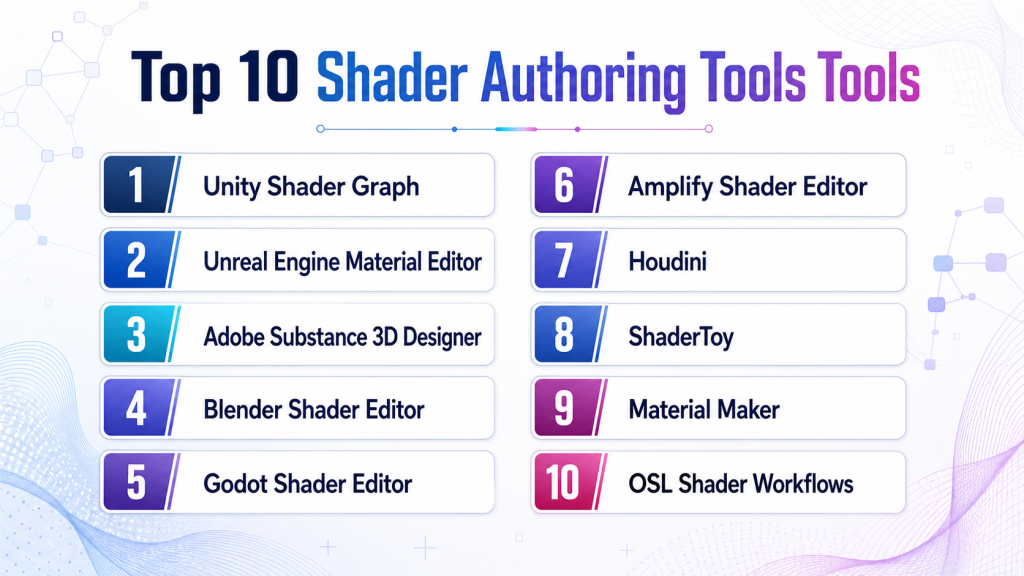
Top 10 Shader Authoring Tools Tools
#1 — Unity Shader Graph
Short description: Unity Shader Graph is a visual node-based shader authoring tool inside Unity. It is best for Unity developers, technical artists, game teams, mobile creators, XR teams, and artists who want to create shaders without writing full shader code.
Key Features
- Visual node-based shader creation
- Real-time preview inside Unity
- Works with Unity render pipelines
- Supports material effects and surface customization
- Good for stylized and realistic looks
- Integrates with Unity assets and scenes
- Useful for artists and technical artists
Pros
- Easy to use for Unity-based teams
- Reduces the need for manual shader coding
- Good for rapid iteration and prototyping
Cons
- Mostly useful inside Unity workflows
- Advanced effects may still require shader programming
- Render pipeline compatibility needs planning
Platforms / Deployment
Windows / macOS / Linux through Unity Editor
Self-hosted / Hybrid depending on Unity project workflow
Security & Compliance
SSO/SAML, MFA, encryption, audit logs, RBAC: Varies by Unity services and enterprise configuration.
SOC 2, ISO 27001, GDPR, HIPAA: Not publicly stated.
Integrations & Ecosystem
Unity Shader Graph fits naturally into Unity’s real-time development ecosystem and works well with Unity scenes, assets, lighting, and render pipelines.
- Unity Editor
- Universal Render Pipeline
- High Definition Render Pipeline
- Unity materials and textures
- Visual Effect Graph workflows
- Version control and build pipelines
Support & Community
Unity provides documentation, tutorials, examples, learning resources, forums, and enterprise support options. Community support is very strong because Shader Graph is widely used by Unity creators.
#2 — Unreal Engine Material Editor
Short description: Unreal Engine Material Editor is a node-based material and shader authoring environment built into Unreal Engine. It is best for teams creating high-quality game materials, cinematic scenes, simulation visuals, virtual production assets, and real-time 3D environments.
Key Features
- Node-based material creation
- Real-time material preview
- Advanced physically based rendering workflow
- Material instances for reusable variations
- Support for effects, masks, blends, and functions
- Integration with Niagara and Unreal rendering systems
- Strong support for cinematic and high-end visuals
Pros
- Powerful built-in material workflow
- Strong for realistic and stylized visuals
- Excellent fit for Unreal-based production
Cons
- Mostly useful inside Unreal Engine
- Complex graphs can become hard to manage
- Performance optimization requires technical skill
Platforms / Deployment
Windows / macOS / Linux through Unreal Engine
Self-hosted / Hybrid depending on project setup
Security & Compliance
SSO/SAML, MFA, encryption, audit logs, RBAC: Varies by Epic services and enterprise setup.
SOC 2, ISO 27001, GDPR, HIPAA: Not publicly stated.
Integrations & Ecosystem
Unreal Engine Material Editor is deeply integrated with Unreal’s rendering, lighting, animation, visual effects, and environment workflows.
- Unreal Engine renderer
- Niagara visual effects
- Quixel Megascans
- Material instances
- Blueprint workflows
- Marketplace assets
Support & Community
Unreal has strong documentation, sample projects, community forums, marketplace assets, learning paths, and professional resources for material creation and shader workflows.
#3 — Adobe Substance 3D Designer
Short description : Adobe Substance 3D Designer is a node-based procedural material creation tool used for games, films, product visualization, architecture, and 3D content pipelines. It is best for artists who need reusable, adjustable, and production-ready materials.
Key Features
- Node-based procedural material creation
- PBR material workflows
- Texture generation and pattern creation
- Parameter-driven material variations
- Export to common texture formats
- Strong game and VFX pipeline fit
- Integration with Substance ecosystem
Pros
- Excellent for procedural materials
- Strong fit for professional texture and material pipelines
- Reusable materials save production time
Cons
- Learning curve can be high for beginners
- Subscription pricing may not suit every user
- Not a game engine shader editor by itself
Platforms / Deployment
Windows / macOS
Self-hosted desktop with cloud-connected account workflows depending on plan
Security & Compliance
SSO/SAML, MFA, encryption, audit logs, RBAC: Varies by Adobe account and enterprise configuration.
SOC 2, ISO 27001, GDPR, HIPAA: Not publicly stated.
Integrations & Ecosystem
Substance 3D Designer fits into many real-time and offline rendering pipelines where procedural materials are important.
- Substance 3D Painter
- Unreal Engine
- Unity
- Blender
- Maya and 3ds Max workflows
- Texture export pipelines
Support & Community
Adobe provides documentation, tutorials, learning resources, support options, and community examples. Substance Designer has a strong professional material artist community.
#4 — Blender Shader Editor
Short description: Blender Shader Editor is a node-based material and shader workflow inside Blender. It is best for 3D artists, indie creators, educators, look development artists, and teams that want an open-source material creation environment.
Key Features
- Node-based material authoring
- Real-time and offline preview workflows
- Procedural texture support
- Cycles and Eevee rendering support
- Open-source customization
- Strong 3D modeling and animation integration
- Large community shader libraries and tutorials
Pros
- Free and open-source
- Strong for learning and production material creation
- Integrated with Blender’s full 3D workflow
Cons
- Game engine export may need extra setup
- Some shaders may not transfer perfectly to engines
- Advanced pipeline use requires technical understanding
Platforms / Deployment
Windows / macOS / Linux
Self-hosted desktop
Security & Compliance
SSO/SAML, MFA, encryption, audit logs, RBAC: Not publicly stated.
SOC 2, ISO 27001, GDPR, HIPAA: Not publicly stated.
Integrations & Ecosystem
Blender Shader Editor works well with Blender’s modeling, lighting, animation, rendering, and asset creation workflows.
- Blender materials
- Cycles renderer
- Eevee renderer
- Geometry Nodes
- glTF export workflows
- Game engine asset pipelines
Support & Community
Blender has one of the strongest open-source creative communities, with extensive tutorials, documentation, forums, add-ons, and learning resources.
#5 — Godot Shader Editor
Short description: Godot Shader Editor helps developers write and manage shaders inside Godot Engine. It is best for indie developers, open-source game creators, 2D/3D teams, and users who want shader control within a lightweight engine.
Key Features
- Built-in shader language
- 2D and 3D shader support
- Visual shader option
- Real-time preview in engine
- Material and scene integration
- Open-source engine workflow
- Good for stylized indie visuals
Pros
- Free and open-source
- Integrated directly into Godot
- Good for learning shader programming
Cons
- Smaller ecosystem than Unity or Unreal
- Advanced shader workflows may need coding skill
- Enterprise support is limited
Platforms / Deployment
Windows / macOS / Linux through Godot Engine
Self-hosted
Security & Compliance
SSO/SAML, MFA, encryption, audit logs, RBAC: Not publicly stated.
SOC 2, ISO 27001, GDPR, HIPAA: Not publicly stated.
Integrations & Ecosystem
Godot Shader Editor fits into the Godot engine ecosystem for 2D and 3D game development.
- Godot materials
- Godot visual shader workflow
- GDScript integration
- Open-source plugins
- Scene and asset workflows
- Version control systems
Support & Community
Godot has documentation, community tutorials, forums, open-source examples, and active contributors. Shader-specific support is community-driven but growing.
#6 — Amplify Shader Editor
Short description : Amplify Shader Editor is a node-based shader creation tool for Unity. It is useful for Unity artists and technical artists who want a mature visual shader workflow with strong customization options.
Key Features
- Node-based shader authoring
- Unity integration
- Real-time previews
- Custom shader generation
- Material workflow support
- Artist-friendly interface
- Useful for stylized and advanced effects
Pros
- Mature visual shader workflow for Unity
- Good for artists who prefer nodes
- Useful for custom Unity materials and effects
Cons
- Unity-focused tool
- Requires purchase or license review
- Advanced optimization still needs technical knowledge
Platforms / Deployment
Windows / macOS through Unity Editor
Self-hosted / Hybrid depending on Unity workflow
Security & Compliance
SSO/SAML, MFA, encryption, audit logs, RBAC: Not publicly stated.
SOC 2, ISO 27001, GDPR, HIPAA: Not publicly stated.
Integrations & Ecosystem
Amplify Shader Editor is built for Unity-based workflows and fits into Unity projects, assets, materials, and rendering pipelines.
- Unity Editor
- Unity materials
- Unity render pipelines
- Asset Store workflows
- Version control
- Custom shader pipelines
Support & Community
Support depends on vendor resources, documentation, and Unity community usage. Community knowledge exists through tutorials, examples, and Unity-focused shader discussions.
#7 — Houdini
Short description: Houdini is a procedural 3D tool used for effects, materials, simulations, environment generation, and technical art pipelines. It is best for advanced artists, VFX studios, game technical artists, and teams creating procedural visual systems.
Key Features
- Procedural node-based workflows
- Material and shader networks
- VFX and simulation tools
- Terrain and environment generation
- Houdini Engine integration
- USD and pipeline-friendly workflows
- Strong technical artist toolset
Pros
- Powerful procedural workflow
- Excellent for technical artists and VFX pipelines
- Strong integration with game and film production workflows
Cons
- Steep learning curve
- Not a simple shader-only tool
- Best results require skilled users
Platforms / Deployment
Windows / macOS / Linux
Self-hosted desktop with engine integrations
Security & Compliance
SSO/SAML, MFA, encryption, audit logs, RBAC: Varies by SideFX account and enterprise setup.
SOC 2, ISO 27001, GDPR, HIPAA: Not publicly stated.
Integrations & Ecosystem
Houdini fits into advanced game, film, VFX, and technical art pipelines.
- Unreal Engine integration
- Unity integration
- USD workflows
- Material networks
- VFX pipelines
- Procedural asset workflows
Support & Community
Houdini has strong documentation, learning resources, forums, tutorials, and a skilled technical artist community. Professional support options vary by license.
#8 — ShaderToy
Short description: ShaderToy is a web-based platform for writing and sharing real-time fragment shaders. It is best for shader programmers, learners, creative coders, graphics researchers, and artists experimenting with procedural visuals.
Key Features
- Browser-based shader coding
- Real-time fragment shader preview
- Large public shader community
- Procedural visual experimentation
- Good for learning GLSL concepts
- Shareable shader examples
- Lightweight creative coding workflow
Pros
- Excellent for learning and experimentation
- Easy to share shader ideas
- Strong creative shader community
Cons
- Not a full production material pipeline
- Mostly code-focused
- Requires adaptation for game engines or apps
Platforms / Deployment
Web
Cloud / web-hosted
Security & Compliance
SSO/SAML, MFA, encryption, audit logs, RBAC: Not publicly stated.
SOC 2, ISO 27001, GDPR, HIPAA: Not publicly stated.
Integrations & Ecosystem
ShaderToy is most useful for shader learning, prototyping, and creative coding rather than full studio material pipelines.
- GLSL-style shader workflows
- Web-based demos
- Creative coding examples
- Research and learning use
- Custom engine adaptation
- Community shader sharing
Support & Community
ShaderToy has a strong creative coding and shader programming community. Support is mostly community-driven through examples, discussions, and shared shader work.
#9 — Material Maker
Short description: Material Maker is an open-source procedural material authoring tool often used with Godot and game development workflows. It is best for indie developers, open-source users, and artists who need procedural textures without a large commercial suite.
Key Features
- Node-based procedural materials
- Open-source workflow
- Texture generation
- PBR material support
- Export workflows for game engines
- Good fit for indie developers
- Lightweight material creation
Pros
- Free and open-source
- Useful for procedural texture generation
- Good option for budget-conscious teams
Cons
- Smaller ecosystem than Substance Designer
- May require manual pipeline setup
- Not as enterprise-ready as commercial tools
Platforms / Deployment
Windows / macOS / Linux
Self-hosted desktop
Security & Compliance
SSO/SAML, MFA, encryption, audit logs, RBAC: Not publicly stated.
SOC 2, ISO 27001, GDPR, HIPAA: Not publicly stated.
Integrations & Ecosystem
Material Maker is useful for open-source and indie material pipelines.
- Godot workflows
- Texture export pipelines
- PBR material workflows
- Open-source plugins
- Custom game engine workflows
- Community examples
Support & Community
Material Maker has community support, open-source resources, tutorials, and examples. Formal enterprise support is limited.
#10 — OSL Shader Workflows
Short description : OSL, or Open Shading Language, is used in rendering pipelines for writing shaders in production rendering environments. It is best for technical directors, look development artists, VFX teams, and studios that need programmable shader workflows.
Key Features
- Code-based shader authoring
- Production rendering workflow support
- Procedural shading capabilities
- Useful for look development
- Renderer integration depending on pipeline
- Strong for custom material behavior
- Suitable for technical artists and shader TDs
Pros
- Powerful for custom production shaders
- Useful in VFX and look development pipelines
- Gives technical users deep control
Cons
- Requires shader programming knowledge
- Not beginner-friendly
- Integration depends on renderer and pipeline
Platforms / Deployment
Windows / macOS / Linux depending on renderer and DCC tool
Self-hosted / Hybrid depending on studio pipeline
Security & Compliance
SSO/SAML, MFA, encryption, audit logs, RBAC: Depends on studio pipeline and renderer.
SOC 2, ISO 27001, GDPR, HIPAA: Not publicly stated.
Integrations & Ecosystem
OSL workflows depend on the renderer and studio pipeline but are useful in production shading and look development.
- Blender Cycles workflows
- Arnold-style production workflows where supported
- Custom render pipelines
- Procedural material systems
- VFX production tools
- Studio asset pipelines
Support & Community
Support depends on the renderer and toolchain used. OSL has technical documentation and professional usage in rendering and VFX communities.
Comparison Table
| Tool Name | Best For | Platform(s) Supported | Deployment (Cloud/Self-hosted/Hybrid) | Standout Feature | Public Rating |
|---|---|---|---|---|---|
| Unity Shader Graph | Unity visual shader creation | Windows, macOS, Linux through Unity | Self-hosted / Hybrid | Node-based shader creation inside Unity | N/A |
| Unreal Engine Material Editor | Unreal materials and real-time visuals | Windows, macOS, Linux through Unreal | Self-hosted / Hybrid | Powerful node-based material workflow | N/A |
| Adobe Substance 3D Designer | Procedural material creation | Windows, macOS | Self-hosted / Cloud-connected options vary | Professional procedural material authoring | N/A |
| Blender Shader Editor | Open-source material creation | Windows, macOS, Linux | Self-hosted | Free node-based material workflow | N/A |
| Godot Shader Editor | Open-source game shader workflows | Windows, macOS, Linux through Godot | Self-hosted | Built-in Godot shader creation | N/A |
| Amplify Shader Editor | Advanced Unity shader nodes | Windows, macOS through Unity | Self-hosted / Hybrid | Mature Unity visual shader editor | N/A |
| Houdini | Procedural VFX and shader pipelines | Windows, macOS, Linux | Self-hosted / Hybrid | Procedural technical art workflows | N/A |
| ShaderToy | Shader learning and experiments | Web | Cloud / web-hosted | Browser-based real-time shader coding | N/A |
| Material Maker | Open-source procedural materials | Windows, macOS, Linux | Self-hosted | Free procedural material generation | N/A |
| OSL Shader Workflows | Production rendering shaders | Windows, macOS, Linux depending on renderer | Self-hosted / Hybrid | Code-based production shader control | N/A |
Evaluation & Scoring of Shader Authoring Tools
The scoring below is comparative. It reflects core shader capability, ease of use, ecosystem strength, security signals, performance, support, and price/value. It is not a public rating.
| Tool Name | Core (25%) | Ease (15%) | Integrations (15%) | Security (10%) | Performance (10%) | Support (10%) | Value (15%) | Weighted Total (0–10) |
|---|---|---|---|---|---|---|---|---|
| Unity Shader Graph | 8 | 8 | 9 | 7 | 8 | 9 | 8 | 8.10 |
| Unreal Engine Material Editor | 9 | 7 | 9 | 7 | 9 | 9 | 8 | 8.35 |
| Adobe Substance 3D Designer | 9 | 6 | 9 | 7 | 8 | 8 | 7 | 7.95 |
| Blender Shader Editor | 8 | 7 | 8 | 4 | 8 | 8 | 10 | 7.75 |
| Godot Shader Editor | 7 | 7 | 7 | 4 | 7 | 7 | 10 | 7.10 |
| Amplify Shader Editor | 8 | 8 | 8 | 5 | 8 | 7 | 7 | 7.40 |
| Houdini | 9 | 4 | 9 | 6 | 8 | 8 | 6 | 7.35 |
| ShaderToy | 6 | 6 | 5 | 4 | 7 | 7 | 10 | 6.55 |
| Material Maker | 7 | 7 | 6 | 4 | 7 | 6 | 10 | 6.95 |
| OSL Shader Workflows | 8 | 3 | 7 | 5 | 8 | 6 | 8 | 6.70 |
How to interpret the scores:
- Higher scores show stronger overall fit across the listed criteria, not a universal winner.
- Engine-native tools score well when your project already uses that engine.
- Procedural tools score highly for reusable material generation and texture workflows.
- Code-based workflows offer deep control but require stronger technical skill.
- Open-source tools often provide strong value but may need more self-managed pipeline work.
Which Shader Authoring Tools Tool Is Right for You?
Solo / Freelancer
Solo artists and freelancers should choose a tool based on the client’s engine, target platform, and required visual style.
Good choices include:
- Unity Shader Graph for Unity projects
- Unreal Engine Material Editor for Unreal projects
- Blender Shader Editor for open-source 3D work
- Material Maker for budget-friendly procedural materials
- ShaderToy for shader learning and experiments
- Adobe Substance 3D Designer for professional procedural material work
Freelancers should avoid overly complex technical pipelines unless the client specifically needs custom shader code or advanced production materials.
SMB
Small and mid-sized teams need shader tools that are easy to learn, fit the engine, and support reusable materials.
Good choices include:
- Unity Shader Graph for Unity-based games and apps
- Unreal Engine Material Editor for Unreal projects
- Adobe Substance 3D Designer for reusable material libraries
- Blender Shader Editor for open-source asset workflows
- Amplify Shader Editor for Unity teams that prefer a mature third-party visual workflow
- Material Maker for low-cost procedural texture creation
SMBs should focus on workflow speed, export formats, performance, and whether artists can maintain the shaders without constant programmer help.
Mid-Market
Mid-market studios often need shader consistency, reusable libraries, version control, performance budgets, and integration with larger asset pipelines.
Good choices include:
- Adobe Substance 3D Designer for procedural material systems
- Unreal Engine Material Editor for high-end real-time visuals
- Unity Shader Graph for cross-platform app and game production
- Houdini for procedural VFX and advanced technical art
- Blender Shader Editor for asset creation and look development
- OSL Shader Workflows for renderer-specific production shading
Mid-market buyers should evaluate how shader assets move between tools, engines, renderers, and source control systems.
Enterprise
Enterprise teams need governance, pipeline consistency, access control, asset library management, and strong integration with DCC tools, engines, and rendering systems.
Good choices include:
- Adobe Substance 3D Designer for professional material libraries
- Unreal Engine Material Editor for enterprise real-time visualization
- Unity Shader Graph for training, XR, mobile, and simulation apps
- Houdini for procedural technical art pipelines
- OSL Shader Workflows for custom rendering and VFX pipelines
- Blender Shader Editor where open-source workflows are accepted
Enterprise buyers should involve technical art, rendering engineering, IT, security, procurement, and production pipeline teams before standardizing.
Budget vs Premium
For budget-focused users, Blender Shader Editor, Godot Shader Editor, ShaderToy, and Material Maker offer strong value. They are useful for learning, indie projects, open-source workflows, and early production.
For premium production workflows, Adobe Substance 3D Designer, Houdini, Unity Shader Graph, Unreal Engine Material Editor, and Amplify Shader Editor may provide stronger pipeline depth and professional efficiency.
Feature Depth vs Ease of Use
If ease of use matters most, consider Unity Shader Graph, Unreal Engine Material Editor, Blender Shader Editor, or Material Maker.
If feature depth matters most, consider Adobe Substance 3D Designer, Houdini, OSL Shader Workflows, or advanced node-based workflows inside Unity and Unreal.
Artists may prefer visual node graphs, while shader programmers may prefer code-based control. The best setup often combines both.
Integrations & Scalability
Shader tools must fit into the larger art and development pipeline. A shader workflow should not create isolated files that are hard to maintain, optimize, or reuse.
Important integration areas include:
- Game engines
- DCC tools
- Texture painting tools
- Version control systems
- Asset management platforms
- Render pipelines
- Material libraries
- Build pipelines
- Performance profiling tools
- Team review workflows
Scalability depends on how well shaders can be reused, parameterized, documented, versioned, tested, and optimized across projects.
Security & Compliance Needs
Shader tools are not usually compliance platforms, but studios and enterprises still need governance. Shader files, proprietary materials, licensed textures, custom rendering code, and internal visual systems can be valuable IP.
Important checks include:
- Source control permissions
- Licensed asset tracking
- Repository security
- Contractor access control
- Build pipeline protection
- Cloud account governance
- Version history
- Internal material library access
- Export control where relevant
- Dependency and plugin review
For enterprise visualization, defense simulation, healthcare training, and unreleased game projects, security review should be part of the production workflow.
Frequently Asked Questions (FAQs)
What is a shader authoring tool?
A shader authoring tool helps artists and developers create materials and visual effects that control how objects look in real-time or rendered environments.
Are shader tools only for games?
No. Shader tools are used in games, films, VFX, product visualization, AR/VR, digital twins, architectural visualization, simulation, and interactive training.
Which shader tool is best for beginners?
Unity Shader Graph, Blender Shader Editor, Unreal Engine Material Editor, and Material Maker are good starting points. They offer visual workflows that are easier than writing shader code from scratch.
Which tool is best for Unity shaders?
Unity Shader Graph is the native option. Amplify Shader Editor is also useful for Unity teams that want a mature visual shader authoring workflow.
Which tool is best for Unreal shaders?
Unreal Engine Material Editor is the best native choice for Unreal projects. It is powerful, visual, and deeply integrated into Unreal’s rendering system.
Which shader tool is best for procedural materials?
Adobe Substance 3D Designer is one of the strongest tools for procedural materials. Houdini and Material Maker are also useful depending on budget and pipeline needs.
Is Blender good for shader authoring?
Yes. Blender Shader Editor is strong for material creation, look development, and open-source workflows. However, game engine export may require extra setup.
What pricing models are common?
Pricing can include free open-source tools, subscriptions, one-time purchases, engine-bundled tools, enterprise licenses, and commercial support plans.
What are common mistakes in shader authoring?
Common mistakes include making shaders too expensive, ignoring target hardware, creating unreadable node graphs, skipping documentation, and not testing under real lighting conditions.
Can shaders affect performance?
Yes. Complex shaders can reduce frame rate, especially on mobile, VR, web, and low-end hardware. Performance testing should happen early.
Can I switch shader tools later?
Switching is possible, but shader logic may not transfer cleanly between engines or renderers. Materials often need rebuilding or conversion.
Are node-based shader tools enough?
For many projects, yes. However, advanced rendering effects, optimization, and custom pipelines may still require shader programming knowledge.
What is the difference between material authoring and shader authoring?
Material authoring usually focuses on creating reusable surface looks. Shader authoring often goes deeper into the rendering logic that controls how the material behaves.
Do shader tools need security review?
Small teams may only need basic file security. Larger studios should review licensed assets, repository access, plugin safety, and protection of proprietary shader code.
Conclusion
Shader Authoring Tools are essential for building strong visual identity, believable materials, stylized effects, and optimized real-time graphics. The best tool depends on your engine, team skill, budget, target platform, and visual goals. Unity Shader Graph is practical for Unity-based teams, while Unreal Engine Material Editor is powerful for Unreal production. Adobe Substance 3D Designer is excellent for procedural materials, and Blender Shader Editor is a strong open-source option. Godot Shader Editor, Material Maker, and ShaderToy are valuable for indie creators and learners. Houdini and OSL Shader Workflows are better suited for technical artists and advanced production pipelines
